Best NAS Hard Drives Under $1000 in 2026: 15 Picks Ranked by Specs
As an Amazon Associate we earn from qualifying purchases. Links on this page are affiliate links.
Finding the right NAS hard drive under 1000 requires balancing storage capacity, spindle speed, and interface compatibility for your network storage enclosure. This guide ranks 15 drives based strictly on the specifications published on the listings.
The Seagate Exos 22TB 7200 RPM SATA HDD takes the top position because it delivers 22TB of enterprise storage density with a 7200 RPM rotational speed on a standard SATA interface. This breakdown helps you decide which drive matches your NAS bay dimensions, interface requirements, and total capacity goals.
Our top pick: Seagate Exos 26TB CMR Hard Drive.
Quick picks
The best fit for you
- You need maximum storage capacity per drive bay Seagate Exos 26TB CMR Hard Drive This drive provides 26TB capacity, CMR recording, and a 512MB cache for high-density 3.5-inch SATA bays.
- You run continuous multi-camera video surveillance systems Western Digital Purple 18TB Surveillance HDD It features an 18TB capacity, 512MB cache, and a sustained 272 MB/s transfer rate for surveillance video streams.
- You use enterprise servers with SAS backplanes Seagate Exos 20TB SAS Renewed Hard Drive It delivers a 12Gb/s SAS interface, 20TB capacity, and a 7200 RPM rotational speed for compatible hardware.
- You require external storage connected via USB Western Digital My Book 14TB External Desktop Drive This desktop unit provides 14TB of storage over an external USB 3.0 interface instead of internal SATA bays.
Our 15 picks

Seagate Exos 26TB CMR Hard Drive
Best for: maximum capacity per 3.5-inch drive bay
- Storage Capacity
- 26TB
- Form Factor
- 3.5 in
- Hardware Interface
- SATA 6Gb/s
- Rotational Speed
- 7200 RPM
- Cache Size
- 512MB
- Recording Technology
- CMR
View on Amazon: Seagate Exos 26TB CMR Hard Drive (paid link)
The Seagate Exos 26TB CMR Hard Drive gives you the highest raw storage capacity among standard SATA drives on this list. It combines Conventional Magnetic Recording technology with a 7200 RPM spindle speed and a 512MB cache. Built for enterprise workloads, it provides a 2.5 million hour MTBF for continuous 24/7 operation. This drive suits you if you need to maximize storage density per drive bay in your NAS enclosure.
Pros
- 26TB capacity maximizes storage density per drive bay
- CMR technology ensures stable, predictable write performance
- 512MB cache paired with 7200 RPM rotational speed
- 2.5M hour MTBF rating for continuous enterprise workloads
- Standard SATA 6Gb/s interface for broad system compatibility
Cons
- 3.5-inch form factor does not fit compact 2.5-inch bays
- SATA interface provides lower maximum throughput than SAS alternatives
Good fit if
- You need 26TB of storage capacity inside a single 3.5-inch drive bay
- You run continuous 24/7 workloads requiring a 2.5M hour MTBF rating
- You require CMR recording and 7200 RPM speed for heavy NAS operations
Skip if
- You need a compact 2.5-inch storage drive
- You require a 12Gb/s SAS interface for enterprise storage arrays
Verdict: Seagate Exos 26TB CMR Hard Drive delivers top-tier single-drive capacity and 24/7 enterprise reliability for 3.5-inch SATA NAS systems.

Seagate Exos 22TB 7200 RPM SATA HDD
Best for: high-capacity enterprise NAS storage
- Storage Capacity
- 22TB
- Form Factor
- 3.5-inch
- Hardware Interface
- SATA 6Gb/s
- Rotational Speed
- 7200RPM
- Weight
- 1.85 pounds
View on Amazon: Seagate Exos 22TB 7200 RPM SATA HDD (paid link)
The Seagate Exos 22TB 7200 RPM SATA HDD is an internal enterprise hard drive built for high-demand NAS arrays. It provides 22TB of raw storage in a standard 3.5-inch form factor, runs at 7200 RPM, and uses a helium-sealed enclosure to balance power draw and weight. This drive fits your setup if you need large-capacity SATA storage for cloud data, enterprise workloads, or multi-bay centralized network storage.
Pros
- 22TB storage capacity in a 3.5-inch form factor
- Fast 7200 RPM rotational speed
- Helium-sealed drive design reduces power consumption
- PowerBalance technology optimizes watts per terabyte
Cons
- Sold as a renewed unit rather than factory new
- Requires a 3.5-inch SATA bay and cannot fit 2.5-inch slots
Good fit if
- You need high-density 22TB storage inside a standard 3.5-inch SATA bay.
- You run enterprise or cloud storage workloads requiring 7200 RPM speed.
- You want a helium-sealed drive with PowerBalance power optimization.
Skip if
- You require a brand-new factory drive instead of a renewed model.
- You need a drive for compact 2.5-inch enclosures.
Verdict: Seagate Exos 22TB 7200 RPM SATA HDD delivers massive storage density with enterprise helium sealing for demanding network arrays. It is an efficient choice when your priority is maximum capacity on a standard SATA interface.

Western Digital Purple 18TB Surveillance HDD
Best for: 24/7 multi-camera surveillance and NVR NAS storage
- Storage Capacity
- 18TB
- Form Factor
- 3.5"
- Hardware Interface
- SATA 6 Gb/s
- Rotational Speed
- 7200 RPM
- Cache Size
- 512MB
- Recording Technology
- CMR
View on Amazon: Western Digital Purple 18TB Surveillance HDD (paid link)
The Western Digital Purple 18TB is a 3.5-inch internal hard drive designed for 24/7 write-heavy setups. You get conventional magnetic recording, a 7200 RPM spindle speed, and a 512MB cache. It handles sustained transfer rates up to 272 MB/s and supports 360TB per year workloads. This drive fits you if you run continuous multi-stream surveillance video recording or dedicated NAS video archives.
Pros
- 512MB cache buffer with sustained read speeds up to 272 MB/s
- Conventional Magnetic Recording (CMR) with 7200 RPM rotation
- Supports up to 64 HD cameras and 32 AI streams
- Helium-sealed architecture designed for 24/7 operation
Cons
- Workload rating is limited to 360TB per year
- SATA interface only without SAS connectivity
Good fit if
- You need continuous 24/7 recording for up to 64 HD cameras
- You want 18TB of CMR storage with a 512MB cache
- You require sustained read speeds up to 272 MB/s for multi-stream setups
Skip if
- You require workloads exceeding 360TB per year
- You need a drive with a SAS interface
Verdict: Western Digital Purple 18TB Surveillance HDD delivers high-capacity CMR storage engineered for round-the-clock video streams and multi-camera workloads. Its 512MB cache and sustained 272 MB/s transfer rate make it a dependable drive for dedicated surveillance NAS setups.

MDD 20TB 7200 RPM Internal SATA Hard Drive
Best for: 24/7 high-capacity NAS and RAID network storage
- Storage Capacity
- 20TB
- Form Factor
- 3.5-Inch
- Hardware Interface
- SATA 6.0Gb/s
- Rotational Speed
- 7200RPM
- Cache Size
- 256MB
- Dimensions
- 5.8 × 4 × 1 inches
View on Amazon: MDD 20TB 7200 RPM Internal SATA Hard Drive (paid link)
The MDD 20TB internal hard drive provides high-capacity storage for your network storage or RAID system. Running at 7200 RPM with a 256MB cache and a SATA 6.0Gb/s interface, it handles continuous 24/7 workloads. It features a 2.0 million hour MTBF rating and an AFR of 0.44%. This drive suits you if you need a high-capacity drive for continuous operation in a multi-bay NAS setup.
Pros
- Large 20TB capacity for heavy storage needs
- 7200 RPM spindle speed with 256MB cache
- 2.0 million hours MTBF and 0.44% AFR for 24/7 operation
- SATA 6.0Gb/s interface compatible with NAS and RAID setups
Cons
- Bare drive only with no mounting screws or cables included
- Requires formatting before system detection
Good fit if
- You need 20TB of 7200 RPM storage for a 24/7 NAS or RAID setup.
- You want a drive rated for a 2.0 million hour MTBF.
Skip if
- You need mounting hardware or cables provided in the box.
- You require a drive that works without formatting first.
Verdict: MDD 20TB 7200 RPM Internal SATA Hard Drive delivers substantial 20TB capacity and 7200 RPM performance for always-on NAS environments. Its 2.0 million hour MTBF rating makes it a dependable choice for continuous heavy workloads.

Seagate Exos 24TB Renewed SATA HDD
Best for: high-capacity CMR backup and archive storage
- Storage Capacity
- 24TB
- Form Factor
- 3.5-Inch
- Hardware Interface
- SATA 6Gb/s
- Rotational Speed
- 7200 RPM
- Cache Size
- 512MB
- Recording Technology
- CMR
View on Amazon: Seagate Exos 24TB Renewed SATA HDD (paid link)
This renewed 3.5-inch enterprise drive provides 24TB of storage using Conventional Magnetic Recording (CMR) technology. It runs at a 7200 RPM spindle speed with a 512MB cache, delivering sustained transfer speeds up to 190MB/s over a standard SATA 6Gb/s interface. It also includes PowerChoice and PowerBalance power management features. It suits you if you need high-capacity CMR storage for large media archives, regular backups, or write-heavy multi-drive NAS environments.
Pros
- 24TB capacity with Conventional Magnetic Recording (CMR)
- 7200 RPM spindle speed with 512MB cache
- Sustained transfer rates up to 190MB/s
- Integrated PowerChoice and PowerBalance power management
Cons
- Renewed unit rather than factory-new
- Requires an enclosure compatible with 24TB drive capacities
Good fit if
- You need 24TB of single-drive capacity with CMR technology.
- You want 7200 RPM operation combined with a 512MB cache.
- You run a SATA 6Gb/s NAS or enclosure that accepts 3.5-inch drives.
Skip if
- You require a factory-new drive rather than a renewed model.
- You need a SAS connection rather than a SATA 6Gb/s interface.
- You use a compact setup that only accepts smaller drive form factors.
Verdict: Seagate Exos 24TB Renewed SATA HDD delivers high-density CMR storage and a 512MB cache for demanding multi-drive setups. Its 7200 RPM speed and SATA 6Gb/s connection make it a solid fit for deep archiving.
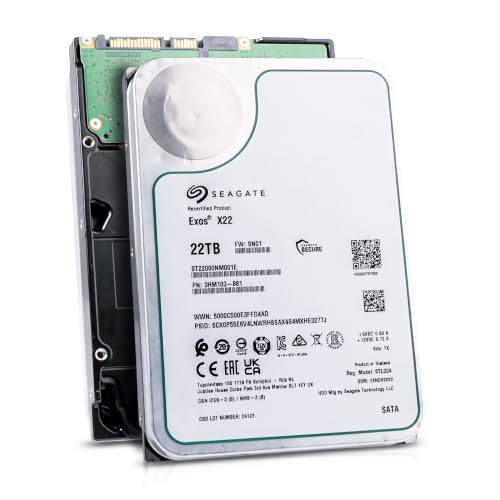
Seagate Exos X22 22TB Recertified Hard Drive
Best for: high-capacity NAS arrays accepting recertified hardware
- Storage Capacity
- 22TB
- Form Factor
- 3.5 Inch
- Hardware Interface
- SATA 6Gb/s
- Rotational Speed
- 7200 RPM
- Dimensions
- 5.71 × 3.94 × 0.98 inches
- Weight
- 8 ounces
View on Amazon: Seagate Exos X22 22TB Recertified Hard Drive (paid link)
This Seagate drive provides 22TB of storage in a standard 3.5-inch form factor. It operates at 7200 RPM using a SATA 6Gb/s interface for high-density architectures and data analytics. As a factory recertified unit, it is tested and sanitized before packaging. You get massive raw volume if your NAS setup requires dense multi-terabyte storage on standard drive bays.
Pros
- 22TB capacity for high-density storage arrays
- 7200 RPM rotational speed on SATA 6Gb/s interface
- Factory sanitized, tested, and complete with all firmware
- Standard 3.5-inch form factor for wide enclosure compatibility
Cons
- Recertified drive rather than brand-new condition
- Six-month replacement warranty is shorter than new drive coverage
Good fit if
- You need 22TB of capacity in a single 3.5-inch drive bay.
- You run a SATA-compatible NAS system needing 7200 RPM performance.
- You accept factory recertified equipment with a six-month warranty.
Skip if
- You require brand-new drives with multi-year warranties.
- You need a SAS hardware interface instead of SATA.
Verdict: Seagate Exos X22 22TB Recertified Hard Drive delivers immense capacity and 7200 RPM SATA performance for density-focused NAS systems. Its factory recertified status and six-month warranty make it a targeted choice for high-volume storage arrays.

Seagate Exos X20 18TB Renewed Internal Hard Drive
Best for: high-capacity 24/7 multi-bay NAS storage arrays
- Storage Capacity
- 18TB
- Form Factor
- 3.5"
- Hardware Interface
- SATA 6Gb/s
- Rotational Speed
- 7200 RPM
- Dimensions
- 5.8 × 4 × 1 inches
- Weight
- 1.48 pounds
View on Amazon: Seagate Exos X20 18TB Renewed Internal Hard Drive (paid link)
This renewed Seagate Exos X20 provides 18TB of storage for your NAS or server setup. It runs at 7200 RPM across a standard SATA 6Gb/s interface in a 3.5-inch form factor. With a 2.5 million hour MTBF rating and helium-sealed casing, it suits you if you need high-capacity continuous operation for large data transfers and multi-drive storage arrays.
Pros
- 18TB storage capacity with 7200 RPM spin speed
- 2.5M-hour MTBF rating for enterprise workloads
- Helium side-sealing weld technology for leak protection
- Digital environmental sensors to track internal conditions
Cons
- Renewed unit rather than factory-new
- Buffer cache size not specified in listing
Good fit if
- You need 18TB of capacity per drive bay in a 3.5-inch enclosure.
- You run 24/7 network storage requiring enterprise-rated MTBF reliability.
- You want 7200 RPM performance over a standard SATA interface.
Skip if
- You prefer brand-new drives with factory warranties over renewed hardware.
- You need a compact 2.5-inch drive or a SAS interface.
Verdict: Seagate Exos X20 18TB Renewed Internal Hard Drive delivers massive enterprise-grade capacity and 7200 RPM speed for heavy NAS storage demands. It is a practical fit when you need high-volume SATA storage and accept renewed hardware.

Western Digital Ultrastar 18TB Enterprise HDD
Best for: high-capacity 24x7 network storage arrays
- Storage Capacity
- 18TB
- Form Factor
- 3.5"
- Hardware Interface
- SATA 6Gb/s
- Rotational Speed
- 7200 RPM
- Cache Size
- 512MB
- Recording Technology
- CMR
View on Amazon: Western Digital Ultrastar 18TB Enterprise HDD (paid link)
This renewed Western Digital 18TB drive provides high-capacity Conventional Magnetic Recording for your storage array. It features a 7200 RPM rotational speed, a SATA 6Gb/s interface, and a 512MB cache buffer on a helium-sealed 3.5-inch platform. Built for continuous 24x7 operation, it supports workloads up to 550TB per year. It suits you if you need dense, reliable enterprise storage for a multi-bay network attached storage setup.
Pros
- Conventional Magnetic Recording for consistent write performance
- Large 512MB cache buffer paired with a 512e sector format
- 7200 RPM spindle speed with a SATA 6Gb/s interface
- Helium-sealed platform engineered for lower power draw
- High 550TB/year workload rating with 2.5 million hour MTBF
Cons
- Renewed drive rather than factory-new hardware
- Requires a 3.5-inch bay and does not fit 2.5-inch slots
Good fit if
- You need 18TB of CMR storage for continuous 24x7 operation.
- You run heavy write workloads up to 550TB per year.
- You want a fast 7200 RPM drive with a 512MB cache.
Skip if
- You require brand-new equipment instead of renewed hardware.
- You need a compact 2.5-inch form factor for small enclosures.
Verdict: Western Digital Ultrastar 18TB Enterprise HDD delivers high-density CMR storage and a large 512MB cache for heavy 24x7 workloads. Its renewed status offers enterprise-grade mechanical specifications for high-capacity multi-bay setups.

MDD 18TB Enterprise 7200 RPM Hard Drive
Best for: continuous NAS and surveillance storage arrays
- Storage Capacity
- 18TB
- Form Factor
- 3.5-inch
- Hardware Interface
- SATA 6.0Gb/s
- Rotational Speed
- 7200 RPM
- Cache Size
- 256MB
- Dimensions
- 5.8 × 4 × 1 inches
View on Amazon: MDD 18TB Enterprise 7200 RPM Hard Drive (paid link)
The MDD 18TB Enterprise Hard Drive gives you high-capacity storage for network-attached setups and RAID arrays. It runs at 7200 RPM on a SATA 6Gb/s interface and includes a 256MB cache. Designed for continuous 24/7 operation, the drive specifies a 2.0-million-hour MTBF rating with an AFR of 0.44 percent. It suits you if you need large capacity for continuous NAS or surveillance storage setups.
Pros
- 18TB storage capacity in a standard 3.5-inch form factor
- Fast 7200 RPM rotational speed with SATA 6Gb/s interface
- Rated for 24/7 operation with 2.0 million hours MTBF
- Equipped with a 256MB cache buffer
Cons
- Bare drive shipment includes no mounting screws or SATA cables
- Requires manual system formatting before initial detection
Good fit if
- You need 18TB of high-density storage for a 24/7 NAS or RAID setup.
- You already have spare mounting hardware and SATA connection cables.
Skip if
- You require an all-in-one kit with included cables and screws.
- You prefer a hard drive configured with more than 256MB of cache.
Verdict: MDD 18TB Enterprise 7200 RPM Hard Drive delivers reliable high-capacity storage for continuous NAS and RAID workloads. Its 2.0-million-hour MTBF and 7200 RPM speed fit multi-bay continuous environments.

Seagate Exos 18TB Renewed Hard Drive
Best for: large-scale 18TB backup and archive storage
- Storage Capacity
- 18TB
- Form Factor
- 3.5-Inch
- Hardware Interface
- SATA 6Gb/s
- Rotational Speed
- 7200 RPM
- Cache Size
- 512MB
- Recording Technology
- CMR
View on Amazon: Seagate Exos 18TB Renewed Hard Drive (paid link)
This renewed Seagate Exos drive offers 18TB of storage using Conventional Magnetic Recording (CMR) technology. Designed for multi-drive environments, it features a 7200 RPM spindle speed, a 512MB cache, and sustained transfer rates up to 190MB/s over a standard SATA 6Gb/s connection. Built-in PowerChoice and PowerBalance tools help you manage power usage. This drive suits you if you need high-capacity storage for backups, file archives, or large media pools.
Pros
- 18TB capacity with Conventional Magnetic Recording (CMR)
- 7200 RPM spindle speed paired with a 512MB cache
- PowerChoice and PowerBalance energy management features
- Sustained transfer rates up to 190MB/s
Cons
- Renewed enterprise unit rather than a factory-new drive
- Sustained transfer rate is rated at 190MB/s
- Requires a 3.5-inch drive bay with SATA compatibility
Good fit if
- You need 18TB of CMR storage for large backups or archives.
- You want a 7200 RPM drive with built-in power management tools.
- You have a system configured for 3.5-inch SATA drives.
Skip if
- You require transfer speeds higher than 190MB/s.
- You prefer brand-new hardware over renewed equipment.
- You need a SAS interface or a 2.5-inch drive format.
Verdict: Seagate Exos 18TB Renewed Hard Drive delivers high-density CMR storage and a 512MB cache for secondary storage or backup systems. It balances 7200 RPM performance with integrated power management features in a standard 3.5-inch SATA form factor.

Seagate Exos X22 20TB Renewed HDD
Best for: high-capacity NAS arrays needing bulk SATA storage
- Storage Capacity
- 20TB
- Form Factor
- 3.5-inch
- Hardware Interface
- SATA 6Gb/s
- Rotational Speed
- 7200RPM
- Weight
- 1.83 pounds
View on Amazon: Seagate Exos X22 20TB Renewed HDD (paid link)
This renewed Seagate Exos X22 gives you 20TB of storage in a standard 3.5-inch form factor. It runs at 7200 RPM and connects via SATA 6Gb/s. The drive uses helium side-sealing weld technology and enhanced caching for large data transfers. It suits your multi-bay NAS if you need high-density bulk storage and accept a renewed enterprise drive with a two-year reseller warranty.
Pros
- 20TB capacity in a standard 3.5-inch form factor
- 7200 RPM spindle speed with SATA 6Gb/s interface
- Helium side-sealing weld technology
- Enhanced caching for large transfers
Cons
- Renewed product rather than factory-new unit
- Limited to a two-year reseller warranty
Good fit if
- You need 20TB capacity per bay for dense storage arrays.
- You want a 7200 RPM enterprise SATA drive with helium sealing.
- You accept renewed hardware with a two-year reseller warranty.
Skip if
- You require a brand-new drive with direct manufacturer warranty coverage.
- You need a SAS interface instead of standard SATA.
Verdict: Seagate Exos X22 20TB Renewed HDD delivers high-capacity enterprise storage with 7200 RPM speed. It provides massive density for high-volume NAS arrays if a two-year reseller warranty fits your operational needs.
Seagate Exos 18TB Renewed Enterprise Hard Drive
Best for: high-capacity 3.5-inch SATA enterprise backups
- Storage Capacity
- 18TB
- Form Factor
- 3.5-Inch
- Hardware Interface
- SATA 6Gb/s
- Rotational Speed
- 7200 RPM
- Cache Size
- 512MB
- Recording Technology
- CMR
View on Amazon: Seagate Exos 18TB Renewed Enterprise Hard Drive (paid link)
This renewed Seagate Exos drive offers 18TB of storage using Conventional Magnetic Recording (CMR) technology. Built for 3.5-inch drive bays, it connects over SATA 6Gb/s and features a 7200 RPM rotational speed paired with a 512MB cache. You get sustained transfer rates up to 190MB/s alongside integrated PowerChoice and PowerBalance energy controls. It suits your setup if you need large-capacity enterprise storage for extensive archives, backups, or media collections.
Pros
- 18TB capacity with Conventional Magnetic Recording (CMR)
- 7200 RPM spindle speed with 512MB cache
- Sustained transfer rates reaching up to 190MB/s
- Built-in PowerChoice and PowerBalance power management
Cons
- Renewed enterprise drive rather than brand-new factory unit
- Sustained transfer rate is capped at 190MB/s
Good fit if
- You need 18TB of CMR storage for large backups or archives.
- You have a system supporting 3.5-inch SATA 6Gb/s drives.
- You want built-in power management tools like PowerChoice and PowerBalance.
Skip if
- You require a factory-new drive instead of a renewed model.
- You need a SAS hardware interface instead of SATA.
Verdict: Seagate Exos 18TB Renewed Enterprise Hard Drive provides high-capacity CMR storage with a 7200 RPM spindle speed and 512MB cache for data-heavy systems. It is a solid 3.5-inch SATA option if you need enterprise-level power management features for archiving and backups.

Seagate Exos X18 16TB SAS Drive (Renewed)
Best for: SAS-equipped NAS enclosures and servers
- Storage Capacity
- 16 TB
- Form Factor
- 3.5"
- Hardware Interface
- 12Gb/s SAS
- Cache Size
- 256 MB
- Dimensions
- 5.78 × 4 × 1.03 inches
View on Amazon: Seagate Exos X18 16TB SAS Drive (Renewed) (paid link)
This renewed Seagate Exos X18 provides 16TB of internal storage for compatible enclosures. It features a 12Gb/s SAS interface, a 256MB cache buffer, and a helium-sealed design. It operates with a 2-million-hour MTBF rating and FastFormat support for 512e and 4Kn formats. You should choose this drive if your NAS or server setup includes dedicated SAS controllers or backplanes rather than standard consumer SATA ports.
Pros
- 12Gb/s SAS interface
- 256MB cache buffer
- 2 million hours MTBF rating
- Helium-sealed drive design
- Built-in digital environmental sensors
Cons
- Requires SAS controllers; incompatible with standard SATA bays
- Renewed condition
Good fit if
- You have a NAS backplane or disk controller supporting SAS.
- You need 16TB capacity with 512e or 4Kn FastFormat options.
Skip if
- You use standard client systems or SATA-only NAS enclosures.
- You prefer factory-new storage drives instead of renewed hardware.
Verdict: Seagate Exos X18 16TB SAS Drive (Renewed) delivers high-speed 12Gb/s SAS connectivity and enterprise-grade reliability ratings for compatible server systems. It is an effective option if your hardware accommodates SAS backplanes rather than standard consumer SATA.

Seagate Exos 20TB SAS Renewed Hard Drive
Best for: SAS-equipped enterprise servers and storage arrays
- Storage Capacity
- 20TB
- Hardware Interface
- SAS 12Gb/s
- Rotational Speed
- 7200RPM
- Cache Size
- 256MB
- Dimensions
- 5.79 × 4.01 × 1.03 inches
- Weight
- 1.5 pounds
View on Amazon: Seagate Exos 20TB SAS Renewed Hard Drive (paid link)
This renewed Seagate drive gives you 20TB of enterprise storage running at 7200 RPM with a 256MB cache. Built with helium side-sealing weld technology and digital environmental sensors, it uses a 12Gb/s SAS interface engineered for high-throughput backplanes. You will need a compatible SAS controller rather than a standard SATA port, making it a targeted choice for enterprise servers or rackmount storage systems.
Pros
- 20TB capacity with 7200 RPM rotational speed
- 12Gb/s SAS interface for capable server backplanes
- Helium side-sealing weld technology for leak protection
- Digital environmental sensors to monitor internal drive conditions
Cons
- Requires a SAS controller and is incompatible with standard SATA bays
- Warranty length depends on the specific reseller rather than a standard factory term
Good fit if
- You have a server or storage enclosure equipped with SAS controllers and backplanes.
- You need 20TB of capacity per drive bay running at 7200 RPM.
Skip if
- You use a standard consumer NAS that only accepts SATA connections.
- You require guaranteed factory warranty terms directly from the manufacturer.
Verdict: Seagate Exos 20TB SAS Renewed Hard Drive provides massive enterprise capacity and a high-speed 12Gb/s SAS interface for compatible storage environments. It is a solid match if your hardware setup supports SAS controllers rather than standard SATA.

Western Digital My Book 14TB External Desktop Drive
Best for: direct USB desktop storage expansion
- Storage Capacity
- 14TB
- Hardware Interface
- USB 3.0
- Form Factor
- Desktop
- Dimensions
- 5.5 × 1.9 × 6.7 inches
View on Amazon: Western Digital My Book 14TB External Desktop Drive (paid link)
The Western Digital My Book provides 14TB of external desktop storage in a black enclosure measuring 1.9 by 6.7 by 5.5 inches. You connect it directly to your host device via a USB 3.0 interface without opening a drive bay. This renewed desktop drive suits you if you need high-capacity external backup or local expansion for a system that accepts external USB storage devices.
Pros
- 14TB storage capacity
- USB 3.0 hardware interface
- Desktop enclosure measuring 1.9 by 6.7 by 5.5 inches
Cons
- External USB 3.0 connection instead of internal SATA or SAS
- Renewed product condition
Good fit if
- You want 14TB of external storage connected via USB 3.0.
- You need a standalone desktop unit with a 1.9-inch width.
Skip if
- You need an internal drive for standard SATA or SAS NAS bays.
- You require factory-new hardware.
Verdict: Western Digital My Book 14TB External Desktop Drive delivers 14TB of standalone storage over a USB 3.0 interface. It is built for setups that rely on external desktop connections rather than internal drive bays.
Specifications side by side
| Spec | Seagate Exos 26TB CMR Hard Drive | Seagate Exos 22TB 7200 RPM SATA HDD | Western Digital Purple 18TB Surveillance HDD | MDD 20TB 7200 RPM Internal SATA Hard Drive | Seagate Exos 24TB Renewed SATA HDD | Seagate Exos X22 22TB Recertified Hard Drive | Seagate Exos X20 18TB Renewed Internal Hard Drive | Western Digital Ultrastar 18TB Enterprise HDD | MDD 18TB Enterprise 7200 RPM Hard Drive | Seagate Exos 18TB Renewed Hard Drive | Seagate Exos X22 20TB Renewed HDD | Seagate Exos 18TB Renewed Enterprise Hard Drive | Seagate Exos X18 16TB SAS Drive (Renewed) | Seagate Exos 20TB SAS Renewed Hard Drive | Western Digital My Book 14TB External Desktop Drive |
|---|---|---|---|---|---|---|---|---|---|---|---|---|---|---|---|
| Storage Capacity | 26TB | 22TB | 18TB | 20TB | 24TB | 22TB | 18TB | 18TB | 18TB | 18TB | 20TB | 18TB | 16 TB | 20TB | 14TB |
| Form Factor | 3.5 in | 3.5-inch | 3.5" | 3.5-Inch | 3.5-Inch | 3.5 Inch | 3.5" | 3.5" | 3.5-inch | 3.5-Inch | 3.5-inch | 3.5-Inch | 3.5" | not specified | not specified |
| Hardware Interface | SATA 6Gb/s | SATA 6Gb/s | SATA 6 Gb/s | SATA 6.0Gb/s | SATA 6Gb/s | SATA 6Gb/s | SATA 6Gb/s | SATA 6Gb/s | SATA 6.0Gb/s | SATA 6Gb/s | SATA 6Gb/s | SATA 6Gb/s | 12Gb/s SAS | SAS 12Gb/s | USB 3.0 |
| Rotational Speed | 7200 RPM | 7200RPM | 7200 RPM | 7200RPM | 7200 RPM | 7200 RPM | 7200 RPM | 7200 RPM | 7200 RPM | 7200 RPM | 7200RPM | 7200 RPM | not specified | 7200RPM | not specified |
| Cache Size | 512MB | not specified | 512MB | 256MB | 512MB | not specified | not specified | 512MB | 256MB | 512MB | not specified | 512MB | 256 MB | 256MB | not specified |
| Recording Technology | CMR | not specified | CMR | not specified | CMR | not specified | not specified | CMR | not specified | CMR | not specified | CMR | not specified | not specified | not specified |
| Workload Rate Limit | not specified | not specified | 360TB/Year | not specified | not specified | not specified | not specified | up to 550TB/year | not specified | not specified | not specified | not specified | not specified | not specified | not specified |
| Size | not specified | not specified | 18TB | not specified | 24TB | 512 | 18 TB | 18 TB | not specified | not specified | 20TB | not specified | not specified | not specified | 14TB |
| Weight | not specified | 1.85 pounds | 1.52 pounds | 1 pounds | 1.5 pounds | 8 ounces | 1.48 pounds | 1.52 pounds | 1.5 pounds | 1.5 pounds | 1.83 pounds | 1.5 pounds | not specified | 1.5 pounds | not specified |
| Dimensions | not specified | not specified | 5.79 × 4 × 1.03 inches | 5.8 × 4 × 1 inches | 5.8 × 4 × 1 inches | 5.71 × 3.94 × 0.98 inches | 5.8 × 4 × 1 inches | 5.79 × 4 × 1.03 inches | 5.8 × 4 × 1 inches | 5.8 × 4 × 1 inches | not specified | 5.8 × 4 × 1 inches | 5.78 × 4 × 1.03 inches | 5.79 × 4.01 × 1.03 inches | 5.5 × 1.9 × 6.7 inches |
| Model | Exos ST26000NM000C | ST22000NM000C | WD180PURZ | MDD20TSATA25672DVR | ST24000NM001C-CR | ST22000NM001E | Exos X20 | WUH721818ALE6L4 | MDD18TSATA25672E | ST18000NM003C/cr | ST20000NM004E | ST18000NM002C/cr | ST16000NM004J | ST20000NM002D | WDBBGB0140HBK-NESN |
| Color | not specified | Silver | Purple | Silver | Silver | Silver | green | Red | Silver | Silver | Silver | Silver | not specified | Silver | Black |
NAS Drive Trade-Offs Under $1000
Under $1000, you get standalone storage drives rather than multi-bay NAS enclosures. These units provide individual capacities from 14TB to 26TB, omitting enclosure hardware such as RAM capacity and bay allotments. Rotational speed peaks at 7200 RPM. Cache size tops out at 512MB, with several models offering 256MB. Hardware interface options remain limited to standard SATA, SAS, or USB 3.0. Additionally, multiple high-capacity drives rely on renewed or recertified hardware specifications.
- Cache size tops out at 512MB and drops to 256MB on certain models.
- Rotational speed reaches a maximum of 7200 RPM across internal drives.
- Form factor choices remain restricted to 3.5-inch drives or desktop enclosures.
If you build a custom storage server alongside your drives, match your drive controller specs to a compatible motherboard under 1000 with sufficient PCIe lanes.
How We Picked These Drives
This guide identifies 15 storage options from Amazon listings matching Under $1000. You see only one capacity or variant per product family to keep your comparison simple. Every specification comes directly from published manufacturer sheets, covering hardware interfaces, spindle speeds, and cache sizes. Products are evaluated strictly on published data and are never physically handled.
The guide arranges products in stock first, then by Amazon sales rank, placing better-selling products first. Stock information updates at least daily on the page. Because models move in or out of this guide whenever listings shift around Under $1000, the rankings stay aligned with current market availability for you in 2026.
How to Choose the Right NAS Drive
-
Selecting the Form Factor
Check your storage enclosure physical setup before choosing a form factor. Most multi-bay network storage systems require internal 3.5-inch drives that slide directly into drive trays. If your system relies on standalone USB expansion rather than internal bays, look at external desktop drives like the Western Digital My Book 14TB External Desktop Drive. It connects using an external USB 3.0 interface. Internal 3.5-inch drives will not fit external-only enclosures without an additional docking station or adapter. Choose internal units for native multi-bay setups.
-
Evaluating Recording Technology
Check the recording technology specification if your NAS runs RAID rebuilds or heavy write operations. Conventional Magnetic Recording, or CMR, writes data across parallel tracks without overlapping them. This design maintains sustained transfer rates during long continuous file transfers and RAID rebuild tasks. For example, the Seagate Exos 26TB CMR Hard Drive explicitly lists CMR recording technology to support continuous multi-drive demands. Choosing CMR drives prevents write bottlenecks when multiple users write large volumes of data across your network simultaneously.
-
Assessing Rotational Speed
Review the rotational speed specification to balance access times against drive noise and power demands. Hard drives in this category typically operate at 7200 RPM, including the Seagate Exos 22TB 7200 RPM SATA HDD. A 7200 RPM spindle speed delivers faster data access and higher sustained sequential read speeds across active network users. If your enclosure sits in an open workspace, note that higher rotational speeds generate more mechanical vibration and heat. Ensure your NAS fan profiles can cool 7200 RPM spindles continuously.
-
Comparing Cache Sizes
Examine the onboard cache size to evaluate how the drive handles temporary burst traffic. Drives on this list feature either 256MB or 512MB cache buffers. A larger 512MB buffer holds more data temporarily before writing it directly to physical platters, smoothing out multi-stream write workloads. A drive with a 256MB cache, such as the MDD 20TB 7200 RPM Internal SATA Hard Drive, provides adequate caching for steady single-stream or general file storage. Compare cache specifications if your NAS regularly manages concurrent user writes.
-
Checking MTBF Reliability Ratings
Evaluate reliability metrics like the Mean Time Between Failures rating if you manage 24/7 continuous operations. NAS environments keep drives spinning constantly, exposing hardware to continuous thermal and mechanical stress. The MDD 18TB Enterprise 7200 RPM Hard Drive specifies a 2.0-million-hour MTBF rating, indicating enterprise-grade design intended for non-stop network environments. Checking published MTBF figures helps you select drives built to handle constant uptime. Match high MTBF ratings to primary server arrays that never enter standby mode.
-
Choosing Dedicated Surveillance Drives
Match the drive design to your workload profile, particularly when building network video recorders. Standard enterprise drives target random reads and writes for general file sharing, while surveillance-class drives prioritize continuous sequential write streams. The Western Digital Purple 18TB Surveillance HDD is engineered for multi-camera video recording and lists a sustained 272 MB/s transfer rate. If your NAS acts primarily as a surveillance server capturing multiple camera feeds, look for dedicated surveillance models to prevent dropped video frames during constant recording sessions.
Frequently asked questions
What is the benefit of CMR recording technology in drives like the Seagate Exos 26TB?
Conventional Magnetic Recording (CMR) enables consistent write speeds and reliable data tracking during intensive network drive rebuilds. Drives using CMR, such as the Seagate Exos 26TB ST26000NM000C, write individual data tracks side by side without overlapping. This architectural design prevents write degradation during heavy data ingestion, making it suitable for continuous multi-drive arrays and random-access file transfers.
How does cache size affect NAS hard drive performance?
Onboard cache acts as a high-speed temporary buffer to smooth out data transfers between your network and the spinning physical platters. A larger 512MB cache, seen on the Seagate Exos 24TB and Western Digital Purple 18TB, holds more incoming write requests than a 256MB cache. This extra buffer capacity helps maintain smooth throughput during bursts of network activity across multiple client machines.
Why are 7200 RPM hard drives preferred for multi-user NAS configurations?
A 7200 RPM rotational speed reduces platter latency and accelerates data access times compared to slower spindle motors. Drives such as the MDD 20TB and Western Digital Ultrastar 18TB spin at 7200 RPM, allowing heads to locate stored sectors faster. This mechanical responsiveness is essential when your storage enclosure simultaneously handles multiple file requests, media streams, or background scheduled parity calculations.
What is MTBF and how does it relate to NAS drive reliability?
Mean Time Between Failures (MTBF) measures the statistical reliability of a storage drive operating under constant operational workloads. For example, the MDD 18TB Enterprise drive features a 2.0-million-hour MTBF rating for round-the-clock service. This published metric helps you evaluate mechanical longevity and drive durability when building continuous RAID environments that run uninterrupted across consecutive days and months.
Can you connect an external USB drive directly to a NAS setup?
You can connect external USB storage to a NAS unit if the enclosure includes an external USB host port. The Western Digital My Book 14TB utilizes a USB 3.0 interface and a desktop form factor instead of an internal 3.5-inch SATA tray. This setup allows you to create detached offline backups or expand shared storage without opening empty drive bays.
What features make the Western Digital Purple 18TB suitable for surveillance NAS workloads?
The Western Digital Purple 18TB WD180PURZ is engineered specifically for continuous video recording workloads that run all day. It features a sustained transfer rate of 272 MB/s along with a 512MB cache to manage incoming video streams without dropping frames. These hardware specifications provide the throughput required for multi-camera NVR storage servers and continuous security monitoring arrays.
How do physical dimensions vary among internal 3.5-inch NAS hard drives?
Internal 3.5-inch hard drives follow standard chassis form factors but show slight variations in physical dimensions and weight. The Seagate Exos 22TB ST22000NM000C weighs 1.85 pounds, whereas the MDD 20TB measures 1 inch high and weighs 1 pound. Verifying drive tray depth and weight tolerances ensures proper physical fit and airflow distribution inside compact multi-bay network towers.