Asustor Flashstor 12-Bay NVMe NAS vs Asustor Lockerstor 6-Bay NAS Dual (2026): Key Differences
As an Amazon Associate we earn from qualifying purchases. Links on this page are affiliate links.
When you compare the asustor flashstor 12 bay nvme NAS vs lockerstor 6 bay NAS dual, you see two distinct approaches to content creation storage. Both units feature the Intel Celeron N5105 processor and target professional creators. The primary difference lies in their storage architecture and networking. The Flashstor is a dedicated all-flash 12-bay system with 2.5GbE ports. The Lockerstor offers a hybrid 6-bay design with dual 5GbE ports and NVMe cache slots.
Key differences
| Aspect | Asustor Flashstor 12-Bay NVMe NAS | Asustor Lockerstor 6-Bay NAS with Dual 5GbE |
|---|---|---|
| Drive Bays | 12 x M.2 NVMe slots | 6 x SATA bays + 4 x M.2 NVMe cache slots |
| RAM Capacity | 4GB DDR4-2933 | 8GB DDR4 |
| Network Connectivity | Single 2.5 Gigabit Ethernet port | Dual 5 Gigabit Ethernet ports |
| Storage Type | All-flash NVMe only | Hybrid SATA HDD/SSD support |
Which one should you choose?
Choose Asustor Flashstor 12-Bay NVMe NAS if
- You need maximum raw flash storage density for large media libraries
- You prefer a compact, low-profile chassis for desk setups
- You want a dedicated all-flash environment without mechanical drives
Choose Asustor Lockerstor 6-Bay NAS with Dual 5GbE if
- You require higher RAM for virtualization or multitasking workloads
- You need faster network throughput with dual 5GbE ports
- You want to mix cost-effective HDDs with fast NVMe caching
Verdict: The Flashstor suits users who prioritize dense, all-flash NVMe storage in a small form factor. The Lockerstor is better for those needing higher RAM, faster dual 5GbE networking, and flexible hybrid storage options. Your choice depends on whether you value pure flash capacity or versatile performance features.
Flashstor vs Lockerstor: Key Specs
Number of drive bays
The Asustor Flashstor 12-Bay NVMe NAS provides twelve dedicated slots for M.2 NVMe drives. This all-flash design maximizes speed for content creators who need rapid access to large media files. In contrast, the Asustor Lockerstor 6-Bay NAS Dual offers six bays that support both SATA HDDs and SSDs. This hybrid approach allows you to mix high-speed storage with cost-effective bulk capacity. If you require maximum raw throughput for 4K editing, the twelve-bay Flashstor is the clear choice. If you need flexible storage tiers, the Lockerstor provides that versatility.
RAM capacity
Memory plays a critical role in multitasking and virtualization. The Asustor Flashstor 12-Bay NVMe NAS comes equipped with 4GB of DDR4-2933 RAM. This is sufficient for basic file serving and light media streaming. The Asustor Lockerstor 6-Bay NAS Dual, however, includes 8GB of DDR4 memory. This doubled capacity ensures smoother performance when running multiple applications, managing virtual machines, or handling intensive media transcoding tasks simultaneously. For creators juggling several heavy workflows, the extra memory in the Lockerstor provides a more stable and responsive environment.
Network connectivity
Data transfer speeds depend heavily on your network infrastructure. The Flashstor features two 2.5 Gigabit Ethernet ports, offering a combined bandwidth of 5 Gbps when link aggregation is enabled. The Lockerstor takes this further with dual 5GbE ports, providing up to 10 Gbps of native throughput. Additionally, the Lockerstor is noted as 10GbE upgrade ready, allowing for future expansion without hardware replacement. If your studio already uses 5GbE or 10GbE switches, the Lockerstor handles large file transfers significantly faster than the Flashstor.
NVMe storage options
Both units leverage NVMe technology, but in different ways. The Flashstor dedicates all twelve bays to M.2 NVMe drives, creating a pure all-flash array. This eliminates mechanical latency entirely. The Lockerstor includes four M.2 NVMe slots designed for caching or acceleration. These slots enhance system responsiveness by speeding up access to frequently used data stored on the slower SATA drives. If you want every drive to be an NVMe SSD, the Flashstor is the only option. If you prefer using NVMe only for cache, the Lockerstor offers that hybrid flexibility.
Physical dimensions and weight
Space and portability matter for your setup. The Flashstor is compact, measuring 12.1 inches in width, 7.6 inches in length, and only 1.89 inches in height. It weighs just 3.02 pounds, making it easy to place on a desk or in a rack. The Lockerstor is a tower-style unit, measuring 12 inches wide, 13 inches long, and 13 inches high. It weighs 9.7 pounds. The Flashstor is much lighter and flatter, while the Lockerstor is a larger, heavier tower. Choose the Flashstor for space efficiency and the Lockerstor if you do not mind a larger footprint.
Which NAS suits your workflow
Users needing maximum raw NVMe capacity
You need twelve dedicated M.2 NVMe slots for pure speed. The Flashstor 12-Bay NVMe NAS offers an all-flash architecture with no mechanical drive bays. This design ensures rapid access to large media files without the latency of spinning disks. It is the ideal choice when storage density and consistent high throughput are your top priorities.
Creators requiring flexible mixed storage options
You want the flexibility to mix SATA HDDs and SSDs in six bays. The Lockerstor 6-Bay NAS supports this hybrid design for cost-efficient bulk storage. It also includes four M.2 NVMe slots for caching or acceleration. This setup lets you balance high-speed access with large capacity storage, providing a versatile solution for varied project needs.
Professionals prioritizing high-speed network bandwidth
You require faster data transfer rates for professional media workflows. The Lockerstor 6-Bay NAS features dual 5-Gigabit Ethernet ports, offering higher network bandwidth than the Flashstor's dual 2.5-Gigabit ports. This increased throughput supports link aggregation and prepares for 10GbE expansion. It ensures smooth handling of large files and reduces bottlenecks during intensive editing sessions.
Users needing more system memory for multitasking
You run multiple applications simultaneously, such as virtualization or media streaming. The Lockerstor 6-Bay NAS comes with 8GB of DDR4 RAM, which is double the 4GB found in the Flashstor. This extra memory improves system responsiveness and allows for smoother multitasking across creative workflows. It provides a more robust platform for demanding software environments.
The products compared

Asustor Flashstor 12-Bay NVMe NAS
Best for: High-density all-flash content creation
- Drive Bays
- 12-Bay
- Network Connectivity
- 10GbE, 2.5GbE
- Processor
- Intel Celeron N5105
- RAM Capacity
- 4GB DDR4-2933
- M.2 NVMe Slots
- 12 slots
- Included Storage
- Diskless
View on Amazon: Asustor Flashstor 12-Bay NVMe NAS Affiliate link
The Asustor Flashstor 12 Pro is a 12-bay all-flash NAS designed for content creators. It features a quad-core Intel Celeron N5105 processor and 4GB of DDR4-2933 RAM. The unit includes 12 M.2 NVMe slots and dual 2.5 Gigabit Ethernet ports for high-speed data transfer. You get two USB 3.2 Gen 2x1 ports for peripheral connectivity. This setup suits users needing dense, fast storage for large media files.
Pros
- 12 M.2 NVMe slots for all-flash storage
- Dual 2.5 Gigabit Ethernet ports
- Quad-core Intel Celeron N5105 processor
- 4GB DDR4-2933 RAM
Cons
- Only 4GB of RAM limits multitasking
- No traditional 3.5-inch HDD bays
- Heavier build at 3.02 pounds
Good fit if
- You need high-density NVMe storage
- You create large media files
- You require fast network throughput
Skip if
- You prefer traditional hard drives
- You need more than 12 drives
- You require 10GbE networking
Verdict: The Asustor Flashstor 12 Pro All-Flash NAS is a specialized unit for creators who prioritize speed and density over capacity flexibility. It fits those building dedicated all-flash libraries for video editing or large datasets.
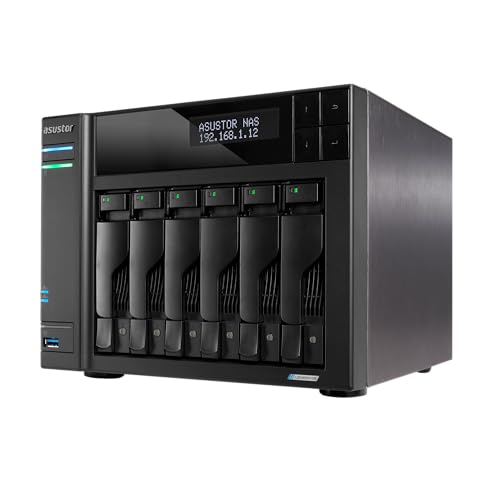
Asustor Lockerstor 6-Bay NAS with Dual 5GbE
Best for: 4K video editing and media workflows
- Drive Bays
- 6-Bay
- Network Connectivity
- 2 x 5GbE
- Processor
- Intel Celeron N5105
- RAM Capacity
- 8GB DDR4
- M.2 NVMe Slots
- 4 slots
- Included Storage
- Diskless
View on Amazon: Asustor Lockerstor 6-Bay NAS with Dual 5GbE Affiliate link
The Asustor AS6706T v2 is a 6-bay NAS built for content creators. It uses an Intel Celeron N5105 quad-core processor and 8GB DDR4 RAM. You get dual 5GbE ports and four M.2 NVMe slots for cache. This setup supports 4K media and heavy multitasking. It suits professionals needing fast local storage and reliable file sharing.
Pros
- Intel Celeron N5105 quad-core processor
- 8GB DDR4 RAM for multitasking
- Dual 5GbE Ethernet ports
- Four M.2 NVMe SSD slots
Cons
- Only six drive bays
- No 10GbE ports included
- Heavier than compact models
Good fit if
- You edit 4K video locally
- You need fast NVMe caching
- You want dual network ports
Skip if
- You need more than six bays
- You require built-in 10GbE
- You want a compact desktop unit
Verdict: Asustor 6-Bay Creator NAS offers strong specs for media work but lacks the capacity of the 12-bay Flashstor 12 Pro. It fits creators who prioritize speed and networking over raw storage volume.
Specifications side by side
| Spec | Asustor Flashstor 12-Bay NVMe NAS | Asustor Lockerstor 6-Bay NAS with Dual 5GbE |
|---|---|---|
| Drive Bays | 12-Bay | 6-Bay |
| Network Connectivity | 10GbE, 2.5GbE | 2 x 5GbE |
| Processor | Intel Celeron N5105 | Intel Celeron N5105 |
| RAM Capacity | 4GB DDR4-2933 | 8GB DDR4 |
| M.2 NVMe Slots | 12 slots | 4 slots |
| Included Storage | Diskless | Diskless |
| Hardware Interface | M.2 NVMe, HDMI | M.2 NVMe, HDMI |
| Number of Bays | 12-Bay | 6-Bay |
| Target Audience | Content Creators | Content Creators |
| Processor Cores | Quad-Core | Quad-Core |
| Dimensions | 7.6 × 12.1 × 1.89 inches | 13 × 12 × 13 inches |
| Weight | 3.02 pounds | 9.7 pounds |
| Size | 12 Bay | 6 Bay |
| Color | neutral | Black |
| Model | 110565 | AS6706T v2 |
Frequently asked questions
Which NAS has more drive bays?
The Asustor Flashstor 12-Bay NVMe NAS offers twelve drive bays. This count is double that of the Asustor Lockerstor 6-Bay NAS, which provides only six slots. The Flashstor uses an all-flash architecture for NVMe drives. The Lockerstor is designed for different storage needs.
What is the main difference between the two models?
The primary difference is the number of drive bays and physical size. The Flashstor features twelve bays for high-density storage. The Lockerstor has six bays. Both units target content creators and share similar internal processing power for handling media workflows efficiently.
Which unit is smaller and lighter?
The Asustor Flashstor 12-Bay NVMe NAS is significantly smaller. It measures 12.1 inches in width and weighs 3.02 pounds. The Lockerstor 6-Bay NAS is larger, measuring 12 inches wide but standing 13 inches tall. It also weighs more at 9.7 pounds.
Are both NAS drives suitable for video editing?
Yes, both units are designed for content creators and video editing. The Flashstor supports twelve NVMe drives for rapid access to large files. The Lockerstor targets 4K video workflows with strong specs. Each model offers a specialized approach to handling demanding media production tasks.
Does the Flashstor have more storage slots than the Lockerstor?
Yes, the Flashstor has more slots. It provides twelve dedicated bays for M.2 NVMe drives. The Lockerstor offers only six bays. This makes the Flashstor better for users who need maximum raw capacity in a compact, all-flash design without mechanical drive limitations.
What is the weight difference between the two NAS units?
The weight difference is substantial. The Flashstor weighs 3.02 pounds. The Lockerstor weighs 9.7 pounds. The Lockerstor is nearly three times heavier due to its larger chassis and different internal construction. This affects how you might position each unit in your workspace.