MINISFORUM NAS Devices: 4 Picks Ranked by Specs
As an Amazon Associate we earn from qualifying purchases. Links on this page are affiliate links.
You are looking at the best MINISFORUM NAS devices for your storage needs. This guide covers 4 models ranked by their published specifications. MINISFORUM offers desktop units in black and blue, featuring AMD Ryzen processors, M.2 NVMe interfaces, and 5GbE or 10GbE connectivity. The MINISFORUM N5 Pro 5-Bay Desktop NAS leads the list for users needing local AI processing and 10GbE speeds. These picks are based strictly on the technical data provided in the listings.
Quick picks
| # | Product | Best for | Price |
|---|---|---|---|
| 1 | MINISFORUM N5 Pro 5-Bay Desktop NAS Best overall | users needing local AI processing and 10GbE speeds | Check price of MINISFORUM N5 Pro 5-Bay Desktop NAS on Amazon |
| 2 | MINISFORUM N5 Pro Desktop NAS Best premium | AI workloads and large storage capacity | Check price of MINISFORUM N5 Pro Desktop NAS on Amazon |
| 3 | MINISFORUM N5 Pro AI NAS Also great | High AI compute and 10GbE networking | Check price of MINISFORUM N5 Pro AI NAS on Amazon |
| 4 | MINISFORUM N5 Air Desktop NAS Best budget | high-performance data management and transcoding | Check price of MINISFORUM N5 Air Desktop NAS on Amazon |
Our 4 picks
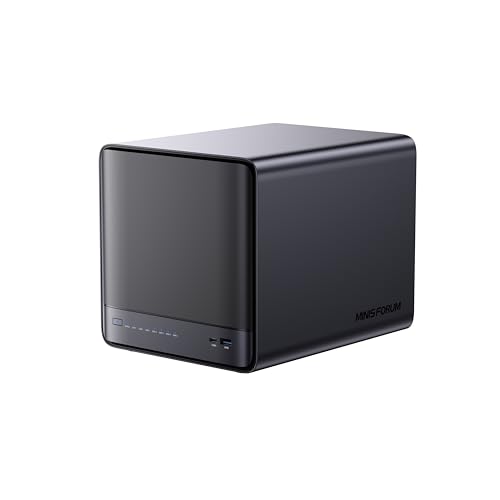
MINISFORUM N5 Pro 5-Bay Desktop NAS
Best for: users needing local AI processing and 10GbE speeds
- Drive Bays
- 5-Bay
- Network Connectivity
- 1 x 10GbE, 1 x 5GbE
- Processor
- AMD Ryzen AI 9 HX PRO 370
- M.2 NVMe Slots
- 3 slots
- Included Storage
- 128GB SSD
- Form Factor
- Desktop
View on Amazon: MINISFORUM N5 Pro 5-Bay Desktop NAS Affiliate link
The MINISFORUM N5 Pro is a 5-bay desktop NAS powered by an AMD Ryzen AI 9 HX PRO 370 processor. It features 12 cores and 24 threads for high-speed file retrieval and video decoding. The unit includes one 10GbE and one 5GbE port, supporting link aggregation for 15Gbps throughput. It offers up to 188TB of storage capacity and includes a built-in 128GB system drive. This model suits users needing robust local AI processing and high network speeds.
Pros
- AMD Ryzen AI 9 HX PRO 370 processor with 12 cores and 24 threads
- 10GbE and 5GbE dual ports with link aggregation support
- Supports up to 188TB total storage capacity across 5 bays
- Slide-out motherboard design for easy RAM and SSD upgrades
- Built-in 128GB system drive with MinisCloud OS
Cons
- Built-in 128GB drive occupies one M.2 slot, reducing available NVMe slots to two
- No internal mechanical hard drives included in the package
- Using third-party OS requires uninstalling the built-in system drive
Good fit if
- You need high-speed network connectivity with 10GbE and 5GbE ports
- You want to perform local AI tasks like image recognition
- You require a desktop chassis with easy internal upgrade access
Skip if
- You need pre-installed mechanical hard drives
- You want to use all three M.2 slots for storage without modifying the system
- You prefer a compact tower form factor over a wide desktop unit
Verdict: The MINISFORUM N5 Pro Desktop NAS is a high-performance desktop unit for users who prioritize local AI processing and fast network speeds. It fits those who value expandable hardware and do not mind managing their own storage drives.

MINISFORUM N5 Pro Desktop NAS
Best for: AI workloads and large storage capacity
- Drive Bays
- 5-Bay
- Network Connectivity
- 1 x 10GbE, 1 x 5GbE
- Processor
- AMD Ryzen AI 9 HX PRO 370
- RAM Capacity
- Expandable up to 96GB DDR5 ECC
- M.2 NVMe Slots
- 3 slots
- Included Storage
- 128GB SSD
View on Amazon: MINISFORUM N5 Pro Desktop NAS Affiliate link
The MINISFORUM N5 Pro is a 5-bay desktop NAS featuring the AMD Ryzen AI 9 HX PRO 370 processor. It offers 12 cores, 24 threads, and up to 80 TOPS for AI tasks. The system includes 128GB SSD storage and supports up to 188TB across five SATA slots. Dual network ports provide 10GbE and 5GbE speeds. ECC DDR5 memory ensures data reliability for business or home use.
Pros
- AMD Ryzen AI 9 HX PRO 370 CPU with 12 cores and 80 TOPS
- Expandable up to 188TB using five SATA HDD slots
- 10GbE and 5GbE network ports with link aggregation support
- ECC DDR5 memory slots for improved data stability
- OCuLink port for external PCIe 4.0 x4 expansion
Cons
- OCuLink port does not support hot-swapping
- Only one 10GbE port limits independent dual-network redundancy
- Base model includes only 128GB SSD storage
Good fit if
- You need high-performance AI processing for local workloads
- You require large storage capacity up to 188TB
- You want ECC memory for critical data protection
Skip if
- You need hot-swappable external GPU connections
- You require more than one 10GbE port
- You prefer a compact 4-bay form factor
Verdict: MINISFORUM N5 Pro 5-Bay Desktop NAS suits users needing heavy AI compute and massive storage. It fits those prioritizing ECC memory and fast network links over compact size.

MINISFORUM N5 Pro AI NAS
Best for: High AI compute and 10GbE networking
- Drive Bays
- 5-Bay
- Network Connectivity
- 5GbE+10GbE
- Processor
- AMD Ryzen AI 9 HX 370
- RAM Capacity
- 2x SODIMM DDR5-5600MHz
- M.2 NVMe Slots
- 3 M.2 + 2 U.2 slots
- Included Storage
- 128GB SSD
View on Amazon: MINISFORUM N5 Pro AI NAS Affiliate link
The MINISFORUM N5 Pro AI NAS uses an AMD Ryzen AI 9 HX Pro 370 with 12 cores and 50 TOPS NPU performance. It supports up to 144TB across five HDD slots and includes dual 10GbE ports for 15Gbps link aggregation. ECC DDR5 memory ensures data integrity. This device suits users needing high AI compute power and robust storage flexibility for heavy multitasking.
Pros
- AMD Ryzen AI 9 HX Pro 370 with 50 TOPS NPU performance
- Supports up to 144TB total storage capacity
- Dual 10GbE and 5GbE ports with link aggregation
- ECC DDR5-5600MHz memory support for data reliability
- Pre-installed MinisCloud OS with Docker and ZFS snapshots
Cons
- Large physical footprint at 9.92 inches in height
- Requires at least one SSD or HDD to function
- No external display output listed in specifications
Good fit if
- You need high AI processing power for local models
- You require fast 10GbE network connectivity for transfers
- You want ECC memory for critical data integrity
Skip if
- You prefer a compact, low-profile desktop form factor
- You want a plug-and-play solution without setup
- You only need basic 1GbE network speeds
Verdict: MINISFORUM N5 Pro AI NAS fits users who need serious AI compute and 10GbE speeds. It is ideal for those building a high-performance, expandable storage server.

MINISFORUM N5 Air Desktop NAS
Best for: high-performance data management and transcoding
- Drive Bays
- 5-Bay
- Network Connectivity
- 1x 10GbE, 1x 5GbE
- Processor
- AMD Ryzen 7 255
- M.2 NVMe Slots
- 3 slots
- Included Storage
- 64GB SSD
- RAID Support
- RAID 0/1/5/6
View on Amazon: MINISFORUM N5 Air Desktop NAS Affiliate link
The MINISFORUM N5 Air is a desktop NAS built for heavy workloads. It uses an AMD Ryzen 7 255 CPU with Radeon 780M graphics for fast transcoding. You get 15 Gbps networking via 10GbE and 5GbE ports. Storage reaches 174 TB with five SATA bays and NVMe slots. It includes OCuLink and USB4 expansion. This unit suits users needing high performance and flexible connectivity.
Pros
- AMD Ryzen 7 255 processor with 8 cores and 16 threads
- 15 Gbps total bandwidth from 10GbE and 5GbE ports
- Supports up to 174 TB with five SATA bays and NVMe slots
- OCuLink port for external GPU expansion
Cons
- No RAM or hard drives included in the base configuration
- Only two LAN ports limit network redundancy options
- No mention of a built-in display for local monitoring
Good fit if
- You need fast 4K/8K video transcoding capabilities
- You require high bandwidth for large file transfers
- You want to expand storage with U.2 SSDs
Skip if
- You prefer a plug-and-play unit with drives pre-installed
- You need more than two network interfaces for redundancy
- You want a compact rack-mountable form factor
Verdict: The MINISFORUM N5 Air 5-Bay Desktop NAS delivers workstation-level performance for users who prioritize speed and expansion over out-of-the-box convenience. It fits creative studios and professionals managing massive datasets.
Specifications side by side
| Spec | MINISFORUM N5 Pro 5-Bay Desktop NAS | MINISFORUM N5 Pro Desktop NAS | MINISFORUM N5 Pro AI NAS | MINISFORUM N5 Air Desktop NAS |
|---|---|---|---|---|
| Drive Bays | 5-Bay | 5-Bay | 5-Bay | 5-Bay |
| Network Connectivity | 1 x 10GbE, 1 x 5GbE | 1 x 10GbE, 1 x 5GbE | 5GbE+10GbE | 1x 10GbE, 1x 5GbE |
| Processor | AMD Ryzen AI 9 HX PRO 370 | AMD Ryzen AI 9 HX PRO 370 | AMD Ryzen AI 9 HX 370 | AMD Ryzen 7 255 |
| RAM Capacity | not stated | Expandable up to 96GB DDR5 ECC | 2x SODIMM DDR5-5600MHz | not stated |
| M.2 NVMe Slots | 3 slots | 3 slots | 3 M.2 + 2 U.2 slots | 3 slots |
| Included Storage | 128GB SSD | 128GB SSD | 128GB SSD | 64GB SSD |
| RAID Support | not stated | 0, 1, 5, 6 | RAID 0/1/5/6/10 | RAID 0/1/5/6 |
| Form Factor | Desktop | Desktop | not stated | Desktop |
| Hardware Interface | M.2 NVMe, HDMI | M.2 NVMe, HDMI | M.2 NVMe | M.2 NVMe |
| Dimensions | not stated | 7.95 × 7.83 × 9.92 inches | 7.95 × 7.83 × 9.92 inches | not stated |
| Size | N5 Pro(0+128G) | N5 Pro(0+128G) | 7.95 x 7.83 x 9.92 inches | N5A-H255(0+0+64) |
| Color | Black | Black | Black | Blue |
| Model | N5-Pro-P370(0+128) | N5-PRO-P370 | DeskMini | N5 Air |
MINISFORUM NAS Lineup Overview
MINISFORUM focuses on desktop units with AMD Ryzen processors and M.2 NVMe interfaces. You will find options with 5GbE or 10GbE network connectivity. The lineup includes the N5 Pro, N5 Pro AI, and N5 Air models. These devices target users who need high performance for local AI processing or fast data transfer. They suit those who value expandable hardware and manage their own storage drives. The N5 Pro stands out for its balance of speed and utility. The N5 Air offers workstation-level performance for creative studios. Both models support large datasets and transcoding tasks. The N5 Pro AI emphasizes serious AI compute capabilities. These units are ideal for professionals who prioritize speed and expansion over compact size. You can choose based on your specific network and processing needs.
Who MINISFORUM Suits Best
MINISFORUM targets users who need local AI processing and high-speed networking. All listed models are desktop units, so they require desk space rather than fitting into tight wall mounts. You get AMD Ryzen processors, M.2 NVMe interfaces, and network speeds of 5GbE or 10GbE. The range spans black and blue finishes. Sizes vary slightly, with dimensions around 7.8 to 9.9 inches. None of these devices are compact or portable. You will not find small form-factor or rack-mount options here. This brand suits those prioritizing expandable hardware and heavy compute over out-of-the-box convenience.
How to choose the right one
-
Check network speed needs
You must decide between standard and fast Ethernet based on your file transfer habits. The MINISFORUM N5 Pro offers 10GbE connectivity for users who move large files daily. If you only need basic access, 5GbE is sufficient. Higher speeds reduce bottlenecks when multiple devices access data simultaneously. Check the Network Connectivity attribute in the specs to confirm available ports. This choice impacts your entire home network performance and hardware costs.
-
Assess local AI requirements
Local AI processing is a key feature for specific workflows. The N5 Pro and N5 Pro AI models are designed for heavy AI compute tasks. You should consider this if you run machine learning models or video analytics locally. The AMD Ryzen processor supports these intensive operations. If you do not use AI tools, this feature may be unnecessary overhead. Review the best_for descriptions to see if AI workloads match your technical needs.
-
Verify form factor fit
All MINISFORUM devices listed are desktop units. You need adequate desk space rather than wall-mounting options. The N5 Pro measures approximately 7.83 by 9.92 by 7.95 inches. Ensure your workspace can accommodate this size. Desktop units often provide better cooling and expansion options. Check the Form Factor attribute to confirm the physical layout. This decision affects airflow and accessibility to internal components for upgrades.
-
Evaluate storage expansion
The N5 Air and N5 Pro models support M.2 NVMe interfaces. You should check the Hardware Interface specs to confirm compatibility with your preferred drives. NVMe drives offer faster data access than traditional SATA options. This speed is crucial for running applications directly from the NAS. Verify the number of available slots in the product details. Proper interface selection ensures your storage system meets your performance expectations.
-
Consider color and design
Aesthetic choices may matter for visible desktop setups. The N5 Air is available in blue, while other models are black. This does not affect performance but influences how the device fits your workspace. Choose the color that matches your existing equipment. The physical dimensions remain consistent across most models. Review the color attribute in the specs to identify available options. This is a minor consideration compared to technical specifications.
Frequently asked questions
Which MINISFORUM NAS is best for local AI processing?
The MINISFORUM N5 Pro Desktop NAS is the top choice for users needing local AI processing. It features an AMD Ryzen processor and 10GbE connectivity for fast data handling. This model is ideal for those who prioritize expandable hardware and high-speed network links over compact size.
Does the MINISFORUM N5 Pro support 10GbE networking?
Yes, the MINISFORUM N5 Pro supports 10GbE networking alongside 5GbE connectivity. This allows for significantly faster file transfers compared to standard Ethernet. You get the speed needed for large datasets while maintaining compatibility with slower network segments in your home or office setup.
What processor do MINISFORUM NAS devices use?
All MINISFORUM NAS models in this guide use AMD Ryzen processors. This provides strong multi-core performance for tasks like transcoding and AI workloads. The Ryzen architecture ensures efficient handling of heavy data management duties across the entire lineup of desktop units.
Are MINISFORUM NAS devices desktop or rack-mounted?
MINISFORUM NAS devices are designed as desktop units. They sit on your desk rather than fitting into server racks or tight wall mounts. This form factor offers flexibility in placement but requires adequate desk space for ventilation and cable management.
What storage interfaces are available on these NAS drives?
These devices feature M.2 NVMe interfaces for high-speed storage expansion. You can add fast SSDs to boost performance for caching or active data access. The hardware interface supports modern NVMe drives, ensuring low latency and high throughput for your most critical files.
Is there a blue option in the MINISFORUM lineup?
Yes, the MINISFORUM N5 Air Desktop NAS is available in blue. Most other models in the lineup come in black. This color option allows you to match your device to your existing desk setup or personal aesthetic preference without compromising on technical specifications.