Asustor Lockerstor 4-Bay Quad-Core NAS vs Asustor Lockerstor 6-Bay NAS 3TB (2026): Key Differences
As an Amazon Associate we earn from qualifying purchases. Links on this page are affiliate links.
This comparison examines the asustor lockerstor 4 bay quad core NAS vs lockerstor 6 bay NAS 3tb. Both units share a quad-core 2.0GHz processor and dual 2.5GbE ports. The main difference lies in capacity and memory. The four-bay model offers four drive slots with 4GB of RAM. The six-bay bundle includes three 1TB SSDs and 8GB of RAM. You need to decide which storage tier fits your workflow.
Key differences
| Aspect | Asustor Lockerstor 4-Bay Quad-Core NAS | Asustor Lockerstor 6-Bay NAS with 3TB SSD |
|---|---|---|
| Drive Bays | 4-Bay | 6 Bay |
| RAM Capacity | 4GB DDR4 | 8GB DDR4-2933 |
| M.2 NVMe Slots | 2 slots | 4X M.2 NVMe Slots |
| Included Storage | Diskless | 3 x 1TB SSD |
Which one should you choose?
Choose Asustor Lockerstor 4-Bay Quad-Core NAS if
- You need a compact unit for essential file storage
- You want to purchase your own drives separately
- You require fewer drive slots for a smaller setup
Choose Asustor Lockerstor 6-Bay NAS with 3TB SSD if
- You need more RAM for virtualization tasks
- You want extra M.2 slots for cache storage
- You prefer a bundle with pre-installed SSDs
Verdict: The four-bay model suits users who want a compact, diskless chassis. The six-bay bundle is better for those needing more RAM and pre-installed SSDs. Choose based on your specific storage and memory requirements.
Storage Capacity and Memory Comparison
Drive Bays
The Asustor Lockerstor 4-Bay Quad-Core NAS provides four drive slots for your data. This model is diskless, meaning you must purchase drives separately. The Asustor Lockerstor 6-Bay NAS includes six drive bays, offering more physical space for expansion. It comes bundled with three 1TB SSDs, giving you immediate storage upon setup. If you need room for a growing media library or large dataset, the six-bay unit offers two additional slots. The four-bay model is better if you prefer a smaller footprint and plan to use fewer drives.
RAM Capacity
Memory is crucial for handling multiple tasks and virtual machines. The Asustor Lockerstor 4-Bay Quad-Core NAS ships with 4GB of DDR4 RAM. This is sufficient for basic file serving and light media streaming. The Asustor Lockerstor 6-Bay NAS doubles this with 8GB of DDR4-2933 RAM. The higher capacity and faster speed allow for smoother operation when running multiple containers or heavy database queries. If you plan to run many apps simultaneously, the extra memory in the six-bay model prevents bottlenecks. The four-bay model may require upgrades for heavier workloads.
M.2 NVMe Slots
Cache and speed benefits come from NVMe SSDs. The Asustor Lockerstor 4-Bay Quad-Core NAS includes two M.2 NVMe slots. This allows you to add fast storage for caching or a dedicated pool. The Asustor Lockerstor 6-Bay NAS offers four M.2 NVMe slots. This flexibility lets you build a larger cache or a high-speed tiered storage system. If you rely on SSDs for performance acceleration, the six-bay model provides double the expansion options. The four-bay model is adequate for basic caching needs but limits future scaling compared to its larger sibling.
Included Storage
Setup convenience varies between the two models. The Asustor Lockerstor 4-Bay Quad-Core NAS is sold diskless. You must buy hard drives or SSDs separately before you can use it. The Asustor Lockerstor 6-Bay NAS comes with three 1TB SSDs included in the box. This bundle provides immediate functionality without extra purchases. You get 3TB of fast storage right away. If you want a ready-to-use solution without hunting for drives, the six-bay model is more convenient. The four-bay model requires additional budget for storage components.
Form Factor
Physical dimensions affect where you can place the device. The Asustor Lockerstor 4-Bay Quad-Core NAS measures 6.69 inches wide, 7.3 inches high, and 9.06 inches long. It weighs 6.53 pounds. The Asustor Lockerstor 6-Bay NAS is significantly larger at 12 inches wide, 13 inches high, and 13 inches long. It weighs 14.9 pounds. The four-bay model fits easily on a desk or in a standard rack. The six-bay model requires more space and may need a dedicated shelf. Choose the four-bay model if space is limited in your home or office.
Which Asustor NAS Should You Choose
Users needing immediate storage capacity
This model includes three 1TB SSDs for a total of 3TB. You get six drive bays for future expansion. The 8GB DDR4-2933 RAM offers higher bandwidth. Four M.2 NVMe slots allow for fast cache. This bundle saves you from buying drives separately.
Budget-focused users preferring diskless design
This unit arrives diskless, letting you choose your own drives. It has four drive bays and 4GB of DDR4 RAM. Two 2.5GbE ports handle network traffic. Two M.2 NVMe slots support caching. The 3-year warranty covers hardware damage. This option gives you flexibility over storage selection.
Users wanting maximum memory and slots
You get 8GB of DDR4-2933 RAM, which is double the standard model. It features four M.2 NVMe slots for extensive caching. The six-bay chassis allows for more drive expansion. The flexible PCIe slot supports 10GbE upgrades. This setup handles heavier multitasking and virtualization workloads more effectively.
The products compared
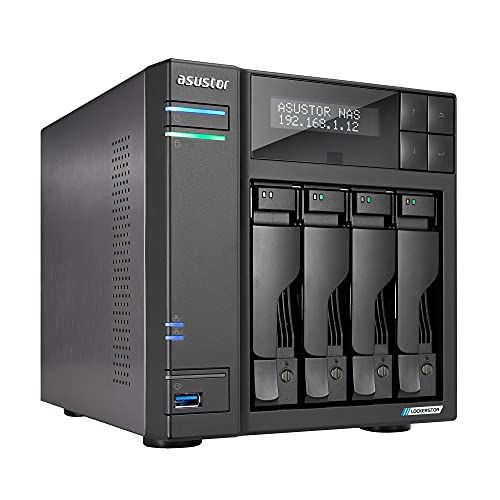
Asustor Lockerstor 4-Bay Quad-Core NAS
Best for: Users needing SSD caching and 2.5GbE speeds
- Drive Bays
- 4-Bay
- Network Connectivity
- 2x 2.5GbE
- Processor
- Quad-Core 2.0GHz
- RAM Capacity
- 4GB DDR4
- M.2 NVMe Slots
- 2 slots
- Included Storage
- Diskless
View on Amazon: Asustor Lockerstor 4-Bay Quad-Core NAS Affiliate link
The Asustor Lockerstor 4-Bay NAS features a quad-core 2.0GHz processor and 4GB of DDR4 RAM. It includes two 2.5GbE ports for faster network transfers and two M.2 NVMe slots for SSD caching. This diskless unit supports over 200 apps and four free IP camera licenses. It suits users needing a compact, powerful storage solution for home or small business use.
Pros
- Quad-Core 2.0GHz processor handles virtual storage tasks
- Two built-in 2.5GbE ports for enhanced connectivity
- Two M.2 NVMe slots for SSD caching
- Includes four free IP camera licenses for NVR use
- Comes with a 3-year hardware warranty
Cons
- Only four drive bays limit total storage capacity
- Sold diskless with no included hard drives
- Smaller capacity compared to six-bay alternatives
Good fit if
- You need fast 2.5GbE network speeds
- You want to add SSDs for caching
- You require four free IP camera licenses
Skip if
- You need more than four drive bays
- You want pre-installed hard drives
- You require 10GbE connectivity
Verdict: Asustor Lockerstor 4-Bay NAS offers strong processing power and dual 2.5GbE ports for users who need speed and SSD caching in a compact four-bay form factor.

Asustor Lockerstor 6-Bay NAS with 3TB SSD
Best for: Users needing pre-loaded high-capacity storage
- Drive Bays
- 6 Bay
- Network Connectivity
- Dual 2.5GbE
- Processor
- Intel Celeron N5105
- RAM Capacity
- 8GB DDR4-2933
- M.2 NVMe Slots
- 4X M.2 NVMe Slots
- Included Storage
- 3 x 1TB SSD
View on Amazon: Asustor Lockerstor 6-Bay NAS with 3TB SSD Affiliate link
This is a 6-bay NAS with a quad-core Intel Celeron N5105 CPU and 8GB of DDR4-2933 RAM. It comes with three 1TB SSDs pre-installed. The unit features four M.2 NVMe slots and dual 2.5GbE ports. You get flexible PCIe expansion for 10GbE or more storage. This bundle suits users who need high capacity and fast local caching without buying drives separately.
Pros
- Includes three 1TB SSDs for immediate use
- Four M.2 NVMe slots for fast caching
- Dual 2.5GbE network ports
- 8GB DDR4-2933 RAM for better multitasking
- Flexible PCIe slot for 10GbE expansion
Cons
- Heavier at 14.9 pounds than 4-bay models
- Larger footprint at 13 inches tall
- Limited to PCIe 3.0 SSD speeds
Good fit if
- You want a pre-loaded NAS with SSDs
- You need six drive bays for large libraries
- You plan to add 10GbE networking later
Skip if
- You only have space for a 4-bay unit
- You need PCIe 4.0 SSD performance
- You prefer a lighter, more compact device
Verdict: Asustor Lockerstor 6-Bay 3TB Bundle offers immediate storage with its included SSDs and strong expandability. It fits users who need high capacity and fast caching without buying drives separately.
Specifications side by side
| Spec | Asustor Lockerstor 4-Bay Quad-Core NAS | Asustor Lockerstor 6-Bay NAS with 3TB SSD |
|---|---|---|
| Drive Bays | 4-Bay | 6 Bay |
| Network Connectivity | 2x 2.5GbE | Dual 2.5GbE |
| Processor | Quad-Core 2.0GHz | Intel Celeron N5105 |
| RAM Capacity | 4GB DDR4 | 8GB DDR4-2933 |
| M.2 NVMe Slots | 2 slots | 4X M.2 NVMe Slots |
| Included Storage | Diskless | 3 x 1TB SSD |
| Hardware Interface | M.2 NVMe | M.2 NVMe |
| Number of Bays | 4-Bay | 6-Bay |
| Processor Cores | Quad-Core | Quad-Core |
| Dimensions | 9.06 × 6.69 × 7.3 inches | 13 × 12 × 13 inches |
| Weight | 6.53 pounds | 14.9 pounds |
| Size | 4 Bay | 3X1TB |
| Color | AS6604T | not stated |
| Model | AS6604T | not stated |
Frequently asked questions
Does the Asustor Lockerstor 4-Bay support faster network connections?
Yes, it includes dual 2.5GbE ports for improved throughput. This allows you to transfer large files more quickly than standard Gigabit Ethernet. The model also supports 5GbE connectivity, giving you flexibility for future network upgrades without needing new cables.
How much RAM does the 6-Bay NAS have?
The Asustor Lockerstor 6-Bay NAS comes with 8GB of RAM. This is double the 4GB found in the 4-Bay Quad-Core model. More memory helps handle multiple users and complex tasks like video editing or running virtual machines more smoothly.
Can I add SSDs for caching on both models?
Both units support M.2 NVMe SSDs for caching. The 4-Bay model allows you to install these drives to accelerate access to frequently used data. The 6-Bay version also supports this feature, helping to improve read and write speeds for your storage pool.
Which NAS has 10GbE connectivity?
The Asustor Lockerstor 6-Bay NAS features 10GbE connectivity in addition to 2.5GbE and 5GbE ports. The 4-Bay Quad-Core model only offers 2.5GbE and 5GbE options. If you need ultra-fast local network speeds, the 6-Bay unit provides the necessary hardware.
Is the 6-Bay NAS sold with drives included?
Yes, the Asustor Lockerstor 6-Bay NAS 3TB bundle includes three 1TB SSDs. You get immediate storage capacity of 3TB upon setup. The 4-Bay model is diskless, so you must purchase hard drives separately to begin using the device.
What are the physical dimensions of the 4-Bay NAS?
The Asustor Lockerstor 4-Bay Quad-Core NAS measures 9.06 inches in length, 6.69 inches in width, and 7.3 inches in height. It weighs 6.53 pounds. This compact form factor makes it easier to fit on a desk or in a smaller rack space.
Does the 6-Bay NAS have more drive slots?
Yes, it offers six drive bays compared to the four bays in the other model. This gives you more room to expand your storage capacity over time. You can mix and match drive types to suit your specific data storage needs.