3 Best NAS Devices Under $200, Compared
As an Amazon Associate we earn from qualifying purchases. Links on this page are affiliate links.
Finding the best NAS devices under $200 requires a close look at published specifications. We compared 3 units to help you choose. The Buffalo LinkStation 210 4TB 1-Bay NAS leads this list. It includes a 4TB drive for simple home storage without extra setup. Our picks are based strictly on the specs published on the listings. We focus on what each device offers in practice. This guide helps you decide which storage solution fits your needs.
Quick picks
| # | Product | Best for | Price |
|---|---|---|---|
| 1 | Buffalo LinkStation 210 4TB 1-Bay NAS Best overall | Simple home storage with included drive | Check price of Buffalo LinkStation 210 4TB 1-Bay NAS on Amazon |
| 2 | QNAP 2-Bay USB-C Direct Attached Storage Best budget | expanding storage for a single computer | Check price of QNAP 2-Bay USB-C Direct Attached Storage on Amazon |
| 3 | Asustor Drivestor 2 Gen 2 Two-Bay NAS Best premium | Home users needing 2.5GbE speeds | Check price of Asustor Drivestor 2 Gen 2 Two-Bay NAS on Amazon |
The best fit for you
- You want simple home storage with included drive Buffalo LinkStation 210 4TB 1-Bay NAS It includes a 4TB drive and offers straightforward setup for basic home use.
- You need to expand storage for a single computer QNAP 2-Bay USB-C Direct Attached Storage Its USB-C direct attachment and hardware RAID simplify local storage expansion.
- You need 2.5GbE speeds for home network performance Asustor Drivestor 2 Gen 2 Two-Bay NAS It provides 2.5GbE connectivity for faster local network transfers.
Our 3 picks
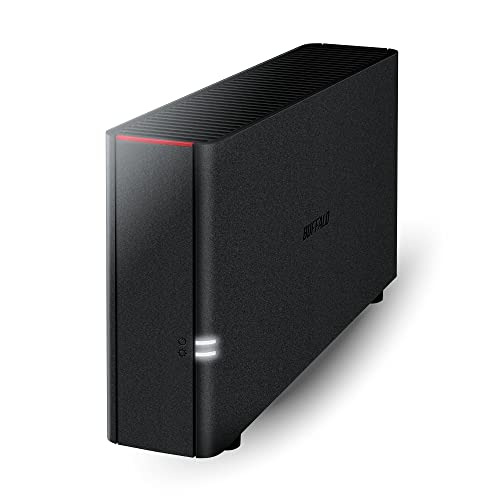
Buffalo LinkStation 210 4TB 1-Bay NAS
Best for: Simple home storage with included drive
- Drive Bays
- 1-Bay
- Included Storage
- 4TB
- Intended Use
- Home Users
- Dimensions
- 9.45 × 3.31 × 8.67 inches
- Weight
- 2.43 pounds
View on Amazon: Buffalo LinkStation 210 4TB 1-Bay NAS Affiliate link
The BUFFALO LinkStation 210 is a 1-bay NAS with 4TB of included storage. It connects to your router for centralized data access across Windows and macOS 15 and earlier. The device uses a closed system and SSL encryption for security. It includes backup utilities and supports individual folder access restrictions. This drive suits users needing a simple, subscription-free personal cloud for photos and media.
Pros
- Includes 4TB HDD in a single drive bay
- Closed system design reduces third-party vulnerabilities
- SSL encryption secures file transfers
- Supports automated backups for multiple computers
Cons
- Single drive bay limits redundancy options
- Limited to macOS 15 and earlier compatibility
- No mention of RAID support in specs
Good fit if
- You need a simple, plug-and-play NAS setup
- You want included storage without buying a drive separately
- You prefer a closed system for security
Skip if
- You require RAID 1 redundancy for data safety
- You use macOS 26 or newer
- You need multiple drive bays for expansion
Verdict: The BUFFALO LinkStation 210 4TB 1-Bay NAS is a straightforward storage solution for home users who prioritize simplicity and security over advanced features. It fits those who want a single-drive setup with included capacity and basic backup tools.

QNAP 2-Bay USB-C Direct Attached Storage
Best for: expanding storage for a single computer
- Drive Bays
- 2-Bay
- Included Storage
- Diskless
- RAID Support
- RAID 0, 1, JBOD
- Dimensions
- 8.86 × 4.02 × 6.63 inches
- Weight
- 2.65 pounds
View on Amazon: QNAP 2-Bay USB-C Direct Attached Storage Affiliate link
The QNAP TR-002 is a 2-bay direct-attached storage device designed for high-speed data transfer via USB Type-C. It supports Windows, macOS, and Linux systems. You can use it as external storage or to expand an existing QNAP NAS. The unit features hardware RAID options including RAID 0, 1, and JBOD. It accommodates 2.5 or 3.5-inch SATA drives. This compact drive enclosure suits users needing quick, reliable local storage expansion.
Pros
- USB Type-C connection for high-speed transfers
- Hardware RAID 0, 1, and JBOD support
- Lockable drive bays for physical security
- Compatible with Windows, macOS, and Linux
Cons
- Not a standalone NAS; requires a host computer
- No built-in network ports for direct IP access
- Limited to 2-bay capacity for large libraries
Good fit if
- You need fast external storage for a single computer
- You want to expand an existing QNAP NAS system
- You prefer hardware RAID configuration over software
Skip if
- You need a standalone network-attached storage device
- You require multiple network ports for server access
- You want to share files across a network without a host PC
Verdict: QNAP TR-002 2-Bay USB-C DAS offers a secure, high-speed way to add local storage to your computer or NAS. It is ideal for users who prioritize direct attachment and hardware RAID simplicity over network accessibility.

Asustor Drivestor 2 Gen 2 Two-Bay NAS
Best for: Home users needing 2.5GbE speeds
- Drive Bays
- 2-Bay
- Network Connectivity
- 2.5GbE
- Processor
- Realtek RTD1619B
- RAM Capacity
- 1GB DDR4
- Included Storage
- Diskless
- Intended Use
- Home Users
View on Amazon: Asustor Drivestor 2 Gen 2 Two-Bay NAS Affiliate link
The Asustor AS1202T is a 2-bay NAS designed for home users. It features a quad-core 1.7GHz processor and 1GB of DDR4 memory. The device includes a 2.5GbE port for faster data transfers than standard gigabit connections. It supports tool-free drive installation for easy setup. This unit suits those needing a personal cloud for file storage and backup.
Pros
- 2.5GbE network port for faster transfers
- Tool-free drive installation
- Quad-core 1.7GHz processor
- 1GB DDR4 memory
Cons
- Only 1GB of RAM limits heavy multitasking
- No mention of USB expansion ports
- Smaller capacity than 4-bay alternatives
Good fit if
- You want faster transfer speeds than gigabit
- You prefer tool-free drive installation
- You need a 2-bay home NAS
Skip if
- You require more than 2 drive bays
- You need heavy multitasking capabilities
- You want a USB direct-attached storage device
Verdict: Asustor AS1202T 2-Bay NAS offers a solid entry point for home users seeking 2.5GbE speeds and easy setup. It fits those prioritizing network performance and simple installation over expandability.
Specifications side by side
| Spec | Buffalo LinkStation 210 4TB 1-Bay NAS | QNAP 2-Bay USB-C Direct Attached Storage | Asustor Drivestor 2 Gen 2 Two-Bay NAS |
|---|---|---|---|
| Drive Bays | 1-Bay | 2-Bay | 2-Bay |
| Network Connectivity | not stated | not stated | 2.5GbE |
| Processor | not stated | not stated | Realtek RTD1619B |
| RAM Capacity | not stated | not stated | 1GB DDR4 |
| Included Storage | 4TB | Diskless | Diskless |
| RAID Support | not stated | RAID 0, 1, JBOD | not stated |
| Number of Bays | not stated | 2-Bay | 2-Bay |
| Intended Use | Home Users | not stated | Home Users |
| Dimensions | 9.45 × 3.31 × 8.67 inches | 8.86 × 4.02 × 6.63 inches | 3.94 × 3.94 × 3.94 inches |
| Weight | 2.43 pounds | 2.65 pounds | 2.56 pounds |
| Size | 4TB (1x4TB) | DAS | 2 Bay |
| Color | Black | Clear | Black |
| Model | LS210D0401 | TR-002 | AS1202T |
How to Choose Your NAS Device
-
Match the Bay Count
Check the number of drive bays before buying. Single-bay units like the Buffalo LinkStation 210 are simpler and include a drive. They suit users who want plug-and-play home storage. Two-bay devices, such as the QNAP TR-002, allow for expanded local storage. These are ideal for direct attachment to a computer. Decide if you need network access or direct connection. Your choice depends on whether you prioritize simplicity or capacity expansion for your specific workflow needs.
-
Verify Network Speed
Look at the Ethernet port speed on the device. The Asustor Drivestor 2 Gen 2 features 2.5GbE ports. This offers faster data transfer than standard Gigabit connections. You benefit from quicker backups and file access. This speed is crucial for home users with large media libraries. Check the specifications to confirm the port type. Higher speeds reduce transfer times for large files. Ensure your network infrastructure supports the faster connection. This spec directly impacts your daily data handling efficiency.
-
Check Form Factor
Review the physical dimensions and weight of the unit. The Buffalo LinkStation 210 measures 3.31 by 9.45 inches. It weighs 2.43 pounds. This compact size fits easily on a desk. The QNAP TR-002 is slightly wider and taller. Measure your available space before purchasing. Weight matters if you plan to move the device. Consider the footprint in your home office. A smaller unit saves desk space. Check the listed dimensions to ensure it fits your setup.
-
Identify the Interface
Determine how the device connects to your system. The QNAP TR-002 uses USB-C for direct attachment. This is a Direct Attached Storage device, not a network NAS. It connects directly to your computer for local storage. The Buffalo LinkStation is a traditional NAS for network sharing. Choose USB-C if you need local expansion for one machine. Choose network NAS for sharing files across multiple devices. The interface dictates how you integrate the drive into your workflow.
-
Assess Included Capacity
See if the drive is included in the package. The Buffalo LinkStation 210 comes with a 4TB drive pre-installed. You get immediate storage without buying separate components. This simplifies the setup process for home users. Other devices may require you to purchase drives separately. Check the size specification in the product data. Included capacity provides immediate value and convenience. Verify the total size matches your storage requirements. This feature is key for users seeking a straightforward solution.
Frequently asked questions
Which NAS device is best for simple home storage?
The Buffalo LinkStation 210 4TB 1-Bay NAS is the top choice for straightforward home use. It includes a single 4TB drive, so you do not need to buy one separately. This setup is ideal if you prioritize simplicity and basic security over advanced features. It fits users who want a plug-and-play experience for their personal files.
Can I use a NAS to expand storage for a single computer?
Yes, the QNAP TR-002 2-Bay USB-C Direct Attached Storage is designed for this purpose. It connects directly to your computer via USB-C, offering a secure way to add local storage. This device is best if you need high-speed local access and hardware RAID simplicity rather than network-wide accessibility for multiple users.
Which NAS supports 2.5GbE network speeds?
The Asustor Drivestor 2 Gen 2 Two-Bay NAS supports 2.5GbE speeds. This model is a solid entry point for home users who want faster network performance than standard Gigabit connections. It offers easy setup and prioritizes network performance, making it a good fit if you move large files frequently across your local network.
How many drive bays do these devices have?
The list includes both single-bay and two-bay options. The Buffalo LinkStation 210 is a 1-bay unit that comes with a 4TB drive installed. The QNAP TR-002 and Asustor Drivestor 2 are both 2-bay devices. You should choose based on whether you need the simplicity of one drive or the expanded capacity of two.
Are these NAS devices suitable for beginners?
Yes, all three devices are aimed at home users who value ease of use. The Buffalo LinkStation 210 is the most straightforward, requiring no extra drive setup. The Asustor Drivestor 2 also focuses on easy installation. These options suit users who want reliable storage without dealing with complex network configurations or advanced technical settings.
What is the difference between a NAS and a DAS?
A Network Attached Storage (NAS) device connects to your network, allowing multiple computers to access files. A Direct Attached Storage (DAS) device, like the QNAP TR-002, connects directly to one computer via USB-C. Choose a DAS if you only need to expand storage for a single machine and prefer local connection speeds.
Do these devices come with hard drives included?
The Buffalo LinkStation 210 includes a 4TB drive, so you can start using it immediately. The QNAP TR-002 and Asustor Drivestor 2 are sold as empty chassis with two bays each. You will need to purchase and install your own drives for the QNAP and Asustor models before they can store data.
Which device is the best overall pick?
The Buffalo LinkStation 210 4TB 1-Bay NAS is ranked as the best overall pick. It is a straightforward storage solution that includes a 4TB drive. This makes it ideal for users who want simplicity and security without the hassle of buying separate components or configuring complex network settings for home use.