9 Best Synology 2-Bay NAS Devices, Compared
As an Amazon Associate we earn from qualifying purchases. Links on this page are affiliate links.
Choosing the best synology 2-Bay network attached storages requires looking at specific hardware details rather than marketing claims. We compared 9 models based strictly on published specifications. Our top pick is the Synology 2-Bay 2GB RAM NAS Hub, which leads due to its 2GB RAM capacity for reliable file backup and surveillance. This guide helps you decide which device fits your storage needs by comparing RAM, processor types, and network ports across these options.
Quick picks
The best fit for you
- You want the most reliable home backup system Synology 2-Bay 2GB RAM NAS Hub The 2GB RAM and compact 2.82-pound size support reliable file backup and surveillance tasks.
- You need a ready-to-use private cloud setup Synology 2-Bay 8TB NAS Pre-installed 8TB drives and hot-swap bays allow for immediate out-of-the-box usage without manual installation.
- You want the most compact and lightweight model Synology 2-Bay Desktop NAS Enclosure This model weighs just 1.92 pounds and measures 3.94 inches wide, fitting small spaces easily.
- You need fast 4K media streaming capabilities Synology 2-Bay Intel Streaming NAS Intel-driven 4K transcoding and 282 MB/s transfer speeds handle high-bitrate media streaming efficiently.
- You require expandable RAM and faster network ports Synology DiskStation 8TB 2-Bay NAS The upgradeable memory path and 5GbE/1GbE network connectivity support demanding home office data integrity.
Our 9 picks

Synology 2-Bay 2GB RAM NAS Hub
Best for: home file backup and surveillance
- Number of Bays
- 2-Bay (what this guide is about)
- Drive Bays
- 2-Bay
- Included Storage
- Diskless
- RAM Capacity
- 2GB RAM
- Dimensions
- 6.5 × 4.25 × 9.17 inches
- Weight
- 2.82 pounds
View on Amazon: Synology 2-Bay 2GB RAM NAS Hub Affiliate link
The Synology DS223 is a 2-bay diskless NAS designed for home and office backup. It features 2GB of RAM and measures 4.25 by 6.5 by 9.17 inches. You can consolidate files from multiple devices and set up automated backups for Macs, PCs, and mobile devices. The unit supports DIY surveillance with IP cameras. It includes a 2-year warranty and ongoing software updates.
Pros
- 2GB RAM for reliable performance
- Supports DIY surveillance systems
- Automated backup for multiple devices
- 2-year warranty included
Cons
- Diskless design requires separate hard drives
- Only 2GB RAM compared to higher-end models
- No mention of 2.5Gb Ethernet port
Good fit if
- You need a central hub for file backup
- You want to set up a DIY surveillance system
- You prefer automated backups for Macs and PCs
Skip if
- You need pre-installed storage drives
- You require high-performance specs like 4GB RAM
- You want built-in 2.5Gb Ethernet connectivity
Verdict: Synology DS223 2-Bay NAS suits users needing reliable file backup and surveillance without pre-installed drives.
Synology 2-Bay 8TB NAS
Best for: ready-to-use out-of-the-box backup setups
- Number of Bays
- 2-Bay (what this guide is about)
- Drive Bays
- 2-Bay
- Network Connectivity
- 1 x RJ-45 1GbE
- Processor
- Realtek RTD1619B
- RAM Capacity
- 2 GB DDR4
- Included Storage
- 8TB
View on Amazon: Synology 2-Bay 8TB NAS Affiliate link
This 2-bay NAS enclosure comes preconfigured with 8TB of storage across Seagate IronWolf hard drives. Powered by a 1.7 GHz quad-core Realtek RTD1619B processor and 2 GB of DDR4 non-ECC memory, it handles everyday file transfers smoothly. You connect through a single 1GbE network port, with three USB 3.2 Gen 1 ports available for peripherals. It suits you if you need ready-to-use network storage without buying separate disks.
Pros
- Includes 8TB of Seagate IronWolf storage pre-installed
- Hot-swappable 2-bay drive design
- Three USB 3.2 Gen 1 ports for external connectivity
- Quad-core 1.7 GHz processor with 2 GB DDR4 memory
Cons
- Limited to a single 1GbE network interface without multi-gigabit support
- Uses non-ECC memory
Good fit if
- You want an out-of-the-box 2-bay solution with 8TB of storage already installed.
- You need hot-swap functionality and multiple USB 3.2 Gen 1 ports for peripherals.
Skip if
- You need network throughput faster than a standard 1GbE LAN connection.
- You require error-correcting ECC system memory.
Verdict: Synology 2-Bay NAS with 8TB Storage provides a capable out-of-the-box private cloud with hot-swap bays and solid quad-core processing. It is ideal if you want pre-installed drives rather than sourcing and mounting storage disks yourself.
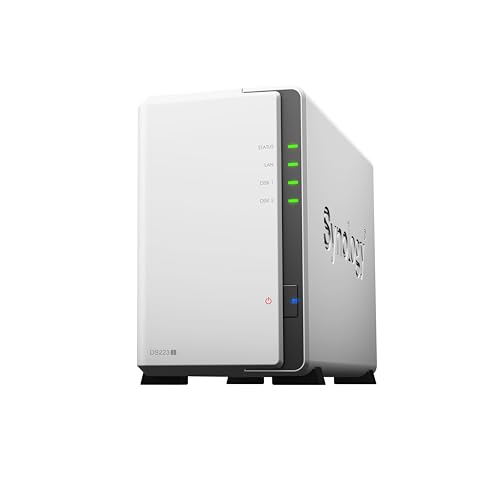
Synology 2-Bay Desktop NAS Enclosure
Best for: basic file backup and IP camera recording
- Number of Bays
- 2-Bay (what this guide is about)
- Drive Bays
- 2-Bay
- Included Storage
- Diskless
- Dimensions
- 6.5 × 3.94 × 8.9 inches
- Weight
- 1.92 pounds
View on Amazon: Synology 2-Bay Desktop NAS Enclosure Affiliate link
The Synology DS223j is a white, diskless 2-bay NAS drive designed for home and office backup. It features a Realtek quad-core processor and 1GB of RAM. This unit supports automated backups for Macs, PCs, and mobile devices. You can use it to store files securely or record footage from multiple IP cameras. It is a compact option for users needing basic private cloud storage without pre-installed drives.
Pros
- 2-bay capacity for drive expansion
- Automated backup support for multiple devices
- Supports multiple IP cameras for home security
- Includes 2-year manufacturer warranty
Cons
- Sold diskless with no included storage
- Only 1GB of RAM limits multitasking
- No mention of 2.5GbE network port
Good fit if
- You need a basic 2-bay NAS for file backups
- You want to connect multiple IP cameras for security
- You prefer a compact, white chassis for home use
Skip if
- You require pre-installed storage drives
- You need high-performance media streaming
- You want a 2.5GbE network interface
Verdict: The Synology DS223j 2-Bay NAS is a practical entry-level device for users who only need basic file backup and IP camera support. It suits those who do not require high processing power or fast network speeds.

Synology 2-Bay Expandable Desktop NAS
Best for: expanding home surveillance and storage
- Number of Bays
- 2-Bay (what this guide is about)
- Drive Bays
- 2-Bay
- Included Storage
- Diskless
- Intended Use
- Home Users
- Dimensions
- 8.78 × 4.17 × 6.54 inches
- Weight
- 3.33 pounds
View on Amazon: Synology 2-Bay Expandable Desktop NAS Affiliate link
The Synology DS725+ is a 2-bay diskless NAS designed for home users who need expandable storage and surveillance capabilities. It supports up to 140TB with a DX525 expansion unit and manages 30 IP cameras. The unit measures 166 x 106 x 223 mm and weighs 3.33 pounds. It includes a 3-year warranty for hardware reliability.
Pros
- Expandable to 140TB with DX525 unit
- Supports up to 30 IP cameras
- Includes 3-year warranty
- RAID redundancy and snapshot technology
Cons
- Diskless design requires separate drive purchase
- No mention of 2.5GbE networking
- Larger footprint than entry-level models
Good fit if
- You need to expand storage beyond 2 bays
- You want to monitor up to 30 cameras
- You prefer hardware with a 3-year warranty
Skip if
- You need pre-installed drives
- You require built-in 2.5GbE ports
- You want a compact desktop unit
Verdict: Synology DS725+ 2-Bay NAS fits users who need surveillance support and future expansion. It is not ideal for those needing immediate plug-and-play storage.

Synology 2-Bay Intel Streaming NAS
Best for: 4K media streaming and multi-camera home surveillance
- Number of Bays
- 2-Bay (what this guide is about)
- Drive Bays
- 2-Bay
- Processor
- Intel CPU
- Included Storage
- Diskless
- Dimensions
- 9.14 × 4.25 × 6.5 inches
- Weight
- 2.87 pounds
View on Amazon: Synology 2-Bay Intel Streaming NAS Affiliate link
This Synology 2-bay NAS operates as a dedicated home media server and backup hub. It features an Intel processor with hardware transcoding for 4K video streaming and achieves network transfer speeds up to 282 MB/s. Because it ships diskless, you provide your own drives to set up RAID redundancy and snapshot protection. It suits you if you need a compact dual-drive system to stream media and monitor up to 30 surveillance cameras.
Pros
- Intel processor with hardware transcoding support for 4K streaming
- Network transfer rates reaching up to 282 MB/s
- Surveillance station capacity for up to 30 IP cameras
- Includes a 3-year hardware warranty
Cons
- Ships diskless with no internal drives included
- Restricted to two drive bays for local storage expansion
Good fit if
- You want to stream 4K video libraries using hardware transcoding
- You plan to connect up to 30 IP cameras for home surveillance
- You need snapshot technology and automated multi-destination backups
Skip if
- You require a system with pre-installed storage drives out of the box
- You need more than two drive bays for large capacity storage arrays
Verdict: Synology 2-Bay Media Server NAS delivers fast 282 MB/s transfers and Intel-driven 4K transcoding for personal cloud streaming. It provides reliable surveillance and backup capabilities across a compact two-bay diskless layout.

Synology DiskStation 8TB 2-Bay NAS
Best for: Users needing expandable RAM and 2.5GbE
- Number of Bays
- 2-Bay (what this guide is about)
- Drive Bays
- 2-Bay
- Processor
- Intel Celeron J4125 Quad-Core
- RAM Capacity
- 2 GB Non-ECC DDR4 SODIMM
- Included Storage
- 8TB
- RAID Support
- Synology Hybrid RAID (SHR)
View on Amazon: Synology DiskStation 8TB 2-Bay NAS Affiliate link
The Synology DS225+ is a 2-bay NAS powered by an Intel Celeron J4125 quad-core processor. It includes 2 GB of expandable DDR4 RAM and a 2.5GbE port for faster local transfers. This model comes with 8TB of storage and uses the Btrfs file system for data protection. It suits users needing reliable private cloud storage with upgradeable memory.
Pros
- Intel Celeron J4125 quad-core processor
- RAM expandable up to 6 GB
- 2.5GbE network connectivity
- Btrfs file system with snapshot support
Cons
- Only 2 GB RAM included at purchase
- Non-ECC memory limits error correction
- 2-bay capacity restricts total storage growth
Good fit if
- You need faster LAN speeds than 1GbE
- You want to upgrade RAM later
- You prefer Intel processors for compatibility
Skip if
- You require ECC memory for critical data
- You need more than 2 drive bays
- You want the highest possible CPU performance
Verdict: Synology DS225+ 8TB Intel Celeron fits users who need a reliable 2-bay NAS with an upgradeable memory path and faster network ports. It is ideal for home offices or small teams prioritizing data integrity over raw processing power.
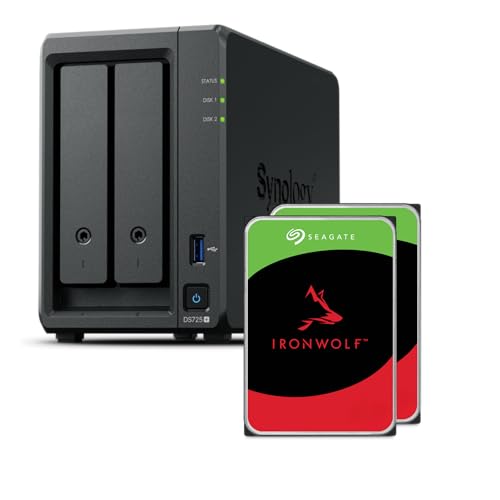
Synology 2-Bay AMD Ryzen NAS
Best for: Users needing fast network and NVMe support
- Number of Bays
- 2-Bay (what this guide is about)
- Drive Bays
- 2-Bay
- Network Connectivity
- 1x 2.5GbE, 1x 1GbE
- Processor
- Ryzen R1600
- RAM Capacity
- 4GB
- M.2 NVMe Slots
- 2 slots
View on Amazon: Synology 2-Bay AMD Ryzen NAS Affiliate link
The Synology DS725+ is a 2-bay NAS drive built for home and small-office use. It features an AMD Ryzen R1600 quad-core processor and 4GB of RAM. You get two M.2 NVMe slots for cache or storage, plus a 2.5GbE and a 1GbE network port. The unit includes 8TB of storage. It supports expansion via a DX525 unit for up to 140TB total capacity. This setup suits users needing fast file transfers and media streaming.
Pros
- AMD Ryzen R1600 quad-core processor for smooth multitasking
- Two M.2 NVMe slots for flexible storage or caching
- Dual network ports including a 2.5GbE connection
- 4GB RAM capacity supports responsive performance
- Expandable to 140TB with a DX525 unit
Cons
- Heavier build at 6.61 pounds compared to lighter models
- Only two drive bays limit immediate storage expansion
- Includes only 8TB of storage in the box
Good fit if
- You need high-speed local transfers via the 2.5GbE port
- You want to use M.2 NVMe drives for caching
- You require a powerful CPU for media server duties
Skip if
- You need more than two drive bays for immediate use
- You prefer a lighter, more portable device
- You do not need the extra performance of a Ryzen CPU
Verdict: Synology DS725+ 2-Bay NAS with Ryzen CPU is ideal for users who prioritize processing power and fast network connectivity for media and file management tasks.
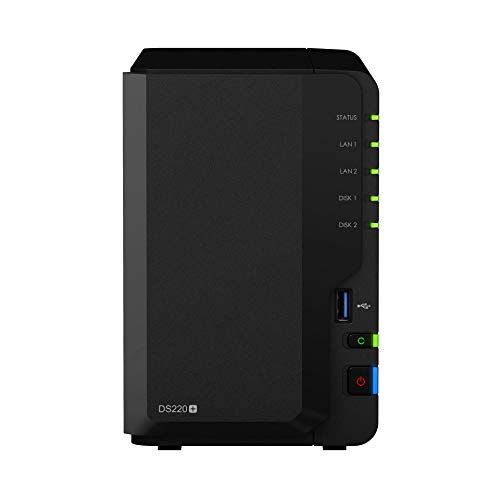
Synology DiskStation 2-Bay Intel Dual-Core NAS
Best for: Users needing encryption and dual LAN ports
- Number of Bays
- 2-Bay (what this guide is about)
- Drive Bays
- 2-Bay
- Network Connectivity
- 2x 1GbE
- Processor
- Intel dual-core
- RAM Capacity
- 2GB DDR4
- Included Storage
- Diskless
View on Amazon: Synology DiskStation 2-Bay Intel Dual-Core NAS Affiliate link
The Synology DS220+ is a 2-bay NAS drive built for home and office backup. It uses an Intel dual-core processor with AES-NI hardware encryption and 2 GB of DDR4 RAM. You get two 1GbE LAN ports that support link aggregation for speeds over 225 MB/s read. This model is diskless, so you must add your own hard drives. It is a solid choice for users who need reliable data protection and hardware encryption.
Pros
- Intel dual-core processor with AES-NI hardware encryption
- 2 GB DDR4 memory expandable up to 6 GB
- Dual 1GbE LAN ports with link aggregation support
- RAID 1 disk mirroring for data protection
Cons
- Diskless design requires separate hard drive purchase
- Limited to 1GbE network connectivity
- Noise level of 19.3 dB(A) may be audible in quiet rooms
Good fit if
- You need hardware encryption for sensitive data
- You want to combine two network ports for higher throughput
- You are comfortable installing your own hard drives
Skip if
- You require pre-installed storage drives
- You need faster than 1GbE network speeds
- You want a silent operation for a bedroom
Verdict: Synology DS220+ 2-Bay NAS provides robust encryption and flexible networking for users who prefer to select their own drives. It suits those who value data security and network redundancy over convenience.

Synology 2-Bay 12TB NAS
Best for: turnkey 12TB home and small office storage
- Number of Bays
- 2-Bay (what this guide is about)
- Drive Bays
- 2-Bay
- Network Connectivity
- 1x RJ-45 1GbE
- Processor
- Realtek RTD1619B
- RAM Capacity
- 1 GB DDR4 non-ECC
- Included Storage
- 12TB
View on Amazon: Synology 2-Bay 12TB NAS Affiliate link
This two-bay network attached storage unit arrives preloaded with 12TB of raw capacity via two 6TB hard drives. Powered by a 1.7 GHz quad-core processor and 1GB of DDR4 memory, it gives you centralized file management, automated backups, and media access over a 1GbE network port. It suits you if you want an out-of-the-box storage setup ready for document archiving and local surveillance without sourcing separate drives.
Pros
- Includes 12TB total storage with two 6TB drives pre-installed
- Quad-core 1.7 GHz Realtek RTD1619B processor
- Two USB 3.2 Gen 1 ports for external connectivity
- Dedicated 1GbE LAN port for network data transfer
Cons
- Fixed 1GB DDR4 non-ECC system memory
- Limited to a single 1GbE network port
Good fit if
- You want a pre-configured two-bay system with 12TB of included drive space.
- You need a dedicated hub for documents, photo backups, and video surveillance.
- You prefer standard 1GbE networking with two USB 3.2 Gen 1 expansion ports.
Skip if
- You require more than 1GB of memory for demanding multitasking workloads.
- You need multi-gigabit network ports for faster data transfers.
Verdict: Synology 2-Bay 12TB NAS provides an integrated 12TB storage solution for file sharing, backups, and basic surveillance right out of the box. Its quad-core processor and 1GbE connection handle day-to-day data management with ease.
Specifications side by side
| Spec | Synology 2-Bay 2GB RAM NAS Hub | Synology 2-Bay 8TB NAS | Synology 2-Bay Desktop NAS Enclosure | Synology 2-Bay Expandable Desktop NAS | Synology 2-Bay Intel Streaming NAS | Synology DiskStation 8TB 2-Bay NAS | Synology 2-Bay AMD Ryzen NAS | Synology DiskStation 2-Bay Intel Dual-Core NAS | Synology 2-Bay 12TB NAS |
|---|---|---|---|---|---|---|---|---|---|
| Drive Bays | 2-Bay | 2-Bay | 2-Bay | 2-Bay | 2-Bay | 2-Bay | 2-Bay | 2-Bay | 2-Bay |
| Network Connectivity | not stated | 1 x RJ-45 1GbE | not stated | not stated | not stated | not stated | 1x 2.5GbE, 1x 1GbE | 2x 1GbE | 1x RJ-45 1GbE |
| Processor | not stated | Realtek RTD1619B | not stated | not stated | Intel CPU | Intel Celeron J4125 Quad-Core | Ryzen R1600 | Intel dual-core | Realtek RTD1619B |
| RAM Capacity | not stated | 2 GB DDR4 | not stated | not stated | not stated | 2 GB Non-ECC DDR4 SODIMM | 4GB | 2GB DDR4 | 1 GB DDR4 non-ECC |
| M.2 NVMe Slots | not stated | not stated | not stated | not stated | not stated | not stated | 2 slots | not stated | not stated |
| Included Storage | Diskless | 8TB | Diskless | Diskless | Diskless | 8TB | 8TB | Diskless | 12TB |
| RAID Support | not stated | not stated | not stated | not stated | not stated | Synology Hybrid RAID (SHR) | not stated | RAID 1 | not stated |
| Hardware Interface | not stated | not stated | not stated | not stated | not stated | not stated | M.2 NVMe | not stated | not stated |
| Number of Bays | 2-Bay | 2-Bay | 2-Bay | 2-Bay | 2-Bay | 2-Bay | 2-Bay | 2-Bay | 2-Bay |
| Size | DS223 | 8TB | 2-bay | 166 mm x 106 mm x 223 mm | DS225+ (Diskless) | 8TB | 6.54 inches H x 4.17 inches W x 8.78 inches D | DS220+ | 12TB |
| Processor Cores | not stated | Quad-Core | not stated | not stated | not stated | Quad-Core | not stated | not stated | Quad-Core |
| Intended Use | not stated | not stated | not stated | Home Users | not stated | not stated | not stated | not stated | not stated |
| Dimensions | 6.5 × 4.25 × 9.17 inches | 9.17 × 4.25 × 6.5 inches | 6.5 × 3.94 × 8.9 inches | 8.78 × 4.17 × 6.54 inches | 9.14 × 4.25 × 6.5 inches | 11.8 × 11 × 4.72 inches | 8.78 × 4.17 × 6.54 inches | 6.5 × 4.25 × 9.14 inches | 8.86 × 3.94 × 6.5 inches |
| Weight | 2.82 pounds | 6.68 pounds | 1.92 pounds | 3.33 pounds | 2.87 pounds | 4.41 pounds | 6.61 pounds | 2.87 pounds | 6.85 pounds |
| Color | Black | Seagate IronWolf | White | Black | Black | Black | gray | Black | WD Red Plus |
| Model | DS223 | not stated | DS223j | DS725+ | DS225+ | DS225+/8TB-IW | DS725+/8TB-IW | DS220+ | DS223j |
To support higher transfer speeds on your network, compare the best 2 5g network switches for multi-gigabit Ethernet connectivity.
How to Choose the Right One
-
Check RAM Capacity
Random Access Memory handles multitasking and application loading. If you run surveillance or virtual machines, more RAM is essential. The DS725+ offers 4GB RAM, which supports heavier workloads better than models with only 2GB. The DS223 and DS220+ provide 2GB RAM, which is sufficient for basic file backup and light media streaming. Check this spec if you plan to install multiple Synology applications simultaneously to ensure smooth performance without lag.
-
Evaluate Network Ports
Network connectivity determines how fast you transfer data across your local area network. Most models feature 1GbE ports, which are standard for home use. However, the DS725+ includes 5GbE and 2.5GbE options for faster internal transfers. The DS225+ 8TB model also offers 5GbE and 1GbE ports. If you move large media files or backup databases frequently, prioritize units with higher speed ports to reduce transfer times significantly compared to standard gigabit connections.
-
Consider Processor Type
The CPU drives transcoding and encryption tasks. Intel Celeron chips, like the one in the DS225+ 8TB, offer reliable performance for home offices. The DS725+ uses an AMD Ryzen processor, which provides higher processing power for demanding media server duties. The DS223j uses a less powerful chip suitable for entry-level tasks. Match the processor to your workload; choose Ryzen for heavy transcoding and Celeron or entry-level chips for simple file storage and basic surveillance recording.
-
Review Hardware Interfaces
Look for M.2 NVMe slots if you need high-speed cache or storage expansion. The DS725+ supports M.2 NVMe drives, allowing you to add fast SSDs for caching or additional volume storage. This feature is absent in entry-level models like the DS223j. If you frequently access large files or run databases, NVMe support significantly improves read and write speeds. Check the specifications for this interface if you plan to upgrade the NAS hardware after purchase.
-
Assess Storage Options
Decide if you want pre-installed drives or a diskless unit. The DS223 is diskless, requiring you to source and install drives yourself. In contrast, the 8TB and 12TB models come with pre-installed drives, offering a ready-to-use setup. Pre-installed options save time but limit your choice of drive brand and capacity. If you prefer specific drive types or want to maximize capacity independently, choose a diskless model. Otherwise, pre-installed units provide immediate convenience for basic backup needs.
Frequently asked questions
Does the Synology DS223 come with hard drives installed?
No, the Synology DS223 does not include pre-installed storage. It is a diskless unit designed for users who prefer to source their own drives. This approach allows you to select specific capacities and drive types that match your long-term backup and surveillance needs without paying for unnecessary storage upfront.
Which Synology 2-Bay model has the fastest network ports?
The Synology DS725+ with AMD Ryzen features the fastest connectivity options. It includes 5GbE, 2.5GbE, and 1GbE ports. These speeds support rapid file transfers and efficient media streaming. This setup is ideal if you need to move large datasets quickly or run multiple high-bandwidth applications simultaneously.
Can I use the Synology DS725+ for home surveillance?
Yes, the Synology DS725+ is designed for expanding home surveillance. It supports IP camera recording and integrates with Synology surveillance software. The device offers future expansion options, making it suitable for users who plan to add more cameras or storage capacity as their security requirements grow over time.
Is there a Synology 2-Bay NAS with 4GB of RAM?
Yes, the Synology DS725+ with AMD Ryzen includes 4GB of RAM. This higher memory capacity supports more intensive tasks and better multitasking performance. It allows you to run multiple applications, such as virtual machines or heavy database services, more smoothly than models limited to 2GB of RAM.
Does the Synology DS223j support IP camera recording?
Yes, the Synology DS223j supports IP camera recording. It is positioned as a practical entry-level device for basic file backup and surveillance tasks. While it lacks high processing power, it handles standard camera feeds adequately for users who do not require advanced video analytics or heavy multitasking capabilities.
Which model is best for 4K media streaming?
The Synology DS225+ is optimized for 4K media streaming. It features Intel-driven transcoding capabilities and delivers fast transfer speeds up to 282 MB/s. This model provides a reliable personal cloud experience for high-resolution video playback, ensuring smooth streaming across your home network without buffering or quality loss.
Do any models include M.2 NVMe slots?
Yes, the Synology DS725+ with AMD Ryzen includes M.2 NVMe support. This hardware interface allows you to install fast solid-state drives for caching or dedicated storage pools. Using NVMe drives can significantly improve application load times and overall system responsiveness compared to traditional spinning hard disk drives.
Is there a Synology 2-Bay NAS with 12TB of storage?
Yes, the Synology 2-Bay 12TB NAS provides an integrated 12TB storage solution. It comes with pre-installed WD Red Plus drives, offering a turnkey setup for home and small office use. This model handles day-to-day data management with ease, supported by a quad-core processor and standard 1GbE connectivity.