What Is Cache Size? A Guide for NAS Hard Drives Buyers (2026)
As an Amazon Associate we earn from qualifying purchases. Links on this page are affiliate links.
Understanding Cache Size for NAS Buyers
Cache size is the amount of fast, temporary memory built into the drive. It sits between the spinning platters and your computer. This memory holds data that is being read or written right now. When your system needs information, it checks this cache first. If the data is there, the drive delivers it instantly. This process is much faster than moving data from the magnetic surface of the disk.
You will see different numbers on product listings. Common values for NAS drives include 512MB, 256MB, and 64MB. These numbers represent the capacity of that temporary buffer. A larger cache can hold more data at one time. This helps the drive manage incoming and outgoing requests more smoothly. It reduces the time the drive head spends moving back and forth across the disk.
Why does this matter for your NAS? Network-attached storage often handles many small files at once. It serves multiple users simultaneously. If the cache is too small, the drive must constantly pause to fetch data from the platters. This creates delays. A larger cache allows the drive to queue more requests. It processes them efficiently before writing them to the slower storage medium.
When you look at specifications, note that cache size is just one part of the puzzle. It works alongside rotational speed and interface type. However, it plays a key role in sustained performance. For heavy workloads, a larger buffer helps maintain steady speeds. It prevents the drive from stalling during bursts of activity.
This guide covers cache size explained in simple terms. You do not need to be an engineer to understand it. Just remember that more buffer space generally means better handling of multiple tasks. Check the specs carefully. Ensure the drive you choose has enough memory for your specific use case. This small detail can impact how responsive your storage feels over time.
Compare NAS Drive Cache Sizes
512MB Cache
This is the largest buffer among the listed drives. It holds more data temporarily before writing to platters. This reduces the number of physical head movements. You benefit from smoother performance during heavy write tasks. The Seagate Exos 26TB and WD Red Plus 14TB use this spec. These drives suit large-scale enterprise arrays or SMB systems. They handle continuous data-intensive workflows efficiently. The trade-off is usually higher cost. You pay more for the extra memory. This option is best if you prioritize sustained throughput over raw capacity alone.
256MB Cache
This is a mid-range buffer size. It offers a balance between cost and performance. The drive can hold a moderate amount of active data. This helps with mixed workloads in business environments. The Toshiba 14TB Enterprise and Seagate Exos 6TB use this cache. They fit users who need reliable enterprise features without the highest price tag. You get solid performance for general NAS tasks. It is not the fastest for huge bursts. However, it is sufficient for many small to medium business setups. You choose this for a practical balance of speed and value.
64MB Cache
This is the smallest buffer in this comparison. It holds less temporary data. The drive relies more on platter speed for performance. This limits its ability to handle large bursts of data. The WD RE 4TB and WD Blue 1TB have this spec. These drives are better for lighter workloads. You should avoid them for heavy NAS use. They lack the cache for intensive enterprise tasks. The WD Blue is explicitly noted as unsuitable for heavy NAS. You choose this only for basic desktop storage or light, occasional access. It is the most basic option for serious storage arrays.
Who Needs Large Cache?
Who needs it
You should prioritize drives with 512MB or 256MB cache if you run multiple virtual machines, edit 4K video directly from storage, or manage a busy media server with many concurrent users. Large cache buffers handle small, random write operations efficiently. It reduces the physical movement of the drive heads. This leads to lower latency and smoother performance during heavy workloads. If your NAS handles frequent database queries or runs several containerized applications simultaneously, the extra memory helps maintain consistent speeds. You will notice less stuttering when many users access files at the same time. The larger buffer absorbs bursts of data, allowing the drive to write more steadily. This is critical for professional workflows where every second counts. Choose higher cache sizes for performance-critical environments.
Who can skip it
You can safely choose drives with 64MB cache if you use your NAS for simple file backups, storing photos, or archiving documents. These tasks involve large, sequential writes rather than many small random operations. The smaller buffer is sufficient for basic home use. You do not need extra memory for streaming a few movies or backing up a single computer. Instead of focusing on cache, prioritize reliability features like CMR recording technology and warranty length. Look for drives designed for 24/7 operation with lower power consumption. Check the rotational speed and interface type for general compatibility. For light workloads, the performance difference between 64MB and 512MB is negligible. Save your budget for additional drive capacity or better network equipment. Focus on data safety and uptime rather than temporary memory size.
Cache Size Glossary
Cache Size
The temporary high-speed memory on the drive. It buffers data between your system and the spinning platters to smooth out read and write operations.
Rotational Speed
How fast the drive platters spin, measured in RPM. Higher speeds like 7200 RPM generally offer faster data access than slower 5400 RPM drives.
Form Factor
The physical size of the drive. Most NAS drives use the 3.5-inch standard, while some compact models use the smaller 2.5-inch format for portability.
Recording Technology
The method used to store data on platters. SMR uses overlapping tracks for higher density, while CMR uses parallel tracks for better consistency during writes.
Hardware Interface
The connection type linking the drive to your motherboard. SATA is the standard for most NAS drives, offering reliable data transfer speeds up to 6 Gbps.
RAM Capacity
The total memory in your NAS server, not the drive. More RAM allows your system to cache more data in software, reducing drive load.
Number of Bays
The slots available in your NAS enclosure for installing drives. More bays allow for larger total storage capacity and more flexible RAID configurations.
Compatibility
Whether the drive works with your specific NAS model. Check the manufacturer’s qualified vendor list to ensure firmware support and optimal performance for your unit.
Quick picks
| # | Product | Best for | Price |
|---|---|---|---|
| 1 | Toshiba 14TB Enterprise 7200 RPM HDD (Renewed) | high-capacity NAS storage needs | Check price of Toshiba 14TB Enterprise 7200 RPM HDD (Renewed) on Amazon |
| 2 | Western Digital RE 4TB 7200 RPM Hard Drive | Small enterprise nearline storage needs | Check price of Western Digital RE 4TB 7200 RPM Hard Drive on Amazon |
| 3 | Seagate Exos 26TB CMR Hard Drive | Large-scale enterprise storage arrays | Check price of Seagate Exos 26TB CMR Hard Drive on Amazon |
| 4 | Seagate Exos 7E8 6TB Enterprise Drive | Business NAS systems needing 6TB capacity | Check price of Seagate Exos 7E8 6TB Enterprise Drive on Amazon |
| 5 | Western Digital WD Blue 1TB 7200 RPM Hard Drive | Basic desktop storage and everyday computing | Check price of Western Digital WD Blue 1TB 7200 RPM Hard Drive on Amazon |
| 6 | Western Digital 14TB WD Red Plus NAS HDD | SMB NAS systems needing high cache | Check price of Western Digital 14TB WD Red Plus NAS HDD on Amazon |
Our 6 picks

Toshiba 14TB Enterprise 7200 RPM HDD (Renewed)
Best for: high-capacity NAS storage needs
- Cache Size
- 256MB Cache (what this guide is about)
- Storage Capacity
- 14TB
- Form Factor
- 3.5"
- Hardware Interface
- SATA 6.0Gb/s
- Rotational Speed
- 7200RPM
- Dimensions
- 7.5 × 5.5 × 2.5 inches
View on Amazon: Toshiba 14TB Enterprise 7200 RPM HDD (Renewed) Affiliate link
This 14TB Toshiba drive offers 256MB of cache for handling large data streams. It spins at 7200RPM and uses SATA 6.0Gb/s. The helium-sealed design helps with heat and noise. You get enterprise reliability in a 3.5-inch form factor. This drive suits users who need high capacity and consistent performance for their NAS or server.
Pros
- 256MB cache for better data buffering
- 7200RPM rotational speed for faster access
- Helium-sealed design for efficiency
- 14TB storage capacity
Cons
- Renewed condition may vary
- Higher noise than 5400RPM drives
- Enterprise class may be overkill for home use
Good fit if
- You need high capacity for a NAS
- You want enterprise-grade reliability
- You prefer faster 7200RPM speeds
Skip if
- You need silent operation for a bedroom
- You only need small storage amounts
- You prefer new condition with full warranty
Verdict: Toshiba MG07ACA14TE 14TB Enterprise HDD provides robust performance for users who prioritize capacity and speed. It is ideal for those building a high-density storage solution.
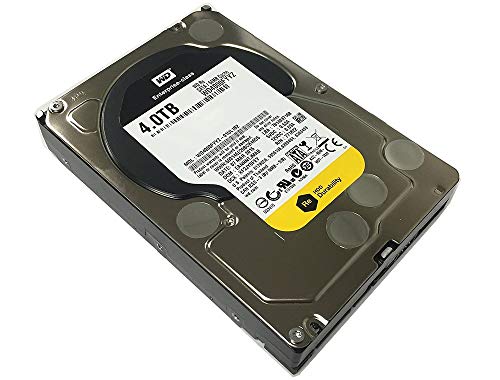
Western Digital RE 4TB 7200 RPM Hard Drive
Best for: Small enterprise nearline storage needs
- Cache Size
- 64MB Cache (what this guide is about)
- Storage Capacity
- 4TB
- Form Factor
- 3.5in
- Hardware Interface
- SATA 6.0Gb/s
- Rotational Speed
- 7200 RPM
- Dimensions
- 9.3 × 5.4 × 3.7 inches
View on Amazon: Western Digital RE 4TB 7200 RPM Hard Drive Affiliate link
This Western Digital RE drive offers 4TB of storage with a 64MB cache. It spins at 7200 RPM and uses a SATA 6.0Gb/s interface. The dual processor design aims to maximize performance for business-critical applications. You get high random I/O rates and sustained sequential data rates of 171 MB/s. It is built for 24x7 operation with a 1.2 million hour MTBF. This drive suits users needing reliable nearline storage.
Pros
- 64MB cache for data buffering
- 7200 RPM rotational speed
- Dual processor for higher performance
- 171 MB/s sustained sequential data rates
Cons
- 64MB cache is smaller than the 256MB and 512MB options on this list
- 4TB capacity is lower than the 14TB and 26TB drives listed
- OEM version with only 3 years warranty from reseller
Good fit if
- You need a reliable drive for 24x7 enterprise operations
- You prioritize rotational speed over massive capacity
- You want a drive with a dual processor design
Skip if
- You require more than 4TB of storage space
- You need a larger cache than 64MB for heavy workloads
- You prefer a standard retail warranty over a reseller warranty
Verdict: WD RE 4TB Enterprise HDD provides solid performance for small-scale enterprise needs but lacks the capacity and cache of larger drives. You should choose this if you value speed and reliability over raw storage volume.

Seagate Exos 26TB CMR Hard Drive
Best for: Large-scale enterprise storage arrays
- Cache Size
- 512MB Cache (what this guide is about)
- Storage Capacity
- 26TB
- Form Factor
- 3.5 in
- Hardware Interface
- SATA 6Gb/s
- Rotational Speed
- 7200 RPM
- Recording Technology
- CMR
View on Amazon: Seagate Exos 26TB CMR Hard Drive Affiliate link
This Seagate Exos drive offers 26TB of storage with a 512MB cache. It runs at 7200 RPM and uses SATA 6Gb/s. The large cache helps buffer data for faster access during heavy workloads. You need this for high-capacity enterprise setups. It suits users who prioritize speed and reliability for continuous operation.
Pros
- 512MB cache size for efficient data buffering
- 26TB high storage capacity
- 7200 RPM rotational speed
- CMR recording technology
Cons
- Large 26TB capacity may be excessive for small home labs
- Enterprise class build may generate more heat than consumer drives
Good fit if
- You require maximum storage density in a single drive
- You run enterprise-grade applications with high workload ratings
- You need a 512MB cache for sustained performance
Skip if
- You only need basic home backup storage
- You are building a small NAS with limited drive bays
- You prefer lower power consumption drives
Verdict: Seagate Exos 26TB 512MB Cache is ideal for users building large-scale enterprise storage arrays. It fits those who need high capacity and fast caching for continuous data-intensive tasks.

Seagate Exos 7E8 6TB Enterprise Drive
Best for: Business NAS systems needing 6TB capacity
- Cache Size
- 256MB Cache (what this guide is about)
- Storage Capacity
- 6TB
- Form Factor
- 3.5-Inch
- Hardware Interface
- SATA
- Workload Rate Limit
- 550TB per year
- Dimensions
- 5.79 × 4.01 × 1.03 inches
View on Amazon: Seagate Exos 7E8 6TB Enterprise Drive Affiliate link
This Seagate Exos 6TB drive features a 256MB cache and SATA interface. It targets enterprise and business NAS systems with a 550TB annual workload limit. The 3.5-inch form factor suits standard bays. You get 24/7 reliability with a 2 million hour MTBF rating. The cache size places it in the mid-range for this guide, balancing performance and capacity for heavy workloads.
Pros
- 256MB cache for data buffering
- 550TB per year workload rate limit
- 2 million hour MTBF rating
- 3.5-inch form factor
Cons
- Smaller 6TB capacity than larger competitors
- 256MB cache is less than 512MB options
- Renewed condition may vary in wear
Good fit if
- You need a 6TB drive for a 3.5-inch bay
- You require high workload reliability for business NAS
- You prefer Seagate enterprise-grade hardware
Skip if
- You need more than 6TB of storage
- You require the largest 512MB cache available
- You want a brand new unit with full warranty
Verdict: Seagate Exos 6TB 256MB Cache Drive offers solid enterprise reliability for users needing moderate capacity. It fits well in business NAS setups where 6TB is sufficient and 256MB cache meets performance needs.

Western Digital WD Blue 1TB 7200 RPM Hard Drive
Best for: Basic desktop storage and everyday computing
- Cache Size
- 64MB Cache (what this guide is about)
- Storage Capacity
- 1TB
- Form Factor
- 3.5"
- Hardware Interface
- SATA 6 Gb/s
- Rotational Speed
- 7200 RPM
- Compatibility
- PC
View on Amazon: Western Digital WD Blue 1TB 7200 RPM Hard Drive Affiliate link
The Western Digital WD10EZEX is a 3.5-inch internal hard drive designed for reliable everyday computing. It features a 7200 RPM rotational speed and a 64 MB cache. The drive uses a SATA 6 Gb/s interface. With a 1TB storage capacity, it suits users needing basic PC storage. The 64 MB cache helps manage data flow, though it is smaller than enterprise-grade alternatives found elsewhere in this guide.
Pros
- 7200 RPM rotational speed for consistent performance
- 64 MB cache size for data buffering
- SATA 6 Gb/s interface for reliable connectivity
- 3.5-inch form factor standard for desktop PCs
Cons
- 64 MB cache is significantly smaller than the 256 MB or 512 MB options in this list
- 1TB capacity is lower than the multi-terabyte drives on this guide
- Targeted for general PC use rather than heavy NAS workloads
Good fit if
- You need a budget-friendly drive for basic desktop storage
- You are building a PC with standard 3.5-inch bays
- You require 7200 RPM speeds for general computing tasks
Skip if
- You need high-capacity storage for a NAS array
- You require large cache sizes for intensive data handling
- You are looking for enterprise-grade reliability features
Verdict: WD Blue 1TB 7200RPM 64MB Cache fits users who need basic, reliable storage for everyday PC tasks. It lacks the capacity and cache size of the other drives on this list, making it unsuitable for heavy NAS use.

Western Digital 14TB WD Red Plus NAS HDD
Best for: SMB NAS systems needing high cache
- Cache Size
- 512MB Cache (what this guide is about)
- Storage Capacity
- 14TB
- Form Factor
- 3.5"
- Hardware Interface
- SATA 6 Gb/s
- Rotational Speed
- 5400 RPM
- Recording Technology
- CMR
View on Amazon: Western Digital 14TB WD Red Plus NAS HDD Affiliate link
This 14TB drive uses CMR recording and a 512 MB cache to handle large data transfers efficiently. It runs at 5400 RPM, which reduces noise and heat compared to faster drives. The NASware firmware helps it stay compatible in multi-bay systems. You get a workload rate of 180 TB per year, making it suitable for small to medium business environments. It supports up to eight bays.
Pros
- 512 MB cache for efficient data buffering
- CMR recording technology for reliable write speeds
- Supports up to eight NAS bays
- 180 TB/yr workload rate limit
Cons
- 5400 RPM speed is slower than 7200 RPM competitors
- 14TB capacity is lower than 26TB options
- 3-year warranty is shorter than enterprise standards
Good fit if
- You need high cache for large file transfers
- You run a small to medium business NAS
- You prefer quieter operation in a 24x7 setup
Skip if
- You require maximum rotational speed for performance
- You need the highest possible capacity available
- You want an enterprise-grade warranty
Verdict: WD Red Plus 14TB 512MB Cache offers a strong balance of cache and capacity for SMB users. It fits those who value quiet operation and CMR reliability over raw speed.
Specifications side by side
| Spec | Toshiba 14TB Enterprise 7200 RPM HDD (Renewed) | Western Digital RE 4TB 7200 RPM Hard Drive | Seagate Exos 26TB CMR Hard Drive | Seagate Exos 7E8 6TB Enterprise Drive | Western Digital WD Blue 1TB 7200 RPM Hard Drive | Western Digital 14TB WD Red Plus NAS HDD |
|---|---|---|---|---|---|---|
| Storage Capacity | 14TB | 4TB | 26TB | 6TB | 1TB | 14TB |
| Form Factor | 3.5" | 3.5in | 3.5 in | 3.5-Inch | 3.5" | 3.5" |
| Hardware Interface | SATA 6.0Gb/s | SATA 6.0Gb/s | SATA 6Gb/s | SATA | SATA 6 Gb/s | SATA 6 Gb/s |
| Rotational Speed | 7200RPM | 7200 RPM | 7200 RPM | not stated | 7200 RPM | 5400 RPM |
| Cache Size | 256MB | 64MB | 512MB | 256MB | 64 MB | 512 MB |
| Recording Technology | not stated | not stated | CMR | not stated | not stated | CMR |
| Bay Support | not stated | not stated | not stated | not stated | not stated | up to 8 bays |
| Workload Rate Limit | not stated | not stated | not stated | 550TB per year | not stated | up to 180 TB/yr |
| Compatibility | not stated | not stated | not stated | not stated | PC | not stated |
| Size | not stated | 4 TB | not stated | 6TB | 1TB | 14TB |
| Dimensions | 7.5 × 5.5 × 2.5 inches | 9.3 × 5.4 × 3.7 inches | not stated | 5.79 × 4.01 × 1.03 inches | 5.8 × 4 × 1 inches | 1.03 × 5.79 × 4 inches |
| Weight | 1.5 pounds | 1 pounds | not stated | not stated | 15.5 ounces | 1.76 ounces |
| Color | Silver | Silver | not stated | Silver | blue | Red |
| Model | MG07ACA14TE | WD4000FYYZ OEM-cr | Exos ST26000NM000C | ST6000NM0115 | WD10EZEX | WD140EFFX |
Frequently asked questions
Does a larger cache always mean faster speeds?
Not necessarily. Cache size works with rotational speed. Drives like the Toshiba MG07ACA14TE use 256MB cache with 7200 RPM platters for high throughput. Meanwhile, the WD Red Plus uses 512MB cache but spins at 5400 RPM. The larger buffer helps, but the physical spin rate still dictates baseline data transfer rates.
Is 64MB cache enough for a NAS?
It depends on your workload. The WD Blue 1TB and WD RE 4TB both feature 64MB cache. These are suitable for light tasks or basic desktop storage. However, for heavy NAS use with many concurrent users, this smaller buffer may become a bottleneck. You might prefer the 256MB or 512MB options for better handling of random write operations.
How does cache help with video editing?
Cache acts as a temporary holding area for data streams. When you edit 4K video directly from storage, the drive needs to switch between read and write tasks quickly. A large cache, like the 512MB found in the Seagate Exos 26TB, buffers these streams. This reduces the need for the drive heads to move constantly, smoothing out playback and export times.
Can I mix drives with different cache sizes in one NAS?
You can, but performance may vary. Your system will be limited by the slowest component in many scenarios. For example, pairing a 512MB cache drive with a 64MB cache drive creates an imbalance. The smaller cache may struggle during heavy writes. It is best to keep cache sizes consistent across all drives in your array for uniform performance.
What is the difference between 256MB and 512MB cache?
The difference is the volume of temporary data the drive can hold. The Seagate Exos 6TB and Toshiba MG07ACA14TE use 256MB. The Seagate Exos 26TB and WD Red Plus use 512MB. The larger 512MB buffer allows for more data to be staged before writing to the platters. This is beneficial for continuous, data-intensive tasks like large-scale enterprise arrays.
Does cache size affect noise levels?
Indirectly, yes. A larger cache can reduce head movement by grouping write operations. Less physical movement often means less noise. The WD Red Plus, with its 512MB cache and 5400 RPM speed, is noted for quiet operation. However, the cache itself does not generate sound. It simply helps the drive manage data more efficiently, potentially reducing mechanical activity.