Form Factor in NAS Hard Drives: What It Is and Is It Worth It?
As an Amazon Associate we earn from qualifying purchases. Links on this page are affiliate links.
Understanding NAS Drive Form Factor
The form factor refers to the physical dimensions of a hard drive. This specification determines how the drive fits into your storage enclosure. You will encounter two main sizes for NAS drives: 3.5 inch and 2.5 inch. Each size serves a distinct purpose in your setup.
A 3.5 inch drive is the standard for desktop NAS systems. These drives are larger and heavier. They typically offer higher storage capacities and faster rotational speeds. Most home and small office NAS units are designed to hold these larger platters. The extra size allows for more robust internal components. This makes them ideal for bulk storage needs.
The 2.5 inch drive is smaller and lighter. You will often find these in mobile or compact NAS devices. They consume less power and generate less heat. This makes them suitable for environments where space is limited. However, they usually have lower maximum capacities compared to their larger counterparts. The smaller footprint is their primary advantage.
When you browse listings, look for these exact terms. Sellers label drives clearly by their physical size. Do not confuse this with interface types like SATA or NVMe. The form factor is strictly about the casing dimensions. Checking this spec ensures the drive fits your bay.
Why does this matter? If you buy a 3.5 inch drive for a 2.5 inch slot, it will not fit. The reverse is also true. A 2.5 inch drive might fit in a 3.5 inch bay with an adapter, but you lose space. Understanding the form factor explained helps you avoid hardware incompatibility. It ensures your new drive integrates seamlessly with your existing NAS hardware. Always verify the physical size before purchasing.
3.5 Inch vs 2.5 Inch Drives
3.5 Inch
This is the standard size for desktop NAS enclosures and server racks. You get larger platters, which allows for higher capacities and faster rotational speeds like 7200 RPM. Western Digital RE 4TB and Toshiba 14TB Enterprise drives use this format. The trade-off is physical size and weight. These drives require more space and mounting hardware. They also consume more power and generate more heat. If you have a full-size NAS with adequate cooling and power, this form factor offers the best performance per dollar. It is ideal for critical data storage where speed and capacity matter more than footprint.
2.5 Inch
This smaller form factor is designed for compact enclosures, mobile devices, and space-constrained NAS units. Seagate BarraCuda 5TB and WD Blue 1TB models fit here. You gain flexibility in placement and often lower power consumption. The trade-off is usually lower rotational speed, such as 5400 RPM, and reduced maximum capacity. These drives are lighter and easier to install in tight spaces. They suit users building small desktop NAS systems or portable storage solutions. If you prioritize a small physical footprint and do not need maximum throughput, this size is practical. It works well for secondary storage or light duty cycles.
Is Form Factor Worth Your Attention
Who needs it
You need to pay close attention to form factor if you are building or expanding a standard desktop NAS enclosure or a server rack. The 3.5-inch drive is the industry standard for these setups. It offers larger platters, which directly translates to higher storage capacities and potentially faster rotational speeds like 7200 RPM. If you prioritize maximum data density and performance for a stationary system, this size is essential. It fits securely into standard drive bays found in most home and small business NAS devices. Choosing the wrong size means you cannot install the drive at all. Ensure your enclosure supports the 3.5-inch format before purchasing. This choice matters most for users who value capacity and speed over physical footprint.
Who can skip it
You can largely ignore form factor if you are using a portable NAS device or a compact, space-saving enclosure. These units often rely on 2.5-inch drives, which are smaller and generate less heat. For these systems, the physical size is already determined by the manufacturer. You do not need to make a separate decision here. Instead, prioritize interface compatibility and rotational speed. Check if the drive supports the SATA connection required by your specific model. Also, consider the vibration resistance features, as smaller drives in tight spaces can be more sensitive to movement. Focus on ensuring the drive fits the internal slot and meets the power requirements. The form factor is a constraint, not a choice, in these compact scenarios. Just verify it matches the existing hardware.
NAS Form Factor Glossary
Form Factor
The physical dimensions of the drive, typically 3.5 inch or 2.5 inch. This size determines which drive bays in your NAS enclosure can accept the drive.
Rotational Speed
How fast the internal platters spin, measured in RPM. Common values are 5400 RPM for quiet operation or 7200 RPM for higher data transfer performance.
Recording Technology
The method used to store data on the magnetic platters. SMR uses overlapping tracks for higher density, while CMR uses parallel tracks for consistent write speeds.
Cache Size
A small, fast memory buffer on the drive. It holds temporary data to smooth out transfers. Common sizes range from 64 MB to 256 MB.
Hardware Interface
The connection standard between the drive and the NAS. SATA is the universal standard for internal drives. SAS offers higher performance but requires compatible controllers.
Compatibility
Whether the drive works with your specific NAS model. Check the manufacturer’s supported device list to ensure firmware updates and error handling function correctly.
Number of Bays
The count of drive slots in your NAS enclosure. This limit dictates the maximum number of drives you can install simultaneously for storage expansion.
RAM Capacity
The amount of memory available in the NAS device itself. More RAM allows the system to cache more data and handle multiple user requests efficiently.
Quick picks
| # | Product | Best for | Price |
|---|---|---|---|
| 1 | Western Digital RE 4TB 7200 RPM Hard Drive | High-performance 3.5-inch NAS storage | Check price of Western Digital RE 4TB 7200 RPM Hard Drive on Amazon |
| 2 | Seagate BarraCuda 5TB 2.5-Inch Hard Drive | Compact desktop NAS storage with high capacity | Check price of Seagate BarraCuda 5TB 2.5-Inch Hard Drive on Amazon |
| 3 | Western Digital AV-GP 1TB 3.5-Inch Hard Drive | Surveillance and 24/7 NAS recording | Check price of Western Digital AV-GP 1TB 3.5-Inch Hard Drive on Amazon |
| 4 | Western Digital Blue 1TB 2.5-Inch Hard Drive | compact NAS enclosures and portable storage | Check price of Western Digital Blue 1TB 2.5-Inch Hard Drive on Amazon |
| 5 | Toshiba 14TB Enterprise 7200 RPM HDD (Renewed) | High-capacity NAS storage needs | Check price of Toshiba 14TB Enterprise 7200 RPM HDD (Renewed) on Amazon |
| 6 | Seagate BarraCuda 500GB 2.5-Inch Hard Drive | Slim laptops and compact external enclosures | Check price of Seagate BarraCuda 500GB 2.5-Inch Hard Drive on Amazon |
Our 6 picks
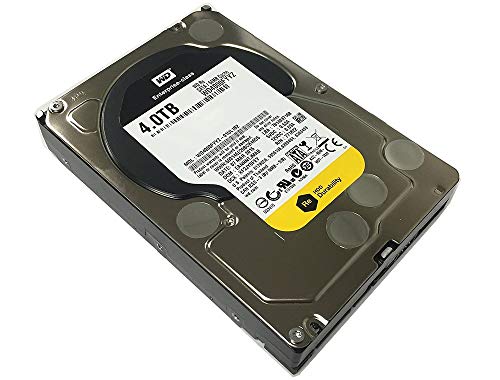
Western Digital RE 4TB 7200 RPM Hard Drive
Best for: High-performance 3.5-inch NAS storage
- Form Factor
- 3.5 Inch (what this guide is about)
- Storage Capacity
- 4TB
- Hardware Interface
- SATA 6.0Gb/s
- Rotational Speed
- 7200 RPM
- Cache Size
- 64MB
- Dimensions
- 9.3 × 5.4 × 3.7 inches
View on Amazon: Western Digital RE 4TB 7200 RPM Hard Drive Affiliate link
This Western Digital RE drive offers 4TB of storage in a 3.5-inch form factor. It runs at 7200 RPM with a 64MB cache and SATA 6.0Gb/s interface. The drive is built for 24x7 operation with a high MTBF rating. It suits users needing reliable, high-performance storage for business-critical applications. You get sustained sequential data rates up to 171 MB/s.
Pros
- 7200 RPM rotational speed for high performance
- 64MB cache for improved data handling
- SATA 6.0Gb/s interface
- Designed for 24x7 duty cycle operation
Cons
- Only 4TB capacity compared to larger options
- OEM version with limited warranty from reseller
- Heavier build at 1 pound
Good fit if
- You need a reliable 3.5-inch drive for NAS
- You require high rotational speed for performance
- You are building a business-critical storage system
Skip if
- You need more than 4TB of storage
- You prefer 2.5-inch drives for compact builds
- You want a retail warranty included
Verdict: WD RE 4TB 7200 RPM Enterprise Drive is a solid choice for users prioritizing speed and reliability in a 3.5-inch NAS setup. It fits those who need consistent performance for critical data.

Seagate BarraCuda 5TB 2.5-Inch Hard Drive
Best for: Compact desktop NAS storage with high capacity
- Form Factor
- 2.5 Inch (what this guide is about)
- Storage Capacity
- 5TB
- Hardware Interface
- SATA 6Gb/s
- Rotational Speed
- 5400RPM
- Cache Size
- 128MB
- Dimensions
- 3.94 × 2.74 × 0.59 inches
View on Amazon: Seagate BarraCuda 5TB 2.5-Inch Hard Drive Affiliate link
This 2.5-inch Seagate BarraCuda offers 5TB of storage in a compact form factor. It uses SATA 6Gb/s and rotates at 5400RPM with a 128MB cache. The 15mm height restricts it to desktop PCs. QuietStep technology manages acoustics. It suits users needing high capacity in a small drive size for desktop NAS builds.
Pros
- 5TB storage capacity for large media libraries
- 2.5-inch form factor saves space in enclosures
- 128MB cache supports data buffering
- SATA 6Gb/s interface ensures compatibility
Cons
- 15mm height prevents use in laptops
- 5400RPM speed is slower than 7200RPM drives
- Sold as a renewed item
Good fit if
- You need high capacity in a 2.5-inch drive
- You are building a compact desktop NAS
- You prioritize storage density over rotational speed
Skip if
- You require a drive for laptops
- You need 7200RPM performance for heavy workloads
- You prefer new items with manufacturer warranties
Verdict: Seagate BarraCuda 5TB 2.5-Inch Drive provides substantial storage in a small footprint. It fits users building space-efficient desktop NAS systems who accept slower rotational speeds.

Western Digital AV-GP 1TB 3.5-Inch Hard Drive
Best for: Surveillance and 24/7 NAS recording
- Form Factor
- 3.5 Inch (what this guide is about)
- Storage Capacity
- 1TB
- Hardware Interface
- SATA 6Gb/s
- Rotational Speed
- 5400RPM~7200RPM
- Cache Size
- 64MB
- Dimensions
- 4.8 × 4 × 1 inches
View on Amazon: Western Digital AV-GP 1TB 3.5-Inch Hard Drive Affiliate link
This Western Digital drive offers 1TB of storage in a standard 3.5-inch form factor. It uses IntelliPower technology, which adjusts rotational speed between 5400 and 7200 RPM. The 64MB cache and SATA 6Gb/s interface provide reliable data transfer. It is built for 24/7 operation and heavy-duty use. This makes it suitable for surveillance systems and NAS setups that prioritize continuous recording over peak burst speeds.
Pros
- 1TB storage capacity
- 3.5-inch internal form factor
- SATA 6Gb/s interface
- Designed for 24/7 operation
Cons
- Variable rotational speed limits consistent performance
- 64MB cache is smaller than many NAS drives
- 1TB capacity is low compared to modern standards
Good fit if
- You need a drive for a surveillance system
- You require a 3.5-inch drive for a NAS
- You want a drive designed for 24/7 operation
Skip if
- You need high capacity for large media libraries
- You require consistent high rotational speeds
- You prioritize large cache sizes for performance
Verdict: WD AV-GP 1TB 3.5 Inch Surveillance Drive is a specialized drive for continuous recording tasks. It fits users who need reliable 24/7 operation in a standard 3.5-inch form factor for surveillance or basic NAS storage.

Western Digital Blue 1TB 2.5-Inch Hard Drive
Best for: compact NAS enclosures and portable storage
- Form Factor
- 2.5 Inch (what this guide is about)
- Storage Capacity
- 1TB
- Hardware Interface
- SATA 6 Gb/s
- Rotational Speed
- 5400 RPM
- Cache Size
- 128MB
- Dimensions
- 2.5 × 2.5 × 0.42 inches
View on Amazon: Western Digital Blue 1TB 2.5-Inch Hard Drive Affiliate link
The WD Blue 1TB Mobile Hard Disk Drive offers 1TB of storage in a compact 2.5-inch form factor. It spins at 5400 RPM with a 128MB cache and uses a SATA 6 Gb/s interface. This smaller size makes it suitable for portable NAS enclosures or compact systems where space is limited. You get reliable storage built to WD standards in a lightweight, thin design.
Pros
- Compact 2.5-inch form factor fits small enclosures
- 1TB storage capacity for moderate data needs
- 128MB cache supports smoother data handling
- SATA 6 Gb/s interface for standard connectivity
- Lightweight 3.2-ounce build for portable setups
Cons
- 5400 RPM speed is slower than 7200 RPM drives
- 1TB capacity is lower than larger NAS drives
- 2.5-inch size may not fit standard 3.5-inch bays
Good fit if
- You need a drive for a compact or portable NAS
- You have limited space in your enclosure
- You want a lightweight drive for mobile use
Skip if
- You require high performance for heavy workloads
- You need maximum storage capacity in one drive
- Your NAS only supports 3.5-inch form factors
Verdict: WD Blue 1TB 2.5 Inch Mobile Drive fits users who prioritize compact size and portability over raw speed and capacity. It is a practical option for small enclosures but not for high-performance or high-capacity needs.

Toshiba 14TB Enterprise 7200 RPM HDD (Renewed)
Best for: High-capacity NAS storage needs
- Form Factor
- 3.5 Inch (what this guide is about)
- Storage Capacity
- 14TB
- Hardware Interface
- SATA 6.0Gb/s
- Rotational Speed
- 7200RPM
- Cache Size
- 256MB
- Dimensions
- 7.5 × 5.5 × 2.5 inches
View on Amazon: Toshiba 14TB Enterprise 7200 RPM HDD (Renewed) Affiliate link
This Toshiba enterprise drive offers 14TB of storage in a standard 3.5-inch form factor. It runs at 7200 RPM with a 256MB cache and uses SATA 6.0Gb/s. The helium-sealed design supports high workloads. You should choose this if you need large capacity and sustained performance for a NAS. It fits well in systems that require 3.5-inch bays.
Pros
- 14TB storage capacity
- 7200 RPM rotational speed
- 256MB cache size
- Helium-sealed design
Cons
- Renewed condition
- Heavier build at 1.5 pounds
- Higher power use than 5400 RPM drives
Good fit if
- You need high capacity for a NAS
- You want enterprise-grade reliability
- You have 3.5-inch drive bays
Skip if
- You need silent operation
- You require new condition
- You have only 2.5-inch slots
Verdict: Toshiba 14TB Enterprise 3.5 HDD provides robust storage for users who prioritize capacity and speed over silence. It is ideal for NAS builds that can accommodate its size and weight.

Seagate BarraCuda 500GB 2.5-Inch Hard Drive
Best for: Slim laptops and compact external enclosures
- Form Factor
- 2.5 Inch (what this guide is about)
- Storage Capacity
- 500GB
- Hardware Interface
- SATA 6Gb/s
- Cache Size
- 128MB
- Dimensions
- 3.95 × 2.75 × 0.28 inches
- Weight
- 3.17 ounces
View on Amazon: Seagate BarraCuda 500GB 2.5-Inch Hard Drive Affiliate link
This Seagate BarraCuda is a 2.5-inch internal hard drive with 500GB of storage. It uses a SATA 6Gb/s interface and includes 128MB of cache. The 7mm thickness makes it suitable for slim laptop bays or external enclosures. It offers a compact form factor for users who need portable or space-saving storage solutions without the bulk of 3.5-inch drives.
Pros
- 2.5-inch form factor fits slim laptops and enclosures
- 7mm height allows for compact builds
- SATA 6Gb/s interface for reliable data transfer
- 128MB cache supports burst performance
Cons
- 500GB capacity is small compared to 3.5-inch NAS drives
- Renewed condition means it is not brand new
- No rotational speed listed, limiting performance predictability
Good fit if
- You need a 2.5-inch drive for a laptop upgrade
- You are building a compact external storage enclosure
- You require a slim 7mm profile for tight spaces
Skip if
- You need high capacity for a primary NAS
- You require a brand-new drive with full warranty
- You need 3.5-inch drives for desktop servers
Verdict: Seagate 500GB 2.5 Inch BarraCuda is a compact storage option for laptops or DIY enclosures. It suits users who prioritize space and portability over high capacity.
Specifications side by side
| Spec | Western Digital RE 4TB 7200 RPM Hard Drive | Seagate BarraCuda 5TB 2.5-Inch Hard Drive | Western Digital AV-GP 1TB 3.5-Inch Hard Drive | Western Digital Blue 1TB 2.5-Inch Hard Drive | Toshiba 14TB Enterprise 7200 RPM HDD (Renewed) | Seagate BarraCuda 500GB 2.5-Inch Hard Drive |
|---|---|---|---|---|---|---|
| Storage Capacity | 4TB | 5TB | 1TB | 1TB | 14TB | 500GB |
| Form Factor | 3.5in | 2.5-Inch | 3.5in | 2.5 Inch | 3.5" | 2.5-Inch |
| Hardware Interface | SATA 6.0Gb/s | SATA 6Gb/s | SATA 6Gb/s | SATA 6 Gb/s | SATA 6.0Gb/s | SATA 6Gb/s |
| Rotational Speed | 7200 RPM | 5400RPM | 5400RPM~7200RPM | 5400 RPM | 7200RPM | not stated |
| Cache Size | 64MB | 128MB | 64MB | 128MB | 256MB | 128MB |
| Dimensions | 9.3 × 5.4 × 3.7 inches | 3.94 × 2.74 × 0.59 inches | 4.8 × 4 × 1 inches | 2.5 × 2.5 × 0.42 inches | 7.5 × 5.5 × 2.5 inches | 3.95 × 2.75 × 0.28 inches |
| Weight | 1 pounds | 2.82 ounces | not stated | 3.2 ounces | 1.5 pounds | 3.17 ounces |
| Size | 4 TB | 5 TB | 1 TB | 1 TB | not stated | 500GB |
| Color | Silver | Silver | Silver | Blue | Silver | not stated |
| Model | WD4000FYYZ OEM-cr | ST5000LM000-cr | WD10EURX-OEM-2YR-cr | WD10SPZX-cr | MG07ACA14TE | ST500LM030-cr |
Frequently asked questions
Can I use a 2.5 inch drive in a 3.5 inch NAS bay?
You generally cannot fit a 2.5 inch drive directly into a standard 3.5 inch bay without an adapter. The physical dimensions differ significantly. For example, the Seagate BarraCuda 5TB 2.5 Inch measures 2.74 inches wide, while the Western Digital RE 4TB 3.5 Inch is 5.4 inches wide. You need specific mounting hardware to adapt the smaller drive for larger enclosures.
Do 2.5 inch drives have lower rotational speeds than 3.5 inch models?
Many 2.5 inch drives operate at lower speeds to save power and reduce heat. The Western Digital Blue 1TB 2.5 Inch runs at 5400 RPM. In contrast, larger 3.5 inch drives like the Toshiba 14TB Enterprise and Western Digital RE 4TB both spin at 7200 RPM. Higher RPMs typically provide faster data access for performance-critical tasks.
Which form factor offers more storage capacity?
The 3.5 inch form factor usually supports higher capacities due to larger internal platters. The Toshiba 14TB Enterprise drive demonstrates this with its 14TB size. The 2.5 inch options listed, such as the Seagate BarraCuda 5TB and Western Digital Blue 1TB, max out at lower capacities. You should choose 3.5 inch for massive storage needs.
Are 3.5 inch drives heavier than 2.5 inch drives?
Yes, 3.5 inch drives are significantly heavier due to their larger size and components. The Toshiba 14TB Enterprise weighs 1.5 pounds, and the Western Digital RE 4TB weighs 1 pound. The 2.5 inch drives are much lighter, with the Seagate BarraCuda 500GB weighing only 3.17 ounces. This weight difference matters for portable or lightweight NAS builds.
Do all these drives use the same interface?
All listed drives use the SATA hardware interface. This standard connection ensures compatibility with most NAS enclosures and desktop systems. You do not need to worry about different connector types for these models. The Western Digital AV-GP 1TB, Seagate BarraCuda 5TB, and Toshiba 14TB all rely on this universal SATA connection for data transfer.
Is cache size important for NAS performance?
Cache size helps buffer data during read and write operations. Larger caches can improve performance for complex tasks. The Toshiba 14TB Enterprise features a 256MB cache, while the Western Digital RE 4TB has 64MB. The 2.5 inch models like the Seagate BarraCuda 5TB have 128MB. You should check the cache specification to match your performance requirements.
Can I use a 3.5 inch drive in a portable enclosure?
You typically cannot use a 3.5 inch drive in a portable enclosure designed for laptops. The Western Digital RE 4TB measures 9.3 inches long and weighs 1 pound. Portable enclosures usually accommodate the smaller 2.5 inch form factor, such as the Western Digital Blue 1TB. You must match the drive size to the enclosure dimensions.