Hardware Interface Explained: What It Means for NAS Hard Drives
As an Amazon Associate we earn from qualifying purchases. Links on this page are affiliate links.
Hardware Interface Explained for Drives
The hardware interface explained defines how a drive connects to your system. This connection determines speed, power delivery, and compatibility. You must match the interface to your NAS enclosure or computer port. Mismatched interfaces cause slow transfers or failure to mount. Most NAS drives use SATA. External drives often use USB or Thunderbolt. Understanding these differences helps you choose the right hardware.
SATA is the standard for internal NAS drives. It stands for Serial Advanced Technology Attachment. You will see SATA III listed on specifications. This version offers a theoretical maximum speed of six gigabits per second. In practice, you get about five hundred fifty megabytes per second. This speed matches the limits of current 7200 RPM mechanical drives. It is reliable and widely supported. Most NAS enclosures provide multiple SATA ports. This allows you to build large storage arrays easily. The interface is internal, so you need a separate cable.
USB 3.0 is common for external portable drives. It provides higher speeds than older USB versions. Theoretical limits reach five gigabits per second. Real world speeds often hit four hundred megabytes per second. This is sufficient for single drive backups or media playback. However, USB drives are not ideal for RAID arrays. They lack the direct controller access that SATA offers. You plug them directly into your computer or a USB hub.
Thunderbolt offers the highest performance. It uses optical or copper cables. Thunderbolt 3 and 4 can reach forty gigabits per second. This speed allows for multiple drives in a single daisy chain. It is ideal for video editors or heavy data workstations. The cost is higher, and compatibility requires specific ports. You need a compatible cable and port on your host device. Choose this only if you need extreme throughput. For most home NAS users, SATA remains the practical choice.
SATA, USB 3.0, and Thunderbolt
SATA
SATA connects internal drives directly to a motherboard or NAS enclosure. This interface provides stable, continuous data transfer for 24/7 operation. It supports high rotational speeds, such as the 7200 RPM found in the Western Digital RE 4TB Enterprise drive. This makes SATA ideal for business-critical applications where uptime matters. You get reliable performance for video editing or server tasks. The trade-off is that SATA requires internal installation. It does not offer the plug-and-play convenience of external ports. You must ensure your NAS chassis supports SATA connections for this interface to function correctly.
USB 3.0
USB 3.0 connects external drives to your computer via a standard port. This interface prioritizes portability and ease of use. It suits users who need simple backup solutions for everyday files on Windows or Mac systems. The Avolusion 4TB USB 3.0 External Hard Drive is a good example for portable storage. You can plug it in and start copying data immediately. The trade-off is that USB 3.0 is generally slower than internal connections. It is not designed for the constant vibration of multi-bay NAS enclosures. It works best for desktop expansion or occasional file transfers rather than heavy network storage workloads.
Thunderbolt
Thunderbolt offers extremely high bandwidth for professional creative workflows. It connects high-performance drives to Mac or PC systems. This interface is best for video editors needing fast daisy-chaining capabilities. The G-Technology G-RAID 8TB Thunderbolt Dual Drive is a specialized solution for this need. You get rapid transfer rates for high-resolution video files. The Western Digital 8TB My Book Thunderbolt Duo also provides flexible RAID options for desktop users. The trade-off is higher cost and complexity. Thunderbolt drives are often larger and heavier. They are not suitable for standard internal NAS slots. You need a specific Thunderbolt port on your computer to utilize this interface.
Is This Drive Worth Your Time
Who needs it
You need this drive if your workflow demands high-speed external transfers or direct high-bandwidth connections. Users who frequently move large video files, raw photo archives, or extensive database backups will benefit significantly from USB 3.0 and Thunderbolt options. These interfaces offer much higher throughput than standard SATA connections. Thunderbolt is ideal for creative professionals who edit footage directly from the drive. USB 3.0 serves well for general external storage needs where speed matters but Thunderbolt hardware is not available. If you rely on rapid data ingestion or need to offload massive datasets quickly, prioritizing these faster interfaces ensures your storage does not become a bottleneck in your daily operations. The speed advantage is real and noticeable during large file movements.
Who can skip it
You can skip the premium interface options if you are using the drive strictly as an internal component in a NAS enclosure. SATA is the standard for internal drives and provides the stable, continuous performance required for 24/7 operation. Most NAS systems only support SATA connections internally. Paying extra for USB 3.0 or Thunderbolt adds no value in this scenario and may introduce unnecessary complexity. Focus on capacity, reliability, and rotational speed instead. Ensure the drive fits your enclosure’s bays and supports the required power delivery. For home users or small offices storing documents and media libraries, SATA offers sufficient performance without the cost or cable management of external interfaces. Prioritize endurance ratings and warranty terms over connection speed for internal installations.
Interface Glossary Terms
SATA Interface
Serial ATA connects internal drives to motherboards. It offers stable, continuous data transfer suitable for 24/7 NAS operation and supports high rotational speeds like 7200 RPM.
USB 3.0
A high-speed external connection standard. It allows for fast data movement between your computer and storage devices, ideal for large file transfers and backups.
Thunderbolt
A high-bandwidth interface for direct, fast connections. It supports rapid data transfer rates, making it suitable for professional workflows involving large video or database files.
Rotational Speed
The rate at which drive platters spin, measured in RPM. Higher speeds, such as 7200 RPM, generally provide faster data access times for performance.
Form Factor
The physical size and shape of the drive. Common sizes include 3.5-inch for desktop NAS units and 2.5-inch for portable or smaller enclosures.
Cache Size
A small amount of fast memory on the drive. It buffers data to improve transfer speeds and efficiency, with larger caches handling complex tasks better.
Recording Technology
The method used to store data on platters. Options like CMR or SMR affect write performance and reliability, especially in dense NAS arrays.
Compatibility
How well the drive works with your specific NAS enclosure or computer. Matching interfaces and supported capacities ensures stable operation and data integrity.
Number of Bays
The count of drive slots in your NAS enclosure. This determines how many drives you can install simultaneously for storage capacity or redundancy.
RAM Capacity
The amount of memory in your NAS system. More RAM allows the system to cache more data, improving overall performance and responsiveness.
Quick picks
| # | Product | Best for | Price |
|---|---|---|---|
| 1 | Western Digital RE 4TB 7200 RPM Hard Drive | Enterprise NAS systems requiring high reliability | Check price of Western Digital RE 4TB 7200 RPM Hard Drive on Amazon |
| 2 | Avolusion 4TB USB 3.0 External Hard Drive | simple portable storage for backups | Check price of Avolusion 4TB USB 3.0 External Hard Drive on Amazon |
| 3 | G-Technology G-RAID 8TB Thunderbolt Dual Drive | Mac video editors needing Thunderbolt daisy-chaining | Check price of G-Technology G-RAID 8TB Thunderbolt Dual Drive on Amazon |
| 4 | Western Digital AV-GP 1TB 3.5-Inch Hard Drive | always-on entry-level NAS and surveillance systems | Check price of Western Digital AV-GP 1TB 3.5-Inch Hard Drive on Amazon |
| 5 | Avolusion PRO-T8 14TB External Desktop Hard Drive | Windows PC storage expansion | Check price of Avolusion PRO-T8 14TB External Desktop Hard Drive on Amazon |
| 6 | Western Digital 8TB My Book Thunderbolt Duo | Desktop users needing fast Thunderbolt RAID storage | Check price of Western Digital 8TB My Book Thunderbolt Duo on Amazon |
Our 6 picks
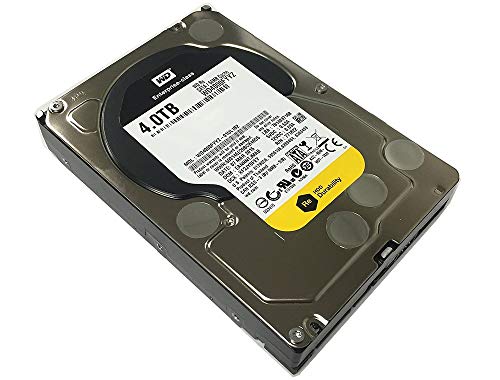
Western Digital RE 4TB 7200 RPM Hard Drive
Best for: Enterprise NAS systems requiring high reliability
- Hardware Interface
- SATA (what this guide is about)
- Storage Capacity
- 4TB
- Form Factor
- 3.5in
- Rotational Speed
- 7200 RPM
- Cache Size
- 64MB
- Dimensions
- 9.3 × 5.4 × 3.7 inches
View on Amazon: Western Digital RE 4TB 7200 RPM Hard Drive Affiliate link
This is an internal 3.5-inch hard drive designed for enterprise environments. It features a SATA 6.0Gb/s interface and spins at 7200 RPM. The drive offers 4TB of storage with a 64MB cache. It is built for 24x7 operation with a high MTBF rating. You should choose this if you need reliable, high-performance storage for business-critical applications.
Pros
- SATA 6.0Gb/s interface for fast data transfer
- 7200 RPM rotational speed for high performance
- 64MB cache for improved random I/O rates
- Designed for 24x7 operation with high reliability
Cons
- Internal drive requires installation into a compatible system
- Lacks external connectivity options like USB or Thunderbolt
- Limited to 4TB capacity compared to higher-end models
Good fit if
- You are building a NAS with SATA bays
- You need enterprise-grade reliability for business use
- You require 7200 RPM performance for critical data
Skip if
- You need a portable external drive for travel
- You want a drive with USB or Thunderbolt connectivity
- You are looking for a drive with more than 4TB capacity
Verdict: Western Digital RE 4TB Enterprise SATA Drive is a solid choice for users who prioritize performance and reliability in a SATA-based NAS setup. It is ideal for business-critical applications where uptime is essential.

Avolusion 4TB USB 3.0 External Hard Drive
Best for: simple portable storage for backups
- Hardware Interface
- USB 3.0 (what this guide is about)
- Storage Capacity
- 4TB
- Compatibility
- Mac
- Dimensions
- 7 × 5 × 1 inches
- Weight
- 3 pounds
View on Amazon: Avolusion 4TB USB 3.0 External Hard Drive Affiliate link
The Avolusion PRO-T5 is a 4TB external hard drive with a USB 3.0 interface. It measures 7 by 5 by 1 inches and weighs 3 pounds. The white casing fits desktop setups. You get plug-and-play compatibility with Windows and Mac OS. This drive suits users needing portable storage for backups, photos, and videos without complex setup.
Pros
- 4TB storage capacity for large files
- USB 3.0 interface for data transfer
- Plug-and-play setup with no software needed
- Compatible with Windows and Mac OS
Cons
- 4TB capacity is smaller than 14TB or 8TB options
- USB 3.0 is slower than Thunderbolt or SATA 6Gb/s
- Renewed condition may vary in wear
Good fit if
- You need extra storage for Windows or Mac
- You want a simple plug-and-play drive
- You store photos, videos, and documents
Skip if
- You need Thunderbolt speeds
- You require more than 4TB capacity
- You prefer internal SATA drives
Verdict: Avolusion PRO-T5 4TB USB 3.0 External Drive fits users who need simple, portable storage for everyday files on Windows or Mac systems.

G-Technology G-RAID 8TB Thunderbolt Dual Drive
Best for: Mac video editors needing Thunderbolt daisy-chaining
- Hardware Interface
- Thunderbolt (what this guide is about)
- Storage Capacity
- 8 TB
- Dimensions
- 9.25 × 5.12 × 3.43 inches
- Weight
- 5.35 pounds
View on Amazon: G-Technology G-RAID 8TB Thunderbolt Dual Drive Affiliate link
This G-Technology G-RAID system uses a Thunderbolt interface for high-speed data transfer. It offers 8 TB of storage in a silver chassis measuring 9.25 by 5.12 by 3.43 inches. The unit supports RAID 0 for maximum performance and includes dual Thunderbolt ports for daisy-chaining. It is designed for Mac OS with Time Machine readiness and plug-and-play setup.
Pros
- Thunderbolt interface for ultra-fast data transfer rates
- 8 TB storage capacity for large media files
- RAID 0 configuration supports multi-stream HDV and ProRes 422 workflows
- Dual Thunderbolt ports allow daisy-chaining up to six peripherals
- Time Machine-ready for Mac OS with plug-and-play setup
Cons
- Thunderbolt interface is less common than SATA or USB 3.0 for standard NAS drives
- RAID 0 setup offers no data redundancy if one drive fails
- Heavier build at 5.35 pounds compared to standard internal drives
Good fit if
- You need Thunderbolt speeds for professional video editing workflows
- You use Mac OS and want Time Machine compatibility
- You require daisy-chaining multiple peripherals via Thunderbolt
Skip if
- You only have SATA or USB 3.0 ports available
- You need data redundancy and cannot risk RAID 0 failure
- You prefer standard internal NAS drives for custom server builds
Verdict: G-Technology G-RAID 8TB Thunderbolt is a specialized storage solution for Mac users needing Thunderbolt speeds and daisy-chaining capabilities. It suits professionals editing high-resolution video who can accept the lack of redundancy in RAID 0.

Western Digital AV-GP 1TB 3.5-Inch Hard Drive
Best for: always-on entry-level NAS and surveillance systems
- Hardware Interface
- SATA (what this guide is about)
- Storage Capacity
- 1TB
- Form Factor
- 3.5in
- Rotational Speed
- 5400RPM~7200RPM
- Cache Size
- 64MB
- Dimensions
- 4.8 × 4 × 1 inches
View on Amazon: Western Digital AV-GP 1TB 3.5-Inch Hard Drive Affiliate link
This 3.5-inch internal hard drive connects via a SATA 6Gb/s interface and provides 1TB of storage space. It uses Western Digital's IntelliPower rotational speed with a 64MB cache and is built for continuous 24/7 operation. If you need a low-power SATA internal drive for an entry-level NAS, media server, or surveillance setup, this provides dedicated baseline storage.
Pros
- SATA 6Gb/s hardware interface
- Engineered for 24/7 continuous operation
- IntelliPower rotational speed with 64MB cache
- Standard 3.5-inch internal drive form factor
Cons
- 1TB capacity is the lowest on this list
- Ships as a bulk pack without cables or accessories included
Good fit if
- You need an internal SATA 6Gb/s drive for an always-on NAS or media server.
- You only need 1TB of dedicated storage for video recording or light file storage.
Skip if
- You require large multi-terabyte capacities for extensive backup libraries.
- You need an external drive that connects over USB or Thunderbolt.
Verdict: Western Digital AV-GP 1TB SATA Hard Drive serves users who need an always-on internal SATA disk for small-scale NAS enclosures, DVRs, or light surveillance setups.

Avolusion PRO-T8 14TB External Desktop Hard Drive
Best for: Windows PC storage expansion
- Hardware Interface
- USB 3.0 (what this guide is about)
- Storage Capacity
- 14TB
- Rotational Speed
- 7200RPM
- Form Factor
- Desktop
- Compatibility
- PC
- Dimensions
- 6 × 1 × 4 inches
View on Amazon: Avolusion PRO-T8 14TB External Desktop Hard Drive Affiliate link
This external drive offers 14TB of storage via a USB 3.0 interface. It uses a 7200RPM enterprise-grade internal drive housed in a desktop case. The unit connects directly to Windows PCs or laptops without opening the case. You get immediate capacity expansion for backups or daily file storage. The black enclosure measures 6 by 4 by 1 inches and weighs 2 pounds.
Pros
- 14TB total storage capacity
- USB 3.0 hardware interface
- 7200RPM rotational speed
- Desktop form factor
Cons
- USB 3.0 interface is slower than Thunderbolt options
- Windows OS compatibility only
- Refurbished internal drive rather than new
Good fit if
- You need large external storage for Windows PCs
- You want fast 7200RPM performance in an enclosure
- You prefer a desktop drive over portable units
Skip if
- You require Thunderbolt connectivity for maximum speed
- You need native Mac OS support
- You prefer a new enterprise drive over refurbished
Verdict: Avolusion PRO-T8 14TB USB 3.0 is a high-capacity desktop solution for Windows users who need fast rotational speeds and do not require Thunderbolt speeds.

Western Digital 8TB My Book Thunderbolt Duo
Best for: Desktop users needing fast Thunderbolt RAID storage
- Hardware Interface
- Thunderbolt (what this guide is about)
- Storage Capacity
- 8 TB
- Form Factor
- Desktop
- Dimensions
- 6.2 × 3.9 × 6.5 inches
- Weight
- 5.07 pounds
View on Amazon: Western Digital 8TB My Book Thunderbolt Duo Affiliate link
This Western Digital desktop drive uses the Thunderbolt interface for high-speed data transfers. It holds 8 TB of data and measures 6.2 by 3.9 by 6.5 inches. The unit weighs 5.07 pounds. You can configure it for RAID 0 or RAID 1 to balance speed and protection. It supports daisy-chaining multiple drives for workflow efficiency. This setup suits users needing fast external storage.
Pros
- Thunderbolt hardware interface for high-speed transfers
- 8 TB storage capacity
- User-selectable RAID 0 or 1 configuration
- Tool-free drive replacement and upgrade
Cons
- Heavier at 5.07 pounds than internal drives
- Larger desktop footprint than portable units
- Thunderbolt port requirement limits compatibility
Good fit if
- You need fast Thunderbolt connectivity
- You want RAID 1 data protection
- You require 8 TB of space
Skip if
- You only have SATA or USB ports
- You need a lightweight portable drive
- You want a smaller 1 TB capacity
Verdict: WD 8TB My Book Thunderbolt Duo delivers fast Thunderbolt speeds and flexible RAID options for desktop users. It fits professionals who need large, protected storage with quick transfer rates.
Specifications side by side
| Spec | Western Digital RE 4TB 7200 RPM Hard Drive | Avolusion 4TB USB 3.0 External Hard Drive | G-Technology G-RAID 8TB Thunderbolt Dual Drive | Western Digital AV-GP 1TB 3.5-Inch Hard Drive | Avolusion PRO-T8 14TB External Desktop Hard Drive | Western Digital 8TB My Book Thunderbolt Duo |
|---|---|---|---|---|---|---|
| Storage Capacity | 4TB | 4TB | 8 TB | 1TB | 14TB | 8 TB |
| Form Factor | 3.5in | not stated | not stated | 3.5in | not stated | not stated |
| Hardware Interface | SATA 6.0Gb/s | USB 3.0 | Thunderbolt | SATA 6Gb/s | USB 3.0 | Thunderbolt |
| Rotational Speed | 7200 RPM | not stated | not stated | 5400RPM~7200RPM | 7200RPM | not stated |
| Cache Size | 64MB | not stated | not stated | 64MB | not stated | not stated |
| Compatibility | not stated | Mac | not stated | not stated | PC | not stated |
| Size | 4 TB | 4TB | 8 TB | 1 TB | 14TB | 8 TB |
| Dimensions | 9.3 × 5.4 × 3.7 inches | 7 × 5 × 1 inches | 9.25 × 5.12 × 3.43 inches | 4.8 × 4 × 1 inches | 6 × 1 × 4 inches | 6.2 × 3.9 × 6.5 inches |
| Weight | 1 pounds | 3 pounds | 5.35 pounds | not stated | 2 pounds | 5.07 pounds |
| Color | Silver | White | Silver | Silver | Black | 8 TB |
| Model | WD4000FYYZ OEM-cr | not stated | 0G02272 | WD10EURX-OEM-2YR-cr | PROT8-BK-14TB-WIN | WDBUTV0080JSL-NESN |
Frequently asked questions
What is the best interface for enterprise NAS reliability?
SATA is the optimal choice for enterprise environments. The Western Digital RE 4TB drive uses a SATA interface and operates at 7200 RPM. This combination ensures high performance and reliability for business-critical applications. The 64MB cache further supports stable data transfer during continuous operation.
Can I use USB drives for internal NAS storage?
USB drives are designed for external, portable storage rather than internal NAS use. The Avolusion 4TB USB 3.0 drive is built for simple backups on Windows or Mac systems. It lacks the internal form factor and continuous operation stability required for a standard NAS enclosure.
Which interface supports daisy-chaining for video editing?
Thunderbolt interfaces support daisy-chaining, which is ideal for video workflows. The G-Technology G-RAID 8TB drive features a Thunderbolt connection. This allows Mac users to link multiple devices in a chain. It provides the high speeds needed for editing high-resolution video files efficiently.
Is SATA suitable for surveillance systems?
Yes, SATA is well-suited for surveillance and basic NAS tasks. The Western Digital AV-GP 1TB drive uses a SATA interface. It is designed for continuous operation, prioritizing reliability over raw speed. This makes it a practical choice for recording video feeds or managing small data sets.
Do Thunderbolt drives offer RAID options?
Many Thunderbolt drives include RAID configurations for data protection. The Western Digital My Book Thunderbolt Duo provides flexible RAID options. It delivers fast transfer rates and large capacity for desktop users. This setup helps protect important files while maintaining quick access to large data archives.
Which interface is best for expanding Windows PC storage?
USB 3.0 is ideal for expanding Windows PC storage. The Avolusion PRO-T8 14TB drive uses a USB 3.0 interface. It offers high capacity and fast rotational speeds for desktop use. This connection type allows for easy plug-and-play expansion without the need for internal installation.