LaCie Rugged Mini 1TB Portable vs LaCie Rugged 1TB Thunderbolt Portable: Spec Comparison
As an Amazon Associate we earn from qualifying purchases. Links on this page are affiliate links.
When you compare the LaCie Rugged Mini 1TB Portable against the LaCie Rugged 1TB Thunderbolt USB drive, you see two durable options for storing data. Both drives offer 1TB of space and share a rugged orange design meant for all-terrain use. They both resist drops, dust, and water. The main difference lies in connectivity. One uses only USB 3.0, while the other adds Thunderbolt for higher speeds and RAID support. Your choice depends on your computer's ports and your need for raw performance.
Key differences
| Aspect | LaCie Rugged Mini 1TB Portable Hard Drive | LaCie Rugged 1TB Thunderbolt Portable Hard Drive |
|---|---|---|
| Hardware Interface | USB 3.0 | Thunderbolt, USB 3.0 |
| Form Factor | 2.5" | not listed |
| Drop Resistance | 4 feet | 5 feet |
| RAID Support | not listed | Hardware RAID 0/1 |
| Weight | 9.88 ounces | 12 ounces |
Which one should you choose?
Choose LaCie Rugged Mini 1TB Portable Hard Drive if
- You need a lighter, more compact drive for travel.
- Your computer only has USB ports available.
- You want a smaller form factor that fits easily in a bag.
Choose LaCie Rugged 1TB Thunderbolt Portable Hard Drive if
- You require the highest possible transfer speeds with Thunderbolt.
- You need hardware RAID options for data redundancy or speed.
- You want slightly better drop resistance up to 5 feet.
Verdict: The LaCie Rugged Mini is the better choice for users who prioritize portability and standard USB connectivity. The LaCie Rugged 1TB Thunderbolt drive suits professionals who need faster data rates and RAID capabilities. Both drives provide solid durability for mobile workflows.
Interface and Build Comparison
Hardware Interface
The LaCie Rugged Mini 1TB Portable relies on a USB 3.0 connection. This interface offers reliable transfer speeds for everyday backups and media storage. It is compatible with USB 2.0 ports as well, though speeds will be slower. In contrast, the LaCie Rugged 1TB Thunderbolt Portable provides both Thunderbolt and USB 3.0 interfaces. Thunderbolt allows for significantly higher bandwidth, supporting speeds up to 240 MB/s. This dual-interface approach gives you more flexibility in connecting to different computers. If you need maximum throughput, the Thunderbolt option is superior.
Form Factor
Size and portability differ between these two drives. The LaCie Rugged Mini 1TB Portable uses a 2.5-inch form factor. Its dimensions are 3.39 inches in width, 5.3 inches in length, and 0.74 inches in height. This compact size makes it easy to slip into a laptop bag. The LaCie Rugged 1TB Thunderbolt Portable is larger, using a 3.5-inch design. It measures 3.5 inches wide, 5.5 inches long, and 1 inch high. The increased size accommodates the internal components needed for Thunderbolt support. You will notice the Mini is more pocket-friendly, while the Thunderbolt model is bulkier.
Drop Resistance
Both drives feature LaCie’s signature rugged orange bumper for protection. However, their drop resistance ratings vary slightly. The LaCie Rugged Mini 1TB Portable is rated to withstand drops up to 4 feet. This is sufficient for most accidental spills from desks or bags. The LaCie Rugged 1TB Thunderbolt Portable offers a higher rating, surviving drops up to 5 feet. This extra foot of protection adds a margin of safety for rougher field conditions. Both models are also dust and water resistant, ensuring they can handle all-terrain use without issue.
Power Source
How you power these drives affects their portability. The LaCie Rugged Mini 1TB Portable draws power directly from the USB port. This bus-powered design means you do not need a separate power adapter, making it very convenient for travel. The LaCie Rugged 1TB Thunderbolt Portable is also bus-powered via Thunderbolt. This allows for mobile workflows without carrying extra cables or bricks. Both drives are self-powered, but the Thunderbolt model’s power delivery is optimized for its higher-speed interface. Neither requires an external power supply for operation.
RAID Capability
Data redundancy and performance configuration differ significantly. The LaCie Rugged Mini 1TB Portable does not list any RAID features in its specifications. It functions as a single drive for standard storage. The LaCie Rugged 1TB Thunderbolt Portable includes hardware RAID 0 and RAID 1 flexibility. RAID 0 can boost speed by striping data, while RAID 1 offers security through mirroring. This hardware-level RAID support is a significant advantage for users who need specific data protection or performance tuning. The Mini model lacks this advanced configuration option.
Choose the right LaCie drive for you
Mobile professionals needing maximum speed
If you move large files between workstations, the Thunderbolt interface on this drive offers speeds up to 240 MB/s. This is significantly faster than standard USB connections. The hardware RAID 0 option also boosts performance for video editing or heavy data transfers, making it ideal for demanding workflows.
Users wanting simple plug-and-play portability
This model uses a standard USB 3.0 connection, which works with almost any computer without special drivers. It is lighter at 9.88 ounces and fits easily in a bag. The 2.5-inch form factor makes it highly portable. It is a straightforward choice for everyday backups and general file storage.
Those prioritizing data security features
This drive includes hardware RAID 1 support, which mirrors data across drives for redundancy. If one drive fails, your information remains safe. This feature provides an extra layer of protection for critical files. The Thunderbolt connection also ensures a stable link for these security-intensive operations.
The products compared

LaCie Rugged Mini 1TB Portable Hard Drive
Best for: Durable portable storage for Windows users
- Storage Capacity
- 1TB
- Form Factor
- 2.5"
- Hardware Interface
- USB 3.0
- Compatibility
- PC, Mac
- Dimensions
- 5.3 × 3.39 × 0.74 inches
- Weight
- 9.88 ounces
View on Amazon: LaCie Rugged Mini 1TB Portable Hard Drive Affiliate link
The LaCie Rugged Mini is a 1TB portable drive with a 2.5-inch form factor. It connects via USB 3.0, offering speeds up to four times faster than USB 2.0. The orange shell provides drop resistance up to 4 feet, along with dust and water protection. It includes password protection and works with PC and Mac systems, though Mac users must reformat the drive. It fits users needing durable, compact storage.
Pros
- USB 3.0 interface for faster data transfer
- Drop resistance up to 4 feet
- Dust and water resistant design
- Built-in password protection
- Compact 2.5-inch portable size
Cons
- Requires reformatting for Mac compatibility
- No Thunderbolt support
- Limited to 1TB capacity
Good fit if
- You need a durable drive for travel
- You use Windows PCs primarily
- You want password protection for data security
Skip if
- You require Thunderbolt connectivity
- You need native Mac formatting
- You need more than 1TB storage
Verdict: LaCie Rugged Mini 1TB USB 3.0 is a durable, compact drive for users who prioritize physical protection and basic security over high-speed Thunderbolt connectivity or large capacity.
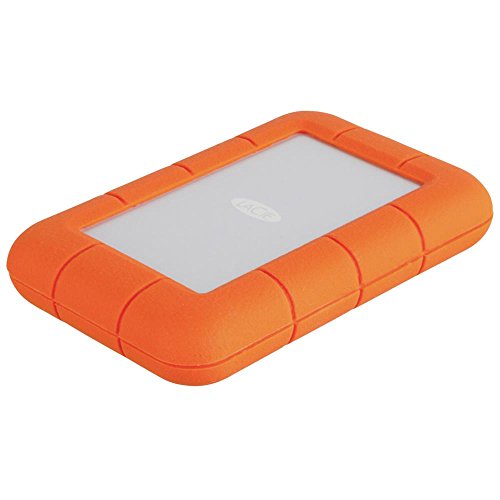
LaCie Rugged 1TB Thunderbolt Portable Hard Drive
Best for: Thunderbolt users needing RAID flexibility
- Storage Capacity
- 1TB
- Hardware Interface
- Thunderbolt, USB 3.0
- Dimensions
- 5.5 × 3.5 × 1 inches
- Weight
- 12 ounces
View on Amazon: LaCie Rugged 1TB Thunderbolt Portable Hard Drive Affiliate link
This LaCie drive offers 1TB of storage with dual Thunderbolt and USB 3.0 interfaces. It reaches speeds up to 240 MB/s and supports hardware RAID 0 or 1. The rugged design handles drops from 5 feet and resists dust and water. It is bus-powered via Thunderbolt, making it suitable for mobile workflows. You get a durable, high-speed option for Mac or PC users needing reliable data protection.
Pros
- Thunderbolt and USB 3.0 connectivity
- Speeds up to 240 MB/s
- Hardware RAID 0/1 flexibility
- Shock, dust, and water resistant
- Bus-powered via Thunderbolt
Cons
- Heavier at 12 ounces
- Larger footprint at 5.5 x 3.5 x 1 inches
- Requires Thunderbolt port for bus power
Good fit if
- You need Thunderbolt speeds for large files
- You require hardware RAID configurations
- You work in rugged outdoor environments
Skip if
- You only have USB ports available
- You prefer a lighter, more compact drive
- You do not need RAID functionality
Verdict: LaCie Rugged 1TB Thunderbolt Portable is ideal for professionals who need Thunderbolt speeds and RAID flexibility. It suits users who prioritize durability and bus-powered convenience over minimal weight.
Specifications side by side
| Spec | LaCie Rugged Mini 1TB Portable Hard Drive | LaCie Rugged 1TB Thunderbolt Portable Hard Drive |
|---|---|---|
| Storage Capacity | 1TB | 1TB |
| Form Factor | 2.5" | not stated |
| Hardware Interface | USB 3.0 | Thunderbolt, USB 3.0 |
| Compatibility | PC, Mac | not stated |
| Size | 1TB | 1TB |
| Dimensions | 5.3 × 3.39 × 0.74 inches | 5.5 × 3.5 × 1 inches |
| Weight | 9.88 ounces | 12 ounces |
| Color | Orange | Orange |
| Model | LAC301558 | LAC9000488 |
Frequently asked questions
Which LaCie drive is better for Mac users?
The LaCie Rugged Mini 1TB Portable is explicitly listed as compatible with both PC and Mac systems. This makes it a versatile choice for mixed-device households. The Thunderbolt model also supports these platforms, but the Mini’s simpler USB 3.0 interface often provides plug-and-play ease without needing extra drivers for basic connectivity.
Is the LaCie Rugged Mini smaller than the Thunderbolt version?
Yes, the LaCie Rugged Mini 1TB Portable is more compact. It measures 3.39 inches in width and 5.3 inches in length. The Thunderbolt model is slightly larger, measuring 3.5 inches wide and 5.5 inches long. The Mini also has a lower profile at 0.74 inches tall compared to the Thunderbolt drive’s 1-inch height.
Does the LaCie Rugged Mini support Thunderbolt connections?
No, the LaCie Rugged Mini 1TB Portable uses a USB 3.0 interface. It does not feature Thunderbolt connectivity. If you require Thunderbolt speeds, you must choose the LaCie Rugged 1TB Thunderbolt Portable, which includes both USB 3.0 and Thunderbolt ports. The Mini relies solely on standard USB connections for data transfer.
How much does the LaCie Rugged Mini weigh?
The LaCie Rugged Mini 1TB Portable weighs 9.88 ounces. This makes it lighter than the LaCie Rugged 1TB Thunderbolt Portable, which weighs 12 ounces. The weight difference is noticeable when carrying the drive in a bag. The Mini’s lighter build supports its design as a highly portable storage solution for travel.
Can I use the LaCie Rugged Mini with Windows?
Yes, the LaCie Rugged Mini 1TB Portable is compatible with PC and Mac systems. It works with Windows operating systems out of the box. This broad compatibility ensures you can connect it to most modern computers using the included USB cable without needing specialized hardware or software adjustments for basic file storage.
What is the main difference in connectivity between these two drives?
The primary difference is the interface technology. The LaCie Rugged Mini 1TB Portable uses only USB 3.0. The LaCie Rugged 1TB Thunderbolt Portable offers both USB 3.0 and Thunderbolt ports. Thunderbolt provides higher potential bandwidth for professionals who transfer large files frequently, while USB 3.0 is sufficient for general backup and media storage tasks.