MINISFORUM Desktop NAS N5 Pro Review: Who It Fits and Who Should Skip It
As an Amazon Associate we earn from qualifying purchases. Links on this page are affiliate links.
This minisforum desktop NAS n5 review highlights a compact storage solution built for high performance. The MINISFORUM N5 Pro features an AMD Ryzen AI 9 HX PRO 370 processor with 12 cores and 24 threads. It supports up to 188TB of storage across five drive bays. The unit includes dual network ports for link aggregation and an expansion slot for added flexibility. This setup targets users needing robust local data management without sacrificing processing power.
What stands out
- AMD Ryzen AI 9 HX PRO 370 processor for multi-user access
- 10Gbps and 5Gbps LAN ports with link aggregation support
- 5-bay configuration supporting up to 188TB total capacity
- PCIe 4.0 expansion slot for SSD caching or GPU upgrades
- Slide-out motherboard design for easy RAM and SSD maintenance
Who it fits
Good fit for
You should consider this NAS if you manage large media libraries or require fast local backups. The powerful processor handles simultaneous file retrieval and video transcoding efficiently. Users who value expandability will appreciate the PCIe slot and modular design. It suits those who want centralized storage with remote access capabilities and AI-driven photo organization. If you need high throughput and flexible storage options, this unit meets those needs.
Who should skip it
You should look elsewhere if you prefer a plug-and-play appliance with minimal configuration. This system requires manual setup for RAID and network settings. Buyers seeking included hard drives will be disappointed, as storage is sold separately. Those who want a pre-installed, fully managed cloud service without technical adjustments may find the learning curve steep. If you dislike managing system updates or hardware upgrades, this desktop NAS may not suit your workflow.
Verdict: The MINISFORUM N5 Pro offers strong processing power and flexible storage for tech-savvy users. It is a solid choice for those who prioritize performance and expandability over simplicity.
Key specs explained for N5 Pro
Processor: AMD Ryzen AI 9 HX PRO 370
This twelve-core processor handles heavy data tasks without slowing down. You can manage multiple users and large files simultaneously. The AI capabilities help organize photos and videos quickly. This chip ensures smooth performance for media streaming and file backups, making it suitable for users with demanding storage needs.
Storage Capacity: Up to 188TB
The drive bays support a massive amount of data across five slots. You can store thousands of high-resolution photos and 4K movies. This capacity eliminates the need for external drives or cloud subscriptions. It is ideal for families or professionals who need a central, local repository for large media libraries.
Network: 10GbE and 5GbE Ports
Dual Ethernet ports allow for faster data transfer than standard gigabit connections. You can combine them for link aggregation to boost speed. This setup reduces wait times when moving large files across your network. It is essential for users who frequently edit video or transfer large datasets between devices.
RAM: DDR5 Slots
The system uses modern DDR5 memory for efficient data processing. You can upgrade the RAM to handle more complex tasks or virtual machines. This flexibility allows you to tailor the NAS to your specific workload. It ensures the system remains responsive as you add more drives or services over time.
Interfaces: HDMI and USB4
Direct display output allows you to connect the NAS to a monitor. You can view media libraries or manage files without a separate computer. USB4 provides high-speed connectivity for peripherals and external storage. This versatility makes the device useful as both a storage server and a media center.
Design and build overview
According to the listing, the MINISFORUM N5 Pro features a compact black frame measuring 199 by 199 by 252 millimeters. This small footprint allows you to place the unit on a desk or shelf without consuming excessive space. The design holds five drives within a four-bay physical space, delivering twenty-five percent more storage capacity than standard layouts. This efficient use of volume is ideal for users with limited desk real estate who still need significant storage.
The chassis incorporates a slide-out motherboard design, which simplifies maintenance and upgrades. You can access RAM and SSD slots without dismantling the entire unit. The modular approach supports standard RAM modules, avoiding onboard limitations for flexible hardware changes. This layout means you can adjust resources as your data needs grow, rather than replacing the whole system.
Cooling is managed by dual 92-millimeter rear fans and a dedicated CPU fan. These components actively cool the HDD bays to ensure stable operation. The listing notes this setup maintains cool temperatures during heavy use. The exterior finish is a simple black color. There are no visible displays or complex control panels mentioned. You interact with the device primarily through software and network connections, keeping the physical interface minimal and uncluttered.
Setup and everyday use
Setup begins with installing your own storage drives, as the unit ships without them. The chassis holds five drives, combining three M.2 slots and two U.2 interfaces. Note that the built-in 128GB system disk occupies one M.2 slot by default. You can remove it to free all slots, or use a USB flash drive for a third-party operating system. This choice determines whether you keep the native MinisCloud OS or switch to custom software. The slide-out motherboard design allows you to access RAM and SSD upgrades without complex disassembly.
Daily operation relies on the MinisCloud system for file management. You can drag and drop files for automatic backup. The interface supports remote access, letting you retrieve data from anywhere. Permission controls allow you to create separate spaces for family members. Parental filters help manage content access. The system handles AI-driven photo organization, including face recognition and scene classification. It also supports lossless audio formats and video transcoding for playback.
Connectivity is handled by a 10Gbps port and a 5Gbps port. You can combine these for link aggregation to reach 15Gbps transfer speeds. HDMI output supports 8K display connections. The PCIe 4.0 slot lets you add network acceleration cards or SSD caching modules. This modular approach means you can boost performance without replacing the entire unit. The dual fans and dedicated CPU cooler keep the hardware stable during continuous use.
Before you buy this NAS
You will need to purchase your own hard drives, as the listing confirms they are not included. The system supports up to 188TB across five bays, so you must verify your preferred drive sizes fit the M.2 and U.2 interfaces. Since the built-in 128GB system disk occupies one M.2 slot, you should check if you need to uninstall it for extra storage. You also need to ensure your network router supports 10GbE or 5GbE connections to utilize the dual-port link aggregation. This unit sits apart from traditional NAS drives because it functions as a full desktop computer with expansion slots. You must consider power consumption and cooling, as it uses dual fans and a dedicated CPU cooler. It suits users who want AI photo management and high-speed media transcoding alongside centralized storage.
Check before you buy
- Buy your own storage drives separately
- Check router compatibility with 10GbE ports
- Verify space for M.2 and U.2 drives
- Consider uninstalling the 128GB system disk
The product at a glance
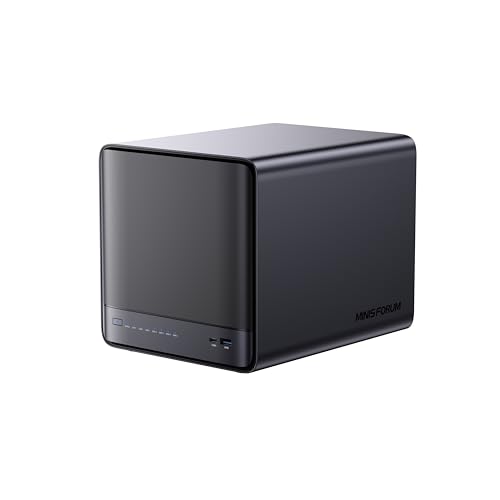
MINISFORUM N5 Pro 5-Bay Desktop NAS
Best for: high-performance desktop NAS with 10GbE
- Drive Bays
- 5-Bay
- Network Connectivity
- 1 x 10GbE, 1 x 5GbE
- Processor
- AMD Ryzen AI 9 HX PRO 370
- M.2 NVMe Slots
- 3 slots
- Included Storage
- 128GB SSD
- Form Factor
- Desktop
View on Amazon: MINISFORUM N5 Pro 5-Bay Desktop NAS Affiliate link
The MINISFORUM N5 Pro is a desktop NAS powered by an AMD Ryzen AI 9 HX PRO 370 processor. It features 12 cores and 24 threads for high-speed decoding and multi-user access. The chassis holds five drives with a total capacity up to 188TB. It includes a 10GbE port and a 5GbE port for link aggregation. The system comes with a built-in 128GB SSD running the MinisCloud OS.
Pros
- AMD Ryzen AI 9 HX PRO 370 processor with 12 cores and 24 threads
- Supports up to 188TB of storage across five drive bays
- 10GbE and 5GbE network ports with link aggregation support
- Slide-out motherboard design for easy RAM and SSD upgrades
- Built-in 128GB SSD for the MinisCloud operating system
Cons
- The built-in 128GB system SSD occupies one of the three M.2 slots
- Storage drives are not included and must be purchased separately
- Using third-party OS requires uninstalling the built-in system disk
Good fit if
- You need high-performance local AI features for photo and video management
- You want a compact desktop unit that holds five drives
- You require 10GbE networking for faster data transfers
Skip if
- You plan to use all three M.2 slots for storage without modifying the system
- You prefer a pre-configured unit with drives already installed
- You want to use a third-party NAS operating system without removing the native one
Verdict: The MINISFORUM N5 Pro Desktop NAS suits users who need a powerful Ryzen AI processor and 10GbE connectivity for media and data management. It is ideal for those willing to manage the system disk trade-off for maximum storage flexibility.
Specifications side by side
| Spec | MINISFORUM N5 Pro 5-Bay Desktop NAS |
|---|---|
| Drive Bays | 5-Bay |
| Network Connectivity | 1 x 10GbE, 1 x 5GbE |
| Processor | AMD Ryzen AI 9 HX PRO 370 |
| M.2 NVMe Slots | 3 slots |
| Included Storage | 128GB SSD |
| Form Factor | Desktop |
| Hardware Interface | M.2 NVMe, HDMI |
| Size | N5 Pro(0+128G) |
| Color | Black |
| Model | N5-Pro-P370(0+128) |
Frequently asked questions
Does the MINISFORUM N5 Pro include storage drives?
No, the unit ships without storage drives. You must purchase your own drives separately. The chassis supports five drives total, combining three M.2 slots and two U.2 interfaces. This allows you to build a storage array that fits your specific capacity needs.
What processor does the N5 Pro use?
It uses an AMD Ryzen AI 9 HX PRO 370 processor. This twelve-core chip with twenty-four threads handles heavy data tasks efficiently. The AI capabilities help organize photos and videos quickly. It ensures smooth performance for multiple users and large files simultaneously.
How much storage capacity can the N5 Pro hold?
The system supports up to 188TB of storage across its five drive bays. You must verify that your preferred drive sizes fit the specific M.2 and U.2 interfaces. This high capacity makes it suitable for extensive media libraries and large data management projects.
What network connectivity options are available?
The device features both 5GbE and 10GbE network connectivity. These ports allow for fast data transfer speeds between your NAS and local network devices. The 10GbE option is particularly useful for high-bandwidth tasks like streaming media or backing up large datasets.
Is the system disk included in the package?
Yes, it includes a built-in 128GB system disk. This disk occupies one M.2 slot by default. You can remove it to free up that slot for additional storage if needed. This trade-off offers maximum storage flexibility for your specific configuration.
What is the form factor of this NAS?
The MINISFORUM N5 Pro is a desktop unit. It features a compact black frame measuring 199 by 199 by 252 millimeters. This small footprint allows you to place the unit on a desk or shelf without consuming excessive space in your home office.
Who is this NAS best suited for?
It suits users who need a powerful desktop NAS with 10GbE connectivity. It is ideal for those managing heavy media and data tasks. You should consider this if you are willing to manage the system disk trade-off for maximum storage flexibility and performance.