QNAP 2-Bay Quad-Core Desktop NAS Review: Specs, Pros and Cons
As an Amazon Associate we earn from qualifying purchases. Links on this page are affiliate links.
In this qnap 2 bay quad core desktop NAS review, we look at the QNAP TS-233-US. This is a compact storage device designed for home users who need reliable file management. It is defined by its ARM Cortex-A55 quad-core processor running at 2.0GHz and 2 GB of DDR4 RAM. These specifications allow it to handle basic tasks like storing photos and streaming media without strain. The unit sits on your desk and connects directly to your network. It offers a straightforward way to centralize your digital life, making your files accessible from multiple devices.
What stands out
- ARM Cortex-A55 quad-core 2.0GHz processor for steady performance
- 2 GB DDR4 RAM supports smooth multitasking
- Storage snapshot technology helps protect data from ransomware
- Built-in support for Windows NetBak Replicator and Mac Time Machine backups
Who it fits
Good fit for
This NAS suits small families or individuals who need a simple, reliable place to store personal photos, music, and videos. It is ideal for users who want automatic backups for their Windows and Mac computers without complex setup. If you primarily stream media to a single TV or a few devices, the quad-core processor and 2 GB RAM provide sufficient power. It is also a good choice for those who want basic ransomware protection through snapshots rather than advanced enterprise features.
Who should skip it
You should look elsewhere if you require high-performance computing or heavy multitasking. The 2 GB RAM limits the number of simultaneous apps or services you can run. If you need more storage capacity, consider the 4-bay variation of this model. Users who require advanced networking features, such as 10GbE connectivity, will find this device lacking. It is also not suitable for heavy virtualization workloads or running multiple Docker containers efficiently.
Verdict: The QNAP TS-233-US is a capable entry-level NAS for basic home storage needs. Its quad-core processor and 2 GB RAM make it a solid choice for simple file backup and media streaming.
Key specs explained for QNAP TS-233-US
ARM Cortex-A55 quad-core 2.0GHz processor
This processor handles multiple tasks simultaneously without slowing down. You can stream media and manage files at the same time. The quad-core design ensures smooth operation for home use. Compare this to single-core models if you plan heavy multitasking. It provides the computing power needed for efficient data management in a compact desktop unit.
2 GB DDR4 RAM
This memory capacity supports the operating system and active applications. It allows for quicker access to frequently used data. While sufficient for basic home storage, it may limit complex virtualization tasks. When shopping for NAS drives, consider this limit if you run many services. It is adequate for standard file sharing and media streaming needs.
2 Bay
This form factor holds two internal hard drives. You can install drives for redundancy or combined storage space. It offers a balance between capacity and physical footprint. Compare this to larger units if you need more drive slots. It is ideal for users who want expandable storage without the bulk of a four-bay system.
Desktop
This design sits on a desk or shelf rather than mounting in a rack. It is built for quiet operation in living spaces. The compact size fits easily into home environments. When choosing a NAS, consider this placement option for accessibility. It is suitable for users who prioritize ease of access over server room integration.
Design and build overview
The QNAP TS-233-US is a 2-Bay Desktop NAS unit. This form factor places it on a flat surface rather than in a rack. The listing identifies it as a compact storage device. This size suits home users who need reliable file management without taking up much space. You can place it near your media center or in a home office. The 2 Bay configuration allows you to install two hard drives. This setup supports basic redundancy or simple expansion for personal data. It is designed for budget-friendly home use.
The device features a ARM Cortex-A55 quad-core 2.0GHz processor. This chip is integrated into the main board. The system includes 2 GB DDR4 RAM. These components are not visible externally. However, they determine how the unit handles tasks. The quad-core design helps manage multiple requests at once. You can stream media while organizing files. The listing states it mitigates ransomware threats via storage snapshot technology. This is a software feature controlled through the interface. The build focuses on functionality for personal or family photos, music, and videos. It supports backup for Windows and Mac computers. The design prioritizes essential storage and backup capabilities for everyday home needs.
Setup and everyday use guide
Setting up the QNAP TS-233-US begins with installing two hard drives into its desktop chassis. The unit is designed for home environments, making it easy to place on a desk or shelf. You connect it to your network to access storage from multiple devices. The ARM Cortex-A55 quad-core processor at 2.0GHz handles background tasks while you work. This means you can manage files without noticeable lag. The 2 GB of DDR4 RAM supports these operations smoothly.
For daily use, this NAS serves as a central hub for your family’s digital life. You can store photos, music, and videos in one place. The system allows you to organize these files efficiently. QNAP includes NetBak Replicator software for Windows computers. This tool simplifies the backup process for your PC data. Mac users can utilize Time Machine for automatic backups. This ensures your important documents are protected.
Security is also a key part of everyday use. The device features storage snapshot technology. This feature helps mitigate ransomware threats by creating point-in-time copies of your data. You can restore files if they are corrupted or encrypted by malicious software. The 2-bay design limits expansion but keeps the footprint small. It is ideal for users who need reliable, budget-friendly storage without complex server management. The interface is straightforward, allowing you to focus on accessing your files rather than troubleshooting.
Before You Buy This NAS
You should verify that your existing hard drives match the supported sizes for this 2-bay chassis. The unit requires two drives, so ensure you have compatible 3.5-inch or 2.5-inch models ready for installation. Check your network infrastructure to confirm your router supports the speeds this ARM Cortex-A55 processor can deliver. You will need to install QNAP’s NetBak Replicator for Windows backups or use Time Machine for Macs. Regularly update the firmware to maintain security and access new features like storage snapshot technology. This model sits at the entry level of the 1 options available. It suits users who prioritize basic file storage and media streaming over heavy virtualization tasks. If you need more drive capacity, consider the 4-bay variation listed alongside this desktop unit. Keep the device in a well-ventilated area to prevent thermal throttling during extended media playback sessions.
Check before you buy
- Confirm your hard drives fit the 2-bay chassis size.
- Ensure your network supports the NAS connection speeds.
- Check compatibility with your Windows or Mac computers.
- Verify firmware update availability for security features.
The product at a glance
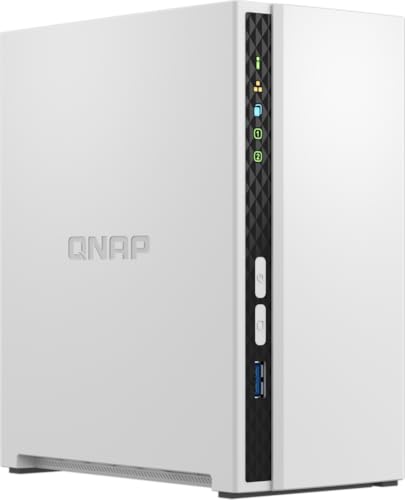
QNAP 2-Bay Quad-Core Desktop NAS
Best for: home file storage and media streaming
- Drive Bays
- 2 Bay
- Processor
- ARM Cortex-A55 quad-core 2.0GHz
- RAM Capacity
- 2 GB DDR4
- Form Factor
- Desktop
View on Amazon: QNAP 2-Bay Quad-Core Desktop NAS Affiliate link
The QNAP TS-233 is a budget-friendly 2-bay desktop NAS designed for home file storage and multimedia streaming. It features an ARM Cortex-A55 quad-core processor running at 2.0GHz and 2 GB of DDR4 RAM. This setup allows you to centrally store family photos, music, and videos. The unit includes storage snapshot technology to help mitigate ransomware threats and supports backup for Windows and Mac computers.
Pros
- ARM Cortex-A55 quad-core 2.0GHz processor
- 2 GB DDR4 RAM for system performance
- 2-bay desktop form factor for easy placement
- Storage snapshot technology for ransomware protection
- Supports Time Machine and NetBak Replicator backups
Cons
- Only 2 GB of RAM limits heavy multitasking
- No mention of built-in Ethernet speed in specs
- Limited to basic home storage and streaming tasks
Good fit if
- You need a simple desktop NAS for family files
- You want ransomware protection via storage snapshots
- You back up Windows or Mac computers regularly
Skip if
- You require high-performance video editing workflows
- You need more than two drive bays
- You require advanced enterprise-grade RAM capacity
Verdict: QNAP TS-233 2-Bay Desktop NAS suits home users who need reliable file storage and basic backup features without complex setup.
Specifications side by side
| Spec | QNAP 2-Bay Quad-Core Desktop NAS |
|---|---|
| Drive Bays | 2 Bay |
| Processor | ARM Cortex-A55 quad-core 2.0GHz |
| RAM Capacity | 2 GB DDR4 |
| Form Factor | Desktop |
| Number of Bays | 2-Bay |
| Size | 2 Bay |
Frequently asked questions
Is the QNAP TS-233 suitable for home media streaming?
Yes, this NAS is designed for home file storage and media streaming. The ARM Cortex-A55 quad-core processor running at 2.0GHz handles multiple tasks simultaneously. This allows you to stream media and manage files at the same time without slowing down the system. The compact desktop form factor makes it easy to place near your entertainment center.
What type of processor does this QNAP NAS use?
It features an ARM Cortex-A55 quad-core processor clocked at 2.0GHz. This architecture is efficient for home use and handles multiple tasks simultaneously. You can stream media and manage files at the same time. The quad-core design ensures smooth operation for home environments, distinguishing it from slower single-core models that might struggle with concurrent duties.
Does this device support rack mounting?
No, this unit is a desktop NAS. It has a desktop form factor, which means it is designed to sit on a flat surface. You can place it on a desk or shelf. It is not built for rack installation. This compact size suits home users who need reliable file storage without requiring specialized server rack hardware in their setup.
How many hard drives can I install in this NAS?
You can install two hard drives in this chassis. It is a 2-bay NAS, so it requires two compatible 3.5-inch or 2.5-inch models. You should verify that your existing drives match the supported sizes before installation. This capacity is ideal for home file storage and provides basic redundancy options if you configure the drives in a RAID array.
Is the QNAP TS-233 easy to set up for beginners?
Yes, it is designed for home users who need reliable file management without complex setup. The unit is compact and easy to place on a desk. You simply install two hard drives and connect it to your network. This straightforward approach makes it accessible for beginners who want basic backup features and file access without deep technical knowledge.
What is the main use case for this QNAP model?
This NAS is best for home file storage and media streaming. It suits users who need reliable file management and basic backup features. The quad-core processor ensures smooth operation for these everyday tasks. You can use it to centralize your digital files and share them across your home network with ease, making it a practical choice for personal data management.
Can I run multiple applications on this NAS simultaneously?
Yes, the ARM Cortex-A55 quad-core processor handles multiple tasks simultaneously. You can stream media and manage files at the same time. The quad-core design ensures smooth operation for home use. This capability allows you to run various applications concurrently without significant performance drops, making it a versatile tool for managing your home digital library and backup routines efficiently.