QNAP 4-Bay Rackmount NAS Dual Review: Who It Fits and Who Should Skip It
As an Amazon Associate we earn from qualifying purchases. Links on this page are affiliate links.
This qnap 4 bay rackmount NAS dual review focuses on the QNAP TS-432PXU-2G. It is a 4-bay rackmount NAS designed for high-speed data transfer. The defining specs are its dual 10GbE SFP+ ports and 2.5GbE connectivity. You get a quad-core 1.7GHz processor and 2GB of DDR4 RAM. The unit ships diskless, so you must install your own drives. It fits into standard rack spaces for professional environments.
What stands out
- Dual 10GbE SFP+ ports for high-bandwidth connections
- Two 2.5 Gigabit Ethernet ports for versatile networking
- AnnapurnaLabs Alpine AL324 quad-core 1.7GHz processor
- 4-bay capacity for 3.5" SATA drives
- Expandable RAM up to 16GB
Who it fits
Good fit for
This NAS suits users who need fast internal network speeds. The dual 10GbE ports are ideal for video editors or small studios moving large files. Professionals who already have 10GbE switches will benefit from the dedicated high-speed ports. It also works well for those who want to mix 10GbE and 2.5GbE connections. If you need a rack-mountable solution with serious throughput, this model fits your setup.
Who should skip it
You should look elsewhere if you need a plug-and-play experience. This unit is diskless, meaning you must buy and install hard drives separately. If you lack a 10GbE switch, the dual SFP+ ports offer limited value. The base 2GB RAM may feel tight for heavy virtualization tasks without upgrading. Users who prefer desktop form factors will find the rackmount design too bulky for their space.
Verdict: The QNAP TS-432PXU-2G delivers serious networking power for rack-mounted setups. It is best for users who already have the necessary high-speed infrastructure.
Key specs explained
Processor: AnnapurnaLabs Alpine AL324
This quad-core ARM processor runs at 1.7GHz. It handles background tasks like file indexing and RAID synchronization without slowing down your main data transfers. This architecture is efficient for home labs or small offices. You get steady performance for multiple users accessing files simultaneously. Compare this to higher-end models with faster clocks if you plan to run heavy virtual machines or complex container applications.
RAM Capacity: 2GB DDR4
The device comes with 2GB of DDR4 memory, which is expandable up to 16GB. This base amount supports basic file serving and light multitasking. If you plan to use Docker containers or virtualization, you will likely need to upgrade the RAM later. More memory allows the system to cache more data, speeding up access for many concurrent users. Check the upgrade path before buying if your workflow is memory-intensive.
Network Connectivity: 2 x 2.5GbE, 2 x 10GbE SFP+
You get two 2.5 Gigabit Ethernet ports and two 10 Gigabit SFP+ ports. The 10GbE ports allow for extremely fast data transfers between this NAS and compatible computers or switches. This is ideal for video editors or large database backups. The 2.5GbE ports offer a modern upgrade over standard 1GbE. Ensure your network hardware supports these speeds to benefit from the high bandwidth capabilities of this rackmount unit.
Drive Bays: 4-Bay
This unit holds four 3.5-inch SATA hard drives. This capacity allows for flexible RAID configurations, such as RAID 5 or RAID 6, balancing storage space with data redundancy. It is suitable for users who need substantial storage without moving to larger 8-bay or 12-bay enclosures. You can mix drive sizes to some extent, but using identical drives is recommended for optimal performance. This form factor fits standard 19-inch racks.
Included Storage: Diskless
The NAS ships without any hard drives installed. You must purchase drives separately. This gives you the freedom to choose the exact capacity and type of drives you need, such as NAS-specific models like IronWolf or SkyHawk. It keeps the initial hardware cost lower, but you must factor in the price of four drives. Ensure you select drives compatible with the SATA interface supported by this chassis.
Design and Build Overview
The QNAP TS-432PXU-2G is built as a 4-bay rackmount unit. This form factor means it is designed to slide into standard server racks rather than sit on a desk. According to the listing, the chassis is constructed to fit into equipment racks, which helps keep your workspace tidy and organized. This design choice is practical for users who have dedicated server rooms or closet spaces. It allows you to stack multiple units vertically while saving valuable floor or desk space.
The unit includes four 3.5-inch drive bays. These bays support SATA 6Gb/s and 3Gb/s drives. The listing notes that the device is diskless, so you must purchase your storage separately. This gives you the freedom to choose drive capacities that match your specific data needs. You can mix and match drives for different performance or capacity tiers.
Front controls are minimal, focusing on essential functions. The unit features dual 10GbE SFP+ ports and two 2.5 Gigabit Ethernet ports. These network interfaces are integrated into the rear panel, keeping the front clean. This layout simplifies cable management for your network setup. The 2GB of DDR4 RAM is installed internally. You can expand this to 16GB if your workload requires more memory for caching or virtualization. The overall build prioritizes connectivity and expandability over flashy aesthetics.
Setup and Daily Network Use
Setting up this NAS begins with mounting the chassis into your rack. The unit is designed for standard server racks, so you need appropriate rails or mounting hardware. Once installed, you connect your network cables. The device includes two 2.5 Gigabit Ethernet ports and two 10 Gigabit Ethernet SFP+ ports. You can plug standard Cat5e or Cat6 cables into the 2.5GbE ports for general network access. If you have a 10GbE switch, you can use the SFP+ ports for high-speed data transfers. This dual connectivity allows you to separate management traffic from heavy file transfers.
The system runs on an AnnapurnaLabs Alpine AL324 quad-core processor. This chip handles the operating system and background tasks like RAID synchronization. You get 2GB of DDR4 RAM by default. The listing notes that this can be expanded up to 16GB. For storage, you install four 3.5-inch SATA drives. The unit is diskless, so you must provide your own hard drives. This setup supports various RAID levels for data redundancy.
In daily use, the 10GbE ports allow fast access to large files. This is useful for video editing or database work. The 2.5GbE ports provide reliable connectivity for everyday office tasks. The rackmount design keeps the device secure and organized in your server closet. You manage the system through the QNAP web interface. The quad-core processor ensures smooth operation even with multiple users accessing files simultaneously.
Before You Buy This NAS
Before you buy, verify your rack space. This unit requires standard server rails for installation. You must purchase hard drives separately. The listing confirms it is diskless. You need to source compatible SATA drives for the four bays. Check your network infrastructure carefully. The dual 10GbE SFP+ ports require compatible switches and fiber or DAC cables. Standard Ethernet ports may not suffice for high-speed transfers. Consider upgrading your RAM later. The base 2GB is modest. You can expand to 16GB for heavier workloads. This model suits users with existing rack infrastructure. It fits alongside other rackmount options in our 1 product guide. If you lack rack space, consider desktop alternatives. Ensure your environment supports the heat output. Proper ventilation is key for longevity. This setup demands planning. It is not a plug-and-play desktop solution. You need the right cabling and mounting hardware. Check compatibility with your current network switches. This ensures smooth integration into your existing setup.
Check before you buy
- Verify rack space and purchase mounting rails
- Source four compatible SATA hard drives separately
- Ensure you have 10GbE SFP+ compatible switches
- Plan for future RAM upgrades to 16GB
The product at a glance
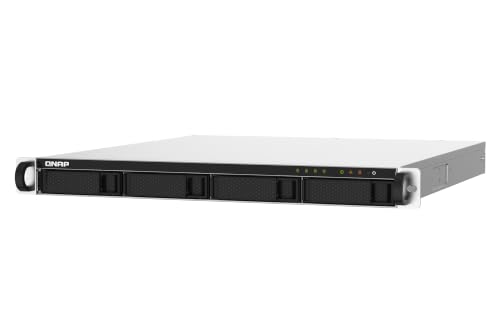
QNAP 4-Bay Rackmount NAS with Dual 10GbE SFP+
Best for: Users needing 10GbE connectivity in a rackmount setup
- Drive Bays
- 4 Bay
- Network Connectivity
- 2 x 10GbE SFP+, 2 x 2.5GbE
- Processor
- AnnapurnaLabs Alpine AL324
- RAM Capacity
- 2GB UDIMM DDR4
- Included Storage
- Diskless
- Form Factor
- Rackmount
View on Amazon: QNAP 4-Bay Rackmount NAS with Dual 10GbE SFP+ Affiliate link
This QNAP TS-432PXU-2G is a 4-bay rackmount NAS designed for network storage. It uses an AnnapurnaLabs Alpine AL324 quad-core 1.7GHz processor and comes with 2GB of DDR4 RAM, which can expand to 16GB. The unit offers versatile connectivity with two 2.5 Gigabit Ethernet ports and two 10 Gigabit SFP+ ports. It is diskless, so you must supply your own drives. This setup suits users needing high-speed network options in a rackmount form factor.
Pros
- Includes two 10 Gigabit SFP+ Ethernet ports for high-speed connections
- Features two 2.5 Gigabit Ethernet ports for flexible networking
- Expandable RAM capacity up to 16GB
- Quad-core 1.7GHz processor handles data tasks efficiently
Cons
- Sold diskless, requiring separate purchase of hard drives
- Base RAM is only 2GB, which may limit heavy multitasking
- Rackmount form factor requires specific mounting infrastructure
Good fit if
- You need 10GbE connectivity for fast network transfers
- You have a server rack for installation
- You want to upgrade RAM beyond the base 2GB
Skip if
- You prefer a desktop NAS that sits on a desk
- You want a pre-loaded unit with drives included
- You do not need 10 Gigabit Ethernet speeds
Verdict: QNAP 4-Bay Rackmount NAS provides robust networking options with dual 10GbE ports and expandable memory. It fits users who require rackmount infrastructure and high-speed data access for their storage needs.
Specifications side by side
| Spec | QNAP 4-Bay Rackmount NAS with Dual 10GbE SFP+ |
|---|---|
| Drive Bays | 4 Bay |
| Network Connectivity | 2 x 10GbE SFP+, 2 x 2.5GbE |
| Processor | AnnapurnaLabs Alpine AL324 |
| RAM Capacity | 2GB UDIMM DDR4 |
| Included Storage | Diskless |
| Form Factor | Rackmount |
| Number of Bays | 4-Bay |
| Size | 4 Bay (Rackmount) |
Frequently asked questions
Does this NAS support standard server rack mounting?
Yes, the QNAP 4-Bay Rackmount NAS is designed specifically for rack installation. It features a rackmount form factor that allows it to slide into standard server racks. This design helps keep your storage infrastructure organized and secure within a dedicated equipment closet or server room environment.
What network ports are included on this device?
This unit provides dual 10GbE SFP+ ports for high-speed connectivity. It also includes 2.5GbE Ethernet ports for standard network connections. These options allow you to connect to high-performance switches for fast data transfers or use existing 2.5GbE infrastructure for general access.
Is this NAS suitable for users needing high-speed data access?
Yes, it fits users who require high-speed data access. The dual 10GbE SFP+ ports enable rapid data transfer rates suitable for demanding workloads. This makes it ideal for environments where quick retrieval of large files and robust networking are primary requirements for storage operations.
How many hard drive bays does this model have?
This model features four drive bays. You can install up to four SATA hard drives to expand your storage capacity. The 4-bay configuration provides flexibility for RAID setups, allowing you to balance performance and redundancy according to your specific data protection needs.
Can I expand the memory on this NAS?
Yes, the device offers expandable memory options. This feature allows you to add more RAM to handle heavier workloads or run additional services. Expanding memory can improve performance when managing multiple users or running virtual machines alongside your storage functions.
Who is the primary target audience for this NAS?
It is best for users needing 10GbE connectivity in a rackmount setup. This includes small offices or home labs that require robust networking options. If you need a dedicated rackmount infrastructure with high-speed data access, this NAS aligns well with those specific technical requirements.