QNAP 4-Bay USB-C Hardware RAID vs QNAP 2-Bay USB-C Direct Attached: Spec Comparison
As an Amazon Associate we earn from qualifying purchases. Links on this page are affiliate links.
You are comparing the qnap 4 bay USB c hardware raid vs 2 bay USB c direct attached models. Both units offer direct-attached storage via USB Type-C for Windows, macOS, and Linux. They both support hardware RAID and lockable drive bays. The main difference lies in capacity and RAID levels. The four-bay model supports RAID 5 for better redundancy, while the two-bay unit is limited to RAID 0 and 1.
Key differences
| Aspect | QNAP 4-Bay USB-C Hardware RAID Enclosure | QNAP 2-Bay USB-C Direct Attached Storage |
|---|---|---|
| Number of Bays | 4-Bay | 2-Bay |
| RAID Support | RAID 0, 1, 5, JBOD | RAID 0, 1, JBOD |
| Drive Compatibility | 3.5-inch SATA 3Gb/s | 2.5/3.5 inch SATA |
| Dimensions (L x W x H) | 8.62 x 6.31 x 6.63 inches | 8.86 x 4.02 x 6.63 inches |
| Weight | 4.08 pounds | 2.65 pounds |
Which one should you choose?
Choose QNAP 4-Bay USB-C Hardware RAID Enclosure if
- You need more storage capacity with four drive bays.
- You want RAID 5 support for improved data redundancy.
- You are using 3.5-inch hard drives exclusively.
Choose QNAP 2-Bay USB-C Direct Attached Storage if
- You prefer a smaller, lighter device for your desk.
- You only need two drive bays for basic backup.
- You want to use either 2.5-inch or 3.5-inch drives.
Verdict: Choose the four-bay model if you need higher capacity and RAID 5 redundancy for larger data sets. The two-bay option is better for users who prioritize a compact footprint and simpler RAID configurations. Both serve well as direct-attached storage for expanding QNAP NAS capacity.
QNAP TR-004 vs TR-002 Specs
Number of drive bays
The QNAP TR-004 offers four drive bays, while the QNAP TR-002 provides two. This capacity difference is significant for your storage planning. The TR-004 accepts four 3.5-inch SATA drives, giving you more space for large media libraries or extensive backups. The TR-002 supports up to two 2.5 or 3.5-inch SATA drives. If you need maximum local storage expansion for your NAS, the four-bay enclosure is the clear choice. The two-bay unit is better for smaller capacity needs.
RAID capabilities
Both units feature hardware RAID for data protection and performance. The QNAP TR-004 supports RAID 0, 1, 5, JBOD, and individual disk modes. RAID 5 allows for striped data with parity across multiple drives, offering a balance of speed and redundancy. The QNAP TR-002 supports RAID 0, 1, JBOD, and individual disks. It lacks RAID 5 support. If you plan to use more than two drives for fault tolerance, the TR-004 is necessary. The TR-002 is sufficient for simple mirroring or basic expansion.
Physical dimensions and weight
Size and weight matter for your desk or rack setup. The QNAP TR-004 measures 6.31 inches in width, 6.63 inches in height, and 8.62 inches in length. It weighs 4.08 pounds. The QNAP TR-002 is smaller, measuring 4.02 inches in width, 6.63 inches in height, and 8.86 inches in length. It weighs 2.65 pounds. The TR-002 is more compact and lighter, making it easier to place in tight spaces. The TR-004 is bulkier due to its four-bay design.
Included connectivity cables
Check what comes in the box for immediate setup. The QNAP TR-004 includes a USB Type-C to Type-A connector cable. This allows you to connect directly to older USB 3.0 ports without an adapter. The QNAP TR-002 includes a USB Type-C to USB 3.0 cable. Both units connect via USB Type-C for high-speed data transfer. The TR-004 provides a more versatile cable for older computers. The TR-002 cable is standard for modern devices.
Model compatibility limits
Both units serve as external storage or NAS expansion. The QNAP TR-004 has specific compatibility notes, listing models it does not support, such as the TS-128 and TS-228. It requires NAS models updatable to QTS 4.3.6 or later. The QNAP TR-002 data does not list specific incompatible models. Both units function as individual storage pools. You cannot install NAS applications on either device. The TR-004 provides explicit compatibility warnings, while the TR-002 data is silent on specific model restrictions.
Choose based on your capacity needs
Users needing maximum storage capacity
The TR-004 provides four drive bays for larger libraries. It supports RAID 5, which offers redundancy with better capacity efficiency than simple mirroring. This model is ideal if you need to store significant media files or require hardware RAID 5 for data protection across multiple disks. The four-bay design allows for greater expansion potential compared to smaller enclosures.
Users prioritizing compact size and weight
The TR-002 is significantly smaller and lighter. It measures 4.02 inches wide and weighs only 2.65 pounds. This compact form factor makes it easier to fit on a desk or in tight spaces. If you only need two drive bays for a NAS backup or expansion, this smaller unit saves space without sacrificing the USB Type-C connection speed or hardware RAID features.
Users wanting RAID 5 redundancy
Only the TR-004 supports RAID 5 among these two options. RAID 5 allows you to lose one drive without losing data, while using less total capacity than RAID 1. The TR-002 only supports RAID 0, 1, and JBOD. If you require the balance of performance and redundancy that RAID 5 provides, the four-bay model is the necessary choice for your setup.
The products compared
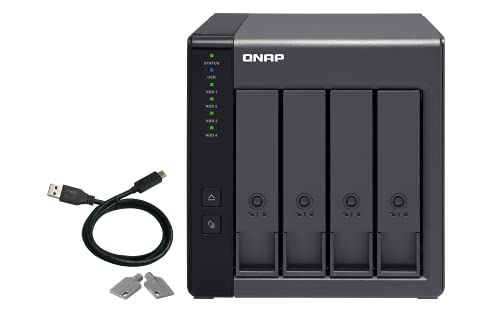
QNAP 4-Bay USB-C Hardware RAID Enclosure
Best for: expanding QNAP NAS capacity or secure backups
- Drive Bays
- 4-Bay
- Included Storage
- Diskless
- RAID Support
- RAID 0, 1, 5, JBOD
- Dimensions
- 8.62 × 6.31 × 6.63 inches
- Weight
- 4.08 pounds
View on Amazon: QNAP 4-Bay USB-C Hardware RAID Enclosure Affiliate link
The QNAP TR-004 is a 4-bay direct-attached storage device connecting via USB Type-C. It features hardware RAID support for RAID 0, 1, 5, and JBOD configurations. This diskless unit expands capacity for Windows, macOS, and Linux systems. It serves well as external storage for NAS backups or to extend your QNAP NAS storage pool. You can use it to add drive space without installing NAS applications directly on the device.
Pros
- Supports hardware RAID 0, 1, 5, and JBOD
- Four 3.5-inch SATA drive bays
- USB Type-C connectivity for Windows, macOS, and Linux
- Lockable drive bays for security
Cons
- Sold diskless without included hard drives
- Cannot run NAS applications or combine storage pools with the host NAS
- Data on drives moved to or from a NAS will not be recognized
Good fit if
- You need to expand the capacity of an existing QNAP NAS
- You require hardware RAID protection for external backup storage
- You want a simple direct-attached solution for Windows, macOS, or Linux
Skip if
- You need a NAS that runs applications or services
- You want a complete storage solution with pre-installed drives
- You need to combine the TR-004 storage pool with your NAS volume
Verdict: The QNAP TR-004 4-Bay USB-C DAS offers reliable hardware RAID and high capacity for users needing to expand QNAP NAS storage or secure external backups. It fits those who want dedicated drive space without managing a full NAS operating system.

QNAP 2-Bay USB-C Direct Attached Storage
Best for: expanding QNAP NAS capacity or simple external storage
- Drive Bays
- 2-Bay
- Included Storage
- Diskless
- RAID Support
- RAID 0, 1, JBOD
- Dimensions
- 8.86 × 4.02 × 6.63 inches
- Weight
- 2.65 pounds
View on Amazon: QNAP 2-Bay USB-C Direct Attached Storage Affiliate link
The QNAP TR-002 is a 2-bay direct-attached storage device designed for high-speed data transfer via USB Type-C. It supports RAID 0, RAID 1, and JBOD configurations through hardware RAID, allowing you to balance speed and redundancy. The unit fits 2.5 or 3.5-inch SATA drives and includes lockable drive bays for security. This compact DAS is ideal for users needing extra storage for a QNAP NAS or as a standalone external drive for Windows, macOS, and Linux systems.
Pros
- Hardware RAID support for RAID 0, 1, and JBOD
- USB Type-C connection for high-speed data transfer
- Lockable drive bays for physical security
- Compatible with 2.5 and 3.5-inch SATA drives
Cons
- Only 2 drive bays limit total capacity
- Includes only a USB 3.0 cable, not USB-C
- No mention of built-in network ports for NAS use
Good fit if
- You need to expand the storage of an existing QNAP NAS
- You want a simple hardware RAID setup without a full NAS
- You require lockable drive bays for security
Skip if
- You need more than 2 drive bays for large storage pools
- You want a standalone NAS with built-in Ethernet ports
- You require USB-C cable connectivity rather than USB 3.0
Verdict: QNAP 2-Bay USB-C DAS offers a secure, compact solution for users needing hardware RAID and lockable bays. It is best for those expanding a QNAP NAS or seeking simple external storage.
Specifications side by side
| Spec | QNAP 4-Bay USB-C Hardware RAID Enclosure | QNAP 2-Bay USB-C Direct Attached Storage |
|---|---|---|
| Drive Bays | 4-Bay | 2-Bay |
| Included Storage | Diskless | Diskless |
| RAID Support | RAID 0, 1, 5, JBOD | RAID 0, 1, JBOD |
| Number of Bays | 4-Bay | 2-Bay |
| Dimensions | 8.62 × 6.31 × 6.63 inches | 8.86 × 4.02 × 6.63 inches |
| Weight | 4.08 pounds | 2.65 pounds |
| Size | 4 Bay | DAS |
| Color | Diskless | Clear |
| Model | TR-004-US | TR-002 |
Frequently asked questions
Can I use the QNAP 4-Bay USB-C enclosure as a standalone NAS?
No. The TR-004 is a direct-attached storage device, not a full NAS. It lacks a built-in operating system for network file sharing. You connect it via USB-C to a computer. It is designed to expand existing storage or provide secure external backups rather than serving files over a network on its own.
What is the physical size difference between the two models?
The 4-bay TR-004 is larger and heavier than the 2-bay TR-002. The TR-004 measures 8.62 inches in length and weighs 4.08 pounds. The compact TR-002 is 8.86 inches long but lighter at 2.65 pounds. Both share a similar height of 6.63 inches. Choose based on your desk space and capacity needs.
Do both units support hardware RAID configurations?
Yes. Both the 4-bay and 2-bay models support hardware RAID. This means the enclosure handles data redundancy without taxing your computer’s processor. You can configure mirrored or striped arrays directly on the device. This feature ensures data protection and consistent performance for your connected drives without requiring complex software setup on the host system.
Are the drive bays secure on both models?
Yes. Both the TR-004 and TR-002 feature lockable drive bays. This physical security prevents unauthorized access to your stored data. You can insert a lock into the bay mechanism to keep drives safe. This is useful for protecting sensitive files in shared workspaces or when transporting the unit for external backups.
Which model is better for expanding QNAP NAS capacity?
The 4-bay TR-004 is ideal for significant expansion. It offers four bays for larger libraries and supports RAID 5 for better capacity efficiency. The 2-bay TR-002 is better for simple external storage or smaller expansions. Both connect via USB-C to your QNAP NAS, but the 4-bay unit provides more raw space for your data.
Does the color of the enclosure affect performance?
No. The color is purely aesthetic and does not impact speed or reliability. The TR-004 comes in a diskless black finish, while the TR-002 is clear. These visual differences help you identify the model or match your desk setup. Performance depends on the internal hardware RAID controller and the connected SATA drives, not the outer casing color.