QNAP TS-673-4G 8 Bay NAS or QNAP 12-Bay 8-Core Tower NAS? Which QNAP Model to Buy
As an Amazon Associate we earn from qualifying purchases. Links on this page are affiliate links.
This qnap ts 673 4g 8 bay NAS vs 12 bay 8 core tower NAS comparison helps you decide which unit fits your setup. Both models come from QNAP and support SATA drives for centralized storage. The main difference lies in capacity and processing power. The TS-673-4G offers eight bays with a quad-core CPU and four gigabit ports. The TS-1655-8G provides twelve bays, an eight-core processor, and larger memory. You must choose based on your drive count and speed needs.
Key differences
| Aspect | QNAP TS-673-4G 8-Bay NAS | QNAP 12-Bay 8-Core Tower NAS |
|---|---|---|
| Number of Bays | 8-Bay | 12-Bay |
| RAM Capacity | 4GB | 128GB |
| Processor | AMD R-Series Quad-core 2.1GHz | Atom C5125 8-core 2.8GHz |
| Network Connectivity | 4x 1GbE | 2x 2.5GbE |
| Graphics | Supports NVIDIA GeForce GT1030 | Not listed |
| Dimensions (H x W x L) | 7.41 x 10.4 x 11 inches | 11 x 19.7 x 19.7 inches |
Which one should you choose?
Choose QNAP TS-673-4G 8-Bay NAS if
- You need native 10GbE expansion via PCIe slots for high-speed networking.
- You require hardware-accelerated 4K video transcoding with a dedicated GPU.
- You prefer a more compact chassis with four standard gigabit ports.
Choose QNAP 12-Bay 8-Core Tower NAS if
- You want to install up to twelve drives for maximum storage density.
- You need significant RAM for running multiple virtual machines or heavy containers.
- You prioritize an eight-core processor for intensive multi-threaded tasks.
Verdict: The TS-673-4G suits users who need flexible networking and media transcoding in a smaller footprint. The TS-1655-8G is the better choice for large-scale data storage and heavy virtualization workloads. Select the model that matches your specific capacity and processing requirements.
NAS Comparison: Bays, RAM, and Ports
Drive bays capacity
Storage expansion is the primary reason to buy a network-attached storage device. The QNAP TS-1655-8G-US offers twelve drive bays, providing significantly more raw space for your files. You can install twelve hard drives in this unit. The QNAP TS-673-4G provides eight bays. It supports six 3.5-inch or 2.5-inch drives plus two M.2 SSD slots. If you need to store large media libraries or run many virtual machines, the twelve-bay model gives you more room to grow. The eight-bay model is sufficient for moderate storage needs. More bays mean more data capacity.
RAM capacity
Random access memory affects how many applications and virtual machines you can run simultaneously. The QNAP TS-1655-8G-US comes with 128GB of RAM, configured as four 32GB modules. This is a massive amount of memory for a NAS. It allows for heavy multitasking and large caching pools. The QNAP TS-673-4G includes 4GB of DDR4 RAM. It also offers an 8GB variant. The difference is stark. If you plan to run Docker containers, virtualization, or intensive database services, the 128GB model is far superior. The 4GB model is best for basic file sharing and light tasks.
Network ports
Network speed determines how fast you can transfer files to and from the NAS. The QNAP TS-673-4G features four 1GbE LAN ports. This allows you to bond multiple connections for better throughput or redundancy. You can also add 10GbE via PCIe expansion cards. The QNAP TS-1655-8G-US has two 2.5GbE ports. While 2.5GbE is faster than standard Gigabit, having four ports on the TS-673-4G offers more flexibility for link aggregation. You can achieve higher total bandwidth with four Gigabit ports combined than with two 2.5GbE ports in some configurations. Both support standard Ethernet speeds.
Processor cores
The CPU handles file management, encryption, and application processing. The QNAP TS-1655-8G-US uses an Atom C5125 processor with eight cores running at 2.8GHz. This multi-core architecture excels at parallel tasks. The QNAP TS-673-4G uses an AMD R-Series quad-core processor at 2.1GHz. It has fewer cores and a lower clock speed. For heavy workloads like video transcoding or running many simultaneous users, the eight-core processor provides more computing power. The quad-core chip is adequate for general home or small office use but lacks the raw power for demanding enterprise-like tasks.
Physical dimensions
Size matters for desk or rack space. The QNAP TS-673-4G is a compact tower. It measures 10.4 inches wide, 11 inches long, and 7.41 inches high. It weighs 12.3 pounds. The QNAP TS-1655-8G-US is much larger. It measures 19.7 inches wide, 19.7 inches long, and 11 inches high. It weighs 9.92 pounds. The twelve-bay model requires significantly more floor or shelf space. If you have limited room, the TS-673-4G is the practical choice. The larger chassis of the TS-1655-8G-US accommodates more drives and better airflow for the powerful components.
Choose the Right QNAP NAS Model
Users needing high capacity for large files
The TS-1655-8G offers twelve drive bays, giving you significantly more raw storage space than the eight-bay alternative. This model supports up to 128GB of RAM via four 32GB modules. This massive memory capacity allows you to handle larger datasets and more complex storage tasks without performance bottlenecks.
Editors requiring hardware video transcoding
The TS-673-4G supports NVIDIA GeForce GT1030 graphics cards. This feature enables 4K video transcoding and output, which the other model does not list. If you plan to stream or convert high-resolution video files directly from your NAS, this hardware acceleration capability is a key advantage for your workflow.
Users wanting faster local network speeds
This unit includes four 1GbE LAN ports, providing more connection options for network flexibility. While the other model has 2.5G ports, the TS-673-4G allows you to aggregate connections or separate traffic more easily. You can also expand connectivity using optional 10GbE PCIe expansion cards for future upgrades.
The products compared

QNAP TS-673-4G 8-Bay NAS
Best for: Local media transcoding and caching
- Drive Bays
- 6 Bay
- Network Connectivity
- 4x GbE LAN
- RAM Capacity
- 4GB DDR4
- M.2 NVMe Slots
- 2 slots
- Number of Bays
- 8-Bay
- Processor Cores
- Quad-Core
View on Amazon: QNAP TS-673-4G 8-Bay NAS Affiliate link
The QNAP TS-673-4G is an 8-bay NAS with a quad-core 2.1GHz AMD processor and 4GB DDR4 RAM. It includes four 1GbE ports and dual M.2 slots for SSD caching. The unit supports NVIDIA graphics for 4K transcoding. You get scalable storage for virtualization and backups. This model suits users needing local media processing and moderate expansion options.
Pros
- Eight drive bays for high capacity
- Dual M.2 slots for SSD caching
- Supports NVIDIA GT1030 for 4K transcoding
- Four 1GbE LAN ports included
Cons
- Only 4GB RAM limits heavy virtualization
- No 10GbE ports on the motherboard
- Quad-core CPU is slower than 8-core rivals
Good fit if
- You need local 4K video transcoding
- You want dual M.2 caching slots
- You prefer four built-in LAN ports
Skip if
- You require native 10GbE connectivity
- You need an 8-core processor
- You want more than 4GB RAM
Verdict: The QNAP TS-673-4G 8-Bay NAS fits users who need local 4K transcoding and four LAN ports. It lacks the speed of 8-core models and native 10GbE ports.
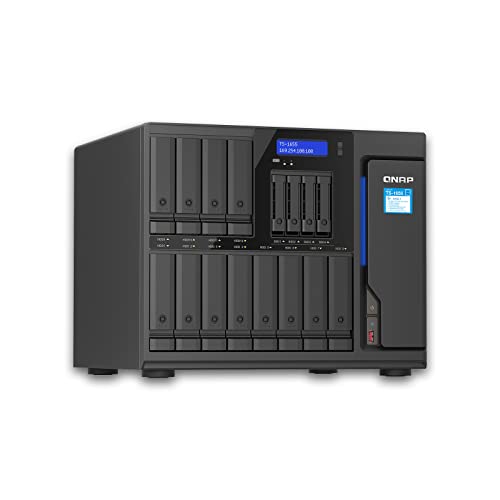
QNAP 12-Bay 8-Core Tower NAS
Best for: High-capacity storage and heavy multitasking
- Drive Bays
- 12BAYS
- Network Connectivity
- 2X 2.5Gigabit Ethernet Port
- Processor
- Atom C5125 8-core 2.8GHz
- RAM Capacity
- 128GB (4×32GB)
- Included Storage
- No HDD
- Number of Bays
- 12-Bay
View on Amazon: QNAP 12-Bay 8-Core Tower NAS Affiliate link
This QNAP tower offers 12 drive bays and an Atom C5125 8-core processor running at 2.8GHz. It includes 128GB of RAM and dual 2.5GbE ports. You get significant capacity and processing power for heavy workloads. The unit ships without internal drives. It suits users needing high-density storage and multi-threaded performance in a single chassis.
Pros
- 12 drive bays for maximum storage density
- Atom C5125 8-core 2.8GHz processor
- 128GB RAM (4x32GB) included
- Dual 2.5GbE Ethernet ports
Cons
- No hard drives included
- Large physical footprint at 19.7 inches wide
- Heavier build at 9.92 pounds
Good fit if
- You need 12 drive bays for large media libraries
- You require 8-core processing for virtualization
- You want 128GB RAM for heavy multitasking
Skip if
- You need pre-installed drives
- You have limited desk space
- You prefer a compact desktop form factor
Verdict: QNAP TS-1655 12-Bay Tower NAS fits users who need maximum drive density and high-end processing power. It is ideal for those building a high-capacity storage server with room for expansion.
Specifications side by side
| Spec | QNAP TS-673-4G 8-Bay NAS | QNAP 12-Bay 8-Core Tower NAS |
|---|---|---|
| Drive Bays | 6 Bay | 12BAYS |
| Network Connectivity | 4x GbE LAN | 2X 2.5Gigabit Ethernet Port |
| Processor | not stated | Atom C5125 8-core 2.8GHz |
| RAM Capacity | 4GB DDR4 | 128GB (4×32GB) |
| M.2 NVMe Slots | 2 slots | not stated |
| Included Storage | not stated | No HDD |
| Number of Bays | 8-Bay | 12-Bay |
| Processor Cores | Quad-Core | 8-Core |
| Dimensions | 11 × 10.4 × 7.41 inches | 19.7 × 19.7 × 11 inches |
| Weight | 12.3 pounds | 9.92 pounds |
| Size | 4GB RAM | not stated |
| Color | Black | not stated |
| Model | TS-673-4G-US | TS-1655-8G |
Frequently asked questions
Which NAS is better for 4K video transcoding?
The QNAP TS-673-4G is the better choice for local 4K transcoding. It features a quad-core processor and 4GB of RAM, which helps handle media caching and conversion tasks efficiently. While the 12-bay model offers more raw processing cores, the TS-673-4G is specifically noted for fitting users who need local transcoding capabilities without requiring the higher density of the larger unit.
Does the TS-673-4G have enough network ports for multiple connections?
Yes, the TS-673-4G includes four LAN ports. This allows you to connect multiple network cables for increased bandwidth or network segmentation. However, these are standard 1GbE ports. If you require native 10GbE connectivity for faster data transfer, this model lacks that specific high-speed networking feature found in some other enterprise-grade units.
How much storage capacity does the 12-bay model provide compared to the 8-bay?
The 12-bay QNAP TS-1655-8G provides significantly more raw storage space than the 8-bay TS-673-4G. It supports twelve hard drives, whereas the TS-673-4G supports eight. This makes the 12-bay unit ideal for building a high-capacity storage server where maximum drive density is the primary requirement for your data archiving or media library needs.
Is the 12-bay NAS suitable for heavy multitasking?
Yes, the QNAP TS-1655-8G is designed for heavy multitasking. It features an 8-core processor, providing high-end processing power compared to the quad-core TS-673-4G. This makes it ideal for users running multiple virtual machines, containerized applications, or complex data services simultaneously, ensuring smooth performance even under heavy computational loads.
What is the physical size difference between the two NAS units?
The TS-673-4G is a compact unit measuring 10.4 inches wide, 7.41 inches high, and 11 inches long. In contrast, the TS-1655-8G is a larger tower model, measuring 19.7 inches wide and 19.7 inches long with an 11-inch height. The 12-bay model is physically larger to accommodate its additional drive bays and cooling requirements.
Can I upgrade the RAM on the TS-673-4G?
The TS-673-4G comes with 4GB of RAM. While specific upgrade paths are not detailed in the provided data, many QNAP models allow for RAM expansion. However, the 12-bay TS-1655-8G is explicitly noted to support up to 128GB of RAM via four 32GB modules, offering significantly more memory scalability for demanding workloads.
Which model is better for expanding storage in the future?
The QNAP TS-1655-8G is better for future expansion due to its twelve drive bays. It offers more room for adding hard drives as your data grows. The TS-673-4G, with only eight bays, has less headroom for physical drive expansion. If you anticipate needing maximum drive density, the 12-bay tower is the more scalable option.