Rotational Speed in NAS Hard Drives: What It Is and Is It Worth It?
As an Amazon Associate we earn from qualifying purchases. Links on this page are affiliate links.
Understanding Rotational Speed in NAS Drives
Rotational speed explained reveals how fast the platters inside your drive spin. This metric directly impacts data access times and overall system responsiveness. You will typically see two common values on listings: 7200 RPM and 5400 RPM. The number stands for revolutions per minute, indicating how many times the disk completes a full circle in sixty seconds.
A 7200 RPM drive spins faster than a 5400 RPM model. This higher speed reduces the time the read head waits to find data on the platter. For NAS users, this can mean quicker file transfers and faster indexing during backups. However, the difference is not always dramatic in daily use. It matters most when you are handling many small files or running multiple virtual machines simultaneously.
The trade-off involves heat and noise. Faster spinning parts generate more friction and heat. This requires better cooling within your NAS enclosure. If your unit lacks adequate airflow, high rotational speeds can shorten drive lifespan. Additionally, 7200 RPM drives tend to be louder. You might notice a distinct whirring sound that 5400 RPM models avoid. Quiet operation is often a priority for home users.
Energy consumption also rises with speed. A 7200 RPM drive draws more power than its slower counterpart. Over time, this increases your electricity bill and carbon footprint. For large arrays with many drives, this adds up significantly. You must balance performance needs against thermal and acoustic constraints.
Check the specifications carefully. Some drives list only the RPM, while others provide detailed latency figures. Look for enterprise-grade models if you need reliability. They often maintain consistent speeds under heavy load. Consumer drives may throttle performance to save power. Your choice depends on whether you prioritize speed or efficiency. Most NAS users find 5400 RPM sufficient for media storage. Power users may prefer 7200 RPM for active workloads.
7200 RPM vs 5400 RPM NAS Drives
7200 RPM
This speed means the platters spin faster, reducing the time it takes to locate and read data. You get lower latency and quicker response times for active files. This setup suits users running data-intensive NAS workloads where speed matters. For example, the Toshiba 14TB Enterprise drive uses this speed for efficient workflow handling. The trade-off is slightly higher power use and noise. However, the performance gain is real for heavy multitasking. If your applications demand rapid access to large datasets, this rotational speed provides the necessary throughput. It is the standard for enterprise-grade reliability and speed in busy environments.
5400 RPM
This lower speed reduces mechanical stress and heat generation. You benefit from quieter operation and better energy efficiency. This option suits home NAS setups with moderate capacity needs or light archival tasks. The Western Digital 4TB Red Plus drive is a solid choice here, prioritizing quiet operation over raw speed. The trade-off is slower data access times compared to faster drives. Random read/write operations may feel less responsive. However, for storing files you do not access constantly, this speed is sufficient. It extends drive longevity by reducing wear. You choose this speed when silence and power savings outweigh the need for maximum performance.
Is High Speed Worth The Noise
Who needs it
You should prioritize the 7200 RPM option if your workflow demands rapid data retrieval. This speed reduces latency, meaning your NAS responds faster when you access active files or run intensive workloads. If you frequently edit large media files directly from the drive or run virtual machines, the quicker mechanical response time improves your daily experience. The trade-off is higher power consumption and increased heat output. You must ensure your NAS enclosure has adequate cooling to handle this. This choice is best for users who value raw performance and speed over energy efficiency. It is the right pick for active servers where every second of access time matters. The faster spin allows for quicker seek times, which helps when handling many small files or heavy database queries.
Who can skip it
You can ignore the higher rotational speed if your storage needs are passive. The 5400 RPM drives are quieter and run cooler, which is better for home environments or small offices. They consume less power, which lowers your electricity bill and reduces heat in enclosed spaces. If you mainly use your NAS for file backups, media streaming, or archiving documents, the speed difference is negligible. Prioritize capacity and reliability over rotational speed for these tasks. The slower drive will not hinder your ability to stream 4K video or access photos later. Focus on features like vibration sensors and warranty terms instead. This option is ideal for users who want a silent, efficient storage solution that does not require aggressive cooling.
Key Drive Terms
Rotational Speed
How fast the internal platters spin, measured in RPM. Faster speeds like 7200 RPM reduce data access time, while 5400 RPM drives run cooler and quieter.
Form Factor
The physical size of the drive. Most NAS units use 3.5-inch drives for desktops or 2.5-inch drives for smaller, portable, or high-density storage enclosures.
Recording Technology
The method used to store data on platters. SMR uses overlapping tracks for higher density, while CMR uses traditional parallel tracks for better performance in RAID.
Cache Size
A small amount of fast memory on the drive. It buffers data to smooth out performance spikes, with common sizes ranging from 64MB to 256MB.
Hardware Interface
The connection standard linking the drive to your motherboard. SATA is the standard for most NAS drives, ensuring compatibility with nearly all consumer and enterprise units.
Compatibility
How well the drive works with your specific NAS model. Check manufacturer lists to ensure the drive is optimized for your device's firmware and vibration settings.
Number of Bays
The number of drive slots in your NAS enclosure. More bays allow for greater total storage capacity and more flexible RAID configurations for redundancy.
RAM Capacity
The amount of memory in your NAS device. More RAM allows the system to cache more data in memory, improving read and write speeds significantly.
Quick picks
| # | Product | Best for | Price |
|---|---|---|---|
| 1 | Toshiba 14TB Enterprise 7200 RPM HDD (Renewed) | Data-intensive NAS workloads requiring speed | Check price of Toshiba 14TB Enterprise 7200 RPM HDD (Renewed) on Amazon |
| 2 | Western Digital 4TB Red Plus CMR NAS Hard Drive | quiet home NAS setups with moderate capacity needs | Check price of Western Digital 4TB Red Plus CMR NAS Hard Drive on Amazon |
| 3 | Western Digital RE 4TB 7200 RPM Hard Drive | business-critical 24x7 applications | Check price of Western Digital RE 4TB 7200 RPM Hard Drive on Amazon |
| 4 | Western Digital 4TB WD Blue 3.5-Inch HDD | Home storage archives and light NAS use | Check price of Western Digital 4TB WD Blue 3.5-Inch HDD on Amazon |
| 5 | Seagate Exos X14 14TB Renewed Enterprise HDD | high-capacity NAS storage with speed | Check price of Seagate Exos X14 14TB Renewed Enterprise HDD on Amazon |
| 6 | Western Digital Blue 1TB 2.5-Inch Hard Drive | Compact NAS setups needing 1 TB storage | Check price of Western Digital Blue 1TB 2.5-Inch Hard Drive on Amazon |
Our 6 picks

Toshiba 14TB Enterprise 7200 RPM HDD (Renewed)
Best for: Data-intensive NAS workloads requiring speed
- Rotational Speed
- 7200 RPM (what this guide is about)
- Storage Capacity
- 14TB
- Form Factor
- 3.5"
- Hardware Interface
- SATA 6.0Gb/s
- Cache Size
- 256MB
- Dimensions
- 7.5 × 5.5 × 2.5 inches
View on Amazon: Toshiba 14TB Enterprise 7200 RPM HDD (Renewed) Affiliate link
This Toshiba enterprise drive offers 14TB of storage with a 7200 RPM rotational speed. It features a 256MB cache and uses a helium-sealed design for reliability. The 3.5-inch form factor fits standard NAS bays. You get high throughput suitable for heavy workloads. The SATA 6.0Gb/s interface ensures compatibility with most NAS systems. It is built for continuous operation in demanding environments.
Pros
- 7200 RPM rotational speed for faster data access
- 256MB cache reduces latency during large transfers
- Helium-sealed design improves efficiency and cooling
- 14TB capacity provides ample space for large libraries
Cons
- 2.5-inch height is thicker than standard 3.5-inch drives
- Renewed condition means no new drive warranty
- Enterprise class may generate more noise than desktop drives
Good fit if
- You need high capacity with fast rotational speeds
- You run a NAS with heavy read/write workloads
- You prioritize performance over quiet operation
Skip if
- You require silent operation in a home office
- You need a drive with a standard manufacturer warranty
- You have a NAS with strict height limitations
Verdict: Toshiba 14TB 7200RPM Enterprise HDD delivers enterprise-grade performance for users who prioritize speed and capacity. It suits those running data-intensive NAS applications where rotational speed directly impacts workflow efficiency.

Western Digital 4TB Red Plus CMR NAS Hard Drive
Best for: quiet home NAS setups with moderate capacity needs
- Rotational Speed
- 5400 RPM (what this guide is about)
- Storage Capacity
- 4TB
- Form Factor
- 3.5"
- Hardware Interface
- SATA 6 Gb/s
- Cache Size
- 256 MB
- Recording Technology
- CMR
View on Amazon: Western Digital 4TB Red Plus CMR NAS Hard Drive Affiliate link
The Western Digital 4TB WD Red Plus uses 5400 RPM rotation with CMR recording and 256 MB of cache. This drive prioritizes quiet operation and lower power consumption over raw speed. It suits users who value efficiency in a 3.5-inch form factor. The SATA 6 Gb/s interface ensures compatibility with most NAS enclosures. You get reliable performance for standard storage tasks without the noise of faster drives.
Pros
- CMR recording technology for reliable data integrity
- 256 MB cache for improved buffer performance
- 5400 RPM rotation for quiet operation
- SATA 6 Gb/s interface compatibility
Cons
- 5400 RPM is slower than the 7200 RPM drives in this list
- 4TB capacity is smaller than the 14TB and 16TB options available
- Heavier at 1.26 pounds compared to smaller mobile drives
Good fit if
- You need a quiet drive for a home office
- You prefer CMR technology over SMR
- You want a balance of speed and power efficiency
Skip if
- You require maximum transfer speeds for heavy workloads
- You need high capacity like 14TB or 16TB
- You are building a high-performance enterprise server
Verdict: Western Digital 4TB 5400 RPM NAS Drive is a solid choice for users who prioritize quiet operation and energy efficiency over raw speed. It fits well in home NAS setups where capacity needs are moderate.
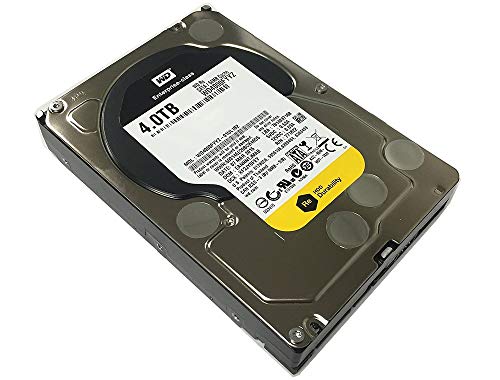
Western Digital RE 4TB 7200 RPM Hard Drive
Best for: business-critical 24x7 applications
- Rotational Speed
- 7200 RPM (what this guide is about)
- Storage Capacity
- 4TB
- Form Factor
- 3.5in
- Hardware Interface
- SATA 6.0Gb/s
- Cache Size
- 64MB
- Dimensions
- 9.3 × 5.4 × 3.7 inches
View on Amazon: Western Digital RE 4TB 7200 RPM Hard Drive Affiliate link
This Western Digital RE drive offers 4 TB of storage at 7200 RPM. It features a 64 MB cache and SATA 6.0Gb/s interface. The drive supports 24x7 operation with a high MTBF rating. It suits users needing sustained performance for business-critical applications. The dual processor helps maximize random I/O rates. It is designed for high duty cycle environments.
Pros
- 7200 RPM rotational speed for higher performance
- 64 MB cache size
- SATA 6.0Gb/s interface
- Designed for 24x7 operation
- Dual processor architecture
Cons
- 4 TB capacity is lower than 14 TB and 16 TB options
- OEM version with only 3-year reseller warranty
- Heavier at 1 pound compared to mobile drives
Good fit if
- You need 7200 RPM performance for business applications
- You require 24x7 reliability for enterprise use
- You want a 4 TB capacity nearline drive
Skip if
- You prefer 5400 RPM for lower power consumption
- You need more than 4 TB of storage
- You want a consumer-grade warranty
Verdict: WD RE 4TB 7200 RPM Enterprise Drive fits users who need sustained 7200 RPM performance and 24x7 reliability for business-critical tasks.

Western Digital 4TB WD Blue 3.5-Inch HDD
Best for: Home storage archives and light NAS use
- Rotational Speed
- 5400 RPM (what this guide is about)
- Storage Capacity
- 4TB
- Form Factor
- 3.5"
- Hardware Interface
- SATA 6 Gb/s
- Cache Size
- 256 MB
- Compatibility
- PC
View on Amazon: Western Digital 4TB WD Blue 3.5-Inch HDD Affiliate link
This Western Digital drive offers 4TB of storage at 5400 RPM. It features a 256 MB cache and a SATA 6 Gb/s interface. The 3.5-inch form factor fits standard desktop enclosures. You get reliable everyday computing performance. The larger cache helps buffer data access. This drive suits users who need ample space without the noise and heat of faster drives.
Pros
- 4TB storage capacity
- 256 MB cache size
- SATA 6 Gb/s interface
- 3.5-inch form factor
Cons
- 5400 RPM speed is slower than 7200 RPM alternatives
- 1-year warranty is shorter than enterprise options
- Heavier build at 1.52 pounds
Good fit if
- You need 4TB of storage for home archives
- You prefer quieter operation over raw speed
- You are building a standard desktop NAS
Skip if
- You require high-performance 7200 RPM speeds
- You need enterprise-grade reliability features
- You are limited to 2.5-inch drive bays
Verdict: Western Digital 4TB WD Blue 5400 RPM provides solid capacity for casual users. It fits home storage needs where speed is secondary to volume.

Seagate Exos X14 14TB Renewed Enterprise HDD
Best for: high-capacity NAS storage with speed
- Rotational Speed
- 7200 RPM (what this guide is about)
- Storage Capacity
- 14TB
- Form Factor
- 3.5-Inch
- Hardware Interface
- SATA 6Gb/s
- Dimensions
- 5.8 × 4 × 1 inches
- Weight
- 1.5 pounds
View on Amazon: Seagate Exos X14 14TB Renewed Enterprise HDD Affiliate link
This Seagate Exos X14 is a 14TB enterprise drive running at 7200 RPM. It uses a SATA 6Gb/s interface and measures 3.5 inches. The unit is manufacturer recertified with under 50 power-on hours. You get a 1-year seller warranty. The high rotational speed supports faster data access for demanding NAS environments.
Pros
- 14TB storage capacity
- 7200 RPM rotational speed
- SATA 6Gb/s interface
- Manufacturer recertified condition
Cons
- Seller warranty only
- Enterprise class form factor
- Heavier build at 1.5 pounds
Good fit if
- You need high capacity for a NAS
- You prefer faster 7200 RPM performance
- You want enterprise-grade reliability
Skip if
- You require a manufacturer warranty
- You need a 5400 RPM drive
- You want a new unit
Verdict: Seagate 14TB Exos X14 7200 RPM suits users who need large storage with faster access speeds in a recertified enterprise drive.

Western Digital Blue 1TB 2.5-Inch Hard Drive
Best for: Compact NAS setups needing 1 TB storage
- Rotational Speed
- 5400 RPM (what this guide is about)
- Storage Capacity
- 1TB
- Form Factor
- 2.5 Inch
- Hardware Interface
- SATA 6 Gb/s
- Cache Size
- 128MB
- Dimensions
- 2.5 × 2.5 × 0.42 inches
View on Amazon: Western Digital Blue 1TB 2.5-Inch Hard Drive Affiliate link
This Western Digital drive offers 1 TB of storage in a compact 2.5-inch form factor. It runs at 5400 RPM with a 128 MB cache and uses a SATA 6 Gb/s interface. The small size makes it suitable for portable or space-constrained NAS setups. You get reliable storage built to WD standards. It is ideal if you need a smaller drive for a specific slot.
Pros
- 1 TB storage capacity
- Compact 2.5-inch form factor
- 128 MB cache buffer
- SATA 6 Gb/s interface
Cons
- 5400 RPM is slower than the 7200 RPM drives on this list
- 1 TB capacity is lower than the 4 TB to 16 TB options available
- 2.5-inch size may not fit standard 3.5-inch NAS bays
Good fit if
- You need a 2.5-inch drive for a portable or compact NAS
- You require 1 TB of storage for light backup duties
- You want a SATA 6 Gb/s connection for basic connectivity
Skip if
- You need high performance with 7200 RPM speeds
- You require more than 1 TB of storage space
- Your NAS only accepts 3.5-inch drives
Verdict: WD Blue 1TB 2.5 Inch 5400 RPM is a compact storage option for users with space constraints. It fits those needing a smaller drive for light tasks, but lacks the speed and capacity of larger enterprise models.
Specifications side by side
| Spec | Toshiba 14TB Enterprise 7200 RPM HDD (Renewed) | Western Digital 4TB Red Plus CMR NAS Hard Drive | Western Digital RE 4TB 7200 RPM Hard Drive | Western Digital 4TB WD Blue 3.5-Inch HDD | Seagate Exos X14 14TB Renewed Enterprise HDD | Western Digital Blue 1TB 2.5-Inch Hard Drive |
|---|---|---|---|---|---|---|
| Storage Capacity | 14TB | 4TB | 4TB | 4TB | 14TB | 1TB |
| Form Factor | 3.5" | 3.5" | 3.5in | 3.5" | 3.5-Inch | 2.5 Inch |
| Hardware Interface | SATA 6.0Gb/s | SATA 6 Gb/s | SATA 6.0Gb/s | SATA 6 Gb/s | SATA 6Gb/s | SATA 6 Gb/s |
| Rotational Speed | 7200RPM | 5400 RPM | 7200 RPM | 5400 RPM | 7200RPM | 5400 RPM |
| Cache Size | 256MB | 256 MB | 64MB | 256 MB | not stated | 128MB |
| Recording Technology | not stated | CMR | not stated | not stated | not stated | not stated |
| Compatibility | not stated | not stated | not stated | PC | not stated | not stated |
| Size | not stated | 4TB | 4 TB | not stated | not stated | 1 TB |
| Dimensions | 7.5 × 5.5 × 2.5 inches | 5.79 × 4 × 1.03 inches | 9.3 × 5.4 × 3.7 inches | not stated | 5.8 × 4 × 1 inches | 2.5 × 2.5 × 0.42 inches |
| Weight | 1.5 pounds | 1.26 pounds | 1 pounds | 1.52 pounds | 1.5 pounds | 3.2 ounces |
| Color | Silver | Red | Silver | Blue | Silver | Blue |
| Model | MG07ACA14TE | WD40EFRX | WD4000FYYZ OEM-cr | WD40EZAZ | Exos X14 | WD10SPZX-cr |
Frequently asked questions
Does rotational speed affect power consumption in NAS drives?
Yes, higher speeds generally draw more power. The Toshiba 14TB Enterprise drive spins at 7200 RPM, which supports high performance but uses more energy. In contrast, the Western Digital 4TB Red Plus operates at 5400 RPM. This slower speed prioritizes energy efficiency and quieter operation for home setups.
Is 5400 RPM too slow for a home NAS?
It depends on your usage patterns. For light tasks, the Western Digital 4TB WD Blue at 5400 RPM provides solid capacity. It fits home storage needs where speed is secondary to volume. If you only archive files occasionally, this speed is sufficient and runs cooler than faster options.
Can I use a 7200 RPM drive in a small NAS?
Form factor matters more than speed for fit. Most listed 7200 RPM drives, like the Seagate Exos X14, are 3.5-inch units. They require standard 3.5-inch bays. The Western Digital Blue 1TB is a 2.5-inch drive, but it also runs at 5400 RPM. You must check physical dimensions before buying.
Do 7200 RPM drives generate more heat?
Faster spinning platters typically generate more heat. The Western Digital RE 4TB Enterprise drive runs at 7200 RPM for business-critical tasks. This sustained performance may increase thermal output. Ensure your NAS has adequate ventilation. Slower 5400 RPM models like the Red Plus run cooler and quieter.
What cache size pairs best with 7200 RPM speeds?
Larger caches help buffer data for faster access. The Toshiba 14TB Enterprise drive features a 256MB cache alongside its 7200 RPM speed. This combination suits data-intensive NAS workloads. The WD RE 4TB also spins at 7200 RPM but has a smaller 64MB cache. Cache size impacts how quickly data is retrieved.
Is 7200 RPM necessary for 24x7 business operations?
It offers sustained performance for critical tasks. The Western Digital RE 4TB is designed for 24x7 reliability at 7200 RPM. It fits users needing consistent speed for business-critical applications. The Toshiba 14TB Enterprise drive also targets these high-performance needs. Choose 7200 RPM if your workflow demands rapid data retrieval.