SanDisk Professional vs G-Technology: NAS Hard Drives Compared by Specs
As an Amazon Associate we earn from qualifying purchases. Links on this page are affiliate links.
This SanDisk Professional vs g technology NAS hard drive comparison looks at two distinct storage solutions. Both brands target professionals, but they serve very different roles. The SanDisk drive is a rugged, portable unit designed for on-the-go backup. The G-Technology system is a high-performance desktop array built for stationary workstations. You need to decide between portability and raw throughput based on your workflow.
Key differences
| Aspect | SanDisk Professional 1TB G-Drive ArmorATD Portable HDD | G-Technology G-RAID 8TB Thunderbolt Dual Drive |
|---|---|---|
| Storage Capacity | 1TB | 8TB |
| Hardware Interface | USB-C, USB 3.2 Gen 1 | Thunderbolt |
| Form Factor | Portable External HDD | Desktop RAID System |
| Interface Speed | 5Gbps | Double USB 3.0 speeds |
Which one should you choose?
Choose SanDisk Professional 1TB G-Drive ArmorATD Portable HDD if
- You need a compact drive for field work.
- You require IP54 dust and rain resistance.
- You primarily use Mac computers out of the box.
Choose G-Technology G-RAID 8TB Thunderbolt Dual Drive if
- You edit multi-stream HD or uncompressed video.
- You need daisy-chaining for multiple peripherals.
- You want RAID 0 performance for large files.
Verdict: The SanDisk Professional drive suits mobile professionals who need durable, portable storage for backups. The G-Technology G-RAID is the better choice for desktop users requiring high-speed data transfer and large RAID volumes. Your choice depends entirely on whether you prioritize ruggedness or throughput.
SanDisk vs G-Tech NAS Specs
Hardware interface
The SanDisk Professional 1TB G-Drive ArmorATD uses a USB-C port with USB 3.2 Gen 1 support, offering speeds up to 5Gbps. This is a standard, widely compatible connection suitable for quick backups and general file transfers. In contrast, the G-Technology G-RAID features a Thunderbolt interface. Thunderbolt technology provides ultra-fast data transfer rates, reportedly double that of USB 3.0 and significantly faster than older standards like Firewire 800. This makes the G-Technology drive ideal for high-bandwidth workflows, such as multi-stream HD video editing, where large files move quickly between the drive and the host computer.
Storage capacity
You have a wide range of capacity choices with the SanDisk Professional drive. The variations list options including 1TB, 2TB, 4TB, and 5TB, allowing you to select the exact amount of space you need for your portable backup needs. The G-Technology G-RAID system is presented with an 8TB configuration, with variations also showing a 4TB option. While the G-Technology unit offers a higher maximum capacity in this specific comparison, the SanDisk drive provides more granular choices for lower-capacity requirements. If you need massive local storage for a desktop workstation, the G-Technology 8TB model is the larger option here.
Form factor and portability
The SanDisk Professional drive is built for portability. It measures 5.12 inches in length, 3.43 inches in width, and 0.83 inches in height, weighing just 8.16 ounces. Its compact, anodized aluminum enclosure is designed to fit easily into a bag for on-the-go use. The G-Technology G-RAID is a desktop storage system. It measures 9.25 inches in length, 5.12 inches in width, and 3.43 inches in height, weighing 5.35 pounds. This heavy, stationary form factor indicates it is meant to sit on a desk or rack, not be carried around. It is a permanent fixture rather than a mobile companion.
Build and durability
The SanDisk Professional drive emphasizes ruggedness. It features a triple-layer shock resistance design and an IP54-rated enclosure that protects against rain and dust. It also claims 1000lb crush resistance, making it suitable for harsh environments or travel where drops and impacts are possible. The G-Technology G-RAID data does not list specific durability ratings like IP54 or crush resistance. It is a dual-drive system housed in a silver enclosure, likely designed for a controlled indoor office environment. If your work involves moving the drive between locations or rough conditions, the SanDisk build is clearly superior.
Compatibility
Both drives target professional users but handle operating system compatibility differently. The SanDisk Professional drive works with macOS right out of the box using HFS+ formatting. For Windows users, it requires reformatting, which erases data. The G-Technology G-RAID is described as Time Machine-ready and plug-and-play on Mac OS, indicating strong native macOS support. The data does not explicitly detail Windows compatibility for the G-Technology unit. If you are a Mac user, both are easy to set up. For Windows users, the SanDisk drive requires initial setup effort, while the G-Technology drive's Windows status is unclear from the provided specs.
Which NAS Drive Fits Your Workflow
Field professionals needing rugged portable storage
You need a drive that survives harsh conditions. The SanDisk Professional unit features an IP54 rating for rain and dust resistance. It also offers 1000lb crush resistance and triple-layer shock protection. Its compact aluminum enclosure weighs just 8.16 ounces. This makes it ideal for on-the-go backups where durability and portability are your top priorities.
Video editors requiring high-speed desktop RAID
Your workflow demands maximum throughput for uncompressed video. The G-Technology system uses Thunderbolt technology for ultra-fast data transfer. It supports RAID 0 for doubled performance. This setup handles multi-stream HDV and ProRes 422 workflows efficiently. The dual ports allow daisy-chaining up to six peripherals, making it a robust desktop solution for heavy media editing tasks.
Users needing large capacity desktop storage
You require significant space for large archives. The G-Technology drive provides 8TB of storage capacity. It is designed as a dual-drive system for reliability and speed. Its desktop form factor supports continuous operation. This option suits those who prioritize raw capacity and performance over portability, ensuring you have ample room for extensive media libraries and project files.
The products compared
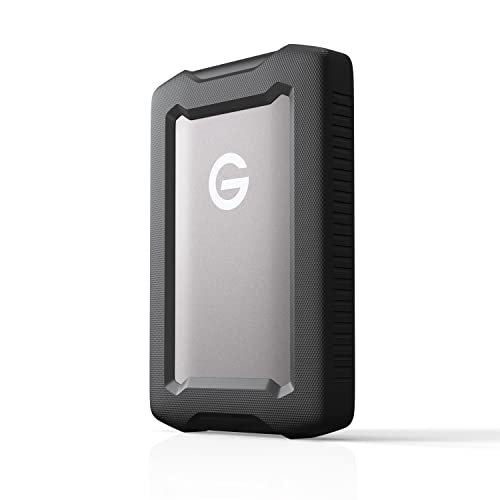
SanDisk Professional 1TB G-Drive ArmorATD Portable HDD
Best for: Rugged macOS external storage
- Storage Capacity
- 1TB
- Hardware Interface
- USB-C, USB 3.2 Gen 1
- Dimensions
- 5.12 × 3.43 × 0.83 inches
- Weight
- 8.16 ounces
View on Amazon: SanDisk Professional 1TB G-Drive ArmorATD Portable HDD Affiliate link
The SanDisk Professional 1TB G-DRIVE ArmorATD is a rugged external hard drive designed for durability. It features a USB-C interface with USB 3.2 Gen 1 speeds up to 5Gbps. The drive sits inside a premium anodized aluminum enclosure that offers IP54 rain and dust resistance plus 1000lb crush resistance. It works with macOS out of the box and requires reformatting for Windows. This compact unit weighs 8.16 ounces and measures 5.12 inches in length.
Pros
- USB-C connection with 5Gbps transfer speeds
- IP54 rated for rain and dust resistance
- 1000lb crush resistance rating
- Ready for macOS without reformatting
- Anodized aluminum enclosure for strength
Cons
- Requires reformatting for Windows compatibility
- Limited to 1TB storage capacity
- Uses USB 3.2 Gen 1 interface
Good fit if
- You need a rugged drive for field use
- You primarily use macOS devices
- You require IP54 dust and water protection
Skip if
- You need native Windows support without setup
- You require large capacity storage options
- You need Thunderbolt connectivity
Verdict: SanDisk 1TB G-DRIVE ArmorATD suits users who need a durable, macOS-ready drive for rugged environments. It is not ideal for Windows users or those needing higher capacities.

G-Technology G-RAID 8TB Thunderbolt Dual Drive
Best for: High-performance video editing workflows
- Storage Capacity
- 8 TB
- Hardware Interface
- Thunderbolt
- Dimensions
- 9.25 × 5.12 × 3.43 inches
- Weight
- 5.35 pounds
View on Amazon: G-Technology G-RAID 8TB Thunderbolt Dual Drive Affiliate link
This G-Technology G-RAID system pairs two drives in RAID 0 for maximum performance. It uses a Thunderbolt interface, offering double the transfer rates of USB 3.0. The 8TB capacity handles multi-stream HDV and ProRes 422 workflows. It features dual ports for daisy-chaining peripherals. This unit is ready for Time Machine on Mac OS.
Pros
- Thunderbolt interface for high-speed data transfer
- RAID 0 configuration for maximum performance
- 8TB total storage capacity
- Dual Thunderbolt ports for daisy-chaining
Cons
- Thunderbolt interface limits compatibility with standard USB ports
- RAID 0 offers no data redundancy
- Large physical footprint at 9.25 inches long
Good fit if
- You need high throughput for uncompressed video workflows
- You use Mac OS and want Time Machine support
- You have Thunderbolt-compatible devices for daisy-chaining
Skip if
- You require data redundancy for critical files
- Your computer only has USB ports
- You need a compact portable drive
Verdict: G-Technology 8TB G-RAID Thunderbolt suits professionals needing raw speed for video editing. It fits users with Thunderbolt ports who prioritize performance over data safety.
Specifications side by side
| Spec | SanDisk Professional 1TB G-Drive ArmorATD Portable HDD | G-Technology G-RAID 8TB Thunderbolt Dual Drive |
|---|---|---|
| Storage Capacity | 1TB | 8 TB |
| Hardware Interface | USB-C, USB 3.2 Gen 1 | Thunderbolt |
| Size | 1TB | 8 TB |
| Dimensions | 5.12 × 3.43 × 0.83 inches | 9.25 × 5.12 × 3.43 inches |
| Weight | 8.16 ounces | 5.35 pounds |
| Color | Space grey | Silver |
| Model | SDPH81G-001T-GBAND | 0G02272 |
Frequently asked questions
Is the SanDisk Professional G-Drive suitable for Windows users?
It is not ideal for Windows users. This drive is specifically designed as rugged macOS external storage. While it uses a standard USB-C interface, its primary optimization targets Apple ecosystems. If you require broad cross-platform compatibility or Windows-specific features, this model may not meet your needs effectively.
Does the G-Technology drive support Thunderbolt connections?
Yes, it supports Thunderbolt. The G-Technology G-RAID 8TB uses a Thunderbolt interface to deliver high performance. This connection type is essential for professionals needing raw speed for video editing workflows. It suits users who prioritize performance and have devices equipped with Thunderbolt ports for data transfer.
What is the maximum capacity of the SanDisk Professional drive?
The maximum capacity is 1TB. This specific model offers 1TB of storage space. It is not ideal for users needing higher capacities. If your workflow requires more than 1TB, you should look for other options from this brand or consider the larger G-Technology system instead.
Which drive is better for video editing?
The G-Technology drive is better for video editing. It is designed for high-performance video editing workflows. Its Thunderbolt interface provides the raw speed necessary for handling large media files. The SanDisk drive focuses on portability and ruggedness rather than the sustained throughput needed for professional video tasks.
How heavy is the G-Technology G-RAID drive?
It weighs 5.35 pounds. This desktop unit is significantly heavier than portable options. Its dimensions are 9.25 inches in length, 5.12 inches in width, and 3.43 inches in height. The weight reflects its internal dual-drive construction and robust metal casing designed for stationary professional use.
Is the SanDisk drive waterproof?
It offers rain and dust resistance. The drive features an IP54 rating for protection against environmental elements. It also includes 1000lb crush resistance and triple-layer shock protection. These specs make it suitable for rugged environments where standard drives might fail due to physical stress or exposure to moisture.
What interface does the G-Technology drive use?
It uses a Thunderbolt interface. This connection type allows for high-speed data transfers required by professional workflows. Unlike the USB-C port on the SanDisk drive, Thunderbolt provides greater bandwidth. This makes the G-Technology system a preferred choice for users who need maximum performance from their storage hardware.