Synology 2-Bay Desktop NAS Enclosure Review: Specs, Pros and Cons
As an Amazon Associate we earn from qualifying purchases. Links on this page are affiliate links.
This synology 2 bay diskstation ds223j review covers a compact network-attached storage unit designed for home and small office use. The device is a diskless enclosure, meaning you must purchase hard drives separately to store data. It features two drive bays, allowing for flexible storage configurations using standard 3.5-inch or 2.5-inch SATA drives. The unit measures 6.5 inches in length and weighs just 1.92 pounds. Its white plastic casing keeps the footprint small. This model focuses on essential file sharing and backup capabilities without requiring complex hardware investments.
What stands out
- Two drive bays for flexible storage expansion
- Diskless design allows you to choose your own drives
- Compact dimensions of 6.5 by 3.94 by 8.9 inches
- Lightweight build at 1.92 pounds for easy placement
Who it fits
Good fit for
You should consider this NAS if you need a simple, private cloud for your home network. It suits users who want to back up Macs, PCs, and mobile devices automatically. The support for IP cameras makes it a good choice for home security monitoring. If you prioritize data ownership and multi-platform access over high-performance media streaming, this diskless enclosure fits your needs. It is ideal for those who prefer to manage their own storage components.
Who should skip it
You should look elsewhere if you require pre-installed storage, as this unit is diskless. Buyers needing high-speed video editing or heavy multitasking will find this model limited by its entry-level processor. If you want built-in RAID hardware or advanced surveillance features without software configuration, this basic enclosure may not suffice. Users expecting a display panel or remote control will also be disappointed, as the device relies entirely on web-based management.
Verdict: The Synology DS223j is a practical, compact entry point for basic file storage and backup. It offers reliable hardware for users who want to build their own storage solution.
Key specs explained for DS223j
2-Bay
This NAS has two slots for internal hard drives. You can install two drives to increase total storage capacity or combine them for redundancy. If one drive fails, your data may remain safe depending on the setup. This configuration suits users who need moderate storage without the complexity of larger systems. It is a practical choice for home offices or small families.
Diskless
The enclosure does not include any internal hard drives. You must purchase compatible hard drives separately before the device can store data. This allows you to choose the exact drive type and capacity you need. It is ideal for users who already have spare drives or want to mix and match storage sizes. You will need to budget for drives in addition to the NAS unit.
White
The exterior casing is white in color. This aesthetic choice helps the device blend into modern home or office decor. It is a neutral color that does not stand out aggressively. You might prefer this if you want the NAS to look like a standard consumer electronics device rather than industrial hardware. Color has no impact on performance or storage capabilities.
DS223j
This is the specific model number for this Synology unit. The 'j' suffix typically indicates a model designed for entry-level or light-duty tasks. It helps you identify the exact hardware when seeking software support or driver updates. Knowing this model ensures you download the correct operating system and accessories. It distinguishes this unit from other Synology models with different capabilities.
Design and build overview
The Synology DS223j is a compact desktop unit designed for home or small office environments. According to the listing, it measures 6.5 inches in length, 3.94 inches in width, and 8.9 inches in height. This small footprint allows it to fit easily on a desk or shelf without taking up significant space. The enclosure is white, offering a neutral look that blends into most home offices or living areas. It weighs 1.92 pounds, making it lightweight and easy to move if needed.
This model is a 2-bay diskless enclosure, meaning you must purchase hard drives separately to store data. The two drive bays allow for flexible storage configurations. You can install two drives to increase total capacity or combine them for redundancy. The design prioritizes simplicity and quiet operation, suitable for continuous use. The compact size and light weight make it ideal for users who need reliable storage without a large server rack. It is built for stability and ease of use in residential settings.
Setup and daily use overview
You set up the Synology DS223j by installing your own hard drives into its two bays. Since the unit is diskless, you must purchase compatible drives separately. The listing notes that Synology provides a knowledge center and YouTube channel to guide you through this initial configuration process. Once installed, the device connects to your network to enable secure private cloud access. You gain 100% data ownership and can access files from multiple platforms anywhere you have an internet connection. Daily use involves syncing and sharing files with clients, colleagues, or collaborators. The system supports automated backups for Macs, PCs, and mobile devices. You can direct these backups to multiple destinations, including other cloud services or external drives. This set-and-forget approach helps protect your data without constant manual intervention. The enclosure also supports home security functions. You can record and monitor your property twenty-four hours a day by connecting multiple IP cameras. Remote viewing allows you to check your footage from any location. The hardware is backed by a two-year warranty. This coverage includes expert customer support and ongoing software updates. These updates ensure the system remains compatible with new devices and security standards over time. The white, compact design fits easily on a desk or shelf. Its small footprint means it does not take up much space in your home or office. You can rely on the included support resources if you encounter any setup challenges. The focus remains on providing a reliable, user-friendly storage solution for your personal or small business needs.
Before you buy this NAS
You need to buy two hard drives separately since this model is diskless. Check compatibility with your existing drives or plan for new purchases. The unit supports automated backups for Macs, PCs, and mobile devices. You can also connect multiple IP cameras for home security monitoring. Ensure your network supports the required protocols for smooth file sharing and syncing. Keep the device in a well-ventilated area to maintain performance. Synology provides ongoing software updates and customer support through their knowledge center and YouTube channel. This setup suits users who want a private cloud with full data ownership. It fits well among other options for those prioritizing security and ease of use. Consider your storage needs and camera requirements before finalizing your choice.
Check before you buy
- Purchase two compatible hard drives for the bays.
- Verify network requirements for camera and backup features.
- Check Synology support resources for setup guidance.
- Confirm drive compatibility with your existing devices.
The product at a glance
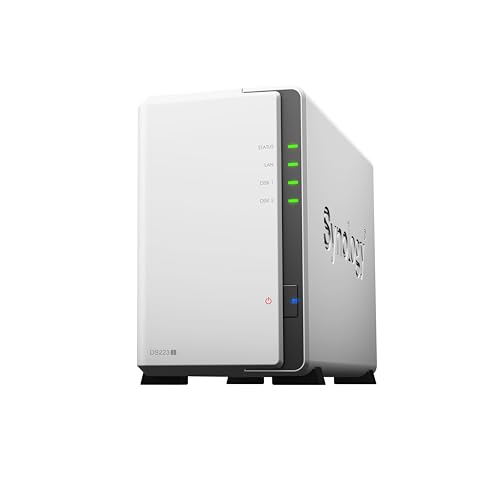
Synology 2-Bay Desktop NAS Enclosure
Best for: basic home file and camera storage
- Drive Bays
- 2-Bay
- Included Storage
- Diskless
- Dimensions
- 6.5 × 3.94 × 8.9 inches
- Weight
- 1.92 pounds
View on Amazon: Synology 2-Bay Desktop NAS Enclosure Affiliate link
The Synology DS223j is a white, 2-bay desktop NAS enclosure. It measures 6.5 x 3.94 x 8.9 inches and weighs 1.92 pounds. This diskless unit supports automated backups for Macs, PCs, and mobile devices. It also functions as a home security system with IP camera support. The hardware includes a 2-year warranty. You get secure private cloud access with full data ownership.
Pros
- 2-bay capacity for drive installation
- Automated backup support for multiple platforms
- IP camera monitoring integration
- 2-year hardware warranty
Cons
- Sold diskless without included drives
- No mention of network interface speed
- No mention of CPU or RAM specifications
Good fit if
- You need a simple 2-bay setup for home files
- You want to connect IP cameras for security
- You prefer Synology's software ecosystem
Skip if
- You require pre-installed storage drives
- You need high-performance processing power
- You want to expand beyond two drives
Verdict: Synology DS223j 2-Bay Desktop NAS is a compact entry point for users who need basic file sharing and camera storage. It suits those who value brand support over raw hardware specs.
Specifications side by side
| Spec | Synology 2-Bay Desktop NAS Enclosure |
|---|---|
| Drive Bays | 2-Bay |
| Included Storage | Diskless |
| Number of Bays | 2-Bay |
| Dimensions | 6.5 × 3.94 × 8.9 inches |
| Weight | 1.92 pounds |
| Size | 2-bay |
| Color | White |
| Model | DS223j |
Frequently asked questions
What is the best use case for the Synology DS223j?
This NAS is best for basic home file sharing and security camera storage. It serves as a compact entry point for users who prioritize brand support and ecosystem reliability over raw hardware performance. It is ideal for small offices or homes needing simple data management without complex technical demands.
Does the Synology DS223j come with hard drives included?
No, the unit is a diskless enclosure. You must purchase two hard drives separately to install them into the two available bays. This allows you to choose the capacity and type of drives that best fit your specific storage needs and budget before setting up the system.
How big is the Synology DS223j NAS enclosure?
The device measures 6.5 inches in length, 3.94 inches in width, and 8.9 inches in height. It weighs 1.92 pounds and comes in white. Its compact dimensions allow it to fit easily on a desk or shelf without taking up significant space in your home or office environment.
Can I connect IP cameras to this NAS model?
Yes, the system supports automated backups and can connect multiple IP cameras for home security. This feature allows you to store surveillance footage directly on the internal drives. It provides a reliable way to manage video data from your security setup without relying on external cloud storage services.
Is the Synology DS223j suitable for beginners?
Yes, it is designed as a compact entry point for users who value brand support. Synology provides a knowledge center and YouTube channel to help with setup. The straightforward two-bay configuration makes it accessible for those who need basic file sharing without dealing with complex hardware specifications or configurations.
What is the model number for this Synology 2-Bay NAS?
The model number is DS223j. It is a 2-bay desktop unit designed for home and small office use. The white casing helps it blend into residential settings. Knowing the exact model ensures you find the correct manual, firmware updates, and compatible accessories when setting up your network storage.