6 Best Alternatives to the Synology 6 bay 2.5" NAS (2026)
As an Amazon Associate we earn from qualifying purchases. Links on this page are affiliate links.
The Synology DS620slim is a compact 6-bay NAS designed for users who prioritize small form factor storage over raw speed. It fits 2.5-inch drives and includes 2GB of expandable DDR3L RAM. This model supports advanced snapshot features and handles 4K video transcoding efficiently. However, you might look for synology 6 bay 2 5 NAS alternatives if you need different drive types, more RAM, or faster network connectivity. Some users prefer larger chassis for better airflow or additional ports for media playback.
The alternatives listed here were chosen because their specifications overlap with the original DS620slim. Each option shares the 6-bay capacity, ensuring you can maintain your current storage volume. The list includes devices with NVMe slots, higher RAM capacities, and varied network interfaces like 10GbE. You will find options tailored for content creators, budget-conscious builders, and those needing rackmount expansion. By comparing these specs, you can select a device that matches your specific performance and size requirements without losing the core 6-bay functionality.
Our top pick: Synology 6-Bay 2.5 Inch NAS DS620slim.
How alternatives differ from Synology
Asustor Flashstor 6-Bay All-NVMe NAS
The Asustor FS6706T uses an all-NVMe design, which differs significantly from the Synology DS620slim’s 2.5-inch SATA bays. This NAS targets content creators who need silent operation and high-speed flash storage rather than traditional hard drive capacity. While the Synology offers RAID flexibility for mixed HDD and SSD setups, the Asustor prioritizes speed and silence for video editing workflows. It is larger and heavier, measuring 12.1 inches wide, compared to the compact Synology. You should choose the Asustor if you already own NVMe drives and value performance over raw storage volume. It is a specialized tool for media servers, whereas the Synology is a general-purpose compact NAS.
LincPlus 6-Bay 10GbE Hybrid NAS
The LincPlus N2 supports both SATA and M.2 NVMe drives, offering more flexibility than the Synology DS620slim’s exclusive 2.5-inch bays. It includes an Intel N100 processor and 10GbE connectivity, providing faster network speeds than the Synology’s standard ports. The LincPlus also runs Unraid, which appeals to users who prefer flexible storage management over Synology’s traditional RAID. It is lighter and thinner, weighing only 1.76 pounds. However, it lacks the polished software ecosystem of Synology. You should pick the LincPlus if you need high RAM, fast networking, and hybrid storage options. It is better for tech-savvy users who want performance and customization over a simplified, compact experience.
Synology CLP8 8-Camera License Pack
The Synology CLP8 is not a NAS but a software license for adding eight IP cameras to an existing Synology system. It differs completely from the DS620slim, which is a hardware storage unit. This product is for users who already own a Synology NAS and need to expand their surveillance capabilities. It does not provide storage or drive bays. You should choose this only if you have a compatible Synology device and need to connect more cameras. It is a digital add-on, weighing just 0.71 ounces. It does not replace the DS620slim but complements it for security-focused setups. This is purely for software licensing, not hardware expansion.
QNAP 4 Bay 1U Rackmount SATA JBOD
The QNAP TL-R400S is a 4-bay rackmount JBOD enclosure, not a standalone NAS like the Synology DS620slim. It is designed to expand storage for existing servers via PCIe, rather than functioning as a network-attached storage device. It supports SATA drives but lacks the integrated operating system and network features of the Synology. It is much larger, measuring 21.3 inches long, and is intended for data center or rack environments. You should pick this if you need to add SATA storage to a Windows or Linux server. It is not a direct alternative for home or office NAS users. It serves a specialized role in server infrastructure, unlike the versatile DS620slim.
BUFFALO LinkStation 220 12TB 2-Bay NAS
The BUFFALO LinkStation 220 is a 2-bay NAS with included 12TB of storage, which differs from the diskless Synology DS620slim. It has fewer drive bays and uses 3.5-inch drives, not the compact 2.5-inch format. It targets home users who want simplicity and pre-configured security over expandability. The BUFFALO is larger and heavier, weighing 5.52 pounds. It lacks the advanced snapshot features and transcoding capabilities of the Synology. You should choose the BUFFALO if you want a plug-and-play solution with included drives. It is ideal for basic home storage needs. It is not suitable for users who need high flexibility, advanced data protection, or a compact form factor for 2.5-inch drives.
Asustor 6-Bay NAS with Quad M.2 NVMe Slots
The Asustor AS6706T supports both SATA and NVMe drives, offering more versatility than the Synology DS620slim’s 2.5-inch-only bays. It includes HDMI output for direct 4K playback, a feature the Synology lacks. The Asustor has 8GB of RAM and a quad-core processor, providing more power for media creation tasks. It is heavier and larger, weighing 10.8 pounds. You should pick the Asustor if you need hybrid storage and direct media playback. It is better for content creators who value flexible drive configurations and multimedia features. The Synology is more compact and focused on data protection. The Asustor is a powerful media server alternative for users who do not need a small form factor.
Quick picks
Our 7 picks

Synology 6-Bay 2.5 Inch NAS DS620slim
Best for: compact 2.5-inch drive storage
- Drive Bays
- 6 Bay
- RAM Capacity
- 2GB DDR3L
- Included Storage
- Diskless
- Form Factor
- 2.5 Inch
- Dimensions
- 6.89 × 5.94 × 4.76 inches
- Weight
- 3.09 pounds
View on Amazon: Synology 6-Bay 2.5 Inch NAS DS620slim Affiliate link
The Synology DS620slim is a 6-bay NAS designed for 2.5-inch drives. It offers RAID flexibility for mixed SSD and HDD setups. The unit includes 2GB of DDR3L memory, expandable to 6GB. It supports dual-channel 4K video transcoding. Advanced Btrfs provides extensive snapshot capabilities. This diskless model suits users needing compact storage with strong data protection features.
Pros
- 6-bay capacity for 2.5-inch drives
- Expandable RAM up to 6GB
- Dual-channel 4K video transcoding
- Advanced Btrfs snapshot support
Cons
- Sold diskless without included drives
- Limited to 2.5-inch drive form factor
- Base RAM is only 2GB
Good fit if
- You need a compact 6-bay enclosure
- You prefer 2.5-inch SSDs or HDDs
- You want advanced snapshot features
Skip if
- You require pre-installed hard drives
- You need 3.5-inch drive bays
- You want 10GbE connectivity
Verdict: Synology DS620slim 6-Bay NAS fits users who prioritize compact 2.5-inch drive storage and advanced data protection over raw throughput speed.

Asustor Flashstor 6-Bay All-NVMe NAS
Best for: Content creators needing silent NVMe storage
- Drive Bays
- 6 Bay
- Network Connectivity
- Dual 2.5GbE
- Processor
- Intel Celeron N5105
- RAM Capacity
- 4GB DDR4
- M.2 NVMe Slots
- 6 slots
- Included Storage
- Diskless
View on Amazon: Asustor Flashstor 6-Bay All-NVMe NAS Affiliate link
The Asustor FS6706T is a 6-bay NAS built exclusively for M.2 NVMe SSDs. It uses an Intel Celeron N5105 processor and dual 2.5GbE ports to handle large media files. This all-flash design runs quietly with low heat, making it suitable for creative workspaces. It supports 4K hardware transcoding and direct HDMI playback for content creators who need fast, silent storage.
Pros
- Six M.2 NVMe SSD slots for all-flash speed
- Intel Celeron N5105 quad-core processor
- Dual 2.5GbE network ports
- HDMI 2.0b output for direct media playback
- Low noise and heat output
Cons
- Requires separate NVMe SSD purchases
- Limited to 2.5GbE network speeds
- No mention of SATA HDD support
Good fit if
- You need silent storage for a studio
- You work with large video files
- You want direct HDMI media playback
Skip if
- You prefer to use traditional HDDs
- You need 10GbE network connectivity
- You want a budget-friendly all-in-one unit
Verdict: Asustor FS6706T 6-Bay All-Flash NAS is a specialized drive for video editors who value speed and silence over capacity. It fits users who already own NVMe drives and need a quiet, high-performance media server.

LincPlus 6-Bay 10GbE Hybrid NAS
Best for: mixed SATA and NVMe storage setups
- Drive Bays
- 6-Bay
- Network Connectivity
- 1x 10GbE
- Processor
- Intel N100
- RAM Capacity
- 16GB LPDDR5
- M.2 NVMe Slots
- 4 slots
- Included Storage
- Diskless
View on Amazon: LincPlus 6-Bay 10GbE Hybrid NAS Affiliate link
The LincStation N2 is a 6-bay NAS with an Intel N100 processor and 16GB LPDDR5 RAM. It offers 2 SATA bays and 4 M.2 NVMe slots for flexible storage. The unit includes a 10GbE port for fast transfers and comes with an Unraid OS license. Its compact metal design supports 4K output. It suits users needing high RAM and mixed drive types for media or virtualization tasks.
Pros
- Intel N100 CPU with 16GB LPDDR5 RAM
- 10GbE network port for high-speed transfers
- Mix 2.5" SATA HDDs with 4 M.2 NVMe SSDs
- Includes Unraid OS starter license
Cons
- Only 2 SATA bays limit large HDD capacity
- No traditional RAID hardware controller
- Unraid requires paid license after 30-day trial
Good fit if
- You want fast NVMe performance alongside HDD storage
- You need 10GbE connectivity for local transfers
- You prefer Unraid's flexible drive mixing
Skip if
- You require standard hardware RAID for simplicity
- You need more than 2 SATA bays for bulk storage
- You prefer a traditional NAS operating system
Verdict: LincPlus LincStation N2 6-Bay NAS delivers high RAM and 10GbE speeds for mixed storage setups, making it ideal for users who value NVMe performance and Unraid flexibility over traditional RAID simplicity.

Synology CLP8 8-Camera License Pack
Best for: expanding Synology camera counts
- Dimensions
- 5 × 5 × 1 inches
- Weight
- 0.71 ounces
View on Amazon: Synology CLP8 8-Camera License Pack Affiliate link
This is a software license pack for Synology NAS devices, not a hardware enclosure. It adds support for eight additional IP surveillance cameras to your system. The package includes a single license key that activates eight devices at once. You can migrate purchased licenses between units. It fits users who already own a Synology NAS and need to expand their camera count beyond the default two licenses included with most models.
Pros
- Supports up to 8 surveillance devices
- Includes a single license key
- Allows license migration between units
Cons
- Requires an existing Synology NAS
- Does not include physical hardware
- Only adds 8 camera licenses
Good fit if
- You already have a Synology NAS
- You need to add 8 cameras
- You want to migrate licenses
Skip if
- You need a new NAS unit
- You only need 1 or 2 cameras
- You want a hardware enclosure
Verdict: Synology CLP8 8-Camera License Pack is a software add-on for existing Synology NAS owners who need to connect eight additional IP cameras to their surveillance setup.

QNAP 4 Bay 1U Rackmount SATA JBOD
Best for: Server storage expansion via PCIe
- Drive Bays
- 4-Bay
- Included Storage
- Diskless
- Form Factor
- Rackmount
- Hardware Interface
- SATA
- Dimensions
- 21.3 × 16.3 × 7.05 inches
View on Amazon: QNAP 4 Bay 1U Rackmount SATA JBOD Affiliate link
This is a 4-bay 1U rackmount SATA 6Gbps JBOD storage enclosure from QNAP. It expands storage for QNAP NAS, Windows, and Linux systems. The unit includes a QXP-400eS-A1164 PCIe SATA card and an SFF-8088 connector. It measures 16.3 inches wide and 21.3 inches long. You should use this if you need dedicated rackmount expansion for existing servers rather than a standalone NAS.
Pros
- 1U rackmount form factor fits standard server racks
- Includes QXP-400eS-A1164 PCIe SATA card for connectivity
- Supports SATA 6Gb/s drives for high-speed data transfer
- Compatible with QNAP NAS, Windows, and Linux systems
Cons
- Only 4 bays, which is fewer than the 6-bay alternatives on this list
- Diskless design requires you to supply your own hard drives
- Requires a PCIe slot and SFF-8088 connection rather than direct USB or network attachment
Good fit if
- You need to add storage to a server using a PCIe slot
- You prefer a 1U rackmount chassis over a tower design
- You are expanding a QNAP NAS or Linux server setup
Skip if
- You need a standalone NAS with its own operating system
- You require more than 4 drive bays for your capacity needs
- You want a plug-and-play USB or network-attached storage device
Verdict: QNAP 4-Bay 1U Rackmount JBOD Enclosure is a specialized expansion unit for servers, not a direct replacement for a 6-bay NAS. It fits users who need to add SATA storage via PCIe to existing Windows or Linux systems.
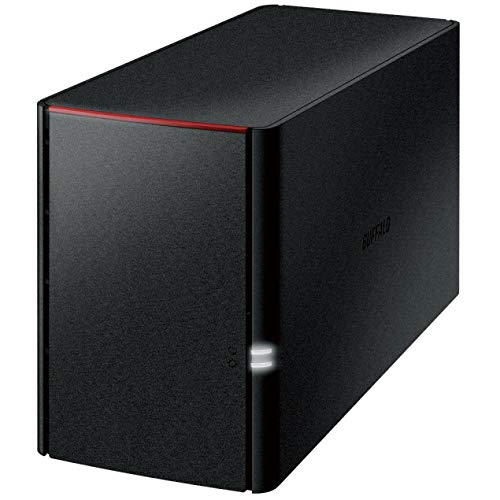
BUFFALO LinkStation 220 12TB 2-Bay NAS
Best for: Home users needing secure, included storage
- Drive Bays
- 2-Bay
- Included Storage
- 12TB
- RAID Support
- RAID 0, RAID 1
- Intended Use
- Home Users
- Dimensions
- 8.1 × 3.4 × 5 inches
- Weight
- 5.52 pounds
View on Amazon: BUFFALO LinkStation 220 12TB 2-Bay NAS Affiliate link
The BUFFALO LinkStation 220 is a 2-bay NAS designed for home users seeking centralized storage. It ships with 12TB of included storage in two 6TB drives. The system supports RAID 0 and RAID 1 configurations. You can use it for backup and secure file sharing across Windows and macOS devices. It features a closed system to reduce third-party vulnerabilities.
Pros
- Includes 12TB total storage capacity
- Supports RAID 0 and RAID 1
- Closed system reduces vulnerability risks
- SSL encryption for secure transfers
Cons
- Only 2 drive bays
- Limited to 12TB max included capacity
- No mention of 10GbE connectivity
Good fit if
- You need a simple, pre-configured storage solution
- You want included drives to start immediately
- You prioritize data security with a closed system
Skip if
- You require more than 2 drive bays
- You need high-speed 10GbE networking
- You want extensive third-party app support
Verdict: The BUFFALO LinkStation 220 12TB 2-Bay NAS fits home users who want a secure, easy-to-use storage device with included drives. It is ideal for those who value simplicity and data redundancy over expandability.

Asustor 6-Bay NAS with Quad M.2 NVMe Slots
Best for: Media creators needing HDMI and hybrid storage
- Drive Bays
- 6-Bay
- Network Connectivity
- Dual 2.5GbE
- Processor
- Intel Celeron N5105
- RAM Capacity
- 8GB DDR4
- M.2 NVMe Slots
- 4 slots
- Included Storage
- Diskless
View on Amazon: Asustor 6-Bay NAS with Quad M.2 NVMe Slots Affiliate link
The Asustor Lockerstor 6 Gen2 offers six SATA bays plus four M.2 NVMe slots for hybrid storage. It uses an Intel Celeron N5105 quad-core processor and 8GB of expandable DDR4 RAM. Dual 2.5GbE ports handle fast transfers. An HDMI port allows direct 4K media playback. This unit suits content creators needing flexible storage and hardware transcoding for Plex workflows.
Pros
- Six SATA bays and four M.2 NVMe slots for hybrid storage
- Intel Celeron N5105 quad-core processor for virtualization and streaming
- Dual 2.5GbE network ports for high-speed data transfer
- HDMI output for direct 4K media playback and transcoding
- Expandable RAM up to 16GB for heavy multitasking
Cons
- Sold diskless without included storage drives
- Weighs 10.8 pounds, making it heavier than slim alternatives
- Limited to 2.5GbE speeds without a separate 10GbE expansion card
Good fit if
- You need HDMI output for direct TV connection
- You want to mix HDDs and NVMe SSDs
- You require 4K hardware transcoding for media servers
Skip if
- You need pre-installed storage drives
- You require native 10GbE connectivity without upgrades
- You prefer a lightweight, slim desktop form factor
Verdict: Asustor Lockerstor 6 Gen2 6-Bay NAS delivers strong hybrid storage and HDMI media features for creators who value flexible drive configurations and direct 4K playback.
Specifications side by side
| Spec | Synology 6-Bay 2.5 Inch NAS DS620slim | Asustor Flashstor 6-Bay All-NVMe NAS | LincPlus 6-Bay 10GbE Hybrid NAS | Synology CLP8 8-Camera License Pack | QNAP 4 Bay 1U Rackmount SATA JBOD | BUFFALO LinkStation 220 12TB 2-Bay NAS | Asustor 6-Bay NAS with Quad M.2 NVMe Slots |
|---|---|---|---|---|---|---|---|
| Drive Bays | 6 Bay | 6 Bay | 6-Bay | not stated | 4-Bay | 2-Bay | 6-Bay |
| Network Connectivity | not stated | Dual 2.5GbE | 1x 10GbE | not stated | not stated | not stated | Dual 2.5GbE |
| Processor | not stated | Intel Celeron N5105 | Intel N100 | not stated | not stated | not stated | Intel Celeron N5105 |
| RAM Capacity | 2GB DDR3L | 4GB DDR4 | 16GB LPDDR5 | not stated | not stated | not stated | 8GB DDR4 |
| M.2 NVMe Slots | not stated | 6 slots | 4 slots | not stated | not stated | not stated | 4 slots |
| Included Storage | Diskless | Diskless | Diskless | not stated | Diskless | 12TB | Diskless |
| RAID Support | not stated | not stated | not stated | not stated | not stated | RAID 0, RAID 1 | not stated |
| Form Factor | 2.5 Inch | not stated | not stated | not stated | Rackmount | not stated | not stated |
| Hardware Interface | not stated | M.2 NVMe, HDMI | SATA, M.2 NVMe | not stated | SATA | not stated | M.2 NVMe, HDMI |
| Number of Bays | 6-Bay | 6-Bay | 6-Bay | not stated | 4-Bay | 2-Bay | 6-Bay |
| Target Audience | not stated | Content Creators | not stated | not stated | not stated | not stated | Content Creators |
| Processor Cores | not stated | Quad-Core | not stated | not stated | not stated | not stated | Quad-Core |
| Intended Use | not stated | not stated | not stated | not stated | not stated | Home Users | not stated |
| Dimensions | 6.89 × 5.94 × 4.76 inches | 7.6 × 12.1 × 1.89 inches | 5.91 × 8.27 × 1.38 inches | 5 × 5 × 1 inches | 21.3 × 16.3 × 7.05 inches | 8.1 × 3.4 × 5 inches | 2.76 × 3.61 × 3.57 inches |
| Weight | 3.09 pounds | 4.41 pounds | 1.76 pounds | 0.71 ounces | not stated | 5.52 pounds | 10.8 pounds |
| Size | 6-bay; 2GB DDR3L | 6 Bay | 5.9 x 8.2 x 1.5 inches | CLP8 | 4 Bay | 12TB (2x6TB) | 6 Bay |
| Color | white | FS6706T | Neutral | Multicolor | black | Black | black / black |
| Model | DS620slim | FS6706T | N2 | CLP8 | TL-R400S | LS220D1202 | AS6706T |
Frequently asked questions
Can I use 2.5-inch SSDs in the Asustor FS6706T?
No. The Asustor FS6706T is an all-NVMe NAS. It is designed for M.2 NVMe drives, not 2.5-inch SATA SSDs or mechanical hard drives. This unit targets users who already own NVMe drives and need a quiet, high-performance media server. It does not support traditional SATA storage formats.
Does the LincPlus N2 support Unraid operating system?
Yes. The LincPlus N2 delivers Unraid flexibility, making it ideal for users who value NVMe performance over traditional RAID simplicity. It features a mixed storage setup with both SATA and M.2 NVMe hardware interfaces. This allows you to combine different drive types for specific performance or capacity needs.
What is the maximum number of cameras the Synology CLP8 supports?
The Synology CLP8 supports eight IP cameras. It is a software add-on for existing Synology NAS owners who need to expand their surveillance setup. This license pack allows you to connect eight additional cameras to your system. It is not a standalone hardware device but a digital license key.
Is the QNAP TL-R400S a direct replacement for a 6-bay NAS?
No. The QNAP TL-R400S is a 4-bay 1U Rackmount JBOD Enclosure. It is a specialized expansion unit for servers, not a direct replacement for a 6-bay NAS. It fits users who need to add SATA storage via PCIe to existing Windows or Linux systems. It lacks the full NAS functionality of a standalone unit.
Does the Asustor AS6706T include HDMI output for direct playback?
Yes. The Asustor AS6706T includes HDMI hardware interface support. It delivers strong hybrid storage and HDMI media features for creators who value direct 4K playback. This allows you to connect the NAS directly to a display or receiver. It supports mixed storage configurations with both SATA bays and M.2 NVMe slots.
How much RAM does the Asustor AS6706T have?
The Asustor AS6706T comes with 8GB of RAM. It features a quad-core processor to handle demanding tasks. This configuration supports its hybrid storage approach and HDMI media features. The higher RAM capacity helps manage multiple simultaneous connections and data processing for content creators.
Can the BUFFALO LS220D1202 expand beyond its included drives?
No. The BUFFALO LS220D1202 is a 2-bay NAS with included 12TB of storage. It fits home users who value simplicity and data redundancy over expandability. It is not designed for adding extra drives beyond its two bays. You cannot expand its capacity further once the included drives are in place.
What network speed does the LincPlus N2 provide?
The LincPlus N2 provides 10GbE network connectivity. It delivers high RAM and 10GbE speeds for mixed storage setups. This high-speed connection supports fast data transfer between your NAS and connected devices. It is ideal for users who need rapid access to large files or mixed SATA and NVMe storage.