TERRAMASTER 4-Bay NAS 32GB RAM Alternatives: 6 Similar Picks Compared
As an Amazon Associate we earn from qualifying purchases. Links on this page are affiliate links.
You are looking at terramaster 4 bay NAS 32gb RAM alternatives to find the right storage solution. The original TerraMaster F4-424 Pro stands out with its Core i3-N305 8-core processor and 32GB DDR5 memory. This high RAM capacity supports demanding business workflows and fast application load times. It also offers dual 2.5GbE ports and two M.2 NVMe slots for SSD caching. These specs make it ideal for users prioritizing raw processing power and memory.
However, you might need different specifications. Some users prefer rack-mounted designs for IT environments. Others may require higher density with eight bays or specific connectivity like 10GbE. Some buyers might prioritize NVMe caching over maximum RAM capacity. The alternatives listed here were chosen because their specs overlap with the original. This list includes 6 similar picks that match your core needs while offering variations in form factor, connectivity, and storage type. You can compare these options to find the best fit for your specific workflow and space constraints.
Our top pick: TerraMaster 4-Bay NAS with 32GB RAM.
How Each Alternative Compares
TERRAMASTER 8-Bay All-NVMe SSD NAS
The TERRAMASTER F8 SSD Plus shifts focus from high RAM to density. It offers eight bays for NVMe SSDs rather than the original's four drive slots. While it retains an 8-core processor, the RAM drops to 16GB, halving the memory capacity of the F4-424 Pro. This makes it less suitable for heavy virtualization but ideal for high-speed caching or direct NVMe storage. Its compact 2.4-inch height saves desk space compared to the larger original. You should choose this if you need more drive slots and faster SSD performance rather than maximum RAM for running multiple complex applications simultaneously.
TERRAMASTER 4-Bay 1U Rackmount NAS with 8GB DDR5
The TERRAMASTER U4-500 is designed for rack mounting, differing significantly from the desktop form factor of the original. It provides 10GbE networking, which is faster than the dual 2.5GbE ports on the F4-424 Pro. However, it includes only 8GB of DDR5 RAM, a substantial reduction from the 32GB in the original. This lower memory limit means it is better for network storage tasks than for running heavy local applications or databases. The 1U rack size suits server rooms. Pick this model if you require high-speed networking and rack integration, and can manage with less RAM for your specific workload.
TERRAMASTER 4-Bay 8-Core Intel NAS
The TERRAMASTER F4-425 Pro keeps the 8-core processor but reduces RAM to 8GB, a major drop from the original's 32GB. It shares the same Core i3-N305 chip, ensuring similar raw processing power for tasks like AI features or containerization. The design is slightly heavier and comes in silver. This model prioritizes caching capabilities and AI tools over memory capacity. You should consider this alternative if your workflow relies more on fast NVMe caching and specific application features rather than large memory pools. It offers a similar form factor but with a different performance balance favoring speed over memory.
TERRAMASTER 4-Bay 8-Core NAS Enclosure
This TerraMaster F4-425 Pro variant mirrors the previous entry with an 8-core processor and 8GB RAM, again significantly less than the original's 32GB. It is marketed for users needing AI features and NVMe caching. The physical dimensions are identical to the other F4-425 Pro model, maintaining a similar footprint. The key difference lies in the target user: those who value flexible caching and containerization over high memory. If your primary need is the original's high RAM for business workflows, this model is a downgrade in that specific area. Choose it only if caching and AI tools are more critical to you than memory capacity.
Synology 4-Bay Rackmount Expansion Unit
The Synology RX418 is a storage expansion unit, not a standalone NAS with computing power. It lacks a processor and RAM entirely, unlike the original TerraMaster which has an 8-core CPU and 32GB RAM. It connects to existing Synology NAS systems to add four drive bays. This product does not offer independent processing or high-speed networking on its own. It is strictly for increasing storage capacity within a Synology ecosystem. You should pick this only if you already own a Synology NAS and need more space. It cannot replace the original TerraMaster for tasks requiring local processing or high RAM.
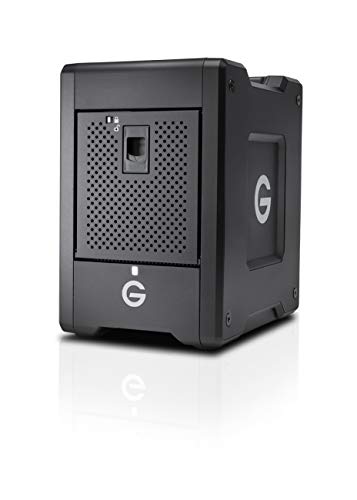
G-Technology 32TB G-Speed Shuttle
The G-Technology G-Speed Shuttle is a portable Thunderbolt 3 drive, lacking internal RAM and app control entirely. It provides 32TB of storage in a rugged, mobile form factor. Unlike the original TerraMaster NAS, it is not a network-attached storage device with a processor or operating system. It is designed for direct connection to a single computer for high-speed video editing. You should choose this if you need portable, high-capacity storage for professional media workflows. It does not offer the network sharing, multi-user access, or application hosting capabilities of the original TerraMaster NAS with its 32GB RAM.
Quick picks
Our 7 picks

TerraMaster 4-Bay NAS with 32GB RAM
Best for: high-memory business workflows
- Drive Bays
- 4-Bay
- Network Connectivity
- 2 x 2.5GbE
- Processor
- Intel Core i3-N305
- RAM Capacity
- 32GB DDR5 4800MHz
- M.2 NVMe Slots
- 2 slots
- Included Storage
- Diskless
View on Amazon: TerraMaster 4-Bay NAS with 32GB RAM Affiliate link
The TERRAMASTER F4-424 Pro is a 4-bay NAS featuring an Intel Core i3-N305 8-core processor and 32GB of DDR5 RAM. It includes dual 2.5GbE ports and two M.2 NVMe slots for caching. This diskless unit targets users needing high application speed and robust data handling for small to medium-sized business workflows.
Pros
- 32GB DDR5 4800MHz RAM capacity
- Intel Core i3-N305 8-core CPU
- Dual 2.5GbE network interfaces
- Two M.2 NVMe SSD slots
Cons
- RAM is non-upgradable
- Sold diskless without drives
- RAM is non-ECC type
Good fit if
- You need high RAM for virtualization
- You want fast app load times
- You require dual 2.5G network ports
Skip if
- You need ECC memory for stability
- You want included hard drives
- You prefer a single 1GbE port
Verdict: TERRAMASTER F4-424 Pro 4-Bay NAS suits users prioritizing raw processing power and memory capacity for demanding business applications over expandability or included storage.

TERRAMASTER 8-Bay All-NVMe SSD NAS
Best for: High-density NVMe SSD storage
- Drive Bays
- 8-Bay
- Network Connectivity
- 10GbE
- Processor
- Intel Core i3-N305
- RAM Capacity
- 16GB DDR5
- Included Storage
- Diskless
- Processor Cores
- 8-Core
View on Amazon: TERRAMASTER 8-Bay All-NVMe SSD NAS Affiliate link
This is an 8-bay NAS designed for full SSD storage. It uses an Intel Core i3-N305 8-core processor and includes 16GB of DDR5 RAM. The unit connects via a 10Gbps Ethernet port. It supports up to 64TB of NVMe SSDs. The compact design fits in tight spaces. It suits users needing high-speed local storage and backup capabilities.
Pros
- Eight bays for M.2 NVMe SSDs
- Intel Core i3-N305 8-core processor
- 16GB DDR5 4800MHz RAM
- 10Gbps Ethernet connectivity
Cons
- Diskless configuration requires separate SSD purchase
- 16GB RAM is less than the 32GB in comparable 4-bay models
- Limited to SSD storage only
Good fit if
- You need high-density NVMe storage
- You require 10Gbps network speeds
- You want a compact 8-bay solution
Skip if
- You need 32GB of RAM
- You prefer traditional hard drives
- You want pre-installed storage
Verdict: TERRAMASTER 8-Bay SSD NAS offers high-speed NVMe storage in a small form factor. It fits users who need 10Gbps connectivity and compact 8-bay capacity.

TERRAMASTER 4-Bay 1U Rackmount NAS with 8GB DDR5
Best for: Rack-mounted 10GbE storage with NVMe cache
- Drive Bays
- 4Bay
- Network Connectivity
- Dual 10GbE
- Processor
- Intel Core i3 1215U
- RAM Capacity
- 8GB DDR5
- Included Storage
- Diskless
- RAID Support
- RAID 0, 1, 5, 6, 10, TRAID, TRAID+
View on Amazon: TERRAMASTER 4-Bay 1U Rackmount NAS with 8GB DDR5 Affiliate link
The U4-500 is a 1U rack-mount NAS with an Intel Core i3-1215U processor and 8GB DDR5 RAM. It includes dual 10GbE ports and dual NVMe slots for Hyper Cache. This diskless unit supports up to 96TB of storage across four bays. It suits users needing high-density rack mounting and fast network connectivity for virtualization or 4K video workflows.
Pros
- Intel Core i3-1215U 6-core processor with up to 4.4GHz turbo
- Dual 10GbE ports with 20Gbps aggregate bandwidth
- Dual M.2 NVMe slots for Hyper Cache acceleration
- Supports RAID 0, 1, 5, 6, 10, TRAID, and TRAID+
Cons
- Only 8GB DDR5 RAM compared to 32GB options in this list
- 1U rack form factor requires compatible server rack infrastructure
- Sold diskless with no included hard drives
Good fit if
- You need a 1U rack-mountable server for your data center
- You require dual 10GbE ports for high-speed network transfers
- You want NVMe caching to boost storage performance
Skip if
- You prefer a compact desktop tower over a rack unit
- You need more than 8GB of RAM for heavy multitasking
- You want a NAS that includes pre-installed hard drives
Verdict: TERRAMASTER U4-500 4-Bay Rack NAS fits IT professionals who need rack mounting and 10GbE networking but can manage with 8GB of RAM.

TERRAMASTER 4-Bay 8-Core Intel NAS
Best for: Users needing NVMe cache and AI features
- Drive Bays
- 4-Bay
- Network Connectivity
- 5GbE x 2
- Processor
- Intel N305
- RAM Capacity
- 8GB
- M.2 NVMe Slots
- 3 slots
- Included Storage
- Diskless
View on Amazon: TERRAMASTER 4-Bay 8-Core Intel NAS Affiliate link
The TERRAMASTER F4-425 Pro is a diskless 4-bay NAS featuring an Intel N305 8-core processor and 8GB of RAM. It includes dual 5GbE ports and three M.2 NVMe slots for Hyper Cache acceleration. This unit runs TOS 7 with AI capabilities and supports Docker and virtualization. It suits users needing flexible storage with TRAID and strong backup features for home or small business use.
Pros
- Intel N305 8-core processor handles multitasking
- Dual 5GbE ports with link aggregation
- Three M.2 NVMe slots for cache
- TOS 7 OS with AI integration
- TRAID technology for mixed drive capacities
Cons
- 8GB RAM is lower than 32GB alternatives
- Diskless design requires separate drive purchase
- No mention of included backup hardware
Good fit if
- You need fast NVMe caching for media
- You want AI features in the OS
- You prefer flexible RAID options like TRAID
Skip if
- You require 32GB of system RAM
- You need pre-installed storage drives
- You want a 8-bay expansion unit
Verdict: TERRAMASTER F4-425 Pro 4-Bay NAS offers strong processing power and caching for users who prioritize speed and AI tools over maximum RAM capacity.

TERRAMASTER 4-Bay 8-Core NAS Enclosure
Best for: Users needing AI features and NVMe caching
- Drive Bays
- 4-Bay
- Processor
- Intel N350
- RAM Capacity
- 16GB DDR5
- Included Storage
- Diskless
- Hardware Interface
- M.2 NVMe
- Network Connectivity
- 5GbE
View on Amazon: TERRAMASTER 4-Bay 8-Core NAS Enclosure Affiliate link
The TerraMaster F4-425 Pro is a diskless 4-bay NAS driven by an Intel N305 8-core processor and 8GB of RAM. It features dual 5GbE ports and three M.2 NVMe slots for cache acceleration. This unit runs TOS 7 with AI capabilities and supports Docker and virtualization. It suits users who need strong multitasking performance and flexible storage options without pre-installed drives.
Pros
- Intel N305 8-core processor for efficient multitasking
- Dual 5GbE ports with link aggregation up to 1020 MB/s
- Three M.2 NVMe slots for Hyper Cache acceleration
- Supports Docker, Portainer, and VirtualBox for containers and VMs
- TOS 7 OS with AI-native features and OpenClaw integration
Cons
- Only 8GB of RAM compared to 32GB options on this list
- Sold diskless with no included hard drives
- No mention of hardware RAID controller or UPS support
Good fit if
- You need fast local AI processing and container support
- You want to use mixed-capacity drives with TRAID technology
- You require dual 5GbE ports for high-speed network traffic
Skip if
- You require 32GB of RAM for heavy virtualization workloads
- You prefer a NAS with pre-installed storage drives
- You need 10GbE networking for maximum throughput
Verdict: TerraMaster F4-425 Pro 4-Bay NAS offers strong 8-core performance and flexible caching for users who prioritize AI features and containerization over maximum RAM capacity.

Synology 4-Bay Rackmount Expansion Unit
Best for: expanding Synology NAS storage capacity
- Drive Bays
- 4-Bay
- Included Storage
- Diskless
- Dimensions
- 17 × 11.4 × 1.73 inches
- Weight
- 9.44 pounds
View on Amazon: Synology 4-Bay Rackmount Expansion Unit Affiliate link
The Synology RX418 is a diskless 4-bay expansion unit designed to increase storage capacity for existing Synology NAS systems. It supports online volume expansion, allowing you to add space without downtime. The unit measures 11.4 inches wide and 17 inches long, fitting into 2-post racks. It includes energy-saving deep sleep mode and is managed via Synology DSM software.
Pros
- 4-bay diskless design for flexible storage upgrades
- Supports online volume expansion without downtime
- Fits in 2-post and wall mount racks
- Managed directly through Synology DiskStation Manager
Cons
- Requires an existing Synology NAS to function
- Diskless, so you must purchase drives separately
- Limited to Synology ecosystem compatibility
Good fit if
- You need to expand storage on a Synology NAS
- You want to add 4 bays without replacing your main unit
- You prefer rack-mountable expansion options
Skip if
- You need a standalone NAS with its own processor
- You use a non-Synology NAS brand
- You want a unit with pre-installed drives
Verdict: Synology RX418 4-Bay Expansion Unit is a practical add-on for Synology users needing more space, but it offers no independent computing power.
G-Technology 32TB G-Speed Shuttle
Best for: portable 4K/8K video editing
- Drive Bays
- 4-Bay
- Included Storage
- 32TB
- RAID Support
- 0, 1, 5, 10
- Hardware Interface
- Thunderbolt
- Dimensions
- 9.75 × 6.85 × 10.5 inches
- Weight
- 16 pounds
View on Amazon: G-Technology 32TB G-Speed Shuttle Affiliate link
This 4-bay NAS uses Thunderbolt 3 for high-speed data transfer. It holds 32TB of data in a transportable design weighing 16 pounds. The unit supports hardware RAID 0, 1, 5, and 10. It is optimized for multi-stream 4K and 8K workflows. You should choose this if you need portable, high-capacity storage for professional video editing tasks.
Pros
- 32TB storage capacity
- Thunderbolt 3 interface
- Hardware RAID support
- Transportable design
Cons
- No internal RAM listed
- No Thunderbolt daisy-chaining mentioned
- No app control specified
Good fit if
- You need portable 4K/8K storage
- You require hardware RAID
- You use Thunderbolt 3 devices
Skip if
- You need internal RAM
- You require app control
- You use USB 3.0 only
Verdict: G-Technology 32TB G-Speed Shuttle Thunderbolt 3 fits professionals needing portable, high-capacity storage for 4K/8K workflows. It lacks internal RAM and app control.
Specifications side by side
| Spec | TerraMaster 4-Bay NAS with 32GB RAM | TERRAMASTER 8-Bay All-NVMe SSD NAS | TERRAMASTER 4-Bay 1U Rackmount NAS with 8GB DDR5 | TERRAMASTER 4-Bay 8-Core Intel NAS | TERRAMASTER 4-Bay 8-Core NAS Enclosure | Synology 4-Bay Rackmount Expansion Unit | G-Technology 32TB G-Speed Shuttle |
|---|---|---|---|---|---|---|---|
| Drive Bays | 4-Bay | 8-Bay | 4Bay | 4-Bay | 4-Bay | 4-Bay | 4-Bay |
| Network Connectivity | 2 x 2.5GbE | 10GbE | Dual 10GbE | 5GbE x 2 | not stated | not stated | not stated |
| Processor | Intel Core i3-N305 | Intel Core i3-N305 | Intel Core i3 1215U | Intel N305 | Intel N350 | not stated | not stated |
| RAM Capacity | 32GB DDR5 4800MHz | 16GB DDR5 | 8GB DDR5 | 8GB | 16GB DDR5 | not stated | not stated |
| M.2 NVMe Slots | 2 slots | not stated | not stated | 3 slots | not stated | not stated | not stated |
| Included Storage | Diskless | Diskless | Diskless | Diskless | Diskless | Diskless | 32TB |
| RAID Support | RAID 0 | not stated | RAID 0, 1, 5, 6, 10, TRAID, TRAID+ | RAID 0, 1, 5, 6, 10, TRAID | not stated | not stated | 0, 1, 5, 10 |
| Form Factor | not stated | not stated | Rackmount | not stated | not stated | not stated | not stated |
| Hardware Interface | not stated | not stated | not stated | M.2 NVMe | M.2 NVMe | not stated | Thunderbolt |
| Number of Bays | 4-Bay | 8-Bay | 4-Bay | 4-Bay | 4-Bay | 4-Bay | 4-Bay |
| Processor Cores | 8-Core | 8-Core | not stated | 8-Core | 8-Core | not stated | not stated |
| Dimensions | 8.74 × 7.05 × 6.06 inches | 6.9 × 5.5 × 2.4 inches | 14.2 × 17.3 × 1.77 inches | 8.62 × 7.13 × 5.91 inches | 8.62 × 7.13 × 5.91 inches | 17 × 11.4 × 1.73 inches | 9.75 × 6.85 × 10.5 inches |
| Weight | 4.2 pounds | 1.32 pounds | 13.7 pounds | 6.39 pounds | 6.39 pounds | 9.44 pounds | 16 pounds |
| Size | 4Bay, 8-Core CPU, 32GB RAM, F4-424 Pro | 2.4 inches x 5.5 inches x 6.9 inches | 4Bay, 1U, 6Core CPU, 8GB RAM | Intel N305, 8GB RAM, Silver | Intel N305, 8GB RAM, Gunmetal Gray | 44 mm x 480 mm x 325 mm | 32TB |
| Color | Black | Black | Black | Silver | Gunmetal Gray | black | Black |
| Model | F4-424 Pro | F8 SSD Plus | U4-500 | F4-425 Pro (N305) | F4-425 Pro (N305) | RX418 | 0G10077 |
Frequently asked questions
Which NAS has the most RAM in this list?
The TerraMaster F4-424 Pro offers the highest memory capacity with 32GB of RAM. This configuration supports demanding business workflows and heavy application loads. Other models in this comparison provide significantly less memory. The 8-bay SSD NAS includes 16GB, while most 4-bay alternatives are limited to 8GB of RAM.
Can I use these NAS drives for rack mounting?
Yes, the TerraMaster U4-500 is designed as a 1U rackmount unit. It fits standard server racks and includes 10GbE networking for high-speed data transfer. The Synology RX418 is also a rackmount expansion unit, but it serves only to add storage capacity to an existing Synology system rather than operating independently.
Which option is best for high-density NVMe SSD storage?
The TerraMaster F8 SSD Plus is the top choice for high-density NVMe storage. It features eight bays dedicated to NVMe SSDs in a compact form factor. While it retains an 8-core processor, it provides 16GB of RAM. This setup suits users who prioritize storage speed and capacity over maximum memory availability.
Do any of these devices support Thunderbolt connectivity?
The G-Technology 32TB G-Speed Shuttle supports Thunderbolt 3 connectivity. It is designed for portable, high-capacity storage needs, particularly for 4K or 8K video editing workflows. Unlike the other NAS drives, it lacks internal RAM and app control, functioning primarily as a high-speed external storage solution for professional creative tasks.
Which NAS is best for users on a budget?
The TerraMaster F4-425 Pro is identified as the best budget option. It provides strong 8-core processing power and flexible NVMe caching capabilities. It includes 8GB of RAM, which is lower than the 32GB model but sufficient for users who prioritize speed and AI tools over maximum memory capacity for their specific workflows.
How do these NAS drives differ in physical size?
The devices vary significantly in dimensions and weight. The 8-bay SSD NAS is the most compact at 2.4 inches in height. The rackmount U4-500 is wider but thinner, measuring 1.77 inches in height. The G-Technology Shuttle is the heaviest at 16 pounds, while the standard 4-bay models range from 4.2 to 6.39 pounds.
Which model supports AI features and containerization?
The TerraMaster F4-425 Pro supports AI features and containerization. It offers strong 8-core performance and flexible caching options to handle these tasks efficiently. This model suits users who need advanced computing capabilities for modern applications, even though it includes only 8GB of RAM compared to the higher-capacity 32GB alternative.