Western Digital 8TB WD Blue Hard Review (2026): A Spec-Based Look
As an Amazon Associate we earn from qualifying purchases. Links on this page are affiliate links.
This western digital 8tb wd blue PC review covers the WD80EAZZ, a desktop hard drive built for bulk storage. You get 8TB of space on a standard 3.5-inch form factor. The drive runs at 5640 RPM and includes 128 MB of cache. It connects via SATA 6 Gb/s, ensuring compatibility with most modern desktops and external enclosures. Western Digital designs this unit for everyday use, focusing on quiet operation and low power draw. It is not a high-performance SSD, but a reliable magnetic storage solution for home servers or backup systems. The specifications prioritize capacity and stability over speed.
What stands out
- 8TB storage capacity for large media libraries
- 5640 RPM rotational speed for quiet operation
- 128 MB cache buffer for data handling
- SATA 6 Gb/s interface for broad compatibility
Who it fits
Good fit for
This drive suits users who need affordable, high-capacity storage for desktop PCs, home servers, or NAS enclosures. If you are building a DIY backup system or storing large video files, the 8TB capacity is useful. The 5640 RPM speed keeps noise levels low, making it suitable for 24/7 operation in living spaces. The standard 3.5-inch size fits most desktop towers and external USB enclosures. It is a practical choice for those who value data longevity and quiet performance over rapid file transfers.
Who should skip it
You should look elsewhere if you need fast boot times or quick application loading. The 5640 RPM rotational speed is slower than many performance drives, which limits sequential read and write speeds. This drive is not ideal for gaming libraries where quick asset loading matters. It also lacks the vibration resistance features found in dedicated NAS drives, so it may not be the best primary choice for multi-bay NAS setups under heavy load. Consider an SSD or a higher-RPM drive for performance-critical tasks.
Verdict: The WD Blue 8TB offers solid capacity and quiet operation for everyday desktop storage. It is a practical choice for backups and media libraries where speed is secondary to space.
Key specs explained for WD Blue
Storage Capacity: 8TB
You get 8,000 gigabytes of space for your files. This capacity suits users who need to store large media libraries, extensive photo archives, or run a home server with many virtual machines. If you only store documents, this might be excessive. Compare this against 4TB or 6TB models if your current storage needs are lower. It offers significant room for growth without requiring immediate upgrades to your NAS or desktop PC.
Rotational Speed: 5640 RPM
The platters spin at 5,640 revolutions per minute. This speed is slower than the common 7,200 RPM drives found in performance systems. You will notice slower file transfer times, especially with large single files. However, it generates less heat and noise. This makes it suitable for quiet home offices or secondary storage drives where speed is less critical than power efficiency and acoustic comfort during long uptime periods.
Cache Size: 128 MB
The drive includes 128 megabytes of temporary memory. This cache helps buffer data before writing it to the disk, smoothing out small file operations. A larger cache can improve performance when handling many small files, such as database logs or operating system files. If you see drives with 256 MB or 512 MB cache, they may handle heavy multitasking better. For basic backup tasks, 128 MB is sufficient for steady data streaming.
Hardware Interface: SATA 6 Gb/s
This interface allows data transfer rates up to 6 gigabits per second. It is the standard connection for most desktop motherboards and NAS enclosures. You will not reach this theoretical maximum with mechanical hard drives due to physical limits, but it ensures compatibility with modern systems. Check that your motherboard or USB enclosure supports SATA III. This interface is backward compatible with older SATA II ports, though speeds will be reduced.
Form Factor: 3.5"
The drive uses the standard 3.5-inch size used in desktop computers and most NAS units. You need a case or enclosure that accommodates this larger size and provides a 12V power connector. It will not fit in laptops or small form factor PCs that require 2.5-inch drives. If you are building a compact NAS or using a USB docking station, verify that the hardware supports the standard 3.5-inch drive dimensions and weight.
Design and build of WD Blue
According to the listing, the Western Digital 8TB WD Blue measures 5.79 inches in length, 4 inches in width, and 1.03 inches in height. This standard 3.5-inch form factor ensures it fits into most desktop PC cases, DIY NAS enclosures, and external drive setups. The drive weighs 1.65 pounds. This moderate weight provides stability during operation without requiring heavy-duty mounting solutions. You can install it in standard drive bays found in typical home servers or desktop towers.
The listing describes an air-based architecture. This design choice supports quiet acoustics and low power consumption. These traits make the drive suitable for 24/7 operation in home environments where noise and heat matter. The blue color coding helps you identify the drive model quickly among other storage devices. The SATA 6Gb/s interface allows for smooth data transfer and broad compatibility with existing hardware.
Western Digital states the drive is built for long-term durability and dependable operation. The 128 MB cache aids in managing data flow efficiently. This combination of size, interface, and internal design means the drive is practical for bulk storage tasks. It works well for desktop PCs, home servers, and backup systems that require high capacity without demanding high-speed performance. The physical layout remains simple, focusing on integration rather than complex features.
Setup and everyday use
You install this drive by connecting it to a motherboard or USB enclosure. The SATA 6 Gb/s interface ensures compatibility with most desktop PCs and external storage devices. You do not need special drivers for basic operation. The standard 3.5-inch form factor means it fits into typical desktop cases and DIY NAS enclosures without modification. You simply secure the 1.65-pound unit and connect the data and power cables.
Daily use involves reading and writing large files. The 5640 RPM rotational speed and 128 MB cache handle bulk storage tasks. You will notice quiet acoustics during operation. This is because the drive uses an air-based architecture. It is designed for low power consumption, which suits 24/7 home storage environments. You can use it for desktop PCs, home servers, or high-capacity backup systems.
The 8TB capacity allows you to store extensive media libraries or photo archives. You do not need to manage space frequently. The drive is built for long-term durability and stable performance. You can trust it for dependable operation. It is ideal for users who need reliable, high-capacity storage without complex setup. The interface ensures smooth data transfer. You get consistent performance for everyday file management tasks.
Before you buy this drive
You need to verify that your motherboard or NAS enclosure supports SATA 6 Gb/s connections. This drive requires a standard 3.5-inch bay, so check your case dimensions carefully. Because it spins at 5640 RPM, it is not ideal for high-performance gaming or heavy video editing workflows. It fits best in home servers or backup systems where quiet operation matters more than speed. You should ensure your power supply provides adequate 5-volt rails for the 1.65-pound weight. Regular backups are essential, as no drive is immune to failure. Keep firmware updated if your system allows it. This model sits alongside other bulk storage options, offering high capacity at a lower rotational speed. It suits users who prioritize space over rapid data access. If you need faster boot times, consider pairing it with an SSD for your operating system. The 128 MB cache helps with larger file transfers, but it will not match the responsiveness of solid-state alternatives. Plan your storage layout to maximize the 8TB capacity efficiently.
Check before you buy
- Verify your case has an available 3.5-inch drive bay.
- Confirm your motherboard supports SATA 6 Gb/s interfaces.
- Ensure your power supply provides sufficient 5-volt power.
- Check if your NAS enclosure supports 8TB drives.
- Plan for regular data backups to protect your files.
The product at a glance
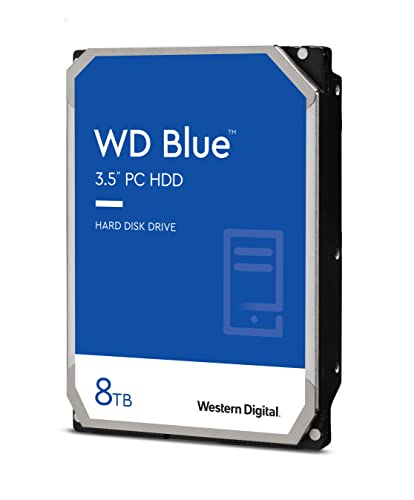
Western Digital 8TB WD Blue Hard Drive
Best for: Quiet desktop storage and home servers
- Storage Capacity
- 8TB
- Form Factor
- 3.5"
- Hardware Interface
- SATA 6 Gb/s
- Rotational Speed
- 5640 RPM
- Cache Size
- 128 MB
- Compatibility
- PC
View on Amazon: Western Digital 8TB WD Blue Hard Drive Affiliate link
This Western Digital 8TB drive uses a 5640 RPM motor and SATA 6 Gb/s interface. It includes 128 MB of cache for data buffering. The 3.5-inch form factor fits standard desktops and NAS enclosures. You will find it suitable for home servers or backup systems. The air-based architecture aims for quiet operation and low power use during 24/7 storage tasks.
Pros
- 8TB storage capacity for large datasets
- SATA 6 Gb/s interface for broad compatibility
- 128 MB cache size
- 3.5-inch form factor for desktop integration
- Quiet air-based architecture
Cons
- 5640 RPM rotational speed is slower than high-performance drives
- 128 MB cache is smaller than many 8TB competitors
- Sold as a renewed unit
Good fit if
- You need high-capacity storage for a desktop PC
- You are building a home server or NAS
- You prioritize quiet operation over raw speed
Skip if
- You require high rotational speeds for gaming
- You need the fastest possible data transfer rates
- You prefer new units over renewed products
Verdict: WD Blue 8TB Desktop HDD offers ample space for home servers. It fits users who value quiet operation and standard desktop compatibility.
Specifications side by side
| Spec | Western Digital 8TB WD Blue Hard Drive |
|---|---|
| Storage Capacity | 8TB |
| Form Factor | 3.5" |
| Hardware Interface | SATA 6 Gb/s |
| Rotational Speed | 5640 RPM |
| Cache Size | 128 MB |
| Compatibility | PC |
| Size | 8TB |
| Dimensions | 5.79 × 4 × 1.03 inches |
| Weight | 1.65 pounds |
| Color | Blue |
| Model | WD80EAZZ |
Frequently asked questions
Is the WD Blue 8TB suitable for a home server?
Yes, this drive is well-suited for home servers. It provides ample 8TB of storage space for virtual machines and media libraries. The 5640 RPM speed and 128MB cache support quiet operation, which is ideal for residential environments where noise matters.
Does this hard drive work with standard desktop PCs?
It is compatible with most desktop PCs. The SATA hardware interface ensures it connects easily to standard motherboards. You do not need special drivers for basic operation, making it a straightforward upgrade for users expanding their desktop storage capacity.
What are the physical dimensions of the WD80EAZZ?
The drive measures 5.79 inches in length, 4 inches in width, and 1.03 inches in height. This standard 3.5-inch form factor allows it to fit into most desktop PC cases and DIY NAS enclosures without requiring special mounting hardware.
How much cache memory does this 8TB drive have?
It includes 128MB of cache memory. This buffer helps manage data flow between the drive and your system. While not the largest cache available, it supports standard desktop performance for bulk storage tasks like archiving photos or videos.
Can I use this drive in an external enclosure?
Yes, you can connect it via a SATA USB enclosure. The SATA interface is standard for external storage devices. This setup allows you to use the 8TB capacity for portable backup or additional storage outside your main desktop system.
Is the WD Blue 8TB quiet during operation?
It is designed for quiet desktop storage. The 5640 RPM spin speed reduces noise compared to higher-performance drives. This makes it a good choice for users who value silent operation in their home office or living room setup.