Looking Beyond the QNAP 4-Bay USB-C Hardware RAID? 6 Alternatives Worth a Look
As an Amazon Associate we earn from qualifying purchases. Links on this page are affiliate links.
The QNAP TR-004 4 Bay USB-C Hardware RAID Enclosure offers direct-attached storage with onboard RAID modes for Windows, macOS, and Linux. If you are searching for qnap tr 004 4 bay USB alternatives, you may need different specs, size, or brand. This enclosure provides simple local expansion when you do not need standalone network capabilities. It includes hardware RAID support for RAID 0, 1, 5, and JBOD configurations. The unit is diskless and features lockable drive bays for physical security.
You might want something else if you need pre-configured storage, rackmount form factors, or Thunderbolt connectivity. Some users prefer Synology expansion units or G-Technology high-capacity drives for specific workflows. The alternatives listed here were chosen because their specs overlap with the original. They all provide four drive bays and direct-attached storage options. Each product serves a distinct use case, from budget rackmount expansion to high-speed video editing. You can compare these options to find the best fit for your storage needs.
Our top pick: QNAP 4-Bay USB-C Hardware RAID Enclosure.
How these alternatives compare to QNAP TR-004
Synology 4-Bay Rackmount Expansion Unit
The Synology RX418 is a rackmount expansion unit, not a standalone device. It connects to a parent Synology NAS to add four drive bays. Unlike the QNAP TR-004, it has no independent operating system or USB connectivity for direct PC attachment. You gain seamless online volume expansion within the Synology ecosystem. It fits a 12-inch rack profile with dimensions of 11.4 inches wide and 1.73 inches high. Choose this if you already own a Synology NAS and need more storage space without managing a separate unit. It lacks the hardware RAID controller found in the QNAP, relying instead on the host NAS for data protection.
G-Technology 32TB G-Speed Shuttle
The G-Technology G-Speed Shuttle uses Thunderbolt 3 instead of USB Type-C. This interface offers higher bandwidth for video editing workflows. It comes pre-configured with 32TB of storage. The QNAP TR-004 is diskless, requiring you to buy drives separately. This G-Technology unit is heavier at 16 pounds and taller at 10.5 inches. It supports hardware RAID for data redundancy. Pick this if you need maximum transfer speeds for 4K or 8K video editing. It is not suitable for users who want to build their own storage configuration or connect to a QNAP NAS. The Thunderbolt connection requires compatible ports on your computer.
QNAP 4-Bay USB-C Direct Attached Storage
This QNAP model includes 12TB of pre-configured storage in RAID 5. The original TR-004 is diskless, meaning you must purchase drives separately. Both units offer lockable drive bays and hardware RAID support. This version is ideal if you want immediate storage without the effort of drive selection and installation. It maintains the same 4-bay form factor and USB-C connectivity. Choose this if you value convenience and pre-configured data protection over custom drive capacity. It does not offer network features, keeping the focus on direct-attached storage. The black color scheme matches the original, ensuring visual consistency in your setup.
G-Technology 56TB G-Speed Shuttle Thunderbolt 3
The G-Technology 56TB Shuttle offers significantly higher capacity than the diskless QNAP. It uses Thunderbolt 3 for sustained transfer rates up to 1000MB/s. This is beneficial for high-end video editing. The QNAP TR-004 relies on USB Type-C and requires separate drive purchases. This G-Technology unit is pre-filled with 56TB of data. It is designed for professionals who need massive storage and speed without managing individual drives. It lacks the flexibility to migrate drives between different QNAP devices. Select this if your workflow demands high throughput and large pre-installed capacity. It is not suitable for users who prefer USB connectivity or modular drive upgrades.
QNAP TR-004U 4 Bay Rackmount NAS
The QNAP TR-004U is a rackmount expansion unit for QNAP NAS systems. It cannot operate as a standalone device like the TR-004. It connects to a QNAP NAS to add four SATA drive slots. The original TR-004 works with Windows, macOS, and Linux via USB-C. This unit is designed specifically for QNAP ecosystems. It fits rackmount spaces and provides additional storage capacity. Choose this if you own a QNAP NAS and need more drive bays. It does not offer independent RAID management or direct PC connectivity. It is not suitable for users who want a simple, plug-and-play external storage solution for multiple platforms.
QNAP TR-004U 4 Bay Rackmount NAS
The QNAP TL-R400S is a rackmount SATA enclosure for QNAP NAS systems. It uses SATA connections instead of USB-C. This provides reliable expansion for rack-mounted setups. The original TR-004 offers USB-C connectivity for direct attachment to computers. The TL-R400S is not suitable for standalone use. It requires a QNAP NAS to function. It adds four SATA drive slots to your existing infrastructure. Choose this if you need dedicated storage for QNAP systems without using USB. It lacks the hardware RAID controller of the TR-004. It is ideal for users who want to expand their NAS capacity within a rack environment. It does not support direct connection to non-QNAP devices.
Quick picks
Our 7 picks
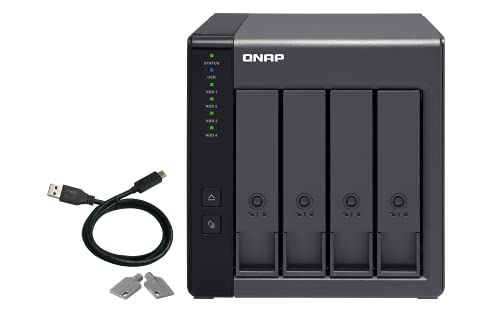
QNAP 4-Bay USB-C Hardware RAID Enclosure
Best for: direct hardware RAID storage and backup
- Drive Bays
- 4-Bay
- Included Storage
- Diskless
- RAID Support
- RAID 0, 1, 5, JBOD
- Dimensions
- 8.62 × 6.31 × 6.63 inches
- Weight
- 4.08 pounds
View on Amazon: QNAP 4-Bay USB-C Hardware RAID Enclosure Affiliate link
This QNAP unit is a 4-bay direct-attached storage enclosure featuring a USB Type-C interface and built-in hardware RAID. It holds four 3.5-inch SATA drives and supports RAID 0, 1, 5, JBOD, and individual disk modes. You can connect it directly to Windows, macOS, or Linux computers, or use it to expand compatible QNAP NAS setups. It suits you if you need hardware-managed RAID storage without managing network services.
Pros
- Hardware RAID controller supporting RAID 0, 1, 5, JBOD, and individual disks
- Direct USB Type-C connectivity for Windows, macOS, and Linux
- Four lockable 3.5-inch drive bays
- Includes USB Type-C to Type-A connection cable
Cons
- Drive interfaces limited to SATA 3Gb/s speeds
- Cannot run NAS applications or merge pools into connected NAS storage
- Incompatible with select older QNAP models like TS-128, TS-228, and TS-431
Good fit if
- You want hardware RAID protection via a direct USB connection to your PC.
- You need an external backup unit or dedicated storage pool for a QNAP NAS.
Skip if
- You need a standalone network-attached storage device that runs applications.
- You want to combine expansion drives directly into an existing NAS storage pool.
Verdict: QNAP 4-Bay USB-C Hardware RAID DAS delivers dependable direct-attached storage with onboard RAID modes for multi-platform workstations and NAS backup. It provides simple local expansion when you do not need standalone network capabilities.

Synology 4-Bay Rackmount Expansion Unit
Best for: shallow-rack Synology storage expansion
- Drive Bays
- 4-Bay
- Included Storage
- Diskless
- Dimensions
- 17 × 11.4 × 1.73 inches
- Weight
- 9.44 pounds
View on Amazon: Synology 4-Bay Rackmount Expansion Unit Affiliate link
This 4-bay rackmount expansion unit provides extra storage capacity managed directly through Synology DiskStation Manager. With a compact 12-inch depth and 1.73-inch height, it fits into shallow two-post frames and wall-mount racks. You get online volume expansion and a low-power deep sleep mode across four disk bays. It suits you if you already run a compatible Synology deployment and need clean rack-mounted drive expansion without deploying an entirely separate network system.
Pros
- Compact 12-inch depth fits standard 2-post and wall-mount racks
- Online volume expansion support
- Managed directly through Synology DiskStation Manager (DSM)
- Energy-saving deep sleep mode
Cons
- Operates as an expansion unit rather than standalone storage
- Ships diskless requiring separate drive purchases
Good fit if
- You need four additional drive bays for an existing Synology setup.
- You use a shallow 2-post or wall-mount rack frame.
Skip if
- You want a standalone DAS unit with direct USB host connectivity.
- You do not use a Synology system running DiskStation Manager.
Verdict: Synology 4-Bay Rackmount Expansion Unit adds four drive bays to your Synology deployment within a compact 12-inch rack profile. It delivers seamless online volume expansion but relies entirely on a parent Synology system for operation.
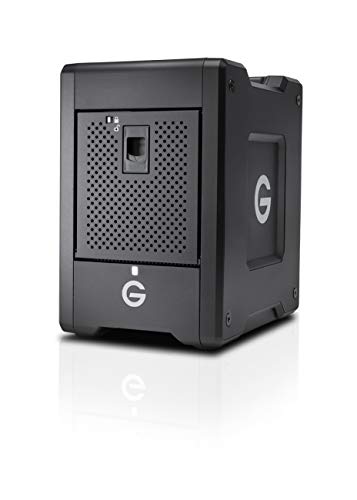
G-Technology 32TB G-Speed Shuttle
Best for: 4K/8K video editing with hardware RAID
- Drive Bays
- 4-Bay
- Included Storage
- 32TB
- RAID Support
- 0, 1, 5, 10
- Hardware Interface
- Thunderbolt
- Dimensions
- 9.75 × 6.85 × 10.5 inches
- Weight
- 16 pounds
View on Amazon: G-Technology 32TB G-Speed Shuttle Affiliate link
This 4-bay Thunderbolt 3 enclosure offers 32TB of storage in a transportable design. It supports hardware RAID 0, 1, 5, and 10 for flexible data protection. The unit measures 9.75 x 6.85 x 10.5 inches and weighs 16 pounds. It is optimized for multi-stream 4K and 8K workflows. You should consider this if you need high-speed direct attachment for heavy media production.
Pros
- Hardware RAID support for RAID 0, 1, 5, and 10
- Thunderbolt 3 interface for high-speed connectivity
- Transportable design for studio-to-location use
- Optimized for multi-stream 4K and 8K workflows
Cons
- 32TB capacity is lower than the 56TB alternative on this list
- Weighs 16 pounds, making it bulkier than typical desktop NAS units
- Lacks built-in network connectivity for direct LAN attachment
Good fit if
- You need high-capacity storage for 4K or 8K video editing
- You require hardware RAID for data redundancy without a full NAS
- You prefer a transportable solution for location shoots
Skip if
- You need a network-attached storage device for multi-user access
- You prefer a lighter, more compact desktop form factor
- You require more than 32TB of storage capacity
Verdict: G-Technology 32TB G-Speed Shuttle Thunderbolt 3 is a heavy, high-capacity direct-attached storage solution for video professionals who need hardware RAID and Thunderbolt 3 speeds but do not require network features.

QNAP 4-Bay USB-C Direct Attached Storage
Best for: Users needing immediate 12TB pre-configured storage
- Drive Bays
- 4-Bay
- Included Storage
- 12TB
- RAID Support
- RAID 0, 1, 5, JBOD
View on Amazon: QNAP 4-Bay USB-C Direct Attached Storage Affiliate link
The QNAP TR-004 is a 4-bay Direct Attached Storage unit featuring 12TB of pre-installed Seagate IronWolf storage. It supports RAID 0, 1, 5, and JBOD configurations. The device connects via a USB 3.2 Gen 1 port with USB Type-C. It includes lockable drive bays and a USB Type-C to Type-A connector cable. This bundle is designed for users who want immediate storage capacity without configuring drives themselves.
Pros
- 12TB of pre-installed 4TB Seagate IronWolf drives
- Pre-configured RAID 5 for data redundancy
- Lockable drive bays for physical security
- USB Type-C connectivity for modern devices
Cons
- USB 3.2 Gen 1 interface limits transfer speeds
- No built-in network ports for direct NAS expansion
- Fixed 12TB capacity limits future upgrade flexibility
Good fit if
- You need a ready-to-use storage solution with 12TB capacity
- You want to use the unit as external backup for a QNAP NAS
- You prefer hardware RAID configurations without manual drive setup
Skip if
- You require 10GbE or 2.5GbE network connectivity
- You need to expand storage beyond the included 12TB
- You want a diskless unit to choose your own drives
Verdict: The QNAP TR-004 4-Bay DAS with 12TB provides immediate, secure storage for users who value pre-configured RAID 5 and lockable bays over network connectivity or expandable capacity.
G-Technology 56TB G-Speed Shuttle Thunderbolt 3
Best for: High-speed 4K/8K video editing workflows
- Drive Bays
- 4-Bay
- Included Storage
- 56TB
- Hardware Interface
- Thunderbolt
- Dimensions
- 9.75 × 6.85 × 10.5 inches
View on Amazon: G-Technology 56TB G-Speed Shuttle Thunderbolt 3 Affiliate link
This 4-bay direct-attached storage unit offers 56TB of capacity via Thunderbolt 3. It delivers sustained transfer rates up to 1000MB/s, making it suitable for multi-stream 4K and 8K workflows. The enclosure includes an ev Bay Adapter accessory. It measures 6.85 inches wide, 9.75 inches long, and 10.5 inches high. You should consider this drive if you need high throughput for large media files.
Pros
- 56TB storage capacity
- Sustained transfer rates up to 1000MB/s
- Thunderbolt 3 interface
- Includes ev Bay Adapter
Cons
- Heavier and bulkier than standard 4-bay USB-C DAS units
- Higher capacity may be unnecessary for small teams
- Thunderbolt 3 requires compatible ports on your computer
Good fit if
- You edit multi-stream 4K or 8K video
- You need high sustained transfer speeds
- Your computer has Thunderbolt 3 ports
Skip if
- You only have USB-C ports without Thunderbolt support
- You need a diskless expansion unit
- You prefer a rackmount form factor
Verdict: G-Technology 56TB G-Speed Shuttle Thunderbolt 3 is a high-capacity, high-speed storage solution for video professionals who require Thunderbolt 3 connectivity and sustained 1000MB/s transfer rates for demanding workflows.

QNAP TR-004U 4 Bay Rackmount NAS
Best for: Expanding QNAP NAS storage capacity
- Drive Bays
- 4 Bay
- Network Connectivity
- USB 3.0 Type-C
- Form Factor
- Rackmount
- Dimensions
- 21.3 × 16.5 × 7.87 inches
- Weight
- 4.41 pounds
View on Amazon: QNAP TR-004U 4 Bay Rackmount NAS Affiliate link
The QNAP TR-004U is a 4-bay rackmount enclosure designed to expand storage for existing QNAP NAS systems. It features a USB 3.0 Type-C port for data transfer and supports SATA drives. You can switch between hardware RAID and software RAID modes using dip switches. The unit includes lockable trays for security. It measures 16.5 by 21.3 inches and weighs 4.41 pounds. This device adds capacity and cross-platform file sharing capabilities to your setup.
Pros
- USB 3.0 Type-C port for data transfer
- Supports up to four SATA drives
- Lockable hard drive trays for security
- Dip switches for RAID configuration modes
Cons
- Requires an existing QNAP NAS for full functionality
- Lacks standalone direct-attached storage mode
- Larger rackmount footprint than desktop units
Good fit if
- You need to expand storage for a QNAP NAS
- You prefer hardware RAID control via dip switches
- You have rack space available in your setup
Skip if
- You want a standalone direct-attached storage device
- You do not own a QNAP NAS
- You need a compact desktop form factor
Verdict: QNAP TR-004U 4-Bay Rackmount Expansion is a specialized expansion unit for QNAP NAS owners. It fits users who need more SATA drive slots and rackmount space. It is not suitable for standalone use.

QNAP 4 Bay 1U Rackmount SATA JBOD
Best for: Rack-mounted SATA storage expansion
- Drive Bays
- 4-Bay
- Included Storage
- Diskless
- Form Factor
- Rackmount
- Hardware Interface
- SATA
- Dimensions
- 21.3 × 16.3 × 7.05 inches
View on Amazon: QNAP 4 Bay 1U Rackmount SATA JBOD Affiliate link
The QNAP TL-R400S is a 4-bay rackmount SATA enclosure designed for storage expansion. It supports 3.5-inch SATA drives and connects via a PCIe SATA card. This diskless unit fits 1U rack spaces, measuring 16.3 inches wide and 7.05 inches high. It suits users needing dedicated SATA storage for QNAP NAS systems or Linux servers without built-in drive bays.
Pros
- Supports four 3.5-inch SATA drives
- 1U rackmount form factor saves desk space
- Includes PCIe SATA card for connection
- Compatible with QNAP NAS and Linux servers
Cons
- Diskless design requires separate drive purchase
- Requires PCIe slot for connectivity
- Large footprint compared to tower enclosures
Good fit if
- You need additional SATA storage for a QNAP NAS
- You have a rackmount chassis available
- You prefer dedicated hardware expansion over USB
Skip if
- You want a tower-style desktop enclosure
- You need pre-installed drives
- You lack a PCIe slot in your host system
Verdict: The QNAP TL-R400S 4-Bay Rackmount SATA Enclosure provides reliable SATA expansion for rack-mounted setups. It fits users who need dedicated storage for QNAP NAS systems without using USB connections.
Specifications side by side
| Spec | QNAP 4-Bay USB-C Hardware RAID Enclosure | Synology 4-Bay Rackmount Expansion Unit | G-Technology 32TB G-Speed Shuttle | QNAP 4-Bay USB-C Direct Attached Storage | G-Technology 56TB G-Speed Shuttle Thunderbolt 3 | QNAP TR-004U 4 Bay Rackmount NAS | QNAP 4 Bay 1U Rackmount SATA JBOD |
|---|---|---|---|---|---|---|---|
| Drive Bays | 4-Bay | 4-Bay | 4-Bay | 4-Bay | 4-Bay | 4 Bay | 4-Bay |
| Network Connectivity | not stated | not stated | not stated | not stated | not stated | USB 3.0 Type-C | not stated |
| Included Storage | Diskless | Diskless | 32TB | 12TB | 56TB | not stated | Diskless |
| RAID Support | RAID 0, 1, 5, JBOD | not stated | 0, 1, 5, 10 | RAID 0, 1, 5, JBOD | not stated | not stated | not stated |
| Form Factor | not stated | not stated | not stated | not stated | not stated | Rackmount | Rackmount |
| Hardware Interface | not stated | not stated | Thunderbolt | not stated | Thunderbolt | not stated | SATA |
| Number of Bays | 4-Bay | 4-Bay | 4-Bay | 4-Bay | 4-Bay | 4-Bay | 4-Bay |
| Dimensions | 8.62 × 6.31 × 6.63 inches | 17 × 11.4 × 1.73 inches | 9.75 × 6.85 × 10.5 inches | not stated | 9.75 × 6.85 × 10.5 inches | 21.3 × 16.5 × 7.87 inches | 21.3 × 16.3 × 7.05 inches |
| Weight | 4.08 pounds | 9.44 pounds | 16 pounds | not stated | not stated | 4.41 pounds | not stated |
| Size | 4 Bay | 44 mm x 480 mm x 325 mm | 32TB | 4 Bay | 56TB | 4 Bay | 4 Bay |
| Color | Diskless | black | Black | Black | not stated | Black | black |
| Model | TR-004-US | RX418 | 0G10077 | TR-004 | 0G10401 | TR-004U | TL-R400S |
If you need direct drive access, sabrent 4 bay USB c 10gbps hard alternatives provide different controller and connection specifications.
Frequently asked questions
What is the best alternative to the QNAP TR-004 for Synology users?
The Synology RX418 is the top choice for those in the Synology ecosystem. It is a 4-bay rackmount expansion unit that adds storage to your existing NAS. It does not operate independently. Instead, it relies on a parent Synology system for all functions. This makes it ideal for seamless online volume expansion within a rack profile.
Which QNAP 4-bay alternative offers pre-configured storage?
The QNAP TR-004 4-Bay DAS with 12TB provides immediate storage without manual setup. It comes with RAID 5 already configured. It also features lockable bays for security. This model is best for users who want direct-attached storage without needing network connectivity or the ability to expand capacity later.
Are there Thunderbolt 3 alternatives for video editing?
Yes, G-Technology offers two strong options for video professionals. The 32TB G-Speed Shuttle and the 56TB version both use Thunderbolt 3. They provide hardware RAID and high transfer speeds. These units are heavy and designed for sustained performance. They are best for 4K or 8K editing workflows that do not require network features.
Can I expand my QNAP NAS with a 4-bay unit?
The QNAP TR-004U 4-Bay Rackmount Expansion is designed for this purpose. It fits users who need more SATA drive slots and rackmount space. It is not suitable for standalone use. You must connect it to an existing QNAP NAS system to add capacity. It is a specialized expansion unit for rack-mounted setups.
Is there a SATA-only expansion option for rackmounts?
The QNAP TL-R400S 4-Bay Rackmount SATA Enclosure uses SATA connections. It provides reliable storage expansion for rack-mounted setups. It is ideal for users who need dedicated storage for QNAP NAS systems. It avoids USB connections entirely. This unit is not for standalone use and requires a host NAS system.
What are the physical dimensions of the G-Technology Shuttle?
Both the 32TB and 56TB G-Technology G-Speed Shuttle models share the same chassis size. They measure 6.85 inches in width, 10.5 inches in height, and 9.75 inches in length. The 32TB version weighs 16 pounds. The 56TB version is similarly substantial. These dimensions make them desktop units rather than portable drives.
Does the Synology RX418 support standalone operation?
No, the Synology RX418 cannot operate on its own. It is a rackmount expansion unit that adds four drive bays to your Synology deployment. It relies entirely on a parent Synology system for operation. It delivers seamless online volume expansion but has no independent operating system or USB connectivity for direct attachment.