QNAP 4-Bay USB-C Hardware RAID Review: Who It Fits and Who Should Skip It
As an Amazon Associate we earn from qualifying purchases. Links on this page are affiliate links.
This qnap tr 004 4 bay USB review covers the QNAP TR-004, a direct-attached storage enclosure designed for expanding capacity via USB Type-C. It features four 3.5-inch drive bays and supports hardware RAID levels including 0, 1, 5, and JBOD. The unit is diskless, meaning you must supply your own drives. It connects to Windows, macOS, and Linux systems. This device serves as external storage for NAS backups or as an independent storage pool. It includes a USB Type-C to Type-A connector cable for broader compatibility.
What stands out
- Hardware RAID support for RAID 0, 1, 5, and JBOD configurations
- Four 3.5-inch SATA drive bays for high-capacity storage expansion
- Direct-attached storage connectivity via USB Type-C for cross-platform use
- Lockable drive bays for physical security of installed drives
Who it fits
Good fit for
You should consider this unit if you need a simple, reliable expansion for a QNAP NAS system that supports QTS 4.3.6 or later. It is ideal for users who want to create a separate storage pool for backups or large media files without complicating their main NAS setup. The hardware RAID options suit those who prefer dedicated RAID management outside of their primary server. It also works well as a standalone external drive for Mac or Windows users needing extra space.
Who should skip it
Skip this model if you plan to install NAS applications directly on the enclosure, as it cannot run QTS or run apps. It is also unsuitable if you need to combine its storage pool with your connected NAS for a single unified volume. Data migrated from a NAS to this device will not be recognized by the NAS, so it lacks seamless integration for shared volumes. Additionally, it is not compatible with older NAS models that cannot update to QTS 4.3.6.
Verdict: The QNAP TR-004 is a practical hardware RAID enclosure for expanding storage capacity via USB. It suits users needing a dedicated backup drive or external pool, but those wanting integrated NAS applications should look elsewhere.
Key specs explained for the TR-004
Drive Bays: 4-Bay
You get four slots for 3.5-inch SATA drives. This allows you to install multiple hard drives to increase total storage capacity. You can mix and match drive sizes within the limits of your RAID configuration. This is ideal if you need significant local storage for backups or media libraries without connecting to a network server. Compare this capacity to single-bay enclosures when planning your data growth.
RAID Support: RAID 0, 1, 5, JBOD
The hardware RAID controller lets you combine drives for performance, redundancy, or simple expansion. RAID 1 mirrors data for safety, while RAID 5 balances speed and protection. RAID 0 maximizes speed but offers no redundancy. JBOD treats drives as separate units. This flexibility helps you choose the right balance between data safety and usable space based on your specific backup needs and risk tolerance.
Included Storage: Diskless
The enclosure does not come with hard drives installed. You must purchase 3.5-inch SATA drives separately. This gives you the freedom to choose specific drives based on your performance needs or budget. It also means the initial setup cost includes both the enclosure and the drives. You should plan for the total weight and power requirements of your chosen drives before installation.
Connection: USB Type-C
The unit connects via a USB Type-C port for high-speed data transfer to your computer or NAS. This modern interface supports faster bandwidth than older USB standards. It ensures efficient communication between the enclosure and your host device. You receive a USB Type-C to Type-A connector cable, allowing use with older ports if needed. This connectivity is essential for fast backup operations and large file transfers.
Design and Build Quality
According to the listing, the QNAP TR-004 measures 6.31 inches in width, 6.63 inches in height, and 8.62 inches in length. It weighs 4.08 pounds. These dimensions indicate a compact footprint suitable for desktop use. The enclosure fits comfortably next to a monitor or under a desk without consuming excessive space. The weight suggests a sturdy internal chassis, though the listing does not specify the exact materials used in construction.
The unit features four lockable drive bays. This design choice enhances physical security for your data. You can secure the drives to prevent unauthorized removal. The layout is straightforward, with direct-attached storage connectivity via USB Type-C. A USB Type-C to Type-A connector cable is included. This ensures compatibility with older ports if needed. The finish is described as diskless, meaning you must supply your own 3.5-inch SATA drives. The listing notes that the device does not support certain older QNAP NAS models. You cannot install NAS applications on the TR-004 itself. It serves strictly as an external storage pool. This functional design limits its role to capacity expansion rather than full network server duties. The build prioritizes utility and security over aesthetic flair.
Setup and everyday use
Setting up the QNAP TR-004 requires inserting four 3.5-inch SATA drives into the bays. The listing notes that the unit is diskless, so you must supply your own storage media. Once the drives are installed, you connect the enclosure to your computer using the included USB Type-C to Type-A connector cable. This connection method allows the device to function as direct-attached storage for Windows, macOS, and Linux systems. You can configure the hardware RAID levels, including RAID 0, 1, 5, and JBOD, directly on the enclosure. The drive bays are lockable, which adds a layer of physical security for your data. In daily use, you can treat the TR-004 as external storage for backing up a NAS. It also serves to expand the capacity of a compatible QNAP NAS. However, there are important limitations. The TR-004 cannot run NAS applications. It acts only as an individual storage pool or volume. You cannot combine its storage pool with the connected NAS. Furthermore, drives can only be migrated between other TR-004 units. Data moved from a NAS or another device will not be recognized on this enclosure. You must ensure your NAS model supports QTS 4.3.6 or later for compatibility. This setup is best for users who need simple, high-capacity external storage with hardware RAID flexibility.
Before You Buy This QNAP TR-004
Before purchasing this QNAP TR-004, verify your computer’s ports. The device connects via USB Type-C, but the package includes a Type-C to Type-A cable. This ensures compatibility with older systems lacking native Type-C outputs. You must provide your own 3.5-inch SATA drives, as the enclosure is diskless. Budget for these separately when planning your storage expansion.
This unit serves as an external storage pool for NAS backups or direct desktop use. It cannot host NAS applications or combine its volume with the connected NAS. Data migration is limited to identical TR-004 units. Moving drives between different NAS models will result in unrecognized files. Ensure your existing NAS supports QTS 4.3.6 or later if using it for expansion. The lockable bays add security for your data. Keep the hardware RAID configuration in mind, as it offers flexibility for redundancy or speed. This DAS fits well alongside NAS drives for those needing simple, high-capacity external storage without network complexity.
Check before you buy
- Confirm your computer has USB Type-C or use the included Type-A adapter.
- Purchase four 3.5-inch SATA drives separately since the unit is diskless.
- Check that your QNAP NAS runs QTS 4.3.6 or newer software.
- Verify the TR-004 is compatible with your specific NAS model list.
- Understand that drives cannot be moved freely between different NAS devices.
The product at a glance
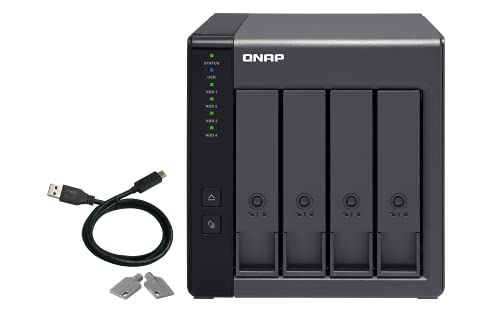
QNAP 4-Bay USB-C Hardware RAID Enclosure
Best for: expanding compatible QNAP NAS capacity with hardware RAID
- Drive Bays
- 4-Bay
- Included Storage
- Diskless
- RAID Support
- RAID 0, 1, 5, JBOD
- Dimensions
- 8.62 × 6.31 × 6.63 inches
- Weight
- 4.08 pounds
View on Amazon: QNAP 4-Bay USB-C Hardware RAID Enclosure Affiliate link
The QNAP TR-004 is a 4-bay direct-attached storage device that connects via USB Type-C. It supports hardware RAID 0, 1, 5, JBOD, and individual disk modes. This unit is diskless and designed to expand QNAP NAS capacity or serve as external backup storage. It works with Windows, macOS, and Linux. The build includes lockable drive bays for physical security. It is a practical expansion tool for existing QNAP users.
Pros
- Hardware RAID support for RAID 0, 1, 5, JBOD, and individual disks
- USB Type-C connection for Windows, macOS, and Linux
- Lockable drive bays for physical security
- Designed to expand QNAP NAS capacity or serve as backup
Cons
- Diskless; you must purchase hard drives separately
- NAS applications cannot be installed on the device
- Incompatible with specific older QNAP models like the TS-128 and TS-228
Good fit if
- You need to expand the storage pool of a compatible QNAP NAS
- You require hardware RAID levels like RAID 5 for data protection
- You want a simple USB-C direct-attached storage solution for macOS or Linux
Skip if
- You need to run NAS applications on the external drives
- You own a QNAP NAS model that cannot update to QTS 4.3.6 or later
- You want a complete storage solution without buying drives separately
Verdict: The QNAP TR-004 4-Bay USB-C DAS is a secure expansion unit for users with compatible QNAP NAS systems who need hardware RAID flexibility. It fits those needing simple USB-C connectivity for backup or capacity growth.
Specifications side by side
| Spec | QNAP 4-Bay USB-C Hardware RAID Enclosure |
|---|---|
| Drive Bays | 4-Bay |
| Included Storage | Diskless |
| RAID Support | RAID 0, 1, 5, JBOD |
| Number of Bays | 4-Bay |
| Dimensions | 8.62 × 6.31 × 6.63 inches |
| Weight | 4.08 pounds |
| Size | 4 Bay |
| Color | Diskless |
| Model | TR-004-US |
Frequently asked questions
Does the QNAP TR-004 come with hard drives installed?
No, the unit is sold diskless. You must purchase and install your own 3.5-inch SATA drives into the four bays. This gives you full control over storage capacity and drive types. It is designed as an expansion unit rather than a pre-loaded storage solution.
What RAID levels does the hardware RAID support?
The enclosure supports hardware RAID levels 0, 1, 5, and JBOD. This flexibility allows you to prioritize speed, redundancy, or maximum capacity. You can configure the drives based on your specific data protection needs without relying on software overhead from the host computer.
Is this device compatible with non-QNAP computers?
Yes, it functions as a standard direct-attached storage (DAS) device. The listing describes it as a secure expansion unit for users with compatible systems. It connects via USB Type-C and includes a Type-C to Type-A cable for older ports, making it usable with various computers.
What are the physical dimensions of the QNAP TR-004?
The enclosure measures 6.31 inches in width, 6.63 inches in height, and 8.62 inches in length. It weighs 4.08 pounds. These compact dimensions make it suitable for desktop placement. It fits comfortably next to other peripherals without taking up excessive desk space.
Can I use this for simple backup storage?
Yes, the unit fits users needing simple USB-C connectivity for backup. It provides a straightforward way to expand storage for compatible systems. The hardware RAID options also allow you to protect your backup data from single drive failures using RAID 1 or 5 configurations.
Does the model number include the USB-C specification?
The specific model listed is the TR-004-US. This confirms it is the USB-C version of the TR-004 series. The US suffix typically denotes the regional power adapter and cable configuration included in the package. Always verify the exact model number to ensure correct connectivity.