SanDisk Professional 18TB G-DRIVE PRO Review: Specs, Pros and Cons
As an Amazon Associate we earn from qualifying purchases. Links on this page are affiliate links.
This sandisk professional 18tb g drive pro review focuses on an enterprise-class desktop hard drive designed for high-throughput workflows. The unit houses a 7200RPM Ultrastar drive, ensuring consistent performance for large data transfers. Its connectivity is defined by dual Thunderbolt 3 ports and a single USB-C port, allowing for versatile integration into modern workstations. The drive supports daisy-chaining, letting you connect up to five additional devices in a single chain. It comes pre-formatted for Mac systems in HFS+ format, while Windows users must reformat the drive to use it. This setup targets professionals who need reliable, high-capacity storage with fast interface speeds.
What stands out
- Dual Thunderbolt 3 ports (20Gbps) and one USB-C port (5Gbps)
- Enterprise-class 7200RPM Ultrastar internal drive
- Read and write speeds up to 260MB/s
- Daisy-chaining capability for up to 5 additional devices
- Pre-formatted for Mac (HFS+); requires reformatting for Windows
Who it fits
Good fit for
This drive suits video editors, 3D artists, and photographers who work with massive files and need rapid transfer rates. The dual Thunderbolt 3 ports allow you to connect multiple high-speed devices in a single chain, simplifying desk setups. The 18TB capacity provides ample space for large project libraries. If you use a Mac, the pre-formatted HFS+ file system means you can start using it immediately without extra configuration steps. It is ideal for users who prioritize speed and reliability in a desktop environment.
Who should skip it
Users on a tight budget should look elsewhere, as this is a premium enterprise-grade device. Windows users must reformat the drive before use, which adds an extra step compared to Mac users. If you need portable storage for laptops, the desktop form factor and 2.6-pound weight make it less suitable for travel. Additionally, if you require native Windows formatting out of the box, this drive will not meet that immediate need without preparation. Those needing smaller capacities might find the 18TB size excessive for their workflow.
Verdict: The SanDisk Professional 18TB G-DRIVE PRO delivers enterprise-class speed and capacity for demanding creative professionals. Its dual Thunderbolt 3 ports and daisy-chaining support make it a robust centerpiece for high-performance desktop setups.
Key specs explained for this drive
Storage Capacity: 18TB
This value indicates the total amount of data the drive can store. You get 18 terabytes of space for your files, backups, and media libraries. This capacity suits users with large video projects or extensive photo collections. When shopping for NAS drives, you compare this against smaller 4TB or 8TB models to determine if the cost per terabyte fits your long-term storage needs.
Rotational Speed: 7200 RPM
This number describes how fast the internal platters spin inside the drive. A 7200 RPM speed provides faster data access and transfer rates compared to standard 5400 RPM drives. This matters if you edit large files directly from the drive. You should check this spec to ensure the drive meets the performance demands of your specific workflow compared to slower, energy-efficient alternatives.
Hardware Interface: Thunderbolt 3, USB-C
These ports define how the drive connects to your computer. Thunderbolt 3 offers high-speed data transfer, while USB-C provides broader compatibility. You benefit from flexible connection options depending on your device. When comparing NAS drives, verify that your computer has these specific ports or that you have the necessary adapters to ensure seamless connectivity and optimal transfer speeds.
Model: SDPH51J-018T-NBAAD
This unique identifier helps you locate the exact product specifications and support documentation online. You use this model number to verify compatibility with your operating system and to check for firmware updates. It distinguishes this specific 18TB variant from other capacities or previous generations, ensuring you purchase the correct hardware for your requirements.
Design and Build Analysis
The SanDisk Professional 18TB G-DRIVE PRO presents a robust desktop form factor. According to the listing, the unit measures 8.27 inches in length, 5.12 inches in width, and 1.81 inches in height. These dimensions indicate a substantial footprint suitable for a dedicated desk or rack space rather than portable use. The device weighs 2.6 pounds, suggesting a solid internal construction that likely helps dampen vibration from the enterprise-class 7200RPM drive inside.
The exterior finish is described as Space Grey, a neutral tone that blends into professional studio or office environments. The layout prioritizes connectivity over minimalism. You will find dual Thunderbolt 3 ports and a single USB-C port on the rear or side, depending on your specific angle. This configuration allows you to daisy chain up to five additional devices, streamlining cable management for complex setups. The presence of two Thunderbolt 3 ports also enables you to connect high-speed peripherals while maintaining data throughput to the drive itself.
There are no visible external controls or displays mentioned in the specifications. The design relies on the internal Ultrastar drive for performance consistency. The build quality appears focused on durability for continuous operation. This sturdy chassis supports the high rotational speed of the internal spindle, ensuring stable performance during large file transfers. The lack of a portable design means you should keep this drive in a fixed location where power and connectivity are readily available.
Setup And Daily Use Guide
Setup begins with connecting the drive to your computer via the available ports. You can use the dual Thunderbolt 3 ports for maximum throughput or the single USB-C port for standard connectivity. The listing notes the drive is ready to use with Mac systems out of the box, formatted in HFS+. If you plan to use this with Windows, you will need to reformat the drive first. This is a necessary step to ensure compatibility with the Windows file system.
For daily use, the enterprise-class 7200RPM Ultrastar drive inside provides consistent performance. You can expect read and write speeds of up to 260MB/s. These speeds are based on internal testing, so actual performance may vary depending on your host device and usage conditions. The dual Thunderbolt 3 ports support daisy chaining. This feature allows you to connect up to five additional devices in a single chain. This setup reduces cable clutter and simplifies your workspace.
The drive is designed for desktop use. Its Space Grey finish and solid build suggest it is meant to sit on a desk or in a rack. The 2.6-pound weight adds stability during operation. You should place it on a flat surface to ensure proper ventilation and stability. The drive does not include a display or remote, so you manage it through your operating system. The 5-year limited warranty provides coverage for five years from the date of purchase. This support period covers manufacturing defects. You should keep your receipt to validate this warranty if needed.
Before You Buy This Drive
You should verify your computer’s port availability before purchasing. This drive requires Thunderbolt 3 or USB-C connections. If your system lacks these, you will need an adapter or a different interface. The unit arrives formatted for Mac systems. Windows users must reformat the drive to use it, which erases existing data. You must plan for adequate ventilation. The 7200RPM enterprise drive generates heat during sustained transfers. Keep it away from walls to ensure airflow. Consider your total storage needs. This 18TB model suits large media libraries. Smaller capacities like 6TB may suffice for lighter workloads. You may also need a UPS. Sudden power loss can damage enterprise drives. Check your operating system compatibility. Ensure your software supports the file system. This drive fits well alongside other high-capacity options in our guide. It targets professionals needing speed and reliability. Compare it with other 18TB or 20TB models. Evaluate if the Thunderbolt interface justifies the premium over standard USB drives. Your workflow dictates the best choice.
Check before you buy
- Verify your computer has Thunderbolt 3 or USB-C ports.
- Plan to reformat the drive if you use Windows.
- Ensure adequate ventilation for the 7200RPM enterprise drive.
- Consider if 18TB matches your actual storage needs.
The product at a glance
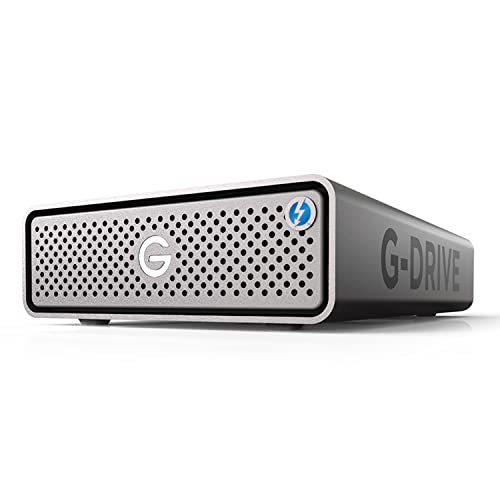
SanDisk Professional 18TB G-DRIVE PRO
Best for: Mac users needing fast Thunderbolt 3 storage
- Storage Capacity
- 18TB
- Hardware Interface
- Thunderbolt 3, USB-C
- Rotational Speed
- 7200 RPM
- Form Factor
- Desktop
- Dimensions
- 8.27 × 5.12 × 1.81 inches
- Weight
- 2.6 pounds
View on Amazon: SanDisk Professional 18TB G-DRIVE PRO Affiliate link
This desktop drive pairs an 18TB capacity with enterprise-grade 7200 RPM performance. It features dual Thunderbolt 3 ports for high-speed data transfer and a USB-C port for broader compatibility. You get read and write speeds up to 260MB/s. The unit supports daisy-chaining up to five devices. It is formatted for Mac out of the box but requires reformatting for Windows use.
Pros
- Dual Thunderbolt 3 ports with 20Gbps speed
- Single USB-C port for 5Gbps connectivity
- Enterprise-class 7200 RPM Ultrastar drive
- Up to 260MB/s read and write speeds
- Daisy-chaining support for up to five devices
Cons
- Requires reformatting to work with Windows
- Single USB-C port limits to 5Gbps speed
- No mention of included Thunderbolt cable
Good fit if
- You need high-capacity storage for Mac systems
- You require fast Thunderbolt 3 transfer speeds
- You want to daisy-chain multiple drives
Skip if
- You need immediate Windows compatibility without reformatting
- You prefer a portable or smaller form factor
- You do not have Thunderbolt 3 ports available
Verdict: SanDisk Professional 18TB G-DRIVE PRO delivers enterprise-class speed and capacity for Mac users who need fast Thunderbolt 3 transfers. It suits professionals who can reformat for Windows and want to chain multiple drives together.
Specifications side by side
| Spec | SanDisk Professional 18TB G-DRIVE PRO |
|---|---|
| Storage Capacity | 18TB |
| Hardware Interface | Thunderbolt 3, USB-C |
| Rotational Speed | 7200 RPM |
| Form Factor | Desktop |
| Dimensions | 8.27 × 5.12 × 1.81 inches |
| Weight | 2.6 pounds |
| Size | 18TB |
| Color | Space Grey |
| Model | SDPH51J-018T-NBAAD |
Frequently asked questions
Is the SanDisk Professional 18TB G-DRIVE PRO compatible with Windows?
Yes, but you must reformat the drive first. The unit ships pre-formatted for Mac systems. Windows users need to initialize the drive using their operating system’s disk management tools before it becomes usable. This process erases the existing file structure, so ensure you have backups if migrating data.
What is the maximum rotational speed of this drive?
The drive operates at 7200 RPM. This rotational speed is typical for desktop-class hard drives and supports consistent performance for large file transfers. It helps maintain steady data throughput for video editing or backup tasks compared to slower 5400 RPM models.
Can I connect multiple G-DRIVE PRO units together?
Yes, the drive features dual Thunderbolt 3 ports. This allows you to daisy-chain multiple units together for expanded storage. You can connect one drive to your computer and then link a second drive to the first, creating a scalable storage solution without using extra ports on your host.
Does this drive include a USB-C port?
Yes, it includes a single USB-C port alongside the dual Thunderbolt 3 connections. You can use this port for standard connectivity if your computer lacks Thunderbolt 3. This provides flexibility for connecting to devices that only support standard USB-C data transfer protocols.
How heavy is the SanDisk Professional 18TB G-DRIVE PRO?
The unit weighs 2.6 pounds. This weight reflects its desktop form factor and internal mechanical components. The substantial mass helps stabilize the drive during operation, reducing vibration and movement on your desk while it handles high-throughput data workloads.
What is the model number for this specific 18TB drive?
The model number is SDPH51J-018T-NBAAD. This identifier corresponds to the 18TB capacity variant in the G-DRIVE PRO line. You can use this number to verify specifications or locate firmware updates directly from the manufacturer.