WD 4TB My Passport Ultra Review: Specs, Pros and Cons
As an Amazon Associate we earn from qualifying purchases. Links on this page are affiliate links.
This wd 4tb my passport ultra review looks at a portable external hard drive designed for straightforward storage expansion. The drive offers 4TB of space, which handles large media libraries and extensive document backups. It connects via USB-C and supports USB 3.1 interfaces for data transfer. The unit features a refined metal cover in silver, weighing just 8.16 ounces. It measures 4.33 by 3.21 by 0.83 inches. This compact form factor makes it easy to slip into a bag. The drive comes formatted for Windows and includes password protection with 256-bit AES hardware encryption to keep your files secure.
What stands out
- 4TB storage capacity for substantial data archiving
- USB-C and USB 3.1 compatible interface
- 256-bit AES hardware encryption with password protection
- Compact metal design measuring 0.83 inches thick
- Includes backup software with ransomware defense
Who it fits
Good fit for
You should consider this drive if you need reliable, high-capacity storage for Windows PCs. The 4TB size suits photographers, videographers, and office workers who manage large files. The USB-C connection works well with modern laptops and desktops. If you prioritize data security, the hardware encryption is a key benefit. The portable size is ideal for users who travel or move between workstations frequently.
Who should skip it
You should look at another option if you use a Mac, as this unit is formatted for Windows only. You would need to reformat the drive to use it on macOS, which erases existing data. If you require cross-platform compatibility out of the box, choose a drive pre-formatted in exFAT. Additionally, if you need Thunderbolt speeds, this USB-based drive may not meet your performance requirements for professional workflows.
Verdict: The WD 4TB My Passport Ultra is a secure, high-capacity portable drive for Windows users. Its compact metal build and encryption features make it a practical choice for daily backups.
Key specs explained for this drive
Storage Capacity: 4TB
This drive holds 4 terabytes of data. You can store thousands of high-resolution photos, hundreds of hours of video, or extensive document archives. For NAS users, this capacity is suitable for a single dedicated backup drive or a small personal media library. It allows you to keep your primary storage free from large files that slow down daily tasks.
Hardware Interface: USB-C, USB 3.1
The drive uses a USB-C connector and supports USB 3.1 standards. This ensures fast data transfer speeds when connected to a compatible port. USB-C is reversible and common on modern laptops and desktops. This interface allows you to quickly move large files without waiting for long periods, making it efficient for regular backups and file management.
Encryption: 256-bit AES hardware encryption
This feature protects your data with 256-bit AES encryption at the hardware level. You can set a password to lock the drive, preventing unauthorized access. This is crucial for sensitive personal or business files. Unlike software encryption, this method does not slow down your computer, keeping your data secure while maintaining performance during transfers and backups.
Dimensions: 4.33 x 3.21 x 0.83 inches
These dimensions make the drive compact and easy to carry in a bag or pocket. The small footprint means it takes up minimal desk space when left connected. This portability is ideal for users who need storage on the go. It fits easily alongside other travel accessories, ensuring you have access to your files wherever you work or travel.
Design and Build Quality Analysis
The listing describes a refined metal cover that gives the drive its silver finish. This material choice suggests a durable exterior designed to withstand the wear of daily transport. The compact dimensions measure 4.33 inches in length, 3.21 inches in width, and 0.83 inches in height. This slim profile allows you to slip the drive into a laptop bag or pocket without adding significant bulk. Weighing 8.16 ounces, it remains light enough for frequent travel yet substantial enough to feel secure in your hand.
According to the listing, the device uses USB-C and USB 3.1 compatible connections. This interface ensures backward compatibility with older USB ports while offering faster data transfer speeds when connected to modern systems. The layout is minimal, featuring no external display or complex button arrays. You rely on the connection port for power and data, which simplifies the setup process. There are no additional controls to manage, reducing potential points of failure.
The design prioritizes portability and straightforward connectivity. The metal casing protects the internal components from minor impacts. Its small footprint means it does not require a dedicated desk space. You can keep it tucked away when not in use. The simple interface means you do not need to learn new controls. This approach suits users who want a reliable, no-fuss storage solution that fits easily into their existing workflow.
Setup and everyday use guide
You plug the drive into a computer using the included USB-C cable. The listing notes compatibility with USB 3.1 interfaces, which ensures you can connect to modern ports. The device is formatted for Windows out of the box. This means you can start storing files immediately on a PC without needing to reformat the drive first. If you use a Mac, you may need to format it yourself, as the PC/Mac Ready option is a separate variation. The drive connects via a single USB-C port. You do not need external power because it draws energy directly from the computer's USB port. This makes it easy to carry in a bag or pocket. Daily use involves copying files to the drive for backup. The listing highlights backup software that includes defense against ransomware. This feature adds a layer of security to your data storage routine. You can also set password protection using 256-bit AES hardware encryption. This locks the drive so only you can access your files. The compact size of 4.33 by 3.21 inches fits easily on a desk. The metal cover provides a sturdy exterior. You can carry it around without worrying about damage from minor bumps. The drive weighs 8.16 ounces, making it light enough for travel. You simply plug it in, enter your password if set, and save your files. The process is straightforward and does not require complex drivers or software installation beyond the included backup tool.
Before you buy this drive
This portable drive requires no external power adapter, which simplifies your desk setup. You only need a free USB port on your computer. Since it ships formatted for Windows, you must reformat it to use it with macOS or Linux. This process erases all data, so plan your transfer strategy carefully. The 4TB capacity is ideal for personal archives, but it is not a network-attached storage solution. It does not support simultaneous access from multiple devices over a network. For NAS users, this unit serves as a local backup target or a dedicated media drive for a single PC. If you need shared access across a home network, you should look at the other 1 options in this guide. Keep the drive in a safe place when not in use, as it lacks built-in shock absorption beyond its metal casing. Regularly check your backup integrity to ensure your files remain safe.
Check before you buy
- Verify you have a free USB-C or USB 3.1 port on your computer.
- Confirm your operating system supports reformatting if you do not use Windows.
- Ensure you need single-device access rather than network-wide shared storage.
- Check if 4TB meets your current storage needs before purchasing.
The product at a glance
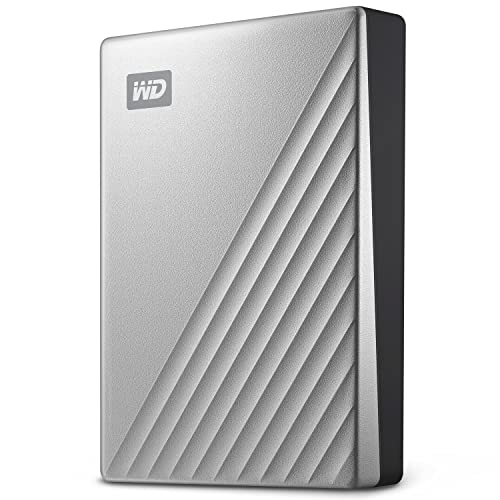
WD 4TB My Passport Ultra Portable HDD
Best for: Windows users needing secure portable storage
- Storage Capacity
- 4TB
- Hardware Interface
- USB-C, USB 3.1
- Compatibility
- PC
- Dimensions
- 4.33 × 3.21 × 0.83 inches
- Weight
- 8.16 ounces
View on Amazon: WD 4TB My Passport Ultra Portable HDD Affiliate link
The WD 4TB My Passport Ultra offers 4TB of storage in a compact silver metal case. It features USB-C and USB 3.1 interfaces for modern connectivity. You get 256-bit AES hardware encryption and password protection for your files. The drive is formatted for Windows and includes backup software. It weighs 8.16 ounces and measures 4.33 by 3.21 inches. This unit suits users needing secure, portable storage for PCs.
Pros
- 4TB storage capacity
- 256-bit AES hardware encryption
- USB-C and USB 3.1 interface
- Refined metal cover design
Cons
- Only formatted for Windows by default
- Includes only a 3-year manufacturer warranty
- Requires Windows for full feature support
Good fit if
- You need 4TB of portable storage
- You want hardware encryption for security
- You use a Windows PC
Skip if
- You primarily use a Mac
- You need USB-A connectivity only
- You require a longer warranty period
Verdict: WD 4TB My Passport Ultra Portable Drive fits Windows users who need secure, high-capacity storage in a compact metal form factor.
Specifications side by side
| Spec | WD 4TB My Passport Ultra Portable HDD |
|---|---|
| Storage Capacity | 4TB |
| Hardware Interface | USB-C, USB 3.1 |
| Compatibility | PC |
| Size | 4TB |
| Dimensions | 4.33 × 3.21 × 0.83 inches |
| Weight | 8.16 ounces |
| Color | Silver |
| Model | WDBFTM0040BSL-WESN |
Frequently asked questions
Is the WD 4TB My Passport Ultra compatible with Mac computers?
The drive is listed as compatible with PC. It ships formatted for Windows out of the box. You must reformat the drive to use it with macOS or Linux. This process erases all existing data on the device. Ensure you back up any important files before changing the file system to avoid data loss.
What are the exact dimensions of this portable drive?
The drive measures 4.33 inches in length, 3.21 inches in width, and 0.83 inches in height. These compact dimensions make it easy to slip into a laptop bag or pocket. The small footprint ensures it does not take up much space on your desk when in use.
Does this drive require an external power adapter?
No, this drive does not require an external power adapter. It draws power directly through the USB-C connection. This simplifies your setup as you only need a free USB port on your computer. It eliminates the need for extra cables or wall outlets for power.
What hardware interface does the WD My Passport Ultra use?
The drive uses a USB-C hardware interface. It supports USB 3.1 interfaces for data transfer. This allows you to connect to modern ports on your computer. The USB-C connection provides both power and data connectivity through a single cable.
How much does the WD 4TB My Passport Ultra weigh?
The drive weighs 8.16 ounces. This lightweight design contributes to its portability. You can carry it easily without adding significant bulk to your bag. The light weight complements its compact metal form factor for travel.
What is the model number for this silver drive?
The model number is WDBFTM0040BSL-WESN. This specific identifier corresponds to the 4TB silver version of the drive. You can use this model number to verify compatibility with accessories or to find replacement cables. It ensures you are looking at the correct product variant.
Is the exterior of the drive made of plastic or metal?
The listing describes a refined metal cover. This material choice suggests a durable exterior designed to withstand daily transport wear. The metal construction also gives the drive its silver finish. This design offers a premium feel compared to standard plastic enclosures.