WD 6TB My Book External vs WD 4TB My Passport Ultra (2026): Key Differences
As an Amazon Associate we earn from qualifying purchases. Links on this page are affiliate links.
This wd western digital 6tb my vs 4tb my passport ultra comparison highlights two distinct storage solutions from Western Digital. Both drives offer password protection and 256-bit AES hardware encryption to keep your data secure. The main difference lies in their design and connectivity. The My Book is a large desktop drive with 6TB of space, while the My Passport Ultra is a compact portable unit with 4TB. You need to decide which form factor fits your workflow.
Key differences
| Aspect | WD 6TB My Book External Hard Drive | WD 4TB My Passport Ultra Portable HDD |
|---|---|---|
| Storage Capacity | 6TB | 4TB |
| Form Factor | Desktop | Portable |
| Hardware Interface | USB 3.0 | USB-C, USB 3.1 |
| Dimensions | 8.5 x 3.46 x 6.7 inches | 4.33 x 3.21 x 0.83 inches |
| Weight | 2.31 pounds | 8.16 ounces |
Which one should you choose?
Choose WD 6TB My Book External Hard Drive if
- You need maximum storage capacity for large media libraries.
- You prefer a stationary drive that stays connected to a computer.
- You want a larger physical footprint for easier cable management.
Choose WD 4TB My Passport Ultra Portable HDD if
- You require portability for travel or on-the-go access.
- You use modern devices with USB-C ports.
- You need a lightweight drive that fits in a bag.
Verdict: Choose the WD 6TB My Book if you prioritize capacity and a fixed desktop setup. Opt for the WD 4TB My Passport Ultra if you need a compact, portable drive with modern USB-C connectivity. Both provide strong encryption for your files.
Form Factor and Connectivity Comparison
Form Factor
The WD 6TB My Book is a desktop drive, measuring 8.5 by 6.7 by 3.46 inches and weighing 2.31 pounds. It requires a dedicated spot on your desk and a constant power outlet. The WD 4TB My Passport Ultra is a portable drive, measuring just 4.33 by 3.21 by 0.83 inches and weighing 8.16 ounces. You can easily slip the Passport into a bag or pocket. The My Book is built for stationary use, while the Passport is designed for mobility and travel. Your choice depends on whether you need permanent storage or on-the-go access.
Hardware Interface
Connectivity differs significantly between these two models. The WD 6TB My Book uses SuperSpeed USB 3.0, which supports transfer rates up to 5 Gbps. It is also compatible with USB 2.0 ports for older systems. The WD 4TB My Passport Ultra features a USB-C interface and is compatible with USB 3.1. This modern connector offers higher potential bandwidth and reversibility, making it easier to plug in without worrying about orientation. If your computer has USB-C ports, the Passport provides a more contemporary connection standard compared to the traditional USB 3.0 port on the My Book.
Storage Capacity
Capacity is a primary differentiator for your storage needs. The WD 6TB My Book External offers 6TB of space, allowing you to store large libraries of high-resolution photos, 4K videos, or extensive game collections. The WD 4TB My Passport Ultra provides 4TB of storage. While still substantial, it holds less data than the My Book. If you need to archive massive amounts of files without splitting them across multiple drives, the 6TB model is the better option. For moderate backups and portable media, the 4TB capacity of the Passport may be sufficient.
Build and Design
The physical design reflects their intended use cases. The WD 6TB My Book comes in black and features a larger, boxier chassis typical of desktop drives that prioritize internal cooling and stability. The WD 4TB My Passport Ultra features a refined metal cover in silver, giving it a sleek, premium look suitable for portable use. The metal cover adds a layer of durability against minor bumps and scratches. The Passport’s compact, low-profile shape makes it less obtrusive when carried, while the My Book’s bulkier design is less relevant for portability but stable for desk use.
Compatibility
Both drives are formatted for Windows, but their connectivity affects broader compatibility. The WD 6TB My Book works with any device having a USB 3.0 or 2.0 port, making it widely compatible with older computers and TVs. The WD 4TB My Passport Ultra relies on USB-C, which is standard on newer laptops and smartphones. However, older devices without USB-C ports will require an adapter to use the Passport. If you have a mix of old and new hardware, the My Book’s USB 3.0 offers easier plug-and-play support without needing extra dongles.
Which drive fits your storage needs
Users needing massive desktop storage
The WD 6TB My Book offers 6TB of space in a desktop form factor. It connects via USB 3.0 for reliable data transfer. You get 256-bit AES hardware encryption to protect your files. This drive is ideal for home servers or workstations where you need high capacity and do not mind a larger footprint.
Users prioritizing portability and modern ports
The WD 4TB My Passport Ultra is a portable drive with a slim metal design. It features USB-C and USB 3.1 compatibility for faster connections on modern devices. Weighing only 8.16 ounces, it fits easily in your bag. You get 256-bit AES encryption and password protection for secure mobile storage on the go.
Users with mixed device connectivity
If you use devices with USB-C ports, the My Passport Ultra is the better choice. It supports USB 3.1 for efficient data movement. The compact 4TB capacity is sufficient for most personal backups. Its portable nature allows you to carry your encrypted data anywhere, unlike the stationary desktop drive which requires a dedicated power outlet.
The products compared
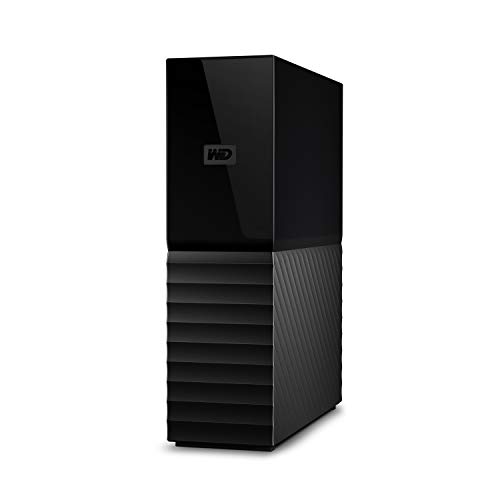
WD 6TB My Book External Hard Drive
Best for: stationary high-capacity data storage
- Storage Capacity
- 6TB
- Hardware Interface
- USB 3.0
- Form Factor
- Desktop
- Dimensions
- 3.46 × 8.5 × 6.7 inches
- Weight
- 2.31 pounds
View on Amazon: WD 6TB My Book External Hard Drive Affiliate link
The WD 6TB My Book is a desktop external hard drive designed for high-capacity storage. It offers 6TB of space via a USB 3.0 interface, delivering SuperSpeed data transfer rates of 5 Gbps. The unit includes 256-bit AES hardware encryption and password protection software for security. Its larger form factor suits stationary setups rather than portable needs. This drive is ideal for users requiring substantial local storage for personal or business data.
Pros
- 6TB storage capacity for large files
- USB 3.0 interface with 5 Gbps speed
- 256-bit AES hardware encryption
- Includes password protection software
Cons
- Desktop form factor limits portability
- Bulky dimensions (8.5 x 6.7 x 3.46 inches)
- Heavier weight (2.31 pounds)
Good fit if
- You need high-capacity local storage for a stationary setup
- You require hardware encryption for data security
- You prefer USB 3.0 speeds for faster transfers
Skip if
- You need a portable drive for travel
- You have limited desk space for a desktop unit
- You prefer a lighter, more compact form factor
Verdict: WD 6TB My Book Desktop HDD is a robust storage solution for users who prioritize capacity and security over mobility. It fits desktop environments where size is not a constraint.
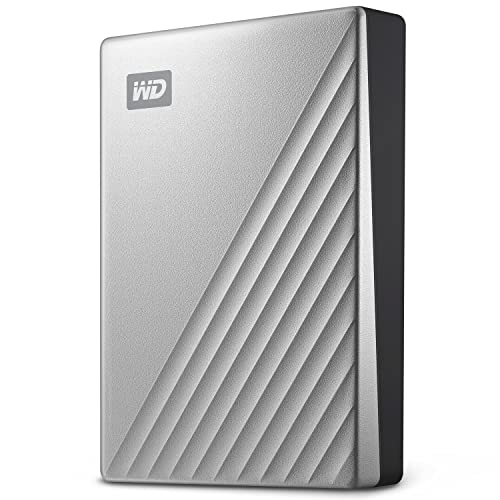
WD 4TB My Passport Ultra Portable HDD
Best for: Secure, portable Windows backup
- Storage Capacity
- 4TB
- Hardware Interface
- USB-C, USB 3.1
- Compatibility
- PC
- Dimensions
- 4.33 × 3.21 × 0.83 inches
- Weight
- 8.16 ounces
View on Amazon: WD 4TB My Passport Ultra Portable HDD Affiliate link
This is a portable external hard drive with 4TB of storage. It connects via USB-C and USB 3.1 interfaces. The drive features a silver metal cover and includes password protection with 256-bit AES hardware encryption. It is formatted for Windows and weighs 8.16 ounces. You should choose this if you need a compact, secure drive for PC backup.
Pros
- 4TB storage capacity
- USB-C and USB 3.1 connectivity
- 256-bit AES hardware encryption
- Compact 3.21 x 4.33 x 0.83 inch size
Cons
- Lower 4TB capacity compared to the 6TB competitor
- Only compatible with Windows out of the box
- Heavier than some thinner portable alternatives
Good fit if
- You need strong hardware encryption for sensitive files
- You prefer a compact, portable drive for your PC
- You want a USB-C connection for modern devices
Skip if
- You require a 6TB or larger storage capacity
- You need immediate compatibility with Mac without reformatting
- You are looking for the highest possible storage density
Verdict: WD 4TB My Passport Ultra Portable Drive offers secure, portable storage with USB-C connectivity. It is ideal for users prioritizing data protection and portability over maximum capacity.
Specifications side by side
| Spec | WD 6TB My Book External Hard Drive | WD 4TB My Passport Ultra Portable HDD |
|---|---|---|
| Storage Capacity | 6TB | 4TB |
| Hardware Interface | USB 3.0 | USB-C, USB 3.1 |
| Form Factor | Desktop | not stated |
| Compatibility | not stated | PC |
| Size | 6TB | 4TB |
| Dimensions | 3.46 × 8.5 × 6.7 inches | 4.33 × 3.21 × 0.83 inches |
| Weight | 2.31 pounds | 8.16 ounces |
| Color | Black | Silver |
| Model | WDBBGB0060HBK-NESN | WDBFTM0040BSL-WESN |
Frequently asked questions
Is the WD 6TB My Book portable?
No, it is a desktop drive. It measures 8.5 by 6.7 by 3.46 inches and weighs 2.31 pounds. You must keep it plugged into a power outlet. It is not designed for travel. The size requires a dedicated spot on your desk. You should choose the My Passport Ultra if you need to carry your drive with you.
Does the WD 4TB My Passport Ultra support USB-C?
Yes, it uses USB-C connectivity. This interface allows for direct connection to modern laptops and devices. The drive is compact, measuring 4.33 by 3.21 by 0.83 inches. It weighs only 8.16 ounces. This makes it easy to slip into a bag for secure, portable Windows backup.
Can I use the WD 6TB My Book with a laptop?
You can connect it via USB 3.0, but it is not ideal. The drive is bulky and requires external power. It is best for stationary high-capacity data storage. You will need to keep it near a power outlet. For laptop use, the smaller, self-powered My Passport Ultra is a better fit.
Which drive is better for data security?
Both drives offer strong security features. They include password protection and 256-bit AES hardware encryption. This protects your files from unauthorized access. The choice depends on your usage. The My Book is for desktops, while the My Passport Ultra is for portable use. Both keep your data safe.
What is the color of the WD 4TB My Passport Ultra?
The WD 4TB My Passport Ultra comes in silver. It has a sleek, metallic finish. The drive is small and lightweight. It measures 4.33 by 3.21 by 0.83 inches. This color option complements modern computer setups. The 6TB My Book, in contrast, is black.
Does the WD 6TB My Book need a power adapter?
Yes, it requires a constant power outlet. As a desktop drive, it does not draw power from the USB cable alone. You must plug it into a wall socket. This limits where you can place it. It is designed for stationary use. The portable My Passport Ultra does not need this extra adapter.