6 Best Alternatives to the Zimablade 2-Bay DIY NAS Kit (2026)
As an Amazon Associate we earn from qualifying purchases. Links on this page are affiliate links.
If you are looking for zimablade 2 bay DIY NAS alternatives, you likely want to compare how different systems handle your specific workload. The Zimablade 2-Bay DIY NAS Kit stands out for its flexible x86 platform and 16GB of RAM. These specs allow you to run Docker containers and stream 4K media without heavy transcoding. It is a solid choice for users who want to build a flexible x86 home server with ample RAM for Docker and media streaming.
However, you might prefer a different form factor, a pre-built enclosure, or a different brand. Some buyers need simpler plug-and-play backup or basic home office file storage. The alternatives on this list were chosen because their specs overlap with the original. We compared processors, RAM capacity, and drive bays to find the best fit for your needs. Whether you need NVMe cache or just reliable data protection, these options cover the key requirements for a personal server.
How the alternatives compare to Zimablade
QNAP TS-233 2-Bay NAS
The QNAP TS-233 offers a complete desktop enclosure, unlike the Zimablade kit which requires you to install drives yourself. It uses a quad-core processor but only includes 2GB of RAM, which is significantly less than the Zimablade’s 16GB. This lower memory capacity limits its ability to run multiple Docker containers or heavy virtualization tasks simultaneously. However, the TS-233 provides a more straightforward setup for basic file backup and ransomware protection. You should choose this model if you prioritize simplicity and pre-configured security features over raw processing power and extensive expandability for a complex homelab environment.
Buffalo LinkStation 220 4TB 2-Bay NAS
The BUFFALO LinkStation 220 comes with 4TB of storage already installed in two 2TB drives, whereas the Zimablade is a bare-bones kit with no included drives. This pre-loaded configuration offers immediate plug-and-play functionality for home users who want secure storage without the effort of assembling components. The BUFFALO unit focuses on basic RAID protection and ease of use rather than the flexible x86 computing power found in the Zimablade. If your primary goal is simple, reliable backup for family photos and documents without managing a server OS, this pre-built solution removes the technical hurdles associated with DIY NAS construction.
QNAP TS-233 2-Bay Desktop NAS
This QNAP TS-233 model is an ARM-based alternative to the Zimablade’s x86 Intel processor. While it shares the 2-bay form factor and quad-core architecture, it only provides 2GB of RAM compared to the Zimablade’s 16GB. The ARM processor limits software compatibility, making it less suitable for diverse Docker applications or complex homelab projects. However, it serves well for basic home file storage and media streaming where extensive computing resources are unnecessary. You should select this option if you need a budget-friendly, dedicated NAS for light tasks and do not require the broad operating system support that x86 architecture provides.
QNAP TS-264 2-Bay Desktop NAS
The QNAP TS-264 distinguishes itself with M.2 NVMe support and faster 5GbE and 2.5GbE network connectivity, features absent in the Zimablade kit. It uses an Intel Celeron quad-core processor, which offers strong performance for high-speed home server tasks. While it lacks the 16GB RAM of the Zimablade, its specialized hardware accelerates storage operations and network transfers. This model is ideal for users who prioritize data access speed and cache performance over general-purpose virtualization. If your workflow involves frequent large file transfers or heavy media transcoding with fast SSD caching, the TS-264 provides a more optimized networking and storage infrastructure.
Synology 2-Bay 2GB RAM NAS Hub
The Synology DS223 provides a compact, pre-assembled unit with 2GB of RAM, contrasting sharply with the Zimablade’s 16GB and DIY nature. It is designed for personal file backup and surveillance support, focusing on reliability and ease of use rather than high-performance computing. The DS223 lacks the expandable PCIe slots and extensive RAM found in the Zimablade, limiting its use for heavy Docker containers. You should choose this NAS if you value a polished, automated backup experience and compact size. It suits users who want a dedicated storage and surveillance hub without the technical maintenance required for a flexible x86 homelab server.
Synology 2-Bay 8TB NAS
This Synology DS223 model comes pre-loaded with 8TB of storage, offering immediate capacity without the need to purchase separate drives. It features 2GB of RAM and a quad-core processor, which is sufficient for basic home storage needs but falls short of the Zimablade’s 16GB RAM for heavy multitasking. The included Seagate IronWolf drives ensure compatibility and reliability for home users. This option is best for those who want a high-capacity, ready-to-use system without the assembly process. If your priority is maximizing storage space with minimal setup effort rather than building a customizable, high-RAM server, this pre-loaded NAS is a practical alternative.
Quick picks
| # | Product | Best for | Price |
|---|---|---|---|
| 1 | Zimablade 2-Bay DIY NAS Kit Best overall | flexible x86 homelab and self-hosting | Check price of Zimablade 2-Bay DIY NAS Kit on Amazon |
| 2 | QNAP TS-233 2-Bay NAS Also great | basic home office file backup | Check price of QNAP TS-233 2-Bay NAS on Amazon |
| 3 | Buffalo LinkStation 220 4TB 2-Bay NAS Best home users | home users seeking plug-and-play backup | Check price of Buffalo LinkStation 220 4TB 2-Bay NAS on Amazon |
| 4 | QNAP TS-233 2-Bay Desktop NAS Best budget | Basic home file storage and media streaming | Check price of QNAP TS-233 2-Bay Desktop NAS on Amazon |
| 5 | QNAP TS-264 2-Bay Desktop NAS Best m.2 nvme | high-performance home servers with NVMe cache | Check price of QNAP TS-264 2-Bay Desktop NAS on Amazon |
| 6 | Synology 2-Bay 2GB RAM NAS Hub Also great | personal file backup and surveillance | Check price of Synology 2-Bay 2GB RAM NAS Hub on Amazon |
| 7 | Synology 2-Bay 8TB NAS Best premium | Home users wanting pre-loaded storage | Check price of Synology 2-Bay 8TB NAS on Amazon |
Our 7 picks
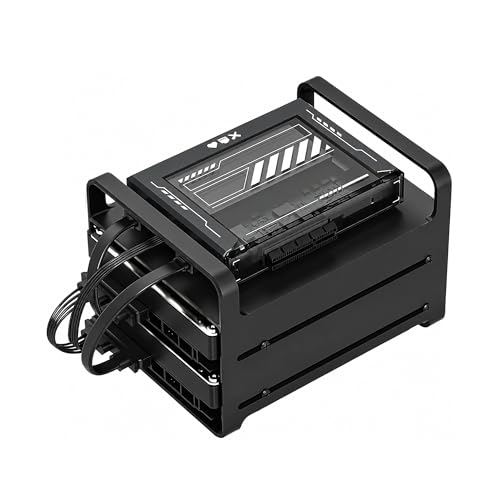
Zimablade 2-Bay DIY NAS Kit
Best for: flexible x86 homelab and self-hosting
- Drive Bays
- 2-Bay
- Processor
- Intel quad-core
- RAM Capacity
- 16GB
- Hardware Interface
- SATA
View on Amazon: Zimablade 2-Bay DIY NAS Kit Affiliate link
This Zimablade 2-bay kit uses an Intel quad-core x86 processor and 16GB of RAM. It is a flexible mini server for building a home lab or personal cloud. The kit includes the power supply, RAM, and a metal drive cage. You can run Linux, Docker, or CasaOS. It supports 4K media streaming via direct play. This setup offers broad compatibility for self-hosting tasks.
Pros
- Intel quad-core x86 processor for broad OS compatibility
- 16GB RAM handles multiple lightweight services simultaneously
- Includes power supply, RAM, and drive cage for immediate assembly
- PCIe slot allows for network or storage expansion
Cons
- Requires you to purchase and install your own storage drives
- No pre-installed operating system or software included
- Manual assembly is needed to build the final system
Good fit if
- You want to run Docker containers or a homelab
- You prefer x86 architecture over ARM-based NAS devices
- You need 16GB of RAM for multi-service workloads
Skip if
- You need a plug-and-play appliance with pre-installed software
- You want to avoid assembling hardware components yourself
- You only need basic file storage without server features
Verdict: Zimablade 2-Bay DIY NAS Kit is a solid choice for users who want to build a flexible x86 home server with ample RAM for Docker and media streaming.

QNAP TS-233 2-Bay NAS
Best for: basic home office file backup
- Drive Bays
- 2 Bay
- Network Connectivity
- 1x Gb LAN
- Processor
- ARM Cortex-A55 Quad-core 2.0 GHz
- RAM Capacity
- 2 GB RAM
- Form Factor
- Desktop
- Dimensions
- 7.4 × 3.54 × 6.14 inches
View on Amazon: QNAP TS-233 2-Bay NAS Affiliate link
The QNAP TS-233 is a 2-bay desktop NAS designed for home and office use. It features a 64-bit Cortex-A55 quad-core processor running at 2.0 GHz and includes 2 GB of RAM. The unit supports 1 Gb LAN connectivity. Its minimalist design makes it suitable for users seeking a compact storage solution. You should consider this device if you need reliable file backup and basic network storage capabilities.
Pros
- Cortex-A55 quad-core 2.0 GHz CPU
- 2 GB RAM capacity
- Snapshots protect data from ransomware
- Compact 2-bay desktop form factor
Cons
- Only 2 GB of RAM limits heavy multitasking
- Single 1 Gb LAN port restricts network speed
- No mention of USB ports for direct backup
Good fit if
- You need a simple 2-bay NAS for basic file storage
- You want ransomware protection via snapshots
- You prefer a minimalist desktop design
Skip if
- You require high-performance computing for virtual machines
- You need dual LAN ports for link aggregation
- You plan to run resource-intensive applications
Verdict: The QNAP TS-233 2-Bay Desktop NAS fits users who need straightforward file backup and ransomware protection without complex setup. It is ideal for light home office environments rather than power users.

Buffalo LinkStation 220 4TB 2-Bay NAS
Best for: home users seeking plug-and-play backup
- Drive Bays
- 2-Bay
- Included Storage
- 4TB
- RAID Support
- RAID 0, RAID 1
- Intended Use
- Home Users
- Dimensions
- 5.04 × 10 × 8.82 inches
- Weight
- 1 pounds
View on Amazon: Buffalo LinkStation 220 4TB 2-Bay NAS Affiliate link
The BUFFALO LinkStation 220 is a pre-built 2-bay NAS with 4TB of included storage. It ships in RAID 1 for automatic backup, offering 2TB of useable space. You can switch to RAID 0 for full capacity. It supports Windows and macOS 15 and earlier. The closed system reduces vulnerabilities. This unit suits home users who want plug-and-play storage without DIY assembly.
Pros
- Includes 4TB of storage in two 2TB drives
- Supports RAID 0 and RAID 1 configurations
- Closed system design reduces third-party app vulnerabilities
- Includes NAS Navigator 2 for macOS 15 and earlier
- SSL encryption for secure file transfers
Cons
- Limited to macOS 15 (Sequoia) and earlier
- Only 2TB useable capacity in default RAID 1
- No mention of support for modern macOS versions
Good fit if
- You want a pre-assembled NAS with drives included
- You need basic RAID 1 backup for home files
- You use Windows or macOS 15 and earlier
Skip if
- You require support for macOS 26
- You need more than 4TB of total storage
- You want to customize your own drive configuration
Verdict: BUFFALO LinkStation 220 4TB 2-Bay NAS provides a simple, secure storage solution for home users who prefer a pre-built system with included drives and basic RAID protection.

QNAP TS-233 2-Bay Desktop NAS
Best for: Basic home file storage and media streaming
- Drive Bays
- 2 Bay
- Processor
- ARM Cortex-A55 Quad-core 2.0 GHz
- RAM Capacity
- 2 GB DDR4 RAM
- Included Storage
- Diskless
- Form Factor
- Desktop
- Dimensions
- 10.4 × 8.74 × 3.94 inches
View on Amazon: QNAP TS-233 2-Bay Desktop NAS Affiliate link
The QNAP TS-233 is a 2-bay desktop NAS powered by an ARM Cortex-A55 quad-core processor running at 2.0GHz. It includes 2 GB of DDR4 RAM for handling basic file storage and multimedia streaming tasks. The unit measures 8.74 by 10.4 by 3.94 inches and weighs 2.2 pounds. This compact device suits users seeking a budget-friendly solution for centralizing family photos, music, and videos while maintaining data safety through storage snapshot technology.
Pros
- ARM Cortex-A55 quad-core processor at 2.0GHz
- 2 GB DDR4 RAM for system operations
- Supports storage snapshot technology for ransomware protection
- Compact desktop form factor measuring 8.74 by 10.4 by 3.94 inches
Cons
- Only 2 GB of RAM limits performance for heavy multitasking
- ARM processor architecture restricts the range of available applications
- Sold as a diskless unit requiring separate hard drive purchases
Good fit if
- You need a low-cost entry point into network storage
- You primarily store and stream media files for personal use
- You want a small footprint that fits easily on a desk
Skip if
- You require high-performance computing for virtual machines
- You need a large library of third-party apps
- You want a pre-loaded system with drives included
Verdict: QNAP TS-233 2-Bay Desktop NAS provides essential 2-bay storage with an ARM quad-core processor for users who prioritize affordability and basic file management over advanced computing power.

QNAP TS-264 2-Bay Desktop NAS
Best for: high-performance home servers with NVMe cache
- Drive Bays
- 2 Bay
- Network Connectivity
- Dual 2.5GbE
- Processor
- Intel Celeron N5105/N5095
- RAM Capacity
- 8GB DDR4
- M.2 NVMe Slots
- Dual M.2 PCIe Gen3x1
- Included Storage
- Diskless
View on Amazon: QNAP TS-264 2-Bay Desktop NAS Affiliate link
The QNAP TS-264-8G-US is a 2-bay desktop NAS built for speed. It features an Intel Celeron quad-core processor and 8GB of DDR4 RAM. Dual M.2 NVMe slots allow for cache acceleration or dedicated storage pools. Dual 2.5GbE ports handle large file transfers efficiently. This unit suits users needing high performance and fast network connectivity for home or office tasks.
Pros
- Intel Celeron N5105/N5095 quad-core processor
- 8GB DDR4 RAM for multitasking
- Dual M.2 PCIe Gen3x1 NVMe slots
- Dual 2.5GbE network ports
- USB 3.2 Gen 2 ports with 10Gb/s speeds
Cons
- Only 2 drive bays limit total capacity
- No 10GbE network ports included
- Heavier build at 5.11 pounds
Good fit if
- You need fast local network transfers
- You want to use NVMe SSDs for cache
- You require ample RAM for virtualization
Skip if
- You need more than 2 drive slots
- You are on a tight budget
- You prefer a smaller footprint
Verdict: QNAP 2-Bay NAS with M.2 NVMe offers strong processing power and fast networking for users who prioritize performance over storage capacity. It is ideal for those building a high-speed home server.

Synology 2-Bay 2GB RAM NAS Hub
Best for: personal file backup and surveillance
- Drive Bays
- 2-Bay
- Included Storage
- Diskless
- RAM Capacity
- 2GB RAM
- Dimensions
- 6.5 × 4.25 × 9.17 inches
- Weight
- 2.82 pounds
View on Amazon: Synology 2-Bay 2GB RAM NAS Hub Affiliate link
The Synology DS223 is a 2-bay NAS drive with 2GB DDR4 RAM. It supports automated backups for Macs, PCs, and mobile devices. You can also use it for DIY surveillance with IP cameras. The unit measures 4.25 by 6.5 by 9.17 inches. It weighs 2.82 pounds. This model is ideal for users who need a compact, reliable storage hub for personal or small office data protection.
Pros
- 2GB DDR4 RAM capacity
- Supports DIY surveillance system
- Automated backup for multiple devices
- Compact 2.82-pound design
Cons
- 2GB RAM is lower than competitors offering 16GB
- No mention of network speed specifications
- Diskless design requires separate drive purchase
Good fit if
- You need a compact storage solution for personal files
- You want to set up a DIY surveillance system
- You prefer automated backups for multiple devices
Skip if
- You require high-performance RAM for heavy multitasking
- You need a pre-installed hard drive setup
- You prioritize high-speed network transfer capabilities
Verdict: Synology DS223 2-Bay NAS offers reliable data protection and surveillance support for users with modest storage needs. It suits those who value compact size and automated backup features over raw performance.
Synology 2-Bay 8TB NAS
Best for: Home users wanting pre-loaded storage
- Drive Bays
- 2-Bay
- Network Connectivity
- 1 x RJ-45 1GbE
- Processor
- Realtek RTD1619B
- RAM Capacity
- 2 GB DDR4
- Included Storage
- 8TB
- Processor Cores
- Quad-Core
View on Amazon: Synology 2-Bay 8TB NAS Affiliate link
The Synology DS223 is a 2-bay NAS with an included 8TB Seagate IronWolf drive. It uses a Realtek RTD1619B quad-core processor at 1.7 GHz and 2 GB of DDR4 RAM. You get one 1GbE LAN port and three USB 3.2 ports. This bundle suits users who want a ready-to-use storage solution without buying drives separately.
Pros
- Includes 8TB Seagate IronWolf storage
- Realtek RTD1619B quad-core CPU
- Three USB 3.2 Gen 1 ports
- Hot-swap drive bays
Cons
- Only 2 GB of system RAM
- Single 1GbE LAN port
- No 2.5GbE or multi-Gigabit support
Good fit if
- You want a complete 8TB storage bundle
- You need reliable home office backup
- You prefer Synology's software ecosystem
Skip if
- You require high-speed 2.5GbE networking
- You plan to run heavy virtualization
- You need more than 8TB capacity
Verdict: Synology DS223 8TB NAS offers a practical entry point for home users who value ease of setup and included storage over raw processing power or network speed.
Specifications side by side
| Spec | Zimablade 2-Bay DIY NAS Kit | QNAP TS-233 2-Bay NAS | Buffalo LinkStation 220 4TB 2-Bay NAS | QNAP TS-233 2-Bay Desktop NAS | QNAP TS-264 2-Bay Desktop NAS | Synology 2-Bay 2GB RAM NAS Hub | Synology 2-Bay 8TB NAS |
|---|---|---|---|---|---|---|---|
| Drive Bays | 2-Bay | 2 Bay | 2-Bay | 2 Bay | 2 Bay | 2-Bay | 2-Bay |
| Network Connectivity | not stated | 1x Gb LAN | not stated | not stated | Dual 2.5GbE | not stated | 1 x RJ-45 1GbE |
| Processor | Intel quad-core | ARM Cortex-A55 Quad-core 2.0 GHz | not stated | ARM Cortex-A55 Quad-core 2.0 GHz | Intel Celeron N5105/N5095 | not stated | Realtek RTD1619B |
| RAM Capacity | 16GB | 2 GB RAM | not stated | 2 GB DDR4 RAM | 8GB DDR4 | not stated | 2 GB DDR4 |
| M.2 NVMe Slots | not stated | not stated | not stated | not stated | Dual M.2 PCIe Gen3x1 | not stated | not stated |
| Included Storage | not stated | not stated | 4TB | Diskless | Diskless | Diskless | 8TB |
| RAID Support | not stated | not stated | RAID 0, RAID 1 | not stated | not stated | not stated | not stated |
| Form Factor | not stated | Desktop | not stated | Desktop | Desktop | not stated | not stated |
| Hardware Interface | SATA | not stated | not stated | not stated | M.2 NVMe | not stated | not stated |
| Number of Bays | 2-Bay | 2-Bay | 2-Bay | 2-Bay | 2-Bay | 2-Bay | 2-Bay |
| Size | SFF/Mini-ITX | Enclosure | 4TB (2x2TB) | 2 Bay | 2 Bay (Unav.) | DS223 | 8TB |
| Processor Cores | Quad-Core | Quad-Core | not stated | Quad-Core | Quad-Core | not stated | Quad-Core |
| Intended Use | not stated | not stated | Home Users | not stated | not stated | not stated | not stated |
| Dimensions | not stated | 7.4 × 3.54 × 6.14 inches | 5.04 × 10 × 8.82 inches | 10.4 × 8.74 × 3.94 inches | 13 × 9 × 11 inches | 6.5 × 4.25 × 9.17 inches | 9.17 × 4.25 × 6.5 inches |
| Weight | not stated | 2.2 pounds | 1 pounds | 2.2 pounds | 5.11 pounds | 2.82 pounds | 6.68 pounds |
| Color | Black | Enclosure | Black | black | Clear | Black | Seagate IronWolf |
| Model | not stated | TS-233 | LS220D0402 | TS-233-US | TS-264-8G-US | DS223 | not stated |
For a related comparison, read aoostar wtr pro 4 2 bay NAS mini PC alternatives.
Frequently asked questions
Which NAS is best for heavy Docker and media streaming workloads?
The Zimablade 2-Bay DIY NAS Kit is the top choice for these tasks. It features a quad-core processor and 16GB of RAM. This high memory capacity allows you to run multiple containers and stream media smoothly. Its flexible x86 architecture supports diverse software environments. This makes it ideal for homelab enthusiasts who need more power than standard NAS units provide.
What is the best option for basic home office file backup?
The QNAP TS-233 2-Bay NAS is designed for straightforward file backup. It includes a quad-core processor and 2GB of RAM. This setup handles light home office environments well. It offers ransomware protection without complex configuration. You get a complete desktop enclosure, so you do not need to build the system yourself. It is a practical solution for users who prioritize ease of use.
Is there a NAS that comes with drives already installed?
Yes, the BUFFALO LinkStation 220 4TB 2-Bay NAS includes two 2TB drives. It is intended for home users who want a plug-and-play experience. The system provides basic RAID protection out of the box. You do not need to purchase or install drives separately. This pre-built solution is secure and simple to set up for basic home storage needs.
Which NAS supports M.2 NVMe for faster performance?
The QNAP TS-264 2-Bay Desktop NAS supports M.2 NVMe drives. It features an Intel Celeron quad-core processor and 5GbE/2.5GbE networking. These specs provide strong processing power and fast data transfer speeds. It is ideal for users building a high-speed home server. The unit weighs 5.11 pounds and offers a clear design. It prioritizes performance over raw storage capacity.
Which NAS is best for personal file backup and surveillance?
The Synology DS223 2-Bay NAS is suitable for personal backup and surveillance. It includes 2GB of RAM and a compact form factor. The system offers reliable data protection and automated backup features. It is designed for users with modest storage needs. You get a black enclosure that is easy to place anywhere. It values compact size and reliability over raw processing power.
What is the best NAS for users wanting pre-loaded 8TB storage?
The Synology DS223 8TB NAS comes with pre-loaded Seagate IronWolf drives. It features a quad-core processor and 2GB of RAM. The unit includes 1GbE network connectivity. This model is a practical entry point for home users. You get included storage and ease of setup. It is ideal for those who value ready-to-use capacity over advanced processing power or high network speeds.