Zimablade 2-Bay DIY NAS Kit Review: Specs, Pros and Cons
As an Amazon Associate we earn from qualifying purchases. Links on this page are affiliate links.
This zimablade 2 bay DIY NAS review looks at the Zimablade 7700, a flexible x86 mini server designed for self-hosting and homelab projects. Unlike locked-down appliance devices, this kit offers broad compatibility with various operating systems and software. It is defined by its Intel quad-core processor and 16GB of RAM, providing the power needed for multiple lightweight services. The package includes a metal drive cage for two drives, making it a complete starting point for building your own personal cloud or Docker host without the limitations of typical ARM-based NAS solutions.
What stands out
- Intel quad-core x86 processor for broad software compatibility
- 16GB RAM handles file sharing and media streaming simultaneously
- Includes power supply, RAM, and drive cage for immediate assembly
- PCIe slot allows for network or storage expansion upgrades
Who it fits
Good fit for
This kit suits DIY enthusiasts who want full control over their homelab setup. If you plan to run Linux, Docker, or CasaOS, the x86 platform and ample RAM provide the flexibility you need. It is also ideal for users who want to stream 4K media via Plex direct play without heavy transcoding. The included components make it a practical choice for those ready to build a personal server from scratch rather than buying a pre-configured unit.
Who should skip it
You should look elsewhere if you prefer a plug-and-play appliance that requires no technical setup. This device is not a traditional NAS with a ready-to-use operating system; it is a kit for building your own server. If you lack experience with Linux or containerization, the learning curve may be steep. Additionally, users who need more than two drive bays or do not require the flexibility of an x86 platform will find this option unnecessarily complex for their storage needs.
Verdict: The Zimablade 7700 is a capable foundation for custom homelab projects, offering strong specs for self-hosting. It best serves users who value flexibility and are comfortable building their own server environment.
Key specs explained for Zimablade
Processor: Intel Quad-Core
This x86 processor provides broad compatibility with many operating systems and software. You can run Linux, Docker, and CasaOS with native support. This setup suits users who want flexibility for self-hosting and homelab projects. It handles multiple lightweight services smoothly without the restrictions found in typical ARM-based NAS devices. You get real freedom to experiment with different configurations and applications.
RAM Capacity: 16GB
Sixteen gigabytes of RAM allows you to handle file sharing, media streaming, and backups simultaneously. This capacity supports smooth multi-service workloads for always-on operation. It is ideal for home labs running 24/7. You can manage container apps and personal cloud services without performance bottlenecks. This amount of memory ensures stable performance when running several applications at once.
Drive Bays: 2-Bay
The two drive bays allow you to install two HDDs or SSDs using the included metal cage and SATA cables. This configuration supports basic storage expansion and redundancy options. You can build your own NAS storage array right out of the box. The kit includes the power supply and necessary cables, making it ready for immediate assembly and setup for your personal data needs.
PCIe Expansion Slot
A PCIe slot offers flexible upgrades for network cards or storage expansion. This feature allows you to customize the device based on your specific needs. You can add capabilities beyond the base configuration, such as faster networking or additional storage controllers. This makes the unit suitable for learning and exploration, giving you room to grow your homelab setup over time without buying new hardware.
Design and Build Overview
The Zimablade 7700 arrives as a 2-bay DIY NAS kit. According to the listing, the chassis measures SFF or Mini-ITX dimensions and is finished in black. This compact form factor allows you to place the unit on a desk or inside a small rack without consuming significant space. The small footprint suits home labs where desk real estate is limited.
Inside, the layout centers on a metal drive cage designed to hold two HDDs or SSDs. The listing confirms that dual SATA cables are included to connect these drives. This internal arrangement keeps storage components organized and secure. You get the structural foundation needed for a reliable storage array without needing to source separate mounting hardware.
The kit is complete for assembly. You receive the main unit, a power supply, and 16GB of RAM pre-installed or included. A PCIe slot is available on the motherboard for future expansion. This design choice means you can add network cards or other adapters later. The build focuses on modularity. You assemble the drives into the cage, connect the cables, and power on the system. The black finish hides dust well in a home environment. This practical design supports your goal of building a flexible x86 server.
Setup and Everyday Use Guide
Setting up this Zimablade 7700 kit requires your own hard drives and operating system choice. The listing provides a power supply, 16GB of RAM, a metal drive cage for two drives, and dual SATA cables. You install your storage media into the cage and connect the SATA cables to the motherboard. Since it is a DIY kit, you handle the software installation. The Intel quad-core x86 processor allows you to choose from a wide range of operating systems. Linux distributions, Docker environments, and CasaOS are supported. This flexibility means you are not locked into a single proprietary interface. You configure the system to match your specific homelab or personal cloud needs. Once configured, the 16GB of RAM supports smooth multi-service workloads. You can run file sharing, media streaming, and backups simultaneously. The system is optimized for low-power, always-on operation. This makes it suitable for running 24/7 in a home office or living space. For media consumption, the hardware supports 4K playback via direct play. You can stream your personal library through Plex or similar servers without heavy transcoding. The x86 platform ensures broad compatibility with container apps and retro systems. If you need more connectivity, the PCIe slot allows for optional upgrades. You can add network cards or expand storage later. This setup is ideal for users who want full control over their server environment.
Before You Buy This Kit
You need to buy two hard drives separately to use this kit as a functional storage server. The listing includes a metal cage and SATA cables, but no disks. You must also select your own operating system. Linux distributions, CasaOS, or Docker environments work well with this x86 hardware. Check that your chosen software supports the Intel quad-core processor and 16GB RAM capacity. Regular upkeep involves monitoring drive health and updating your OS to maintain security. This device fits alongside traditional NAS drives by offering raw computing power rather than a pre-configured appliance. It suits users who want to build a custom homelab or personal cloud. If you prefer plug-and-play simplicity, a standard network-attached storage drive might be better. However, for those willing to configure their own services, this kit provides flexible expansion via its PCIe slot. It is an ideal foundation for self-hosting applications, media streaming with Plex, or containerized apps. You get the freedom to customize every aspect of your server environment.
Check before you buy
- Buy two compatible hard drives for the 2-bay cage.
- Choose an OS like Linux or CasaOS before installing.
- Verify your software supports x86 architecture and 16GB RAM.
- Ensure you have space for the SFF or Mini-ITX form factor.
The product at a glance
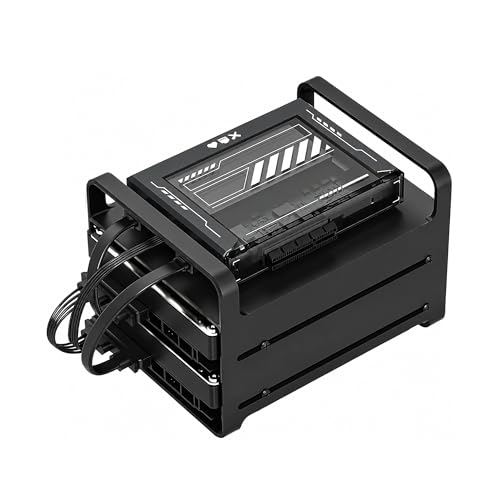
Zimablade 2-Bay DIY NAS Kit
Best for: DIY homelab builders and Plex users
- Drive Bays
- 2-Bay
- Processor
- Intel quad-core
- RAM Capacity
- 16GB
- Hardware Interface
- SATA
View on Amazon: Zimablade 2-Bay DIY NAS Kit Affiliate link
This Zimablade 2-bay kit uses an Intel quad-core x86 processor and 16GB of RAM. It includes a metal drive cage, SATA cables, and a PCIe slot for expansion. You get a flexible platform for Docker, CasaOS, or Plex media streaming. It suits builders who want full control over their homelab software rather than a locked-down appliance.
Pros
- Intel quad-core x86 processor for broad OS compatibility
- 16GB RAM supports multiple concurrent services
- Includes power supply, RAM, and drive cage
- PCIe slot allows for network or storage upgrades
Cons
- Limited to only two drive bays
- Requires manual assembly and OS installation
- No pre-installed software or remote management included
Good fit if
- You want to run Docker containers or CasaOS
- You need 4K media streaming with Plex
- You prefer x86 architecture over ARM
Skip if
- You need more than two drive bays
- You want a plug-and-play appliance
- You do not want to manage your own operating system
Verdict: Zimablade 2-Bay DIY NAS Kit is a flexible x86 mini server for users who want to build a custom homelab with Docker or Plex. It fits those who value software freedom over out-of-the-box simplicity.
Specifications side by side
| Spec | Zimablade 2-Bay DIY NAS Kit |
|---|---|
| Drive Bays | 2-Bay |
| Processor | Intel quad-core |
| RAM Capacity | 16GB |
| Hardware Interface | SATA |
| Number of Bays | 2-Bay |
| Processor Cores | Quad-Core |
| Size | SFF/Mini-ITX |
| Color | Black |
Frequently asked questions
What operating systems work with this kit?
You can install a wide range of operating systems on the Zimablade 2-Bay DIY NAS Kit. Its x86 architecture ensures broad compatibility with Linux distributions, Docker environments, and CasaOS. This flexibility allows you to choose the software that best fits your homelab needs rather than being locked into a proprietary system.
Is this device good for running Plex?
Yes, the Zimablade 2-Bay DIY NAS Kit is well-suited for Plex media servers. It features an Intel quad-core processor and 16GB of RAM, which provides the necessary resources for smooth video transcoding and library management. This setup is ideal for users who want to build a custom media center.
How much RAM does the kit include?
The Zimablade 2-Bay DIY NAS Kit comes with 16GB of RAM installed. This capacity supports multitasking and running multiple Docker containers or virtual machines simultaneously. It is sufficient for most homelab projects and self-hosting applications without requiring immediate upgrades.
What is the form factor of this NAS?
The Zimablade 2-Bay DIY NAS Kit uses an SFF or Mini-ITX form factor. It is finished in black and designed to be compact enough to fit on a desk or inside a small enclosure. This size makes it easy to integrate into home office setups without taking up excessive space.
Do I need to buy hard drives separately?
Yes, you must purchase two hard drives separately to use this kit. The listing includes a metal drive cage and dual SATA cables, but no storage disks are included. You will need to install your chosen operating system and storage media to make the unit functional.
Who is this NAS kit best for?
This kit is best for DIY homelab builders and users who value software freedom. It targets those who want to build a custom server with Docker or Plex rather than using a simple out-of-the-box appliance. If you prefer flexibility over simplicity, this x86 mini server fits your needs.