Best Western Digital NAS Hard Drives Under $1000 in 2026: 12 Picks
As an Amazon Associate we earn from qualifying purchases. Links on this page are affiliate links.
Finding the best western digital NAS hard drives under $1000 requires matching your specific storage needs to published specifications. This guide compares 12 options to help you choose the right hardware for your setup. The top pick is the Western Digital 16TB My Book Duo Desktop RAID, which leads due to its 16TB capacity and integrated USB hub for easy expansion. These selections are based strictly on the specs listed on each product page. This guide helps you decide between internal NAS drives, external desktop units, and enterprise-grade options based on your capacity and interface requirements.
Quick picks
The best fit for you
- You want desktop RAID storage without mounting internal drives Western Digital 16TB My Book Duo Desktop RAID This desktop unit provides 16TB of external capacity with preconfigured RAID-0 and an integrated USB hub.
- You need high-endurance storage for heavy enterprise workloads Western Digital WD Gold 18TB 7200 RPM Hard Drive The drive features an enterprise-grade 550TB per year workload rating paired with 7200 RPM speed.
- You want quiet CMR storage for an eight-bay NAS WD Red Plus 14TB 5400 RPM NAS Hard Drive It uses CMR recording technology and runs at 5400 RPM with a 512MB cache.
- You need the highest capacity internal SATA drive available Western Digital Ultrastar DC HC590 26TB Hard Drive It delivers 26TB of CMR storage and sustained throughput up to 302 MB/s.
Our 12 picks

Western Digital 16TB My Book Duo Desktop RAID
Best for: encrypted desktop RAID storage and USB expansion
- Storage Capacity
- 16TB
- Hardware Interface
- USB 3.1, USB 3.0
- Form Factor
- Desktop
- Dimensions
- 6.3 × 3.94 × 7.09 inches
- Weight
- 5.2 pounds
View on Amazon: Western Digital 16TB My Book Duo Desktop RAID Affiliate link
The Western Digital 16TB My Book Duo is a dual-drive desktop external storage system designed for local backups. You get 16TB of total capacity preconfigured in RAID-0, with USB 3.1 Gen 1 and USB 3.0 connectivity. It includes an integrated hub with two USB 3.0 ports plus 256-bit AES hardware encryption. This unit suits you if you need high-capacity external desktop storage without installing internal drives into a bay.
Pros
- 16TB total storage capacity across dual drives
- RAID-0 ready out of the box
- 256-bit AES hardware encryption with password protection
- Built-in hub with two USB 3.0 ports
- USB 3.1 Gen 1 ready with USB 3.0 compatibility
Cons
- External desktop form factor cannot mount inside standard internal NAS drive bays
- Large desktop footprint weighing 5.2 pounds
Good fit if
- You need a 16TB external desktop unit with USB 3.1 Gen 1 connectivity.
- You want built-in 256-bit AES hardware encryption for local backups.
- You need extra connection ports via an integrated dual USB 3.0 hub.
Skip if
- You need a bare internal 3.5-inch drive for an existing NAS enclosure.
- You require a compact, portable drive rather than a stationary desktop unit.
Verdict: Western Digital 16TB My Book Duo External Desktop RAID delivers high-capacity encrypted desktop storage with ready-to-use RAID-0 and an integrated USB hub. It is a solid choice when you need plug-and-play external capacity without mounting internal drives.

Western Digital WD Gold 18TB 7200 RPM Hard Drive
Best for: high-workload enterprise NAS arrays
- Storage Capacity
- 18TB
- Form Factor
- 3.5"
- Hardware Interface
- SATA 6 Gb/s
- Rotational Speed
- 7200 RPM Class
- Cache Size
- 512 MB
- Recording Technology
- EAMR
View on Amazon: Western Digital WD Gold 18TB 7200 RPM Hard Drive Affiliate link
The Western Digital 18TB WD Gold Enterprise HDD is a 3.5-inch internal SATA drive built for heavy storage demands. You get 18TB of space, a 7200 RPM rotational speed, and a 512MB cache. It handles workloads up to 550TB per year and uses vibration protection along with HelioSeal technology. This drive suits you if you need high continuous data throughput and large capacity inside multi-drive NAS environments.
Pros
- 550TB per year workload rate limit
- Large 512MB cache buffer
- Fast 7200 RPM rotational speed
- HelioSeal and vibration protection technology
Cons
- Internal bare drive without external enclosure or cables included
- Standard 3.5-inch form factor does not fit 2.5-inch bays
Good fit if
- You need a high workload rating up to 550TB per year.
- You require 18TB of capacity paired with a 512MB cache.
Skip if
- You need an external plug-and-play USB drive.
- You operate a compact enclosure limited to 2.5-inch drives.
Verdict: Western Digital 18TB WD Gold Enterprise HDD delivers high endurance with its 550TB per year workload rating and 7200 RPM performance. It provides high-capacity, vibration-protected SATA storage for continuous multi-bay operation.

WD Red Plus 14TB 5400 RPM NAS Hard Drive
Best for: home and small-office 8-bay NAS setups
- Storage Capacity
- 14TB
- Form Factor
- 3.5"
- Hardware Interface
- SATA 6 Gb/s
- Rotational Speed
- 5400 RPM Class
- Cache Size
- 512MB
- Recording Technology
- CMR
View on Amazon: WD Red Plus 14TB 5400 RPM NAS Hard Drive Affiliate link
This Western Digital 14TB WD Red Plus is a 3.5-inch internal SATA hard drive designed for home and small business network storage. It runs at a 5400 RPM class rotational speed, features a 512MB cache, and uses CMR recording to maintain steady write performance. If you need reliable bulk capacity for a personal backup server or media library in up to eight drive bays, this drive gives you balanced everyday NAS operation.
Pros
- Large 512MB cache buffer
- Conventional Magnetic Recording (CMR) technology
- Certified for enclosures up to 8 bays
- 3D Active Balance vibration reduction hardware
Cons
- 5400 RPM class rotational speed
- 180TB/year workload rate limit
- Not intended for enclosures exceeding 8 drive bays
Good fit if
- You need 14TB of CMR capacity inside an array of up to 8 bays.
- You operate a home or small-office server under a 180TB/year workload.
- You want lower rotational speed operation via a 5400 RPM class mechanism.
Skip if
- You need 7200 RPM rotational performance for faster data transfers.
- You deploy storage into server chassis holding more than 8 bays.
- You run intensive data transfers that exceed 180TB of writes annually.
Verdict: Western Digital 14TB WD Red Plus NAS HDD provides ample CMR storage with a large 512MB cache for networks up to eight bays. It is tailored for home and small office setups operating within standard annual workload limits.

Western Digital 20TB Elements Desktop Hard Drive
Best for: high-capacity external USB desktop backups
- Storage Capacity
- 20TB
- Hardware Interface
- USB 3.0
- Form Factor
- Desktop
- Dimensions
- 10 × 2 × 2.7 inches
- Weight
- 10.6 ounces
View on Amazon: Western Digital 20TB Elements Desktop Hard Drive Affiliate link
The WD 20TB Elements Desktop External Hard Drive gives you 20TB of external storage over a USB 3.0 connection. It works out of the box with Windows 10+ devices via an included USB Type-A cable and maintains compatibility with USB 2.0 ports. This desktop unit suits you if you need direct-attached capacity for local backups without opening a computer case or installing internal drive bays.
Pros
- 20TB storage capacity in a desktop enclosure
- USB 3.0 interface with USB 2.0 backward compatibility
- Plug-and-play setup for Windows 10+ systems
- Includes USB Type-A connection cable
Cons
- External USB enclosure rather than an internal SATA NAS drive
- Requires dedicated desktop space measuring 10 by 2.7 by 2 inches
- Lacks native USB Type-C connectivity
Good fit if
- You need 20TB of external desktop capacity via USB 3.0.
- You want plug-and-play direct-attached storage for a Windows 10+ PC.
Skip if
- You require an internal 3.5-inch SATA drive to install inside a NAS chassis.
- You only have USB Type-C ports available on your host system.
Verdict: WD 20TB Elements Desktop External Hard Drive delivers 20TB of direct-attached storage through a standard USB 3.0 port. It is an effective option when you need external desktop capacity rather than an internal drive for a NAS bay.

WD 20TB Elements Desktop USB 3.0
Best for: Windows PC external storage expansion
- Storage Capacity
- 20TB
- Hardware Interface
- USB 3.0
- Form Factor
- Desktop
- Dimensions
- 5.31 × 1.89 × 6.53 inches
- Weight
- 1.98 pounds
View on Amazon: WD 20TB Elements Desktop USB 3.0 Affiliate link
The WD 20TB Elements Desktop External Hard Drive offers high-capacity storage via a USB 3.0 interface. It is designed for plug-and-play use with Windows PCs. The drive measures 6.53 by 5.31 by 1.89 inches and weighs 1.98 pounds. It provides fast data transfers for large file management. This drive suits users needing simple, external expansion for Windows systems without internal installation.
Pros
- 20TB storage capacity
- USB 3.0 hardware interface
- Plug-and-play Windows compatibility
- Desktop form factor
Cons
- Requires reformatting for macOS use
- External USB connection limits direct NAS integration
- No RAID or redundancy features listed
Good fit if
- You need extra storage for a Windows PC
- You want a simple plug-and-play setup
- You prefer external desktop drives over internal ones
Skip if
- You use macOS as your primary system
- You need internal NAS drive installation
- You require RAID redundancy for data protection
Verdict: WD 20TB Elements Desktop External HDD is a straightforward storage solution for Windows users needing large external capacity. It fits those who prioritize simple connectivity over NAS-specific features.

WD 22TB My Book External HDD
Best for: secure desktop backups
- Storage Capacity
- 22 TB
- Hardware Interface
- USB 3.0
- Form Factor
- Desktop
- Compatibility
- PC, Mac
- Weight
- 10.6 ounces
View on Amazon: WD 22TB My Book External HDD Affiliate link
The WD 22TB My Book is a desktop external hard drive designed for straightforward data storage and backup. It connects via USB 3.0 and includes built-in 256-bit AES hardware encryption with password protection. This unit offers 22 TB of capacity, making it suitable for users needing large, secure, and portable storage solutions for PCs and Macs.
Pros
- 22 TB storage capacity
- 256-bit AES hardware encryption
- USB 3.0 interface
- Includes backup software
Cons
- Lower capacity than 26 TB and 20 TB options on this list
- Desktop form factor requires AC power supply
- USB 3.0 speed slower than internal SATA connections
Good fit if
- You need large external storage for backups
- You want hardware encryption for data security
- You use a PC or Mac for desktop storage
Skip if
- You require internal drive installation
- You need faster USB 3.1 or Thunderbolt speeds
- You want the highest available capacity
Verdict: WD 22TB My Book External HDD provides secure, high-capacity desktop storage for users prioritizing data protection and ease of use over raw speed or internal integration.

Western Digital Ultrastar 20TB SAS Hard Drive
Best for: SAS-enabled NAS and enterprise server storage
- Storage Capacity
- 20 TB
- Form Factor
- 3.5"
- Hardware Interface
- SAS 12Gb/s
- Rotational Speed
- 7200 RPM
- Cache Size
- 512 MB
View on Amazon: Western Digital Ultrastar 20TB SAS Hard Drive Affiliate link
The Western Digital Ultrastar 20TB SAS Hard Drive provides high-capacity enterprise storage for compatible NAS setups and servers. You get 20 TB of space on a 3.5-inch platform running at 7200 RPM with a 512 MB cache buffer. It uses a SAS 12Gb/s interface rather than standard SATA. This drive suits you if your enclosure natively supports SAS connectivity and demands large volume capacity.
Pros
- Large 20 TB storage capacity
- Fast 7200 RPM rotational speed
- High-speed SAS 12Gb/s hardware interface
- Generous 512 MB cache buffer
Cons
- Uses SAS interface instead of standard consumer SATA
- Requires a dedicated SAS controller or backplane
Good fit if
- You run a server or NAS with SAS 12Gb/s backplane support.
- You need a large 20 TB capacity drive with a 7200 RPM spin speed.
- You want a 512 MB cache buffer for demanding data environments.
Skip if
- You have a standard NAS enclosure that only accepts SATA connections.
- You need an external USB drive rather than an internal 3.5-inch disk.
Verdict: Western Digital Ultrastar 20TB SAS Hard Drive delivers 7200 RPM spindle speeds and a 512 MB cache for enterprise environments. It provides massive 20 TB density if your hardware specifically supports SAS 12Gb/s connectivity.

WD Red Pro 20TB NAS Drive
Best for: High-performance multi-bay NAS systems
- Storage Capacity
- 20TB
- Form Factor
- 3.5"
- Hardware Interface
- SATA 6 Gb/s
- Rotational Speed
- 7200 RPM
- Cache Size
- 512 MB
- Recording Technology
- CMR
View on Amazon: WD Red Pro 20TB NAS Drive Affiliate link
The Western Digital Red Pro 20TB is an internal 3.5-inch drive built for high-performance NAS systems. It features a 7200 RPM rotational speed and 512 MB cache for fast data access. The drive uses CMR technology and supports a 550TB/year workload rate. It is designed for 24x7 multi-user environments and integrates with major NAS vendors. You get reliable storage for demanding RAID setups.
Pros
- 20TB capacity for large-scale storage needs
- 7200 RPM speed for faster data transfer
- 512 MB cache improves performance
- CMR recording technology ensures stability
- Rated for 550TB/year workload
Cons
- 7200 RPM generates more heat than 5400 RPM drives
- Higher power consumption due to faster rotation
- Internal drive requires a separate enclosure
Good fit if
- You need maximum capacity in a single drive
- You run a high-performance RAID array
- You want CMR reliability for critical data
Skip if
- You need a silent drive for a bedroom
- You are building a small 1-bay NAS
- You prefer lower power consumption
Verdict: WD Red Pro 20TB NAS Drive suits users who need high capacity and speed for heavy RAID workloads. It delivers strong performance for professional NAS environments.
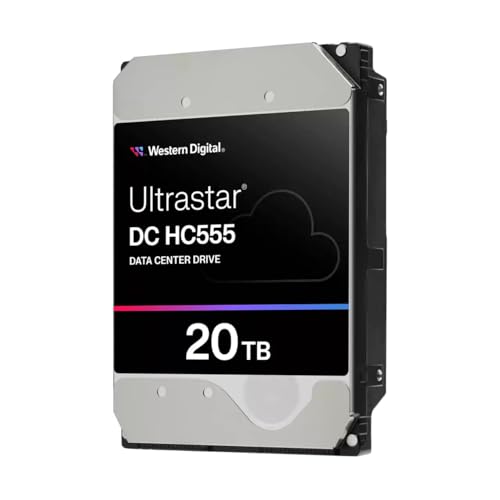
Western Digital Ultrastar 20TB SATA Hard Drive
Best for: high-capacity internal SATA data storage
- Storage Capacity
- 20 TB
- Form Factor
- 3.5"
- Hardware Interface
- SATA
- Cache Size
- 512 MB
- Recording Technology
- EAMR
- Dimensions
- 1.18 × 55.1 × 3.94 inches
View on Amazon: Western Digital Ultrastar 20TB SATA Hard Drive Affiliate link
This internal 3.5-inch hard drive provides 20 TB of storage using SATA connectivity and Energy-Assisted Magnetic Recording (EAMR) technology. It includes a 512 MB cache buffer to assist data processing, along with a Triple-stage Actuator designed to manage head positioning. If you need a high-capacity drive to store massive image or video libraries in a compatible internal drive bay, this Ultrastar unit matches your storage requirements without requiring external enclosures.
Pros
- 20 TB storage capacity for large file archives
- 512 MB cache buffer for data handling
- Energy-Assisted Magnetic Recording (EAMR) technology
- Triple-stage Actuator (TSA) design
Cons
- Rotational speed (RPM) is omitted from the published data
- Requires a standard internal 3.5-inch drive bay
Good fit if
- You need 20 TB of internal SATA storage.
- You want a drive equipped with a 512 MB cache buffer.
- You have an available 3.5-inch internal drive bay.
Skip if
- You need a portable external drive with direct USB connectivity.
- You require drive specifications that explicitly document rotation speed.
Verdict: Western Digital Ultrastar 20TB SATA Hard Drive delivers massive 20 TB internal capacity backed by a 512 MB cache and EAMR technology. It is a solid 3.5-inch option when you need high-density SATA storage for large data archives.
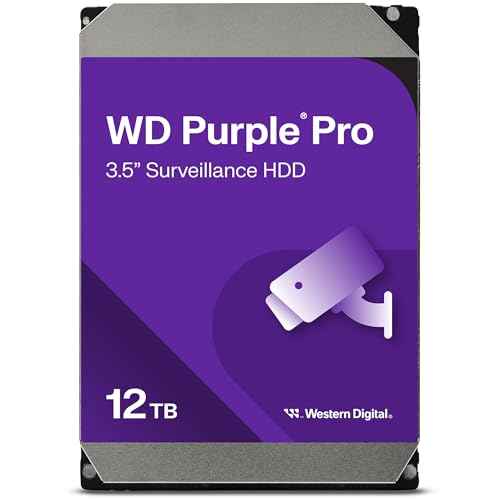
Western Digital 12TB WD Purple Pro Surveillance Drive
Best for: surveillance systems needing reliable video recording
- Storage Capacity
- 12TB
- Form Factor
- 3.5 Inch
- Hardware Interface
- SATA
- Rotational Speed
- 7,200 RPM
- Cache Size
- 512 MB
- Recording Technology
- CMR
View on Amazon: Western Digital 12TB WD Purple Pro Surveillance Drive Affiliate link
The Western Digital WD Purple Pro 12TB is a 3.5-inch internal drive designed for continuous surveillance recording. It features a 7,200 RPM rotational speed and 512 MB cache for stable performance in constant write environments. The drive uses CMR technology and includes AllFrame Technology to prevent data loss. It supports up to 64 HD cameras, making it a high-capacity option for security systems.
Pros
- 12TB storage capacity for extensive video archives
- 7,200 RPM rotational speed for faster data access
- 512 MB cache buffer for stable operation
- CMR recording technology ensures reliable write performance
- AllFrame Technology reduces frame loss during recording
Cons
- 12TB capacity is lower than the 16TB to 26TB options on this list
- 7,200 RPM speed is slower than the 7,200 RPM enterprise drives but optimized for surveillance rather than general NAS use
- Designed specifically for surveillance, which may not suit general NAS workloads
Good fit if
- You need a drive dedicated to surveillance recording
- You want CMR technology for consistent write performance
- You require AllFrame Technology to minimize video loss
Skip if
- You need higher capacity than 12TB
- You are building a general-purpose NAS rather than a surveillance system
- You prefer lower rotational speeds for quieter operation
Verdict: WD Purple Pro 12TB Surveillance HDD is a solid choice for security setups needing reliable continuous recording. It fits users prioritizing video integrity over maximum storage density.

Western Digital Ultrastar DC HC520 12TB
Best for: Enterprise users needing reliable high-speed storage
- Storage Capacity
- 12TB
- Form Factor
- 3.5-inch
- Hardware Interface
- SATA
- Rotational Speed
- 7200 RPM
- Cache Size
- 256MB
- Recording Technology
- CMR
View on Amazon: Western Digital Ultrastar DC HC520 12TB Affiliate link
The WD Ultrastar DC HC520 is a 12TB internal hard drive built for enterprise environments. It uses CMR recording technology and runs at 7200 RPM with 256MB of cache. The drive supports SATA interfaces and fits in 3.5-inch bays. It is rated for 550 TB per year of workload. This model suits users who need reliable, high-performance storage for constant operation.
Pros
- CMR recording technology for consistent performance
- 7200 RPM rotational speed for fast data access
- 256MB cache buffer for smoother processing
- 550 TB/year workload rating for heavy use
Cons
- Lower 12TB capacity compared to 16TB or 20TB options on this list
- No included RAID enclosure or external interface like USB
- Sold as an Amazon.co.jp exclusive with limited regional warranty
Good fit if
- You need enterprise-grade reliability for a NAS
- You prefer CMR technology over SMR
- You require 7200 RPM speeds for performance
Skip if
- You want a larger capacity like 18TB or 20TB
- You need a plug-and-play external USB drive
- You are looking for a consumer-grade warranty
Verdict: WD Ultrastar DC HC520 12TB Enterprise HDD delivers enterprise-class speed and durability for users who prioritize performance over maximum capacity.

Western Digital Ultrastar DC HC590 26TB Hard Drive
Best for: high-density enterprise NAS arrays
- Storage Capacity
- 26TB
- Form Factor
- 3.5in
- Hardware Interface
- SATA 6Gb/s
- Rotational Speed
- 7200 RPM
- Cache Size
- 512MB
- Recording Technology
- CMR
View on Amazon: Western Digital Ultrastar DC HC590 26TB Hard Drive Affiliate link
The Western Digital Ultrastar DC HC590 26TB Hard Drive delivers maximum conventional capacity for your multi-bay storage setup. It utilizes an 11-disk CMR design inside a helium-sealed 3.5-inch chassis. Running at 7200 RPM with a 512MB cache, it pushes sustained data transfers up to 302 MB/s. It suits you if you operate high-density enterprise environments or need massive single-drive density rated for continuous 550TB per year workloads.
Pros
- 26TB capacity built on an 11-disk CMR platform
- Sustained transfer speeds reaching 302 MB/s
- Rated for 550TB/year workload with 2.5 million hours MTBF
- 512MB cache paired with 7200 RPM rotational speed
Cons
- Requires a Molex-to-SATA adapter on older power supplies supplying 3.3V on pin 3
- 512e format rather than native 4Kn sector size
Good fit if
- You need 26TB of CMR storage in a single 3.5-inch bay.
- You run demanding 24x7 servers needing a 550TB/year workload rating.
- You want built-in TCG Enterprise self-encrypting drive hardware security.
Skip if
- You use older power supplies that supply 3.3V to pin 3 without adapters.
- You want low-power 5400 RPM class drives for a simple desktop NAS.
Verdict: Western Digital Ultrastar DC HC590 26TB Hard Drive delivers maximum CMR capacity and sustained 302 MB/s throughput for data-intensive storage arrays. It is engineered for 24x7 enterprise environments requiring high reliability and hardware-level encryption.
Specifications side by side
| Spec | Western Digital 16TB My Book Duo Desktop RAID | Western Digital WD Gold 18TB 7200 RPM Hard Drive | WD Red Plus 14TB 5400 RPM NAS Hard Drive | Western Digital 20TB Elements Desktop Hard Drive | WD 20TB Elements Desktop USB 3.0 | WD 22TB My Book External HDD | Western Digital Ultrastar 20TB SAS Hard Drive | WD Red Pro 20TB NAS Drive | Western Digital Ultrastar 20TB SATA Hard Drive | Western Digital 12TB WD Purple Pro Surveillance Drive | Western Digital Ultrastar DC HC520 12TB | Western Digital Ultrastar DC HC590 26TB Hard Drive |
|---|---|---|---|---|---|---|---|---|---|---|---|---|
| Storage Capacity | 16TB | 18TB | 14TB | 20TB | 20TB | 22 TB | 20 TB | 20TB | 20 TB | 12TB | 12TB | 26TB |
| Form Factor | not stated | 3.5" | 3.5" | not stated | not stated | not stated | 3.5" | 3.5" | 3.5" | 3.5 Inch | 3.5-inch | 3.5in |
| Hardware Interface | USB 3.1, USB 3.0 | SATA 6 Gb/s | SATA 6 Gb/s | USB 3.0 | USB 3.0 | USB 3.0 | SAS 12Gb/s | SATA 6 Gb/s | SATA | SATA | SATA | SATA 6Gb/s |
| Rotational Speed | not stated | 7200 RPM Class | 5400 RPM Class | not stated | not stated | not stated | 7200 RPM | 7200 RPM | not stated | 7,200 RPM | 7200 RPM | 7200 RPM |
| Cache Size | not stated | 512 MB | 512MB | not stated | not stated | not stated | 512 MB | 512 MB | 512 MB | 512 MB | 256MB | 512MB |
| Recording Technology | not stated | EAMR | CMR | not stated | not stated | not stated | not stated | CMR | EAMR | CMR | CMR | CMR |
| Bay Support | not stated | not stated | up to 8 bays | not stated | not stated | not stated | not stated | not stated | not stated | not stated | not stated | not stated |
| Workload Rate Limit | not stated | up to 550TB per year | up to 180TB/yr | not stated | not stated | not stated | not stated | 550TB/yr | not stated | not stated | 550 TB/year | up to 550TB/year |
| Compatibility | not stated | not stated | not stated | not stated | not stated | PC, Mac | not stated | not stated | not stated | not stated | not stated | not stated |
| Size | 16TB | 18 TB | 14TB | 20tb | 20TB | 22 TB | not stated | 20TB | 1" x 4" x 5.8" | 12TB | not stated | not stated |
| Dimensions | 6.3 × 3.94 × 7.09 inches | 5.79 × 4 × 1.03 inches | 7.6 × 5.1 × 2.6 inches | 10 × 2 × 2.7 inches | 5.31 × 1.89 × 6.53 inches | not stated | not stated | 6.4 × 4.1 × 1.1 inches | 1.18 × 55.1 × 3.94 inches | not stated | not stated | not stated |
| Weight | 5.2 pounds | 1.5 pounds | 1.7 pounds | 10.6 ounces | 1.98 pounds | 10.6 ounces | not stated | 1.47 pounds | 1.52 pounds | not stated | not stated | not stated |
| Color | Black | Gold | Red | Black | Black | 22TB | silver | Red | Information Not Available | not stated | not stated | not stated |
| Model | WDBFBE0160JBK-NESN | WD181KRYZ-SPAGBB0 | WDBAVV0140HNC-WRSN | WDBWLG0200HBK-EESN | WDBWLG0200HBK-NESN | WDBBGB0220HBK-EESN | 0F38652 | WD202KFGX-SPCKWN0 | WUH722020CLE6L4 | WD122PURP-AJP | WUS7212BLE6L4-AJP | WUH722626ALE601 |
If you prefer music over data storage, consult our guide to the best digital pianos under 1000 for your next purchase.
How to Choose the Right Western Digital Drive
-
Select the Optimal Spindle Speed
Check the rotational speed specification before you buy. Hard drives with 5400 RPM spindle speeds, like the WD Red Plus 14TB, generate less heat, consume less power, and produce minimal acoustic noise. These drives suit standard home media servers and quiet office setups. Drives rated at 7200 RPM deliver higher data transfer rates and faster file access, which benefits multi-user environments handling intensive reading and writing. Choose 5400 RPM for quiet efficiency or 7200 RPM for maximum sustained performance in busy storage networks.
-
Verify Conventional Magnetic Recording
Inspect the recording technology spec on the drive sheet. Conventional Magnetic Recording, or CMR, writes data tracks side by side without overlapping. This architecture ensures consistent write speeds during continuous write tasks and uninterrupted RAID rebuild sequences. The Western Digital WD Red Pro 18TB uses CMR architecture to maintain steady data transfer rates across multi-user environments. If you operate an active RAID array with frequent file modifications, confirm the drive uses CMR rather than alternate magnetic recording technologies to prevent performance bottlenecks.
-
Check SAS Versus SATA Protocols
Examine your backplane hardware to confirm whether your system requires SATA or SAS interface connectivity. Standard consumer and small business NAS enclosures accept standard SATA drives. Enterprise servers and dedicated storage backplanes often support Serial Attached SCSI. The Western Digital Ultrastar 20TB SAS Hard Drive requires a controller that specifically handles SAS 12Gb/s connections. Standard consumer NAS units cannot read SAS drives. Always verify that your server backplane or controller card matches the hardware interface specification listed on the hard drive before purchasing.
-
Evaluate Onboard Cache Capacity
Review the onboard cache specification when selecting a drive. Cache memory temporarily holds data during read and write operations, smoothing out data transfer spikes across your network. Drives such as the Western Digital WD Gold 18TB feature a 512MB cache, which helps manage dense data streams and large file queues efficiently. A larger cache reduces input and output latency when multiple clients access the storage pool simultaneously. Look for a 512MB cache size if your network regularly handles heavy concurrent traffic.
-
Match Drive Specs to Workloads
Match the drive model series to your primary NAS workload. General network storage benefits from general-purpose NAS drives, while continuous camera recording requires specialized firmware. The Western Digital 14TB WD Purple Pro Surveillance HDD is built specifically for video-focused storage and multi-stream camera recording. It handles continuous write demands from surveillance systems operating 24x7 without dropping video frames. Check your primary storage purpose to decide between general network storage drives and specialized units optimized for high-stream video recording systems.
-
Confirm Multi Bay Scaling Limits
Check the bay limit specification before installing drives in multi-slot enclosures. Vibrations from multiple spinning disks can cause read errors if the drive is not rated for larger enclosures. The Western Digital 12TB WD Red Plus NAS HDD is specified for network setups containing up to eight bays. If your storage server holds more than eight drive bays, select enterprise-grade drives designed to handle higher vibration levels. Verify that your total physical drive bay count remains within the drive specification limits.
Frequently asked questions
What recording technology do WD Red Plus hard drives use?
WD Red Plus hard drives use Conventional Magnetic Recording, commonly abbreviated as CMR. This recording technology provides consistent write speeds during heavy transfers and array rebuilds. Models such as the WD Red Plus 14TB and 12TB pair CMR design with large 512MB caches to ensure reliable multi-bay network storage performance.
How many bays do Western Digital WD Red Plus drives support?
WD Red Plus drives are designed for NAS enclosures with up to eight drive bays. Both the 12TB and 14TB versions feature 512MB caches and CMR architecture for continuous operation. They provide stable throughput for home and small-office environments where you operate multi-drive storage pools within eight-bay hardware limits.
Can you install a Western Digital SAS hard drive into a standard SATA NAS?
You cannot install a SAS drive into a standard SATA-only enclosure. Drives like the Western Digital Ultrastar 20TB SAS require dedicated hardware controllers and backplanes supporting SAS 12Gb/s connectivity. Standard consumer and office enclosures utilize SATA interfaces, requiring SATA drives like the Ultrastar 20TB SATA or WD Gold.
What workload rating does the Western Digital WD Gold drive support?
The Western Digital WD Gold 18TB hard drive supports an enterprise workload rating of 550TB per year. Built with a 7200 RPM rotational speed and a 512MB cache, this 3.5-inch SATA drive includes built-in vibration protection. These specifications make it suitable for high-demand, continuous multi-bay storage environments handling heavy enterprise traffic.
Can you use a WD Purple Pro hard drive in a NAS system?
You can use a WD Purple Pro hard drive in a NAS configured for video recording. The 14TB WD Purple Pro uses CMR recording technology, runs at 7200 RPM, and has a 512MB cache. These attributes deliver reliable multi-stream data writing, making it well suited for network systems managing surveillance footage.
What throughput does the Western Digital Ultrastar DC HC590 26TB achieve?
The Western Digital Ultrastar DC HC590 26TB hard drive reaches sustained throughput of up to 302 MB/s. It operates at 7200 RPM on a SATA interface, featuring CMR technology and a 512MB cache. This high transfer rate allows you to maintain rapid data access when managing dense 24x7 enterprise arrays.
What features does the Western Digital My Book Duo desktop drive include?
The Western Digital 16TB My Book Duo desktop drive features factory-configured RAID-0 and hardware encryption. It also includes an integrated USB hub for extra connectivity alongside its primary desktop interface. This external form factor gives you immediate high-capacity storage when you need local desktop expansion instead of mounting drives internally.