Best 8-Core NAS Devices: 9 Spec-Based Picks
As an Amazon Associate we earn from qualifying purchases. Links on this page are affiliate links.
You need the best 8-Core network attached storages for heavy multitasking and virtualization. We compared 9 models using only the specifications published on the listings. The QNAP 12-Bay 8-Core Tower NAS leads because it supports up to 128GB of RAM for intensive workloads. Eight-core processors handle parallel tasks efficiently, but drive count and memory capacity vary significantly across these units. Some models prioritize dense rackmount storage, while others offer compact desktop footprints with high-speed networking. This guide helps you decide which chassis and specs match your specific storage and processing needs.
Quick picks
The best fit for you
- You need massive storage and heavy virtualization power QNAP 12-Bay 8-Core Tower NAS This 12-bay tower supports up to 128GB of RAM for demanding virtualization tasks.
- You want high RAM capacity in a compact chassis TerraMaster 4-Bay NAS with 32GB RAM The F4-424 Pro offers 32GB of RAM in a small 4-bay desktop enclosure.
- You need fast NVMe storage in a small footprint TERRAMASTER 8-Bay All-NVMe SSD NAS This 8-bay SSD NAS provides high performance with an 8-core CPU and 16GB RAM.
- You require high-density rackmount storage for professional use Asustor Lockerstor 16 Pro 16-Bay Rackmount NAS The 16-bay Lockerstor 16 Pro features an 8-core AMD Ryzen processor and 10GbE connectivity.
Our 9 picks
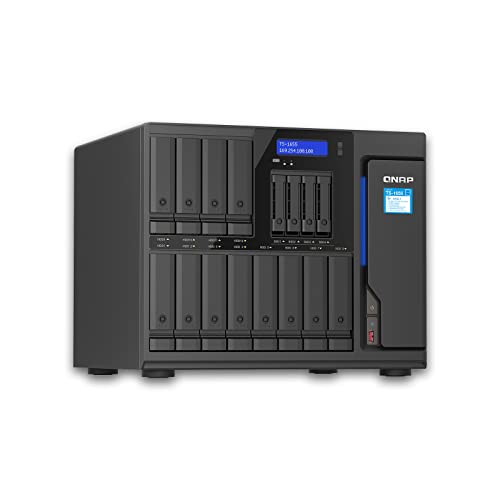
QNAP 12-Bay 8-Core Tower NAS
Best for: high-capacity storage and virtualization
- Processor Cores
- 8-Core (what this guide is about)
- Drive Bays
- 12BAYS
- Network Connectivity
- 2X 2.5Gigabit Ethernet Port
- Processor
- Atom C5125 8-core 2.8GHz
- RAM Capacity
- 128GB (4×32GB)
- Included Storage
- No HDD
The QNAP TS-1655-8G-US is a 12-bay NAS built around an Atom C5125 8-core processor running at 2.8GHz. It includes 128GB of RAM across four slots, offering significant headroom for virtualization and heavy multitasking. You get two 2.5GbE ports for network connectivity. This unit arrives without internal drives installed, allowing you to configure storage capacity to your exact needs.
Pros
- Atom C5125 8-core processor at 2.8GHz
- 12 drive bays for high capacity
- 128GB RAM (4x32GB) pre-installed
- Dual 2.5GbE Ethernet ports
Cons
- Limited to 2.5GbE network speeds
- Large 19.7-inch footprint
- No internal drives included
Good fit if
- You need maximum drive capacity in a single tower
- You require high RAM for virtual machines
- You want an 8-core CPU for heavy workloads
Skip if
- You need 10GbE or faster networking
- You have limited desk or rack space
- You want a pre-loaded storage solution
Verdict: QNAP TS-1655 12-Bay NAS suits users who prioritize massive storage expansion and heavy multitasking power over high-speed networking. It is ideal for those who need 128GB of RAM for virtualization and have the physical space for a large tower.

QNAP 16-Bay Hybrid NAS with Atom 8-Core
Best for: High capacity storage and AI acceleration
- Processor Cores
- 8-Core (what this guide is about)
- Drive Bays
- 16 Bay
- Network Connectivity
- Dual 2.5GbE
- Processor
- Intel Atom C-5125
- RAM Capacity
- 8GB DDR4
- M.2 NVMe Slots
- Dual M.2 NVMe PCIe Gen 3
The QNAP TS-1655-8G-US offers 16 drive bays for high-capacity storage. It uses an Intel Atom C-5125 8-core processor running up to 2.8GHz. You get 8GB of DDR4 RAM, expandable to 128GB with ECC support. Dual 2.5GbE ports handle heavy file access. Two M.2 NVMe slots allow for SSD caching or Coral AI acceleration. This unit suits users needing extensive storage and processing power.
Pros
- 16 drive bays for large capacity
- Intel Atom C-5125 8-core processor
- RAM upgradable to 128GB with ECC
- Dual 2.5GbE network ports
- Dual M.2 NVMe PCIe Gen 3 slots
Cons
- Large physical footprint at 18x19x20 inches
- Only 8GB base RAM included
- Limited to 2.5GbE network speeds
Good fit if
- You need maximum drive capacity
- You plan to upgrade RAM significantly
- You require AI acceleration via M.2
Skip if
- You have limited desk or rack space
- You need 10GbE connectivity
- You want a compact desktop unit
Verdict: QNAP 16-Bay Hybrid NAS with Atom 8-Core is ideal for users requiring extensive storage and upgradable memory. It fits those prioritizing capacity and AI acceleration over network speed or compact size.

QNAP 8-Bay Short-Depth Rackmount NAS
Best for: shallow-depth rackmount business storage and backups
- Processor Cores
- 8-Core (what this guide is about)
- Drive Bays
- 8 Bay
- Network Connectivity
- Dual 2.5GbE
- Processor
- Intel Atom C5125
- RAM Capacity
- 8GB SODIMM DDR4
- M.2 NVMe Slots
- Dual M.2 PCIe Gen 3 x4 NVMe SSD slots
This short-depth rackmount NAS gives you eight drive bays powered by an 8-core 2.8GHz Intel Atom C5125 processor and 8GB of DDR4 memory. It includes dual 2.5GbE networking, two M.2 PCIe Gen 3 NVMe slots, and two PCIe expansion slots. Its compact chassis fits shallow server cabinets, making it a practical choice if you need multi-drive storage and backup tools in limited rack space.
Pros
- 8-core Intel Atom C5125 2.8GHz processor with ECC RAM support up to 64GB
- Dual M.2 PCIe Gen 3 x4 NVMe SSD slots for caching or storage pools
- Two PCIe Gen 3 x4 expansion slots for network or storage cards
- Dual 2.5GbE Ethernet ports
Cons
- Comes diskless with no pre-installed hard drives
- Ships with 8GB base RAM requiring upgrades for heavy memory workloads
- No native 10GbE ports out of the box
Good fit if
- You need an 8-bay 8-core storage server designed for shallow rackmount cabinets.
- You want expansion options via two PCIe Gen 3 slots and two M.2 NVMe slots.
- You plan to back up Microsoft 365 or Google Workspace data using Boxafe.
Skip if
- You prefer a desktop tower form factor over a rackmount chassis.
- You need factory-installed 10GbE network interfaces without buying expansion cards.
- You want pre-populated storage drives included in the box.
Verdict: QNAP 8-Bay Short-Depth Rackmount NAS delivers 8-core processing, dual 2.5GbE connectivity, and dual PCIe expansion in a compact 2U rack form factor. It provides dependable rack-based capacity for business backups and local data management.

TerraMaster 4-Bay NAS with 32GB RAM
Best for: High RAM capacity in a compact 4-bay chassis
- Processor Cores
- 8-Core (what this guide is about)
- Drive Bays
- 4-Bay
- Network Connectivity
- 2x 2.5GbE
- Processor
- Core i3-N305
- RAM Capacity
- 32GB DDR5 4800MHz
- M.2 NVMe Slots
- 2 slots
The TERRAMASTER F4-424 Pro is a 4-bay NAS featuring an Intel Core i3-N305 8-core processor. It stands out with 32GB of DDR5 RAM, which is higher than most competitors in this list. You get dual 2.5GbE ports and two M.2 NVMe slots for caching. This unit is diskless. It suits users who need high memory capacity for virtualization or heavy application loads in a compact 4-bay form factor.
Pros
- Intel Core i3-N305 8-core processor with 3.8GHz turbo speed
- 32GB DDR5 4800MHz non-ECC RAM
- Dual 2.5GbE Ethernet ports
- Two M.2 NVMe slots for SSD caching
Cons
- Only 4 drive bays, limiting total storage expansion
- RAM is non-upgradable
- Sold diskless with no included hard drives
Good fit if
- You need high RAM capacity for virtualization tasks
- You prefer a compact 4-bay chassis
- You want fast DDR5 memory performance
Skip if
- You require more than 4 drive bays
- You need ECC memory for critical data integrity
- You want a pre-configured unit with drives included
Verdict: TERRAMASTER F4-424 Pro 4-Bay NAS offers high memory capacity for users prioritizing application performance over raw drive count. It fits those who need 32GB of RAM in a small footprint.

TERRAMASTER 8-Bay All-NVMe SSD NAS
Best for: fast NVMe storage in a small footprint
- Processor Cores
- 8-Core (what this guide is about)
- Drive Bays
- 8-Bay
- Network Connectivity
- 10Gbps
- Processor
- Intel Core i3-N305
- RAM Capacity
- 16GB DDR5 4800MHz
- Included Storage
- Diskless
The TERRAMASTER F8 SSD Plus is an 8-bay NAS built for speed. It uses an Intel Core i3-N305 8-core processor and 16GB of DDR5 RAM. The device holds eight NVMe SSDs for high performance. It includes 10Gbps networking and weighs just 1.32 pounds. This compact unit suits users needing fast storage in a small footprint.
Pros
- Intel Core i3-N305 8-core processor
- 16GB DDR5 4800MHz RAM
- Supports eight M.2 NVMe SSDs
- 10Gbps Ethernet connectivity
- Ultra-compact 2.4 x 5.5 x 6.9 inch design
Cons
- Sold diskless with no included drives
- Only eight bays compared to 16-bay competitors
- Uses SATA NVMe slots rather than U.2
Good fit if
- You need fast NVMe storage for virtualization
- You require a compact NAS for tight spaces
- You want high RAM capacity for multitasking
Skip if
- You need pre-installed hard drives
- You prefer traditional HDD storage over SSDs
- You require more than eight drive bays
Verdict: The TERRAMASTER F8 SSD Plus 8-Bay NAS delivers high performance with its 8-core CPU and 16GB RAM. It fits users who prioritize speed and compact size over raw capacity.

Asustor Lockerstor 16 Pro 16-Bay Rackmount NAS
Best for: high-density 16-bay rackmount storage
- Processor Cores
- 8-Core (what this guide is about)
- Drive Bays
- 16-Bay
- Network Connectivity
- Dual 10GbE, Dual 1GbE
- Processor
- AMD Ryzen 7 Pro 7745
- RAM Capacity
- 16GB ECC DDR5
- Included Storage
- Diskless
View on Amazon: Asustor Lockerstor 16 Pro 16-Bay Rackmount NAS
This 16-bay rackmount NAS uses an 8-core AMD Ryzen 7 Pro 7745 processor. It includes 16 GB of ECC DDR5 RAM, expandable to 192 GB. The unit features dual 10GbE and dual 1GbE ports for flexible networking. You get dual redundant platinum power supplies for reliability. It is a diskless system designed for high-density storage needs.
Pros
- 16-bay capacity for large storage arrays
- AMD Ryzen 7 Pro 7745 8-core CPU
- 16 GB ECC DDR5 RAM with expansion
- Dual 10GbE and dual 1GbE ports
Cons
- Heavy 33.7-pound build requires strong rack support
- Large 22.7-inch length needs ample space
- Diskless design requires separate drive purchase
Good fit if
- You need high-density storage in a rack
- You require ECC memory for data integrity
- You want redundant power supplies for uptime
Skip if
- You need a compact desktop unit
- You want a pre-loaded storage solution
- You only need single 1GbE connectivity
Verdict: Asustor Lockerstor 16 Pro Gen2 16-Bay NAS suits users needing massive capacity and robust server-grade components. It is ideal for professional environments requiring high availability and expansion.

TERRAMASTER 4-Bay 8-Core Intel NAS
Best for: entry-level 8-core storage and container virtualization
- Processor Cores
- 8-Core (what this guide is about)
- Drive Bays
- 4-Bay
- Network Connectivity
- Dual 5GbE
- Processor
- Intel N305 8-Core
- RAM Capacity
- 8GB
- M.2 NVMe Slots
- 3 slots
This 4-bay network attached storage enclosure runs on an 8-core Intel N305 processor paired with 8GB of system memory. It delivers dual 5GbE network connections alongside three M.2 NVMe slots for cache acceleration or storage pools. You get support for flexible TRAID arrays and container virtualization via Docker or VirtualBox. It suits you if you need multi-core processing power and high-speed networking across four drive bays without pre-installed storage.
Pros
- Intel N305 8-core processor handles multitasking and containers
- Dual 5GbE ports provide aggregated throughput up to 1020 MB/s
- Three M.2 NVMe slots for SSD caching or high-speed storage
- TRAID configuration supports mixing different drive capacities
Cons
- Ships diskless without pre-installed storage drives
- 8GB base memory is lower than 16GB or 32GB configurations
- Enclosure is capped at four primary drive bays
Good fit if
- You need 8-core processing power for Docker containers and local virtualization.
- You run a multi-gigabit local network capable of utilizing dual 5GbE ports.
- You want to combine drives of varying sizes using TRAID array support.
Skip if
- You require more than four primary drive bays for large storage pools.
- You prefer an out-of-the-box system with storage drives included.
- You run extensive virtual machines that demand more than 8GB of RAM out of the box.
Verdict: TERRAMASTER 4-Bay 8-Core NAS provides 8-core computing and dual 5GbE transfer speeds in a compact desktop enclosure. It gives you flexible storage options and hardware transcoding if 8GB of baseline RAM meets your needs.

TERRAMASTER 4-Bay 8-Core NAS Enclosure
Best for: 4K media streaming and multi-gigabit home labs
- Processor Cores
- 8-Core (what this guide is about)
- Drive Bays
- 4-Bay
- Network Connectivity
- 2x 5GbE
- Processor
- Intel N305/N300
- RAM Capacity
- 8GB
- M.2 NVMe Slots
- 3 slots
This 4-bay enclosure pairs an 8-core Intel N305 processor with 8GB of memory and dual 5GbE network connections. You get three M.2 NVMe slots for SSD caching, plus flexible storage options via TRAID to mix drive sizes. Built-in 4K hardware decoding handles media serving through Plex or Jellyfin. It suits home labs, virtualization users, and media enthusiasts who want multi-gigabit throughput across four main drive bays.
Pros
- Dual 5GbE network ports supporting link aggregation
- Three M.2 NVMe slots for SSD cache acceleration
- TRAID support allows mixing hard drives of different capacities
- Hardware 4K decoding with native Plex, Emby, and Jellyfin support
Cons
- Ships diskless with no pre-installed hard drives
- Base memory is limited to 8GB RAM
- Lacks native 10GbE network interfaces
Good fit if
- You need 5GbE networking speeds for high-bandwidth local transfers.
- You want three M.2 NVMe slots dedicated to cache acceleration.
- You plan to run virtual machines, Docker containers, or 4K media servers.
Skip if
- You require a turnkey NAS that includes pre-installed hard drives.
- You need native 10GbE connectivity for your network setup.
- You want more than 8GB of base memory out of the box.
Verdict: TERRAMASTER 4-Bay 8-Core NAS delivers balanced multi-gigabit throughput and expansive M.2 caching for virtualization and media streaming. It provides an efficient 8-core foundation if you supply your own hard drives.

QNAP 8-Bay 8-Core 10GbE Desktop NAS
Best for: Teams needing 10GbE speeds and 128GB RAM
- Processor Cores
- 8-Core (what this guide is about)
- Drive Bays
- 8 Bay
- Network Connectivity
- Single 10Gbase-T and dual 2.5GbE
- Processor
- Intel Atom C5125
- RAM Capacity
- 8GB U-DIMM DDR4
- M.2 NVMe Slots
- Dual M.2 PCIe Gen 3 x4 NVMe SSD slots
This 8-bay NAS uses an Intel Atom C5125 8-core processor running at 2.8GHz. It includes 8GB of DDR4 RAM, expandable to 128GB with ECC support. Network speeds are boosted by a single 10GbE port and two 2.5GbE ports. Dual M.2 NVMe slots allow for cache acceleration or SSD storage pools. It is designed for teams needing fast file sharing and large transfer capabilities.
Pros
- Intel Atom C5125 8-core 2.8GHz processor
- Single 10GbE and dual 2.5GbE network ports
- Dual M.2 PCIe Gen 3 x4 NVMe slots
- RAM expandable to 128GB with ECC support
Cons
- Uses older DDR4 RAM instead of DDR5
- NVMe slots are PCIe Gen 3, not Gen 4
- No mention of built-in UPS or display
Good fit if
- You need high-speed 10GbE connectivity for large files
- You want to expand RAM up to 128GB
- You require dual M.2 NVMe slots for caching
Skip if
- You prefer DDR5 memory for modern efficiency
- You want PCIe Gen 4 NVMe speeds
- You need a rackmount form factor
Verdict: QNAP TS-855X 8-Bay NAS offers strong 8-core processing and versatile networking for teams handling large data. It fits users who prioritize 10GbE speeds and expandable RAM over the latest DDR5 standards.
Specifications side by side
| Spec | QNAP 12-Bay 8-Core Tower NAS | QNAP 16-Bay Hybrid NAS with Atom 8-Core | QNAP 8-Bay Short-Depth Rackmount NAS | TerraMaster 4-Bay NAS with 32GB RAM | TERRAMASTER 8-Bay All-NVMe SSD NAS | Asustor Lockerstor 16 Pro 16-Bay Rackmount NAS | TERRAMASTER 4-Bay 8-Core Intel NAS | TERRAMASTER 4-Bay 8-Core NAS Enclosure | QNAP 8-Bay 8-Core 10GbE Desktop NAS |
|---|---|---|---|---|---|---|---|---|---|
| Drive Bays | 12BAYS | 16 Bay | 8 Bay | 4-Bay | 8-Bay | 16-Bay | 4-Bay | 4-Bay | 8 Bay |
| Network Connectivity | 2X 2.5Gigabit Ethernet Port | Dual 2.5GbE | Dual 2.5GbE | 2x 2.5GbE | 10Gbps | Dual 10GbE, Dual 1GbE | Dual 5GbE | 2x 5GbE | Single 10Gbase-T and dual 2.5GbE |
| Processor | Atom C5125 8-core 2.8GHz | Intel Atom C-5125 | Intel Atom C5125 | Core i3-N305 | Intel Core i3-N305 | AMD Ryzen 7 Pro 7745 | Intel N305 8-Core | Intel N305/N300 | Intel Atom C5125 |
| RAM Capacity | 128GB (4×32GB) | 8GB DDR4 | 8GB SODIMM DDR4 | 32GB DDR5 4800MHz | 16GB DDR5 4800MHz | 16GB ECC DDR5 | 8GB | 8GB | 8GB U-DIMM DDR4 |
| M.2 NVMe Slots | not specified | Dual M.2 NVMe PCIe Gen 3 | Dual M.2 PCIe Gen 3 x4 NVMe SSD slots | 2 slots | not specified | not specified | 3 slots | 3 slots | Dual M.2 PCIe Gen 3 x4 NVMe SSD slots |
| Included Storage | No HDD | not specified | Diskless | Diskless | Diskless | Diskless | Diskless | Diskless | Diskless |
| RAID Support | not specified | not specified | not specified | RAID 0 | not specified | not specified | RAID 0, 1, 5, 6, 10, TRAID | RAID 0, 1, 5, 6, 10, TRAID | not specified |
| Form Factor | not specified | not specified | Rackmount | not specified | not specified | Rackmount | not specified | not specified | not specified |
| Number of Bays | 12-Bay | not specified | 8-Bay | 4-Bay | 8-Bay | not specified | 4-Bay | 4-Bay | 8-Bay |
| Processor Cores | 8-Core | 8-Core | 8-Core | 8-Core | 8-Core | 8-Core | 8-Core | 8-Core | 8-Core |
| Dimensions | 19.7 × 19.7 × 11 inches | 20 × 18 × 19 inches | 23 × 21 × 8 inches | 8.74 × 7.05 × 6.06 inches | 6.9 × 5.5 × 2.4 inches | 22.7 × 17.3 × 4.57 inches | 8.62 × 7.13 × 5.91 inches | 8.62 × 7.13 × 5.91 inches | 17 × 16 × 4 inches |
| Weight | 9.92 pounds | not specified | 9 pounds | 4.2 pounds | 1.32 pounds | 33.7 pounds | 6.39 pounds | 6.39 pounds | 22 pounds |
| Model | TS-1655-8G | TS-1655-8G-US | TS-855EU-RP-8G-US | F4-424 Pro | F8 SSD Plus | AS7216RDX | F4-425 Pro (N305) | F4-425 Pro (N305) | TS-855X-8G-US |
| Size | not specified | 16U x 3.5" x 16" | Short Rackmount-RP (Unav.) | 4Bay, 8-Core CPU, 32GB RAM, F4-424 Pro | 2.4 inches x 5.5 inches x 6.9 inches | not specified | Intel N305, 8GB RAM, Silver | 4 Bay, F4-425 Pro (N305) | Desktop Tower (Unav.) |
| Color | not specified | Coral | Black or Gray | Black | Black | Black | Silver | Gray | Black |
If you want standalone CPU specifications instead of integrated systems, you can evaluate the best processors with 8 Cores directly.
How to choose the right 8-core NAS
-
Match RAM to your workload
Eight cores process data quickly, but insufficient memory causes bottlenecks during virtualization or heavy multitasking. You must check the baseline RAM and upgrade potential. The QNAP TS-1655 supports up to 128GB, making it ideal for running multiple virtual machines simultaneously. Conversely, the TerraMaster F4-424 Pro includes 32GB in a compact form, which suits users who need strong application performance without expanding to a massive chassis. Ensure the memory capacity aligns with your specific software requirements.
-
Select the correct form factor
Your physical space dictates the chassis type. Tower models like the QNAP TS-1655 offer vertical expansion but require significant desk or floor space. Rackmount units, such as the Asustor Lockerstor 16 Pro or the QNAP TS-855EU-RP, are designed for standard server racks and save floor space. The TerraMaster F8 SSD Plus provides a tiny desktop footprint for users with limited room. Measure your available area carefully before purchasing, as dimensions vary widely from compact 4-bay units to large 16-bay racks.
-
Evaluate network connectivity needs
Data transfer speeds depend on your network infrastructure. Most models offer 2.5GbE or 5GbE ports, which suffice for most home and small office setups. However, if you manage large files or require high throughput, look for 10GbE support. The Asustor Lockerstor 16 Pro and the QNAP TS-855X include 10GbE options for professional environments. The TerraMaster F4-425 Pro provides dual 5GbE ports for balanced performance. Verify that your switches and cables support these speeds to avoid limiting your system's potential.
-
Consider storage type and bays
The number of bays determines your raw capacity. The QNAP 12-Bay and 16-Bay models maximize drive counts for archival purposes. If speed is your priority, consider the TerraMaster F8 SSD Plus, which uses NVMe drives for rapid access. This model sacrifices capacity for performance in a small 8-bay chassis. The TerraMaster F4-425 Pro offers a middle ground with four bays for standard hard drives. Choose the bay count that matches your data volume and access frequency requirements.
-
Check processor architecture
Not all eight-core processors perform identically. The QNAP and Asustor models often use AMD Ryzen or Intel Core chips optimized for server tasks. The TerraMaster F4-425 Pro utilizes the Intel N305, which provides efficient hardware transcoding for media streaming. Verify the specific processor model to ensure compatibility with your intended applications. Some chips excel at virtualization, while others are better suited for media server duties. Review the processor details to match your primary use case, whether it is heavy computing or media delivery.
Frequently asked questions
Which 8-core NAS is best for virtualization?
The QNAP 12-Bay 8-Core Tower NAS is the top choice for virtualization. It supports up to 128GB of RAM, which handles intensive multitasking and heavy virtualization workloads effectively. Its 12-bay design also allows for massive storage expansion to support multiple virtual machines simultaneously.
What is the smallest 8-core NAS available?
The TERRAMASTER F8 SSD Plus is the most compact option, measuring 2.4 by 5.5 by 6.9 inches. It weighs just 1.32 pounds and features an 8-core CPU with 16GB of RAM. This small footprint is ideal for users who prioritize speed and space over raw drive count.
Does any 8-core NAS support 10GbE networking?
Yes, the Asustor Lockerstor 16 Pro Gen2 and the QNAP TS-855X both feature 10GbE ports. The Asustor model includes 10GbE and 1GbE connectivity in a 16-bay rackmount chassis. The QNAP TS-855X offers 10GbE speeds with up to 128GB of RAM for high-speed data transfer.
Which 8-core NAS is best for rackmount setups?
The Asustor Lockerstor 16 Pro Gen2 is designed for high-density rackmount storage. It is a 16-bay unit with 16GB of RAM and server-grade components. The QNAP 8-Bay Short-Depth Rackmount NAS is another option, offering dual PCIe expansion in a compact 2U form factor for business backups.
How much RAM do these 8-core NAS drives have?
RAM capacity varies significantly across these models. The QNAP TS-1655 supports up to 128GB of RAM for heavy virtualization. The TERRAMASTER F4-424 Pro provides 32GB in a compact chassis. Most other models, like the Asustor and QNAP TS-855X, start with 16GB or 8GB of baseline memory.
Is there an 8-core NAS with only 4 bays?
Yes, TERRAMASTER offers several 4-bay models with 8-core processors. The F4-424 Pro includes 32GB of RAM for high application performance. The F4-425 Pro provides dual 5GbE transfer speeds and 8GB of RAM. These compact units are suitable for entry-level storage and container virtualization.
Which 8-core NAS is best for AI acceleration?
The QNAP 16-Bay Hybrid NAS with Atom 8-Core is ideal for AI acceleration. It provides extensive storage capacity and upgradable memory to handle demanding AI tasks. This model fits users who prioritize processing power and capacity over high-speed networking or a compact physical size.