Looking Beyond the Seagate Backup Plus Hub 8TB? 6 Alternatives Worth a Look
As an Amazon Associate we earn from qualifying purchases. Links on this page are affiliate links.
The Seagate Backup Plus Hub 8TB Desktop Drive offers a practical solution for users who need simple USB backup and included data recovery services. Its 120MB/s transfer speed and compact 3.5-inch form factor make it a reliable choice for basic desktop storage needs. If you are looking for seagate backup plus hub 8tb alternatives, you might want to consider drives with different specifications that better fit your specific workflow.
We selected these 6 alternatives because their core specs overlap with the original, ensuring they can perform similar tasks. You might prefer higher rotational speeds, such as the 7200 RPM found in the Toshiba Enterprise drive, for faster data access. Others may offer more capacity, like the 16TB or 10TB options, or specialized connectivity like Thunderbolt or hardware encryption. Each option focuses on a distinct spec, whether it is raw speed, storage size, or security features, allowing you to choose the drive that matches your exact requirements without unnecessary extras.
How Each Alternative Compares
Toshiba 16TB Enterprise 7200 RPM Hard Drive
The Toshiba 16TB Enterprise Drive doubles your storage capacity compared to the Seagate 8TB model. It uses a SATA interface rather than USB, meaning you need a compatible motherboard port instead of a direct plug-and-play connection. Its 7200 RPM rotational speed offers faster data access than the Seagate drive, which is better for active NAS or server environments. You give up the included USB hub and Rescue Data Recovery services. This drive is for users who prioritize raw capacity and performance over convenience features. It fits high-end desktop setups where you manage the connection and backup software yourself.
Western Digital 8TB My Book Thunderbolt Duo
The Western Digital My Book Thunderbolt Duo provides Thunderbolt connectivity instead of standard USB. This interface allows for significantly higher transfer speeds, ideal for video editing or large file workflows. It supports RAID configurations, giving you flexibility for redundancy or speed, which the Seagate drive lacks. The unit is larger and heavier, weighing 5.07 pounds compared to the Seagate’s 1.92 pounds. You pay for advanced connectivity and RAID options rather than simple plug-and-play backup. This alternative is best for professionals who need fast data movement and flexible storage management. It suits users who already have Thunderbolt ports and require robust desktop storage solutions.
Apricorn 4TB Aegis Padlock Encrypted Desktop Drive
The Apricorn Aegis Padlock focuses on security rather than capacity. It offers 4TB of storage, which is half the capacity of the Seagate 8TB drive. Its key feature is FIPS-validated hardware encryption, which protects data at the drive level. You access files by entering a PIN, adding a layer of security that the Seagate model does not provide. You lose significant storage space and do not get included data recovery services. This drive is for users who handle sensitive information and need strict compliance with security standards. It is a specialized choice for professionals who prioritize data protection over maximum storage volume.
Western Digital 8TB Elements Desktop External Hard Drive
The Western Digital Elements Desktop Drive matches the Seagate 8TB capacity but uses a USB 3.0 interface. It is a no-frills solution, lacking the backup software and Rescue Data Recovery services found in the Seagate model. The drive is slightly heavier at 2.09 pounds. You get straightforward, reliable storage without extra features. This is a good option if you already have your own backup software and do not need included data recovery protection. It suits users who want simple, high-capacity desktop storage. The lack of advanced features makes it a practical choice for basic file archiving and expansion.
Western Digital Elements 10TB External Desktop Drive
The Western Digital Elements 10TB Drive offers more storage space than the Seagate 8TB model. It uses a USB 3.0 interface for easy connection. Like the Elements 8TB, it lacks included backup software and data recovery services. The drive weighs 2.09 pounds. You gain 2TB of extra capacity for a similar form factor. This is a practical choice for users who need more space than 8TB provides. It fits those who prioritize capacity over convenience features. If you do not need the Rescue Data Recovery services, this drive gives you more room for your files at a comparable size and connectivity standard.
Seagate Expansion 10TB USB 3.0 External Hard Drive
The Seagate Expansion 10TB Drive provides more capacity than the Backup Plus Hub. It also uses USB 3.0 for connectivity. Unlike the Backup Plus Hub, this model does not include a USB hub for charging devices. It does include data recovery protection, similar to the Seagate original. The drive is slightly larger and heavier at 2.59 pounds. You gain 2TB of storage but lose the hub functionality. This is a good alternative if you need more space and do not require the USB hub. It suits users who want Seagate’s data recovery services but need extra capacity for their desktop storage needs.
Quick picks
Our 7 picks
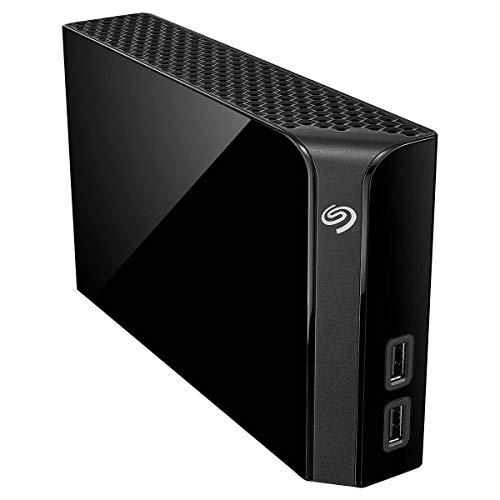
Seagate Backup Plus Hub 8TB Desktop Drive
Best for: Single desktop backup with data recovery
- Storage Capacity
- 8TB
- Form Factor
- 3.5 inch
- Hardware Interface
- USB
- Weight
- 1.92 pounds
View on Amazon: Seagate Backup Plus Hub 8TB Desktop Drive Affiliate link
This Seagate desktop drive offers 8TB of storage in a compact 3.5-inch form factor. It connects via USB and spins at speeds up to 120MB/s. The unit includes built-in backup software for automatic data protection and comes with Rescue Data Recovery Services. Weighing 1.92 pounds, it is designed for straightforward desktop use rather than portable needs.
Pros
- 8TB storage capacity for large file collections
- USB connectivity for easy desktop setup
- Includes Rescue Data Recovery Services
- Built-in automatic backup software
Cons
- Limited to 8TB capacity compared to 16TB enterprise options
- USB interface is slower than Thunderbolt or SATA
- No mention of RAID or dual-drive redundancy
Good fit if
- You need simple, automatic backup for a single desktop PC
- You want included data recovery services for peace of mind
- You prefer a compact 3.5-inch desktop drive
Skip if
- You require Thunderbolt speeds for high-performance editing
- You need RAID configurations for data redundancy
- You want more than 8TB in a single unit
Verdict: Seagate Backup Plus Hub 8TB Desktop is a practical choice for users who prioritize included data recovery services and simple USB backup over raw speed or high-capacity enterprise features.

Toshiba 16TB Enterprise 7200 RPM Hard Drive
Best for: high-capacity desktop NAS and server storage
- Storage Capacity
- 16 TB
- Form Factor
- 3.5"
- Hardware Interface
- SATA 6 Gb/s
- Rotational Speed
- 7200 RPM
- Cache Size
- 512 MiB
- Recording Technology
- CMR
View on Amazon: Toshiba 16TB Enterprise 7200 RPM Hard Drive Affiliate link
This Toshiba drive offers 16TB of CMR storage in a standard 3.5-inch form factor. It spins at 7200 RPM with 512 MiB of cache, delivering sustained throughput around 262 MiB/s. The helium-sealed design supports 24/7 operation with a 550 TB/year workload rating. It suits users needing high capacity and enterprise-grade reliability for desktop NAS or storage arrays.
Pros
- 16TB capacity using CMR technology
- 7200 RPM rotational speed with 512 MiB cache
- Helium-sealed 9-platter design for efficiency
- 550 TB/year workload rate limit
- MTTF of 2.5 million hours
Cons
- Requires SATA 6 Gb/s interface, not USB
- Sold as renewed condition
- Heavier at 1.32 pounds
Good fit if
- You need maximum storage density in a 3.5-inch drive
- You are building a high-performance NAS or server
- You require enterprise-grade workload ratings
Skip if
- You need a plug-and-play USB external drive
- You prefer new condition products only
- You are looking for a portable or lightweight drive
Verdict: Toshiba 16TB 7200RPM Enterprise Drive delivers high capacity and speed for serious storage needs. It fits users who prioritize workload reliability and raw performance over convenience features.

Western Digital 8TB My Book Thunderbolt Duo
Best for: Thunderbolt users needing RAID flexibility
- Storage Capacity
- 8 TB
- Hardware Interface
- Thunderbolt
- Form Factor
- Desktop
- Dimensions
- 6.2 × 3.9 × 6.5 inches
- Weight
- 5.07 pounds
View on Amazon: Western Digital 8TB My Book Thunderbolt Duo Affiliate link
This Western Digital desktop drive uses Thunderbolt for high-speed data transfer. It holds 8TB of data in a 3.9 by 6.2 by 6.5-inch chassis. You can configure RAID 0 for speed or RAID 1 for protection. The unit weighs 5.07 pounds and allows tool-free drive replacement. It suits users needing fast Thunderbolt connectivity and flexible RAID options for their desktop setup.
Pros
- Thunderbolt hardware interface for fast data transfer
- User-selectable RAID 0 or RAID 1 configurations
- Tool-free user serviceable drive replacement
- Daisy-chaining support for multiple drives
Cons
- Only 8TB capacity compared to 10TB or 16TB alternatives
- Thunderbolt interface limits compatibility with standard USB ports
- No mention of included backup software or encryption
Good fit if
- You need Thunderbolt connectivity for maximum speed
- You want to configure RAID 1 for data protection
- You prefer tool-free drive upgrades
Skip if
- You only have USB ports available
- You need more than 8TB of storage
- You require hardware encryption for security
Verdict: WD 8TB My Book Thunderbolt Duo delivers high-speed Thunderbolt transfer and flexible RAID options. It fits users who need fast connectivity and tool-free maintenance for their desktop workflow.

Apricorn 4TB Aegis Padlock Encrypted Desktop Drive
Best for: FIPS-validated hardware encryption
- Storage Capacity
- 4TB
- Hardware Interface
- USB 3.0
- Form Factor
- Desktop
- Dimensions
- 1 × 4.25 × 2 inches
- Weight
- 3 pounds
View on Amazon: Apricorn 4TB Aegis Padlock Encrypted Desktop Drive Affiliate link
This Apricorn desktop drive offers 4TB of storage with Super Speed USB 3.0 connectivity. It stands out by including 256-bit AES XTS hardware encryption and FIPS 140-2 Level 2 validation. You get separate admin and user modes for strict access control. This unit suits users who need physical PIN authentication rather than software-based security for their data.
Pros
- 256-bit AES XTS hardware encryption
- FIPS 140-2 Level 2 validated
- Separate admin and user modes
- Super Speed USB 3.0 interface
Cons
- Smaller 4TB capacity compared to 8TB or 10TB alternatives
- Requires PIN entry for access, lacking remote management
- No mention of included data recovery services
Good fit if
- You need hardware-level encryption for sensitive files
- You require FIPS 140-2 compliance for your organization
- You prefer PIN-based access over password software
Skip if
- You need more than 4TB of storage space
- You want a drive without physical PIN entry
- You are looking for a budget-friendly option
Verdict: Apricorn 4TB Encrypted Desktop Drive provides robust FIPS-validated security for users prioritizing data protection over raw capacity. It fits professionals who need strict hardware encryption and PIN access control for their desktop storage needs.

Western Digital 8TB Elements Desktop External Hard Drive
Best for: Simple desktop backup and expansion
- Storage Capacity
- 8 TB
- Hardware Interface
- USB 3.0, USB 2.0
- Form Factor
- Desktop
- Dimensions
- 5.31 × 1.89 × 6.53 inches
- Weight
- 2.09 pounds
View on Amazon: Western Digital 8TB Elements Desktop External Hard Drive Affiliate link
The WD 8TB Elements offers reliable desktop storage via USB 3.0. It supports fast data transfer rates and works plug-and-play with Windows 10+. The drive measures 5.31 x 6.53 x 1.89 inches and weighs 2.09 pounds. It is a straightforward option for users needing extra space without RAID or encryption features. It fits those who want simple, high-capacity backup.
Pros
- 8 TB storage capacity
- USB 3.0 interface for fast transfers
- Backwards compatible with USB 2.0
- Plug-and-play setup with Windows 10+
Cons
- No hardware encryption or security features
- No RAID configuration support
- No Thunderbolt or high-speed bus connection
Good fit if
- You need simple, high-capacity desktop storage
- You want plug-and-play USB 3.0 connectivity
- You are backing up Windows PCs
Skip if
- You require hardware encryption for sensitive data
- You need RAID redundancy for data protection
- You want Thunderbolt speed for large files
Verdict: WD 8TB Elements Desktop External Hard Drive is a no-frills storage solution for users who prioritize capacity and simplicity over advanced features like encryption or RAID.
Western Digital Elements 10TB External Desktop Drive
Best for: Windows users needing extra space
- Storage Capacity
- 10TB
- Hardware Interface
- USB 3.0
- Form Factor
- Desktop
- Dimensions
- 5.31 × 1.89 × 6.53 inches
- Weight
- 2.09 pounds
View on Amazon: Western Digital Elements 10TB External Desktop Drive Affiliate link
The Western Digital 10TB Elements Desktop offers high-capacity storage for personal use. It features a USB 3.0 interface for fast data transfers and arrives plug-and-play ready for Windows PCs. The drive ships in a black desktop enclosure measuring 6.53 by 5.31 inches. You get 10TB of space to expand your library. Note that Mac users must reformat the drive before use.
Pros
- 10TB storage capacity
- USB 3.0 interface
- Plug-and-play Windows setup
- Desktop form factor
Cons
- Requires reformatting for Mac compatibility
- No included encryption
- Basic desktop design
Good fit if
- You need large personal storage on Windows
- You want plug-and-play simplicity
- You prefer a desktop drive
Skip if
- You use a Mac without reformatting
- You need hardware encryption
- You want portable storage
Verdict: Western Digital 10TB Elements Desktop is a straightforward option for Windows users needing extra space. It fits those who value capacity over advanced features.

Seagate Expansion 10TB USB 3.0 External Hard Drive
Best for: Users needing extra capacity beyond 8TB
- Storage Capacity
- 10TB
- Hardware Interface
- USB 3.0
- Form Factor
- Desktop
- Dimensions
- 7.04 × 1.65 × 4.92 inches
- Weight
- 2.59 pounds
View on Amazon: Seagate Expansion 10TB USB 3.0 External Hard Drive Affiliate link
This Seagate Expansion Desktop drive offers 10TB of storage via USB 3.0. It is a plug-and-play solution that recognizes Windows and Mac computers automatically. You get drag-and-drop simplicity and Rescue Data Recovery Services. It suits users needing more capacity than the 8TB Seagate Backup Plus Hub, providing extra space for large media libraries or extensive backups without complex setup.
Pros
- 10TB storage capacity
- USB 3.0 interface
- Rescue Data Recovery Services included
- Automatic OS recognition
Cons
- USB 3.0 is slower than Thunderbolt
- No built-in RAID support
- Requires reformatting for Time Machine
Good fit if
- You need more than 8TB of storage
- You want simple plug-and-play setup
- You value data recovery services
Skip if
- You need Thunderbolt speeds
- You require RAID configurations
- You want zero-configuration Mac compatibility
Verdict: Seagate Expansion Desktop 10TB is ideal for users who need extra capacity beyond 8TB and prefer straightforward, reliable storage with included data recovery protection.
Specifications side by side
| Spec | Seagate Backup Plus Hub 8TB Desktop Drive | Toshiba 16TB Enterprise 7200 RPM Hard Drive | Western Digital 8TB My Book Thunderbolt Duo | Apricorn 4TB Aegis Padlock Encrypted Desktop Drive | Western Digital 8TB Elements Desktop External Hard Drive | Western Digital Elements 10TB External Desktop Drive | Seagate Expansion 10TB USB 3.0 External Hard Drive |
|---|---|---|---|---|---|---|---|
| Storage Capacity | 8TB | 16 TB | 8 TB | 4TB | 8 TB | 10TB | 10TB |
| Form Factor | 3.5 inch | 3.5" | not specified | not specified | not specified | not specified | not specified |
| Hardware Interface | USB | SATA 6 Gb/s | Thunderbolt | USB 3.0 | USB 3.0, USB 2.0 | USB 3.0 | USB 3.0 |
| Rotational Speed | not specified | 7200 RPM | not specified | not specified | not specified | not specified | not specified |
| Cache Size | not specified | 512 MiB | not specified | not specified | not specified | not specified | not specified |
| Recording Technology | not specified | CMR | not specified | not specified | not specified | not specified | not specified |
| Workload Rate Limit | not specified | up to 550 TB/year | not specified | not specified | not specified | not specified | not specified |
| Size | each | 16TB | 8 TB | 4TB | 8 TB | 10TB | 10TB |
| Weight | 1.92 pounds | 1.32 pounds | 5.07 pounds | 3 pounds | 2.09 pounds | 2.09 pounds | 2.59 pounds |
| Dimensions | not specified | 5.8 × 4 × 1 inches | 6.2 × 3.9 × 6.5 inches | 1 × 4.25 × 2 inches | 5.31 × 1.89 × 6.53 inches | 5.31 × 1.89 × 6.53 inches | 7.04 × 1.65 × 4.92 inches |
| Color | Black | Silver | 8 TB | 4 TB | Black | Black | Black |
| Model | N/A | MG08ACA16TE | WDBUTV0080JSL-NESN | ADT-3PL256F-4000 | WDBWLG0080HBK-EESN | WDBWLG0100HBK-NESN | STKP10000400 |
Frequently asked questions
What is the highest capacity drive available in this list?
The Toshiba 16TB Enterprise Hard Drive offers the largest storage capacity at 16TB. It is designed for high-capacity desktop NAS and server storage. This drive suits users who prioritize raw performance and workload reliability over convenience features. It uses a SATA interface and rotates at 7200 RPM for serious storage needs.
Which option provides the fastest connectivity for creative workflows?
The Western Digital My Book Thunderbolt Duo uses a Thunderbolt interface for high-speed data transfers. It is ideal for users needing fast connectivity and flexible RAID options. This desktop drive supports tool-free maintenance and fits well into desktop workflows that require rapid data movement and flexible storage configurations.
Is there a drive with hardware encryption for sensitive data?
Yes, the Apricorn Aegis Padlock Encrypted Desktop Drive includes FIPS-validated hardware encryption. It provides robust security for users prioritizing data protection over raw capacity. This 4TB drive requires PIN access control, making it suitable for professionals who need strict hardware encryption for their desktop storage needs.
Which drives are best for simple plug-and-play backup?
The Western Digital Elements Desktop drives offer simple, no-frills storage for basic backup needs. Both the 8TB and 10TB models use USB 3.0 interfaces for straightforward connectivity. These drives fit users who value capacity and simplicity over advanced features like encryption or RAID configurations for their desktop setups.
Can I find a drive with more than 8TB but less than 16TB?
Yes, there are two 10TB options available in this list. The Western Digital Elements 10TB External Desktop Drive and the Seagate Expansion 10TB USB 3.0 Drive both provide extra capacity beyond 8TB. These drives are suitable for users needing more space while preferring straightforward, reliable desktop storage solutions.
Which drive is best for Windows users needing extra space?
The Western Digital Elements 10TB External Desktop Drive is a straightforward option for Windows users needing extra space. It fits those who value capacity over advanced features. This drive provides reliable storage expansion without the complexity of RAID or encryption, making it a practical choice for simple desktop backup tasks.
Does the top-rated drive include data recovery services?
Yes, the Seagate Backup Plus Hub 8TB Desktop Drive includes included data recovery services. It is a practical choice for users who prioritize simple USB backup over raw speed. This drive is best for single desktop backup scenarios where data protection and ease of use are key requirements.