Best Hard Drive Enclosures with AMD Ryzen: 15 Spec-Based Picks
As an Amazon Associate we earn from qualifying purchases. Links on this page are affiliate links.
Choosing a hard drive enclosure with AMD Ryzen provides your network setup with capable processing power for intensive multi-user storage tasks. We compared 15 models based on specifications published on the listings to identify the most practical configurations available.
The Synology 4-Bay AMD Ryzen NAS leads the list because it delivers multi-gigabit transfer speeds and scalable storage up to 9 bays. This guide helps you decide on the right number of drive bays, network interface speeds, and memory capacity for your deployment.
Our top pick: Asustor Lockerstor 16 Pro 16-Bay Rackmount NAS.
Quick picks
The best fit for you
- You need a large rackmount NAS with redundant power Asustor Lockerstor 16 Pro 16-Bay Rackmount NAS This 16-bay unit features an 8-core Ryzen CPU, dual 10GbE ports, and dual power supplies.
- You want a compact 4-bay NAS for business use Synology 4-Bay 16TB NAS It offers quad-core Ryzen processing, ECC memory support, and multi-gigabit networking in a 4-bay form factor.
- You need a small NAS for home or office Synology 2-Bay AMD Ryzen NAS This 2-bay model provides multi-gigabit speeds and M.2 NVMe expansion in a compact desktop design.
Our 15 picks

Asustor Lockerstor 16 Pro 16-Bay Rackmount NAS
Best for: high-capacity rackmount storage with redundant power
- Processor
- AMD Ryzen (what this guide is about)
- Number of Bays
- 16-bay
- Processor Cores
- 8-Core
- RAM Capacity
- 16 GB ECC DDR5-4800
- Network Connectivity
- Dual 10GbE, Dual 1GbE
- Form Factor
- Rackmount
View on Amazon: Asustor Lockerstor 16 Pro 16-Bay Rackmount NAS
This rackmount enclosure gives you 16 drive bays powered by an 8-core AMD Ryzen 7 Pro 7745 processor and 16 GB of ECC DDR5 memory. For connectivity and expansion, you get dual 10GbE ports, dual 1GbE ports, and two PCIe 5.0 slots with PCIe Gen5 SSD support. Dual redundant 80 PLUS Platinum power supplies keep the unit running. It suits your deployment if you require high-capacity networked storage with redundant power.
Pros
- AMD Ryzen 7 Pro 7745 8-core, 16-thread processor
- Dual 10GbE and dual 1GbE network ports
- 16 GB ECC DDR5 RAM expandable up to 192 GB
- PCIe 5.0 expansion slots with PCIe Gen5 SSD support
- Dual redundant 80 PLUS Platinum power supplies
Cons
- Large rackmount chassis weighs over 33 pounds without drives
- Wake on LAN is limited to the 1GbE ports
Good fit if
- You need a 16-bay rackmount setup with redundant power supplies.
- You require built-in 10GbE networking and PCIe Gen5 SSD expansion.
- You plan to scale memory up to 192 GB of ECC DDR5.
Skip if
- You want a compact desktop enclosure instead of a server rack unit.
- You do not need 16 drive bays or redundant enterprise power supplies.
Verdict: Asustor Lockerstor 16-Bay Rackmount NAS provides an 8-core Ryzen 7 Pro CPU, dual 10GbE networking, and dual redundant power supplies for large-scale rack installations. It delivers high-throughput network connectivity and memory expansion up to 192 GB.

Synology 4-Bay 16TB NAS
Best for: turnkey multi-gigabit business storage and virtualization
- Processor
- AMD Ryzen (what this guide is about)
- Number of Bays
- 4-Bay
- Processor Cores
- quad-core
- RAM Capacity
- 4 GB DDR4
- Network Connectivity
- Dual 2.5 GbE
- M.2 NVMe Slots
- 2x M.2 NVMe
This bundle pairs a Synology four-bay enclosure with four 4TB Seagate IronWolf hard drives for 16TB of raw storage. An AMD Ryzen V1500B quad-core processor powers the system alongside 4GB of DDR4 ECC memory. Dual 2.5GbE LAN ports handle network connectivity, while two M.2 NVMe slots support caching or storage pools. You get ready-to-run shared storage suited for virtualization, backups, and small-business file hosting.
Pros
- AMD Ryzen V1500B quad-core processor with DDR4 ECC memory support
- Bundled with four 4TB Seagate IronWolf hard drives
- Dual 2.5GbE LAN ports and two M.2 NVMe slots
- Expands up to nine bays via DX525 expansion unit
Cons
- Ships with 4GB RAM installed out of 32GB maximum capacity
- External expansion limited to USB 3.2 Gen1 ports
Good fit if
- You want a turnkey four-bay setup complete with 16TB of hard drives.
- You need dual 2.5GbE connectivity paired with an AMD Ryzen processor.
- You plan to add M.2 NVMe cache or expand up to nine bays later.
Skip if
- You require more than 4GB of system memory out of the box.
- You need native 10GbE network speeds without multi-port link aggregation.
Verdict: Synology DS925+ 4-Bay 16TB NAS delivers quad-core Ryzen processing, ECC memory support, and bundled drives ready for business backup tasks. It provides a balanced multi-gigabit setup with clear upgrade paths for memory and storage.
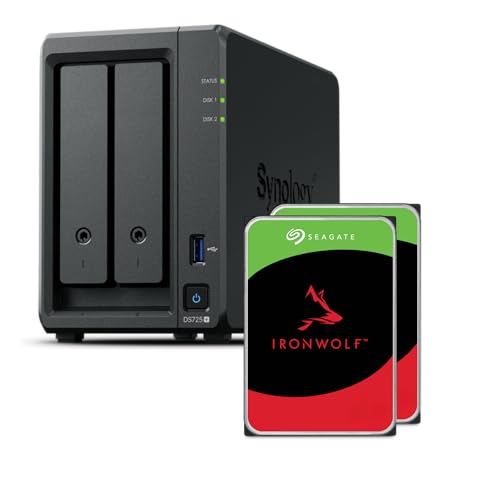
Synology 2-Bay AMD Ryzen NAS
Best for: compact home and small-office Ryzen storage
- Processor
- AMD Ryzen (what this guide is about)
- Number of Bays
- 2-Bay
- Processor Cores
- quad-core
- RAM Capacity
- 4GB
- Network Connectivity
- 1x 2.5GbE, 1x 1GbE
- M.2 NVMe Slots
- 2x M.2 NVMe
The Synology 2-Bay AMD Ryzen NAS provides centralized network storage powered by an AMD Ryzen processor and 4GB of RAM. It features two internal drive bays, two M.2 NVMe slots, and networking options spanning 1GbE, 2.5GbE, and 5GbE. Rated for up to 276 MB/s read and 224 MB/s write throughput, it suits you if you need compact, expandable private cloud storage for backups without committing to a large chassis.
Pros
- AMD Ryzen processor with 4GB RAM
- Two M.2 NVMe slots for cache or storage
- Expansion support up to 140 TB across 7 bays using DX525
- Networking support including 1GbE, 2.5GbE, and 5GbE
Cons
- Base unit limited to two drive bays
- Sequential speeds capped at 276 MB/s read and 224 MB/s write
Good fit if
- You need a compact two-bay desktop NAS powered by an AMD Ryzen processor.
- You plan to scale capacity later by adding a five-bay expansion unit.
- You want multi-gigabit network connectivity out of the box.
Skip if
- You require more than two internal drive bays without buying expansion hardware.
- You need sequential throughput exceeding 276 MB/s read.
Verdict: Synology 2-Bay AMD Ryzen NAS delivers capable dual-bay storage with multi-gigabit networking and M.2 NVMe expansion. It provides a compact setup that can scale up to seven bays as your requirements increase.

Synology 1U 4-Bay Rackmount NAS with 48TB
Best for: 1U rackmount business edge storage
- Processor
- AMD Ryzen (what this guide is about)
- Number of Bays
- 4-bay
- Processor Cores
- 4-Core
- RAM Capacity
- 32GB DDR4 ECC UDIMM
- Network Connectivity
- 4 x 1GbE
This 1U rackmount NAS gives you a four-core AMD Ryzen R1500B processor running at 2.2GHz, paired with 32GB of DDR4 ECC UDIMM memory. It includes 48TB of raw storage across four 12TB drives and provides four 1GbE network ports. Running Synology DiskStation Manager, it suits you if your branch office or deployment needs centralized backups, snapshot replication, and local edge storage.
Pros
- AMD Ryzen R1500B 4-core 2.2GHz processor
- 32GB DDR4 ECC UDIMM memory included
- Four 12TB SATA hard drives providing 48TB of storage
- Four 1GbE LAN ports for network connectivity
Cons
- Drives and memory upgrades arrive uninstalled and require manual assembly
- Network ports are limited to 1GbE speeds
Good fit if
- You need a 1U rackmount NAS with high memory capacity for edge deployments.
- You want 48TB of bundled storage ready for multi-endpoint backups and surveillance.
Skip if
- You require pre-installed drives and memory out of the box.
- You need native multi-gigabit network ports like 2.5GbE or 10GbE.
Verdict: Synology 1U 4-Bay Rack NAS with 48TB delivers capable quad-core AMD Ryzen processing and 32GB ECC RAM for compact business environments. It is a solid rackmount choice if you need ample included storage and do not mind installing the components yourself.

Synology 4-Bay 1U RackStation with 48TB
Best for: compact 1U rackmount storage with included drives
- Processor
- AMD Ryzen (what this guide is about)
- Number of Bays
- 4-bay
- Processor Cores
- 2-Core
- RAM Capacity
- 2GB DDR4 ECC UDIMM
- Network Connectivity
- 2 x 1GbE
This 1U rackmount NAS combines an AMD Ryzen R1600 dual-core processor with four 12TB hard drives for 48TB of total raw storage. It features 2GB of DDR4 ECC memory and two 1GbE network ports. You get integrated data protection tools like Snapshot Replication and centralized cloud backups through DiskStation Manager. It suits small offices or home labs seeking rack-mounted file sharing and storage without purchasing drives separately.
Pros
- Includes four 12TB SATA hard drives for 48TB total capacity
- Dual-core AMD Ryzen R1600 processor reaching up to 3.1GHz
- Compact 1U rackmount chassis fits shallow server racks
- Uses DDR4 ECC UDIMM memory to detect and correct data errors
Cons
- Network connectivity is limited to two 1GbE ports
- Base memory configuration is 2GB
- Hard drives arrive uninstalled and require manual setup
Good fit if
- You need a 1U rackmount enclosure bundled with 48TB of storage.
- You want an AMD Ryzen CPU paired with ECC memory protection.
- You require centralized backup software for local and cloud data.
Skip if
- You need native 2.5GbE or 10GbE network ports out of the box.
- You require factory pre-installed drives ready to boot immediately.
Verdict: Synology 4-Bay 1U Rackmount NAS with 48TB delivers turnkey high-capacity rack storage powered by an AMD Ryzen dual-core processor. It offers a reliable 1U deployment for business backups and file synchronization, provided 1GbE transfer speeds meet your requirements.
Synology 1U 4-Bay Rackmount NAS with 32GB RAM
Best for: compact 1U rackmount business backup setups
- Processor
- AMD Ryzen (what this guide is about)
- Number of Bays
- 4-bay
- Processor Cores
- 4-Core
- RAM Capacity
- 32GB DDR4 ECC SODIMM
- Network Connectivity
- 4 x 1GbE
View on Amazon: Synology 1U 4-Bay Rackmount NAS with 32GB RAM
This 1U rackmount NAS server gives you an AMD Ryzen R1500B quad-core 2.2GHz processor paired with 32GB of DDR4 ECC memory. It includes four 2TB SATA solid-state drives totaling 8TB of storage and features four 1GbE network ports for data management. Designed for standard server racks, it suits you if you run centralized branch office backups, endpoint data protection, or surveillance deployments through Synology DSM software.
Pros
- AMD Ryzen R1500B 4-core 2.2GHz processor
- 32GB DDR4 ECC SODIMM memory capacity
- Four 2TB 2.5-inch SATA SSDs included (8TB total)
- Four 1GbE LAN network ports
- Compact 1U rackmount chassis measuring 1.75 inches high
Cons
- Network connectivity limited to 1GbE ports
- Drives and memory upgrades ship uninstalled and require setup
Good fit if
- You require a 1U rackmount enclosure with an AMD Ryzen processor and 32GB RAM.
- You need all-flash SATA SSD storage included out of the box.
- You deploy centralized backups or surveillance via Synology DSM tools.
Skip if
- You require native multi-gigabit network ports like 2.5GbE or 10GbE.
- You prefer hardware that arrives fully pre-assembled without manual installation.
Verdict: Synology 1U 4-Bay Rackmount NAS with 32GB RAM provides dependable Ryzen processing and high ECC memory capacity in a slim 1U format. It delivers a complete solid-state package for multi-endpoint office backups and edge storage tasks.

Synology 5-Bay 60TB Desktop NAS
Best for: turnkey 8GB RAM virtualization and bulk storage
- Processor
- AMD Ryzen (what this guide is about)
- Number of Bays
- 5-Bay
- RAM Capacity
- 8GB
- Network Connectivity
- 2X 2.5GbE
- Weight
- 4.81 pounds
This 5-bay NAS bundle pairs an AMD Ryzen V1500B processor with 8GB of RAM and 60TB of included storage across five 12TB drives. You get dual 2.5GbE networking for fast throughput and support for lightweight virtualization under DiskStation Manager. It suits you if you need a preconfigured, high-capacity system ready for container hosting, virtual machine storage, and shared backups without purchasing drives separately.
Pros
- Includes 8GB RAM with an AMD Ryzen V1500B processor
- Comes bundled with five 12TB drives for 60TB total raw capacity
- Equipped with two integrated 2.5GbE network ports
- Expandable up to 300TB raw storage via DX525 expansion unit
Cons
- DX525 expansion unit is sold separately
- 10GbE network upgrade module is not included
Good fit if
- You want an AMD Ryzen NAS pre-populated with 60TB of drive capacity.
- You need 8GB of RAM out of the box for containers or virtual machine storage.
- You plan to use integrated 2.5GbE network connectivity.
Skip if
- You already own hard drives and only need a diskless enclosure.
- You require 10GbE networking immediately without purchasing an optional card.
Verdict: Synology 5-Bay 60TB Ryzen NAS delivers capable AMD processing with 8GB of memory and five preinstalled 12TB drives. It is an ideal turnkey option if you want ample storage and dual 2.5GbE speeds right away.

Synology RackStation 12-Bay 216TB NAS
Best for: high-capacity rack storage with power redundancy
- Processor
- AMD Ryzen (what this guide is about)
- Processor Cores
- 4-Core
- RAM Capacity
- 32GB DDR4 ECC SODIMM
- Network Connectivity
- 4 x RJ-45 1GbE
- Hardware Interface
- RJ-45, USB 3.2
This rackmount server pairs an AMD Ryzen V1500B 4-core 2.2GHz processor with 32GB of DDR4 ECC memory and 216TB of SATA storage. You receive twelve 18TB drives alongside dual redundant power supplies for continuous uptime. Four 1GbE ports support failover and link aggregation. It suits you if you need a large-capacity rack unit for centralized backups, virtual machines, and shared office data.
Pros
- AMD Ryzen V1500B quad-core 2.2GHz processor with 32GB DDR4 ECC memory
- Includes twelve 18TB hard drives providing 216TB of raw storage
- Dual redundant power supplies protect against power hardware failure
- Four 1GbE LAN ports with link aggregation and failover support
Cons
- Integrated network interfaces are limited to 1GbE speeds
- Hard drives and memory upgrades require manual installation before use
- Chassis requires dedicated server rack infrastructure
Good fit if
- You need 216TB of storage capacity bundled with 32GB ECC RAM
- You operate server racks requiring dual redundant power supplies
- You host local virtual machines and centralized backup repositories
Skip if
- You need native 2.5GbE or 10GbE network ports out of the box
- You prefer a standalone desktop enclosure over a rackmount unit
- You want drives pre-installed inside the drive bays upon delivery
Verdict: Synology RackStation 12-Bay 216TB NAS delivers massive storage volume and ECC memory backed by AMD Ryzen processing and dual power supplies. It provides dependable uptime for rack environments, though base networking relies on 1GbE connections.
Synology RackStation 12-Bay 48TB NAS
Best for: rackmount business backups needing redundant power
- Processor
- AMD Ryzen (what this guide is about)
- Processor Cores
- 4-Core
- RAM Capacity
- 32GB DDR4 ECC SODIMM
- Network Connectivity
- 4 x RJ-45 1GbE
- Hardware Interface
- RJ-45, USB 3.2
This Synology rackmount NAS combines an AMD Ryzen V1500B quad-core processor with 32GB of ECC DDR4 memory and 48TB of included storage across twelve 4TB hard drives. It features dual redundant power supplies, four 1GbE network ports with link aggregation, and a sliding rail kit. If you manage central business backups or host virtual machines requiring hardware redundancy, this bundled server delivers substantial capacity.
Pros
- AMD Ryzen V1500B 4-core 2.2GHz processor with 32GB ECC DDR4 memory
- Pre-bundled with 48TB total capacity across twelve 4TB SATA drives
- Dual redundant power supplies prevent downtime from electrical failure
- Four 1GbE LAN ports supporting link aggregation and failover
Cons
- Drives and memory ship separately and require manual installation
- Network connectivity limited to 1GbE without native multi-gig ports
Good fit if
- You need hardware power redundancy for critical uptime.
- You require 48TB of bundled storage alongside 32GB of ECC RAM.
- You want a rack-ready chassis that includes the sliding rail kit.
Skip if
- You need factory-installed hard drives and memory ready on arrival.
- You require native 2.5GbE or 10GbE network interfaces out of the box.
Verdict: Synology 12-Bay Rackmount NAS with 48TB pairs a quad-core Ryzen processor with redundant power and generous ECC memory for high-availability deployments. It suits business environments that need reliable local backup storage and can handle manual component setup.
Synology RackStation 12TB SSD NAS
Best for: Rackmount deployments needing redundant power supplies
- Processor
- AMD Ryzen (what this guide is about)
- Processor Cores
- 4-Core
- RAM Capacity
- 32GB DDR4 ECC SODIMM
- Network Connectivity
- 4 x 1GbE
- Hardware Interface
- RJ-45, USB 3.2
This rackmount Synology NAS pairs a quad-core AMD Ryzen V1500B processor with 32GB of ECC DDR4 memory and twelve 1TB SATA SSDs. It features dual power supplies for uninterrupted operation and includes four 1GbE LAN ports with link aggregation support. If you need a rack-ready storage server with fault-tolerant power and pre-packaged solid-state storage for virtualization or office backups, this configuration fits your workflow.
Pros
- AMD Ryzen V1500B quad-core 2.2GHz processor
- Redundant power supplies and included sliding rail kit
- 32GB DDR4 ECC memory and 12TB all-SSD storage package
- Four 1GbE LAN ports supporting link aggregation and failover
Cons
- Networking capped at 1GbE without native 2.5GbE or 10GbE ports
- Drives and memory require manual installation before use
Good fit if
- You need redundant power supplies for hardware failover in a server rack.
- You want 32GB of ECC memory paired with an all-SSD storage bundle.
- You plan to run virtual machines and backup tasks using the AMD Ryzen processor.
Skip if
- You need out-of-the-box multi-gigabit networking like 2.5GbE or 10GbE.
- You prefer a system that arrives with the drives and RAM already installed.
Verdict: Synology RackStation 12-Bay NAS with Redundant Power delivers business-grade power redundancy, 32GB ECC memory, and an AMD Ryzen processor for rack deployments. You will need to install the provided components manually and work within standard 1GbE network speeds.
Synology 12-Bay Rackmount NAS with 24TB Storage
Best for: rackmount deployments needing redundant power and memory
- Processor
- AMD Ryzen (what this guide is about)
- Processor Cores
- 4-Core
- RAM Capacity
- 32GB DDR4 ECC SODIMM
- Network Connectivity
- 4 x 1GbE
- Hardware Interface
- RJ-45, USB 3.2
View on Amazon: Synology 12-Bay Rackmount NAS with 24TB Storage
This rackmount server pairs an AMD Ryzen V1500B quad-core processor with 32GB of ECC DDR4 memory and dual power supplies. It includes twelve 2TB hard drives providing 24TB of raw SATA storage, along with four 1GbE network ports that support link aggregation and failover. A sliding rail kit comes in the package. It suits your setup if you require high-capacity networked storage, hardware redundancy, and ready-to-install drives for server workloads.
Pros
- AMD Ryzen V1500B 4-core 2.2GHz processor
- 32GB DDR4 ECC SODIMM memory included
- Redundant power supplies for power fault protection
- Includes 24TB across twelve 2TB SATA hard drives
- Sliding rail kit included in the box
Cons
- Drives and memory upgrades require manual installation
- Network connectivity limited to 1GbE ports out of the box
Good fit if
- You need redundant power supplies for critical uptime.
- You want 32GB ECC memory and 24TB storage supplied together.
- You use four 1GbE ports with link aggregation or failover.
Skip if
- You require pre-installed hard drives and memory.
- You need native multi-gigabit or 10GbE network ports.
Verdict: Synology Rackmount Ryzen NAS with 24TB Storage delivers high-capacity storage, ECC memory, and power supply redundancy for server roles. You receive all components together, though you must assemble the drives and RAM yourself.
Synology 12-Bay Rackmount NAS with 192TB Storage
Best for: high-capacity business rack deployments needing redundant power
- Processor
- AMD Ryzen (what this guide is about)
- Processor Cores
- 4-Core
- RAM Capacity
- 32GB DDR4 ECC SODIMM
- Network Connectivity
- 4 x 1GbE
- Hardware Interface
- RJ-45, USB 3.2
View on Amazon: Synology 12-Bay Rackmount NAS with 192TB Storage
This rackmount server gives you a centralized storage setup powered by an AMD Ryzen V1500B quad-core processor and 32GB of ECC DDR4 memory. It comes bundled with 192TB of raw capacity across twelve 16TB drives and includes dual redundant power supplies for continuous uptime. It suits your business if you need high-capacity multi-drive storage with hardware redundancy for backups, virtual machine management, and centralized file serving.
Pros
- AMD Ryzen V1500B 4-core 2.2GHz processor
- Includes 192TB total storage across twelve 16TB drives
- 32GB ECC DDR4 memory minimizes data corruption
- Dual redundant power supplies prevent downtime
- Includes sliding rail kit for rack installation
Cons
- Network ports top out at 1GbE speeds
- Drives and memory require manual installation before use
Good fit if
- You require high-density 12-bay rackmount storage with redundant power supplies.
- You need ECC memory and a quad-core Ryzen processor for server workloads.
- You want pre-bundled 16TB hard drives ready to populate the unit.
Skip if
- You need integrated 2.5GbE or 10GbE network interfaces directly out of the box.
- You prefer hard drives and memory to arrive pre-installed in the chassis.
Verdict: Synology 12-Bay Rackmount NAS with 192TB delivers extensive raw capacity and dependable power redundancy for business environments. Its quad-core Ryzen processor and 32GB ECC memory handle centralized backups and multi-user storage tasks reliably.
Synology 4-Bay 1U Rackmount NAS with 32TB
Best for: compact 1U rackmount storage and backups
- Processor
- AMD Ryzen (what this guide is about)
- Number of Bays
- 4-bay
- Processor Cores
- 2-Core
- RAM Capacity
- 2GB DDR4 ECC UDIMM
- Network Connectivity
- 2 x 1GbE
This 1U rackmount NAS comes equipped with a dual-core AMD Ryzen R1600 processor, 2GB of DDR4 ECC memory, and four 8TB SATA hard drives providing 32TB of raw storage. Dual 1GbE network ports handle connectivity for file serving, Snapshot Replication, and cloud backups. It suits you if you run a home lab or small office needing compact rack-mounted storage for central file synchronization and daily backups.
Pros
- Dual-core AMD Ryzen R1600 processor with up to 3.1GHz turbo
- Pre-bundled with four 8TB SATA hard drives for 32TB total capacity
- Compact 1U rackmount form factor designed for server racks
- Includes 2GB of DDR4 ECC UDIMM memory
Cons
- Networking is limited to dual 1GbE LAN ports
- Drives and memory ship uninstalled and require manual installation
- Base configuration includes only 2GB of system memory
Good fit if
- You need a compact 1U rack-mountable NAS with pre-bundled storage drives.
- You require ECC memory support and central backup tools for your business data.
Skip if
- You require native multi-gigabit or 10GbE network interfaces.
- You want storage drives pre-installed directly out of the box.
Verdict: Synology 1U 4-Bay RackStation 32TB NAS offers a space-saving 1U layout powered by an AMD Ryzen R1600 processor for reliable rack storage. It delivers dependable backup tools and file sync capabilities, though network speeds remain capped at 1GbE.

Asustor Lockerstor 10-Bay NAS with 2x 1TB SSD
Best for: high-throughput quad-core multi-gigabit network storage
- Processor
- AMD Ryzen (what this guide is about)
- Number of Bays
- 10 Bay
- Processor Cores
- Quad-Core
- RAM Capacity
- 16GB ECC DDR5
- Network Connectivity
- Dual 5GbE, dual 10GbE
- M.2 NVMe Slots
- 4 M.2 NVMe
View on Amazon: Asustor Lockerstor 10-Bay NAS with 2x 1TB SSD
This 10-bay NAS enclosure runs on an AMD Ryzen Embedded V3C14 quad-core processor clocking up to 3.8 GHz turbo. You get 16GB of DDR5 ECC memory expandable to 64GB, dual 10-Gigabit Ethernet ports, dual 5-Gigabit Ethernet ports, and four PCIe 4.0 M.2 NVMe slots. It includes two 1TB SSDs out of the box. This unit suits you if you need dense network bandwidth, multi-drive capacity, and high-speed NVMe tiering in one desktop chassis.
Pros
- Quad-core AMD Ryzen Embedded V3C14 processor up to 3.8 GHz turbo
- Dual 10GbE and dual 5GbE Ethernet interfaces
- Four PCIe 4.0 M.2 NVMe slots
- Two 40 Gbps USB4 ports and three 10 Gbps USB 3.2 ports
- 16GB DDR5-4800 ECC memory expandable up to 64GB
Cons
- Weighs 20.6 pounds unpopulated with mechanical drives
- Large desktop dimensions measuring 15 inches wide and 14 inches long
- Only includes two 1TB SSDs across ten available drive bays
Good fit if
- You need native dual 10GbE and dual 5GbE networking without add-in cards.
- You require four PCIe 4.0 M.2 NVMe SSD bays for fast caching or storage pools.
- You run workloads that benefit from DDR5 ECC memory upgradeable to 64GB.
Skip if
- You have limited desk space for a 20.6-pound, 15-inch-wide enclosure.
- You need more than four physical processor cores for virtualization.
Verdict: Asustor Lockerstor 10 Gen3 10-Bay NAS combines high-speed quad-core Ryzen processing with dual 10GbE and quad M.2 NVMe support. It delivers expansive multi-gigabit throughput and memory headroom for demanding local storage setups.

Asustor Lockerstor 6 Gen3 6-Bay NAS with 4TB SSD
Best for: Users needing high memory bandwidth and M.2 NVMe expansion
- Processor
- AMD Ryzen (what this guide is about)
- Number of Bays
- 6 Bay
- Processor Cores
- Quad-Core
- RAM Capacity
- 16GB ECC DDR5
- Network Connectivity
- Dual 5GbE, Dual 10GbE
- M.2 NVMe Slots
- 4x M.2 NVMe
View on Amazon: Asustor Lockerstor 6 Gen3 6-Bay NAS with 4TB SSD
This 6-bay NAS uses an AMD Ryzen Embedded V3C14 quad-core processor running up to 3.8 GHz. It includes 16GB of DDR5 ECC memory and four M.2 NVMe slots for PCIe 4.0 speeds. Network options include dual 5GbE and dual 10GbE ports. It comes with a 4TB SSD bundle. This setup suits users needing high memory bandwidth and fast internal storage expansion alongside robust network connectivity.
Pros
- AMD Ryzen Embedded V3C14 quad-core CPU with 3.8 GHz turbo
- 16GB DDR5 ECC memory expandable to 64GB
- Four M.2 NVMe slots supporting PCIe 4.0
- Dual 10GbE and dual 5GbE network ports
Cons
- Heavier build at 14.3 pounds
- Larger footprint with 13-inch height
- Includes only one 4TB SSD in the bundle
Good fit if
- You need high-speed internal storage via M.2 NVMe
- You require 10GbE network connectivity
- You want ECC memory for data integrity
Skip if
- You prefer a compact desktop form factor
- You do not need ECC memory
- You want more than six drive bays
Verdict: Asustor Lockerstor 6 Gen3 6-Bay NAS fits users who prioritize DDR5 ECC memory and M.2 NVMe expansion over raw drive count. It delivers strong processing power and network speeds for demanding workloads.
Specifications side by side
| Spec | Asustor Lockerstor 16 Pro 16-Bay Rackmount NAS | Synology 4-Bay 16TB NAS | Synology 2-Bay AMD Ryzen NAS | Synology 1U 4-Bay Rackmount NAS with 48TB | Synology 4-Bay 1U RackStation with 48TB | Synology 1U 4-Bay Rackmount NAS with 32GB RAM | Synology 5-Bay 60TB Desktop NAS | Synology RackStation 12-Bay 216TB NAS | Synology RackStation 12-Bay 48TB NAS | Synology RackStation 12TB SSD NAS | Synology 12-Bay Rackmount NAS with 24TB Storage | Synology 12-Bay Rackmount NAS with 192TB Storage | Synology 4-Bay 1U Rackmount NAS with 32TB | Asustor Lockerstor 10-Bay NAS with 2x 1TB SSD | Asustor Lockerstor 6 Gen3 6-Bay NAS with 4TB SSD |
|---|---|---|---|---|---|---|---|---|---|---|---|---|---|---|---|
| Number of Bays | 16-bay | 4-Bay | 2-Bay | 4-bay | 4-bay | 4-bay | 5-Bay | not specified | not specified | not specified | not specified | not specified | 4-bay | 10 Bay | 6 Bay |
| Processor | AMD Ryzen 7 Pro 7745 | AMD Ryzen V1500B | Ryzen R1600 | Ryzen R1500B | Ryzen R1600 | Ryzen R1500B | Ryzen V1500B | Ryzen V1500B | Ryzen V1500B | Ryzen V1500B | Ryzen V1500B | Ryzen V1500B | Ryzen R1600 | AMD Ryzen Embedded V3C14 | AMD Ryzen Embedded V3C14 |
| Processor Cores | 8-Core | quad-core | quad-core | 4-Core | 2-Core | 4-Core | not specified | 4-Core | 4-Core | 4-Core | 4-Core | 4-Core | 2-Core | Quad-Core | Quad-Core |
| RAM Capacity | 16 GB ECC DDR5-4800 | 4 GB DDR4 | 4GB | 32GB DDR4 ECC UDIMM | 2GB DDR4 ECC UDIMM | 32GB DDR4 ECC SODIMM | 8GB | 32GB DDR4 ECC SODIMM | 32GB DDR4 ECC SODIMM | 32GB DDR4 ECC SODIMM | 32GB DDR4 ECC SODIMM | 32GB DDR4 ECC SODIMM | 2GB DDR4 ECC UDIMM | 16GB ECC DDR5 | 16GB ECC DDR5 |
| Network Connectivity | Dual 10GbE, Dual 1GbE | Dual 2.5 GbE | 1x 2.5GbE, 1x 1GbE | 4 x 1GbE | 2 x 1GbE | 4 x 1GbE | 2X 2.5GbE | 4 x RJ-45 1GbE | 4 x RJ-45 1GbE | 4 x 1GbE | 4 x 1GbE | 4 x 1GbE | 2 x 1GbE | Dual 5GbE, dual 10GbE | Dual 5GbE, Dual 10GbE |
| M.2 NVMe Slots | not specified | 2x M.2 NVMe | 2x M.2 NVMe | not specified | not specified | not specified | not specified | not specified | not specified | not specified | not specified | not specified | not specified | 4 M.2 NVMe | 4x M.2 NVMe |
| Hardware Interface | not specified | USB 3.2 Gen1 | not specified | not specified | not specified | not specified | not specified | RJ-45, USB 3.2 | RJ-45, USB 3.2 | RJ-45, USB 3.2 | RJ-45, USB 3.2 | RJ-45, USB 3.2 | not specified | USB4, USB 3.2 Gen 2 Type-A | USB4, USB 3.2 Gen 2 Type-A |
| Form Factor | Rackmount | not specified | not specified | not specified | not specified | not specified | not specified | not specified | not specified | not specified | not specified | not specified | not specified | not specified | not specified |
| Dimensions | 22.7 × 17.3 × 4.57 inches | not specified | not specified | not specified | not specified | not specified | not specified | not specified | not specified | not specified | not specified | not specified | not specified | 14 × 15 × 13 inches | 13 × 10 × 13 inches |
| Weight | 33.7 pounds | 13.2 pounds | 6.61 pounds | not specified | not specified | not specified | 4.81 pounds | not specified | not specified | not specified | not specified | not specified | not specified | 20.6 pounds | 14.3 pounds |
| Color | Black | not specified | gray | Black | not specified | not specified | black | Black | not specified | Black | Black | Black | Black | not specified | not specified |
| Model | AS7216RDX | DS925+/8TB-IW | DS725+/8TB-IW | not specified | not specified | not specified | DS1525+ | RS2421RP+ | RS2421RP+ | RS2421RP+ | RS2421RP+ | RS2421RP+ | not specified | not specified | not specified |
| Size | not specified | 16TB | not specified | not specified | not specified | 1.75 inches | 60TB | not specified | 24U | not specified | 24U x 24" x 36" | not specified | not specified | 2X1TB | 1X4TB |
If you need more details, see our guide to the best AMD processors.
How to Choose an AMD Ryzen NAS Enclosure
-
Evaluate Processor Core Counts
Review the CPU core count to handle your concurrent workloads. AMD Ryzen NAS units on the market offer dual-core, quad-core, or 8-core processors. Dual-core CPUs manage basic file transfers and simple local backup routines. Quad-core units handle moderate multitasking, automated container tasks, and media synchronization. If you run multiple virtual environments or continuous multi-user background tasks, choose an 8-core CPU. The Asustor Lockerstor 16 Pro 16-Bay Rackmount NAS features an 8-core Ryzen 7 Pro processor that provides ample computational headroom for heavy computational demands.
-
Check ECC Memory Support
Confirm whether the system supports Error-Correcting Code memory for business data safety. Standard RAM operates without inline error checking, which leaves long-term archives exposed to rare memory bit flips. ECC memory actively detects and fixes single-bit memory corruptions during active read and write operations. Units configured with 32GB ECC RAM suit critical edge backups and multi-user databases where data corruption cannot be tolerated. The Synology 1U 4-Bay Rackmount NAS with 48TB provides preinstalled ECC memory to keep system processes and scheduled office backups operating reliably.
-
Look for M.2 NVMe Slots
Check the hardware interface specifications for built-in M.2 NVMe slots before making a decision. Standard mechanical hard drives provide high overall storage volume but deliver lower random access speeds during busy periods. Dedicated NVMe slots allow you to install solid-state drives for read and write caching, or create high-speed storage pools. This interface improves response times for frequent database queries and directory indexing. The Asustor Lockerstor 10-Bay NAS with 2x 1TB SSD includes dedicated M.2 NVMe capability to accelerate overall data throughput.
-
Verify Hard Drive Compatibility
Examine drive brand requirements before purchasing your enclosure and storage media. Some manufacturers permit any standard SATA or NVMe drive, giving you flexibility to reuse spare drives or pick third-party models. Other systems enforce strict drive ecosystems and mandate manufacturer-labeled storage drives for optimal array status and support validation. If you prefer using standard third-party disks, confirm whether vendor drive restrictions apply to the model. The Synology 4-Bay AMD Ryzen NAS carries a specific requirement to use Synology-branded drives within its primary drive bays.
-
Inspect Power Supply Redundancy
Check whether your intended setup requires dual redundant power supplies for continuous operation. Standard desktop units and basic rack enclosures rely on a single external power brick or internal supply. A single power supply creates an immediate outage if an electrical circuit trips or a power unit fails. High-availability server deployments benefit from dual redundant power modules connected to separate power lines. The Synology RackStation 12-Bay 216TB NAS includes redundant power supplies to maintain continuous system uptime and prevent unexpected hardware shutdowns in enterprise environments.
-
Assess Turnkey Versus Bare Enclosures
Decide whether you want factory-preinstalled storage or an empty enclosure requiring component assembly. Prepopulated units arrive with pretested drives and configured memory, saving setup time and verifying drive matching out of the box. Diskless models or bundle packages require you to mount each mechanical drive into trays, seat RAM sticks, and configure storage pools manually. If you want an immediate deployment without handling hardware components, choose an integrated unit. The Synology 5-Bay 60TB Desktop NAS delivers five preinstalled 12TB hard drives ready for direct network initialization.
Frequently asked questions
Can I use an AMD Ryzen NAS for virtualization?
Yes, several models support virtualization workloads. The Synology 5-Bay 60TB Desktop NAS includes 8GB of RAM and dual 2.5GbE ports, making it suitable for turnkey virtualization. Higher-end rackmount units like the Synology 12-Bay 192TB offer 32GB ECC memory, which provides the headroom needed for running multiple virtual machines reliably.
Do these enclosures include redundant power supplies?
Many rackmount models feature redundant power for higher uptime. The Asustor Lockerstor 16 Pro and the Synology RackStation 12-Bay 216TB both include dual power supplies. This setup ensures that if one power unit fails, the other continues to keep your storage and files accessible without interruption.
What is the maximum RAM capacity available?
You can find units with up to 192 GB of RAM. The Asustor Lockerstor 16 Pro supports memory expansion up to this limit. Other models like the Synology 12-Bay RackStation typically come with 32GB ECC RAM, which is sufficient for most business backup and edge storage tasks.
Are there options with 10GbE networking?
Yes, high-performance models include 10GbE ports for faster data transfer. The Asustor Lockerstor 16 Pro and the Lockerstor 10-Bay both feature dual 10GbE connectivity. These speeds allow you to move large files quickly between your computer and the NAS, which is ideal for media editing or large database backups.
Can I add M.2 NVMe drives for caching?
Several desktop and rackmount models support M.2 NVMe expansion. The Synology 2-Bay AMD Ryzen NAS and the Asustor Lockerstor 10-Bay both offer M.2 slots. You can use these drives to cache frequently accessed data, which speeds up read and write operations for your most active files and applications.
Which model is best for a small office?
The Synology 2-Bay AMD Ryzen NAS is ideal for small offices. It offers a compact form factor with multi-gigabit networking and M.2 NVMe expansion. It provides capable dual-bay storage that can scale as your requirements increase, making it a practical choice for home or small-office Ryzen storage needs.
Do I need to install the drives myself?
It depends on the specific model you choose. Some units, like the Synology 1U 4-Bay Rack NAS with 48TB, come with included drives but require manual assembly of components. Others are turnkey solutions with preinstalled drives. Check the product details to see if the storage is ready to use out of the box.