15 Best Quad-Core Hard Drive Enclosures, Compared
As an Amazon Associate we earn from qualifying purchases. Links on this page are affiliate links.
Finding the best quad core hard drive enclosures depends on matching compute power, drive bay capacity, and network bandwidth to your storage goals. The Synology 12-Bay Quad-Core NAS leads the ranking with its 12-bay capacity, expansion support up to 24 bays, and read throughput up to 2,201 MB/s.
We evaluated 15 models based strictly on the specifications published on their listings. This guide helps you decide on the right enclosure by comparing bay counts, networking ports, and memory configurations for your data demands.
Quick picks
The best fit for you
- You need massive expandable storage capacity across many drives Synology 12-Bay Quad-Core NAS It provides 12 drive bays expandable to 24 bays and delivers read throughput up to 2,201 MB/s.
- You manage large 4K video libraries for creative work Asustor 6-Bay NAS with Quad M.2 NVMe Slots It features six drive bays, four M.2 NVMe slots, and dual 2.5GbE ports for fast video editing workflows.
- You want a shallow rackmount enclosure with high-speed networking QNAP 4-Bay Short-Depth Rackmount NAS with M.2 NVMe This short-depth rackmount enclosure includes dual 10GbE connectivity and M.2 NVMe slots for fast data access.
Our 15 picks

Synology 12-Bay Quad-Core NAS
Best for: high-capacity expandable multi-drive network storage
- Processor Cores
- Quad-Core (what this guide is about)
- Number of Bays
- 12-bay
- RAM Capacity
- 4GB DDR4
- Dimensions
- 18.5 × 17 × 16.5 inches
- Weight
- 20.9 pounds
This Synology unit is a 12-bay NAS enclosure powered by a quad-core processor and 4GB of DDR4 memory. It delivers speeds up to 2,201 MB/s read and 1,383 MB/s sequential write. You can expand capacity to 24 bays with a DX1222 unit or scale RAM to 32GB. This suits you if you need extensive multi-drive capacity and fast transfer rates.
Pros
- Delivers up to 2,201 MB/s read and 1,383 MB/s sequential write
- Expands from 12 bays to 24 bays via DX1222 unit
- Memory scales up to 32GB DDR4
- Includes 3-year hardware warranty
Cons
- Includes only 4GB base RAM across 12 bays
- Weighs 20.9 pounds without hard drives
- Ships diskless without included storage media
Good fit if
- You need 12 drive bays with expansion options up to 24 bays.
- You require sequential data transfers reaching up to 2,201 MB/s read.
- You plan to add 10/25GbE networking or NVMe SSD cache.
Skip if
- You want a compact enclosure under 20 pounds.
- You prefer an enclosure that includes pre-installed drives.
- You need more than 4GB of RAM installed out of the box.
Verdict: Synology 12-Bay Quad-Core NAS Enclosure delivers 12 bays, quad-core processing, and high read throughput up to 2,201 MB/s. It provides scalable expansion up to 24 bays if you need extensive storage capacity.

Asustor 6-Bay NAS with Quad M.2 NVMe Slots
Best for: content creators managing large 4K video libraries
- Processor Cores
- Quad-Core (what this guide is about)
- Number of Bays
- 6 Bay
- Processor
- Intel Celeron N5105
- RAM Capacity
- 8GB DDR4
- Network Connectivity
- Dual 2.5GbE
- M.2 NVMe Slots
- 4X M.2 NVMe
This 6-bay enclosure runs on an Intel Celeron N5105 quad-core processor and includes 8GB of DDR4 memory. You get four dedicated M.2 NVMe slots for SSD caching or storage pools alongside six SATA drive bays. Dual 2.5GbE network ports and an HDMI output provide fast transfers and 4K hardware transcoding. It suits you if you need high-capacity hybrid storage for creative workflows.
Pros
- Intel Celeron N5105 quad-core processor with 4K hardware transcoding
- Four M.2 NVMe SSD slots alongside six SATA drive bays
- Dual 2.5GbE ports with PCIe expansion support for 10GbE upgrades
- 8GB DDR4 RAM expandable up to 16GB
Cons
- Memory expansion maximum is limited to 16GB DDR4
- 10GbE connectivity requires a separate PCIe expansion card
Good fit if
- You need six SATA bays plus four M.2 NVMe slots for hybrid storage setups.
- You want dual 2.5GbE networking with a PCIe slot for future 10GbE expansion.
- You require hardware-based 4K video transcoding and direct HDMI output.
Skip if
- You need more than 16GB of RAM for demanding virtualization tasks.
- You require built-in 10GbE network ports out of the box.
Verdict: Asustor Lockerstor 6-Bay Quad-Core NAS delivers substantial hybrid drive capacity and four NVMe slots for intensive creative projects. Its dual 2.5GbE ports and PCIe upgrade path give you fast, flexible networking for 4K video workflows.

QNAP 4-Bay 2.5GbE NAS Enclosure
Best for: four-bay 2.5GbE local network backups
- Processor Cores
- Quad-Core (what this guide is about)
- Number of Bays
- 4BAYS
- Processor
- Cortex-A55 ARM
- RAM Capacity
- 4GB
- Network Connectivity
- 1x 2.5Gigabit Ethernet Port
- Dimensions
- 2.48 × 3.39 × 2.62 inches
This QNAP desktop tower enclosure provides four drive bays and up to 80TB of raw storage capacity. It runs on a 2.0GHz quad-core Cortex-A55 ARM processor paired with 4GB of built-in memory. Network connectivity includes a single 2.5GbE port supporting multi-gigabit transfer rates alongside standard Gigabit and 100M connections. This unit suits you if you need multi-drive storage flexibility with faster networking for your local backup array.
Pros
- 2.0GHz 4-core Cortex-A55 ARM processor
- 2.5GbE Ethernet port for high-speed network transfers
- Four drive bays supporting up to 80TB total storage
- 4GB built-in memory
Cons
- No hard drives included in the enclosure
- Single network port limits failover options
Good fit if
- You need a 4-bay enclosure supporting up to 80TB of storage.
- You want 2.5GbE connectivity on a quad-core ARM platform.
- You supply your own hard drives.
Skip if
- You need dual network ports for link aggregation.
- You require an enclosure with pre-installed drives.
Verdict: QNAP 4-Bay Quad-Core 2.5GbE NAS balances quad-core ARM processing with 2.5GbE connectivity and four storage bays. It provides up to 80TB of network capacity for setups where you supply your own hard drives.

TERRAMASTER 2-Bay Quad-Core Desktop NAS
Best for: entry-level home storage and 4K streaming
- Processor Cores
- Quad-Core (what this guide is about)
- Number of Bays
- 2-Bay
- Processor
- ARM v8
- RAM Capacity
- 1GB DDR4
- Dimensions
- 8.74 × 4.69 × 6.06 inches
- Weight
- 4.6 pounds
The TERRAMASTER 2-Bay Quad-Core NAS gives you a compact storage enclosure running on an ARM v8 1.7GHz quad-core processor and 1GB of non-upgradeable DDR4 memory. It accommodates two 2.5-inch or 3.5-inch SATA drives for up to 64TB of total storage in RAID 0. With hardware 4K video decoding and broad protocol support like SMB and NFS, it suits you if you need basic home backups and central media streaming.
Pros
- ARM v8 1.7GHz quad-core processor with 4K video hardware decoding
- Supports up to 24TB per bay and 64TB total in RAID 0
- Compatible with 3.5-inch SATA HDDs, 2.5-inch SATA HDDs, and 2.5-inch SATA SSDs
- Integrates standard network protocols including SMB, NFS, SFTP, and WebDAV
Cons
- Fixed 1GB DDR4 RAM cannot be upgraded
- Limited to two drive bays without extra enclosure expansion
Good fit if
- You need a dedicated 2-bay enclosure for home backups and file sharing.
- You want hardware 4K video decoding with DLNA and uPnP streaming.
- You plan to install SATA drives up to 24TB each.
Skip if
- You require more than 1GB of system memory for demanding applications.
- You need more than two drive bays for multi-disk RAID arrays.
Verdict: TERRAMASTER 2-Bay Quad-Core NAS delivers essential dual-bay storage and 4K media playback via an energy-efficient ARM processor. Its non-upgradeable 1GB RAM makes it best suited for lightweight backup routines and personal media libraries.

TERRAMASTER 2-Bay Intel Quad-Core NAS
Best for: quiet home media streaming and compact backups
- Processor Cores
- Quad-Core (what this guide is about)
- Number of Bays
- 2-Bay
- Processor
- Intel x86
- RAM Capacity
- 4GB
- Network Connectivity
- 2.5GbE
- Dimensions
- 8.74 × 4.69 × 6.06 inches
The TERRAMASTER 2-Bay Quad-Core NAS is a compact network storage enclosure designed for home media and backups. Powered by an Intel x86 quad-core processor and 4GB of RAM, it handles tasks like 4K H.265 hardware decoding and file synchronization. A single 2.5GbE port delivers network connectivity for up to 60TB of total raw capacity across two drives. It suits you if you need quiet, multi-user access without managing a large multi-drive array.
Pros
- Intel x86 quad-core processor with 4GB RAM
- 2.5GbE network connectivity for multi-user transfers
- Hardware-level 4K H.265 video decoding
- Tool-free push-lock drive bay installation
- Low 19dB(A) noise level during operation
Cons
- Limited to two storage drive bays
- Single network port prevents link aggregation
Good fit if
- You want a compact 2-bay enclosure for 4K media streaming.
- You need 2.5GbE networking for faster local transfers.
- You operate your storage in noise-sensitive rooms like bedrooms.
Skip if
- You need more than two drive bays for larger RAID pools.
- You require dual LAN ports for network redundancy.
Verdict: TERRAMASTER 2-Bay Quad-Core NAS delivers efficient media streaming and 2.5GbE networking in a quiet, two-drive desktop form factor. It gives you solid personal cloud storage and 4K transcoding capability without taking up significant space.

Synology DiskStation 8TB 2-Bay NAS
Best for: compact dual-bay network storage and backups
- Processor Cores
- Quad-Core (what this guide is about)
- Number of Bays
- 2-Bay
- Processor
- Intel Celeron J4125
- RAM Capacity
- 2 GB DDR4
- Network Connectivity
- 1 x 2,5 GbE, 1 x 1 GbE
- Hardware Interface
- RJ-45
The Synology DiskStation 2-Bay Quad-Core NAS runs an Intel Celeron J4125 quad-core processor paired with 2 GB of DDR4 memory. It offers two drive bays pre-populated with 8TB of storage, expandable memory up to 6 GB, and dual network connectivity including a 2.5 GbE port. You get support for Btrfs snapshots and Synology Hybrid RAID, making it suitable if you need reliable data protection in a compact dual-bay format.
Pros
- Intel Celeron J4125 quad-core processor
- Multi-Gigabit network connectivity with one 2.5 GbE and one 1 GbE port
- Btrfs file system support with snapshot technology
- Memory expandable up to 6 GB via SODIMM slot
Cons
- Limited to two drive bays for internal storage
- Base system memory is 2 GB DDR4
Good fit if
- You need a compact two-bay unit powered by a quad-core Intel Celeron chip.
- You want 2.5 GbE networking alongside standard 1 GbE.
- You rely on Synology Hybrid RAID and Btrfs snapshots for file integrity.
Skip if
- You need more than two drive bays for RAID configurations.
- You require more than 6 GB of maximum system memory.
Verdict: Synology DiskStation 2-Bay Quad-Core NAS delivers steady Intel quad-core performance, multi-Gigabit Ethernet, and robust Btrfs protection in a compact dual-bay form factor.
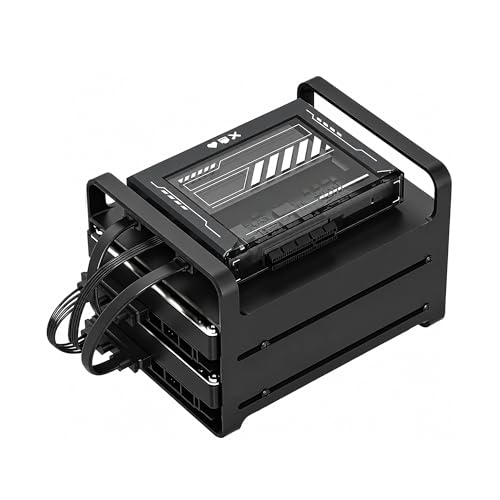
Zimablade 2-Bay DIY NAS Kit
Best for: DIY homelab setups and Docker containers
- Processor Cores
- Quad-Core (what this guide is about)
- Number of Bays
- 2-bay
- RAM Capacity
- 16GB
This Zimablade unit is a DIY x86 mini server kit designed for home storage and self-hosting. It features an Intel quad-core processor, 16GB of RAM, and a metal drive cage built to hold two SATA drives. You also get a PCIe expansion slot for hardware upgrades. It suits you if you want a compact, low-power setup to run Docker containers, media streaming, or Linux alongside your primary storage drives.
Pros
- Intel quad-core x86 processor
- 16GB RAM included
- PCIe slot for hardware expansion
- Includes two-bay drive cage and dual SATA cables
Cons
- Limited to two drive bays
- Requires manual assembly
Good fit if
- You want an x86 platform with 16GB RAM for Docker and container apps.
- You need a compact two-bay DIY server with PCIe expansion capability.
Skip if
- You need more than two drives for high-capacity storage arrays.
- You prefer a pre-assembled, turn-key NAS appliance.
Verdict: Zimablade 2-Bay Quad-Core NAS Kit provides an open x86 architecture with 16GB RAM and PCIe expansion for DIY server tasks. It delivers hardware flexibility in a compact dual-bay format.

QNAP 4-Bay Short-Depth Rackmount NAS with M.2 NVMe
Best for: short-depth rack setups needing 10GbE connectivity
- Processor Cores
- Quad-Core (what this guide is about)
- Number of Bays
- 4 Bay
- Processor
- Marvell OCTEON TX2 CN9130 / CN9131
- RAM Capacity
- 4GB DDR4
- Network Connectivity
- Dual 2.5GbE, Dual 10GbE
- M.2 NVMe Slots
- Dual M.2 PCIe Gen 3 x1 NVMe
View on Amazon: QNAP 4-Bay Short-Depth Rackmount NAS with M.2 NVMe
This QNAP rackmount NAS enclosure provides four drive bays powered by a quad-core Marvell OCTEON TX2 processor running at 2.2 GHz. You get four high-speed network connections, including dual 10GbE and dual 2.5GbE ports, alongside two M.2 PCIe Gen 3 NVMe slots for SSD caching. It suits you if you need compact rackmount storage with high-speed networking for team file sharing.
Pros
- Dual 10GbE and dual 2.5GbE network interfaces
- Dual M.2 PCIe Gen 3 x1 NVMe SSD slots
- DDR4 memory expandable up to 32GB
- Short-depth rackmount form factor
Cons
- M.2 slots run at PCIe Gen 3 x1 speeds
- Ships with 4GB baseline memory installed
Good fit if
- You require rackmount hardware with built-in 10GbE and 2.5GbE network ports.
- You plan to add M.2 NVMe SSDs for cache acceleration or fast pools.
- You need native support for backing up Google Workspace or Microsoft 365.
Skip if
- You prefer a desktop tower chassis over rack equipment.
- You need more than four primary drive bays.
Verdict: QNAP 4-Bay Rackmount Quad-Core NAS delivers dual 10GbE connectivity and NVMe caching inside a short-depth rack chassis. It provides capable transfer speeds for rack-equipped environments needing multi-gigabit file access.

TERRAMASTER 2-Bay N95 Dual 5GbE NAS
Best for: Users needing high RAM and fast network speeds
- Processor Cores
- Quad-Core (what this guide is about)
- Number of Bays
- 2-Bay
- Processor
- Intel N95
- RAM Capacity
- 8GB RAM
- Network Connectivity
- Dual 5GbE
- M.2 NVMe Slots
- Triple M.2
The TERRAMASTER F2-425 Plus is a 2-bay NAS powered by an Intel N95 quad-core CPU and 8GB of RAM. It features dual 5GbE ports for high-speed connectivity and supports triple M.2 NVMe slots for caching or additional storage. This unit suits users who need fast local network speeds and ample memory for virtualization or media transcoding tasks.
Pros
- Intel N95 quad-core processor up to 3.4GHz
- 8GB RAM capacity for demanding workloads
- Dual 5GbE network interfaces
- Triple M.2 NVMe expansion slots
Cons
- Only two drive bays for storage
- Sold diskless without included hard drives
- Limited to 5GbE rather than 10GbE connectivity
Good fit if
- You need high RAM for virtual machines or Docker containers
- You require fast 5GbE network throughput for media editing
- You want to expand storage with NVMe SSDs
Skip if
- You need more than two drive bays
- You require 10GbE network connectivity
- You want a NAS with pre-installed drives
Verdict: The TERRAMASTER F2-425 Plus 2-Bay NAS offers strong processing power and memory for users who prioritize speed and expansion over raw drive capacity. It fits professionals needing fast local transfers and NVMe caching capabilities.

Asustor Lockerstor 10-Bay NAS with 2x 1TB SSD
Best for: high-capacity storage and multi-gigabit network setups
- Processor Cores
- Quad-Core (what this guide is about)
- Number of Bays
- 10 Bay
- Processor
- AMD Ryzen Embedded V3C14
- RAM Capacity
- 16GB ECC DDR5
- Network Connectivity
- Dual 5GbE, dual 10GbE
- M.2 NVMe Slots
- 4 M.2 NVMe
View on Amazon: Asustor Lockerstor 10-Bay NAS with 2x 1TB SSD
This 10-bay network enclosure runs on an AMD Ryzen quad-core processor clocking up to 3.8 GHz turbo. You get 16GB of DDR5 ECC memory, four PCIe 4.0 M.2 NVMe slots, and dual 10GbE alongside dual 5GbE ports. The bundle includes two 1TB solid-state drives. It suits you if your setup requires massive bay density, fast wired networking, and high-bandwidth USB4 expansion for large-scale data storage.
Pros
- Dual 10GbE and dual 5GbE network connectivity
- Four PCIe 4.0 M.2 NVMe SSD slots
- Two 40 Gbps USB4 ports and three 10 Gbps USB 3.2 Gen 2 ports
- 16GB ECC DDR5 RAM expandable up to 64GB
Cons
- Heavy 20.6-pound base weight before populating all ten bays
- Substantial physical footprint at 15 inches wide and 14 inches long
Good fit if
- You need 10 drive bays combined with four M.2 NVMe slots for high-capacity storage.
- You want multi-gigabit connectivity with native dual 10GbE and dual 5GbE ports.
- You require error-correcting DDR5 memory for reliable data handling.
Skip if
- You need a compact, lightweight enclosure for a small desk space.
- You only require a two-bay or four-bay unit for basic home backups.
Verdict: Asustor Lockerstor 10-Bay Quad-Core NAS delivers exceptional network throughput and external connectivity with 10GbE and USB4 ports. It gives you expansive capacity across ten storage bays backed by an AMD Ryzen quad-core processor.

Asustor Lockerstor 4-Bay NAS with 12TB SSD
Best for: bundled SSD storage with multi-gigabit networking
- Processor Cores
- Quad-Core (what this guide is about)
- Number of Bays
- 4 Bay
- Processor
- Intel Celeron N5105
- RAM Capacity
- 4GB DDR4
- Network Connectivity
- Dual 5GbE
- M.2 NVMe Slots
- 4x M.2 NVMe
This four-bay network enclosure pairs an Intel Celeron N5105 quad-core processor with 4GB of DDR4 memory and comes bundled with three 4TB solid-state drives. Dual 5GbE Ethernet ports give you high-bandwidth networking right out of the box, while four internal M.2 NVMe slots allow fast storage expansion. It suits you if you need a pre-configured multi-gigabit storage setup with solid processing power and integrated flash drives for immediate use.
Pros
- Dual 5GbE Ethernet ports for multi-gigabit connectivity
- Four internal M.2 NVMe slots for flash storage
- Intel Celeron N5105 quad-core 2.0GHz processor
- Bundled with three 4TB SSDs
Cons
- Base configuration includes 4GB of RAM
- Ships with bundled drives rather than as a diskless unit
Good fit if
- You want dual 5GbE ports for high-bandwidth local transfers.
- You need an enclosure bundled with three 4TB solid-state drives.
- You want up to four M.2 NVMe slots for expansion.
Skip if
- You prefer an empty, diskless chassis to supply your own drives.
- You need more than four drive bays for bulk storage.
Verdict: Asustor Lockerstor 4-Bay Quad-Core NAS pairs an Intel Celeron N5105 processor with dual 5GbE networking, four M.2 NVMe slots, and three included 4TB SSDs. It gives you a multi-gigabit platform ready for immediate high-speed network storage.

Asustor Lockerstor 6 Gen3 6-Bay NAS with 4TB SSD
Best for: high-speed networking and intensive multi-user local storage
- Processor Cores
- Quad-Core (what this guide is about)
- Number of Bays
- 6 Bay
- Processor
- AMD Ryzen Embedded V3C14
- RAM Capacity
- 16GB ECC DDR5
- Network Connectivity
- Dual 5GbE, Dual 10GbE
- M.2 NVMe Slots
- 4x M.2 NVMe
View on Amazon: Asustor Lockerstor 6 Gen3 6-Bay NAS with 4TB SSD
This 6-bay enclosure runs on a quad-core AMD Ryzen Embedded V3C14 processor clocked up to 3.8 GHz. You get 16GB of DDR5 ECC memory, four PCIe 4.0 M.2 slots, dual 10GbE ports, and two 40 Gbps USB4 ports. The unit includes one 4TB NVMe SSD straight out of the box. It suits high-bandwidth workflows where you need fast multi-gigabit networking and expandable solid-state caching alongside six primary drive bays.
Pros
- Dual 10GbE and dual 5GbE network interfaces
- Two 40 Gbps USB4 ports
- Four PCIe 4.0 M.2 NVMe slots
- 16GB DDR5 ECC memory expandable up to 64GB
Cons
- Large physical footprint weighing 14.3 pounds
- Comes with only one SSD to populate four M.2 slots
- Wake on WAN support limited to the 5GbE ports
Good fit if
- You need 10GbE data transfer speeds without installing add-in network cards.
- You run services that benefit from error-correcting DDR5 ECC memory.
- You want dedicated NVMe storage caching while keeping all six main bays open.
Skip if
- You prefer an unpopulated diskless chassis so you can supply every drive yourself.
- You need a compact, lightweight storage enclosure for tight desk spaces.
Verdict: Asustor Lockerstor 6-Bay NAS with 4TB SSD delivers exceptional network throughput and PCIe 4.0 storage flexibility. Its combination of DDR5 ECC memory, dual 10GbE ports, and USB4 connectivity makes it a capable hub for intensive local data transfers.

Asustor Lockerstor 6-Bay NAS with 3TB SSD
Best for: Users needing NVMe speed and included SSDs
- Processor Cores
- Quad-Core (what this guide is about)
- Number of Bays
- 6 Bay
- Processor
- Intel Celeron N5105
- RAM Capacity
- 8GB DDR4
- Network Connectivity
- Dual 2.5GbE
- M.2 NVMe Slots
- 4x M.2 NVMe
This 6-bay NAS features an Intel Celeron N5105 quad-core processor and 8GB of DDR4 RAM. It includes three 1TB WD Blue SN570 NVMe SSDs. The unit offers dual 2.5GbE ports and a flexible PCIe slot for 10GbE expansion. It suits users needing high-speed storage and expandability. The included SSDs provide fast caching or storage. You get a complete solution with pre-installed drives.
Pros
- Quad-core Intel Celeron N5105 CPU
- 8GB DDR4 RAM capacity
- Includes three 1TB NVMe SSDs
- Dual 2.5GbE network ports
- Flexible PCIe slot for expansion
Cons
- Heavier build at 14.9 pounds
- Larger dimensions than compact units
- No 10GbE card included
Good fit if
- You need fast NVMe caching
- You want pre-installed SSDs
- You require 6 drive bays
Skip if
- You need built-in 10GbE
- You prefer smaller footprints
- You only have 2 drives
Verdict: Asustor 6-Bay NAS with 3TB SSDs delivers strong performance for users who value speed and included storage. It is ideal for those building a robust home server with NVMe capabilities.

Synology DS223 1GbE NAS
Best for: light home and small office storage
- Processor Cores
- Quad-Core (what this guide is about)
- Processor
- Realtek RTD1619B
- RAM Capacity
- 2 GB DDR4
- Network Connectivity
- 1GbE
- Hardware Interface
- RJ-45, USB 3.2 Gen 1
- Dimensions
- 9.16 × 6.5 × 4.25 inches
The Synology DS223 is a 2-bay diskless NAS built around a Realtek RTD1619B quad-core processor running at 1.7 GHz. It includes 2 GB of DDR4 RAM and a single 1GbE LAN port. This unit targets home users and small offices needing basic data management. It offers three USB 3.2 Gen 1 ports for peripheral connections. The compact chassis measures 9.16 inches in length and weighs 2.2 pounds.
Pros
- Realtek RTD1619B quad-core 1.7 GHz processor
- 2 GB DDR4 non-ECC system memory
- Single 1GbE RJ-45 LAN port
- Three USB 3.2 Gen 1 ports
Cons
- Only 2 GB of RAM limits heavy multitasking
- Single 1GbE port restricts network throughput
- Diskless design requires separate drive purchases
Good fit if
- You need a simple 2-bay storage solution
- You prefer Synology's data management platform
- You require USB ports for backup devices
Skip if
- You need more than 2 GB of RAM
- You require 2.5GbE or higher network speeds
- You want a pre-loaded drive configuration
Verdict: Synology DS223 Quad-Core NAS provides a compact quad-core foundation for light home use. It suits users who value brand reliability over high performance or expandability.

Synology 4-Bay Quad-Core Desktop NAS
Best for: four-bay network storage with 2GB RAM
- Processor Cores
- Quad-Core (what this guide is about)
- Number of Bays
- 4-Bay
- Processor
- Realtek RTD1619B
- RAM Capacity
- 2GB
- Network Connectivity
- 2xGbE
- Hardware Interface
- 3 x USB3.2
The Synology 4-Bay Quad-Core NAS is a diskless storage enclosure built around a 1.7 GHz Realtek RTD1619B quad-core processor and 2GB of RAM. It provides four 3.5-inch drive bays for your hard drives, along with two Gigabit Ethernet ports for network connections and three USB 3.2 ports for external drives. This setup suits you if you need multi-drive storage capacity with baseline memory for centralized backups and everyday file sharing across your local network.
Pros
- Realtek RTD1619B 4-core 1.7 GHz processor
- Four 3.5-inch drive bays
- Two Gigabit Ethernet ports
- Three USB 3.2 ports
Cons
- 2GB RAM capacity
- Diskless design requires purchasing hard drives separately
Good fit if
- You need four drive bays for 3.5-inch storage drives.
- You want dual Gigabit Ethernet ports for network setups.
- You need three USB 3.2 ports for external hardware.
Skip if
- You require more than 2GB of RAM.
- You need storage drives included out of the box.
Verdict: Synology 4-Bay Quad-Core NAS provides four drive bays and dual Gigabit Ethernet ports backed by a 1.7 GHz quad-core processor. It serves as a dedicated multi-drive enclosure when your applications fit within a 2GB memory footprint.
Specifications side by side
| Spec | Synology 12-Bay Quad-Core NAS | Asustor 6-Bay NAS with Quad M.2 NVMe Slots | QNAP 4-Bay 2.5GbE NAS Enclosure | TERRAMASTER 2-Bay Quad-Core Desktop NAS | TERRAMASTER 2-Bay Intel Quad-Core NAS | Synology DiskStation 8TB 2-Bay NAS | Zimablade 2-Bay DIY NAS Kit | QNAP 4-Bay Short-Depth Rackmount NAS with M.2 NVMe | TERRAMASTER 2-Bay N95 Dual 5GbE NAS | Asustor Lockerstor 10-Bay NAS with 2x 1TB SSD | Asustor Lockerstor 4-Bay NAS with 12TB SSD | Asustor Lockerstor 6 Gen3 6-Bay NAS with 4TB SSD | Asustor Lockerstor 6-Bay NAS with 3TB SSD | Synology DS223 1GbE NAS | Synology 4-Bay Quad-Core Desktop NAS |
|---|---|---|---|---|---|---|---|---|---|---|---|---|---|---|---|
| Number of Bays | 12-bay | 6 Bay | 4BAYS | 2-Bay | 2-Bay | 2-Bay | 2-bay | 4 Bay | 2-Bay | 10 Bay | 4 Bay | 6 Bay | 6 Bay | not specified | 4-Bay |
| Processor | not specified | Intel Celeron N5105 | Cortex-A55 ARM | ARM v8 | Intel x86 | Intel Celeron J4125 | not specified | Marvell OCTEON TX2 CN9130 / CN9131 | Intel N95 | AMD Ryzen Embedded V3C14 | Intel Celeron N5105 | AMD Ryzen Embedded V3C14 | Intel Celeron N5105 | Realtek RTD1619B | Realtek RTD1619B |
| Processor Cores | Quad Core | quad-core | 4-core | Quad-Core | quad-core | Quad-Core | Quad-Core | Quad Core | Quad-Core | Quad-Core | Quad-Core | Quad-Core | Quad-Core | Quad-Core | 4-core |
| RAM Capacity | 4GB DDR4 | 8GB DDR4 | 4GB | 1GB DDR4 | 4GB | 2 GB DDR4 | 16GB | 4GB DDR4 | 8GB RAM | 16GB ECC DDR5 | 4GB DDR4 | 16GB ECC DDR5 | 8GB DDR4 | 2 GB DDR4 | 2GB |
| Network Connectivity | not specified | Dual 2.5GbE | 1x 2.5Gigabit Ethernet Port | not specified | 2.5GbE | 1 x 2,5 GbE, 1 x 1 GbE | not specified | Dual 2.5GbE, Dual 10GbE | Dual 5GbE | Dual 5GbE, dual 10GbE | Dual 5GbE | Dual 5GbE, Dual 10GbE | Dual 2.5GbE | 1GbE | 2xGbE |
| M.2 NVMe Slots | not specified | 4X M.2 NVMe | not specified | not specified | not specified | not specified | not specified | Dual M.2 PCIe Gen 3 x1 NVMe | Triple M.2 | 4 M.2 NVMe | 4x M.2 NVMe | 4x M.2 NVMe | 4x M.2 NVMe | not specified | not specified |
| Hardware Interface | not specified | HDMI | not specified | not specified | not specified | RJ-45 | not specified | not specified | not specified | USB4, USB 3.2 Gen 2 Type-A | USB, HDMI | USB4, USB 3.2 Gen 2 Type-A | USB 3.2 Gen 2 | RJ-45, USB 3.2 Gen 1 | 3 x USB3.2 |
| Form Factor | not specified | not specified | not specified | not specified | not specified | not specified | not specified | Rackmount | not specified | not specified | not specified | not specified | not specified | not specified | not specified |
| Size | 12-bay; 4GB DDR4 | 6 Bay | not specified | 2 Bay | 2Bay, F2-425 | 8TB | SFF/Mini-ITX | 4 Bay (Unav.) | 2Bay, Intel N95, 8GB RAM | 2X1TB | 3X4TB | 1X4TB | 3X1TB | 0TB | not specified |
| Target Audience | not specified | Content Creators | not specified | not specified | not specified | not specified | not specified | not specified | not specified | not specified | not specified | not specified | not specified | not specified | not specified |
| Dimensions | 18.5 × 17 × 16.5 inches | 2.76 × 3.61 × 3.57 inches | 2.48 × 3.39 × 2.62 inches | 8.74 × 4.69 × 6.06 inches | 8.74 × 4.69 × 6.06 inches | 11.8 × 11 × 4.72 inches | not specified | not specified | 8.62 × 4.76 × 5.91 inches | 14 × 15 × 13 inches | 10 × 12 × 13 inches | 13 × 10 × 13 inches | 13 × 12 × 13 inches | 9.16 × 6.5 × 4.25 inches | 9.65 × 11.4 × 10.2 inches |
| Weight | 20.9 pounds | 10.8 pounds | 4.56 pounds | 4.6 pounds | 2.87 pounds | 4.41 pounds | not specified | not specified | 4.19 pounds | 20.6 pounds | 11.9 pounds | 14.3 pounds | 14.9 pounds | 2.2 pounds | 7.94 pounds |
| Color | Black | black / black | White | 2-Bay, Quad-Core, F2-212 | Black | Black | Black | not specified | Silver | not specified | not specified | not specified | not specified | No Drives | Black |
| Model | DS2422+ | AS6706T | TS-433-4G | F2-212 | F2-425 | DS225+/8TB-IW | not specified | not specified | F2-425 Plus (N95) | not specified | not specified | not specified | not specified | DS223 | DS423 |
You should also check the best ORICO SSD enclosures for more options in this category.
How to Choose a Quad-Core NAS Enclosure
-
Evaluate Network Port Speeds
Network port throughput determines how quickly you can move files across your local network. Standard 1GbE connections cap transfers at roughly 110 MB/s, which can bottleneck multi-drive arrays. Choosing 2.5GbE, 5GbE, or 10GbE ports allows your quad-core system to send and receive data much faster when connected to matching multi-gigabit switches or client cards. The QNAP 4-Bay Short-Depth Rackmount NAS provides 10GbE connectivity, making it suitable for environments where several users access uncompressed footage or massive backup archives simultaneously without saturating the local link.
-
Balance Drive Bay Needs
The number of drive bays dictates your maximum raw volume and your data redundancy options. A 2-bay enclosure restricts you to basic mirroring like RAID 1, which cuts your total drive capacity in half. Enclosures with 4 bays or more let you configure parity-based storage such as RAID 5, where you lose only a single drive of capacity across three or more disks. If you plan to expand your volume over time without replacing every installed drive at once, select an enclosure with four or more bays to ensure adequate room for future expansion.
-
Check M.2 Slot Availability
Dedicated M.2 NVMe slots let you configure high-speed flash pools or read-write caching without consuming primary 3.5-inch hard drive bays. Caching accelerates frequent small-block operations, database indexing, and user interface responsiveness. If your workload involves multi-stream video editing, virtual machines, or high-transaction file transfers, ensure the chassis includes physical M.2 connections on the motherboard. The Asustor 6-Bay NAS with Quad M.2 NVMe Slots provides four dedicated NVMe positions, allowing you to maximize input-output performance while retaining all six main drive bays for bulk spinning disks.
-
Consider Chassis Form Factor
Physical enclosure dimensions determine noise levels and placement constraints in your office or server closet. Desktop enclosures use compact vertical towers that sit directly on your workstation or bookshelf, requiring only standard desk clearance. Rackmount enclosures fit standard 19-inch equipment racks, making them ideal for structured network cabinets with dedicated ventilation. Short-depth rack designs reduce the chassis depth to fit smaller wall-mount cabinets. Check the physical width, depth, and vertical space of your target shelf before choosing a chassis style to ensure your enclosure receives proper airflow and cable clearance.
-
Compare Processor Architecture Types
Quad-core enclosures use either ARM or x86 processor architectures, which changes the software packages you can execute. ARM chips consume minimal electrical power and run cooler, making them suitable for simple file sharing, backup synchronization, and basic media streaming. Conversely, x86 chips from Intel or AMD support advanced virtualization, software containers, and hardware-accelerated transcoding for video files. If you plan to run Docker containers or host third-party services on your enclosure, prioritize an x86 quad-core model such as the TERRAMASTER 2-Bay Intel Quad-Core NAS to ensure wide software binary compatibility.
-
Inspect Video Display Ports
Certain quad-core enclosures include onboard display outputs such as HDMI ports alongside standard networking interfaces. An HDMI port allows you to connect the storage unit straight to a television, monitor, or production display for direct media playback without going through a network media receiver. This hardware interface also enables local command-line monitoring or direct desktop user interfaces during maintenance tasks. If you want direct-attached playback capabilities or local console administration rather than relying strictly on web-based management consoles across your local subnet, verify that the physical chassis features an external HDMI connection.
Frequently asked questions
What processor types are used in quad-core NAS enclosures?
Both ARM and x86 processors power these enclosures. For example, the QNAP TS-433-4G uses an ARM quad-core processor, while the Synology DS225+ runs an Intel Celeron quad-core chip. Higher-tier options like the Asustor Lockerstor 10-Bay utilize an AMD Ryzen quad-core CPU. Your workload dictates the choice, as x86 chips provide broader software compatibility, whereas ARM processors prioritize energy-efficient operation for everyday file management tasks.
Can a quad-core NAS enclosure run virtual machines or Docker containers?
Yes, you can run containerized applications and virtualization workloads on quad-core enclosures equipped with sufficient system memory. Models like the TERRAMASTER F2-425 Plus feature an Intel N95 quad-core processor and 8GB RAM for virtualization tasks. Similarly, the Zimablade 2-Bay kit provides an open x86 architecture with 16GB RAM for DIY Docker setups. Lightweight models with 1GB RAM lack the memory headroom for virtualization.
Do quad-core hard drive enclosures come with pre-installed storage drives?
Most enclosures ship diskless, but select models include factory-installed storage. The Synology DS225+/8TB-IW provides 8TB of bundled storage across two bays. Asustor offers pre-configured options like the Lockerstor 4-Bay, which includes three 4TB solid-state drives, and the Lockerstor 10-Bay with two 1TB drives. In contrast, diskless units like the QNAP TS-433-4G require you to supply your own compatible hard drives to complete your setup.
What are M.2 NVMe slots used for in quad-core NAS units?
M.2 NVMe slots provide high-speed caching or dedicated flash storage tiers alongside mechanical hard drives. Enclosures like the Asustor AS6706T incorporate four M.2 NVMe slots, while the TERRAMASTER F4-425 Plus (N95) integrates three slots. Rackmount hardware like the QNAP 4-Bay rack enclosure utilizes NVMe caching to accelerate file transfer speeds across multi-gigabit network interfaces, reducing data bottlenecks for demanding local network storage tasks.
Can you connect a quad-core NAS directly to an external display?
Yes, specific quad-core enclosures feature integrated HDMI hardware interfaces for direct video playback. The Asustor AS6706T and Asustor Lockerstor 4-Bay include dedicated HDMI outputs alongside their network ports. This interface lets you connect your storage enclosure directly to a monitor or television for direct media playback and administrative viewing without routing the video stream through a secondary computer on your local network.
Are quad-core NAS enclosures available in rackmount form factors?
Yes, quad-core enclosures come in rackmount form factors as well as standard desktop towers. While desktop units dominate home settings, models like the QNAP 4-Bay short-depth rackmount NAS fit directly into standard equipment cabinets. This rackmount unit features dual 10GbE ports, 4GB RAM, and M.2 NVMe caching, allowing you to deploy high-throughput quad-core storage inside space-constrained server racks and network closets.
What external connectivity options do quad-core NAS units offer beyond Ethernet?
Beyond Ethernet, quad-core enclosures offer high-speed ports like USB4 and PCIe expansion. The Asustor Lockerstor 10-Bay and Lockerstor 6 Gen3 include USB4 ports alongside multi-gigabit networking for external device connections. If you prefer hardware customization, the Zimablade 2-Bay kit features a PCIe slot for add-in cards. These physical interfaces expand how you attach auxiliary peripherals, direct external drives, and dedicated expansion hardware.