Best NAS Devices with 8GB RAM: 13 Spec-Based Picks
As an Amazon Associate we earn from qualifying purchases. Links on this page are affiliate links.
Finding the best hard drive enclosures with 8GB RAM gives your setup the memory headroom needed for container apps and multi-user access. We evaluated 13 models based strictly on the specifications published on their product listings.
The Asustor 6-Bay NAS with Quad M.2 NVMe Slots takes the top spot because it pairs six drive bays with four M.2 NVMe slots and 5GbE networking. This guide helps you select the right drive capacity, interface options, and network throughput for your workspace.
Quick picks
The best fit for you
- You need multi-bay capacity with fast NVMe caching Asustor 6-Bay NAS with Quad M.2 NVMe Slots It features six drive bays, four M.2 NVMe slots, and 5GbE connectivity.
- You need high-density rack storage with redundant power Synology 12-Bay Rackmount NAS The 12-bay rackmount chassis includes dual power supplies and scales up to 24 drives.
- You want a compact two-bay desktop setup TERRAMASTER 2-Bay N95 Dual 5GbE NAS It offers a two-bay footprint powered by an Intel N95 quad-core processor.
- You want pre-installed high-capacity storage ready for use Synology 5-Bay 60TB Desktop NAS It comes pre-fitted with five 12TB drives and an AMD Ryzen processor.
Our 13 picks

Asustor 6-Bay NAS with Quad M.2 NVMe Slots
Best for: hybrid storage setups requiring NVMe caching
- RAM Capacity
- 8GB RAM (what this guide is about)
- Drive Bays
- 6-Bay
- Network Connectivity
- Dual 2.5GbE
- Processor
- Intel Celeron N5105
- M.2 NVMe Slots
- 4 slots
- Included Storage
- Diskless
This 6-bay NAS enclosure comes equipped with 8GB of DDR4 memory, expandable up to 16GB. It runs on an Intel Celeron N5105 quad-core processor and includes four M.2 NVMe SSD slots alongside its main drive bays. Dual 2.5GbE ports and a PCIe expansion slot provide flexible network connectivity. You get a balanced platform built for media streaming, virtualization, and hybrid storage setups.
Pros
- 8GB DDR4 RAM expandable up to 16GB
- Four M.2 NVMe SSD slots for caching or storage
- Dual 2.5GbE ports with PCIe slot for 10GbE expansion
- Intel Celeron N5105 quad-core CPU with 4K transcoding support
Cons
- Memory expansion caps at 16GB
- 10GbE speeds require a separate PCIe add-in card
- Uses DDR4 memory rather than DDR5
Good fit if
- You need six SATA bays plus multiple NVMe slots for caching or fast storage tiers.
- You want 8GB RAM out of the box with room to upgrade to 16GB.
- You plan to run 4K media streaming or lightweight virtualization workloads.
Skip if
- You require factory-installed 10GbE networking without occupying the PCIe slot.
- You need memory expansion beyond 16GB for heavier server environments.
Verdict: Asustor Lockerstor 6-Bay NAS with 4 M.2 Slots delivers solid multi-bay capacity and four NVMe slots backed by 8GB of expandable DDR4 memory. It offers a versatile balance of local drive expansion and multi-gigabit networking for creative and backup workloads.

Synology 8-Bay Expandable NAS
Best for: scalable multi-drive storage with high expansion potential
- RAM Capacity
- 8GB RAM (what this guide is about)
- Drive Bays
- 8-Bay
- Included Storage
- Diskless
- Dimensions
- 14.6 × 18.1 × 12.6 inches
- Weight
- 16.5 pounds
This diskless 8-bay desktop enclosure includes 8GB of DDR4 memory for heavy data management and system tasks. You can scale storage up to 18 bays by attaching two DX517 expansion units. It provides hot-swappable bays, online volume expansion, and high-availability clustering support to maximize system uptime. This enclosure suits you if you need a high-capacity storage foundation with ample built-in memory and broad expansion headroom.
Pros
- Equipped with 8GB DDR4 RAM
- Offers 8 hot-swappable drive bays with online volume expansion
- Expands up to 18 drive bays using two DX517 expansion units
- Supports Synology High Availability clustering
Cons
- Supplied diskless with no hard drives included
- Large footprint measuring 18.11 inches wide and weighing 16.53 pounds
Good fit if
- You need 8 drive bays combined with 8GB RAM out of the box.
- You plan to scale capacity up to 18 bays with expansion units.
- You require hot-swappable drive trays and high-availability failover.
Skip if
- You prefer a turnkey NAS that includes pre-installed storage drives.
- You have limited desk space for an 18.11-inch wide enclosure.
Verdict: Synology 8-Bay DiskStation with 8GB RAM delivers substantial built-in memory and 8 bays engineered for continuous uptime. Its ability to expand to 18 bays makes it a reliable pick for high-capacity deployments.

Synology 5-Bay 60TB Desktop NAS
Best for: turnkey 60TB storage with virtualization support
- RAM Capacity
- 8GB RAM (what this guide is about)
- Drive Bays
- 5-Bay
- Network Connectivity
- 2 x 2.5GbE
- Processor
- Ryzen V1500B
- Included Storage
- 60TB
- Weight
- 4.81 pounds
This Synology unit pairs an AMD Ryzen processor with 8GB RAM and includes 60TB of total storage via five 12TB Seagate IronWolf hard drives. It features two 2.5GbE networking ports alongside support for an optional 10GbE module. DiskStation Manager provides backup, container hosting, and virtualization support. You get a pre-populated five-bay system ready for immediate deployment without sourcing bare drives.
Pros
- Includes 60TB storage across five 12TB Seagate IronWolf drives
- 8GB RAM paired with an AMD Ryzen processor
- Dual 2.5GbE network ports built in
- Certified for VMware vSphere, Microsoft Hyper-V, Citrix XenServer, and OpenStack
Cons
- Optional 10GbE network upgrade sold separately
- DX525 expansion unit required to reach maximum 300TB capacity
Good fit if
- You need 60TB of factory-installed storage ready out of the box.
- You run virtual machines or containers requiring 8GB of RAM.
- You want dual 2.5GbE connectivity for business backups.
Skip if
- You prefer a diskless enclosure to install your own drives.
- You require built-in 10GbE ports without purchasing separate add-on cards.
Verdict: Synology 5-Bay 60TB Desktop NAS delivers an integrated 8GB RAM platform pre-fitted with five 12TB drives for immediate virtualization and mass storage. It provides robust 2.5GbE networking out of the box with room to expand capacity later.

QNAP 4-Bay Desktop NAS with 8GB RAM
Best for: Desktop 4K media playback and local display
- RAM Capacity
- 8GB RAM (what this guide is about)
- Drive Bays
- 4-Bay
- Network Connectivity
- Dual 2.5GbE
- Processor
- Intel Pentium Gold G7400
- M.2 NVMe Slots
- 2 slots
- Included Storage
- Diskless
This 4-bay desktop NAS enclosure gives you an Intel Pentium Gold G7400 dual-core processor paired with 8GB of DDR4 memory, expandable up to 64GB. It features dual 2.5GbE network ports, dual M.2 PCIe Gen3 NVMe SSD slots for caching or storage pools, and 10Gbps USB 3.2 Gen 2 connectivity. It suits you if you need direct 4K video transcoding and local HDMI output in a compact multi-drive setup.
Pros
- RAM expands from 8GB up to 64GB DDR4
- Dual 2.5GbE ports for accelerated file transfers
- Dual M.2 PCIe Gen3x2 NVMe SSD slots for caching or storage
- Direct HDMI 1.4b output supporting 4K media playback
Cons
- HDMI 1.4b port tops out at 4K @30Hz
- Processor is limited to 2 cores and 4 threads
- M.2 slots use Gen3x2 bandwidth
Good fit if
- You need direct 4K video playback via an HDMI port.
- You want memory expansion headroom up to 64GB.
- You run a 2.5GbE local network environment.
Skip if
- You need more than four drive bays for storage.
- You require 4K video output at 60Hz.
- You want a CPU with more than two physical cores.
Verdict: QNAP 4-Bay Desktop NAS with Intel Pentium provides balanced 2.5GbE connectivity, dual NVMe slots, and hardware transcoding with HDMI output. It works well if you want an expandable desktop media and backup unit with substantial memory headroom.

TERRAMASTER 2-Bay N95 Dual 5GbE NAS
Best for: Compact setups needing 8GB RAM and 5GbE
- RAM Capacity
- 8GB RAM (what this guide is about)
- Drive Bays
- 2-Bay
- Network Connectivity
- Dual 5GbE
- Processor
- Intel N95
- M.2 NVMe Slots
- 3 slots
- Included Storage
- Diskless
The TERRAMASTER F2-425 Plus is a compact 2-bay NAS featuring an Intel N95 quad-core processor and 8GB of RAM. It includes dual 5GbE ports for high-speed networking and supports triple M.2 NVMe slots for SSD caching or expansion. This diskless unit offers 84TB of total storage capacity. It suits users who need strong performance in a small aluminum chassis with tool-less drive trays.
Pros
- 8GB RAM capacity for smooth multitasking
- Intel N95 quad-core CPU up to 3.4GHz
- Dual 5GbE LAN ports with link aggregation
- Triple M.2 NVMe slots for SSD expansion
- Durable aluminum-alloy chassis with tool-less trays
Cons
- Only two drive bays limit total HDD capacity
- Sold diskless without pre-installed hard drives
- Smaller form factor than 6-bay competitors
Good fit if
- You need 8GB RAM in a compact 2-bay unit
- You want dual 5GbE ports for faster networking
- You plan to use M.2 SSDs for caching
Skip if
- You require more than two drive bays
- You need a NAS with drives included
- You prefer rackmount or larger chassis designs
Verdict: TERRAMASTER F2-425 Plus 2-Bay NAS delivers strong specs in a small footprint. It fits users who prioritize RAM and network speed over raw drive count.

Asustor Lockerstor 6-Bay NAS with 3TB SSD
Best for: 10GbE networking expansion with bundled SSD storage
- RAM Capacity
- 8GB RAM (what this guide is about)
- Drive Bays
- 6 Bay
- Network Connectivity
- Dual 2.5GbE
- Processor
- Intel Celeron N5105
- M.2 NVMe Slots
- 4X M.2 NVMe Slots
- Included Storage
- 3 x 1TB SSD
This 6-bay enclosure includes 8GB of DDR4 memory paired with a quad-core Intel Celeron N5105 processor and three 1TB solid-state drives. It features built-in 2.5GbE networking alongside an open PCIe slot designed for an optional 10GbE expansion card or extra M.2 NVMe drives. If you need multi-gigabit throughput and pre-installed flash storage for high-demand file transfers or local network backups, this unit gives you room to expand.
Pros
- PCIe slot supports add-in 10GbE network cards
- Bundled with three 1TB solid-state drives
- Dual 2.5GbE network ports and 10Gbps USB 3.2 Gen2 ports
- Quad-core Intel Celeron N5105 processor with 8GB RAM
Cons
- 10GbE connectivity requires a separate PCIe expansion card
- Heavier chassis at 14.9 pounds empty
- Uses DDR4 memory instead of DDR5
Good fit if
- You plan to install a 10GbE PCIe expansion card for faster networking.
- You need a 6-bay storage unit bundled with 3TB of solid-state storage.
- You want 8GB of RAM combined with high-speed USB 3.2 Gen2 connectivity.
Skip if
- You need 10GbE ports built directly into the rear panel without expansion cards.
- You prefer a diskless chassis without pre-installed solid-state drives.
- You want a lightweight enclosure for portable or shelf placement.
Verdict: Asustor Lockerstor 6-Bay NAS delivers 8GB of RAM, six SATA bays, and PCIe expansion readiness for 10GbE networking. It fits users seeking multi-gigabit performance paired with bundled SSD storage.

TERRAMASTER 6-Bay Intel Core i3 NAS
Best for: high-speed media editing and network virtualization
- RAM Capacity
- 8GB RAM (what this guide is about)
- Drive Bays
- 6-Bay
- Network Connectivity
- Dual 10GbE
- Processor
- Intel Core i3-1315U
- M.2 NVMe Slots
- 3 slots
- Included Storage
- Diskless
This 6-bay diskless NAS enclosure features an Intel Core i3-1315U 6-core processor paired with 8GB of DDR5 memory. It includes dual 10GbE network ports and three M.2 NVMe slots for SSD caching, along with support for point-to-point TB4 Bridge connections. If you manage heavy file transfers, host local containers, or edit high-resolution media directly across your network, this unit provides the throughput and processing capacity your workflows require.
Pros
- Dual 10GbE network ports supporting up to 2090 MB/s via SMB Multichannel
- Intel Core i3-1315U 6-core processor with 8GB DDR5 memory
- Three M.2 NVMe slots dedicated to Hyper Cache acceleration
- Direct PC-to-NAS TB4 Bridge connection providing 10 to 20Gbps bandwidth
Cons
- Diskless chassis requires purchasing storage drives separately
- Requires compatible host hardware to utilize the TB4 Bridge connection
Good fit if
- You need high network bandwidth from dual 10GbE ports or direct TB4 Bridge connections.
- You plan to run Docker containers or virtual machines using a 6-core Intel Core i3 CPU.
- You want 6 storage bays paired with three M.2 NVMe slots for SSD caching.
Skip if
- You want a turnkey storage system that includes pre-installed hard drives.
- You only require standard 1GbE network speeds for simple file backups.
Verdict: TERRAMASTER 6-Bay Core i3 NAS combines 8GB of DDR5 memory with dual 10GbE connectivity and three M.2 NVMe slots. It delivers substantial throughput for multi-stream media editing and virtualization workloads.
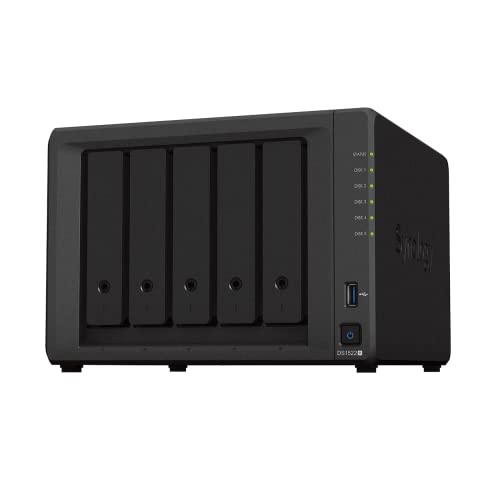
Synology 5-Bay NAS Enclosure
Best for: expandable five-bay storage and virtualization workloads
- RAM Capacity
- 8GB RAM (what this guide is about)
- Drive Bays
- 5 Bay
- Network Connectivity
- Four 1GbE ports
- Included Storage
- Diskless
- Dimensions
- 12 × 12 × 11.3 inches
- Weight
- 9.24 pounds
This Synology 5-bay diskless enclosure runs on 8GB of DDR4 memory and supports sequential transfer rates up to 736 MB/s read and 796 MB/s write. You get four built-in 1GbE LAN ports, support for optional 10GbE network expansion, and scaling up to 15 drives using two expansion units. It suits you if you need a flexible platform for virtualization, photo management, surveillance tasks, and future multi-drive capacity growth.
Pros
- 8GB DDR4 memory installed
- Scales up to 15 drives using two DX517 expansion units
- Four 1GbE ports with optional 10GbE network upgrade support
- Sequential read and write speeds up to 736 MB/s and 796 MB/s
- Includes a 3-year warranty
Cons
- Comes diskless with no pre-installed hard drives
- Requires an optional add-on module for 10GbE network speeds
Good fit if
- You need 8GB of RAM and five bays with the option to expand to 15 bays later.
- You plan to use built-in tools for virtualization, surveillance, or file backup.
- You want multiple 1GbE ports with an optional path to 10GbE connectivity.
Skip if
- You want hard drives included directly out of the box.
- You need built-in 10GbE connectivity without purchasing optional accessories.
Verdict: Synology 5-Bay NAS Enclosure delivers five drive bays, 8GB RAM, and 15-drive expansion potential for memory-dependent network storage tasks.

QNAP 8-Bay Short-Depth Rackmount NAS
Best for: shallow rack installations needing high drive capacity
- RAM Capacity
- 8GB RAM (what this guide is about)
- Drive Bays
- 8 Bay
- Network Connectivity
- Dual 2.5GbE
- Processor
- Intel Celeron N5105/N5095
- M.2 NVMe Slots
- Dual M.2 PCIe Gen 3 x1 NVMe
- Included Storage
- Diskless
This rackmount enclosure gives you eight drive bays in a short-depth chassis for standard server cabinets. It features a quad-core Intel Celeron processor paired with 8GB of onboard memory, alongside dual 2.5GbE networking ports. Internal dual M.2 PCIe Gen 3 NVMe slots support SSD caching or dedicated pools. You will find it well suited if your setup needs high-capacity rack storage, fast local transfers, and dedicated SSD slots without taking full rack depth.
Pros
- Eight drive bays in a space-saving short-depth rackmount form factor
- Dual 2.5GbE network ports for high-speed file transfers
- Dual M.2 PCIe Gen 3 x1 NVMe slots for cache or storage pools
- USB 3.2 Gen 2 Type-A ports with up to 10Gb/s speeds
- HDMI 1.4b port supporting 4K video output at 30Hz
Cons
- Installed 8GB system RAM is non-expandable
- HDMI output is capped at 30Hz for 4K video
Good fit if
- You need an eight-bay setup designed for shallow server cabinets.
- You want multi-gigabit networking via dual 2.5GbE ports.
- You plan to use M.2 NVMe SSDs for caching or storage pools.
Skip if
- You need to expand system memory beyond the fixed 8GB capacity.
- You require a desktop tower enclosure rather than a rackmount unit.
Verdict: QNAP 8-Bay Short-Depth Rackmount NAS fits eight bays into shallow server racks while providing dual 2.5GbE ports and M.2 SSD caching. Its fixed 8GB memory limits future RAM upgrades, but it delivers solid rack performance right out of the box.

Synology 12-Bay Rackmount NAS
Best for: rackmount deployments needing redundant power
- RAM Capacity
- 8GB RAM (what this guide is about)
- Drive Bays
- 12-Bay
- Included Storage
- Diskless
- Dimensions
- 22.8 × 19 × 3.5 inches
- Weight
- 32.3 pounds
The Synology 12-Bay Rackmount NAS provides 12 drive bays and 8GB of DDR4 memory in a standard 19-inch rackmount chassis. It features dual redundant power supplies, hot-swappable bays, and online volume expansion to keep operations running continuously. You can scale storage up to 24 bays using a compatible expansion unit. This system suits you if you need high-capacity, rack-mounted data storage with built-in power redundancy.
Pros
- 12 hot-swappable drive bays with expansion up to 24 bays
- Dual redundant power supplies for hardware failover
- 8GB DDR4 memory pre-installed
- Standard 19-inch rackmount form factor
Cons
- Large rackmount footprint measuring 22.8 inches deep and 32.28 pounds
- Ships diskless without pre-installed storage drives
Good fit if
- You need 12 drive bays with expansion potential up to 24 bays.
- You require dual power supplies for continuous uptime in a server rack.
- You want built-in high-availability clustering and online volume expansion.
Skip if
- You need a compact desktop enclosure instead of a rackmount chassis.
- You want a storage system that arrives with drives pre-installed.
Verdict: Synology 12-Bay Rackmount NAS delivers 12 bays, 8GB RAM, and dual power supplies in a 19-inch rackmount chassis. It handles large-scale data storage and scales up to 24 drives.

TERRAMASTER 8-Bay All-SSD NAS
Best for: compact all-flash 10Gbps network storage
- RAM Capacity
- 8GB RAM (what this guide is about)
- Drive Bays
- 8-Bay
- Network Connectivity
- 10Gbps
- Processor
- Intel N95
- Processor Cores
- Quad-Core
- Dimensions
- 5.91 × 3.94 × 1.57 inches
This compact unit pairs an Intel N95 quad-core processor with 8GB of DDR5 memory and a 10Gbps Ethernet port. Designed entirely for flash storage, it holds up to eight M.2 2280 NVMe solid-state drives across a tool-free chassis. If you need silent desktop backups, high transfer speeds up to 1024MB/s, and a tiny footprint without mechanical drive vibration, this setup delivers full network storage in a portable form factor.
Pros
- 8GB DDR5 4800MHz memory paired with an Intel N95 4-core processor
- Single 10Gbps Ethernet port supporting transfer speeds up to 1024MB/s
- Accommodates up to eight M.2 2280 NVMe SSDs for 64TB total capacity
- Compact footprint weighing 1.32 pounds with standby noise below 19dB
Cons
- Accepts only M.2 2280 NVMe drives with no 3.5-inch drive bays
- Arrives diskless with no solid-state drives included
Good fit if
- You want an all-flash M.2 NVMe setup running over a 10Gbps network link.
- You need a quiet, palm-sized NAS with standby noise under 19dB.
- You plan to utilize 8GB DDR5 memory for multi-tier business backups.
Skip if
- You require 3.5-inch SATA hard drive bays for high-capacity mechanical disks.
- You prefer an enclosure that includes pre-installed storage media out of the box.
Verdict: TERRAMASTER 8-Bay All-SSD NAS provides high-speed flash performance in an ultra-compact enclosure powered by 8GB DDR5 memory and 10Gbps networking. It gives you silent operation and eight NVMe bays where traditional mechanical drives cannot fit.

TERRAMASTER 6-Bay 8GB DDR5 NAS
Best for: six-bay high-capacity multi-user local backups
- RAM Capacity
- 8GB RAM (what this guide is about)
- Drive Bays
- 6-Bay
- Network Connectivity
- 2 x 2.5GbE
- Processor
- Intel N95
- M.2 NVMe Slots
- 2 slots
- Included Storage
- Diskless
This diskless 6-bay network-attached storage enclosure features 8GB of DDR5 memory paired with an Intel N95 quad-core processor. You get dual 2.5GbE network ports with link aggregation and two M.2 NVMe slots for SSD caching. It suits you if you need six drive bays, fast data transfers, and integrated business backup tools for centralized storage, file synchronization, and multi-user access.
Pros
- 8GB DDR5 4800MHz memory expandable up to 32GB
- Dual 2.5GbE ports with link aggregation support
- Two M.2 NVMe slots with side-sliding cover design
- Six drive bays supporting RAID 0, 1, 5, 6, 10, and TRAID
Cons
- Installed RAM is non-ECC memory
- Arrives diskless with no pre-installed hard drives
- Lacks native 10GbE networking interfaces
Good fit if
- You need six drive bays with support for flexible RAID and TRAID configurations.
- You want 8GB DDR5 memory with the option to expand up to 32GB.
- You require dual 2.5GbE connectivity for multi-user local file access.
Skip if
- You require factory-installed hard drives out of the box.
- You need error-correcting ECC RAM for critical enterprise workflows.
- You want built-in 10GbE networking ports.
Verdict: TERRAMASTER 6-Bay 8GB DDR5 NAS delivers six drive bays, expandable DDR5 memory, and dual 2.5GbE connectivity for data-heavy workloads. It pairs versatile RAID management with dedicated M.2 SSD caching slots in a compact footprint.

QNAP 9-Bay Hybrid NAS with 8GB RAM
Best for: 9-bay hybrid storage with 10GbE networking
- RAM Capacity
- 8GB RAM (what this guide is about)
- Drive Bays
- 9-Bay
- Network Connectivity
- 2 x 2.5GbE, 1 x 10GbE
- Processor
- AMD Ryzen Embedded V1500B
This 9-bay hybrid desktop NAS delivers multi-gigabit networking and expandable memory for data-heavy workloads. It comes equipped with 8GB of DDR4 RAM across two SO-DIMM slots, with room to expand up to 64GB. Under the hood, an AMD Ryzen Embedded V1500B quad-core processor handles multi-threaded tasks, while built-in 10GBASE-T and dual 2.5GbE ports manage fast network transfers. It suits you if you require 10GbE networking and 9-bay capacity out of the box.
Pros
- Built-in 10GBASE-T port along with dual 2.5GbE LAN ports
- AMD Ryzen Embedded V1500B 4-core, 8-thread 2.2 GHz processor
- 8GB DDR4 RAM expandable up to 64GB with optional ECC support
- Equipped with USB 3.2 Gen2 Type-C and Type-A connectivity
Cons
- Uses DDR4 memory instead of DDR5
- Pre-installed with 8GB out of its 64GB maximum memory capacity
Good fit if
- You need native 10GBASE-T networking without buying expansion cards.
- You plan to upgrade memory up to 64GB or need optional ECC RAM support.
- You want a 9-bay hybrid drive enclosure for mixed storage setups.
Skip if
- You prefer a platform utilizing newer DDR5 memory.
- You require more than 8GB of factory-installed RAM immediately.
Verdict: QNAP 9-Bay Hybrid NAS with 8GB RAM pairs AMD quad-core processing with native 10GBASE-T networking and flexible memory expansion up to 64GB. It provides dense 9-bay capacity for users prioritizing high-throughput local data transfers.
Specifications side by side
| Spec | Asustor 6-Bay NAS with Quad M.2 NVMe Slots | Synology 8-Bay Expandable NAS | Synology 5-Bay 60TB Desktop NAS | QNAP 4-Bay Desktop NAS with 8GB RAM | TERRAMASTER 2-Bay N95 Dual 5GbE NAS | Asustor Lockerstor 6-Bay NAS with 3TB SSD | TERRAMASTER 6-Bay Intel Core i3 NAS | Synology 5-Bay NAS Enclosure | QNAP 8-Bay Short-Depth Rackmount NAS | Synology 12-Bay Rackmount NAS | TERRAMASTER 8-Bay All-SSD NAS | TERRAMASTER 6-Bay 8GB DDR5 NAS | QNAP 9-Bay Hybrid NAS with 8GB RAM |
|---|---|---|---|---|---|---|---|---|---|---|---|---|---|
| Drive Bays | 6-Bay | 8-Bay | 5-Bay | 4-Bay | 2-Bay | 6 Bay | 6-Bay | 5 Bay | 8 Bay | 12-Bay | 8-Bay | 6-Bay | 9-Bay |
| Network Connectivity | Dual 2.5GbE | not specified | 2 x 2.5GbE | Dual 2.5GbE | Dual 5GbE | Dual 2.5GbE | Dual 10GbE | Four 1GbE ports | Dual 2.5GbE | not specified | 10Gbps | 2 x 2.5GbE | 2 x 2.5GbE, 1 x 10GbE |
| Processor | Intel Celeron N5105 | not specified | Ryzen V1500B | Intel Pentium Gold G7400 | Intel N95 | Intel Celeron N5105 | Intel Core i3-1315U | not specified | Intel Celeron N5105/N5095 | not specified | Intel N95 | Intel N95 | AMD Ryzen Embedded V1500B |
| RAM Capacity | 8GB DDR4 | not specified | 8GB | 8GB DDR4 | 8GB RAM | 8GB DDR4-2933 | 8GB DDR5 | not specified | 8GB DDR4 | not specified | 8GB DDR5 4800MHz | 8GB DDR5 4800MHz | 8GB DDR4 |
| M.2 NVMe Slots | 4 slots | not specified | not specified | 2 slots | 3 slots | 4X M.2 NVMe Slots | 3 slots | not specified | Dual M.2 PCIe Gen 3 x1 NVMe | not specified | not specified | 2 slots | not specified |
| Included Storage | Diskless | Diskless | 60TB | Diskless | Diskless | 3 x 1TB SSD | Diskless | Diskless | Diskless | Diskless | not specified | Diskless | not specified |
| RAID Support | not specified | not specified | not specified | not specified | not specified | not specified | RAID 0, 1, 5, 6, 10, TRAID, TRAID+ | not specified | not specified | not specified | not specified | not specified | not specified |
| Form Factor | not specified | not specified | not specified | Desktop | not specified | not specified | not specified | not specified | Rackmount | not specified | not specified | not specified | not specified |
| Hardware Interface | M.2 NVMe, HDMI | not specified | not specified | not specified | not specified | M.2 NVMe | not specified | not specified | not specified | not specified | not specified | not specified | not specified |
| Number of Bays | 6-Bay | 8-Bay | not specified | 4-Bay | 2-Bay | 6-Bay | not specified | not specified | 8-Bay | 12-Bay | 8-Bay | 6-Bay | not specified |
| Target Audience | Content Creators | not specified | not specified | not specified | not specified | not specified | not specified | not specified | not specified | not specified | not specified | not specified | not specified |
| Processor Cores | Quad-Core | not specified | not specified | not specified | Quad-Core | Quad-Core | not specified | not specified | not specified | not specified | Quad-Core | Quad-Core | not specified |
| Dimensions | 2.76 × 3.61 × 3.57 inches | 14.6 × 18.1 × 12.6 inches | not specified | not specified | 8.62 × 4.76 × 5.91 inches | 13 × 12 × 13 inches | 3.44 × 3.72 × 2.39 inches | 12 × 12 × 11.3 inches | 17.7 × 6.61 × 9.3 inches | 22.8 × 19 × 3.5 inches | 5.91 × 3.94 × 1.57 inches | 8.74 × 9.45 × 6.06 inches | not specified |
| Weight | 10.8 pounds | 16.5 pounds | 4.81 pounds | not specified | 4.19 pounds | 14.9 pounds | 4.63 pounds | 9.24 pounds | 20.5 pounds | 32.3 pounds | 1.32 pounds | 4.6 pounds | not specified |
| Size | 6 Bay | DS1823xs+ | 60TB | Intel Pentium | 2Bay, Intel N95, 8GB RAM | 3X1TB | 6 Bay, F6-425 Pro | DS1522+ | 8 bay (Unav.) | RS2423RP+ | 8.66 inches x 5.91 inches x 2.17 inches | 6Bay, 4-Core CPU, 8GB RAM, F6-424 | 8GB RAM |
| Color | black / black | Black | black | Black | Silver | not specified | Black | Black | black | Black | black | Black | black |
| Model | AS6706T | DS1823xs+ | DS1525+ | not specified | F2-425 Plus (N95) | not specified | F6-425 Pro | DS1522+ | 0885022024544 | RS2423RP+ | F8 SSD | F6-424 | TS-h973AX-8G-AM-US |
If you need to pair these enclosures with memory, review our list of the best 8GB ddr5 RAMs, Compared.
How to Choose an 8GB RAM NAS
-
Selecting Form Factor
Your physical deployment space determines whether you need a desktop tower or a rackmount enclosure. Desktop chassis sit on shelves or desks, keeping footprint compact. Rackmount units mount into standard server cabinets. If you manage a shallow network cabinet, verify chassis depth before buying. For example, the QNAP 8-Bay Short-Depth Rackmount NAS measures 17.7 inches in length, allowing it to fit equipment racks where full-depth enterprise servers cannot install.
-
Evaluating Memory Expandability
Every unit on this list starts with 8GB RAM, but memory architecture and expansion ceilings differ. Look closely at the memory type, such as DDR4 versus newer DDR5, and confirm whether the RAM is soldered or expandable via standard slots. If you plan to run multiple virtual machines, verify the maximum supported memory. The QNAP 9-Bay Hybrid NAS with 8GB RAM allows expansion up to 64GB, giving you headroom for future memory-intensive tasks.
-
Matching Processor Capabilities
The processor determines how quickly your system manages parity checks, file encryption, and multi-user requests. Basic storage tasks run efficiently on dual-core or quad-core chips like Intel Celeron processors. Heavy database management, active containers, and virtualization need faster compute options like AMD Ryzen or Intel Core processors. For instance, the Synology 5-Bay 60TB Desktop NAS includes an AMD Ryzen processor, providing dedicated processing power to handle simultaneous background services without slowing down network file transfers.
-
Checking Drive Bay Expansion
Check whether an enclosure supports dedicated external expansion units before deciding on native bay counts. If your initial data needs require eight drives but will grow over time, look for models engineered with expansion ports. The Synology 8-Bay Expandable NAS begins with eight internal drive bays but can scale up to 18 bays total. This upgrade path lets you add storage volume later without having to replace your central operating system or network hardware.
-
Evaluating Power Redundancy
Hardware reliability requirements dictate whether you need redundant power inputs. Standard desktop enclosures use a single external power adapter or internal supply. If a power brick or circuit trips, the system shuts down abruptly. Mission-critical enterprise environments require continuous uptime and failover protection. Units like the Synology 12-Bay Rackmount NAS feature dual power supplies. Connecting each power supply cord to separate electrical circuits keeps your data accessible if one power source drops or fails unexpectedly.
-
Reviewing SSD Caching Options
Look for dedicated M.2 NVMe slots if you need fast read and write caching. Without dedicated NVMe slots, solid-state cache drives must occupy standard drive bays, reducing your overall mechanical storage capacity. A dedicated caching interface accelerates input and output operations for databases and high-traffic multi-user access. The TERRAMASTER 6-Bay 8GB DDR5 NAS features dedicated M.2 SSD slots, allowing you to establish high-speed caching while keeping all six primary SATA bays available for mass storage.
Frequently asked questions
What workloads benefit from an 8GB RAM NAS?
An 8GB RAM configuration supports memory-intensive tasks such as virtualization, concurrent multi-user file transfers, and container services. In setups like the Synology 5-Bay 60TB Desktop NAS and TERRAMASTER 6-Bay Intel Core i3 NAS, this baseline allocation ensures sufficient headroom for multi-stream operations without running into system bottlenecks.
Can you upgrade the RAM beyond 8GB on these NAS units?
Upgrade capability depends on the specific hardware. The QNAP 9-Bay Hybrid NAS allows memory expansion up to 64GB, and the Asustor 6-Bay NAS supports expandable DDR4 memory. Conversely, models such as the QNAP 8-Bay Short-Depth Rackmount NAS feature a fixed 8GB memory configuration that prevents future hardware memory upgrades.
Which 8GB RAM NAS devices support 10GbE network speeds?
Several models feature 10GbE connectivity directly or through expansion. The TERRAMASTER 6-Bay Intel Core i3 NAS includes dual 10GbE interfaces, while the TERRAMASTER 8-Bay All-SSD NAS provides native 10Gbps networking. The QNAP 9-Bay Hybrid NAS supplies 10GBASE-T networking, and the Asustor Lockerstor 6-Bay NAS includes PCIe expansion readiness for 10GbE.
What processors are used in 8GB RAM NAS systems?
Processors vary across brands to match target workloads. The Synology 5-Bay 60TB Desktop NAS runs an AMD Ryzen processor, while the TERRAMASTER 2-Bay N95 uses an Intel N95 chip. Other systems feature Intel Pentium chips, quad-core Intel Celeron CPUs, or Intel Core i3 options found in the TERRAMASTER 6-Bay NAS.
Can you expand physical drive capacity beyond the internal bays?
Yes, select models offer physical drive expansion beyond their standard chassis bays. The Synology 8-Bay Expandable NAS scales up to 18 bays for larger storage volumes. Similarly, the Synology 5-Bay NAS Enclosure expands to 15 drives, and the Synology 12-Bay Rackmount NAS scales up to 24 drives in total.
What type of RAM standard do these 8GB NAS devices use?
These systems use either DDR4 or DDR5 memory architecture depending on the processor platform. The Asustor 6-Bay NAS utilizes DDR4 memory. Newer enclosures, such as the TERRAMASTER 6-Bay Intel Core i3 NAS and the TERRAMASTER 6-Bay 8GB DDR5 NAS, rely on higher-speed DDR5 memory standards.