Best NAS Devices with AMD Ryzen: 15 Spec-Based Picks
As an Amazon Associate we earn from qualifying purchases. Links on this page are affiliate links.
Finding the best network attached storages with AMD Ryzen requires looking closely at hardware specifications. We compared 15 devices based strictly on the specs published on their listings. The Synology 4-Bay AMD Ryzen NAS leads because it includes dual 2.5GbE ports for faster local networking. You will see how RAM capacity, bay count, and processor cores vary across these models. This guide helps you decide which device fits your specific storage and compute needs.
Quick picks
The best fit for you
- You need dual 2.5GbE ports and expandable storage Synology 4-Bay AMD Ryzen NAS It features dual 2.5GbE ports and 4GB of RAM for virtualization tasks.
- You require high-density 16-bay rackmount storage Asustor Lockerstor 16 Pro 16-Bay Rackmount NAS It offers a 16-bay rackmount chassis with an 8-Core AMD Ryzen processor.
- You want the most compact 2-bay NAS Synology 2-Bay AMD Ryzen NAS It provides a compact 2-bay form factor with M.2 NVMe support.
- You need high-RAM 2-bay AMD Ryzen workloads Synology DS723+ 2-Bay Ryzen NAS It includes 32GB of RAM in a small 2-bay desktop chassis.
Our 15 picks

Synology 4-Bay AMD Ryzen NAS
Best for: Users needing dual 2.5GbE ports and expandable storage
- Processor
- AMD Ryzen (what this guide is about)
- Drive Bays
- 4-Bay (up to 9-Bay)
- Network Connectivity
- 2x 2.5GbE
- RAM Capacity
- 4GB
- Dimensions
- 11.4 × 10.2 × 9.45 inches
- Weight
- 4.98 pounds
The Synology DS925+ is a 4-bay NAS powered by an AMD Ryzen V1500B processor. It includes 4GB of RAM and dual 2.5GbE ports for fast networking. Sequential read speeds reach 565 MB/s. You can expand storage up to 9 bays using the DX525. This device suits users who need reliable file management and virtualization support in a compact form factor.
Pros
- AMD Ryzen V1500B processor for dependable performance
- Dual 2.5GbE ports for fast and flexible networking
- Expandable to 9 bays with the DX525
- Up to 565 MB/s sequential read throughput
Cons
- Only 4GB of RAM installed
- Compatible only with Synology branded drives
- Limited to 4 drive bays without expansion
Good fit if
- You need dual 2.5GbE ports for redundancy
- You want to expand storage beyond 4 bays
- You require virtualization and surveillance features
Skip if
- You need more than 4GB of RAM
- You prefer non-Synology hard drives
- You require more than 9 drive bays
Verdict: Synology DS925+ 4-Bay NAS fits users who value dual 2.5GbE networking and expandable storage capacity. It offers solid performance for virtualization and file management tasks.
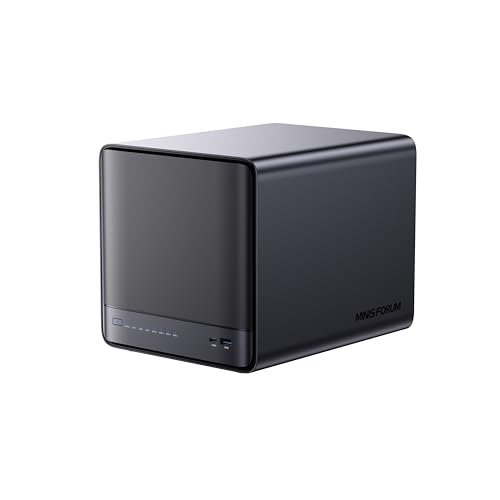
MINISFORUM N5 Pro 5-Bay Desktop NAS
Best for: Users needing Ryzen AI performance and easy upgrades
- Processor
- AMD Ryzen (what this guide is about)
- Drive Bays
- 5-Bay
- Network Connectivity
- 1 x 10GbE, 1 x 5GbE
- M.2 NVMe Slots
- 3 slots
- Included Storage
- 128GB SSD
- Form Factor
- Desktop
This 5-bay desktop NAS uses an AMD Ryzen AI 9 HX PRO 370 processor with 12 cores and 24 threads. It features dual network ports for 15 Gbps link aggregation and supports up to 188 TB of storage. The design includes slide-out motherboard access for easy RAM and SSD upgrades. It targets users needing high performance for AI photo analysis and media transcoding.
Pros
- AMD Ryzen AI 9 HX PRO 370 processor with 12 cores
- 10GbE and 5GbE ports with link aggregation support
- Slide-out motherboard design for easy hardware upgrades
- Supports up to 188 TB of total storage capacity
Cons
- Built-in 128GB system disk occupies one M.2 slot
- No hard drives included in the package
- Proprietary MinisCloud OS limits third-party software options
Good fit if
- You need high CPU performance for AI photo analysis
- You want easy access to RAM and SSD upgrades
- You require fast network speeds via link aggregation
Skip if
- You prefer Synology's DSM software ecosystem
- You need maximum M.2 slots for NVMe caching
- You want a pre-loaded storage solution
Verdict: MINISFORUM N5 Pro 5-Bay Desktop NAS offers powerful Ryzen processing and flexible hardware access for users prioritizing performance and upgradeability over standard NAS software.

MINISFORUM N5 Pro Desktop NAS
Best for: High-performance AI and media workloads
- Processor
- AMD Ryzen (what this guide is about)
- Drive Bays
- 5-Bay
- Network Connectivity
- 1 x 10GbE, 1 x 5GbE
- RAM Capacity
- Expandable up to 96GB DDR5 ECC
- M.2 NVMe Slots
- 3 slots
- Included Storage
- 128GB SSD
The MINISFORUM N5 Pro is a 5-bay desktop NAS powered by the AMD Ryzen AI 9 HX PRO 370 processor. It features 12 cores and 24 threads with speeds up to 5.1GHz. The system includes 128GB of storage and supports up to 188TB with expansion. It offers 10GbE and 5GbE network ports for high-speed transfers. This unit suits users needing strong AI performance and expandable DDR5 ECC memory.
Pros
- AMD Ryzen AI 9 HX PRO 370 CPU with up to 5.1GHz clock speed
- 10GbE and 5GbE network ports with link aggregation support
- Expandable DDR5 ECC memory up to 96GB via two SODIMM slots
- Supports up to 188TB total storage across SATA and NVMe slots
- OCuLink interface for external PCIe connection up to 64Gbps
Cons
- OCuLink port does not support hot-swapping
- Only includes 128GB of internal storage
- No mention of built-in UPS battery backup
Good fit if
- You need high-performance AI processing for media decoding
- You require ECC memory for data reliability
- You want 10GbE networking for fast file transfers
Skip if
- You prefer a compact 2-bay or 4-bay form factor
- You need hot-swappable external GPU connections
- You want a system with more than 5 drive bays
Verdict: MINISFORUM N5 Pro Desktop NAS delivers top-tier Ryzen AI performance and robust networking for power users. It is the best fit for creators and professionals who need ECC memory and 10GbE speeds in a 5-bay desktop chassis.

Asustor Lockerstor 16 Pro 16-Bay Rackmount NAS
Best for: high-density 16-bay rackmount storage
- Processor
- AMD Ryzen (what this guide is about)
- Drive Bays
- 16-Bay
- Network Connectivity
- Dual 10GbE, Dual 1GbE
- RAM Capacity
- 16GB ECC DDR5
- Included Storage
- Diskless
- Form Factor
- Rackmount
View on Amazon: Asustor Lockerstor 16 Pro 16-Bay Rackmount NAS
This 16-bay rackmount NAS uses an AMD Ryzen 7 Pro 7745 processor. It includes 16 GB of ECC DDR5 memory, expandable to 192 GB. You get dual 10GbE and dual 1GbE ports for high-speed connectivity. The unit features dual redundant power supplies. It suits users needing massive storage density and robust processing power for demanding tasks.
Pros
- AMD Ryzen 7 Pro 7745 8-core processor
- 16 GB ECC DDR5 RAM, expandable to 192 GB
- Dual 10GbE and dual 1GbE network ports
- Dual redundant 80 PLUS Platinum power supplies
- 16 drive bays for high capacity
Cons
- Heavy build at 33.7 pounds
- Large footprint at 22.7 inches long
- Only includes dual 1GbE ports for standard networking
Good fit if
- You need a high-density 16-bay storage solution
- You require ECC memory for data integrity
- You want dual redundant power supplies for reliability
Skip if
- You need a compact desktop form factor
- You are limited to standard 1GbE connections only
- You prefer a lighter, smaller unit
Verdict: Asustor Lockerstor 16 Pro Gen2 16-Bay NAS fits professionals who need maximum drive density and robust server-grade specs in a rackmount chassis.

MINISFORUM N5 Pro AI NAS
Best for: AI workloads and high-speed networking
- Processor
- AMD Ryzen (what this guide is about)
- Drive Bays
- 5-Bay
- Network Connectivity
- 5GbE+10GbE
- RAM Capacity
- 2x SODIMM DDR5-5600MHz
- M.2 NVMe Slots
- 3 M.2 + 2 U.2 slots
- Included Storage
- 128GB SSD
The MINISFORUM N5 Pro is a 5-bay NAS built around the AMD Ryzen AI 9 HX Pro 370 processor. It features 12 cores and an NPU delivering up to 50 TOPS for local AI tasks. You get dual 10GbE and one 5GbE port for high-speed data transfer. The system supports ECC DDR5 memory and includes a 128GB SSD with MinisCloud OS. It is designed for users who need significant compute power alongside storage.
Pros
- AMD Ryzen AI 9 HX Pro 370 with 12 cores and 50 TOPS NPU performance
- Dual 10GbE and single 5GbE network ports with link aggregation support
- Supports ECC DDR5-5600MHz memory for enhanced data integrity
- Pre-installed MinisCloud OS with ZFS snapshots and Docker app support
Cons
- Larger physical footprint than standard 2-bay or 4-bay NAS units
- Runs MinisCloud OS rather than the industry-standard Synology DSM
- No mention of hardware RAID controller, relying on software-based RAID
Good fit if
- You require dedicated NPU power for local AI workloads like Stable Diffusion
- You need high-bandwidth networking with dual 10GbE ports
- You want ECC memory support for critical data reliability
Skip if
- You prefer the established Synology ecosystem and DSM interface
- You need a compact 2-bay unit for small spaces
- You want a pre-configured appliance without DIY assembly
Verdict: The MINISFORUM N5 Pro AI NAS is a high-performance hybrid for users who need both substantial storage and powerful local AI computing capabilities. It suits those willing to adopt MinisCloud OS in exchange for Ryzen AI hardware and 10GbE networking.

Synology 4-Bay 16TB NAS
Best for: Small businesses needing ECC memory and dual 2.5GbE
- Processor
- AMD Ryzen (what this guide is about)
- Drive Bays
- 4-Bay
- Network Connectivity
- 2x 2.5GbE
- RAM Capacity
- 4 GB DDR4 ECC
- M.2 NVMe Slots
- 2 slots
- Included Storage
- 16TB
The Synology DS925+ is a 4-bay NAS featuring an AMD Ryzen V1500B quad-core processor and 4 GB of DDR4 ECC RAM. It includes dual 2.5GbE ports and two M.2 NVMe slots for caching or storage expansion. This bundle comes with 16 TB of pre-installed storage. It suits users needing reliable data management and virtualization capabilities in a compact form factor.
Pros
- AMD Ryzen V1500B quad-core processor for robust performance
- Dual 2.5GbE LAN ports for high-speed network connectivity
- Two M.2 NVMe slots for cache or storage pools
- 4 GB DDR4 ECC RAM expandable up to 32 GB
Cons
- Only 4 drive bays limit maximum storage expansion
- Base 4 GB RAM is lower than many competitors
- Heavier build at 13.2 pounds compared to smaller units
Good fit if
- You need a compact 4-bay NAS with strong processing power
- You want dual 2.5GbE ports for faster network transfers
- You require ECC memory for data integrity in business use
Skip if
- You need more than 4 drive bays for large capacity
- You require 10GbE networking for high-bandwidth environments
- You want a system with 32 GB RAM pre-installed
Verdict: Synology DS925+ 4-Bay NAS with Ryzen V1500B fits small businesses needing a balance of processing power and expandability. It is ideal for users who prioritize ECC memory and dual 2.5GbE connectivity over raw storage capacity.

Synology DS723+ 2-Bay Ryzen NAS
Best for: High-RAM 2-bay AMD Ryzen workloads
- Processor
- AMD Ryzen (what this guide is about)
- Drive Bays
- 2-Bay
- Network Connectivity
- 2 x 1GbE
- RAM Capacity
- 32GB DDR4 ECC
- M.2 NVMe Slots
- 1TB M.2 NVMe SSD
- Included Storage
- 20TB HDD + 1TB SSD
The Synology DS723+ is a two-bay NAS built around the AMD Ryzen R1600 processor running at 2.6GHz. It includes 32GB of DDR4 ECC memory and supports up to 20TB of HDD storage. You get two 1GbE ports and M.2 NVMe SSD slots. This setup handles file syncing and home backups efficiently. It suits users who need solid processing power and ample RAM for virtual machines or heavy multitasking.
Pros
- AMD Ryzen R1600 2.6GHz CPU
- 32GB DDR4 ECC Memory
- Dual 1GbE LAN ports
- M.2 NVMe SSD support
Cons
- Only two drive bays
- Limited to 1GbE network speeds
- Requires manual assembly
Good fit if
- You need high RAM for virtualization
- You want AMD Ryzen processing
- You prefer a compact 2-bay design
Skip if
- You require 2.5GbE networking
- You need more than two drive slots
- You want a pre-assembled unit
Verdict: Synology DS723+ 2-Bay Ryzen NAS offers strong compute specs for a small form factor. It fits users prioritizing RAM and CPU power over expansion capacity.
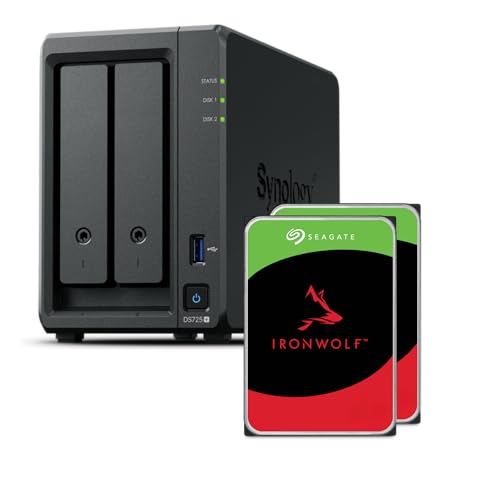
Synology 2-Bay AMD Ryzen NAS
Best for: compact home or small-office private cloud storage
- Processor
- AMD Ryzen (what this guide is about)
- Drive Bays
- 2-Bay
- Network Connectivity
- 1x 2.5GbE, 1x 1GbE
- RAM Capacity
- 4GB
- M.2 NVMe Slots
- 2 slots
- Included Storage
- 8TB
The Synology DS725+ is a compact 2-bay NAS built for home and small-office use. It features an AMD Ryzen R1600 quad-core processor and 4GB of RAM. You get one 2.5GbE port and one 1GbE port for network connectivity. Two M.2 NVMe slots allow for cache expansion. It supports up to 276 MB/s sequential read speeds. This setup suits users needing private cloud access and media streaming.
Pros
- AMD Ryzen R1600 quad-core processor for multitasking
- Two M.2 NVMe slots for SSD caching
- 1x 2.5GbE and 1x 1GbE network ports
- Up to 276 MB/s sequential read throughput
Cons
- Only two drive bays limit total storage capacity
- 4GB RAM is lower than many competitors on this list
- Single 2.5GbE port restricts high-bandwidth network throughput
Good fit if
- You need a compact solution for home or small-office storage
- You want to add NVMe SSDs for faster cache performance
- You require private cloud access and media streaming capabilities
Skip if
- You need more than two drive bays for large storage arrays
- You require multiple 2.5GbE or 10GbE ports for high-speed networking
- You need higher RAM capacity for intensive virtualization tasks
Verdict: Synology DS725+ 2-Bay NAS is a practical choice for users who prioritize compact size and NVMe caching over raw network speed or massive drive capacity. It fits small teams or home users who need reliable private cloud access without bulk.

Synology 1U 4-Bay Rackmount NAS with 48TB
Best for: Small business edge storage with high RAM
- Processor
- AMD Ryzen (what this guide is about)
- Drive Bays
- 4-bay
- Network Connectivity
- 4 x 1GbE
- RAM Capacity
- 32GB DDR4 ECC UDIMM
- Included Storage
- 48TB
The Synology RackStation RS822+ is a 1U 4-bay NAS built for edge storage in small businesses. It uses an AMD Ryzen R1500B 2.2GHz processor and includes 32GB of DDR4 ECC UDIMM memory. This high-capacity system comes with 48TB of pre-installed storage across four 12TB drives. It features four 1GbE LAN ports for reliable network connectivity. You will get a robust solution for daily data management, backup, and surveillance needs.
Pros
- Includes 32GB DDR4 ECC UDIMM memory for stability
- Comes with 48TB of pre-installed SATA 3.5" HDDs
- Powered by an AMD Ryzen R1500B 4-core processor
- Supports comprehensive backup strategies like Hyper Backup
Cons
- Only includes four 1GbE LAN ports
- Lacks 2.5GbE or 10GbE network options
- Limited to a 4-bay drive configuration
Good fit if
- You need high-capacity edge storage for branch offices
- You require ECC memory for data integrity
- You want a compact 1U rackmount solution
Skip if
- You need faster than 1GbE network speeds
- You want to expand beyond 4 drive bays
- You prefer a desktop form factor over rackmount
Verdict: Synology RackStation RS822+ 4-Bay NAS offers substantial storage and memory for small business edge deployments. It suits teams needing reliable data protection without requiring high-speed networking upgrades.

Synology 4-Bay 1U RackStation with 48TB
Best for: High-capacity rackmount storage
- Processor
- AMD Ryzen (what this guide is about)
- Drive Bays
- 4-bay
- Network Connectivity
- 2 x 1GbE
- RAM Capacity
- 2GB DDR4 ECC UDIMM
- Included Storage
- 48TB
The Synology RS422+ is a 1U rackmount NAS with a Ryzen R1600 CPU and 2GB of ECC memory. It includes 48TB of storage across four 3.5-inch bays. Network connectivity relies on two 1GbE ports. This setup suits users who need high capacity and reliable data protection in a compact form factor. It is a solid choice for small businesses or home labs managing daily backups and file synchronization.
Pros
- Ryzen R1600 2.6GHz processor with turbo boost
- 48TB included storage in four bays
- 2GB DDR4 ECC UDIMM memory
- 1U rackmount form factor
Cons
- Only 2GB RAM limits heavy multitasking
- 1GbE ports lack 2.5GbE speed
- No included expansion slots for RAM
Good fit if
- You need 48TB of pre-installed storage
- You require a compact 1U rackmount solution
- You prioritize ECC memory for data integrity
Skip if
- You need 2.5GbE network speeds
- You plan to run heavy virtual machines
- You require more than 4 drive bays
Verdict: Synology RS422+ 4-Bay NAS provides high capacity and ECC memory for users needing reliable storage in a rackmount chassis. It fits small offices prioritizing data protection over high-speed networking.
Synology 1U 4-Bay Rackmount NAS with 32GB RAM
Best for: Edge storage with high RAM and SSDs
- Processor
- AMD Ryzen (what this guide is about)
- Drive Bays
- 4-bay
- Network Connectivity
- 4 x 1GbE
- RAM Capacity
- 32GB DDR4 ECC SODIMM
- Included Storage
- 8TB
View on Amazon: Synology 1U 4-Bay Rackmount NAS with 32GB RAM
The Synology RackStation RS822+ is a 1U edge storage server built around an AMD Ryzen R1500B processor. You get 32GB of DDR4 ECC memory and 8TB of pre-installed SATA SSDs. It includes four 1GbE LAN ports for reliable connectivity. This setup suits small businesses needing consolidated backup and surveillance. The included SSDs provide fast storage for daily data management tasks.
Pros
- AMD Ryzen R1500B 4-core 2.2GHz processor
- 32GB DDR4 ECC SODIMM memory
- 8TB (4x 2TB) SATA 2.5" SSDs included
- Four 1GbE LAN ports
Cons
- Limited to 1GbE network speeds
- Only four drive bays
- No 2.5GbE or 10GbE connectivity
Good fit if
- You need fast SSD storage for edge computing
- You require ECC memory for data integrity
- You are setting up a branch office server
Skip if
- You need 2.5GbE or 10GbE network speeds
- You require more than four drive bays
- You want a desktop form factor
Verdict: The Synology RackStation RS822+ 4-Bay is a high-memory edge server for small offices. It fits teams needing fast SSD storage and robust backup tools.

Synology 5-Bay 60TB Desktop NAS
Best for: Users needing 8GB RAM and high capacity
- Processor
- AMD Ryzen (what this guide is about)
- Drive Bays
- 5-Bay
- Network Connectivity
- 2 x 2.5GbE
- RAM Capacity
- 8GB
- Included Storage
- 60TB
- Weight
- 4.81 pounds
The Synology DS1525+ is a 5-bay NAS featuring an AMD Ryzen V1500B processor and 8GB of RAM. It includes 60TB of storage via five 12TB drives. Dual 2.5GbE ports provide solid network connectivity. You will appreciate the expandable design, which supports up to 300TB of raw storage with expansion units. This setup suits users needing high capacity and ample memory for virtualization tasks.
Pros
- 8GB RAM capacity for improved multitasking
- AMD Ryzen V1500B processor
- 5-bay storage with 60TB included
- Dual 2.5GbE network ports
- Expandable to 300TB with DX525
Cons
- Base RAM is lower than 32GB models on this list
- 10GbE networking requires separate purchase
- No mention of included expansion units
Good fit if
- You need 8GB RAM for virtualization
- You want 60TB of pre-installed storage
- You plan to expand capacity later
Skip if
- You require 10GbE networking included
- You need more than 300TB raw storage
- You prefer a 2-bay or 4-bay form factor
Verdict: Synology DS1525+ 5-Bay NAS with 8GB RAM offers robust memory and high capacity for users who prioritize expandability and virtualization support over included 10GbE networking.

Synology RackStation 12-Bay 216TB NAS
Best for: High-capacity enterprise storage with redundancy
- Processor
- AMD Ryzen (what this guide is about)
- Network Connectivity
- 4 x 1GbE
- RAM Capacity
- 32GB DDR4 ECC SODIMM
- Included Storage
- 216TB
This Synology RackStation is a high-capacity server built for demanding environments. It uses an AMD Ryzen V1500B processor and includes 32GB of ECC memory. You get 216TB of pre-installed storage across twelve drives. The unit features four 1GbE ports and redundant power supplies. It is designed for roles like backup, file storage, and virtualization in a rack-mountable chassis.
Pros
- 32GB DDR4 ECC SODIMM memory for stability
- 216TB of included SATA HDD storage
- Redundant power supplies for reliability
- Four 1GbE LAN ports with aggregation support
Cons
- Limited to 1GbE network speeds
- Requires manual installation of drives and memory
- No 2.5GbE or 10GbE connectivity options
Good fit if
- You need massive pre-installed storage capacity
- You require ECC memory for data integrity
- You are setting up a rack-mounted server
Skip if
- You need 2.5GbE or faster network speeds
- You want a plug-and-play setup without assembly
- You prefer a compact desktop form factor
Verdict: Synology RackStation RS2421RP+ 24-Bay NAS is ideal for enterprises needing high capacity and redundancy. It suits users who prioritize storage volume and memory stability over modern network speeds.
Synology RackStation 12-Bay 48TB NAS
Best for: Rack-mounted servers needing redundant power and ECC memory
- Processor
- AMD Ryzen (what this guide is about)
- Network Connectivity
- 4 x 1GbE
- RAM Capacity
- 32GB DDR4 ECC SODIMM
- Included Storage
- 48TB
The Synology RackStation RS2421RP+ is a 2U rack-mounted server designed for high-performance roles like backup and domain control. It features an AMD Ryzen V1500B processor and 32GB of DDR4 ECC memory. You get 48TB of pre-installed SATA storage across twelve drives. The unit includes redundant power supplies and four 1GbE LAN ports. This setup suits users who need enterprise-grade stability and large capacity in a rack chassis.
Pros
- 32GB DDR4 ECC SODIMM memory for data integrity
- Redundant power supplies for continuous uptime
- 48TB total capacity with twelve 4TB drives included
- Four 1GbE LAN ports with link aggregation support
Cons
- Only 1GbE network ports, lacking 2.5GbE speeds
- 2U rack form factor requires specific mounting
- Hard drives and memory sold separately in some configurations
Good fit if
- You need a rack-mounted server with redundant power
- You require 32GB of ECC memory for stability
- You want 48TB of pre-installed storage
Skip if
- You need 2.5GbE or faster network speeds
- You are installing in a small home office
- You prefer a compact 2-bay desktop NAS
Verdict: Synology 2U RackStation RS2421RP+ 48TB NAS is a robust choice for data centers or serious home labs needing enterprise features. It fits users who prioritize ECC memory and redundant power over high-speed networking.
Synology RackStation 12TB SSD NAS
Best for: High-capacity rack-mounted enterprise storage
- Processor
- AMD Ryzen (what this guide is about)
- Network Connectivity
- 4 x 1GbE
- RAM Capacity
- 32GB DDR4 ECC SODIMM
- Included Storage
- 12TB
The Synology RS2421RP+ is a 24-bay rack server built for high-performance roles like backup and domain control. It features an AMD Ryzen V1500B 4-core 2.2GHz CPU and 32GB of DDR4 ECC SODIMM memory. The unit includes 12TB of SATA 2.5-inch SSD storage and four 1GbE LAN ports. Redundant power supplies provide extra protection. This setup suits users needing robust, expandable storage in a server rack environment.
Pros
- 32GB DDR4 ECC SODIMM memory for stability
- Redundant power supplies for reliability
- Four 1GbE LAN ports with link aggregation
- Includes 12TB SATA 2.5-inch SSD storage
Cons
- Limited to 1GbE network speeds
- Requires separate installation of drives and memory
- Uses older Ryzen V1500B processor
Good fit if
- You need a high-capacity rack-mounted solution
- You require ECC memory for data integrity
- You want redundant power for critical servers
Skip if
- You need 2.5GbE or faster networking
- You prefer pre-installed storage drives
- You require a desktop form factor
Verdict: Synology RS2421RP+ Rack NAS delivers serious capacity and ECC memory for enterprise-style deployments. It fits IT professionals who prioritize redundancy and expandable storage over modern networking speeds.
Specifications side by side
| Spec | Synology 4-Bay AMD Ryzen NAS | MINISFORUM N5 Pro 5-Bay Desktop NAS | MINISFORUM N5 Pro Desktop NAS | Asustor Lockerstor 16 Pro 16-Bay Rackmount NAS | MINISFORUM N5 Pro AI NAS | Synology 4-Bay 16TB NAS | Synology DS723+ 2-Bay Ryzen NAS | Synology 2-Bay AMD Ryzen NAS | Synology 1U 4-Bay Rackmount NAS with 48TB | Synology 4-Bay 1U RackStation with 48TB | Synology 1U 4-Bay Rackmount NAS with 32GB RAM | Synology 5-Bay 60TB Desktop NAS | Synology RackStation 12-Bay 216TB NAS | Synology RackStation 12-Bay 48TB NAS | Synology RackStation 12TB SSD NAS |
|---|---|---|---|---|---|---|---|---|---|---|---|---|---|---|---|
| Drive Bays | 4-Bay (up to 9-Bay) | 5-Bay | 5-Bay | 16-Bay | 5-Bay | 4-Bay | 2-Bay | 2-Bay | 4-bay | 4-bay | 4-bay | 5-Bay | not specified | not specified | not specified |
| Network Connectivity | 2x 2.5GbE | 1 x 10GbE, 1 x 5GbE | 1 x 10GbE, 1 x 5GbE | Dual 10GbE, Dual 1GbE | 5GbE+10GbE | 2x 2.5GbE | 2 x 1GbE | 1x 2.5GbE, 1x 1GbE | 4 x 1GbE | 2 x 1GbE | 4 x 1GbE | 2 x 2.5GbE | 4 x 1GbE | 4 x 1GbE | 4 x 1GbE |
| Processor | AMD Ryzen V1500B | AMD Ryzen AI 9 HX PRO 370 | AMD Ryzen AI 9 HX PRO 370 | AMD Ryzen 7 Pro 7745 | AMD Ryzen AI 9 HX 370 | AMD Ryzen V1500B Quad-Core | Ryzen R1600 2.6GHz | Ryzen R1600 | Ryzen R1500B 4-Core 2.2GHz | Ryzen R1600 | Ryzen R1500B | Ryzen V1500B | Ryzen V1500B | Ryzen V1500B | Ryzen V1500B |
| RAM Capacity | 4GB | not specified | Expandable up to 96GB DDR5 ECC | 16GB ECC DDR5 | 2x SODIMM DDR5-5600MHz | 4 GB DDR4 ECC | 32GB DDR4 ECC | 4GB | 32GB DDR4 ECC UDIMM | 2GB DDR4 ECC UDIMM | 32GB DDR4 ECC SODIMM | 8GB | 32GB DDR4 ECC SODIMM | 32GB DDR4 ECC SODIMM | 32GB DDR4 ECC SODIMM |
| M.2 NVMe Slots | not specified | 3 slots | 3 slots | not specified | 3 M.2 + 2 U.2 slots | 2 slots | 1TB M.2 NVMe SSD | 2 slots | not specified | not specified | not specified | not specified | not specified | not specified | not specified |
| Included Storage | not specified | 128GB SSD | 128GB SSD | Diskless | 128GB SSD | 16TB | 20TB HDD + 1TB SSD | 8TB | 48TB | 48TB | 8TB | 60TB | 216TB | 48TB | 12TB |
| RAID Support | not specified | not specified | 0, 1, 5, 6 | not specified | RAID 0/1/5/6/10 | not specified | not specified | not specified | not specified | not specified | not specified | not specified | not specified | not specified | not specified |
| Form Factor | not specified | Desktop | Desktop | Rackmount | not specified | not specified | not specified | not specified | not specified | not specified | not specified | not specified | not specified | not specified | not specified |
| Hardware Interface | not specified | M.2 NVMe, HDMI | M.2 NVMe, HDMI | not specified | M.2 NVMe | not specified | M.2 NVMe | M.2 NVMe | not specified | not specified | not specified | not specified | not specified | not specified | not specified |
| Number of Bays | 4-Bay | not specified | not specified | not specified | not specified | 4-Bay | not specified | 2-Bay | not specified | not specified | not specified | not specified | not specified | not specified | not specified |
| Processor Cores | not specified | not specified | not specified | 8-Core | not specified | not specified | not specified | not specified | not specified | not specified | not specified | not specified | not specified | not specified | not specified |
| Dimensions | 11.4 × 10.2 × 9.45 inches | not specified | 7.95 × 7.83 × 9.92 inches | 22.7 × 17.3 × 4.57 inches | 7.95 × 7.83 × 9.92 inches | not specified | not specified | not specified | not specified | not specified | not specified | not specified | not specified | not specified | not specified |
| Weight | 4.98 pounds | not specified | not specified | 33.7 pounds | not specified | 13.2 pounds | not specified | 6.61 pounds | not specified | not specified | not specified | 4.81 pounds | not specified | not specified | not specified |
| Size | 29 cm x 26 cm x 25 cm | N5 Pro(0+128G) | N5 Pro(0+128G) | not specified | 7.95 x 7.83 x 9.92 inches | 16TB | not specified | not specified | not specified | not specified | 1.75 inches | 60TB | not specified | 24U | not specified |
| Color | black | Black | Black | Black | Black | not specified | Black | gray | Black | not specified | not specified | black | Black | not specified | Black |
| Model | DS925+ | N5-Pro-P370(0+128) | N5-PRO-P370 | AS7216RDX | DeskMini | DS925+/8TB-IW | not specified | DS725+/8TB-IW | not specified | not specified | not specified | DS1525+ | RS2421RP+ | RS2421RP+ | RS2421RP+ |
If you require more PCIe lanes, compare specifications across the best AMD ryzen threadripper processors for intensive server builds.
How to choose the right one
-
Match RAM to your tasks
RAM capacity directly impacts how many simultaneous services you can run. If you plan to host virtual machines or heavy database queries, you need more memory. The Synology DS723+ offers 32GB of RAM, which supports intensive workloads in a small footprint. In contrast, the Synology RS422+ includes only 2GB of RAM, limiting its multitasking ability. Check the listed RAM capacity to ensure the device handles your specific application demands without slowing down.
-
Check network connectivity speeds
Network ports determine how fast you can transfer data across your local area network. Standard Gigabit Ethernet caps speeds at 1GbE. For faster transfers, look for 2.5GbE or 10GbE options. The Synology DS925+ features dual 2.5GbE ports, allowing for increased throughput. The MINISFORUM N5 Pro provides 10GbE connectivity for high-speed data movement. Select a device with the port speed that matches your current or future network infrastructure requirements.
-
Select the correct form factor
The physical chassis type affects where you can place the device and how many drives it holds. Desktop models like the MINISFORUM N5 Pro sit on a desk and offer easy hardware access. Rackmount units, such as the Asustor Lockerstor 16 Pro, fit into server racks for dense storage deployments. Choose a desktop form factor for home offices or a rackmount design for dedicated server rooms to ensure proper fit and airflow.
-
Align bays with storage needs
The number of drive bays dictates your maximum storage capacity and redundancy options. A 2-bay NAS, like the Synology DS725+, is compact and suitable for small teams or home users. A 16-bay unit, such as the Asustor Lockerstor 16 Pro, supports high-density storage for enterprises. Evaluate your current drive count and future growth plans. Select a chassis with enough bays to accommodate your data volume without requiring external expansion units.
-
Verify hardware interface options
Additional interfaces allow for expansion and peripheral connectivity. M.2 NVMe slots enable the use of fast solid-state drives for caching or virtual machine storage. HDMI ports allow direct video output for desktop use. The MINISFORUM N5 Pro includes both M.2 NVMe and HDMI interfaces, supporting flexible setups. Check the listed hardware interfaces to ensure the NAS supports the expansion cards or display connections your workflow requires.
Frequently asked questions
Which AMD Ryzen NAS offers the best networking for small offices?
The Synology DS925+ is the top pick for users needing dual 2.5GbE ports. This configuration allows for faster file transfers and improved virtualization performance. It pairs these network capabilities with 4GB of RAM in a compact 4-bay chassis, making it ideal for expandable storage needs without requiring enterprise-grade infrastructure.
What is the best AMD Ryzen NAS for high-density enterprise storage?
The Asustor Lockerstor 16 Pro Gen2 is the best premium choice for high-density needs. It features a 16-bay rackmount chassis and an 8-Core AMD Ryzen processor. This setup supports 16GB of RAM and includes both 10GbE and 1GbE connectivity, providing robust server-grade specs for professional environments requiring maximum drive density.
Which Ryzen NAS provides the most RAM for virtualization tasks?
The Synology DS723+ offers the highest RAM capacity at 32GB in a 2-bay form factor. This makes it suitable for users prioritizing compute power and virtualization support over raw storage expansion. It includes M.2 NVMe interfaces and 1GbE connectivity, delivering strong performance for memory-intensive workloads in a compact desktop design.
Are there AMD Ryzen NAS devices with 10GbE networking?
Yes, several models include 10GbE ports for high-speed data transfer. The MINISFORUM N5 Pro variants feature both 5GbE and 10GbE connectivity, supporting powerful Ryzen AI performance. The Asustor Lockerstor 16 Pro also includes 10GbE alongside 1GbE ports, catering to users who need rapid network speeds for large file management and professional workloads.
Which AMD Ryzen NAS is best for compact home office use?
The Synology DS725+ is the best 2-bay option for compact home or small-office use. It provides 4GB of RAM and dual 5GbE/2.5GbE ports for reliable private cloud access. The chassis supports M.2 NVMe caching, allowing for faster performance in a small footprint. It weighs 6.61 pounds and fits easily on a desk without bulk.
What is the best AMD Ryzen NAS for AI workloads?
The MINISFORUM N5 Pro AI NAS is designed for high-performance AI and media workloads. It delivers top-tier Ryzen AI processing capabilities within a 5-bay desktop chassis. The device supports 10GbE networking and M.2 NVMe interfaces, making it ideal for creators and professionals who need substantial local computing power alongside robust storage expansion options.