Best NAS Devices with 16GB RAM: 14 Spec-Based Picks
As an Amazon Associate we earn from qualifying purchases. Links on this page are affiliate links.
You need the best network attached storages with 16GB RAM to handle demanding workloads like virtualization or high IOPS tasks. This guide compares 14 models based strictly on their published specifications. The Synology 12-Bay Xeon Desktop Enclosure leads because it pairs 16GB RAM with a 6-core Xeon CPU for superior processing power. Each pick is ranked by how well its specs match specific needs, from compact NVMe designs to large rackmount units. Use this list to decide which hardware configuration fits your storage and compute requirements.
Quick picks
The best fit for you
- You need a high-performance chassis for virtualization Synology 12-Bay Xeon Desktop Enclosure It features a 6-core Xeon CPU and 16GB RAM for demanding workloads.
- You want the most compact NVMe storage solution TERRAMASTER 8-Bay All-NVMe SSD NAS This 8-bay unit weighs only 1.32 pounds and offers 10Gbps connectivity.
- You require a rackmount NAS for large datasets Asustor Lockerstor 16 Pro 16-Bay Rackmount NAS It provides 16 drive bays, 10GbE networking, and an 8-core Ryzen processor.
- You are building a DIY homelab with x86 flexibility Zimablade 2-Bay DIY NAS Kit This kit includes 16GB RAM and supports Docker or custom container projects.
Our 14 picks

Synology 12-Bay Xeon Desktop Enclosure
Best for: virtualization and high IOPS workloads
- RAM Capacity
- 16GB RAM (what this guide is about)
- Drive Bays
- 12-Bay
- Processor
- 6-core Intel Xeon
- Included Storage
- Diskless
- Dimensions
- 17 × 18.3 × 17 inches
- Weight
- 21.6 pounds
The Synology 12 Bay DS3622xs+ is a diskless NAS with 16GB of RAM and a 6-core Intel Xeon processor. It delivers over 260,000 4K random read IOPS and 4,700 MB/s sequential read speeds. You can scale to 36 bays using expansion units. It supports 10/25GbE networking and Fibre Channel. This unit suits users needing high performance and expandability.
Pros
- 6-core Intel Xeon processor for virtualization and backups
- 16GB RAM capacity for heavy multitasking
- Over 260,000 4K random read IOPS
- 4,700 MB/s sequential read performance
- Supports 10/25GbE networking and Fibre Channel
Cons
- Sold diskless with no included storage
- Heavy at 21.6 pounds
- Large footprint at 18.3 inches wide
Good fit if
- You need a diskless chassis for custom storage
- You require 16GB RAM for virtual machines
- You want to scale to 36 drive bays
Skip if
- You need pre-installed hard drives
- You prefer a compact desktop size
- You only need basic home backup
Verdict: Synology 12 Bay 16GB RAM NAS is a high-performance, diskless chassis for users who need 16GB RAM and a 6-core Xeon CPU for virtualization. It fits those who plan to scale storage with expansion units.

TERRAMASTER 8-Bay All-NVMe SSD NAS
Best for: Compact NVMe storage with 10Gbps speed
- RAM Capacity
- 16GB RAM (what this guide is about)
- Drive Bays
- 8-Bay
- Network Connectivity
- 10Gbps
- Processor
- Intel Core i3-N305
- Included Storage
- Diskless
- Processor Cores
- 8-Core
The TERRAMASTER F8 SSD Plus is a compact 8-bay NAS designed for high-speed storage using NVMe drives. It features an Intel Core i3-N305 8-core processor and 16GB of DDR5 RAM. The unit includes a 10Gbps Ethernet port for fast data transfer. Its small footprint and quiet operation make it suitable for home offices or small business environments where space and noise are concerns.
Pros
- 16GB DDR5 4800MHz RAM capacity
- 8-bay design for up to 64TB total NVMe storage
- Intel Core i3-N305 8-core processor with 3.4GHz turbo
- 10Gbps Ethernet connectivity
- Ultra-compact dimensions at 2.4 x 5.5 x 6.9 inches
Cons
- Diskless configuration requires separate drive purchase
- Intel Core i3 processor is less powerful than i7 or Ryzen 7 options in this category
- Limited to NVMe SSDs, excluding traditional HDD support
Good fit if
- You need a high-density storage solution for NVMe drives
- You require 10Gbps network speeds for large file transfers
- You have limited desk space for a large NAS chassis
Skip if
- You prefer to use traditional spinning hard drives
- You need a higher-end CPU for intensive virtualization
- You want a pre-loaded unit with drives included
Verdict: The TERRAMASTER F8 SSD Plus 8-Bay NAS offers a dense, fast, and quiet NVMe storage solution for users with space constraints. It fits users who prioritize speed and compactness over raw processing power or HDD compatibility.

TERRAMASTER T12-500 Pro 12-Bay NAS
Best for: High-performance business backup and virtualization
- RAM Capacity
- 16GB RAM (what this guide is about)
- Drive Bays
- 12-Bay
- Network Connectivity
- Dual 10GbE
- Processor
- Intel Core i7-1255U
- Included Storage
- Diskless
- RAID Support
- Single, RAID 0, 1, 5, 6, 10
The TERRAMASTER T12-500 Pro is a 12-bay NAS featuring a 10-core Intel Core i7-1255U processor and 16GB of DDR5 RAM. It includes dual 10GbE ports for high throughput and supports up to 288TB of storage. This diskless unit suits businesses needing robust backup and virtualization capabilities with enterprise-grade encryption and flexible RAID options.
Pros
- 10-core Intel Core i7-1255U processor with 16GB DDR5 RAM
- Dual 10GbE Ethernet ports supporting 20Gbps bandwidth
- 12-bay capacity for up to 288TB storage
- Hardware AES NI encryption and Iris Xe Graphics
- Supports ext4 and Btrfs file systems with TRAID/TRAID+
Cons
- Diskless design requires you to supply your own drives
- Large physical footprint at 13.2 inches in length
- Heavier build at 21.2 pounds compared to smaller units
Good fit if
- You need high throughput for video editing or virtualization
- You require a large 12-bay capacity for extensive data
- You want hardware encryption and 10GbE connectivity
Skip if
- You prefer a pre-loaded unit with drives included
- You have limited space for a large chassis
- You only need basic home storage with fewer bays
Verdict: The TERRAMASTER T12-500 Pro 12-Bay NAS delivers strong performance for small to medium businesses needing high-speed data handling and extensive storage. It fits users who prioritize processing power and network speed over a compact, pre-loaded design.

TERRAMASTER 8-Bay 2U Rackmount NAS
Best for: high-performance virtualization and video editing
- RAM Capacity
- 16GB RAM (what this guide is about)
- Drive Bays
- 8-Bay
- Network Connectivity
- Dual 10GbE
- Processor
- Intel Core i7 1255U
- M.2 NVMe Slots
- 2 slots
- Included Storage
- Diskless
The TERRAMASTER U8-500 Plus is an 8-bay NAS with 16GB DDR5 RAM and an Intel Core i7-1255U processor. It features dual 10GbE ports for high throughput and two M.2 NVMe slots for caching. This 2U rack-mount unit suits users needing strong performance for video editing or virtualization. It supports multiple RAID levels and includes enterprise backup tools.
Pros
- 16GB DDR5 RAM for robust multitasking
- Intel Core i7-1255U 10-core processor
- Dual 10GbE Ethernet ports
- Two M.2 NVMe slots for Hyper Cache
Cons
- Large 2U form factor requires rack space
- Diskless design needs separate drive purchases
- Heavy build at 30.9 pounds
Good fit if
- You need dual 10GbE connectivity
- You require 16GB RAM for virtualization
- You have rack-mount space available
Skip if
- You prefer a compact desktop size
- You want included storage drives
- You need a 1U low-profile unit
Verdict: TERRAMASTER U8-500 Plus 8-Bay NAS is a powerful choice for users who need high bandwidth and memory for demanding workloads. It fits well in rack environments where its 2U size and dual 10GbE ports provide necessary infrastructure.

MINISFORUM N5 Pro 5-Bay Desktop NAS
Best for: AI processing and high-speed network transfers
- RAM Capacity
- 16GB RAM (what this guide is about)
- Drive Bays
- 5-Bay
- Network Connectivity
- 1 x 10GbE, 1 x 5GbE
- Processor
- AMD Ryzen AI 9 HX PRO 370
- M.2 NVMe Slots
- 3 slots
- Included Storage
- 128GB SSD
The MINISFORUM N5 Pro is a 5-bay desktop NAS powered by the AMD Ryzen AI 9 HX PRO 370 processor. It includes 16GB of DDR5 RAM and a 128GB SSD. The system features 10GbE and 5GbE network ports for high-speed data transfer. It supports up to 188TB of storage across SATA and NVMe slots. This unit suits users needing strong AI processing and expandable memory for media creation or virtualization tasks.
Pros
- AMD Ryzen AI 9 HX PRO 370 CPU with 12 cores
- 16GB DDR5 RAM with expandable slots up to 96GB ECC
- 10GbE and 5GbE dual network ports with link aggregation
- Supports up to 188TB total storage capacity
- Native OCuLink interface for external GPU connection
Cons
- Factory-configured 16GB RAM does not support ECC
- OCuLink port does not support hot-swapping
- Limited to 5 drive bays compared to larger competitors
Good fit if
- You need high-performance AI processing for media or virtualization
- You require 10GbE networking for fast file transfers
- You want to expand RAM to 96GB ECC later
Skip if
- You require more than 5 drive bays
- You need ECC memory included out of the box
- You prefer a traditional 4-bay or larger rackmount form factor
Verdict: The MINISFORUM N5 Pro 5-Bay Desktop NAS delivers exceptional processing power and network speeds for users prioritizing AI tasks and expandable memory. It is best for creators who need high concurrency and fast data handling.

Asustor Lockerstor 16 Pro 16-Bay Rackmount NAS
Best for: large-scale data storage and processing
- RAM Capacity
- 16GB RAM (what this guide is about)
- Drive Bays
- 16-Bay
- Network Connectivity
- Dual 10GbE, Dual 1GbE
- Processor
- AMD Ryzen 7 Pro 7745
- Included Storage
- Diskless
- Form Factor
- Rackmount
View on Amazon: Asustor Lockerstor 16 Pro 16-Bay Rackmount NAS
This 16-bay rackmount NAS uses an AMD Ryzen 7 Pro 7745 8-core processor and 16 GB of ECC DDR5 memory. It offers dual 10GbE and dual Gigabit Ethernet ports for high-speed connectivity. The unit includes dual redundant power supplies and supports PCIe 5.0 expansion. It suits users needing massive storage capacity and robust expandability for demanding server tasks.
Pros
- 16-bay drive capacity for large data sets
- AMD Ryzen 7 Pro 7745 8-core CPU
- 16 GB ECC DDR5 RAM expandable to 192 GB
- Dual 10GbE and dual Gigabit Ethernet ports
- Dual redundant 80 PLUS Platinum power supplies
Cons
- Heavy 33.7-pound build requires sturdy mounting
- Large 17.3-inch width needs significant space
- Diskless design requires separate drive purchases
Good fit if
- You need a high-density storage solution
- You require 10GbE network connectivity
- You have a dedicated server room
Skip if
- You prefer a compact desktop unit
- You need a pre-loaded storage device
- You have limited rack space
Verdict: Asustor Lockerstor 16 Pro Gen2 16-Bay NAS is a powerful rackmount solution for users who need extensive drive bays and fast network speeds. It fits professionals managing large datasets who can accommodate its size and weight.
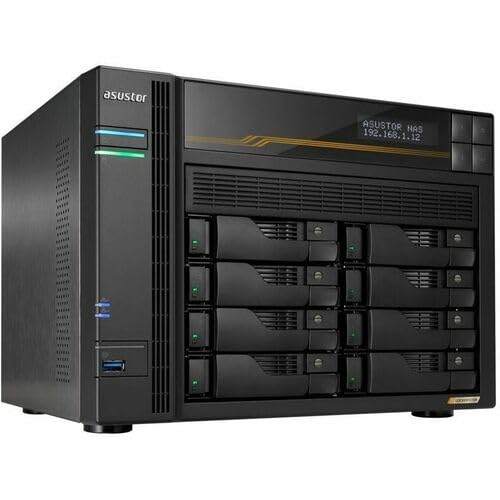
Asustor Lockerstor 8-Bay 10GbE NAS
Best for: high-speed 8-bay setups needing ECC DDR5
- RAM Capacity
- 16GB RAM (what this guide is about)
- Drive Bays
- 8-Bay
- Network Connectivity
- Dual 5GbE, Dual 10GbE
- Processor
- AMD Ryzen Quad-Core 2.3 GHz
- M.2 NVMe Slots
- 4 slots
- Included Storage
- Diskless
This eight-bay NAS unit combines 16GB of ECC DDR5 RAM with an AMD Ryzen quad-core 2.3 GHz processor to manage heavy network traffic. You get both 5GbE and 10GbE connectivity options, plus four M.2 NVMe slots for cache or tiering. It suits you if you need a diskless eight-drive enclosure ready for high-speed networking and memory-intensive storage deployments.
Pros
- 16GB ECC DDR5 memory
- Dual 5GbE and 10GbE network connectivity
- Eight drive bays plus four M.2 NVMe slots
- AMD Ryzen 2.3 GHz quad-core processor
Cons
- Zero storage drives included out of the box
- Substantial 42U rack-sized dimensions
Good fit if
- You need 16GB ECC DDR5 memory for multi-drive storage tasks.
- You require integrated 10GbE and 5GbE network connections.
- You want eight drive bays alongside four M.2 NVMe slots.
Skip if
- You want a system that includes pre-installed drives.
- You lack space for a large 42U-sized chassis.
Verdict: Asustor Lockerstor 8-Bay NAS with 16GB ECC DDR5 combines multi-gigabit network ports with substantial drive capacity. It offers reliable memory and expandable storage for demanding multi-user environments.
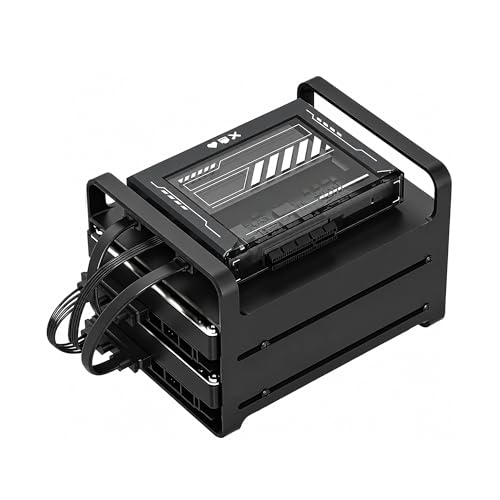
Zimablade 2-Bay DIY NAS Kit
Best for: DIY homelab builders needing 16GB RAM
- RAM Capacity
- 16GB RAM (what this guide is about)
- Drive Bays
- 2-Bay
- Processor
- Intel Quad-Core
This 2-bay DIY NAS kit features an Intel quad-core processor and 16GB of RAM. It uses an x86 platform for broad OS compatibility, supporting Linux, Docker, and CasaOS. The kit includes power, RAM, and drive cages. It supports 4K direct play via Plex. You get a flexible mini server for homelab projects rather than a locked-down appliance.
Pros
- 16GB RAM capacity
- Intel quad-core x86 processor
- Supports Docker and CasaOS
- Includes PCIe expansion slot
Cons
- Only 2 drive bays
- Requires DIY assembly
- No included hard drives
Good fit if
- You want to build a custom homelab
- You need 16GB RAM for Docker containers
- You prefer x86 Linux compatibility
Skip if
- You need more than 2 drive bays
- You want a pre-built plug-and-play NAS
- You need enterprise-grade reliability
Verdict: ZimaBlade 2-Bay x86 NAS Kit suits builders who need 16GB RAM and x86 flexibility for Docker or homelab projects. It is not for users who need more storage bays or a ready-to-use appliance.

Asustor Lockerstor 6-Bay AMD Ryzen NAS
Best for: high-speed 6-bay networking and NVMe storage
- RAM Capacity
- 16GB RAM (what this guide is about)
- Drive Bays
- 6 Bay
- Network Connectivity
- Dual 5GbE, Dual 10GbE
- Processor
- AMD Ryzen Quad-Core 2.3 GHz
- M.2 NVMe Slots
- 4 M.2 NVMe Slots
- Included Storage
- Diskless
This 6-bay enclosure pairs an AMD Ryzen quad-core 2.3 GHz processor with 16GB of ECC DDR5 memory. You get high-speed networking through integrated 5GbE and 10GbE ports, alongside four M.2 NVMe slots for fast storage. It arrives diskless, supporting up to six hard drives or solid-state drives. This setup suits you if you need six drive bays combined with 10GbE network throughput.
Pros
- 16GB ECC DDR5 system memory
- Integrated 5GbE and 10GbE network ports
- Four M.2 NVMe hardware slots
- AMD Ryzen 2.3 GHz quad-core processor
Cons
- Includes zero installed drives out of the box
- Footprint measures 12 by 13 by 13 inches
Good fit if
- You need 10GbE or 5GbE wired network speeds out of the box.
- You want six primary drive bays plus four M.2 NVMe slots.
- You require ECC memory for error checking.
Skip if
- You want a turnkey NAS with storage drives pre-installed.
- You need more than six primary drive bays.
Verdict: Asustor Lockerstor 6-Bay NAS delivers quad-core Ryzen performance and 10GbE networking in a six-bay desktop form factor. It provides a balanced combination of 16GB ECC DDR5 memory and four M.2 NVMe slots for data-heavy workflows.
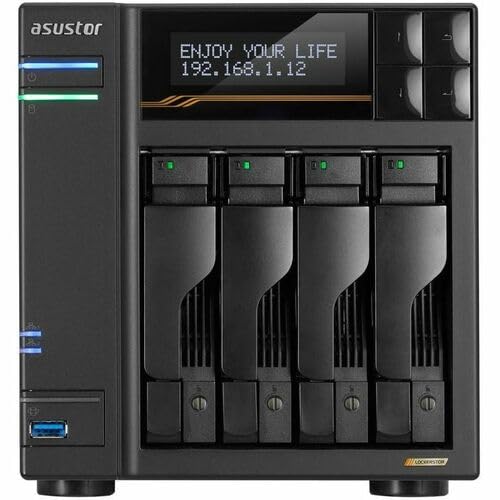
Asustor Lockerstor 4-Bay 10GbE NAS
Best for: fast 10GbE networking with four NVMe drives
- RAM Capacity
- 16GB RAM (what this guide is about)
- Drive Bays
- 4 Bay
- Network Connectivity
- Dual 5GbE, Dual 10GbE
- Processor
- AMD Ryzen Quad-Core 2.3 GHz
- M.2 NVMe Slots
- 4 M.2 NVMe Slots
- Included Storage
- Diskless
This Asustor 4-bay NAS pairs an AMD Ryzen quad-core 2.3 GHz processor with 16GB of ECC DDR5 memory. You get networking through 5GbE and 10GbE ports, alongside four M.2 NVMe slots for solid-state storage. It operates diskless out of the box, supporting up to four hard drives. If you need fast networking, error-correcting memory, and dedicated NVMe slots, this four-bay unit fits your deployment.
Pros
- 16GB ECC DDR5 RAM
- Dual 5GbE and 10GbE network connectivity
- Four M.2 NVMe slots supported
- AMD Ryzen quad-core 2.3 GHz processor
Cons
- Ships diskless with zero hard drives or SSDs installed
- Capacity limited to four primary drive bays
Good fit if
- You need 5GbE and 10GbE connectivity directly from the chassis.
- You want four M.2 NVMe slots for solid-state storage.
- You require ECC DDR5 memory with an AMD Ryzen quad-core processor.
Skip if
- You need more than four primary storage bays.
- You prefer a system that includes pre-installed drives.
Verdict: Asustor Lockerstor 4-Bay 16GB ECC RAM NAS provides 10GbE networking, four NVMe slots, and Ryzen processing in a four-bay unit. It is an ideal pick if you bring your own drives and demand fast local throughput.

MINISFORUM N5 Air 5-Bay NAS
Best for: Compact high-performance home servers
- RAM Capacity
- 16GB RAM (what this guide is about)
- Drive Bays
- 5-Bay
- Network Connectivity
- 1x 10GbE, 1x 5GbE
- Processor
- AMD Ryzen 7 255
- M.2 NVMe Slots
- 3 slots
- Included Storage
- 64GB SSD
The MINISFORUM N5 Air is a 5-bay desktop NAS featuring an AMD Ryzen 7 255 processor and 16GB of DDR5 RAM. It supports up to 174TB of storage across its SATA slots. The system includes dual LAN ports for 15Gbps link aggregation and a PCIe slot for expansion. It suits users needing high-speed data handling and local video playback via triple 8K outputs.
Pros
- AMD Ryzen 7 255 CPU with 8 cores
- 16GB DDR5 RAM expandable to 96GB
- Dual LAN ports (10GbE and 5GbE)
- PCIe x16 expansion slot
- Triple 8K video outputs
Cons
- Only 5 drive bays compared to 8-16 bay competitors
- No mention of included storage drives
- Dimensions listed as 50 inches height are likely incorrect
Good fit if
- You need a compact 5-bay solution with high RAM
- You require PCIe expansion for network cards
- You want local 8K video playback capabilities
Skip if
- You need more than 5 drive bays
- You require pre-installed hard drives
- You prefer a standard tower form factor
Verdict: The MINISFORUM N5 Air 5-Bay NAS fits users who prioritize CPU power and expansion slots over raw drive capacity.

Asustor Lockerstor 10-Bay NAS with 2x 1TB SSD
Best for: Users needing dual 10GbE and ECC memory
- RAM Capacity
- 16GB RAM (what this guide is about)
- Drive Bays
- 10 Bay
- Network Connectivity
- Dual 5GbE, Dual 10GbE
- Processor
- AMD Ryzen Embedded V3C14
- M.2 NVMe Slots
- 4 slots
- Included Storage
- 2 x 1TB SSD
View on Amazon: Asustor Lockerstor 10-Bay NAS with 2x 1TB SSD
The Asustor Lockerstor 10 Gen3 is a 10-bay NAS powered by a 2.3 GHz quad-core AMD Ryzen processor and 16GB of ECC DDR5 RAM. It includes dual 10GbE and dual 5GbE ports for high-speed connectivity. The unit comes with two 1TB SSDs and four M.2 NVMe slots. This setup supports heavy multitasking and large file transfers for professional environments.
Pros
- 16GB ECC DDR5 RAM for data integrity
- Dual 10GbE and dual 5GbE network ports
- Quad M.2 slots for NVMe caching
- Includes two 1TB SSDs in the bundle
Cons
- Heavy 20.6-pound build requires sturdy mounting
- Quad-core CPU limits peak turbo performance
- Large 15-inch width needs significant desk space
Good fit if
- You need dual 10GbE ports for high throughput
- You require ECC memory for critical data safety
- You want a bundled storage solution for immediate use
Skip if
- You have limited physical space for a large chassis
- You prefer a lighter device for easy transport
- You need more than four cores for heavy virtualization
Verdict: Asustor Lockerstor 10 Gen3 10-Bay NAS delivers robust networking and memory for users needing dual 10GbE connectivity and ECC stability in a single chassis.

TERRAMASTER 4-Bay 8-Core NAS with 16GB RAM
Best for: Docker containers, lightweight virtualization, and media streaming
- RAM Capacity
- 16GB RAM (what this guide is about)
- Drive Bays
- 4-Bay
- Network Connectivity
- Dual 5GbE
- Processor
- Intel N350 8-Core
- M.2 NVMe Slots
- 3 slots
- Included Storage
- Diskless
This 4-bay diskless unit combines an 8-core Intel processor with 16GB of DDR5 memory. You get dual 5GbE network ports for aggregated transfers up to 1020MB/s, alongside three M.2 NVMe slots for cache acceleration. It runs TOS 7 with native Docker, Portainer, and VirtualBox support. This setup suits you if you need a compact virtualization server, container host, or local 4K media streaming hub.
Pros
- 16GB DDR5 memory paired with an 8-core 7W Intel processor
- Dual 5GbE networking ports with link aggregation up to 1020MB/s
- Three M.2 NVMe slots for SSD caching
- Native virtualization tools including Docker Compose, Portainer, and VirtualBox
Cons
- Comes diskless without pre-installed storage drives
- Limited to four main drive bays
- Lacks native single-port 10GbE network interfaces
Good fit if
- You need 16GB of DDR5 RAM and an 8-core CPU to run virtual machines and containers.
- You want multi-gigabit speeds using dual 5GbE network connections.
- You plan to accelerate array performance with up to three M.2 NVMe SSDs.
Skip if
- You need more than four main drive bays for large storage pools.
- You require a native 10GbE port rather than aggregated 5GbE connections.
Verdict: TERRAMASTER 4-Bay 8-Core NAS with 16GB RAM delivers fast DDR5 memory, dual 5GbE networking, and three NVMe slots in a compact footprint. It provides the compute and networking specifications you need for containers, backups, and 4K media tasks.

TERRAMASTER 4-Bay 16GB DDR5 NAS
Best for: Small offices needing 16GB RAM and M.2 slots
- RAM Capacity
- 16GB RAM (what this guide is about)
- Drive Bays
- 4-Bay
- Network Connectivity
- Dual 5GbE
- Processor
- Intel N150
- M.2 NVMe Slots
- 3 slots
- Included Storage
- Diskless
The TERRAMASTER F4-425 Plus is a 4-bay NAS drive featuring 16GB of DDR5 RAM and an Intel N150 quad-core processor. It includes dual 5GbE ports for fast data transfer and three M.2 NVMe slots for SSD caching. This diskless unit suits users needing moderate capacity with flexible expansion options for media or small business tasks.
Pros
- 16GB DDR5 RAM capacity
- Intel N150 quad-core CPU
- Three M.2 NVMe slots
- Dual 5GbE network ports
Cons
- Only 4 drive bays
- Intel N150 is lower-end compared to i7 or Ryzen 7 options
- Diskless design requires separate drive purchase
Good fit if
- You need 16GB of RAM for virtualization
- You want M.2 SSD caching flexibility
- You prefer a compact 4-bay form factor
Skip if
- You require more than 4 drive bays
- You need 10GbE or higher network speeds
- You want a pre-installed high-end processor
Verdict: The TERRAMASTER F4-425 Plus 4-Bay NAS fits users who need 16GB of RAM in a compact chassis with M.2 expansion. It is ideal for small offices or media servers that do not require maximum drive capacity.
Specifications side by side
| Spec | Synology 12-Bay Xeon Desktop Enclosure | TERRAMASTER 8-Bay All-NVMe SSD NAS | TERRAMASTER T12-500 Pro 12-Bay NAS | TERRAMASTER 8-Bay 2U Rackmount NAS | MINISFORUM N5 Pro 5-Bay Desktop NAS | Asustor Lockerstor 16 Pro 16-Bay Rackmount NAS | Asustor Lockerstor 8-Bay 10GbE NAS | Zimablade 2-Bay DIY NAS Kit | Asustor Lockerstor 6-Bay AMD Ryzen NAS | Asustor Lockerstor 4-Bay 10GbE NAS | MINISFORUM N5 Air 5-Bay NAS | Asustor Lockerstor 10-Bay NAS with 2x 1TB SSD | TERRAMASTER 4-Bay 8-Core NAS with 16GB RAM | TERRAMASTER 4-Bay 16GB DDR5 NAS |
|---|---|---|---|---|---|---|---|---|---|---|---|---|---|---|
| Drive Bays | 12-Bay | 8-Bay | 12-Bay | 8-Bay | 5-Bay | 16-Bay | 8-Bay | 2-Bay | 6 Bay | 4 Bay | 5-Bay | 10 Bay | 4-Bay | 4-Bay |
| Network Connectivity | not specified | 10Gbps | Dual 10GbE | Dual 10GbE | 1 x 10GbE, 1 x 5GbE | Dual 10GbE, Dual 1GbE | Dual 5GbE, Dual 10GbE | not specified | Dual 5GbE, Dual 10GbE | Dual 5GbE, Dual 10GbE | 1x 10GbE, 1x 5GbE | Dual 5GbE, Dual 10GbE | Dual 5GbE | Dual 5GbE |
| Processor | 6-core Intel Xeon | Intel Core i3-N305 | Intel Core i7-1255U | Intel Core i7 1255U | AMD Ryzen AI 9 HX PRO 370 | AMD Ryzen 7 Pro 7745 | AMD Ryzen Quad-Core 2.3 GHz | Intel Quad-Core | AMD Ryzen Quad-Core 2.3 GHz | AMD Ryzen Quad-Core 2.3 GHz | AMD Ryzen 7 255 | AMD Ryzen Embedded V3C14 | Intel N350 8-Core | Intel N150 |
| RAM Capacity | not specified | 16GB DDR5 4800MHz | 16GB DDR5 | 16GB DDR5 | 16GB DDR5 | 16GB ECC DDR5 | 16GB ECC DDR5 | 16GB | 16GB ECC DDR5 | 16GB ECC DDR5 | 16GB DDR5 | 16GB ECC DDR5 | 16GB DDR5 | 16GB DDR5 |
| M.2 NVMe Slots | not specified | not specified | not specified | 2 slots | 3 slots | not specified | 4 slots | not specified | 4 M.2 NVMe Slots | 4 M.2 NVMe Slots | 3 slots | 4 slots | 3 slots | 3 slots |
| Included Storage | Diskless | Diskless | Diskless | Diskless | 128GB SSD | Diskless | Diskless | not specified | Diskless | Diskless | 64GB SSD | 2 x 1TB SSD | Diskless | Diskless |
| RAID Support | not specified | not specified | Single, RAID 0, 1, 5, 6, 10 | Single, RAID 0, 1, 5, 6, 10 | 0, 1, 5, 6 | not specified | not specified | not specified | not specified | not specified | not specified | not specified | RAID 0, 1, 5, 6, 10, TRAID | not specified |
| Form Factor | not specified | not specified | not specified | not specified | Desktop | Rackmount | not specified | not specified | not specified | not specified | Desktop | not specified | not specified | not specified |
| Hardware Interface | not specified | not specified | not specified | not specified | M.2 NVMe, HDMI | not specified | M.2 NVMe | not specified | M.2 NVMe | M.2 NVMe | M.2 NVMe, HDMI | M.2 NVMe | not specified | not specified |
| Number of Bays | 12-Bay | 8-Bay | 12-Bay | 8-Bay | not specified | not specified | 8-Bay | 2-Bay | 6-Bay | 4-Bay | not specified | not specified | 4-Bay | 4-Bay |
| Processor Cores | not specified | 8-Core | not specified | not specified | not specified | 8-Core | Quad-Core | Quad-Core | Quad-Core | Quad-Core | not specified | Quad-Core | 8-Core | Quad-Core |
| Dimensions | 17 × 18.3 × 17 inches | 6.9 × 5.5 × 2.4 inches | 13.2 × 6.42 × 11.6 inches | 15.1 × 17.3 × 3.46 inches | 7.95 × 7.83 × 9.92 inches | 22.7 × 17.3 × 4.57 inches | not specified | not specified | 13 × 12 × 13 inches | 13 × 12 × 10 inches | 10 × 2 × 50 inches | 14 × 15 × 13 inches | 8.62 × 7.13 × 5.91 inches | 8.62 × 7.13 × 5.91 inches |
| Weight | 21.6 pounds | 1.32 pounds | 21.2 pounds | 30.9 pounds | not specified | 33.7 pounds | not specified | not specified | not specified | not specified | not specified | 20.6 pounds | 6.39 pounds | 6.39 pounds |
| Size | DS3622xs+ | 2.4 inches x 5.5 inches x 6.9 inches | 10-Core, 16GB RAM, 12Bay, T12-500 Pro | 8Bay, 2U, 10Core CPU, 16GB RAM | N5 Pro(16G+128G) | not specified | 42U x 19" x 24" (106.68cm x 48.26cm x 60.96cm) | SFF/Mini-ITX | not specified | not specified | N5 Air(16G+64G) | 2X1TB | Intel N350, 16GB DDR5, Gunmetal Gary | 4Bay, Intel N150, 16GB DDR5 |
| Color | Black | Black | Black | Black | Black | Black | Black | Black | not specified | not specified | not specified | not specified | Silver | Silver |
| Model | DS3622xs+ | F8 SSD Plus | T12-500 Pro | U8-500 Plus | N5-PRO-P370 | AS7216RDX | not specified | not specified | AS6806T | AS6804T | ZLHT-N5A-H255(16+64)-US | not specified | F4-425 Pro (N350) | F4-425 Plus |
If you plan to upgrade an expandable enclosure, you can compare the best 16GB ddr4 RAMs across published memory specifications.
How to choose the right one
-
Match the form factor
Select a chassis that fits your physical environment. Rackmount models like the Asustor Lockerstor 16 Pro require server room infrastructure. Desktop units such as the MINISFORUM N5 Pro sit on a desk. Consider weight and dimensions carefully. The Synology 12-Bay weighs 21.6 pounds. The TERRAMASTER F8 SSD Plus weighs only 1.32 pounds. Ensure your surface supports the load. Verify clearance for ventilation. A mismatched form factor complicates setup and airflow management. Choose based on where you place the device.
-
Check network connectivity
Verify the available network ports for your bandwidth needs. Many 16GB RAM models include 10GbE ports for high-speed transfers. The Asustor Lockerstor 8-Bay offers both 5GbE and 10GbE options. The TERRAMASTER U8-500 Plus provides dual 10GbE ports. If you only have Gigabit Ethernet, these ports offer future-proofing. Check if the model includes multiple ports for link aggregation. Faster networking reduces bottlenecks during large file transfers. Ensure your switch or router supports the same speed. This spec directly impacts daily workflow efficiency.
-
Select the right bays
Choose the number of drive bays based on your storage capacity. The Asustor Lockerstor 16 Pro offers 16 bays for massive datasets. The Zimablade 2-Bay Kit suits minimal setups. The TERRAMASTER T12-500 Pro provides 12 bays for business backup. More bays mean higher potential capacity but also more power and heat. Fewer bays keep the unit compact and quiet. Consider if you need expansion units later. The Synology 12-Bay supports expansion. Match the bay count to your current and projected drive needs. Do not overbuy if space is limited.
-
Evaluate hardware interfaces
Check for M.2 NVMe slots if you need fast cache or boot drives. The Asustor Lockerstor 6-Bay includes four M.2 NVMe slots. The TERRAMASTER 4-Bay 8-Core has three NVMe slots. These interfaces accelerate read and write speeds for active data. They also allow for local caching. If you do not need NVMe, standard SATA bays suffice. The MINISFORUM N5 Pro includes HDMI for direct display output. This adds versatility for desktop use. Verify the interface types match your storage strategy and performance goals.
-
Review processor cores
Assess the CPU core count for your workload intensity. Virtualization and Docker containers benefit from higher core counts. The TERRAMASTER U8-500 Plus features a 10-core Intel processor. The Synology DS3622xs+ uses a 6-core Xeon. The Asustor Lockerstor 4-Bay has a quad-core AMD Ryzen. More cores allow more simultaneous tasks. If you only stream media, fewer cores may suffice. The TERRAMASTER F4-425 Plus uses a quad-core for small offices. Match the core count to your application demands. Higher specs cost more but handle heavier loads better.
Frequently asked questions
Can I use these 16GB RAM NAS drives for virtualization?
Yes, several models support virtualization workloads. The Synology 12-Bay Xeon Desktop Enclosure includes a 6-core Xeon CPU and 16GB RAM, making it suitable for high IOPS tasks. The TERRAMASTER T12-500 Pro also targets business virtualization with its 10-core processor and 16GB memory capacity for demanding environments.
What is the smallest NAS with 16GB RAM?
The TERRAMASTER 8-Bay All-NVMe SSD NAS is the most compact option listed. It measures 2.4 inches in height and weighs only 1.32 pounds. This unit provides 16GB RAM and an 8-core Intel Core processor, offering dense storage without requiring significant desk space.
Do these NAS devices support ECC memory?
Some models feature Error Correction Code memory for data stability. The Asustor Lockerstor 8-Bay 10GbE NAS and the Asustor Lockerstor 6-Bay AMD Ryzen NAS both include 16GB ECC DDR5 RAM. This type of memory helps correct data corruption, which is vital for multi-user environments.
Which NAS has the most drive bays?
The Asustor Lockerstor 16 Pro 16-Bay Rackmount NAS offers the highest drive capacity. It provides 16 bays in a rackmount form factor, paired with an 8-core AMD Ryzen processor and 16GB RAM. This model is designed for professionals managing large-scale data storage and processing needs.
Are there NAS options with 10GbE networking?
Yes, many models include high-speed network connectivity. The TERRAMASTER 8-Bay 2U Rackmount NAS features dual 10GbE ports. The Asustor Lockerstor 16 Pro and Lockerstor 10-Bay NAS also support dual 10GbE connections. These ports allow for faster data transfers in demanding workloads.
Can I use these NAS drives for AI processing?
Certain models are optimized for AI tasks. The MINISFORUM N5 Pro 5-Bay Desktop NAS highlights exceptional processing power for AI processing. It combines 16GB RAM with an AMD Ryzen processor to handle high concurrency and fast data handling required for creative and AI workflows.
What is the difference between desktop and rackmount NAS?
The form factor determines where you place the device. Desktop units like the MINISFORUM N5 Pro sit on a desk and offer flexible placement. Rackmount models, such as the Asustor Lockerstor 16 Pro, are designed for server rooms. They fit standard equipment racks and often weigh more due to robust construction.