6 Best Alternatives to the SanDisk Professional 4TB G-Drive PRO Desktop (2026)
As an Amazon Associate we earn from qualifying purchases. Links on this page are affiliate links.
If you are assessing external storage options, comparing sandisk professional 4tb g drive pro alternatives helps you identify the best hardware configuration for your workstation. The original SanDisk Professional 4TB G-Drive PRO delivers strong performance through its enterprise-class 7200 RPM Ultrastar hard drive, dual 20Gbps Thunderbolt 3 ports, support for daisy-chaining up to five devices, and a solid aluminum enclosure backed by a 5-year limited warranty.
You might want something else if your setup requires larger storage capacities such as 8TB, 16TB, or 18TB, dual-bay RAID failover protection, a standalone USB-C connection, or an internal 3.5-inch SATA drive for a personal enclosure. The 6 options in this 2026 guide were chosen because their specifications closely overlap with the original drive, providing equivalent 7200 RPM rotational speeds, sturdy desktop form factors, and fast interface connectivity across distinct brands and feature sets.
Our top pick: SanDisk Professional 4TB G-Drive PRO Desktop Drive.
Comparing G-Drive PRO Alternatives
Seagate LaCie 2big Dock 8TB Desktop Array
The Seagate LaCie 2big Dock 8TB doubles your available storage compared to the 4TB SanDisk G-Drive PRO. Both options provide desktop form factors with Thunderbolt and USB-C hardware interfaces. However, the 2big Dock is noticeably larger and heavier. It measures 4.65 by 3.67 by 8.54 inches and weighs 6.39 pounds, whereas the G-Drive PRO weighs 4.41 pounds with a slimmer 1.79-inch height. The G-Drive PRO also specifies an enterprise-class 7200 RPM Ultrastar drive and five-device daisy chaining. You should pick this 8TB LaCie unit if you need twice the capacity on your workstation and have the extra desk space to accommodate its heavier chassis.
LaCie 2big RAID 16TB Desktop Hard Drive
The LaCie 2big RAID provides 16TB of storage, giving you four times the capacity of the 4TB SanDisk G-Drive PRO. Both products utilize 7200 RPM enterprise-grade drives in desktop enclosures. The primary advantage of the LaCie unit is dual-bay storage with configurable RAID redundancy, allowing you to secure data against drive failure. In exchange, you lose the dual Thunderbolt 3 ports and 5-device daisy chaining found on the G-Drive PRO, relying solely on a USB-C interface. The LaCie enclosure is also taller at 8.54 inches. You should pick the LaCie 2big RAID if your workflow requires massive desktop capacity and RAID redundancy over Thunderbolt connectivity.
SanDisk Professional 18TB G-DRIVE PRO
The SanDisk Professional 18TB G-DRIVE PRO provides more than four times the storage capacity of the 4TB model while maintaining the same core desktop architecture. Both units feature 7200 RPM rotational speeds, Thunderbolt and USB-C connectivity, daisy-chaining capability, and a 5-year warranty. The 18TB model delivers transfer rates up to 260MB/s and weighs only 2.6 pounds, making it lighter than the 4.41-pound 4TB drive despite identical 8.27-inch length and 5.12-inch width dimensions. You do not sacrifice connection flexibility or build quality with this model. Choose the 18TB G-DRIVE PRO if you need maximum single-drive capacity for data-intensive projects while keeping the high-speed daisy-chaining features of the original drive.
SanDisk Professional 4TB G-Drive Desktop HDD
This standard SanDisk Professional 4TB G-Drive matches the 4TB capacity and 7200 RPM Ultrastar enterprise drive found in the PRO version. It delivers transfer rates of 250MB/s inside an aluminum desktop casing. However, it trades away the dual Thunderbolt 3 ports and daisy-chain support, offering only a single USB-C connection. It is slightly lighter at 3.06 pounds compared to the 4.41-pound PRO model, with a slightly slimmer 1.61-inch height. It also does not list the 5-year warranty of the PRO. You should pick this drive if you want the same 4TB Ultrastar reliability for basic Mac backups and do not need Thunderbolt daisy-chaining speeds.
White Label 4TB 7200 RPM Enterprise Hard Drive
The White Label 4TB Enterprise Hard Drive matches the 4TB storage capacity and 7200 RPM rotational speed of the G-Drive PRO. However, this is an internal 3.5-inch bare drive with a SATA interface and a 64MB cache, intended for PC server bays or RAID arrays. It lacks the aluminum external enclosure, power supply, and dual Thunderbolt 3 ports of the G-Drive PRO. Weighing just 1 pound, it offers no external plug-and-play convenience or daisy chaining for external setups. Pick this White Label drive if you already own an external enclosure or NAS chassis and only require an internal 4TB replacement disk.
LaCie 2big Dock 8TB External RAID Drive
The LaCie 2big Dock 8TB provides double the storage capacity of the 4TB G-Drive PRO and faster performance, reaching speeds up to 440MB/s. It includes USB 3.0, Thunderbolt, and USB-C hardware interfaces, functioning as both an external RAID array and a desktop docking hub. In contrast, the G-Drive PRO uses a single 7200 RPM Ultrastar drive with dual Thunderbolt 3 ports. The 2big Dock has a taller footprint at 8.54 inches and weighs 4.65 pounds. You should pick this LaCie 2big Dock if you need higher throughput, expanded port selection including USB 3.0, and double the storage capacity on a multi-device desktop workstation.
Quick picks
Our 7 picks
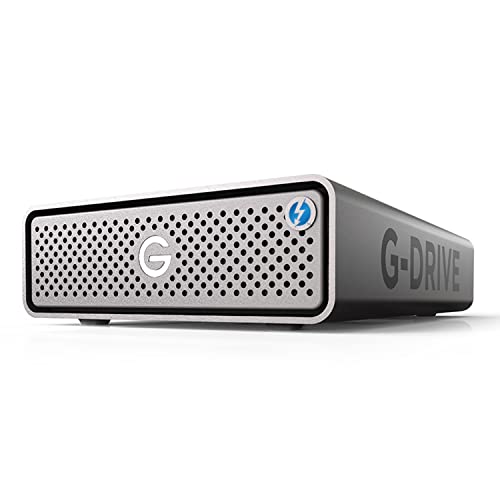
SanDisk Professional 4TB G-Drive PRO Desktop Drive
Best for: Thunderbolt daisy-chaining and enterprise desktop storage
- Storage Capacity
- 4TB
- Hardware Interface
- Thunderbolt 3 (20Gbps), USB-C (5Gbps)
- Rotational Speed
- 7200RPM
- Form Factor
- Desktop
- Dimensions
- 8.27 × 5.12 × 1.79 inches
- Weight
- 4.41 pounds
View on Amazon: SanDisk Professional 4TB G-Drive PRO Desktop Drive
The SanDisk Professional 4TB G-Drive PRO Desktop is an external hard drive built into an aluminum enclosure. It contains a 7200 RPM Ultrastar enterprise-class drive and provides two Thunderbolt 3 ports alongside one 5Gbps USB-C port. You can daisy-chain up to five additional hardware devices through the secondary Thunderbolt interface. This setup suits your workflow if you need dedicated high-speed desktop storage and peripheral expansion.
Pros
- Dual Thunderbolt 3 ports supporting daisy-chaining for up to five devices
- Enterprise-class 7200 RPM Ultrastar internal drive
- Solid all-aluminum enclosure
- 5-year limited warranty
Cons
- USB-C connection runs at 5Gbps rather than higher USB interface bandwidths
- Fixed single-drive enclosure lacks integrated hardware RAID redundancy
- Substantial 4.41-pound weight limits portable use
Good fit if
- You need to daisy-chain multiple Thunderbolt peripherals through one host connection.
- You want an enterprise-grade 7200 RPM drive for continuous desktop workloads.
- You value an all-aluminum build protected by a 5-year warranty.
Skip if
- You require multi-drive RAID protection against mechanical drive failure.
- You need portable storage that weighs significantly less than 4.41 pounds.
Verdict: SanDisk Professional 4TB G-Drive PRO Desktop delivers reliable 7200 RPM enterprise performance and daisy-chain flexibility in a durable aluminum casing. It provides a sturdy, high-speed anchor for your desk workstation.

Seagate LaCie 2big Dock 8TB Desktop Array
Best for: desktop workstations needing Thunderbolt 3 speed
- Storage Capacity
- 8000GB
- Hardware Interface
- Thunderbolt 3
- Form Factor
- Desktop
- Dimensions
- 8.54 × 4.65 × 3.67 inches
- Weight
- 6.39 pounds
The LaCie 2big Dock 8TB Thunderbolt 3 Drive is a desktop disk array featuring a one-piece aluminum housing designed to reduce noise and vibration. You get 8,000GB of storage with Thunderbolt 3 and USB-C hardware interfaces. The unit includes AES 256-bit encryption software, bivolt power support, and an integrated cable lock. It suits you if you want a grounded desktop array with expanded storage capacity.
Pros
- 8TB storage capacity
- Thunderbolt 3 and USB-C hardware interfaces
- One-piece aluminum housing dampens noise and vibration
- AES 256-bit encryption software included
- Integrated cable lock and Kensington lock compatibility
Cons
- Heavier desktop build weighing 6.39 pounds
- Large physical footprint measuring 8.54 inches in length
Good fit if
- You need 8TB of capacity over Thunderbolt 3 and USB-C.
- You want a rigid aluminum enclosure to minimize desk vibration.
- You require hardware security via Kensington or integrated cable locks.
Skip if
- You need a lightweight travel drive under 6 pounds.
- You have tight desk space unable to fit an 8.54-inch chassis.
Verdict: LaCie 2big Dock 8TB Thunderbolt 3 Drive delivers expanded desktop storage paired with robust aluminum vibration control and high-speed interfaces. It is a solid choice if you need physical drive security alongside twice the space of a 4TB unit.
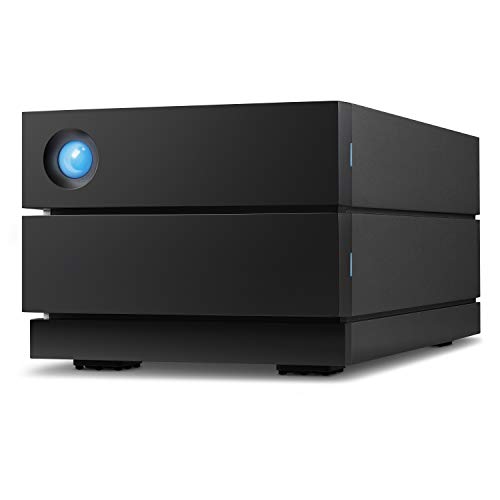
LaCie 2big RAID 16TB Desktop Hard Drive
Best for: dual-bay desktop storage with RAID redundancy
- Storage Capacity
- 16TB
- Rotational Speed
- 7200 RPM
- Form Factor
- Desktop
- Hardware Interface
- USB-C
- Compatibility
- PC, Mac
- Dimensions
- 4.65 × 3.67 × 8.54 inches
The LaCie 2big RAID 16TB gives you dual hot-swappable 7200 RPM IronWolf Pro enterprise drives in a desktop enclosure. Connecting via USB-C or USB 3.0, it delivers transfer speeds up to 440MB/s. You can configure it in RAID 0 for speed or RAID 1 for mirrored data redundancy. It fits creators and desktop users needing expanded capacity beyond single-drive options.
Pros
- Speeds up to 440MB/s
- Hot-swappable 7200 RPM IronWolf Pro enterprise-class drives
- Configurable RAID 0 and RAID 1 modes via setup wizard
- Includes five-year limited warranty with Rescue Data Recovery Services
Cons
- Weighs 4.65 pounds with an 8.54-inch tall desktop footprint
- Supports only two-drive RAID 0 and RAID 1 configurations
Good fit if
- You need 16TB of storage with hardware-level RAID 1 data redundancy.
- You want hot-swappable 7200 RPM enterprise-grade drives in a single enclosure.
- You connect using USB-C or USB 3.0 ports on macOS or Windows.
Skip if
- You need a portable, lightweight drive that fits easily in a bag.
- You require multi-drive RAID setups such as RAID 5 or RAID 6.
Verdict: LaCie 2big RAID 16TB USB-C Desktop Hard Drive delivers enterprise-grade 7200 RPM storage with the security of configurable RAID 1 redundancy. It is an ideal step up when single-drive external options lack sufficient capacity or drive failover.
SanDisk Professional 18TB G-DRIVE PRO
Best for: high-capacity desktop storage and daisy-chaining
- Storage Capacity
- 18TB
- Hardware Interface
- Thunderbolt 3, USB-C
- Rotational Speed
- 7200 RPM
- Form Factor
- Desktop
- Dimensions
- 8.27 × 5.12 × 1.81 inches
- Weight
- 2.6 pounds
The SanDisk Professional 18TB G-DRIVE PRO expands your workspace with massive enterprise-grade storage. It pairs an internal 7200 RPM Ultrastar drive with dual Thunderbolt 3 ports and one USB-C port, delivering transfer speeds up to 260MB/s. You can daisy-chain up to five additional hardware units directly through the setup. This desktop unit suits you if you require high-capacity storage, multi-device chaining, and reliable hardware for Mac workflows.
Pros
- 18TB capacity with 7200 RPM enterprise-class Ultrastar drive
- Dual Thunderbolt 3 ports allow daisy-chaining up to 5 devices
- Up to 260MB/s read and write transfer rates
- Five-year limited warranty coverage
Cons
- Requires reformatting before use with Windows operating systems
- Single mechanical drive provides no built-in RAID redundancy
Good fit if
- You want high-capacity 18TB desktop storage with Thunderbolt 3 speeds.
- You plan to daisy-chain multiple peripheral devices through one connection.
- You work primarily on macOS and prefer pre-formatted HFS+ drives.
Skip if
- You use Windows and want out-of-the-box compatibility without reformatting.
- You need internal multi-drive RAID protection against drive failure.
Verdict: SanDisk Professional 18TB G-DRIVE PRO delivers massive enterprise-grade capacity and versatile Thunderbolt 3 daisy-chaining for Mac setups. Its 260MB/s transfer rates and 5-year warranty make it a dependable high-capacity workstation expansion.

SanDisk Professional 4TB G-Drive Desktop HDD
Best for: Mac desktop backups and standalone storage
- Storage Capacity
- 4TB
- Hardware Interface
- USB-C (10Gbps), USB 3.2 Gen 2
- Rotational Speed
- 7200RPM
- Form Factor
- Desktop
- Compatibility
- Mac
- Dimensions
- 8.27 × 5.24 × 1.61 inches
View on Amazon: SanDisk Professional 4TB G-Drive Desktop HDD
This external desktop hard drive pairs a 4TB, 7200RPM Ultrastar enterprise drive with a USB-C 10Gbps interface. It delivers transfer rates up to 250MB/s read and write inside an anodized aluminum enclosure. It comes preformatted for Mac systems with Apple Time Machine support and can be reformatted for Windows. If you need dedicated single-drive desktop storage for backups or local file management without complex multi-bay setups, this unit gives you steady throughput.
Pros
- Enterprise-class 7200RPM Ultrastar hard drive inside
- Up to 250MB/s read and 250MB/s write speeds via USB-C 10Gbps
- Stackable, anodized aluminum enclosure
- Three adjustable LED brightness modes
Cons
- Single-drive enclosure lacks hardware RAID options
- Weighs 3.06 pounds and requires dedicated desk space
- Preformatted for Mac, requiring reformatting for Windows use
Good fit if
- You need a 4TB desktop drive with transfer speeds up to 250MB/s.
- You use macOS and want out-of-the-box Apple Time Machine compatibility.
- You want a stackable aluminum enclosure with adjustable LED lighting.
Skip if
- You need multi-drive RAID redundancy or hardware disk arrays.
- You want a lightweight portable drive that does not weigh 3.06 pounds.
Verdict: SanDisk Professional 4TB G-Drive Desktop HDD provides reliable 7200RPM Ultrastar performance and 250MB/s speeds in a durable aluminum casing. It serves as a dependable desktop backup drive for Mac and Windows environments.
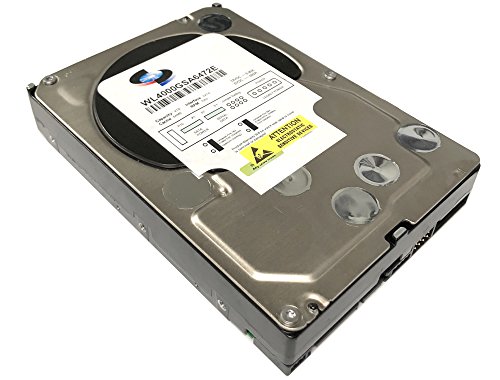
White Label 4TB 7200 RPM Enterprise Hard Drive
Best for: internal desktop, RAID, and server bay installations
- Storage Capacity
- 4TB
- Form Factor
- 3.5"
- Hardware Interface
- SATA 6.0Gb/s
- Rotational Speed
- 7200RPM
- Cache Size
- 64MB
- Compatibility
- PC
View on Amazon: White Label 4TB 7200 RPM Enterprise Hard Drive
The White Label 4TB 7200 RPM Enterprise Hard Drive gives you an internal 3.5-inch SATA storage drive built for continuous 24x7 duty cycles. It features a 64MB cache, 7200 RPM spindle speed, and a sustained transfer rate up to 171 MB/s. Built with rotational vibration protection and dual processors, it suits you if you need bare internal capacity for your existing PC desktop, server, or multi-bay RAID setup.
Pros
- 7200 RPM rotational speed
- 1.2 million hour MTBF rating for 24x7 operation
- Sustained sequential transfer speeds up to 171 MB/s
- Enhanced RAFF rotational vibration monitoring technology
Cons
- Bare internal drive without an external enclosure or USB interface
- 64MB cache size is smaller than higher-tier alternatives
Good fit if
- You need a 3.5-inch SATA drive to install inside a PC, server, or RAID array.
- You require continuous 24x7 duty cycle reliability with hardware vibration compensation.
Skip if
- You want a plug-and-play external desktop drive with Thunderbolt or USB cabling.
- You need a larger data cache for heavier concurrent workloads.
Verdict: White Label 4TB 7200 RPM Enterprise Hard Drive delivers 24x7 reliability and 7200 RPM speed for internal 3.5-inch SATA bays. It is a direct fit if you need to supply your own drive for an existing enclosure or storage array.
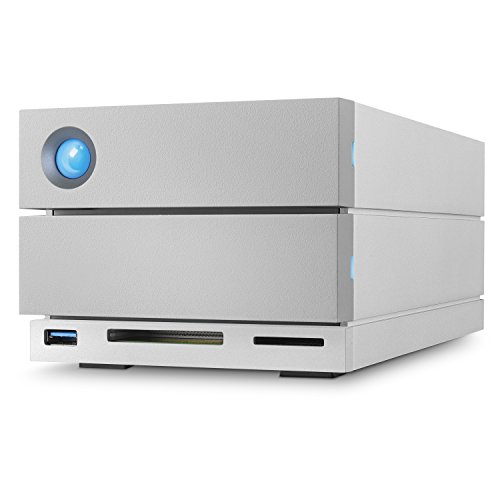
LaCie 2big Dock 8TB External RAID Drive
Best for: desktop setups needing integrated USB 3.0 docking
- Storage Capacity
- 8TB
- Hardware Interface
- Thunderbolt 3, USB-C, USB 3.0, USB 3.1
- Form Factor
- Desktop
- Compatibility
- PC, Mac
- Dimensions
- 4.65 × 3.66 × 8.54 inches
- Weight
- 4.65 pounds
The LaCie 2big Dock 8TB is a desktop RAID storage unit equipped with hot-swappable IronWolf Pro enterprise-class drives. You get transfer speeds reaching up to 440MB/s, configurable RAID 0 and RAID 1 modes, and integrated SD and CF card slots. Connectivity includes dual Thunderbolt 3 ports, USB 3.1, DisplayPort, and a USB 3.0 hub for charging devices and offloading data directly to your workstation.
Pros
- Integrated USB 3.0 hub charges devices and offloads footage
- Dual Thunderbolt 3 ports support peripheral daisy chaining
- Built-in SD and CF card slots allow direct ingestion
- Equipped with hot-swappable IronWolf Pro enterprise drives
- Hardware support for RAID 0 and RAID 1 configurations
Cons
- Desktop weight of 4.65 pounds limits portability
- Maximum transfer speed is limited to 440MB/s
- Enclosure requires 8.54 inches of vertical desk clearance
Good fit if
- You need an external drive that doubles as a USB 3.0 hub and memory card reader.
- You require RAID 1 redundancy or RAID 0 speed using hot-swappable enterprise disks.
- You plan to connect monitors or daisy-chain devices via Thunderbolt 3.
Skip if
- You need a lightweight, bus-powered portable drive for travel.
- You require sustained data transfer rates higher than 440MB/s.
Verdict: LaCie 2big Dock 8TB RAID Desktop Drive delivers enterprise-grade storage with transfer rates up to 440MB/s and a versatile selection of ports. It serves as both a dual-drive RAID array and an active desktop hub.
Specifications side by side
| Spec | SanDisk Professional 4TB G-Drive PRO Desktop Drive | Seagate LaCie 2big Dock 8TB Desktop Array | LaCie 2big RAID 16TB Desktop Hard Drive | SanDisk Professional 18TB G-DRIVE PRO | SanDisk Professional 4TB G-Drive Desktop HDD | White Label 4TB 7200 RPM Enterprise Hard Drive | LaCie 2big Dock 8TB External RAID Drive |
|---|---|---|---|---|---|---|---|
| Storage Capacity | 4TB | 8000GB | 16TB | 18TB | 4TB | 4TB | 8TB |
| Form Factor | not specified | not specified | not specified | not specified | not specified | 3.5" | not specified |
| Hardware Interface | Thunderbolt 3 (20Gbps), USB-C (5Gbps) | Thunderbolt 3 | not specified | Thunderbolt 3, USB-C | USB-C (10Gbps), USB 3.2 Gen 2 | SATA 6.0Gb/s | Thunderbolt 3, USB-C, USB 3.0, USB 3.1 |
| Rotational Speed | 7200RPM | not specified | 7200 RPM | 7200 RPM | 7200RPM | 7200RPM | not specified |
| Cache Size | not specified | not specified | not specified | not specified | not specified | 64MB | not specified |
| Compatibility | not specified | not specified | PC, Mac | not specified | Mac | PC | PC, Mac |
| Size | 4TB | 8 TB | 16TB | 18TB | 4TB | 4TB | 8TB |
| Dimensions | 8.27 × 5.12 × 1.79 inches | 8.54 × 4.65 × 3.67 inches | 4.65 × 3.67 × 8.54 inches | 8.27 × 5.12 × 1.81 inches | 8.27 × 5.24 × 1.61 inches | not specified | 4.65 × 3.66 × 8.54 inches |
| Weight | 4.41 pounds | 6.39 pounds | 4.65 pounds | 2.6 pounds | 3.06 pounds | 1 pounds | 4.65 pounds |
| Color | Grey | argentée | Not Available | Space Grey | Dark Grey | White | not specified |
| Model | 718037891651 | STGB8000400 | STHJ16000800 | SDPH51J-018T-NBAAD | SDPHF1A-004T-NBAAD | WL4000GSA6472E | STGB8000400 |
If you require mobile storage instead of desktop hardware, sandisk 2tb extreme pro portable alternatives provide similar transfer specs.
Frequently asked questions
What is the main difference between the standard G-Drive and the G-Drive PRO?
The main difference comes down to the hardware interface. The standard SanDisk Professional 4TB G-Drive Desktop HDD relies solely on a USB-C interface. In contrast, the G-Drive PRO includes Thunderbolt and USB-C connections. Both units share a 7200 RPM rotational speed and a 4TB capacity. The standard model delivers speeds up to 250MB/s, and its physical dimensions measure 5.24 by 1.61 by 8.27 inches.
Which alternative provides the highest storage capacity?
The SanDisk Professional 18TB G-DRIVE PRO offers the largest storage capacity on this list. It provides 18TB of space alongside Thunderbolt and USB-C interfaces. This drive runs at 7200 RPM, reaches transfer rates up to 260MB/s, and weighs 2.6 pounds. If you need multi-drive redundancy instead of a single massive drive, the dual-bay LaCie 2big RAID provides 16TB of capacity with USB-C connectivity.
Can you use internal enterprise drives as alternatives to external desktop drives?
You can use an internal drive if you install it into an existing enclosure, PC tower, or server bay. The White Label 4TB 7200 RPM Enterprise Hard Drive operates via a SATA interface rather than external USB or Thunderbolt ports. It features 4TB of storage, a 64MB cache, and a standard desktop form factor. It weighs 1 pound and requires a compatible internal 3.5-inch bay.
Which alternatives support legacy USB 3.0 connections?
The LaCie 2big Dock 8TB External RAID Drive includes dedicated USB 3.0 connectivity alongside its Thunderbolt and USB-C ports. This triple-interface design gives you versatile connection options for both older workstations and newer computers. It supports data transfer rates up to 440MB/s and provides 8TB of desktop capacity. The enclosure measures 3.66 inches wide, 8.54 inches high, and 4.65 inches long, weighing 4.65 pounds.
What should you choose if you need RAID redundancy?
You should choose a multi-bay system like the LaCie 2big RAID 16TB Desktop Hard Drive for hardware redundancy. This unit features configurable RAID 1 protection and enterprise-class 7200 RPM drives. It connects through a USB-C interface and works with both PC and Mac operating systems. The unit measures 3.67 inches wide, 8.54 inches high, and 4.65 inches long, with a weight of 4.65 pounds.
How many alternatives on this list offer Thunderbolt connectivity?
Three alternatives on this 6-drive list feature Thunderbolt interfaces alongside USB-C. These models include the Seagate LaCie 2big Dock 8TB, the SanDisk Professional 18TB G-DRIVE PRO, and the LaCie 2big Dock 8TB External RAID Drive. Thunderbolt connectivity allows daisy-chaining multiple devices through a single workstation port. If you do not require Thunderbolt, USB-C options like the SanDisk Professional 4TB Desktop HDD provide simpler connectivity.