15 Best 12-Bay NAS Devices, Compared
As an Amazon Associate we earn from qualifying purchases. Links on this page are affiliate links.
Finding the best 12-Bay network attached storages requires careful attention to hardware specifications. We compared 15 models based strictly on the specs published on their listings. The Asustor Lockerstor 12-Bay Rackmount NAS leads the list because it supports memory expansion up to 128GB. This flexibility makes it ideal for virtualized business environments. You can choose from rackmount or desktop forms, with options ranging from 4GB to 16GB of base RAM. Some units include 10GbE ports, while others focus on pure capacity. This guide helps you decide which NAS matches your storage and processing needs.
Quick picks
The best fit for you
- You need memory expansion for virtualized business storage Asustor Lockerstor 12-Bay Rackmount NAS It supports RAM expansion up to 128GB on a 2U rackmount platform.
- You want to expand existing Synology NAS capacity Synology 12-Bay DiskStation Expansion Unit This diskless expansion unit adds 12 bays to your current Synology system.
- You need pre-loaded 240TB rackmount storage for business BUFFALO TeraStation 51220RH 12-Bay 240TB It comes with 12x20TB drives installed and includes 10GbE connectivity.
- You require high RAM and 8-core processing power QNAP 12-Bay 8-Core Tower NAS This tower NAS features an 8-Core CPU for demanding tasks.
Our 15 picks

Asustor Lockerstor 12-Bay Rackmount NAS
Best for: virtualized business storage needing memory expansion
- Number of Bays
- 12-Bay (what this guide is about)
- Drive Bays
- 12 Bay
- Processor
- Intel Atom C3538
- RAM Capacity
- 8 GB DDR4-2133
- Included Storage
- Diskless
- Form Factor
- Rackmount
The Asustor Lockerstor 12-Bay 2.5GbE Rackmount NAS is a 2U rackmount storage system designed for business environments. You get twelve drive bays powered by a quad-core 2.1GHz Intel Atom C3538 processor and 8GB of DDR4 memory. For network connectivity, it includes two 2.5GbE ports, two Gigabit ports, and a PCIe slot for 10GbE expansion. It suits you if you need scalable virtualization support and expandable memory up to 128GB.
Pros
- RAM expands up to 128GB across four slots
- Dual 2.5GbE and dual Gigabit Ethernet ports
- PCIe expansion slot for an optional 10GbE network card
- Support for VMware, Citrix, Hyper-V, and Docker
Cons
- Requires a separate expansion card for 10GbE speeds
- Ships with 8GB of RAM installed out of the 128GB maximum
Good fit if
- You need a 12-bay 2U rackmount unit with multi-gigabit network ports.
- You plan to run virtual machines or Docker containers with up to 128GB RAM.
- You want a PCIe expansion slot for future network upgrades.
Skip if
- You need built-in 10GbE ports ready out of the box.
- You require a desktop tower form factor instead of a rackmount chassis.
Verdict: Asustor Lockerstor 12-Bay 2.5GbE Rackmount NAS offers flexible multi-gigabit networking and memory expansion up to 128GB. It gives you a capable 2U rackmount platform for containerized apps and business virtualization.

Synology 12-Bay DiskStation Expansion Unit
Best for: expanding Synology NAS storage capacity
- Number of Bays
- 12-Bay (what this guide is about)
- Drive Bays
- 12-Bay
- Included Storage
- Diskless
- Dimensions
- 18.5 × 17.1 × 16.5 inches
- Weight
- 19.9 pounds
This is a diskless expansion unit that adds 12 drive bays to your existing Synology NAS. It measures 17.1 x 16.5 x 18.5 inches and weighs 19.9 pounds. The plug-and-play design allows you to upgrade storage capacity easily. It is built for users who need more space but already have a compatible host system. You get five years of limited warranty support for peace of mind.
Pros
- Adds 12 additional drive bays
- Plug-and-play design for easy upgrades
- Includes 5-year limited warranty
Cons
- Diskless; requires separate purchase of drives
- Requires a compatible Synology host system
- Heavier at 19.9 pounds than desktop units
Good fit if
- You need to expand storage on a Synology NAS
- You want a plug-and-play upgrade solution
- You value a 5-year warranty
Skip if
- You need a standalone NAS with a CPU
- You want pre-installed drives
- You use a non-Synology NAS
Verdict: Synology 12-Bay Expansion Unit is a diskless add-on for existing Synology users who need more drive space without buying a new server.

Synology 12-Bay Quad-Core NAS
Best for: High-capacity storage expansion
- Number of Bays
- 12-Bay (what this guide is about)
- Drive Bays
- 12-Bay
- Processor
- Quad Core
- RAM Capacity
- 4GB DDR4
- Included Storage
- Diskless
- Dimensions
- 18.5 × 17 × 16.5 inches
This 12-bay Synology NAS features a Quad Core CPU and 4GB of DDR4 RAM. It delivers up to 2,201 MB/s read speeds. You can expand storage to 24 bays using a DX1222 unit. The device supports up to 32GB of RAM and 25GbE networking. It weighs 20.9 pounds and includes a 3-year warranty. It suits users needing high capacity and expandability.
Pros
- 12-bay drive configuration for large storage arrays
- Up to 2,201 MB/s sequential read performance
- Expandable to 24 bays with DX1222 unit
- Supports up to 32GB of RAM
Cons
- 4GB base RAM is lower than many competitors
- Sold diskless with no included storage drives
- Heavy at 20.9 pounds for desktop placement
Good fit if
- You need to store massive amounts of data
- You plan to expand capacity to 24 bays
- You want to upgrade RAM up to 32GB
Skip if
- You require pre-installed hard drives
- You need more than 4GB of base RAM
- You prefer a lighter desktop device
Verdict: Synology DS2422+ 12-Bay NAS is a high-capacity storage solution for users who prioritize expandability and raw throughput over base memory.

Synology 12-Bay Xeon Desktop Enclosure
Best for: Enterprise virtualization and high IOPS workloads
- Number of Bays
- 12-Bay (what this guide is about)
- Drive Bays
- 12-Bay
- Processor
- 6-core Intel Xeon
- Included Storage
- Diskless
- RAM Capacity
- 16GB RAM
- Dimensions
- 17 × 18.3 × 17 inches
This is a 12-bay Synology DiskStation designed for high-performance storage. It features a 6-core Intel Xeon processor and 16GB of RAM. The system delivers over 260,000 4K random read IOPS and 4,700 MB/s sequential read speeds. You can expand memory up to 48 GB and scale to 36 drive bays. It supports 10/25GbE networking and Fibre Channel. This unit is diskless and includes a 5-year warranty.
Pros
- 6-core Intel Xeon processor for heavy workloads
- Over 260,000 4K random read IOPS
- 4,700 MB/s sequential read performance
- Expandable to 48 GB RAM
- Supports Fibre Channel and 25GbE networking
Cons
- Diskless design requires separate drive purchase
- Larger physical footprint at 18.3 inches wide
- Heavier build at 21.6 pounds
Good fit if
- You need high IOPS for virtual machines
- You want Fibre Channel connectivity
- You plan to expand to 36 bays
Skip if
- You want included storage drives
- You need a compact desktop form factor
- You require a smaller footprint
Verdict: Synology 12-Bay DiskStation DS3622xs+ fits users who need enterprise-grade processing power and Fibre Channel support for virtualization or video management. It is a robust, diskless solution for scaling storage infrastructure.

BUFFALO TeraStation 51220RH 12-Bay 240TB
Best for: businesses needing pre-loaded 240TB rackmount storage
- Number of Bays
- 12-Bay (what this guide is about)
- Drive Bays
- 12-Bay
- Network Connectivity
- 10GbE
- Included Storage
- 240TB (12x20TB)
- RAID Support
- RAID 0, 6
- Form Factor
- Rackmount
The BUFFALO TeraStation 51220RH is a 12-bay rackmount NAS with 240TB of pre-installed storage. It features native 10GbE connectivity for fast transfers and 256-bit drive encryption for security. The system supports snapshots and cloud integration with Azure and S3. It ships in RAID 6 for 200TB usable space. This unit suits businesses needing high capacity and enterprise-grade data protection.
Pros
- 240TB total capacity with 12x20TB drives included
- Native 10GbE port for high-speed file transfers
- 256-bit drive encryption and two-factor authentication
- Snapshot feature for instant data recovery
- Cloud sync with Dropbox, S3, and Azure
Cons
- Large 18.9-inch height requires rack space
- 55.4-pound weight makes it difficult to move
- No mention of included RAM or CPU specs
Good fit if
- You need a fully populated 12-bay storage solution
- You require native 10GbE connectivity for your network
- You want enterprise encryption and snapshot features
Skip if
- You need a compact desktop NAS that fits on a desk
- You want to build your own storage from empty bays
- You require detailed processor and memory specifications
Verdict: BUFFALO TeraStation 12-Bay 240TB NAS is a heavy, rackmount solution for businesses that need immediate high capacity and 10GbE speeds. It fits teams prioritizing security features like snapshots and drive encryption over flexible hardware customization.

BUFFALO TeraStation 12-Bay 80TB Rackmount NAS
Best for: enterprises needing pre-loaded 10GbE rack storage
- Number of Bays
- 12-Bay (what this guide is about)
- Drive Bays
- 12-Bay
- Network Connectivity
- 4x 10GbE
- Processor
- Intel Xeon
- Included Storage
- 80TB (4x20TB)
- Form Factor
- Rackmount
View on Amazon: BUFFALO TeraStation 12-Bay 80TB Rackmount NAS
This 12-bay rackmount NAS comes with 80TB of storage included. It features an Intel Xeon processor and four native 10GbE ports for high-speed data transfer. The system supports PCIe Gen 4x8 slots for SSD caching and includes Btrfs file system snapshots for rapid recovery. It is designed for enterprise environments that need robust data protection and scalable performance.
Pros
- Includes 80TB of pre-installed hard drives
- Four native 10GbE network ports
- Intel Xeon processor for high performance
- Btrfs snapshots for instant data recovery
Cons
- Heavy at 54.2 pounds
- Large 18.9-inch height requires rack space
- Limited to 4 native network ports
Good fit if
- You need a fully populated 12-bay rackmount solution
- You require 10GbE connectivity for fast transfers
- You want enterprise-grade data protection features
Skip if
- You are looking for a desktop form factor
- You need more than four native network ports
- You prefer a lighter, portable storage device
Verdict: BUFFALO TeraStation 71210RH 80TB 12-Bay NAS is a heavy-duty enterprise storage unit for businesses that need immediate capacity and 10GbE speeds without buying drives separately.
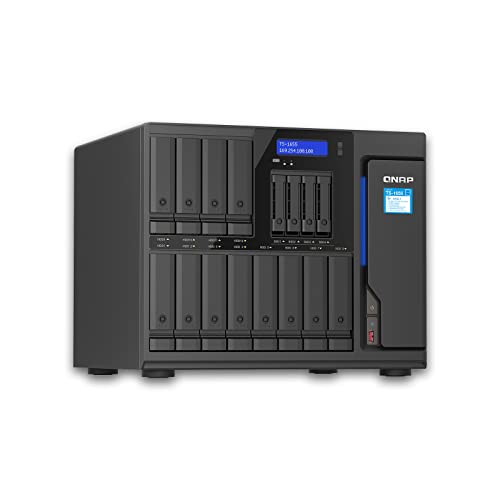
QNAP 12-Bay 8-Core Tower NAS
Best for: users needing high RAM and 8-core power
- Number of Bays
- 12-Bay (what this guide is about)
- Drive Bays
- 12BAYS
- Network Connectivity
- 2X 2.5Gigabit Ethernet Port
- Processor
- Atom C5125 8-core 2.8GHz
- RAM Capacity
- 128GB (4×32GB)
- Included Storage
- No HDD
This 12-bay NAS tower features an Atom C5125 8-core processor running at 2.8GHz. It includes 128GB of RAM across four slots, offering substantial memory for heavy workloads. Network connectivity is provided by two 2.5 Gigabit Ethernet ports. The unit weighs 9.92 pounds and does not include hard drives. It suits users needing high processing power and large memory capacity for their storage infrastructure.
Pros
- Atom C5125 8-core processor at 2.8GHz
- 128GB RAM (4x32GB) installed
- Two 2.5 Gigabit Ethernet ports
- 12 drive bays for expansion
Cons
- No hard drives included
- Only 2.5G network ports, lacking 10G
- Heavier than compact alternatives
Good fit if
- You need high RAM capacity
- You require an 8-core CPU
- You want a 12-bay tower
Skip if
- You need 10G Ethernet
- You want pre-installed drives
- You prefer a rackmount form
Verdict: QNAP 12-Bay NAS with 8-Core CPU fits users who need maximum RAM and processing cores for demanding tasks. It is not suitable for those requiring 10G networking or pre-loaded storage.

Synology 12-Bay Redundant Power Expansion Unit
Best for: expanding Synology NAS with redundant power
- Number of Bays
- 12-Bay (what this guide is about)
- Drive Bays
- 12-Bay
- Included Storage
- Diskless
- Dimensions
- 32.7 × 25.7 × 8.27 inches
- Weight
- 38.5 pounds
View on Amazon: Synology 12-Bay Redundant Power Expansion Unit
This diskless unit expands your Synology NAS with 12 bays for 3.5-inch or 2.5-inch SATA drives. It features redundant power supplies to prevent single points of failure. You gain storage in minutes using DSM tools. The chassis measures 16.9 by 27.2 by 3.5 inches and weighs 38.5 pounds. It is designed for users needing reliable, integrated capacity growth.
Pros
- 12-bay capacity for 3.5-inch or 2.5-inch SATA drives
- Redundant power supply prevents single points of failure
- Integrates with Synology DSM for quick setup
- Backed by a 5-year limited warranty
Cons
- Sold diskless with no included storage
- Requires an existing Synology NAS host
- Heavy at 38.5 pounds
Good fit if
- You need to add 12 more drive slots to your Synology system
- You require redundant power for critical data expansion
- You want seamless integration with Synology DSM
Skip if
- You need a standalone NAS with built-in storage
- You use a non-Synology NAS brand
- You prefer a lightweight desktop device
Verdict: Synology 12-Bay Expansion Unit is the correct choice for expanding an existing Synology NAS with redundant power and 12 drive bays. It fits users who need reliable, diskless capacity growth without managing a separate system.

Asustor Flashstor 12-Bay NVMe NAS
Best for: all-flash content creation workflows
- Number of Bays
- 12-Bay (what this guide is about)
- Drive Bays
- 12 Bay
- Network Connectivity
- 2.5 Gigabit Ethernet
- Processor
- Intel Celeron N5105
- RAM Capacity
- 4GB DDR4-2933
- M.2 NVMe Slots
- 12 x M.2 NVMe slots
This 12-bay NAS targets content creators with an all-flash design. It uses 12 M.2 NVMe slots for high-speed storage. The Intel Celeron N5105 processor and 4GB DDR4-2933 RAM handle intensive workflows. You get 2.5 Gigabit Ethernet for fast network transfers. It is a compact desktop unit for professionals who need speed over bulk capacity.
Pros
- 12 M.2 NVMe slots for all-flash storage
- Intel Celeron N5105 Quad-Core CPU
- 2.5 Gigabit Ethernet connectivity
- 4GB DDR4-2933 RAM
Cons
- Limited to 4GB of RAM
- No HDD bays for traditional hard drives
- Only 2.5 Gigabit network speed
Good fit if
- You need fast NVMe storage for video editing
- You prefer an all-flash storage architecture
- You want a compact desktop NAS
Skip if
- You require 10 Gigabit Ethernet ports
- You need to use traditional 3.5-inch HDDs
- You want expandable RAM beyond 4GB
Verdict: Asustor Flashstor 12 Pro FS6712X is a specialized all-flash NAS for content creators who prioritize NVMe speed over traditional hard drive capacity. It suits those building high-performance media workflows.

TERRAMASTER T12-500 Pro 12-Bay NAS
Best for: high-performance backup and video editing workflows
- Number of Bays
- 12-Bay (what this guide is about)
- Drive Bays
- 12-Bay
- Network Connectivity
- Dual 10GbE
- Processor
- Intel Core i7-1255U
- RAM Capacity
- 16GB DDR5
- Included Storage
- Diskless
The TERRAMASTER T12-500 Pro is a 12-bay NAS driven by an Intel Core i7-1255U processor with 16GB of DDR5 RAM. It features dual 10GbE ports for high throughput and supports RAID 0 through 10. This diskless unit suits professionals needing strong backup performance and enterprise-grade data protection for small to medium businesses.
Pros
- Intel Core i7-1255U 10-core processor with 16GB DDR5 RAM
- Dual 10GbE Ethernet ports for up to 20Gbps bandwidth
- Supports RAID 0, 1, 5, 6, and 10 configurations
- Includes enterprise-grade TerraMaster Business Backup Suite
Cons
- Diskless enclosure requires separate hard drive purchase
- Limited to 9 3.5-inch SATA bays despite 12-bay form factor
- Weighs 21.2 pounds, making it bulky for desktop use
Good fit if
- You need high sequential write speeds for video editing
- You require enterprise backup features like ransomware protection
- You want dual 10GbE connectivity for fast network transfers
Skip if
- You need a fully assembled unit with drives included
- You require all 12 bays to accept 3.5-inch drives
- You prefer a lightweight device for easy desk placement
Verdict: TERRAMASTER T12-500 Pro 12-Bay delivers robust processing power and fast networking for users prioritizing backup speed and data redundancy over raw drive capacity.

TerraMaster 12-Bay 2U Rackmount NAS
Best for: High-performance backup and virtualized environments
- Number of Bays
- 12-Bay (what this guide is about)
- Drive Bays
- 12Bay
- Network Connectivity
- Dual 10GbE
- Processor
- Intel Core i7 1255U
- RAM Capacity
- 16GB DDR5
- M.2 NVMe Slots
- 2 slots
This diskless 12-bay NAS features an Intel Core i7-1255U processor and 16GB of DDR5 memory. It includes dual 10GbE ports for high-speed connectivity and two M.2 NVMe slots for caching. The unit supports RAID 0, 1, 5, 6, and 10 configurations. It is designed for high-performance backup and virtualized environments. You get a robust 2U rackmount chassis for centralized storage management.
Pros
- Intel Core i7-1255U processor with 10 cores
- 16GB DDR5 memory capacity
- Dual 10GbE Ethernet ports
- Two M.2 NVMe slots for Hyper Cache
Cons
- Diskless enclosure requires separate drive purchase
- 2U rackmount form factor needs compatible rack space
- No internal SATA ports for additional expansion mentioned
Good fit if
- You need high-speed 10GbE connectivity for video editing
- You require enterprise-grade backup and disaster recovery features
- You have rackmount space available for a 2U chassis
Skip if
- You prefer a pre-loaded drive configuration
- You need a compact desktop form factor
- You only require 1GbE network speeds
Verdict: TERRAMASTER U12-500 Plus 12-Bay NAS suits professionals needing powerful CPU performance and fast network throughput for demanding workloads. It fits users who prioritize raw processing power and caching capabilities over plug-and-play simplicity.

QNAP 12-Bay Hybrid Desktop NAS
Best for: desktop hybrid storage and 4K editing
- Number of Bays
- 12-Bay (what this guide is about)
- Drive Bays
- 12-Bay
- Network Connectivity
- Dual 10GbE
- Processor
- AMD Ryzen 5 7000-series
- Form Factor
- Desktop
- Dimensions
- 22 × 21 × 12 inches
This 12-bay desktop unit combines eight 3.5-inch SATA bays with four 2.5-inch U.2 NVMe Gen4 slots for tiered hybrid storage. Driven by a 6-core AMD Ryzen 5 7000-series processor and 16 GB of DDR5 memory, it includes dual 10GbE network ports and three PCIe Gen4 slots for hardware expansion. You get dedicated high-speed flash alongside bulk storage, making it well suited for direct 4K video editing, local virtualization, and multi-user team workflows.
Pros
- Hybrid bay layout with eight 3.5-inch SATA bays and four 2.5-inch U.2 NVMe Gen4 slots
- AMD Ryzen 5 6-core processor with boost clocks up to 5.1 GHz
- Dual 10GbE ports for high-bandwidth file transfers
- Three PCIe Gen4 expansion slots supporting GPU pass-through
- DDR5 memory support scalable up to 192 GB with ECC options
Cons
- Hybrid layout limits 3.5-inch mechanical hard drives to eight total bays
- Ships with 16 GB RAM installed out of 192 GB supported capacity
Good fit if
- You need fast U.2 NVMe flash storage tiers alongside high-capacity SATA drives.
- You run virtual machines or edit video directly over 10GbE network connections.
- You want a standalone desktop tower instead of a rackmount chassis.
Skip if
- You require twelve matching 3.5-inch drive bays for standard hard drives.
- You need a server rack form factor for data closet installation.
Verdict: QNAP 12-Bay Desktop Hybrid NAS balances eight mass-storage SATA bays with four high-speed U.2 NVMe slots for intensive multi-user editing and virtualization tasks. Its desktop footprint delivers enterprise-grade PCIe expansion and 10GbE connectivity without requiring a server rack.

QNAP 12-Bay 2U Rackmount NAS with 10GbE SFP+
Best for: high-bandwidth 10GbE rackmount file storage
- Number of Bays
- 12-Bay (what this guide is about)
- Drive Bays
- 12 Bay
- Network Connectivity
- 2 x 2.5GbE, 2 x 10GbE SFP+
- Processor
- AnnapurnaLabs Alpine AL324
- RAM Capacity
- 4GB UDIMM DDR4
- Included Storage
- Diskless
View on Amazon: QNAP 12-Bay 2U Rackmount NAS with 10GbE SFP+
This 2U rackmount unit gives you 12 SATA drive bays for high-density network storage. It runs on an AnnapurnaLabs Alpine AL324 quad-core 1.7GHz ARM processor with 4GB DDR4 memory, expandable to 16GB. You get dual 10GbE SFP+ ports alongside dual 2.5GbE connections for high-bandwidth traffic, backed by redundant power supplies. It suits your setup if you require rack-mounted mass storage with fast networking without needing an x86 server processor.
Pros
- Dual 10GbE SFP+ ports and dual 2.5GbE ports built in
- Redundant power supply hardware
- One PCIe Gen 2 x2 expansion slot
- Four USB 3.2 Gen 1 ports
Cons
- Base memory starts at 4GB with a 16GB maximum ceiling
- ARM Cortex-A57 processor limits heavy compute tasks
- PCIe slot restricted to Gen 2 x2 bandwidth
Good fit if
- You need native dual 10GbE SFP+ networking without buying add-in cards.
- You want continuous operation supported by redundant power supplies.
- You require 12 drive bays focused on storage capacity rather than virtual machines.
Skip if
- You need an x86 CPU architecture for container workloads or heavy virtualization.
- You require more than 16GB of system RAM.
Verdict: QNAP 12-Bay 2U Rackmount NAS with 10GbE SFP+ delivers integrated 10-gigabit networking and power redundancy for high-capacity rack storage. Its ARM architecture and 16GB memory ceiling make it best suited for dedicated file serving rather than compute-heavy services.

Synology 12-Bay Rackmount NAS
Best for: Enterprise rackmount storage with redundancy
- Number of Bays
- 12-Bay (what this guide is about)
- Drive Bays
- 12-Bay
- Included Storage
- Diskless
- RAM Capacity
- 8GB RAM
- Dimensions
- 22.8 × 19 × 3.5 inches
- Weight
- 32.3 pounds
The Synology RS2423RP+ is a 12-bay rackmount NAS designed for enterprise environments. It includes 8GB of RAM and dual redundant power supplies to maintain uptime. The unit supports hot-swappable drives and online volume expansion. You can scale storage by adding one Synology RX1223RP expansion unit. This diskless chassis requires you to purchase drives separately for your specific capacity needs.
Pros
- 12 drive bays for high capacity
- Dual redundant power supplies
- 8GB RAM for performance
- Supports online volume expansion
- Hot-swappable drive bays
Cons
- Diskless chassis requires separate drive purchase
- Rackmount form factor needs server rack
- Fixed 8GB RAM capacity
Good fit if
- You need redundant power for uptime
- You have a server rack for installation
- You want to expand storage later
Skip if
- You need included hard drives
- You lack rack mounting space
- You require more than 8GB RAM
Verdict: Synology RS2423RP+ 12-Bay Rack NAS is a robust storage solution for organizations that require dual power redundancy and scalable capacity in a rackmount format.

Asustor FS6812X 12-Bay All-Flash NAS
Best for: high-performance all-flash enterprise storage
- Number of Bays
- 12-Bay (what this guide is about)
- Drive Bays
- 12-Bay
- Network Connectivity
- Dual 10GbE
- Processor
- AMD Ryzen Embedded V3C14
- RAM Capacity
- 16GB ECC DDR5
- M.2 NVMe Slots
- 12 slots
The Asustor FS6812X is a 12-bay all-flash NAS designed for high-performance enterprise workloads. It features an AMD Ryzen Embedded V3C14 quad-core CPU and 16GB of ECC DDR5 memory. Dual 10GbE ports provide high-speed networking, while USB4 support allows for rapid external expansion. This unit is built for silent, energy-efficient operation using only NVMe SSDs, making it ideal for virtualization and media production.
Pros
- 12 M.2 NVMe SSD slots for extreme IOPS
- AMD Ryzen Embedded V3C14 quad-core CPU
- 16GB ECC DDR5 server-grade memory
- Dual 10GbE Ethernet ports with SMB Multichannel
Cons
- Requires separate purchase of NVMe drives
- No HDD bays for traditional hard drives
- Higher cost compared to hybrid NAS options
Good fit if
- You need ultra-low latency for AI or virtualization
- You require silent operation in a studio environment
- You prioritize speed over raw storage capacity
Skip if
- You need to store large archives of cold data
- You prefer a lower cost per terabyte
- You want to use existing 3.5-inch hard drives
Verdict: Asustor FS6812X 12-Bay All-Flash NAS delivers extreme performance for users who need fast, silent, and reliable all-flash storage for professional workloads.
Specifications side by side
| Spec | Asustor Lockerstor 12-Bay Rackmount NAS | Synology 12-Bay DiskStation Expansion Unit | Synology 12-Bay Quad-Core NAS | Synology 12-Bay Xeon Desktop Enclosure | BUFFALO TeraStation 51220RH 12-Bay 240TB | BUFFALO TeraStation 12-Bay 80TB Rackmount NAS | QNAP 12-Bay 8-Core Tower NAS | Synology 12-Bay Redundant Power Expansion Unit | Asustor Flashstor 12-Bay NVMe NAS | TERRAMASTER T12-500 Pro 12-Bay NAS | TerraMaster 12-Bay 2U Rackmount NAS | QNAP 12-Bay Hybrid Desktop NAS | QNAP 12-Bay 2U Rackmount NAS with 10GbE SFP+ | Synology 12-Bay Rackmount NAS | Asustor FS6812X 12-Bay All-Flash NAS |
|---|---|---|---|---|---|---|---|---|---|---|---|---|---|---|---|
| Drive Bays | 12 Bay | 12-Bay | 12-Bay | 12-Bay | 12-Bay | 12-Bay | 12BAYS | 12-Bay | 12 Bay | 12-Bay | 12Bay | 12-Bay | 12 Bay | 12-Bay | 12-Bay |
| Network Connectivity | not specified | not specified | not specified | not specified | 10GbE | 4x 10GbE | 2X 2.5Gigabit Ethernet Port | not specified | 2.5 Gigabit Ethernet | Dual 10GbE | Dual 10GbE | Dual 10GbE | 2 x 2.5GbE, 2 x 10GbE SFP+ | not specified | Dual 10GbE |
| Processor | Intel Atom C3538 | not specified | Quad Core | 6-core Intel Xeon | not specified | Intel Xeon | Atom C5125 8-core 2.8GHz | not specified | Intel Celeron N5105 | Intel Core i7-1255U | Intel Core i7 1255U | AMD Ryzen 5 7000-series | AnnapurnaLabs Alpine AL324 | not specified | AMD Ryzen Embedded V3C14 |
| RAM Capacity | 8 GB DDR4-2133 | not specified | 4GB DDR4 | not specified | not specified | not specified | 128GB (4×32GB) | not specified | 4GB DDR4-2933 | 16GB DDR5 | 16GB DDR5 | not specified | 4GB UDIMM DDR4 | not specified | 16GB ECC DDR5 |
| M.2 NVMe Slots | not specified | not specified | not specified | not specified | not specified | not specified | not specified | not specified | 12 x M.2 NVMe slots | not specified | 2 slots | not specified | not specified | not specified | 12 slots |
| Included Storage | Diskless | Diskless | Diskless | Diskless | 240TB (12x20TB) | 80TB (4x20TB) | No HDD | Diskless | not specified | Diskless | Diskless | not specified | Diskless | Diskless | not specified |
| RAID Support | not specified | not specified | not specified | not specified | RAID 0, 6 | not specified | not specified | not specified | not specified | Single, RAID 0, 1, 5, 6, 10 | Single, RAID 0, 1, 5, 6, 10 | not specified | not specified | not specified | not specified |
| Form Factor | Rackmount | not specified | not specified | not specified | Rackmount | Rackmount | not specified | not specified | not specified | not specified | not specified | Desktop | Rackmount | not specified | not specified |
| Number of Bays | 12-Bay | 12-Bay | 12-Bay | 12-Bay | 12-Bay | 12-Bay | 12-Bay | 12-Bay | 12-Bay | 12-Bay | 12-Bay | 12-Bay | 12-Bay | 12-Bay | 12-Bay |
| Target Audience | not specified | not specified | not specified | not specified | not specified | not specified | not specified | not specified | Content Creators | not specified | not specified | not specified | not specified | not specified | not specified |
| Processor Cores | Quad-Core | not specified | Quad-Core | not specified | not specified | not specified | 8-Core | not specified | not specified | not specified | not specified | not specified | not specified | not specified | not specified |
| Dimensions | 21.1 × 17.3 × 3.46 inches | 18.5 × 17.1 × 16.5 inches | 18.5 × 17 × 16.5 inches | 17 × 18.3 × 17 inches | 29 × 3.4 × 18.9 inches | 29 × 3.5 × 18.9 inches | 19.7 × 19.7 × 11 inches | 32.7 × 25.7 × 8.27 inches | 7.6 × 12.1 × 1.89 inches | 13.2 × 6.42 × 11.6 inches | 21.7 × 17.3 × 3.46 inches | 22 × 21 × 12 inches | 25 × 21 × 5 inches | 22.8 × 19 × 3.5 inches | 13.4 × 11.8 × 3.54 inches |
| Weight | 25.8 pounds | 19.9 pounds | 20.9 pounds | 21.6 pounds | 55.4 pounds | 54.2 pounds | 9.92 pounds | 38.5 pounds | 3.02 pounds | 21.2 pounds | not specified | 14.3 pounds | 5.51 pounds | 32.3 pounds | 1.73 pounds |
| Size | 5.5"(W) x 7.5"(H) x 9.1"(D) | 270 mm x 300 mm x 340 mm | 12-bay; 4GB DDR4 | DS3622xs+ | 240TB (12x20TB) | 80TB (4x20TB) | not specified | 16.9" x 27.2" x 3.5" | 12 Bay | 10-Core, 16GB RAM, 12Bay, T12-500 Pro | 12Bay, 2U, 10Core CPU, 16GB RAM | 12 Bay | 12 Bay (Unav.) | RS2423RP+ | 12 Bay |
| Color | AS6512RD | Black | Black | Black | Black | Black | not specified | Black | neutral | Black | Black | Black | Black | Black | Black |
| Model | AS6512RD | DX1215II | DS2422+ | DS3622xs+ | TS51220RH24012 | TS71210RH8004 | TS-1655-8G | RX1223RP | 110565 | T12-500 Pro | not specified | TVS-h1277AX-R5-16G-US | TS-1232PXU-RP-4G-US | RS2423RP+ | FS6812X |
For outdoor equipment housing, you can compare specifications for the best horizontal storage sheds by volume and footprint.
How to Choose a 12-Bay NAS
-
Assess Network Port Speeds
Network transfer rates depend heavily on the integrated Ethernet specifications. Standard gigabit ports throttle 12-bay arrays, so you should check for multi-gigabit connections like 2.5GbE, 5GbE, or 10GbE. If you transfer large media archives across a local office, optical 10GbE SFP+ ports provide the highest throughput. The QNAP 12-Bay 2U Rackmount NAS includes integrated 10GbE SFP+ connections alongside 2.5GbE and 5GbE ports to prevent network bottlenecks during heavy transfers.
-
Check Power Supply Redundancy
Hardware failure prevention is critical when managing continuous deployments. If your business operations require uninterrupted uptime, examine whether the enclosure includes dual power supplies. A redundant power setup ensures your array stays online if one electrical circuit or power unit fails. The Synology RackStation 12-Bay 2U Redundant Power NAS includes dual internal power supplies to safeguard your continuous business workflows against unexpected electrical interruptions.
-
Verify Storage Drive Interfaces
Drive bay design determines your balance between raw storage volume and data access speeds. Standard 12-bay units accept traditional SATA hard drives for uniform bulk capacity. Alternatively, hybrid configurations blend traditional hard drive bays with high-speed solid-state interfaces for low-latency caching or editing scratch space. The QNAP 12-Bay Hybrid Desktop NAS divides its 12 positions into eight SATA bays and four high-speed U.2 NVMe slots to balance high storage capacity with rapid data access.
-
Match Processor to Workloads
Your planned software services dictate the processor architecture you need. Dedicated file storage, local backups, and data archiving run efficiently on power-conscious ARM processors. However, if you plan to run virtualization tools or compute-heavy background tasks, quad-core platforms offer broader application compatibility. The QNAP 12-Bay 2U Rackmount NAS with 10GbE SFP+ utilizes an ARM architecture with a 16GB memory ceiling, making it suited specifically for dedicated file serving duties.
-
Measure Server Rack Depth
Rackmount units vary significantly in physical length and weight, which affects enclosure compatibility. Before selecting a 2U rackmount unit, you must verify your server cabinet depth accommodates the chassis alongside power and network cabling. The Asustor Lockerstor 12-Bay Rackmount NAS measures 21.1 inches long, 17.3 inches wide, and 3.46 inches high, weighing 25.8 pounds. Checking these physical dimensions ensures the hardware fits properly within your existing cabinet.
Frequently asked questions
Can I add more RAM to a 12-bay NAS?
Yes, many models support memory upgrades. The Asustor Lockerstor 12-Bay allows expansion up to 128GB. The Synology DS3622xs+ starts with 16GB RAM. Other units like the QNAP TS-1655-8G offer high core counts for demanding tasks. Check the specific attributes for each model to see its maximum capacity limits.
Do 12-bay NAS units need a server rack?
Not always. Most high-capacity units use a 2U rackmount form factor. The Asustor Lockerstor and BUFFALO TeraStation 51220RH are designed for racks. However, the QNAP 12-Bay Hybrid Desktop NAS fits on a desk. You can choose a desktop footprint if you lack rack infrastructure.
What is the fastest network speed available on these devices?
Several models feature 10GbE connectivity. The BUFFALO TeraStation 71210RH and QNAP TS-1232PXU include 10GbE ports. The QNAP Hybrid Desktop also offers 10GbE connectivity. This speed handles large file transfers better than standard 2.5GbE or 5GbE options found on other units.
Are there diskless options for expanding storage?
Yes. The Synology DX1215II is a diskless expansion unit. It adds 12 bays to existing Synology systems. The Synology RX1223RP also provides diskless expansion with redundant power. These units let you increase capacity without buying a separate server.
Which NAS is best for content creators?
The Asustor Flashstor 12-Bay NVMe NAS targets content creators. It uses NVMe drives for high speed. The QNAP Hybrid Desktop also supports four U.2 NVMe slots alongside SATA bays. These options handle intensive editing workflows effectively.
Does a 12-bay NAS come with drives included?
Some models include pre-loaded drives. The BUFFALO TeraStation 51220RH comes with 240TB of storage. The BUFFALO TeraStation 71210RH includes 80TB. Most other units are diskless, allowing you to choose your own drive capacity and type for flexibility.
What processor types are used in 12-bay NAS units?
Options range from ARM to Intel Core. The QNAP TS-1655-8G features an 8-Core CPU. The TERRAMASTER T12-500 Pro and U12-500 Plus use Intel Core processors with 10 cores. The Asustor Lockerstor uses a Quad-Core processor. Choose based on your compute needs.