Best 6-Bay NAS Devices: 15 Spec-Based Picks
As an Amazon Associate we earn from qualifying purchases. Links on this page are affiliate links.
Choosing the best 6-Bay network attached storages requires careful attention to hardware specifications. We compared 15 models to find options that match your specific storage and performance needs. The Synology 6-Bay 2.5 Inch NAS DS620slim leads this list because it fits users who prioritize compact design and snapshot-heavy workflows over modern memory standards and high-speed networking. Every pick is based strictly on the specifications published on the listings. This guide helps you decide which device fits your capacity, speed, and form factor requirements.
Quick picks
The best fit for you
- You need the smallest physical footprint for tight spaces Synology 6-Bay 2.5 Inch NAS DS620slim Its 5.94 by 4.76 by 6.89 inch dimensions and 2.5-inch drive bays make it the most compact option.
- You require silent operation for a creative studio environment Asustor Flashstor 6-Bay All-NVMe NAS This all-NVMe model uses no mechanical drives, ensuring quiet performance for low-profile studio setups.
- You want the highest network speed for large file transfers LincPlus 6-Bay 10GbE Hybrid NAS It features 10GbE networking and four NVMe slots for maximum data throughput.
- You need direct video output for media playback UGREEN NASync 6-Bay NAS with 8K HDMI It includes an HDMI interface for direct display connection alongside high-speed 10GbE networking.
Our 15 picks

Synology 6-Bay 2.5 Inch NAS DS620slim
Best for: Compact 2.5-inch drive storage with snapshots
- Number of Bays
- 6-Bay (what this guide is about)
- Drive Bays
- 6 Bay
- RAM Capacity
- 2GB DDR3L
- Included Storage
- Diskless
- Form Factor
- 2.5 Inch
- Dimensions
- 6.89 × 5.94 × 4.76 inches
The Synology DS620slim is a compact 6-bay NAS designed for 2.5-inch drives. It includes 2GB of DDR3L memory, which you can expand to 6GB. The device supports dual-channel 4K video transcoding and uses the Btrfs file system. This system allows for extensive snapshot capabilities, offering 65,000 system-wide snapshots. It is suitable for users needing a small footprint with flexible RAID options for mixed SSD and HDD storage.
Pros
- Supports 6 bays for 2.5-inch HDDs and SSDs
- Dual-channel 4K video transcoding capability
- Memory expandable from 2GB to 6GB
- Btrfs file system with 65,000 system-wide snapshots
Cons
- Base memory is only 2GB DDR3L
- No mention of 10GbE or higher-speed networking ports
- Uses older DDR3L memory instead of DDR4 or DDR5
Good fit if
- You need a small form factor for 2.5-inch drive storage
- You require extensive snapshot features for data protection
- You want to expand RAM up to 6GB later
Skip if
- You require 10GbE networking for high-speed transfers
- You prefer modern DDR4 or DDR5 memory
- You need pre-installed hard drives included
Verdict: Synology DS620slim 6-Bay 2.5-Inch NAS fits users who prioritize a compact design and snapshot-heavy workflows over modern memory standards and high-speed networking.

Asustor 6-Bay NAS with Quad M.2 NVMe Slots
Best for: Content creators needing SSD caching and dual 2.5GbE
- Number of Bays
- 6-Bay (what this guide is about)
- Drive Bays
- 6-Bay
- Network Connectivity
- Dual 2.5GbE
- Processor
- Intel Celeron N5105
- RAM Capacity
- 8GB DDR4
- M.2 NVMe Slots
- 4 slots
The Asustor Lockerstor 6 Gen2 is a 6-bay NAS built for content creators. It features an Intel Celeron N5105 quad-core processor and 8GB of expandable DDR4 RAM. You get four M.2 NVMe slots for SSD caching or all-flash acceleration. Dual 2.5GbE ports provide fast network connectivity. The unit supports hardware transcoding for 4K media streaming and includes a PCIe slot for future 10GbE upgrades.
Pros
- Four M.2 NVMe slots for SSD caching
- Dual 2.5GbE network ports
- Expandable RAM up to 16GB
- Hardware transcoding for 4K video
Cons
- Only 8GB base RAM compared to 16GB in competitors
- No 10GbE ports included by default
- Diskless with no included storage
Good fit if
- You need fast SSD caching for media workflows
- You want dual 2.5GbE network connectivity
- You plan to upgrade to 10GbE later
Skip if
- You require 10GbE networking out of the box
- You want pre-installed hard drives
- You need more than 16GB of RAM
Verdict: Asustor Lockerstor 6 6-Bay NAS offers strong performance for creators needing SSD caching and dual 2.5GbE ports. It suits users who plan to upgrade RAM or network speeds later.

Asustor Flashstor 6-Bay All-NVMe NAS
Best for: silent all-flash creative studio workflows
- Number of Bays
- 6-Bay (what this guide is about)
- Drive Bays
- 6 Bay
- Network Connectivity
- Dual 2.5GbE
- Processor
- Intel Celeron N5105
- M.2 NVMe Slots
- 6x M.2 NVMe SSD slots
- Target Audience
- Content Creators
The Asustor Flashstor is a 6-bay all-flash network attached storage device built entirely around M.2 NVMe SSD slots rather than traditional hard drives. Powered by an Intel Celeron N5105 quad-core processor and dual 2.5GbE networking, it delivers quiet operation in a slim 1.89-inch profile. With integrated HDMI 2.0b and hardware 4K transcoding support, you get a dedicated flash array tailored for fast media production and desktop studio workflows.
Pros
- Six dedicated M.2 NVMe SSD slots
- Dual 2.5GbE network connectivity
- Intel Celeron N5105 quad-core processor with 4K hardware transcoding
- Direct video output via HDMI 2.0b and USB 3.2 Gen2 ports
Cons
- Accommodates M.2 NVMe drives only, with no 2.5-inch or 3.5-inch SATA drive bays
- Lacks 10GbE network connectivity found on some competing 6-bay options
Good fit if
- You need high-speed all-flash M.2 NVMe storage instead of mechanical hard drives.
- You want a low-noise, compact NAS enclosure for a studio or desktop work area.
- You require hardware 4K media transcoding with dual 2.5GbE network ports.
Skip if
- You need high-capacity 3.5-inch SATA hard drives for bulk data storage.
- You require 10GbE networking out of the box.
Verdict: Asustor Flashstor 6-Bay All-NVMe SSD NAS delivers fast all-flash performance, dual 2.5GbE networking, and 4K transcoding in a quiet, low-profile enclosure. It is an ideal 6-bay solution if you prioritize solid-state speed and silent studio operation over mechanical drive capacity.

UGREEN 6-Bay 10GbE Intel i5 NAS
Best for: Teams needing high-speed wired storage
- Number of Bays
- 6-Bay (what this guide is about)
- Drive Bays
- 6-Bay
- Processor
- 12th Gen Intel Core i5
- Included Storage
- Diskless
- RAID Support
- JBOD, Basic, RAID 0/1/5/6/10
- Weight
- 13.4 pounds
The UGREEN NASync DXP6800 Pro is a 6-bay NAS built for teams and small businesses. It features a 12th Gen Intel Core i5 processor with 10 cores and 12 threads. The unit includes dual 10GbE ports for aggregated 20G bandwidth. It supports up to 208TB of storage across six SATA bays. The device runs RAID levels 0, 1, 5, 6, and 10. You get a unified app for file and photo management. This model is diskless and requires separate drive purchases.
Pros
- 12th Gen Intel Core i5 10-core processor
- Dual 10GbE network ports with 20G aggregation
- Supports RAID 0, 1, 5, 6, and 10
- Unified NAS App for all functions
Cons
- No Wi-Fi support; wired Ethernet only
- Diskless design requires separate drive purchase
- No mention of included storage capacity
Good fit if
- You need high throughput for large files
- You want a powerful CPU for virtual machines
- You prefer a single app for management
Skip if
- You require Wi-Fi connectivity
- You want a NAS with pre-installed drives
- You need more than six drive bays
Verdict: UGREEN NASync DXP6800 Pro 6-Bay delivers strong processing power and fast networking for teams needing robust local storage. It suits users who prioritize wired speed and CPU performance over wireless convenience.

TERRAMASTER 6-Bay 8GB DDR5 NAS
Best for: Users needing DDR5 speed and dual 2.5GbE ports
- Number of Bays
- 6-Bay (what this guide is about)
- Drive Bays
- 6-Bay
- Network Connectivity
- 2 x 2.5GbE
- Processor
- Intel N95
- RAM Capacity
- 8GB DDR5 4800MHz
- M.2 NVMe Slots
- 2 slots
The TerraMaster F6-424 is a 6-bay NAS drive powered by an Intel N95 quad-core CPU and 8GB DDR5 RAM. It includes dual 2.5GbE ports and two M.2 NVMe slots for caching. This diskless unit suits users needing solid processing power for applications and file transfers without the cost of pre-installed drives.
Pros
- Intel N95 quad-core processor with 3.4GHz turbo speed
- 8GB DDR5 4800MHz RAM, upgradable to 32GB
- Dual 2.5GbE network interfaces for 5Gb aggregated bandwidth
- Two M.2 NVMe slots for SSD caching
Cons
- Intel N95 is less powerful than the Ryzen or i3 options on this list
- No 10GbE networking compared to other 6-bay models here
- Sold diskless, requiring you to purchase drives separately
Good fit if
- You need DDR5 speed for faster application load times
- You want dual 2.5GbE ports for reliable file access
- You are building a storage system from scratch
Skip if
- You require 10GbE connectivity for high-speed transfers
- You need a more powerful processor for heavy virtualization
- You prefer a NAS with drives included
Verdict: TerraMaster F6-424 Intel N95 6-Bay NAS delivers strong DDR5 performance and dual 2.5GbE ports for users who prioritize application speed and network flexibility over raw CPU power or 10GbE speeds.

Asustor FS6806X 6-Bay NVMe NAS
Best for: 4K/8K video editing and virtualization workflows
- Number of Bays
- 6-Bay (what this guide is about)
- Drive Bays
- 6-Bay
- Network Connectivity
- 10GbE
- Processor
- AMD Ryzen Embedded V3C14
- RAM Capacity
- 8GB DDR5 ECC
- M.2 NVMe Slots
- 6 slots
The Asustor FS6806X is a 6-bay all-flash NAS built for extreme performance. It features six M.2 NVMe SSD slots supporting PCIe 4.0. An AMD Ryzen Embedded V3C14 quad-core processor drives this system. You get 8GB of DDR5 ECC memory for data stability. A 10GbE port handles large file transfers. This setup suits video editors and virtualization users who need low latency and high IOPS.
Pros
- Six M.2 NVMe slots with PCIe 4.0 support
- AMD Ryzen Embedded V3C14 quad-core processor
- 8GB DDR5 ECC memory for data integrity
- 10GbE networking for high-speed transfers
- Silent operation due to all-flash design
Cons
- Requires separate NVMe SSDs; sold diskless
- Limited to 8GB of DDR5 ECC RAM
- No mention of included hard drive cages for 3.5-inch drives
Good fit if
- You need ultra-fast IOPS for 4K/8K editing
- You run virtual machines or Docker containers
- You require silent operation in a studio
Skip if
- You want to use traditional 3.5-inch HDDs
- You need more than 8GB of RAM
- You require a budget-friendly all-inclusive package
Verdict: The Asustor FS6806X 6-Bay All-Flash NVMe NAS is a specialized tool for creators who prioritize speed and silence over capacity. It fits professionals managing large media libraries or virtualized environments who can invest in NVMe drives.

TERRAMASTER 6-Bay 10-Core NAS
Best for: multitasking media servers and busy small offices
- Number of Bays
- 6-Bay (what this guide is about)
- Drive Bays
- 6bay
- Processor
- 10-core
- RAM Capacity
- 8GB DDR5
- Included Storage
- Diskless
- Dimensions
- 11.8 × 7.87 × 9.84 inches
The TerraMaster 6-Bay 10-Core Desktop NAS gives you a high-density network storage enclosure built around a 10-core processor. It features six drive bays for your storage drives, backed by 8GB of DDR5 RAM for system tasks and data management. Because it ships diskless, you choose your own hard drives. This setup suits your home network, small office, or media server if you need high compute capacity across multiple drives.
Pros
- 10-core processor for fast multitasking and data processing
- Six drive bays for custom storage capacity
- Equipped with 8GB DDR5 memory
Cons
- Ships diskless with no pre-installed hard drives
- Includes 8GB base memory for a 10-core system
Good fit if
- You need 10-core processing power for multitasking network environments.
- You want six drive bays to configure with your own hard drives.
- You manage a high-demand home network, small office, or media server.
Skip if
- You want a system that includes hard drives out of the box.
- You require more than 8GB of pre-installed system RAM.
Verdict: TerraMaster 6-Bay 10-Core Desktop NAS pairs strong 10-core computing with six flexible drive bays. It serves well as a diskless foundation for high-demand home networks and small offices.

TERRAMASTER 6-Bay Quad-Core NAS
Best for: six-bay setups needing fast DDR5 memory
- Number of Bays
- 6-Bay (what this guide is about)
- Drive Bays
- 6-Bay
- Processor
- Quad-Core
- RAM Capacity
- 8GB DDR5
- Included Storage
- Diskless
- Dimensions
- 9.06 × 5.91 × 6.69 inches
This TerraMaster unit provides a diskless 6-bay network attached storage enclosure built with a quad-core processor and 8GB of DDR5 RAM. Its chassis weighs 7.5 pounds and measures 9.06 inches long by 5.91 inches wide and 6.69 inches high. If you need multi-bay storage with modern DDR5 memory for central backups or media management, this hardware setup gives you six bays to populate with your own drives.
Pros
- Six drive bays for storage expansion
- 8GB of DDR5 system memory
- Quad-core processing unit
- Compact chassis measuring 9.06 by 5.91 by 6.69 inches
Cons
- Ships diskless without pre-installed storage drives
- Quad-core configuration rather than higher core counts
Good fit if
- You want a 6-bay storage chassis equipped with DDR5 RAM.
- You already have hard drives to install in a diskless unit.
- You need a desktop footprint weighing 7.5 pounds.
Skip if
- You need an enclosure that includes pre-installed hard drives.
- You require more than four processor cores for heavier workloads.
Verdict: TerraMaster 6-Bay Quad-Core NAS delivers a six-drive diskless platform equipped with 8GB of DDR5 memory. It serves well as a dedicated multi-bay solution when you want to supply your own drives.

LincPlus 6-Bay 10GbE Hybrid NAS
Best for: compact 10GbE flash and Unraid setups
- Number of Bays
- 6-Bay (what this guide is about)
- Drive Bays
- 6-Bay
- Network Connectivity
- 1x 10GbE
- Processor
- Intel N100
- RAM Capacity
- 16GB LPDDR5
- M.2 NVMe Slots
- 4 slots
The LincPlus LincStation 6-Bay Hybrid NAS combines compact storage with high-speed networking. Inside, you get an Intel N100 processor, 16GB of LPDDR5 memory, and a built-in 10GbE port. Its six bays split into four M.2 NVMe SSD slots and two 2.5-inch SATA slots, driven by an included Unraid OS Starter license. It suits you if you want fast flash-based networking without the footprint of traditional desktop drive enclosures.
Pros
- Built-in 10GbE networking port
- Four M.2 NVMe SSD slots paired with two 2.5-inch SATA bays
- Intel N100 quad-core CPU with 16GB LPDDR5 memory
- Includes Unraid OS Starter license
Cons
- No support for 3.5-inch hard drives
- Memory is fixed LPDDR5 without upgrade slots
- Single network port precludes link aggregation
Good fit if
- You need 10GbE network throughput for high-speed file transfers
- You plan to run Unraid OS across NVMe drives and 2.5-inch disks
- You want direct HDMI 2.0 4K output for media playback
Skip if
- You need large-capacity 3.5-inch desktop hard drives
- You require expandable system memory beyond 16GB
- You want dual ethernet ports for hardware redundancy
Verdict: LincPlus LincStation 6-Bay Hybrid NAS delivers 10GbE networking and four NVMe slots in a compact footprint. It provides an efficient hardware platform for Unraid users focused on flash and 2.5-inch drives.

UGREEN 6-Bay Core i3 Desktop NAS
Best for: High-speed 10GbE transfers and container virtualization
- Number of Bays
- 6-Bay (what this guide is about)
- Drive Bays
- 6-Bay
- Network Connectivity
- 1x 10GbE, 1x 2.5GbE
- Processor
- Intel i3 1215u
- M.2 NVMe Slots
- 2 slots
- Included Storage
- Diskless
This 6-bay desktop enclosure gives you centralized local storage powered by a 12th Gen Intel Core i3 1215u 6-core processor. It features one 10GbE port alongside a 2.5GbE port, six SATA bays, and two M.2 NVMe slots for up to 208TB of raw storage. It suits you if you manage massive file archives and require high network throughput with virtualization or Docker support.
Pros
- 12th Gen Intel Core i3 1215u 6-core, 8-thread processor
- Dedicated 10GbE port paired with an additional 2.5GbE network port
- Two built-in M.2 NVMe slots alongside six SATA drive bays
- Supports Docker containers and virtual machine deployment
Cons
- Arrives diskless with no pre-installed hard drives or SSDs
- Wired Ethernet only with no built-in Wi-Fi support
- Maximum 208TB capacity requires a RAID 0 configuration
Good fit if
- You need 10GbE network speeds for high-bandwidth local transfers.
- You plan to run Docker containers or virtual machines on a 6-core processor.
- You want M.2 NVMe expansion slots alongside primary drive bays.
Skip if
- You want a turnkey NAS with hard drives pre-installed.
- You require wireless Wi-Fi connectivity rather than wired Ethernet.
Verdict: UGREEN 6-Bay Core i3 Desktop NAS delivers high-speed 10GbE networking and strong processing power for multi-drive environments. It provides flexible expansion across six SATA bays and two M.2 slots for demanding local workloads.

Asustor Lockerstor 6-Bay NAS with Dual 5GbE
Best for: Creators needing NVMe caching and dual ports
- Number of Bays
- 6-Bay (what this guide is about)
- Drive Bays
- 6-Bay
- Network Connectivity
- Dual 5GbE
- Processor
- Intel Celeron N5105
- RAM Capacity
- 8GB DDR4
- M.2 NVMe Slots
- 4 slots
This 6-bay NAS uses an Intel Celeron N5105 processor and 8GB of DDR4 RAM. It features dual 5GbE ports and four M.2 NVMe slots for caching. The design supports both SATA drives and SSDs. It targets content creators needing 4K media support and reliable file sharing for small teams.
Pros
- Intel Celeron N5105 quad-core processor
- 8GB DDR4 RAM for multitasking
- Dual 5GbE Ethernet ports
- Four M.2 NVMe SSD slots
- Hybrid 6-bay HDD and SSD support
Cons
- Only 5GbE networking, not 10GbE
- Uses DDR4 memory, not DDR5
- No 10GbE expansion card included
Good fit if
- You need fast local caching for video editing
- You want to mix HDDs and SSDs
- You require dual network ports for link aggregation
Skip if
- You need 10GbE ports built-in
- You want DDR5 system memory
- You prefer a compact desktop size
Verdict: Asustor 6-Bay Creator NAS offers strong caching options with four NVMe slots and dual 5GbE ports. It suits creators who need flexible storage mixing and reliable local media workflows.

UGREEN NASync 6-Bay NAS with 8K HDMI
Best for: Users needing high CPU power and 10GbE speed
- Number of Bays
- 6-Bay (what this guide is about)
- Drive Bays
- 6-Bay
- Network Connectivity
- Dual 10GbE
- Processor
- 12th Gen Intel Core i5
- Form Factor
- Desktop
- Hardware Interface
- HDMI
The UGREEN DXP6800 Pro is a 6-bay desktop NAS built for high performance. It uses a 12th Gen Intel Core i5 processor with 10 cores. You get dual 10GbE network ports for fast data transfer. The unit supports up to 208TB of storage across SATA and NVMe bays. It includes an HDMI port for direct display connection. This setup suits users who need robust processing power and high-speed networking for media or file servers.
Pros
- 12th Gen Intel Core i5 10-core processor
- Dual 10GbE network ports with link aggregation
- Supports up to 208TB total storage capacity
- Includes HDMI hardware interface for desktop use
Cons
- No mention of included RAM or storage drives
- Higher power consumption due to powerful CPU
- Larger desktop footprint compared to compact NAS units
Good fit if
- You need high-speed 10GbE network connectivity
- You require strong CPU performance for media transcoding
- You want a desktop unit with HDMI output
Skip if
- You prefer a silent, fanless storage solution
- You need a compact, space-saving design
- You are looking for a diskless entry-level NAS
Verdict: UGREEN DXP6800 Pro 6-Bay Desktop NAS delivers strong processing power and fast networking for users who need a versatile desktop storage server. It is ideal for those who prioritize speed and direct display capabilities over compactness.
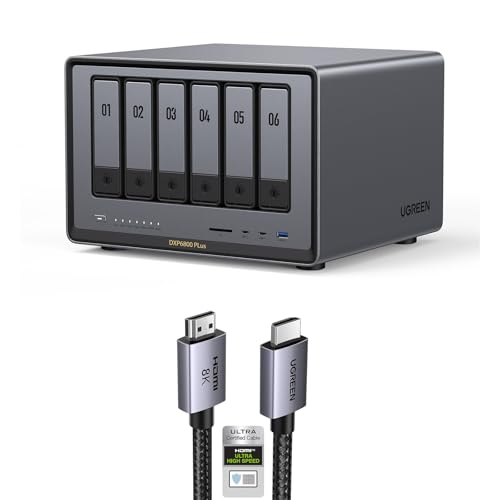
UGREEN 6-Bay Core i3 Desktop NAS
Best for: direct HDMI video output and 10GbE networking
- Number of Bays
- 6-Bay (what this guide is about)
- Drive Bays
- 6-Bay
- Network Connectivity
- 1x 10GbE, 1x 2.5GbE
- Processor
- 12th Gen Intel Core i3
- M.2 NVMe Slots
- 2 slots
- Form Factor
- Desktop
This 6-bay desktop NAS pairs a 12th Gen 6-core Intel Core i3 processor with six SATA drive bays and two M.2 NVMe slots. For wired networking, you get one 10GbE port alongside a 2.5GbE port, plus an HDMI interface bundled with an 8K HDMI cable. It supports multiple RAID configurations and up to 208TB of storage, making it suitable if you need direct display output and high-speed local data backups.
Pros
- Bundled 6.6-foot 8K HDMI cable for hardware video output
- Equipped with one 10GbE and one 2.5GbE network port
- 12th Gen Intel Core i3 processor with 6 cores and 8 threads
- Storage expansion with six SATA bays and two M.2 NVMe slots
Cons
- Asymmetric network ports with only one 10GbE interface instead of dual 10GbE
- Requires manual firmware update for improved app functionality
Good fit if
- You want an HDMI connection with an included 8K cable for direct display output.
- You need a combination of 10GbE and 2.5GbE networking for local file transfers.
- You plan to build a hybrid storage setup using six SATA drives and two M.2 NVMe SSDs.
Skip if
- You need dual identical 10GbE ports rather than a mixed 10GbE and 2.5GbE setup.
- You prefer an all-flash NVMe enclosure without traditional 3.5-inch or 2.5-inch SATA bays.
Verdict: UGREEN 6-Bay Desktop NAS with HDMI delivers fast 10GbE networking and responsive 12th Gen Core i3 performance across six SATA bays and two NVMe slots. It stands out if you need direct video output alongside high-capacity local RAID storage.

UGREEN iDX6011 6-Bay AI NAS
Best for: Creators needing local AI and 10GbE speeds
- Number of Bays
- 6-Bay (what this guide is about)
- Network Connectivity
- Dual 10GbE, Thunderbolt 4
- Processor
- Intel Core Ultra 5 125H
- RAM Capacity
- 32GB LPDDR5X
- RAID Support
- JBOD/Basic/RAID 0/1/5/6/10
- Target Audience
- Content Creators
The UGREEN iDX6011 is a 6-bay NAS built for creators and small teams. It features an Intel Core Ultra 5 125H processor with 32GB LPDDR5X memory and supports up to 208TB of storage. Dual 10GbE and Thunderbolt 4 ports enable fast data transfers. Local AI tools help manage files, photos, and videos. This system suits users who need high performance and private data control.
Pros
- Intel Core Ultra 5 125H processor with 14 cores
- 32GB LPDDR5X memory for responsive multitasking
- Dual 10GbE and Thunderbolt 4 connectivity
- Supports up to 208TB across six bays
- Local AI search and file organization tools
Cons
- Heavier build at 13.9 pounds
- Larger dimensions than standard desktop NAS units
- No mention of included hard drives
Good fit if
- You need fast transfer speeds for large media files
- You want local AI tools for photo and video management
- You require high RAM for Docker or virtual machines
Skip if
- You prefer a compact, lightweight desktop unit
- You need pre-installed hard drives
- You only require basic file storage without AI features
Verdict: UGREEN iDX6011 6-Bay AI NAS suits creators who need high-speed connectivity and local AI processing for large media libraries. It fits teams that value private data management and flexible storage configurations.

UGREEN DXP6800 Ultra 6-Bay NAS
Best for: Teams needing Thunderbolt 4 and dual 10GbE
- Number of Bays
- 6-Bay (what this guide is about)
- Drive Bays
- 6-Bay
- Network Connectivity
- Dual 10GbE
- Processor
- Intel 120U
- RAM Capacity
- 8GB DDR5
- Included Storage
- Diskless
The UGREEN DXP6800 Ultra is a 6-bay NAS built for teams and small businesses. It features an Intel 120U 10-core processor and 8GB of DDR5 RAM. Dual 10GbE ports support high-bandwidth workflows. You get up to 208TB of storage across six SATA bays and two M.2 NVMe slots. Thunderbolt 4 connectivity and local AI photo tools round out the feature set.
Pros
- Intel 120U 10-core processor with speeds up to 5.0GHz
- Dual 10GbE network ports for multi-user connectivity
- Up to 208TB total capacity via 6 SATA and 2 M.2 NVMe slots
- Thunderbolt 4 ports for fast workstation transfers
Cons
- Limited to 8GB base DDR5 RAM
- Sold diskless with no included drives
- No mention of eSATA or USB 3.2 Gen 2x2 ports
Good fit if
- You need dual 10GbE for team file sharing
- You require Thunderbolt 4 for creative workflows
- You want local AI photo management tools
Skip if
- You need pre-installed hard drives
- You require more than 8GB of base RAM
- You only have single 1GbE network connections
Verdict: The UGREEN DXP6800 Ultra 6-Bay NAS fits small businesses needing Thunderbolt 4 and dual 10GbE connectivity. It supports heavy VM and Docker workloads with its 10-core CPU.
Specifications side by side
| Spec | Synology 6-Bay 2.5 Inch NAS DS620slim | Asustor 6-Bay NAS with Quad M.2 NVMe Slots | Asustor Flashstor 6-Bay All-NVMe NAS | UGREEN 6-Bay 10GbE Intel i5 NAS | TERRAMASTER 6-Bay 8GB DDR5 NAS | Asustor FS6806X 6-Bay NVMe NAS | TERRAMASTER 6-Bay 10-Core NAS | TERRAMASTER 6-Bay Quad-Core NAS | LincPlus 6-Bay 10GbE Hybrid NAS | UGREEN 6-Bay Core i3 Desktop NAS | Asustor Lockerstor 6-Bay NAS with Dual 5GbE | UGREEN NASync 6-Bay NAS with 8K HDMI | UGREEN 6-Bay Core i3 Desktop NAS | UGREEN iDX6011 6-Bay AI NAS | UGREEN DXP6800 Ultra 6-Bay NAS |
|---|---|---|---|---|---|---|---|---|---|---|---|---|---|---|---|
| Drive Bays | 6 Bay | 6-Bay | 6 Bay | 6-Bay | 6-Bay | 6-Bay | 6bay | 6-Bay | 6-Bay | 6-Bay | 6-Bay | 6-Bay | 6-Bay | not specified | 6-Bay |
| Network Connectivity | not specified | Dual 2.5GbE | Dual 2.5GbE | not specified | 2 x 2.5GbE | 10GbE | not specified | not specified | 1x 10GbE | 1x 10GbE, 1x 2.5GbE | Dual 5GbE | Dual 10GbE | 1x 10GbE, 1x 2.5GbE | Dual 10GbE, Thunderbolt 4 | Dual 10GbE |
| Processor | not specified | Intel Celeron N5105 | Intel Celeron N5105 | 12th Gen Intel Core i5 | Intel N95 | AMD Ryzen Embedded V3C14 | 10-core | Quad-Core | Intel N100 | Intel i3 1215u | Intel Celeron N5105 | 12th Gen Intel Core i5 | 12th Gen Intel Core i3 | Intel Core Ultra 5 125H | Intel 120U |
| RAM Capacity | 2GB DDR3L | 8GB DDR4 | not specified | not specified | 8GB DDR5 4800MHz | 8GB DDR5 ECC | 8GB DDR5 | 8GB DDR5 | 16GB LPDDR5 | not specified | 8GB DDR4 | not specified | not specified | 32GB LPDDR5X | 8GB DDR5 |
| M.2 NVMe Slots | not specified | 4 slots | 6x M.2 NVMe SSD slots | not specified | 2 slots | 6 slots | not specified | not specified | 4 slots | 2 slots | 4 slots | not specified | 2 slots | not specified | not specified |
| Included Storage | Diskless | Diskless | not specified | Diskless | Diskless | not specified | Diskless | Diskless | Diskless | Diskless | not specified | not specified | not specified | not specified | Diskless |
| RAID Support | not specified | not specified | not specified | JBOD, Basic, RAID 0/1/5/6/10 | not specified | RAID 0, 1, 5, 6, 10, JBOD | not specified | not specified | not specified | JBOD, Basic, RAID 0, 1, 5, 6, 10 | not specified | not specified | not specified | JBOD/Basic/RAID 0/1/5/6/10 | RAID 0/1/5/6/10 |
| Form Factor | 2.5 Inch | not specified | not specified | not specified | not specified | not specified | not specified | not specified | not specified | Desktop | not specified | Desktop | Desktop | not specified | not specified |
| Hardware Interface | not specified | M.2 NVMe, HDMI | not specified | not specified | not specified | not specified | not specified | not specified | SATA, M.2 NVMe | not specified | not specified | HDMI | HDMI | not specified | not specified |
| Number of Bays | 6-Bay | 6-Bay | 6-Bay | 6-Bay | 6-Bay | 6-Bay | 6-Bay | 6-Bay | 6-Bay | 6-Bay | 6-Bay | 6-Bay | 6-Bay | 6-Bay | 6-Bay |
| Target Audience | not specified | Content Creators | Content Creators | not specified | not specified | not specified | not specified | not specified | not specified | not specified | Content Creators | not specified | not specified | Content Creators | not specified |
| Processor Cores | not specified | Quad-Core | not specified | not specified | Quad-Core | not specified | not specified | Quad-Core | not specified | not specified | not specified | not specified | not specified | not specified | not specified |
| Dimensions | 6.89 × 5.94 × 4.76 inches | 2.76 × 3.61 × 3.57 inches | 7.6 × 12.1 × 1.89 inches | not specified | 8.74 × 9.45 × 6.06 inches | 12.2 × 13 × 3.54 inches | 11.8 × 7.87 × 9.84 inches | 9.06 × 5.91 × 6.69 inches | 5.91 × 8.27 × 1.38 inches | not specified | 13 × 12 × 13 inches | not specified | not specified | 11.6 × 10.2 × 7.44 inches | not specified |
| Weight | 3.09 pounds | 10.8 pounds | 4.41 pounds | 13.4 pounds | 4.6 pounds | 1.71 pounds | 9.92 pounds | 7.5 pounds | 1.76 pounds | not specified | 9.7 pounds | not specified | not specified | 13.9 pounds | not specified |
| Size | 6-bay; 2GB DDR3L | 6 Bay | 6 Bay | DXP6800 Pro 6-Bay | 6Bay, 4-Core CPU, 8GB RAM, F6-424 | 6 Bay | Medium | 34cm x 28cm x 19cm | 5.9 x 8.2 x 1.5 inches | DXP6800 Plus,6-Bay (Diskless) | 6 Bay | not specified | not specified | not specified | not specified |
| Color | white | black / black | FS6706T | Grey | Black | Black | black | BlackS. | Neutral | Grey | Black | not specified | not specified | not specified | Grey |
| Model | DS620slim | AS6706T | FS6706T | DXP6800 Pro 6-Bay (Diskless) | F6-424 | FS6806X | F6-424 MAX | F6-424 | N2 | DXP6800 Plus,6-Bay (Diskless) | AS6706T v2 | DXP6800 Pro | not specified | iDX6011 | DXP6800 Ultra |
For other storage needs, you might prefer the best vertical storage sheds for your space.
How to Choose the Right 6-Bay NAS
-
Check RAM Capacity
Start by verifying the installed RAM. Most units in this guide include 8GB, which handles basic tasks well. If you plan to run virtual machines or heavy databases, look for models with 16GB. The Asustor AS6806T offers 16GB ECC DDR5 for data integrity. Higher memory allows smoother multitasking when multiple users access files simultaneously. Ensure the RAM type matches your workload needs for long-term stability.
-
Compare Network Ports
Network speed defines how fast you transfer files. Standard 2.5GbE ports are common and sufficient for most home users. For faster transfers, consider dual 10GbE options like the LincPlus N2 or the Asustor AS6806T. These ports reduce bottlenecks when moving large video files. Check if the ports are single or dual. Dual ports allow for link aggregation or separate network traffic, improving overall efficiency for busy small offices or creative teams.
-
Evaluate Form Factor
Size matters for placement. Desktop models like the UGREEN DXP6800 Pro are larger but offer robust expansion. Compact units like the LincPlus N2 measure just 5.9 x 8.2 x 1.5 inches, fitting easily on shelves. Consider your available space and ventilation needs. Larger cases often provide better airflow for multiple drives. Choose a form factor that fits your desk or rack without compromising cooling or accessibility for drive maintenance.
-
Review Hardware Interfaces
Look for M.2 NVMe slots if you need SSD caching. The Asustor AS6706T includes four NVMe slots to boost performance. HDMI ports, found on the UGREEN DXP6800 Pro, allow direct video output for media servers. SATA bays handle traditional hard drives. Matching interfaces to your storage strategy is crucial. NVMe slots speed up access to frequently used files. HDMI support simplifies home theater setups. Verify these ports exist before purchasing to avoid extra hardware costs.
-
Assess Processor Power
The CPU handles transcoding and file management. Quad-core processors like the Intel N95 in the TerraMaster F6-424 are efficient for general use. For heavier loads, 10-core options like the TerraMaster F6-424 MAX provide more headroom. AMD Ryzen chips in the Asustor AS6806T offer strong multi-threading. Match the core count to your expected workload. More cores help when running multiple containers or transcoding 4K video streams simultaneously without slowing down the system.
Frequently asked questions
Which 6-bay NAS is best for compact 2.5-inch drive storage?
The Synology DS620slim is the best choice for users prioritizing a small footprint. It supports 2.5-inch drives and measures 5.94 by 4.76 by 6.89 inches. This model includes 2GB of DDR3L memory. It suits workflows that rely heavily on snapshots rather than high-speed networking.
What is the fastest networking option available in a 6-bay NAS?
The UGREEN DXP6800 Ultra offers dual 10GbE ports for maximum wired speed. It also includes Thunderbolt 4 connectivity for high-bandwidth transfers. This model features a 10-core CPU to handle heavy VM and Docker workloads efficiently. It is ideal for teams needing robust local storage speeds.
Which 6-bay NAS supports all-NVMe SSD storage for silent operation?
The Asustor Flashstor FS6706T is an all-NVMe solution designed for silent operation. It lacks mechanical drives, making it ideal for creative studios. The unit measures 12.1 by 1.89 by 7.6 inches and weighs 4.41 pounds. It provides fast all-flash performance with dual 2.5GbE networking.
Does any 6-bay NAS support DDR5 memory for better performance?
Yes, several models include DDR5 RAM for improved application speed. The TerraMaster F6-424 and the UGREEN NASync DXP6800 Pro both feature 8GB of DDR5 memory. These units offer dual 2.5GbE ports. They suit users who prioritize modern memory standards and network flexibility over raw CPU power.
Which NAS is best for 4K video editing and virtualization?
The Asustor FS6806X is a specialized tool for 4K and 8K video editing. It uses an all-flash NVMe design for speed and silence. This model weighs only 1.71 pounds and measures 13 by 3.54 by 12.2 inches. It fits professionals managing large media libraries or virtualized environments.
Is there a 6-bay NAS with direct HDMI video output?
The UGREEN DXP6800 Pro includes an HDMI interface for direct display connection. It features a 12th Gen Core i3 processor and 10GbE networking. The unit supports six SATA bays and two NVMe slots. It stands out if you need direct video output alongside high-capacity local RAID storage.
Which NAS is best for Unraid users with flash drives?
The LincPlus LincStation N2 is a hybrid NAS designed for Unraid setups. It offers 10GbE networking and four NVMe slots in a compact 5.9 by 8.2 by 1.5 inch footprint. It supports SATA and M.2 NVMe interfaces. This model is efficient for users focused on flash and 2.5-inch drives.