Best NAS Devices Under $1000: 15 Spec-Based Picks
As an Amazon Associate we earn from qualifying purchases. Links on this page are affiliate links.
Finding the best network attached storages under $1000 requires looking at hard specs rather than marketing claims. We compared 15 devices to help you choose the right hardware for your needs. Our top pick is the QNAP TS-431K 4-Bay NAS, which leads for basic home file storage and backup thanks to its 4-bay capacity and 1GbE connectivity. Every selection here is based strictly on the specifications published on the listings. This guide helps you decide which device matches your storage volume and networking requirements.
Quick picks
The best fit for you
- You need basic home file storage without high performance QNAP TS-431K 4-Bay NAS The QNAP TS-431K offers 4 bays and 1GbE connectivity for modest entry-level needs.
- You want a ready-to-use rackmount system with included drives BUFFALO TeraStation 4-Bay 8TB Rackmount NAS The BUFFALO TeraStation provides 8TB capacity in a rackmount form with 2.5GbE speeds.
- You are a content creator needing 12 NVMe slots Asustor Flashstor 12-Bay NVMe NAS The Asustor Flashstor features 12 NVMe slots and 2.5GbE networking for fast file access.
- You require high throughput and massive local storage for teams UGREEN 6-Bay 10GbE Intel i5 NAS The UGREEN DXP6800 Pro includes dual 10GbE ports and strong processing power.
- You prioritize high-speed networking and AI media management MINISFORUM N5 Pro 5-Bay Desktop NAS The MINISFORUM N5 Pro offers dual 10GbE ports and an AMD Ryzen processor.
Our 15 picks

QNAP TS-431K 4-Bay NAS
Best for: basic home file storage and backup
- Drive Bays
- 4 Bay
- Network Connectivity
- 2 x 1 GbE
- Processor
- Annapurna Labs AL-214
- RAM Capacity
- 1GB DDR3
- Included Storage
- Diskless
- Dimensions
- 6.3 × 8.62 × 6.3 inches
This QNAP TS-431K is a 4-bay NAS designed for home use. It features an Annapurna Labs AL-214 quad-core 1.7 GHz processor and 1GB of DDR3 RAM. You get two 1 GbE ports for network connectivity and three USB 3.2 Gen 1 ports for peripheral expansion. The unit supports four 3.5-inch SATA drives. It weighs 4.4 pounds and measures 8.62 by 6.3 by 6.3 inches. This setup suits users needing basic storage without high-speed networking.
Pros
- Annapurna Labs AL-214 quad-core 1.7 GHz processor
- Two 1 GbE network ports
- Three USB 3.2 Gen 1 ports
- Supports four 3.5-inch SATA drives
Cons
- Only 1GB of DDR3 RAM limits multitasking
- 1 GbE ports cap network speed at 125 MB/s
- No mention of NVMe cache support in the data
Good fit if
- You need a basic 4-bay storage solution for home files
- You prefer a compact desktop form factor under 5 pounds
- You want USB expansion for backups or peripherals
Skip if
- You require 2.5 GbE or faster network speeds
- You plan to run heavy virtualization or container workloads
- You need more than 4 drive bays
Verdict: QNAP TS-431K 4-Bay NAS is a modest entry-level device for users who only need basic file storage and do not require high-performance networking or extensive memory for complex applications.

BUFFALO TeraStation 4-Bay 8TB Rackmount NAS
Best for: rackmount setups with included drives
- Drive Bays
- 4-Bay
- Network Connectivity
- 2.5GbE
- Included Storage
- 8TB (4x2TB)
- RAID Support
- RAID 0, 5, 6
- Form Factor
- Rackmount
This rackmount NAS includes four 2TB drives for 8TB total capacity. It ships in RAID 5 for 4TB usable space, or you can switch to RAID 6 for redundancy or RAID 0 for full 8TB. A native 2.5GbE port handles fast transfers without new cables. It offers 256-bit drive encryption and syncs with cloud services like Dropbox and Azure. The 3-year warranty covers the drives.
Pros
- Includes 8TB of pre-tested hard drives
- Native 2.5GbE port for fast transfers
- 256-bit drive encryption for data security
- Cloud sync with Dropbox, Azure, and OneDrive
Cons
- Rackmount form factor limits desktop placement
- Only one 2.5GbE port available
- No mention of built-in USB ports
Good fit if
- You need a rackmount solution with drives included
- You want 2.5GbE speeds without new cables
- You require 3-year warranty coverage
Skip if
- You need a compact desktop form factor
- You require multiple network ports
- You prefer a diskless system
Verdict: BUFFALO TeraStation 8TB 4-Bay Rackmount NAS fits users who need a ready-to-use rackmount system with included drives and 2.5GbE connectivity.

Synology 2-Bay 8TB NAS
Best for: Home users needing simple, pre-loaded storage
- Drive Bays
- 2-Bay
- Network Connectivity
- 1 x RJ-45 1GbE
- Processor
- Realtek RTD1619B
- RAM Capacity
- 2 GB DDR4
- Included Storage
- 8TB
- Processor Cores
- Quad-Core
The Synology DS223 is a 2-bay NAS with an 8TB Seagate IronWolf bundle. It uses a Realtek RTD1619B quad-core processor and 2GB DDR4 RAM. You get one 1GbE LAN port and three USB 3.2 ports. This setup suits users who need reliable home storage without the bulk of larger systems. It is a compact solution for basic file management and media access.
Pros
- Includes 8TB of pre-installed storage
- Quad-core 1.7 GHz processor
- Three USB 3.2 Gen 1 ports
- Hot-swap drive bays
Cons
- Only 2GB of system RAM
- Single 1GbE network port
- No 10GbE connectivity option
Good fit if
- You need a simple, compact storage unit
- You want pre-installed drives to save setup time
- You have basic home network speeds
Skip if
- You require high-speed 10GbE networking
- You need to store more than 8TB initially
- You plan to run heavy virtualization tasks
Verdict: Synology DS223 8TB NAS is a practical entry-level choice for users who value ease of use and included storage over raw performance or expansion capacity.

Asustor Flashstor 12-Bay NVMe NAS
Best for: Content creators needing 12 NVMe slots
- Drive Bays
- 12 Bay
- Network Connectivity
- 2.5 Gigabit Ethernet
- Processor
- Intel Celeron N5105
- RAM Capacity
- 4GB DDR4-2933
- M.2 NVMe Slots
- 12 x M.2 NVMe slots
- Target Audience
- Content Creators
The Asustor Flashstor 12 Pro is a 12-bay NAS built for content creators who need speed. It uses a Quad-Core Intel Celeron N5105 CPU and 4GB DDR4-2933 RAM. The chassis holds 12 M.2 NVMe drives, not traditional hard disks. It connects via 2.5 Gigabit Ethernet. This setup offers high throughput for large media files. It suits users who prioritize SSD performance over bulk storage capacity.
Pros
- 12 M.2 NVMe slots for all-flash storage
- Quad-Core Intel Celeron N5105 processor
- 2.5 Gigabit Ethernet connectivity
- 4GB DDR4-2933 RAM
Cons
- Supports only M.2 NVMe SSDs, not 3.5-inch HDDs
- 4GB RAM is lower than competitors with 8GB
- No mention of included drives in specifications
Good fit if
- You need high-speed NVMe storage for video editing
- You want a dedicated all-flash NAS solution
- You require 12 drive slots for SSDs
Skip if
- You prefer to use traditional 3.5-inch hard drives
- You need more than 4GB of system RAM
- You want a 2-bay or 4-bay desktop unit
Verdict: Asustor FS6712X 12-Bay All-Flash NAS is the right choice for creators who need 12 NVMe slots and fast 2.5GbE networking. It delivers specialized performance for large files rather than general-purpose bulk storage.

UGREEN 6-Bay 10GbE Intel i5 NAS
Best for: Teams needing high throughput and large local storage
- Drive Bays
- 6-Bay
- Processor
- 12th Gen Intel Core i5
- Included Storage
- Diskless
- RAID Support
- JBOD, Basic, RAID 0/1/5/6/10
- Weight
- 13.4 pounds
This 6-bay NAS features a 12th Gen Intel Core i5 processor and dual 10GbE ports. It supports up to 208TB of storage across six SATA and two M.2 NVMe bays. The device includes RAID levels 0, 1, 5, 6, and 10. It runs Docker and Plex via Docker. This unit suits teams needing high throughput and massive local capacity.
Pros
- 12th Gen Intel Core i5 processor
- Dual 10GbE network ports
- Supports up to 208TB capacity
- Six SATA and two M.2 NVMe bays
Cons
- No Wi-Fi support
- Diskless design
- Heavy at 13.4 pounds
Good fit if
- You need 10GbE network speeds
- You require large local storage capacity
- You run Docker containers
Skip if
- You need built-in Wi-Fi
- You want pre-installed drives
- You prefer a lightweight desktop unit
Verdict: UGREEN NASync DXP6800 Pro 6-Bay offers strong processing power and dual 10GbE ports for teams needing high throughput and massive local capacity.

Asustor FS6806X 6-Bay NVMe NAS
Best for: professional video editing and virtualization
- Drive Bays
- 6-Bay
- Network Connectivity
- 10GbE
- Processor
- AMD Ryzen Embedded V3C14
- RAM Capacity
- 8GB DDR5 ECC
- M.2 NVMe Slots
- 6 slots
- RAID Support
- RAID 0, 1, 5, 6, 10, JBOD
The Asustor FS6806X is a 6-bay all-flash NAS built for high-performance environments. It uses six M.2 NVMe slots with PCIe 4.0 support and an AMD Ryzen Embedded V3C14 quad-core processor. The system includes 10GbE networking and 8GB DDR5 ECC memory. This configuration targets users needing fast file access and data integrity for professional workloads like video editing and virtualization.
Pros
- Six M.2 NVMe slots with PCIe 4.0 support
- 10GbE Ethernet for high-speed data transfers
- AMD Ryzen Embedded V3C14 quad-core processor
- 8GB DDR5 ECC memory for data stability
- Silent operation due to all-flash architecture
Cons
- Requires separate purchase of NVMe drives
- Only includes 8GB of system memory
- Limited to 10GbE networking ports
Good fit if
- You need fast storage for 4K or 8K video editing
- You require high bandwidth for large file transfers
- You want silent operation in a professional studio
Skip if
- You need pre-installed hard drives for immediate use
- You require 25GbE or higher network speeds
- You are looking for a budget-friendly desktop NAS
Verdict: Asustor 6-Bay NVMe Enterprise NAS delivers specialized performance for content creators who prioritize speed and silence over included storage capacity.

Synology DS223j 4TB 2.5 Inch SSD NAS
Best for: Silent, low-power 2.5-inch SSD storage
- Drive Bays
- 2-Bay
- Network Connectivity
- 1GbE
- Processor
- RTD1619B 4-Core 1.7GHz
- RAM Capacity
- 1GB DDR4
- Included Storage
- 4TB
- Form Factor
- 2.5 Inch
This 2-bay NAS comes with pre-installed 2.5-inch SSDs for fast, quiet storage. It uses a quad-core 1.7GHz CPU and 1GB of memory. The system supports 1GbE networking and Btrfs snapshots for data protection. It runs at low power. You get a compact white unit with 4TB of total SSD capacity. It suits users who want silent operation and fast file access in a small footprint.
Pros
- Includes 4TB of 2.5-inch SSD storage
- Quad-core 1.7GHz RTD1619B processor
- Low 17.3W energy consumption
- Btrfs file system with snapshot support
Cons
- Only 1GB of RAM limits heavy multitasking
- Single 1GbE network port restricts throughput
- No mention of expansion slots for more drives
Good fit if
- You need a silent, low-power NAS for light use
- You prefer SSDs for faster read/write speeds
- You want a pre-configured unit with 4TB capacity
Skip if
- You require 10GbE networking for high bandwidth
- You need more than 2 drive bays
- You want to expand RAM beyond 1GB
Verdict: Synology DS223j 2-Bay 2.5-inch SSD NAS offers a quiet, efficient solution for small offices or home users who prioritize speed and low power over expansion. It fits those who need 4TB of fast storage without the noise of traditional hard drives.
Synology DS223j 16TB 3.5 Inch NAS
Best for: Home users needing plug-and-play storage
- Drive Bays
- 2-Bay
- Network Connectivity
- 1 x 1GbE
- Processor
- RTD1619B 4-Core 1.7GHz
- RAM Capacity
- 1GB DDR4
- Included Storage
- 16TB
- Form Factor
- 3.5 Inch
The Synology DS223j is a two-bay NAS with 16TB of pre-installed storage. It uses a quad-core 1.7GHz CPU and 1GB of DDR4 memory. The device includes one 1GbE port for network connections. It runs on the Btrfs file system with snapshot technology for data protection. This unit suits users who need high capacity without buying drives separately. It is designed for efficient, low-energy home data management.
Pros
- Includes 16TB of 3.5-inch HDD storage
- Quad-core 1.7GHz RTD1619B processor
- Btrfs file system with snapshot support
- Low 17.3 W energy consumption
Cons
- Only 1GB of system memory
- Single 1GbE network port
- No mention of RAM upgrade capability
Good fit if
- You want pre-installed storage to save time
- You need basic home file backup
- You prioritize energy efficiency
Skip if
- You require 10GbE network speeds
- You need to run heavy virtual machines
- You plan to upgrade RAM later
Verdict: Synology DS223j 16TB NAS is a ready-to-use storage solution for home users who value convenience and capacity over high-speed networking or expandability.

TERRAMASTER 6-Bay Quad-Core NAS
Best for: high-capacity team file storage
- Drive Bays
- 6-Bay
- Processor
- Quad-Core
- RAM Capacity
- 8GB DDR5
- Included Storage
- Diskless
- Dimensions
- 9.06 × 5.91 × 6.69 inches
- Weight
- 7.5 pounds
The TerraMaster F6-424 is a 6-bay NAS drive designed for users needing high capacity and robust processing power. It features a quad-core processor and 8GB of DDR5 RAM to handle demanding tasks. This diskless unit allows you to install your own hard drives, giving you full control over storage costs and configuration. It is a practical choice for small businesses or teams requiring reliable file server capabilities.
Pros
- Six drive bays for high storage capacity
- 8GB DDR5 RAM for improved multitasking
- Quad-core processor for efficient data handling
- Diskless design for flexible drive selection
Cons
- No internal storage included in the package
- Larger physical footprint compared to 2-bay models
- Heavier build at 7.5 pounds
Good fit if
- You need to store large amounts of data
- You want to choose your own hard drives
- You require a dedicated file server for a team
Skip if
- You need a pre-loaded drive solution
- You require a compact desktop footprint
- You only need minimal storage capacity
Verdict: TerraMaster 6-Bay NAS with 8GB DDR5 offers a powerful, expandable foundation for users who prioritize storage volume and processing speed over compactness. It suits those building a custom storage array for professional or heavy personal use.

BUFFALO TeraStation 8TB 4-Bay NAS
Best for: Users wanting pre-installed drives and 2.5GbE
- Drive Bays
- 4-Bay
- Included Storage
- 8TB (4x2TB)
- RAID Support
- RAID 0, RAID 5, RAID 6
- Form Factor
- Desktop
The BUFFALO TeraStation Essentials 2025 is a 4-bay desktop NAS with 8TB of included storage. It features a 2.5GbE port for fast transfers and supports RAID 0, 5, and 6. The system ships pre-configured with 4x2TB drives for immediate use. It includes 256-bit drive encryption and cloud sync options. This diskless-free setup suits users needing reliable, out-of-the-box data protection without complex assembly.
Pros
- Includes 8TB (4x2TB) hard drives
- Native 2.5GbE port
- RAID 0, 5, and 6 support
- 256-bit drive encryption
Cons
- Limited to 4 drive bays
- No mention of Thunderbolt connectivity
- No mention of USB 3.2 Gen 2 ports
Good fit if
- You want pre-installed drives for immediate use
- You need 2.5GbE network speeds
- You require RAID 6 redundancy
Skip if
- You need more than 4 bays
- You prefer a diskless unit
- You require Thunderbolt 3/4 connectivity
Verdict: BUFFALO TeraStation 2025 4-Bay 8TB NAS offers immediate readiness with included drives and 2.5GbE speeds. It fits users who want a secure, pre-configured storage solution without buying separate hard drives.

TERRAMASTER 4-Bay 1U Rackmount NAS with 8GB DDR5
Best for: High-performance rack-mount NAS needs
- Drive Bays
- 4-Bay
- Processor
- Intel Core i3-1215U
- RAM Capacity
- 8GB DDR5
- Included Storage
- Diskless
- RAID Support
- RAID 0, 1, 5, 6, 10, TRAID, TRAID+
- Dimensions
- 14.2 × 17.3 × 1.77 inches
View on Amazon: TERRAMASTER 4-Bay 1U Rackmount NAS with 8GB DDR5
The TerraMaster U4-500 is a 4-bay NAS with an Intel Core i3-1215U processor and 8GB DDR5 RAM. It features dual 10GbE ports and dual M.2 NVMe slots for high performance. This 1U rack-mount unit suits businesses needing fast data access and secure processing. It supports up to 96TB of storage across four bays. You get enterprise-class specs in a compact form factor.
Pros
- 8GB DDR5 RAM for smooth multitasking
- Dual 10GbE ports with 20Gbps aggregate bandwidth
- Intel Core i3-1215U processor with AES-NI
- Dual M.2 NVMe slots with Hyper Cache
- Supports RAID 0, 1, 5, 6, 10, TRAID, and TRAID+
Cons
- Diskless design requires separate drive purchases
- 1U rack-mount form factor needs compatible mounting
- Heavier at 13.7 pounds than desktop units
Good fit if
- You need dual 10GbE connectivity for fast transfers
- You require 8GB DDR5 RAM for virtualization
- You prefer a 1U rack-mount chassis
Skip if
- You want a pre-loaded storage solution
- You need a desktop form factor
- You require less than 4 drive bays
Verdict: TerraMaster U4-500 4-Bay NAS delivers strong performance with 8GB DDR5 RAM and dual 10GbE ports. It fits users who need a rack-mount NAS for virtualization or high-speed data access.
MINISFORUM N5 Pro 5-Bay Desktop NAS
Best for: High-speed networking and AI media management
- Drive Bays
- 5-Bay
- Network Connectivity
- 1 x 10GbE, 1 x 5GbE
- Processor
- AMD Ryzen AI 9 HX PRO 370
- M.2 NVMe Slots
- 3 slots
- Included Storage
- 128GB SSD
- Form Factor
- Desktop
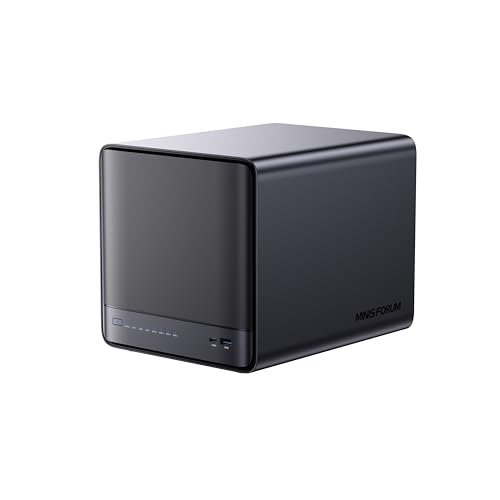
The MINISFORUM N5 Pro is a 5-bay desktop NAS powered by an AMD Ryzen AI 9 HX PRO 370 processor. It features dual network ports for 5GbE and 10GbE connectivity, supporting link aggregation for up to 15Gbps throughput. The unit includes a built-in 128GB system disk and supports up to 188TB of storage across its drive bays. It suits users needing high-speed data access and AI-driven media management.
Pros
- AMD Ryzen AI 9 HX PRO 370 processor with 12 cores
- Dual 5GbE and 10GbE ports with link aggregation
- Supports up to 188TB of storage capacity
- Built-in 128GB system disk for MinisCloud OS
- AI-driven photo and video analysis capabilities
Cons
- Built-in 128GB disk occupies one M.2 slot
- Requires separate purchase of storage drives
- Uses proprietary MinisCloud OS instead of standard NAS software
Good fit if
- You need 10GbE networking for fast data transfer
- You want AI features for media organization
- You prefer a compact 5-bay desktop form factor
Skip if
- You require pre-installed hard drives
- You prefer standard NAS operating systems like Synology or QNAP
- You need more than five drive bays
Verdict: The MINISFORUM N5 Pro 5-Bay Desktop NAS fits users who prioritize high-speed networking and AI media tools. Its powerful processor and dual 10GbE port make it ideal for demanding home servers.

MINISFORUM N5 Pro Desktop NAS
Best for: High-performance home labs and AI workflows
- Drive Bays
- 5-Bay
- Network Connectivity
- 1 x 10GbE, 1 x 5GbE
- Processor
- AMD Ryzen AI 9 HX PRO 370
- RAM Capacity
- Expandable up to 96GB DDR5 ECC
- M.2 NVMe Slots
- 3 slots
- Included Storage
- 128GB SSD
The MINISFORUM N5 Pro is a 5-bay desktop NAS powered by an AMD Ryzen AI 9 HX PRO 370 processor. It offers 128GB of SSD storage and includes 1x10GbE plus 1x5GbE network ports. The system supports up to 96GB of expandable DDR5 ECC memory. This setup handles large files and multi-user access efficiently. It suits users needing high compute power alongside substantial storage capacity.
Pros
- AMD Ryzen AI 9 HX PRO 370 12-core processor
- 1x10GbE and 1x5GbE network ports
- Expandable up to 96GB DDR5 ECC memory
- Supports 5 SATA HDDs and multiple NVMe slots
Cons
- OCuLink port does not support hot-swapping
- Includes only 128GB SSD, no HDDs
- Uses proprietary MinisCloud OS
Good fit if
- You need high CPU performance for AI or media tasks
- You require 10GbE networking speeds
- You want to expand RAM up to 96GB
Skip if
- You prefer standard consumer NAS operating systems
- You need hot-swappable external GPU connections
- You want a device with pre-installed hard drives
Verdict: The MINISFORUM N5 Pro 5-Bay AI NAS fits users who prioritize raw processing power and high-speed networking over traditional NAS simplicity. Its unique architecture supports demanding workloads and extensive memory upgrades.

Asustor Lockerstor 6-Bay NAS with Dual 5GbE
Best for: media creators needing NVMe caching
- Drive Bays
- 6-Bay
- Network Connectivity
- Dual 5GbE
- Processor
- Intel Celeron N5105
- RAM Capacity
- 8GB DDR4
- M.2 NVMe Slots
- 4 slots
- Target Audience
- Content Creators
This 6-bay NAS targets content creators with an Intel Celeron N5105 quad-core processor and 8GB of DDR4 RAM. It features dual 5GbE ports and four M.2 NVMe slots for caching or high-speed storage. The hybrid design supports both SATA HDDs and SSDs, making it suitable for 4K media workflows and file sharing in professional environments.
Pros
- Intel Celeron N5105 quad-core processor
- Dual 5GbE Ethernet ports
- Four M.2 NVMe SSD slots
- 8GB DDR4 RAM
- Hybrid HDD and SSD support
Cons
- DDR4 memory instead of DDR5
- 9.7 pound weight
- No 10GbE ports included
Good fit if
- You need fast caching for video editing
- You want dual 5GbE connectivity
- You require 6 drive bays
Skip if
- You need DDR5 RAM
- You require built-in 10GbE ports
- You prefer a lighter device
Verdict: Asustor 6-Bay Creator NAS fits users who need dedicated NVMe caching and dual 5GbE ports for media workflows. It suits those who prioritize storage flexibility over the latest RAM standards.

UGREEN NASync 6-Bay NAS with 8K HDMI
Best for: High-speed local storage and media management
- Drive Bays
- 6-Bay
- Network Connectivity
- Dual 10GbE
- Processor
- 12th Gen Intel Core i5
- Form Factor
- Desktop
- Hardware Interface
- HDMI
This 6-bay desktop NAS features a 12th Gen Intel Core i5 processor and dual 10GbE network ports. It supports up to 208TB of storage across SATA and NVMe bays. The device includes an HDMI interface for direct display output. You get a unified app for storage and file management. This setup suits users needing high throughput and local data security.
Pros
- 12th Gen Intel Core i5 10-core processor
- Dual 10GbE ports with 20G aggregated bandwidth
- 6 SATA bays plus 2 M.2 NVMe slots
- HDMI hardware interface for direct connection
Cons
- No mention of included storage drives
- Desktop form factor requires significant desk space
- Limited to SATA and NVMe without eSATA
Good fit if
- You need fast 10GbE transfer speeds for large files
- You want a powerful CPU for virtualization or media transcoding
- You prefer a unified app for all NAS functions
Skip if
- You need a compact 1U rackmount design
- You require pre-installed hard drives for immediate use
- You only need basic 1GbE connectivity
Verdict: UGREEN DXP6800 Pro 6-Bay NAS offers robust processing power and high-speed networking for users managing large media libraries. It fits professionals who need local storage security and fast data access without cloud dependency.
Specifications side by side
| Spec | QNAP TS-431K 4-Bay NAS | BUFFALO TeraStation 4-Bay 8TB Rackmount NAS | Synology 2-Bay 8TB NAS | Asustor Flashstor 12-Bay NVMe NAS | UGREEN 6-Bay 10GbE Intel i5 NAS | Asustor FS6806X 6-Bay NVMe NAS | Synology DS223j 4TB 2.5 Inch SSD NAS | Synology DS223j 16TB 3.5 Inch NAS | TERRAMASTER 6-Bay Quad-Core NAS | BUFFALO TeraStation 8TB 4-Bay NAS | TERRAMASTER 4-Bay 1U Rackmount NAS with 8GB DDR5 | MINISFORUM N5 Pro 5-Bay Desktop NAS | MINISFORUM N5 Pro Desktop NAS | Asustor Lockerstor 6-Bay NAS with Dual 5GbE | UGREEN NASync 6-Bay NAS with 8K HDMI |
|---|---|---|---|---|---|---|---|---|---|---|---|---|---|---|---|
| Drive Bays | 4 Bay | 4-Bay | 2-Bay | 12 Bay | 6-Bay | 6-Bay | 2-Bay | 2-Bay | 6-Bay | 4-Bay | 4-Bay | 5-Bay | 5-Bay | 6-Bay | 6-Bay |
| Network Connectivity | 2 x 1 GbE | 2.5GbE | 1 x RJ-45 1GbE | 2.5 Gigabit Ethernet | not specified | 10GbE | 1GbE | 1 x 1GbE | not specified | not specified | not specified | 1 x 10GbE, 1 x 5GbE | 1 x 10GbE, 1 x 5GbE | Dual 5GbE | Dual 10GbE |
| Processor | Annapurna Labs AL-214 | not specified | Realtek RTD1619B | Intel Celeron N5105 | 12th Gen Intel Core i5 | AMD Ryzen Embedded V3C14 | RTD1619B 4-Core 1.7GHz | RTD1619B 4-Core 1.7GHz | Quad-Core | not specified | Intel Core i3-1215U | AMD Ryzen AI 9 HX PRO 370 | AMD Ryzen AI 9 HX PRO 370 | Intel Celeron N5105 | 12th Gen Intel Core i5 |
| RAM Capacity | 1GB DDR3 | not specified | 2 GB DDR4 | 4GB DDR4-2933 | not specified | 8GB DDR5 ECC | 1GB DDR4 | 1GB DDR4 | 8GB DDR5 | not specified | 8GB DDR5 | not specified | Expandable up to 96GB DDR5 ECC | 8GB DDR4 | not specified |
| M.2 NVMe Slots | not specified | not specified | not specified | 12 x M.2 NVMe slots | not specified | 6 slots | not specified | not specified | not specified | not specified | not specified | 3 slots | 3 slots | 4 slots | not specified |
| Included Storage | Diskless | 8TB (4x2TB) | 8TB | not specified | Diskless | not specified | 4TB | 16TB | Diskless | 8TB (4x2TB) | Diskless | 128GB SSD | 128GB SSD | not specified | not specified |
| RAID Support | not specified | RAID 0, 5, 6 | not specified | not specified | JBOD, Basic, RAID 0/1/5/6/10 | RAID 0, 1, 5, 6, 10, JBOD | not specified | not specified | not specified | RAID 0, RAID 5, RAID 6 | RAID 0, 1, 5, 6, 10, TRAID, TRAID+ | not specified | 0, 1, 5, 6 | not specified | not specified |
| Form Factor | not specified | Rackmount | not specified | not specified | not specified | not specified | 2.5 Inch | 3.5 Inch | not specified | Desktop | not specified | Desktop | Desktop | not specified | Desktop |
| Hardware Interface | not specified | not specified | not specified | not specified | not specified | not specified | not specified | not specified | not specified | not specified | not specified | M.2 NVMe, HDMI | M.2 NVMe, HDMI | not specified | HDMI |
| Number of Bays | 4-Bay | 4-Bay | 2-Bay | 12-Bay | 6-Bay | 6-Bay | not specified | not specified | 6-Bay | 4-Bay | 4-Bay | not specified | not specified | 6-Bay | 6-Bay |
| Size | NAS | 8TB (4x2TB) | 8TB | 12 Bay | DXP6800 Pro 6-Bay | 6 Bay | b) 4TB (2 x 2TB) 2.5" SSDs | b) 16TB (2 x 8TB) 3.5" HDD | 34cm x 28cm x 19cm | 8TB | 4Bay, 1U, 6Core CPU, 8GB RAM | N5 Pro(0+128G) | N5 Pro(0+128G) | 6 Bay | not specified |
| Target Audience | not specified | not specified | not specified | Content Creators | not specified | not specified | not specified | not specified | not specified | not specified | not specified | not specified | not specified | Content Creators | not specified |
| Processor Cores | not specified | not specified | Quad-Core | not specified | not specified | not specified | Quad-Core | Quad-Core | Quad-Core | not specified | not specified | not specified | not specified | not specified | not specified |
| Dimensions | 6.3 × 8.62 × 6.3 inches | not specified | 9.17 × 4.25 × 6.5 inches | 7.6 × 12.1 × 1.89 inches | not specified | 12.2 × 13 × 3.54 inches | 12 × 6 × 12 inches | 12 × 6 × 12 inches | 9.06 × 5.91 × 6.69 inches | not specified | 14.2 × 17.3 × 1.77 inches | not specified | 7.95 × 7.83 × 9.92 inches | 13 × 12 × 13 inches | not specified |
| Weight | 4.4 pounds | not specified | 6.68 pounds | 3.02 pounds | 13.4 pounds | 1.71 pounds | not specified | not specified | 7.5 pounds | not specified | 13.7 pounds | not specified | not specified | 9.7 pounds | not specified |
| Color | White | Black | Seagate IronWolf | neutral | Grey | Black | White | White | BlackS. | not specified | Black | Black | Black | Black | not specified |
| Model | TS-431K | TS3420R0804S | not specified | 110565 | DXP6800 Pro 6-Bay (Diskless) | FS6806X | DS223j | DS223j | F6-424 | TS3430D0804S | U4-500 | N5-Pro-P370(0+128) | N5-PRO-P370 | AS6706T v2 | DXP6800 Pro |
You may also want to view best storage sheds under 1000 for your equipment housing needs.
How to Choose the Right NAS
-
Check Network Port Speed
Network speed determines how fast you access files across your local area network. Most entry-level models, like the Synology 2-Bay 8TB NAS, offer standard 1GbE ports. This is sufficient for basic home backups and media streaming. If you handle large video files or work with a team, look for 2.5GbE or 10GbE ports. The Asustor Flashstor 12-Bay includes fast 2.5GbE connectivity. The UGREEN 6-Bay 10GbE Intel i5 NAS provides dual 10GbE ports for maximum throughput. Faster ports reduce transfer times significantly when moving large datasets between devices.
-
Select the Right Form Factor
Your physical space and installation environment dictate the form factor. Desktop units sit on a desk or shelf and are easy to access. The BUFFALO TeraStation 8TB 4-Bay NAS is a desktop model that includes pre-installed drives for immediate use. Rackmount units fit into server cabinets and save desk space. The TerraMaster 4-Bay 1U Rackmount NAS is designed for this purpose. It has a low profile that slides into standard racks. Choose a desktop unit for home offices and a rackmount model for dedicated server rooms or closets where space is tight.
-
Evaluate RAM Capacity
RAM allows the NAS to handle multiple tasks smoothly, such as running virtual machines or caching data. Entry-level 2-bay models often have 2GB of RAM, which is adequate for simple file storage. The Synology 2-Bay 8TB NAS includes 2GB RAM for basic home use. If you plan to run containers or virtual machines, you need more memory. The TerraMaster 6-Bay Quad-Core NAS offers 8GB of DDR5 RAM. This higher capacity supports heavier multitasking and improves response times when many users access files simultaneously.
-
Consider Storage Density
The number of bays determines how many drives you can install. Fewer bays mean a smaller footprint but less total storage. The Synology DiskStation 8TB 2-Bay NAS is compact and includes 8TB of pre-loaded storage. For larger libraries, choose a model with more slots. The Asustor Flashstor 12-Bay NVMe NAS offers 12 slots for NVMe drives, ideal for content creators. The QNAP 8-Bay 10GbE Quad-Core NAS provides high-density storage for bulk data. Match the bay count to your current drive collection and future expansion plans.
-
Look for HDMI Output
Some NAS drives include HDMI ports, allowing you to connect directly to a television or monitor. This feature turns the NAS into a media player. The UGREEN NASync 6-Bay NAS with 8K HDMI supports high-resolution playback without a separate computer. The UGREEN 6-Bay Core i3 Desktop NAS also features HDMI for direct media management. This is useful for streaming movies from your local library to a living room TV. If you only need file storage and do not plan to use the NAS as a display source, this feature is optional.
Frequently asked questions
Which NAS is best for basic home file storage?
The QNAP TS-431K is the best choice for basic home file storage. It features four drive bays and standard 1GbE network connectivity. This modest entry-level device handles simple backups without requiring high-performance networking or extensive memory for complex applications. It is ideal if you do not need advanced features.
What is the best rackmount NAS under $1000?
The BUFFALO TeraStation 4-Bay 8TB Rackmount NAS is the top pick for rackmount setups. It comes with included 8TB of storage across four bays. The unit also features 2.5GbE connectivity for faster data transfer. This ready-to-use system is perfect for users who need a pre-configured rackmount solution.
Is there a NAS with NVMe slots for content creators?
Yes, the Asustor Flashstor 12-Bay NVMe NAS is designed for content creators. It provides twelve NVMe slots for fast storage. The device includes 2.5GbE networking to handle large files efficiently. It delivers specialized performance for media workflows rather than general-purpose bulk storage, making it a strong choice for creative professionals.
Which NAS offers the highest network speed for teams?
The UGREEN NASync DXP6800 Pro offers dual 10GbE ports for high throughput. It features six drive bays for massive local capacity. The device includes strong processing power to support teams needing fast data access. This configuration is ideal for users who prioritize high-speed networking and large storage volumes over compactness.
Can I get a NAS with included drives for home use?
The Synology DS223j 16TB NAS is a ready-to-use solution for home users. It includes two 8TB 3.5-inch hard drives for immediate storage. The device features a quad-core processor and 1GbE connectivity. This plug-and-play option is best for those who value convenience and capacity over high-speed networking or expandability.
Which NAS is best for silent operation?
The Synology DS223j 4TB NAS is ideal for silent operation. It uses two 2.5-inch SSDs to eliminate the noise of traditional hard drives. The device offers 4TB of fast storage with a quad-core processor. This quiet, efficient solution fits small offices or home users who prioritize speed and low power consumption.