15 Best NAS Devices Under $1500, Compared
As an Amazon Associate we earn from qualifying purchases. Links on this page are affiliate links.
Finding the best network attached storages under $1500 requires careful attention to hardware specifications. We compared 15 models based strictly on published specs to help you choose the right system. The Asustor Lockerstor 4-Bay Quad-Core NAS leads this list because it offers NVMe caching and 2.5GbE networking in a compact 4-bay chassis. This approach ensures you get accurate data on bays, ports, and processors without marketing fluff. Use this guide to decide which NAS fits your specific storage and speed needs.
Quick picks
The best fit for you
- You want the best overall NAS with NVMe support Asustor Lockerstor 4-Bay Quad-Core NAS The Asustor AS6604T offers 4 bays, quad-core processing, and 2.5GbE networking for flexible home server use.
- You need 10GbE and 2.5GbE ports for speed QNAP 4-Bay 10GbE SFP+ NAS The QNAP TS-431X3 provides robust networking with both 10GbE and 2.5GbE ports for efficient data management.
- You want included drives and 2.5GbE connectivity BUFFALO TeraStation 4-Bay 32TB NAS The BUFFALO TeraStation includes 32TB of storage and 2.5GbE connectivity for a ready-to-use secure system.
Our 15 picks
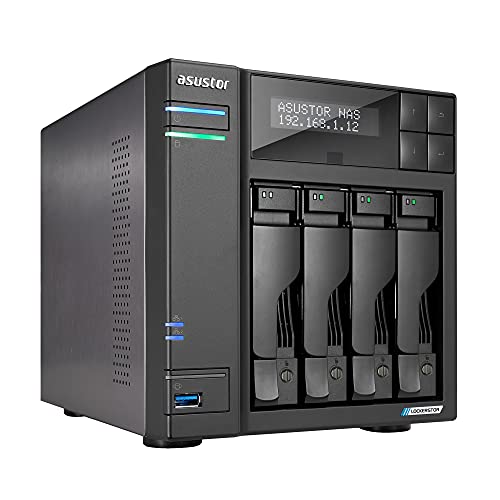
Asustor Lockerstor 4-Bay Quad-Core NAS
Best for: Home servers needing NVMe caching
- Drive Bays
- 4-Bay
- Network Connectivity
- 2x 2.5GbE
- Processor
- Quad-Core 2.0GHz
- RAM Capacity
- 4GB DDR4
- M.2 NVMe Slots
- 2 slots
- Included Storage
- Diskless
The Asustor AS6604T is a 4-bay NAS drive with a quad-core 2.0GHz processor and 4GB of DDR4 RAM. It features two 2.5GbE ports for reliable network connectivity and includes two M.2 NVMe slots for SSD caching. This diskless unit supports over 200 free apps for media and backup tasks. It suits users needing a balanced home or small office server with solid expandability options.
Pros
- Quad-core 2.0GHz CPU for multitasking
- Two 2.5GbE network ports
- Two M.2 NVMe SSD slots
- 4GB DDR4 RAM capacity
- Includes four free IP camera licenses
Cons
- Sold without internal hard drives
- Only 4GB of RAM for heavy virtualization
- No 10GbE or 1GbE ports listed
Good fit if
- You need fast local network transfers via 2.5GbE
- You want to add NVMe SSDs for caching
- You plan to use the unit as an NVR
Skip if
- You require pre-installed storage drives
- You need 10GbE network connectivity
- You want a rackmount form factor
Verdict: Asustor AS6604T 4-Bay NAS is a practical choice for users who want a flexible 4-bay system with NVMe support and 2.5GbE networking, provided you supply your own drives.

QNAP 4-Bay 10GbE SFP+ NAS
Best for: Users needing 10GbE and 2.5GbE ports
- Drive Bays
- 4-Bay
- Network Connectivity
- 1x 10GbE, 1x 2.5GbE, 1x 1GbE
- Processor
- AnnapurnaLabs AL-314
- RAM Capacity
- 4GB DDR3L
- Included Storage
- Diskless
- Dimensions
- 10 × 10 × 10 inches
This 4-bay NAS features a quad-core 1.7GHz processor and 4GB of DDR3L memory. It offers versatile networking with 10GbE, 2.5GbE, and 1GbE ports. The unit is diskless, allowing you to choose your drives. It weighs 5.1 pounds and measures 10 inches in height. This setup suits users needing high-speed data transfer and flexible connectivity options for their storage needs.
Pros
- Includes a 10GbE SFP+ port for high-speed connections
- Features a dedicated 2.5GbE port for faster local transfers
- Quad-core 1.7GHz processor handles multiple tasks
- Expandable RAM up to 8GB
Cons
- Only 4GB of RAM included by default
- Sold diskless, requiring separate drive purchases
- Heavier and bulkier than desktop alternatives
Good fit if
- You need 10GbE connectivity for fast network transfers
- You want to use your own hard drives
- You require multiple network port types
Skip if
- You need pre-installed storage drives
- You prefer a compact desktop form factor
- You do not need 10GbE networking
Verdict: QNAP TS-431X3 4-Bay NAS delivers robust networking options for users prioritizing speed. It fits those who need 10GbE and 2.5GbE ports for efficient data management.

Synology 12-Bay DiskStation Expansion Unit
Best for: expanding existing Synology NAS capacity
- Drive Bays
- 12-Bay
- Included Storage
- Diskless
- Dimensions
- 18.5 × 17.1 × 16.5 inches
- Weight
- 19.9 pounds
The Synology DX1215II is a diskless expansion unit that adds 12 drive bays to your existing Synology NAS. It connects via eSATA to increase storage capacity without needing a new server. The unit measures 18.5 inches long and weighs 19.9 pounds. It supports Synology HAT5300 drives for verified compatibility. This device suits users who need more space but already own a compatible Synology host.
Pros
- 12 drive bays for high capacity
- Diskless design reduces initial cost
- Plug-and-play eSATA connection
- 5-year limited warranty
Cons
- Requires a compatible Synology NAS host
- No internal drives included
- Limited to eSATA connectivity speeds
Good fit if
- You need to expand storage on an existing Synology NAS
- You want to add 12 more drive slots
- You prefer a diskless expansion chassis
Skip if
- You need a standalone NAS server
- You do not own a compatible Synology DiskStation
- You require 10GbE or higher internal connectivity
Verdict: Synology DX1215II 12-Bay Expansion Unit is a practical storage add-on for existing Synology owners. It fits users who need more bays but already have a capable NAS host.

Synology 5-Bay 10GbE Desktop NAS
Best for: Professional video editing teams
- Drive Bays
- 5-Bay
- Included Storage
- Diskless
- Network Connectivity
- 10GbE
- Intended Use
- Video Editors
- Dimensions
- 8.78 × 9.06 × 6.54 inches
- Weight
- 5.89 pounds
The Synology DS1525+ is a 5-bay NAS designed for professional video editing. It supports 10GbE networking for high-speed transfers and scales up to 300TB with expansion units. You get 1,181 MB/s speeds for 4K and 8K footage. It includes a 3-year warranty. This unit is diskless, so you must buy drives separately. It suits teams needing shared, high-capacity storage for media projects.
Pros
- 10GbE network connectivity for fast data transfer
- Supports up to 300TB total storage capacity
- 1,181 MB/s editing speeds for 4K and 8K
- 3-year warranty with enterprise support
Cons
- Diskless design requires separate drive purchases
- Only 5 bays compared to 8 or 12-bay competitors
- No mention of built-in 2.5GbE ports
Good fit if
- You edit 4K or 8K video over the network
- You need to scale storage up to 300TB
- You want 10GbE networking for your team
Skip if
- You need pre-installed drives for immediate use
- You require more than 5 drive bays
- You are on a tight budget for hardware
Verdict: Synology 5-Bay NAS for Video is a solid choice for post-production teams needing 10GbE speeds and massive scalability. It fits users who prioritize network performance and expansion over included storage.

Synology 8-Bay Expandable NAS Enclosure
Best for: Video production teams needing 8 bays
- Drive Bays
- 8-Bay
- Included Storage
- Diskless
- Dimensions
- 9.57 × 13.5 × 6.54 inches
- Weight
- 13.2 pounds
This is an 8-bay Synology NAS designed for high-performance video production. It supports up to 360TB of storage when expanded. The system handles 50+ concurrent users editing 4K or 8K projects. It features flexible networking with optional 10GbE or 25GbE cards. You get enterprise-grade data protection and a 3-year warranty. It is diskless, so you must supply your own drives.
Pros
- 8-bay capacity for large storage arrays
- Supports 25GbE network upgrade cards
- Handles 50+ concurrent video editing users
- 3-year warranty with enterprise support
Cons
- Sold diskless with no included storage
- Requires separate purchase for 25GbE connectivity
- No built-in 10GbE port listed in specs
Good fit if
- You need an 8-bay chassis for large archives
- You require 25GbE speeds for video editing
- You want enterprise support for critical data
Skip if
- You need a NAS with pre-installed drives
- You only have 2 to 4 hard drives
- You want built-in 25GbE without extra cards
Verdict: Synology DS1825+ 8-Bay NAS is a robust solution for teams needing high-density storage and fast network options. It fits video production studios that can add their own drives and network cards.

UGREEN 8-Bay Core i5 Dual 10GbE NAS
Best for: Large studios needing 10GbE and 8 bays
- Drive Bays
- 8-Bay
- Network Connectivity
- 2 x 10GbE
- Processor
- 12th Gen Intel Core i5
- M.2 NVMe Slots
- 2 slots
- Included Storage
- Diskless
- RAID Support
- JBOD, Basic, RAID 0/1/5/6/10
This 8-bay NAS features a 12th Gen Intel Core i5 processor and dual 10GbE ports for high-speed data transfer. It includes two M.2 NVMe slots and supports RAID 0, 1, 5, 6, and 10. The unit is diskless, meaning you must purchase drives separately. It offers a unified app for file and photo management. This device suits large studios and IT teams needing substantial local storage and processing power.
Pros
- 12th Gen Intel Core i5 10-core processor
- Dual 10GbE network ports with 20G aggregation
- 8 SATA bays plus 2 M.2 NVMe slots
- Supports RAID 0, 1, 5, 6, and 10
- Unified NASync app for storage and files
Cons
- No internal storage drives included
- Wired Ethernet only, no Wi-Fi support
- Large 8-bay form factor requires significant space
Good fit if
- You need massive local storage capacity up to 272TB
- You require high-speed 10GbE network connectivity
- You run demanding business or studio workloads
Skip if
- You prefer a compact 2-bay or 4-bay NAS
- You need built-in Wi-Fi connectivity
- You want a NAS with pre-installed drives
Verdict: UGREEN NAS DXP8800 Plus 8-Bay delivers enterprise-grade processing and dual 10GbE ports for teams managing large media files. It fits studios that need scalable storage and high throughput without relying on cloud services.

Synology DS223j 8TB SSD NAS
Best for: Home users needing fast SSD storage
- Drive Bays
- 2-Bay
- Network Connectivity
- 1GbE
- Processor
- RTD1619B 4-Core 1.7GHz
- RAM Capacity
- 1GB DDR4
- Included Storage
- 8TB
- Form Factor
- 2.5 Inch
The Synology DS223j is a compact 2-bay NAS designed for home users who need reliable storage without high power usage. It comes with 8TB of 2.5-inch SSD storage, offering faster read and write speeds than traditional hard drives. The quad-core 1.7GHz CPU handles basic file management tasks efficiently. You will appreciate the low 17.3W energy consumption and the Btrfs file system for data protection. This unit is ideal for small offices or home media libraries.
Pros
- Includes 8TB (2x 4TB) 2.5-inch SSDs for high-speed storage
- Low energy consumption at just 17.3 W during operation
- Btrfs file system with snapshot technology for data protection
- Compact 2-bay form factor fits easily in small spaces
Cons
- Only one 1GbE network port limits high-speed network transfers
- Fixed 1GB DDR4 memory cannot be upgraded
- 2.5-inch SSDs offer less total capacity than 3.5-inch HDD options
Good fit if
- You need a quiet, energy-efficient NAS for home use
- You want fast storage speeds from pre-installed SSDs
- You have limited desk space for a compact device
Skip if
- You require 10GbE or 2.5GbE network connectivity
- You need expandable RAM for heavy multitasking
- You want to store large media libraries exceeding 8TB
Verdict: Synology DS223j 2-Bay 2.5 Inch NAS is a solid entry-level choice for users prioritizing speed and efficiency over raw capacity. It fits home users who value low power draw and quick file access.
Synology DS223j 2-Bay 3.5 inch NAS
Best for: basic home file storage
- Drive Bays
- 2-Bay
- Network Connectivity
- 1GbE
- Processor
- RTD1619B 4-Core 1.7GHz
- RAM Capacity
- 1GB DDR4
- Included Storage
- 24TB
- Form Factor
- 3.5 Inch
The Synology DS223j is a 2-bay NAS drive designed for home or small office use. It features a quad-core 1.7GHz CPU and 1GB of DDR4 memory. The unit supports 3.5-inch hard drives, offering capacities up to 44TB in this lineup. It includes one 1GbE network port for connectivity. The system uses the Btrfs file system to protect data with snapshot technology. This model suits users who need reliable storage without high-speed networking demands.
Pros
- Quad-core 1.7GHz RTD1619B processor
- Supports 3.5-inch HDDs up to 44TB total
- Btrfs file system with snapshot technology
- Low energy consumption at 17.3 W
Cons
- Only one 1GbE network port
- 1GB DDR4 memory limits multitasking
- No 2.5GbE or 10GbE upgrade options
Good fit if
- You need simple file storage for a few users
- You prefer 3.5-inch drives for high capacity
- You want a quiet, low-power device
Skip if
- You require fast network transfers for large files
- You need to run multiple virtual machines
- You want expandable RAM beyond 1GB
Verdict: Synology DS223j 3.5-inch NAS provides solid basic storage for light users. It fits those who prioritize capacity and reliability over speed. It is not suitable for heavy workloads or fast network environments.

BUFFALO TeraStation 4-Bay 32TB NAS
Best for: Users needing included drives and 2.5GbE speed
- Drive Bays
- 4-Bay
- Included Storage
- 32TB (4x8TB)
- RAID Support
- RAID 0, RAID 5, RAID 6
- Form Factor
- Desktop
The BUFFALO TeraStation Essentials 2025 is a 4-bay desktop NAS with 32TB of included storage. It features a native 2.5GbE port for fast transfers and supports RAID 0, 5, and 6. The unit ships pre-configured in RAID 5 for 24TB usable space. It includes 256-bit drive encryption and cloud sync options. This drive suits users who want a ready-to-use system with professional-grade data protection.
Pros
- Includes 32TB storage (4x8TB drives)
- Native 2.5GbE network port
- Supports RAID 0, 5, and 6
- 256-bit drive encryption
- Cloud sync with Amazon S3 and Azure
Cons
- No 10GbE port for higher speeds
- Desktop form factor limits rack mounting
- Locked closed system architecture
Good fit if
- You need a fully pre-configured NAS with drives included
- You want 2.5GbE speeds without upgrading cables
- You require 256-bit drive encryption for security
Skip if
- You need a rackmount form factor for server rooms
- You require 10GbE networking for maximum throughput
- You prefer open-source software flexibility
Verdict: BUFFALO TeraStation 32TB 4-Bay NAS is a practical choice for users who want a ready-to-use system with 32TB of included storage and 2.5GbE connectivity. It fits small offices needing secure, encrypted file sharing without complex setup.

UGREEN DXP8800 Plus 8-Bay Desktop NAS
Best for: High-speed 10GbE transfers and mixed storage
- Network Connectivity
- Dual 10GbE
- Processor
- Intel Core i5 12th Gen
- Included Storage
- Diskless
- Form Factor
- Desktop
- Number of Bays
- 8-Bay
The UGREEN NASync DXP8800 Plus is an 8-bay desktop NAS driven by a 12th Gen Intel Core i5 processor with 10 cores and 12 threads. It features dual 10GbE ports capable of 20G aggregated bandwidth and supports up to 272TB of storage across SATA and M.2 NVMe bays. This unit suits users needing high throughput and massive capacity for large media libraries or professional workflows.
Pros
- 12th Gen Intel Core i5 10-core processor
- Dual 10GbE ports with 20G aggregated bandwidth
- Supports up to 272TB total capacity
- Combines SATA and M.2 NVMe drive bays
- Single app for Storage Manager and file access
Cons
- Diskless chassis requires separate drive purchases
- Higher power draw from Core i5 CPU
- Limited to 8 bays compared to 12-bay competitors
Good fit if
- You need fast 10GbE transfer speeds for large files
- You require high CPU performance for video editing
- You want to mix SATA and NVMe drives
Skip if
- You prefer a pre-filled storage solution
- You are on a tight budget for drives
- You need more than 8 drive bays
Verdict: UGREEN NASync DXP8800 Plus 8-Bay Desktop NAS delivers serious processing power and speed for users who prioritize performance over included storage. It is ideal for creators managing large media files who already own drives.

Synology DiskStation 2-Bay 16TB NAS
Best for: Users needing 16TB capacity and 2-bay efficiency
- Network Connectivity
- 2 x 1GbE
- Processor
- Celeron J4125 4-Core 2.0GHz
- RAM Capacity
- 6GB DDR4
- Included Storage
- 16TB
The Synology DS224+ is a 2-bay NAS featuring a Celeron J4125 quad-core processor and 6GB of DDR4 RAM. It comes with 16TB of included storage across two 8TB drives. Network connectivity relies on two 1GbE ports. This unit is designed for users needing reliable file management and data safeguarding with efficient power usage. It suits those prioritizing storage capacity and solid performance for everyday tasks.
Pros
- Includes 16TB storage (2 x 8TB HDDs)
- 6GB DDR4 RAM for better indexing speeds
- Celeron J4125 4-Core 2.0GHz CPU
- Low operational power usage at 15 watts
Cons
- Limited to 2 x 1GbE network ports
- Only 2 drive bays for expansion
- No 10GbE or 2.5GbE connectivity options
Good fit if
- You need high capacity without buying drives separately
- You want a compact 2-bay solution for home or small office
- You prioritize energy efficiency and data security features
Skip if
- You require 10GbE or 2.5GbE network speeds
- You need more than 2 drive bays for expansion
- You are building a high-performance video editing server
Verdict: Synology DS224+ 2-Bay NAS with 16TB Storage is a practical choice for users who need pre-installed capacity and efficient performance. It fits those who do not require high-speed networking or extensive drive expansion.

Synology DS225+ 2-Bay NAS
Best for: Home users needing 16TB of storage
- Drive Bays
- 2-Bay
- Processor
- Intel Celeron J4125 Quad-Core
- RAM Capacity
- 2 GB DDR4 non-ECC SODIMM
- Included Storage
- 16TB
- RAID Support
- Synology Hybrid RAID (SHR)
- Network Connectivity
- 5GbE, 1GbE
The Synology DS225+ is a 2-bay NAS featuring an Intel Celeron J4125 quad-core processor and 2 GB of non-ECC DDR4 RAM. It includes 16TB of storage and supports Synology Hybrid RAID. The unit offers 2.5 GbE connectivity for faster local transfers. You should consider this if you need reliable home storage with expandable memory and modern file system protections.
Pros
- Intel Celeron J4125 quad-core processor
- 16TB included storage capacity
- 2.5 GbE network connectivity
- RAM expandable up to 6 GB
Cons
- Only 2 drive bays limit capacity
- Base RAM is non-ECC DDR4
- No 10GbE port for high-speed networking
Good fit if
- You need a compact 2-bay solution
- You want 16TB of pre-installed storage
- You plan to expand the RAM later
Skip if
- You require more than 2 drive bays
- You need 10GbE connectivity for heavy workloads
- You want ECC memory for data integrity
Verdict: Synology DS225+ 2-Bay NAS with 16TB fits users who want a compact, pre-stocked NAS with room to upgrade memory. It is not suitable for those needing high-speed 10GbE connections or extensive drive expansion.
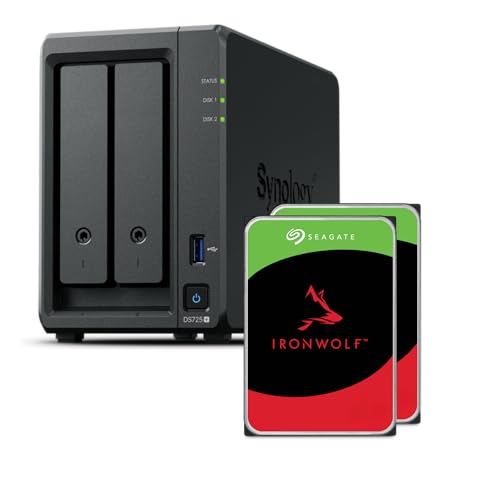
Synology 2-Bay AMD Ryzen NAS
Best for: home and small office storage needs
- Drive Bays
- 2-Bay
- Network Connectivity
- 1x 2.5GbE, 1x 1GbE
- Processor
- Ryzen R1600
- RAM Capacity
- 4GB
- M.2 NVMe Slots
- 2 slots
- Included Storage
- 8TB
The Synology DS725+ is a compact 2-bay NAS built for home and small office use. It features an AMD Ryzen R1600 quad-core processor and 4GB of RAM. You get one 2.5GbE and one 1GbE port for network connectivity. Two M.2 NVMe slots allow for cache expansion. With included 8TB storage, it supports up to 140TB with expansion units. It offers sequential read speeds up to 276 MB/s.
Pros
- AMD Ryzen R1600 quad-core processor for smooth multitasking
- Two M.2 NVMe slots for cache acceleration
- Dual network ports including 2.5GbE and 1GbE
- Up to 276 MB/s sequential read throughput
Cons
- Only two drive bays limit total storage capacity
- 4GB RAM is lower than many competitors in this price range
- No 10GbE port for high-speed enterprise connectivity
Good fit if
- You need a compact NAS for home or small office data storage
- You want to expand performance using M.2 NVMe SSDs
- You require reliable file management and media streaming capabilities
Skip if
- You need more than two drive bays for large storage arrays
- You require 10GbE networking for high-speed professional workflows
- You need more than 4GB of RAM for heavy virtualization tasks
Verdict: Synology DS725+ 2-Bay NAS with Ryzen is a capable entry point for users who value AMD processing power and NVMe caching in a small form factor. It suits home users and small offices who need flexible storage expansion without the bulk of larger systems.

UGREEN DXP6800 Ultra 6-Bay NAS
Best for: Teams needing 10GbE and Thunderbolt 4
- Drive Bays
- 6-Bay
- Network Connectivity
- Dual 10GbE
- Processor
- Intel 120U
- RAM Capacity
- 8GB DDR5
- Included Storage
- Diskless
- RAID Support
- RAID 0/1/5/6/10
The UGREEN DXP6800 Ultra is a 6-bay NAS built for teams handling large files. It features an Intel 120U 10-core processor and dual 10GbE ports for high bandwidth. You get Thunderbolt 4, 8K HDMI, and local AI photo tools. It supports up to 208TB with RAID options. This diskless unit suits small businesses needing centralized storage and virtualization.
Pros
- Dual 10GbE network ports for multi-user workflows
- Intel 120U 10-core processor with up to 5.0GHz speeds
- Thunderbolt 4 connectivity and 8K HDMI output
- Local AI tools for photo and surveillance management
Cons
- Sold diskless with no included HDDs or SSDs
- Higher power draw from 10-core CPU and 10GbE ports
- No mention of included RAM, limiting out-of-box performance
Good fit if
- You need dual 10GbE for fast team file transfers
- You require Thunderbolt 4 for direct workstation connections
- You want local AI for photo or surveillance organization
Skip if
- You need a ready-to-use device with drives included
- You only require 2.5GbE network speeds
- You prefer a simpler 2-bay or 4-bay form factor
Verdict: The UGREEN DXP6800 Ultra 6-Bay NAS fits small businesses that need high-speed 10GbE connectivity and powerful local AI features for file and media management.

QNAP 4-Bay Desktop NAS with 8GB RAM
Best for: Users needing high RAM and NVMe support
- Drive Bays
- 4-Bay
- Network Connectivity
- Dual 2.5GbE
- Processor
- Intel Pentium Gold G7400
- RAM Capacity
- 8GB DDR4
- M.2 NVMe Slots
- 2 slots
- Included Storage
- Diskless
This QNAP NAS features a 3.7 GHz Intel Pentium Gold processor and 8GB of DDR4 RAM. It includes dual 2.5GbE ports for faster network transfers and two M.2 NVMe slots for SSD caching or storage. The device supports 4K media playback via HDMI. It suits users needing strong processing power and memory for demanding tasks in a compact desktop form factor.
Pros
- 8GB DDR4 RAM supports up to 64GB expansion
- Dual 2.5GbE ports for accelerated file sharing
- Two M.2 NVMe slots for SSD storage or caching
- Intel Pentium Gold G7400 3.7 GHz processor
Cons
- Only two network ports limit redundancy options
- HDMI output is limited to 4K at 30Hz
- No 10GbE connectivity for high-speed backbone links
Good fit if
- You need ample RAM for virtualization or heavy multitasking
- You want to use NVMe drives for caching or storage
- You require 4K media playback capabilities
Skip if
- You need built-in 10GbE connectivity
- You require dual 10GbE ports for link aggregation
- You need more than four drive bays
Verdict: QNAP TVS-h474-8G 4-Bay NAS offers strong processing and memory for users who prioritize RAM capacity and SSD flexibility over higher network speeds.
Specifications side by side
| Spec | Asustor Lockerstor 4-Bay Quad-Core NAS | QNAP 4-Bay 10GbE SFP+ NAS | Synology 12-Bay DiskStation Expansion Unit | Synology 5-Bay 10GbE Desktop NAS | Synology 8-Bay Expandable NAS Enclosure | UGREEN 8-Bay Core i5 Dual 10GbE NAS | Synology DS223j 8TB SSD NAS | Synology DS223j 2-Bay 3.5 inch NAS | BUFFALO TeraStation 4-Bay 32TB NAS | UGREEN DXP8800 Plus 8-Bay Desktop NAS | Synology DiskStation 2-Bay 16TB NAS | Synology DS225+ 2-Bay NAS | Synology 2-Bay AMD Ryzen NAS | UGREEN DXP6800 Ultra 6-Bay NAS | QNAP 4-Bay Desktop NAS with 8GB RAM |
|---|---|---|---|---|---|---|---|---|---|---|---|---|---|---|---|
| Drive Bays | 4-Bay | 4-Bay | 12-Bay | 5-Bay | 8-Bay | 8-Bay | 2-Bay | 2-Bay | 4-Bay | not specified | not specified | 2-Bay | 2-Bay | 6-Bay | 4-Bay |
| Network Connectivity | 2x 2.5GbE | 1x 10GbE, 1x 2.5GbE, 1x 1GbE | not specified | not specified | not specified | 2 x 10GbE | 1GbE | 1GbE | not specified | Dual 10GbE | 2 x 1GbE | not specified | 1x 2.5GbE, 1x 1GbE | Dual 10GbE | Dual 2.5GbE |
| Processor | Quad-Core 2.0GHz | AnnapurnaLabs AL-314 | not specified | not specified | not specified | 12th Gen Intel Core i5 | RTD1619B 4-Core 1.7GHz | RTD1619B 4-Core 1.7GHz | not specified | Intel Core i5 12th Gen | Celeron J4125 4-Core 2.0GHz | Intel Celeron J4125 Quad-Core | Ryzen R1600 | Intel 120U | Intel Pentium Gold G7400 |
| RAM Capacity | 4GB DDR4 | 4GB DDR3L | not specified | not specified | not specified | not specified | 1GB DDR4 | 1GB DDR4 | not specified | not specified | 6GB DDR4 | 2 GB DDR4 non-ECC SODIMM | 4GB | 8GB DDR5 | 8GB DDR4 |
| M.2 NVMe Slots | 2 slots | not specified | not specified | not specified | not specified | 2 slots | not specified | not specified | not specified | not specified | not specified | not specified | 2 slots | not specified | 2 slots |
| Included Storage | Diskless | Diskless | Diskless | Diskless | Diskless | Diskless | 8TB | 24TB | 32TB (4x8TB) | Diskless | 16TB | 16TB | 8TB | Diskless | Diskless |
| RAID Support | not specified | not specified | not specified | not specified | not specified | JBOD, Basic, RAID 0/1/5/6/10 | not specified | not specified | RAID 0, RAID 5, RAID 6 | not specified | not specified | Synology Hybrid RAID (SHR) | not specified | RAID 0/1/5/6/10 | not specified |
| Form Factor | not specified | not specified | not specified | not specified | not specified | not specified | 2.5 Inch | 3.5 Inch | Desktop | Desktop | not specified | not specified | not specified | not specified | Desktop |
| Hardware Interface | M.2 NVMe | not specified | not specified | not specified | not specified | not specified | not specified | not specified | not specified | not specified | not specified | not specified | M.2 NVMe | not specified | not specified |
| Number of Bays | 4-Bay | 4-Bay | 12-Bay | not specified | 8-Bay | 8-Bay | not specified | not specified | 4-Bay | 8-Bay | not specified | 2-Bay | 2-Bay | 6-Bay | 4-Bay |
| Processor Cores | Quad-Core | not specified | not specified | not specified | not specified | not specified | Quad-Core | Quad-Core | not specified | not specified | not specified | Quad-Core | not specified | not specified | not specified |
| Intended Use | not specified | not specified | not specified | Video Editors | not specified | not specified | not specified | not specified | not specified | not specified | not specified | not specified | not specified | not specified | not specified |
| Dimensions | 9.06 × 6.69 × 7.3 inches | 10 × 10 × 10 inches | 18.5 × 17.1 × 16.5 inches | 8.78 × 9.06 × 6.54 inches | 9.57 × 13.5 × 6.54 inches | not specified | 12 × 6 × 12 inches | 12 × 6 × 12 inches | not specified | not specified | not specified | not specified | not specified | not specified | not specified |
| Weight | 6.53 pounds | 5.1 pounds | 19.9 pounds | 5.89 pounds | 13.2 pounds | not specified | not specified | not specified | not specified | not specified | not specified | 4.41 pounds | 6.61 pounds | not specified | not specified |
| Size | 4 Bay | 2.5GbE and 10GbE Ports | 270 mm x 300 mm x 340 mm | 166 mm x 230 mm x 223 mm | 166 mm x 343 mm x 243 mm | DXP8800 Plus,8-Bay | c) 8TB (2 x 4TB) 2.5" SSDs | d) 24TB (2 x 12TB) 3.5" HDD | 32TB | not specified | 1U | 16TB | not specified | not specified | Intel Pentium |
| Color | AS6604T | black | Black | Black | Black | Grey | White | White | not specified | Black | black | Black | gray | Grey | Black |
| Model | AS6604T | TS-431X3 | DX1215II | DS1525+ | DS1825+ | DXP8800 Plus,8-Bay (Diskless) | DS223j | DS223j | TS3430D3204S | DXP8800 Plus | not specified | DS225+/16TB-IW | DS725+/8TB-IW | DXP6800 Ultra | not specified |
For outdoor storage needs, see our guide on the best storage sheds under 1500.
How to choose the right NAS
-
Check network connectivity needs
You must match the network ports to your current setup. Most users benefit from 2.5GbE or 5GbE ports for faster file transfers. If you have a 10GbE switch, look for models like the QNAP TS-431X3 which includes both 10GbE and 2.5GbE ports. The Synology DS1525+ also offers 10GbE for video teams. Ensure your router supports these speeds to avoid bottlenecks. Without the right ports, your storage speed will be limited by the connection.
-
Select the correct form factor
Your physical space determines the form factor. Desktop units like the Asustor AS6604T sit on a desk and are easy to access. Rackmount options, such as the QNAP TS-432PXU-RP, fit into server cabinets for IT teams. Expansion units like the Synology DX1215II add bays to existing systems. Consider the weight and dimensions provided in the specs. A 19.9-pound unit needs a sturdy surface. Choose a form that fits your environment and usage pattern.
-
Evaluate RAM capacity requirements
RAM affects how many tasks the NAS can handle simultaneously. Models with 32GB RAM, like the QNAP TS-h973AX, support heavy virtualization. The QNAP TVS-h474-8G offers 8GB for strong processing. Basic units may have less. If you run multiple services, more RAM is essential. Check the listed capacity for each model. Higher RAM allows for smoother performance when accessing files or running applications. Match this spec to your expected workload complexity.
-
Look for NVMe caching support
NVMe slots can significantly speed up data access. The Asustor AS6604T and AS6704T both support M.2 NVMe interfaces. This allows you to add fast SSDs for caching frequently used files. The Synology DS725+ also includes NVMe support. This feature is useful for home servers and small offices. It improves performance without needing expensive internal drive arrays. Verify if the model has these slots if speed is a priority for your specific use case.
-
Decide on pre-installed storage
Some NAS devices come with drives installed, while others are diskless. The BUFFALO TS3430D3204S includes 32TB of storage, making it ready to use immediately. The Synology DS224+ comes with 16TB pre-installed. Other models, like the Asustor AS6604T, require you to buy drives separately. If you want simplicity, choose a unit with included storage. If you prefer customizing capacity, select a diskless model. Check the specs to see if drives are included in the box.
Frequently asked questions
Which NAS supports NVMe caching for faster performance?
The Asustor AS6604T and Synology DS725+ both feature M.2 NVMe slots. The Asustor model includes 4GB of RAM and 2.5GbE networking. The Synology DS725+ uses an AMD Ryzen processor and offers multiple network ports. These features help accelerate data access for demanding tasks.
What is the best NAS for 10GbE networking?
The QNAP TS-431X3 and Synology DS1525+ provide 10GbE ports. The QNAP also includes 2.5GbE connectivity. The Synology DS1525+ is a 5-bay desktop unit. These models suit users who need high throughput for large file transfers and professional video editing workflows.
Which NAS comes with pre-installed hard drives?
The BUFFALO TS3430D3204S includes 32TB of storage. The Synology DS224+ comes with 16TB. The Synology DS225+ also includes 16TB. The Asustor AS6704T includes four 1TB SSDs. These options save you from buying drives separately for immediate use.
Which NAS has the most RAM for virtualization?
The QNAP TS-h973AX features 32GB of RAM and nine drive bays. It supports 10GbE networking. This high memory capacity allows for heavy virtualization tasks. It is ideal for users running multiple virtual machines or database applications simultaneously.
Can I expand an existing Synology NAS?
Yes, the Synology DX1215II is a 12-bay expansion unit. It connects to existing Synology hosts to add capacity. It does not function as a standalone NAS. This unit is best for users who need more drive slots without replacing their main server.
Which NAS is best for rackmount installation?
The QNAP TS-432PXU-RP is a 4-bay rackmount NAS. It features 10GbE connectivity. This form factor fits standard server racks. It is designed for IT teams with existing rack infrastructure who need a compact, high-speed storage solution.
Which NAS includes an HDMI port?
The Asustor AS6704T includes an HDMI interface. It also has four 1TB SSDs and dual 5GbE ports. This allows for direct video output to a display. It suits users who want to connect the NAS directly to a monitor or TV.
What is the largest capacity NAS available?
The BUFFALO TS3430D3204S offers 32TB of included storage. The Synology DX1215II provides 12 bays for expansion. The QNAP TS-h973AX has nine bays. These models provide significant storage space for large media libraries or extensive business data archives.