12 Best Seagate NAS Hard Drives Under $300, Compared
As an Amazon Associate we earn from qualifying purchases. Links on this page are affiliate links.
Finding the best seagate NAS hard drives under $300 requires looking past marketing claims. We compared 12 models strictly by their published specifications. The top pick is the Seagate Exos 8TB Enterprise SATA HDD. Its 7200 RPM rotational speed delivers the high performance needed for heavy NAS workloads. This ranking focuses on data like cache size, form factor, and interface type. You will see how each drive fits different storage environments. Use this guide to decide which drive matches your specific capacity and speed requirements.
Quick picks
The best fit for you
- You need high-performance storage for heavy workloads Seagate Exos 8TB Enterprise SATA HDD Its 7200 RPM speed and 256MB cache deliver enterprise-grade performance for demanding NAS environments.
- You want a drive optimized for surveillance video Seagate SkyHawk 6TB Surveillance Hard Drive The 6TB capacity and 256MB cache are designed for continuous write workloads in DVR systems.
- You require portable backup for laptops and desktops Seagate Backup Plus Portable 4TB External Drive Its USB 3.0 interface and compact 4TB size make it ideal for simple external storage.
- You need high-capacity desktop backup without networking Seagate Expansion 8TB Desktop External Hard Drive This 8TB desktop drive offers large storage via USB 3.0 for straightforward external backups.
Our 12 picks

Seagate Exos 8TB Enterprise SATA HDD
Best for: High-performance NAS storage needs
- Storage Capacity
- 8TB
- Form Factor
- 3.5-inch
- Hardware Interface
- SATA 6Gb/s
- Rotational Speed
- 7200 RPM
- Cache Size
- 256MB
- Dimensions
- 4.3 × 1 × 6 inches
This is a Seagate Exos 7E8 enterprise drive with 8TB capacity. It runs at 7200 RPM with SATA 6Gb/s and 256MB cache. The 3.5-inch form factor fits standard NAS bays. You get high sustained transfer speeds suitable for heavy workloads. It is recertified with zero hours usage. This drive suits users needing fast, reliable storage for critical data.
Pros
- 7200 RPM rotational speed for fast data access
- 8TB storage capacity for large libraries
- 256MB cache buffer improves performance
- SATA 6Gb/s interface ensures compatibility
Cons
- Enterprise class drives can be louder than consumer models
- Recertified status means it is not brand new
- 3.5-inch form factor requires space in desktop chassis
Good fit if
- You need high performance for active NAS use
- You require 8TB of storage in one drive
- You prefer enterprise-grade reliability for critical files
Skip if
- You need a silent drive for a bedroom office
- You only have space for 2.5-inch drives
- You want a brand new unit with full retail warranty
Verdict: Seagate Exos 7E8 8TB 7200 RPM delivers enterprise speed for heavy NAS workloads. You should buy it if you prioritize performance and capacity over silence.

Seagate Backup Plus Portable 4TB External Drive
Best for: Portable backup for laptops and desktops
- Storage Capacity
- 4TB
- Hardware Interface
- USB 3.0
- Compatibility
- PC, Mac
- Dimensions
- 4.51 × 3.07 × 0.81 inches
- Weight
- 8.64 ounces
View on Amazon: Seagate Backup Plus Portable 4TB External Drive
This is a 4TB external hard drive designed for portable storage on PCs and Macs. It connects via USB 3.0 and fits in a compact metal enclosure measuring 4.51 by 3.07 inches. You get two months of Adobe Creative Cloud access and a two-year limited warranty. It suits users needing simple, mobile backup for laptops or desktops without internal installation.
Pros
- 4TB storage capacity for large file archives
- USB 3.0 interface for fast data transfer
- Compact 2.5-inch metal enclosure for portability
- Includes two-year limited warranty
- Compatible with both PC and Mac systems
Cons
- External USB design limits internal NAS integration
- No built-in RAID or network connectivity
- Requires separate power or bus power for larger transfers
Good fit if
- You need portable backup for a laptop
- You want simple plug-and-play storage for Mac or PC
- You prefer external drives over internal NAS units
Skip if
- You require internal NAS drive installation
- You need network-attached storage capabilities
- You want a drive for a multi-bay NAS system
Verdict: Seagate Backup Plus Portable 4TB External HDD is a practical portable drive for users who need simple, external storage for laptops or desktops. It fits buyers who prioritize mobility and basic backup over networked NAS features.

Seagate IronWolf 4TB NAS Hard Drive
Best for: 8-bay NAS environments with health monitoring needs
- Storage Capacity
- 4TB
- Form Factor
- 3.5-Inch
- Hardware Interface
- SATA 6Gb/s
- Cache Size
- 256MB
- Bay Support
- up to 8-Bay
- Dimensions
- 5.79 × 4.01 × 1.03 inches
The Seagate IronWolf 4TB is a 3.5-inch internal hard drive built for NAS servers. It features a SATA 6Gb/s interface and a 256MB cache. This drive supports up to 8-bay environments. It includes an integrated health management system. You get 1M hours MTBF for reliability. It suits multi-user NAS setups needing stable file sharing.
Pros
- 256MB cache for improved performance
- SATA 6Gb/s interface
- Supports up to 8-bay NAS enclosures
- Integrated IronWolf health management system
Cons
- 4TB capacity is lower than 6TB and 8TB options
- Three-year warranty is shorter than enterprise alternatives
- Heavier at 1.35 pounds
Good fit if
- You need a drive for an 8-bay NAS
- You want integrated health monitoring
- You require 256MB cache
Skip if
- You need more than 4TB storage
- You prefer a longer warranty period
- You want a lighter drive
Verdict: Seagate IronWolf 4TB NAS Drive fits users with 8-bay NAS systems who value health monitoring. It offers a solid 256MB cache for multi-user environments.

Seagate BarraCuda 5TB 2.5-Inch Hard Drive
Best for: compact 2.5-inch personal storage needs
- Storage Capacity
- 5 TB
- Form Factor
- 2.5in
- Hardware Interface
- Sata 6gb/s
- Rotational Speed
- 5400rpm
- Cache Size
- 128mb
- Dimensions
- 3.95 × 2.75 × 0.59 inches
This 5 TB drive uses a 2.5-inch form factor with SATA 6Gb/s connectivity. It spins at 5400 RPM and includes 128 MB of cache. The compact size suits portable or space-constrained setups. You get reliable internal storage for personal files. The rotational speed is standard for this class. It fits well if you need moderate capacity in a small drive.
Pros
- 5 TB storage capacity
- 2.5-inch compact form factor
- SATA 6Gb/s interface
- 128 MB cache buffer
Cons
- 5400 RPM rotational speed is slower than 7200 RPM drives
- Not designed for 24/7 NAS or surveillance workloads
- 2.5-inch size limits use in standard 3.5-inch NAS bays
Good fit if
- You need high capacity in a small 2.5-inch drive
- You are building a portable or compact storage solution
- You store personal files rather than running heavy server loads
Skip if
- You require 3.5-inch drives for standard desktop NAS enclosures
- You need high performance for video surveillance or enterprise use
- You want 7200 RPM speeds for faster data access
Verdict: Seagate Barracuda 5TB 2.5 Inch is a solid choice for users needing large storage in a compact 2.5-inch package. It fits personal archives and portable projects, not professional NAS arrays.

Seagate IronWolf 6TB NAS Hard Drive
Best for: Multi-bay NAS systems needing high speed
- Storage Capacity
- 6TB
- Form Factor
- 3.5-Inch
- Hardware Interface
- SATA 6Gb/s
- Rotational Speed
- 7200Rpm
- Cache Size
- 128MB
- Bay Support
- 1- to 8-Bay
This 3.5-inch internal drive offers 6TB of storage for NAS systems. It spins at 7200 RPM with a 128MB cache, delivering sustained data rates up to 210MB/s. The drive supports 1- to 8-bay configurations and includes a 180TB/year workload limit. You get 24/7 performance designed for multi-drive environments. It fits home, SOHO, and small business setups.
Pros
- 7200 RPM rotational speed for fast data access
- 128MB cache for improved performance
- 180TB/year workload rate limit
- Compatible with 1- to 8-bay NAS servers
Cons
- Heavier at 1.43 pounds compared to portable options
- Limited to SATA 6Gb/s interface
- No mention of vibration sensors in data
Good fit if
- You need high capacity for a 1- to 8-bay NAS
- You require 24/7 operation with a 180TB/year workload limit
- You want 7200 RPM speed for faster data transfers
Skip if
- You need a 2.5-inch drive for compact laptops
- You require external USB connectivity
- You are on a tight budget for smaller capacities
Verdict: Seagate IronWolf 6TB NAS Drive is a robust choice for users building or expanding a multi-bay NAS system who need high sustained performance and a substantial workload limit.

Seagate BarraCuda 5TB 2.5-Inch Hard Drive
Best for: Compact desktop storage with high capacity
- Storage Capacity
- 5TB
- Form Factor
- 2.5 Inch
- Hardware Interface
- SATA 6Gb/s
- Rotational Speed
- 5400 RPM
- Cache Size
- 128MB
- Compatibility
- PC
This Seagate BarraCuda drive offers 5TB of storage in a compact 2.5-inch form factor. It uses SATA 6Gb/s and spins at 5400 RPM with 128MB cache. While not a dedicated NAS drive like the IronWolf, its size fits small enclosures. You can use it for desktop backups or light file storage. It suits users needing space in a tight slot.
Pros
- 5TB storage capacity for large files
- Compact 2.5-inch form factor fits small bays
- SATA 6Gb/s interface for standard connectivity
- 128MB cache for data buffering
Cons
- 5400 RPM speed is slower than NAS drives
- Not designed for 24/7 NAS vibration resistance
- Lacks NAS-specific firmware optimizations
Good fit if
- You need 5TB in a 2.5-inch slot
- You are building a compact desktop storage solution
- You want high capacity for light use
Skip if
- You need 24/7 NAS reliability
- You require high rotational speed for performance
- You are installing in a 3.5-inch bay only
Verdict: Seagate BarraCuda 5TB 2.5-inch HDD fits users needing high capacity in a small form factor. It works well for desktop backups but lacks the durability for dedicated NAS arrays.

Seagate Expansion Portable 1TB External Hard Drive
Best for: Basic portable PC backup
- Storage Capacity
- 1TB
- Hardware Interface
- USB 3.0
- Compatibility
- PC
- Dimensions
- 4.61 × 3.15 × 0.59 inches
- Weight
- 6.35 ounces
View on Amazon: Seagate Expansion Portable 1TB External Hard Drive
The Seagate Expansion 1TB is a portable external hard drive designed for PC users. It connects via USB 3.0 for data transfer. The drive measures 4.61 by 3.15 by 0.59 inches and weighs 6.35 ounces. It offers 1TB of storage in a compact black casing. This unit suits users needing basic, mobile storage for laptops or desktops who do not require NAS integration.
Pros
- 1TB storage capacity for documents and media
- USB 3.0 hardware interface for connectivity
- Compact dimensions of 4.61 x 3.15 x 0.59 inches
- Lightweight design at 6.35 ounces
Cons
- Limited 1TB capacity compared to NAS drives
- USB 3.0 interface only, no network connectivity
- Not designed for 24/7 NAS operation
Good fit if
- You need portable storage for a single PC
- You want a lightweight drive for travel
- You require basic external backup for documents
Skip if
- You need network-attached storage for multiple devices
- You require high-capacity NAS drives over 1TB
- You need internal 3.5-inch drive installation
Verdict: Seagate Expansion 1TB Portable HDD is a simple external drive for single-PC backup. It fits users needing portable, low-capacity storage rather than network-attached solutions.
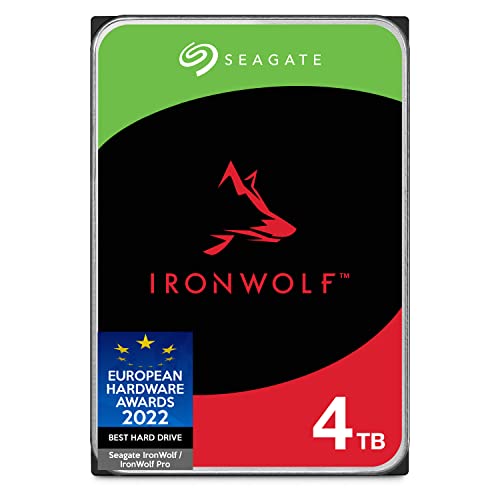
Seagate IronWolf 4TB CMR NAS Hard Drive
Best for: Small to medium NAS systems
- Storage Capacity
- 4TB
- Form Factor
- 3.5 Inch
- Hardware Interface
- SATA 6Gb/s
- Rotational Speed
- 5900 RPM
- Cache Size
- 64MB
- Recording Technology
- CMR
The Seagate IronWolf 4TB is a 3.5-inch internal drive built for NAS enclosures. It uses CMR technology and spins at 5900 RPM with 64MB of cache. This model supports up to 8-bay systems and includes IronWolf Health Management. It offers 1 million hours MTBF and a five-year warranty. You get reliable performance for multi-user environments with minimal vibration and noise.
Pros
- CMR recording technology for consistent performance
- Optimized for up to 8-bay NAS systems
- IronWolf Health Management for drive monitoring
- Low vibration and noise operation
Cons
- 4TB capacity is lower than 6TB or 8TB options
- 5900 RPM speed is slower than 7200 RPM drives
- 64MB cache is smaller than 256MB cache models
Good fit if
- You need a drive for a 1 to 8-bay NAS
- You prefer CMR technology over SMR
- You want a drive with health monitoring features
Skip if
- You require 7200 RPM rotational speed
- You need more than 4TB of storage
- You are building a large 12-bay array
Verdict: The Seagate IronWolf 4TB NAS HDD fits users who prioritize CMR reliability and health monitoring in small to medium NAS setups. It is a solid choice for 1 to 8-bay enclosures where vibration control matters.

Seagate SkyHawk 6TB Surveillance Hard Drive
Best for: Surveillance and DVR video storage
- Storage Capacity
- 6TB
- Form Factor
- 3.5 Inch
- Hardware Interface
- SATA 6GB/s
- Cache Size
- 256MB
- Workload Rate Limit
- 180TB/year
- Dimensions
- 5.79 × 4 × 1.03 inches
This Seagate SkyHawk drive is built for 24/7 video recording. It offers 6TB of storage with a 256MB cache. The 180TB/year workload rating handles write-heavy tasks better than standard desktop drives. RV sensors help maintain stability in multi-drive systems. It uses a SATA 6Gb/s interface. This drive suits users who need reliable storage for security cameras or DVR systems.
Pros
- 256MB cache for smoother data handling
- 180TB/year workload rating for heavy use
- RV sensors for RAID stability
- SATA 6Gb/s interface
Cons
- Optimized for surveillance, not general NAS use
- Image Perfect firmware may limit general file access
- No NAS-specific error recovery controls like IronWolf
Good fit if
- You need storage for a DVR or NVR system
- You run a multi-drive setup with RV sensors
- You prioritize 24/7 write reliability over file flexibility
Skip if
- You need a drive for general home NAS file storage
- You want IronWolf's NAS-specific error recovery controls
- You need a smaller 2.5-inch form factor
Verdict: Seagate SkyHawk 6TB Surveillance Drive is a solid choice for security camera systems. It fits users who need dedicated, high-workload storage for video recording.

Seagate One Touch 2TB Portable USB 3.0 Hard Drive
Best for: Portable USB backup for PC and Mac users
- Storage Capacity
- 2TB
- Hardware Interface
- USB 3.0
- Compatibility
- PC, Mac
- Dimensions
- 4.52 × 3.07 × 0.46 inches
- Weight
- 9.45 ounces
View on Amazon: Seagate One Touch 2TB Portable USB 3.0 Hard Drive
This Seagate One Touch drive offers 2TB of storage via a USB 3.0 interface. It features a compact 2.5-inch brushed metal enclosure weighing just 9.45 ounces. The unit includes a two-year limited warranty and Rescue Data Recovery Service. It is designed for simple plug-and-play backups on Windows and Mac systems. This portable drive suits users needing extra space for photos and files on the go.
Pros
- 2TB storage capacity
- USB 3.0 interface
- Compact 2.5-inch form factor
- Brushed metal enclosure
- Two-year Rescue Data Recovery Service
Cons
- USB 3.0 interface limits transfer speeds compared to NAS standards
- No built-in network connectivity for shared access
- Portable design lacks the durability of internal NAS drives
Good fit if
- You need portable storage for a laptop or desktop
- You want simple USB backup for photos and files
- You prefer a compact drive with a metal finish
Skip if
- You require a drive for a NAS enclosure
- You need 24/7 continuous operation reliability
- You want direct network connectivity via Ethernet
Verdict: Seagate One Touch 2TB Portable Drive is a compact, portable storage solution for individuals backing up personal files to a PC or Mac. It fits users who prioritize portability and simple USB connectivity over networked NAS features.

Seagate Expansion 5TB Portable
Best for: portable external backup and media storage
- Storage Capacity
- 5TB
- Form Factor
- 2.5 Inch
- Hardware Interface
- USB 3.0
- Compatibility
- PC, Mac
- Dimensions
- 3.15 × 0.59 × 4.61 inches
- Weight
- 6.4 ounces
This Seagate Expansion Portable drive offers 5TB of storage in a compact 2.5-inch form factor. It connects via USB 3.0 for drag-and-drop file saving on both Windows and Mac computers. The sleek black design measures 4.61 by 3.15 by 0.59 inches and weighs just 6.4 ounces. It includes Rescue Data Recovery Services and a limited warranty. This external hard drive is ideal for users needing portable storage for photos, movies, and music.
Pros
- Generous 5TB storage capacity
- Compact 2.5-inch portable design
- USB 3.0 interface for fast transfers
- Compatible with PC and Mac
Cons
- External USB connection limits NAS integration
- No internal SATA interface for direct drive bay mounting
- Requires reformatting for Time Machine support
Good fit if
- You need large portable storage for media files
- You want a lightweight drive for travel
- You back up data between Windows and Mac
Skip if
- You require internal NAS drive installation
- You need 24/7 continuous operation reliability
- You want a drive without external cables
Verdict: Seagate Expansion Portable 5TB External Drive provides ample space for personal media in a highly portable package. It suits individuals who prioritize capacity and portability over internal NAS integration or enterprise-grade reliability.

Seagate Expansion 8TB Desktop External Hard Drive
Best for: High-capacity external backup storage
- Storage Capacity
- 8TB
- Hardware Interface
- USB 3.0
- Form Factor
- Desktop
- Dimensions
- 8.58 × 8.4 × 3.15 inches
- Weight
- 2.85 pounds
View on Amazon: Seagate Expansion 8TB Desktop External Hard Drive
The Seagate 8TB Expansion Desktop offers high storage capacity in a standalone enclosure. It connects via USB 3.0 for fast file transfers. The drive supports Windows and Mac computers with automatic recognition. You get drag-and-drop simplicity right out of the box. This unit is ideal for users needing large, plug-and-play storage without NAS complexity.
Pros
- 8TB storage capacity for large media libraries
- USB 3.0 interface for fast data transfer speeds
- Automatic recognition for Windows and Mac setup
- Includes Rescue Data Recovery Services
Cons
- USB connection limits use to external backup, not NAS networking
- Requires reformatting for Time Machine compatibility
- Desktop form factor requires external power adapter
Good fit if
- You need massive local storage for media files
- You want a simple plug-and-play backup solution
- You prefer desktop drives over portable units
Skip if
- You require direct network connectivity for NAS use
- You need a drive that fits inside a NAS enclosure
- You want seamless Time Machine support without reformatting
Verdict: Seagate 8TB Expansion Desktop USB 3.0 is a high-capacity external drive for users who need simple, large-scale storage without network features. It fits those prioritizing capacity and ease of use over NAS integration.
Specifications side by side
| Spec | Seagate Exos 8TB Enterprise SATA HDD | Seagate Backup Plus Portable 4TB External Drive | Seagate IronWolf 4TB NAS Hard Drive | Seagate BarraCuda 5TB 2.5-Inch Hard Drive | Seagate IronWolf 6TB NAS Hard Drive | Seagate BarraCuda 5TB 2.5-Inch Hard Drive | Seagate Expansion Portable 1TB External Hard Drive | Seagate IronWolf 4TB CMR NAS Hard Drive | Seagate SkyHawk 6TB Surveillance Hard Drive | Seagate One Touch 2TB Portable USB 3.0 Hard Drive | Seagate Expansion 5TB Portable | Seagate Expansion 8TB Desktop External Hard Drive |
|---|---|---|---|---|---|---|---|---|---|---|---|---|
| Storage Capacity | 8TB | 4TB | 4TB | 5 TB | 6TB | 5TB | 1TB | 4TB | 6TB | 2TB | 5TB | 8TB |
| Form Factor | 3.5-inch | not specified | 3.5-Inch | 2.5in | 3.5-Inch | 2.5 Inch | not specified | 3.5 Inch | 3.5 Inch | not specified | 2.5 Inch | not specified |
| Hardware Interface | SATA 6Gb/s | USB 3.0 | SATA 6Gb/s | Sata 6gb/s | SATA 6Gb/s | SATA 6Gb/s | USB 3.0 | SATA 6Gb/s | SATA 6GB/s | USB 3.0 | USB 3.0 | USB 3.0 |
| Rotational Speed | 7200 RPM | not specified | not specified | 5400rpm | 7200Rpm | 5400 RPM | not specified | 5900 RPM | not specified | not specified | not specified | not specified |
| Cache Size | 256MB | not specified | 256MB | 128mb | 128MB | 128MB | not specified | 64MB | 256MB | not specified | not specified | not specified |
| Recording Technology | not specified | not specified | not specified | not specified | not specified | not specified | not specified | CMR | not specified | not specified | not specified | not specified |
| Bay Support | not specified | not specified | up to 8-Bay | not specified | 1- to 8-Bay | not specified | not specified | up to 8 bay | not specified | not specified | not specified | not specified |
| Workload Rate Limit | not specified | not specified | not specified | not specified | 180TB/Year | not specified | not specified | not specified | 180TB/year | not specified | not specified | not specified |
| Compatibility | not specified | PC, Mac | not specified | not specified | not specified | PC | PC | not specified | not specified | PC, Mac | PC, Mac | not specified |
| Size | 8 TB | 4TB | 4TB | 5 TB | 6TB | 5TB | Standard | 4TB | 6TB | 2TB | 5TB | 8TB |
| Dimensions | 4.3 × 1 × 6 inches | 4.51 × 3.07 × 0.81 inches | 5.79 × 4.01 × 1.03 inches | 3.95 × 2.75 × 0.59 inches | 5.79 × 4.01 × 1.03 inches | 3.95 × 2.75 × 0.59 inches | 4.61 × 3.15 × 0.59 inches | 5.79 × 4.01 × 1.03 inches | 5.79 × 4 × 1.03 inches | 4.52 × 3.07 × 0.46 inches | 3.15 × 0.59 × 4.61 inches | 8.58 × 8.4 × 3.15 inches |
| Weight | not specified | 8.64 ounces | 1.35 pounds | 2.82 ounces | 1.43 pounds | 3.17 ounces | 6.35 ounces | 1.43 pounds | 1.36 pounds | 9.45 ounces | 6.4 ounces | 2.85 pounds |
| Color | Silver | Black | Silver | Black | 6TB | Not Available | Black | OLD | multi-color | Space Grey | Black | DESKTOP |
| Model | ST8000NM0045 | STDR4000100 | ST4000VN008 | ST5000LM000 | ST6000VN0041 | ST5000LM000 | STEA1000400 | ST4000VN008 | ST6000VXZ01 | STKB2000404 | STKM5000400 | STKP8000400 |
You might also find our guide to the best playhouses under 300 helpful for your comparison needs.
How to choose the right one
-
Check rotational speed needs
Rotational speed directly impacts data transfer rates. The Seagate Exos 8TB Enterprise HDD spins at 7200 RPM, offering faster access times than standard drives. This speed suits users who prioritize performance and capacity over silence in heavy NAS workloads. If you need quieter operation for a home office, consider drives with lower RPMs. However, for multi-user environments demanding high sustained throughput, 7200 RPM remains the practical choice for responsive file access and reduced latency during concurrent operations.
-
Verify form factor fit
Ensure the physical size matches your NAS enclosure. Most internal NAS drives use a 3.5-inch form factor, like the Seagate IronWolf 4TB and 6TB models. These fit standard 3.5-inch bays in multi-bay systems. If you have a compact setup or need portable storage, a 2.5-inch drive like the Seagate BarraCuda 5TB may be suitable. Always check your NAS manual for supported dimensions. Mismatched form factors prevent installation. The 3.5-inch drives generally offer higher capacities and better thermal management for enclosed NAS environments.
-
Confirm recording technology
CMR technology ensures reliable performance in multi-bay arrays. The Seagate IronWolf 4TB CMR NAS Hard Drive uses conventional magnetic recording, which is preferred for RAID setups. SMR drives can struggle with heavy rewrite workloads common in NAS environments. If you are building a small to medium NAS system, CMR provides better stability and vibration control. Verify the specifications list CMR. This technology maintains consistent write speeds during intensive tasks, protecting your data integrity in shared network storage scenarios.
-
Evaluate cache size impact
Cache size buffers data between the drive and your system. The Seagate Exos 8TB and IronWolf 4TB both feature 256MB caches, handling multi-user environments efficiently. A larger cache improves performance when reading and writing large files simultaneously. The Seagate IronWolf 6TB has a 128MB cache, which is still robust for high-speed multi-bay systems. Smaller caches, like the 64MB in the IronWolf 4TB CMR, may suffice for lighter workloads. Check the cache specification to ensure your drive can handle your expected concurrent access levels.
-
Match hardware interface
Most internal NAS drives use the SATA interface. The Seagate Exos, IronWolf, and BarraCuda models all feature SATA connections, ensuring compatibility with standard NAS controllers. External drives like the Seagate Backup Plus Portable use USB 3.0, which is not suitable for internal NAS installation. If you are building a NAS, verify your enclosure supports SATA. This interface provides the necessary bandwidth and reliability for network-attached storage. USB drives are better for portable backup or external archiving rather than integrated NAS arrays.
Frequently asked questions
Which Seagate drive is best for a high-performance NAS?
The Seagate Exos 8TB Enterprise SATA HDD is the top choice for demanding NAS environments. It features a 7200 RPM rotational speed and a 256MB cache. These specs provide enterprise-grade speed for heavy workloads. You should select this model if you prioritize performance and capacity over silence in your system.
Are there CMR drives available in this list?
Yes, the Seagate IronWolf 4TB CMR NAS Hard Drive is included. It uses CMR recording technology for reliable performance in small to medium NAS setups. This drive is suitable for 1 to 8-bay enclosures where vibration control matters. It offers a 64MB cache and SATA interface for consistent data access.
Can I use these drives for surveillance video storage?
The Seagate SkyHawk 6TB Surveillance Hard Drive is designed for security camera systems. It supports high-workload storage for video recording with a 256MB cache. This drive fits users who need dedicated storage for DVR systems. It uses a SATA interface and 3.5-inch form factor for reliable integration into surveillance arrays.
What is the largest capacity drive on the list?
The Seagate Exos 8TB Enterprise SATA HDD and the Seagate Expansion 8TB Desktop External Hard Drive both offer 8TB capacity. The Exos model is optimized for internal NAS use with 7200 RPM speed. The Expansion drive is an external USB 3.0 solution for simple backup storage without network features.
Is the Seagate IronWolf 6TB good for multi-bay systems?
Yes, the Seagate IronWolf 6TB NAS Hard Drive is robust for multi-bay NAS systems. It provides high sustained performance and a substantial workload limit. The drive includes a 128MB cache and a 3.5-inch form factor. It is ideal for users building or expanding a system that needs reliable, high-speed storage.
Which drive is best for portable backup instead of NAS?
The Seagate Backup Plus Portable 4TB External Drive is best for portable backup. It uses a USB 3.0 interface and is compatible with PC and Mac. This drive fits users who need simple external storage for laptops or desktops. It prioritizes mobility and basic backup over networked NAS features.
Does the Seagate BarraCuda 5TB work in a NAS?
The Seagate BarraCuda 5TB 2.5-Inch Hard Drive is not recommended for professional NAS arrays. It is designed for compact desktop storage and personal archives. The drive features a 5400 RPM speed and 128MB cache. It lacks the durability required for dedicated NAS systems, making it suitable only for personal use.