15 Best 2-Bay Network Attached Storages, Compared
As an Amazon Associate we earn from qualifying purchases. Links on this page are affiliate links.
Finding the best 2-Bay network attached storages depends on balancing drive capacity, connection speeds, and internal hardware for your setup. We compared 15 models strictly using the specifications published on the listings.
The Buffalo LinkStation 220 4TB 2-Bay NAS leads the list because it provides 4TB of pre-configured storage right out of the box for turnkey home backups. This guide helps you choose the right two-bay enclosure based on drive inclusion, network transfer speeds, and your specific storage needs.
Quick picks
The best fit for you
- You want turnkey home storage with drives already included Buffalo LinkStation 220 4TB 2-Bay NAS It includes 4TB of pre-configured storage across two 2TB hard drives.
- You need local direct-attached storage instead of network connectivity QNAP 2-Bay USB-C Direct Attached Storage It provides hardware-managed RAID via a direct USB-C connection rather than standard network ports.
- You need multi-gigabit speeds and heavy solid-state caching Asustor Lockerstor 2-Bay NAS with Dual 5GbE It features dual 5GbE network ports and four M.2 NVMe slots for solid-state expansion.
- You want massive pre-installed capacity ready out of the box Synology 2-Bay Quad-Core NAS 24TB It comes pre-configured with 24TB of storage and an Intel Celeron quad-core processor.
Our 15 picks

Buffalo LinkStation 220 4TB 2-Bay NAS
Best for: turnkey home backups with included drives
- Number of Bays
- 2-Bay (what this guide is about)
- Drive Bays
- 2-Bay
- Included Storage
- 4TB
- RAID Support
- RAID 0, RAID 1
- Intended Use
- Home Users
- Dimensions
- 5.04 × 10 × 8.82 inches
The Buffalo LinkStation 220 is a pre-configured 2-bay network attached storage unit with 4TB of storage across two included 2TB drives. You get out-of-the-box RAID 1 mirroring for 2TB of protected storage, with the option to switch to RAID 0 for the full 4TB. It features automated backup software and SSL encryption. This closed system suits home users who want simple network storage without managing separate drive purchases.
Pros
- Includes two 2TB hard drives totaling 4TB capacity
- Hardware RAID support for RAID 0 and RAID 1
- Closed operating system with SSL encryption
- Bundled PC backup software and NAS Navigator utility
Cons
- Closed system does not support third-party applications
- macOS compatibility limited to version 15 and earlier
Good fit if
- You want a 2-bay storage unit with hard drives pre-installed.
- You need automated computer backups with RAID 1 redundancy.
- You operate Windows or macOS 15 and earlier client systems.
Skip if
- You want to install custom third-party NAS applications.
- You require storage compatibility for macOS versions newer than 15.
Verdict: Buffalo LinkStation 220 4TB 2-Bay NAS delivers turnkey network storage with drives included and pre-configured RAID 1 data protection. It provides straightforward, centralized storage for home networks running compatible operating systems.

QNAP 2-Bay USB-C Direct Attached Storage
Best for: direct-attached hardware RAID and NAS expansion
- Number of Bays
- 2-Bay (what this guide is about)
- Drive Bays
- 2-Bay
- RAID Support
- RAID 0, 1, JBOD
- Dimensions
- 8.86 × 4.02 × 6.63 inches
- Weight
- 2.65 pounds
The QNAP 2-Bay USB-C Hardware RAID Storage serves as direct-attached storage or NAS expansion. You get two lockable drive bays supporting 2.5-inch or 3.5-inch SATA drives. The unit provides hardware RAID modes including RAID 0, RAID 1, and JBOD. It connects via a USB Type-C port and includes a Type-C to USB 3.0 cable. This setup fits you if you need local hardware-managed storage or extra capacity for a QNAP NAS.
Pros
- Hardware RAID support for RAID 0, 1, JBOD, and individual disks
- Accepts both 2.5-inch and 3.5-inch SATA drives
- Direct connection via USB Type-C with included USB 3.0 cable
- Lockable drive bays for physical drive security
Cons
- Connects via USB rather than a dedicated Ethernet network port
- Requires a host computer or QNAP NAS to operate
Good fit if
- You need hardware RAID 0, 1, or JBOD over a direct USB connection.
- You want to expand storage capacity on an existing QNAP NAS.
- You use Windows, macOS, or Linux systems needing direct-attached external storage.
Skip if
- You need standalone network-attached storage that plugs directly into a router via Ethernet.
- You want independent network access without a host system.
Verdict: QNAP 2-Bay USB-C Hardware RAID Storage provides hardware-managed drive arrays via USB-C for local workstations or QNAP expansion. It functions as direct-attached storage rather than a standalone network server.
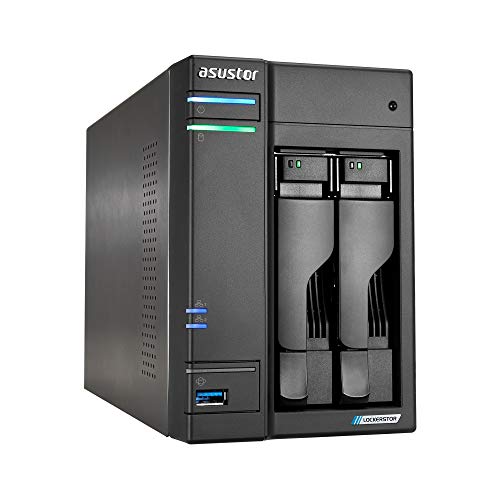
Asustor Lockerstor 2-Bay NVMe NAS
Best for: 4K media streaming and NVMe SSD caching
- Number of Bays
- 2-Bay (what this guide is about)
- Drive Bays
- 2-Bay
- Network Connectivity
- Dual 2.5GbE
- Processor
- Intel Celeron N5105
- RAM Capacity
- 4GB DDR4
- M.2 NVMe Slots
- 4 slots
The Asustor Lockerstor 2 Gen2 is a diskless 2-bay network attached storage unit designed for demanding home and small office setups. It features an Intel Celeron N5105 quad-core processor, 4GB of DDR4 memory, and dual 2.5GbE ports. With four internal M.2 NVMe SSD slots for caching or storage pools, this enclosure gives you extensive expansion options if you manage high-bandwidth file transfers, 4K media streaming, or lightweight virtualization.
Pros
- Intel Celeron N5105 quad-core processor with 4K hardware transcoding
- Four M.2 NVMe SSD slots for cache acceleration or storage pools
- Dual 2.5GbE ports for higher network bandwidth
- Expandable memory up to 16GB DDR4
Cons
- Ships diskless without pre-installed storage drives
- Restricted to two primary hard drive bays for mass storage
Good fit if
- You want multi-gigabit speeds using dual 2.5GbE network connections.
- You plan to utilize up to four M.2 NVMe SSDs for fast caching or storage pools.
- You need 4K hardware transcoding capability for Plex media streaming.
Skip if
- You require pre-installed hard drives ready to run immediately.
- You need more than two standard drive bays for broad RAID configurations.
Verdict: Asustor Lockerstor 2 Gen2 2-Bay NAS delivers strong throughput with dual 2.5GbE connectivity and four M.2 NVMe slots for cache or storage expansion. It is a capable choice if you need fast networking and heavy solid-state acceleration in a compact footprint.

Synology 2-Bay 8TB NAS
Best for: turnkey 8TB storage with hot-swap bays
- Number of Bays
- 2-Bay (what this guide is about)
- Drive Bays
- 2-Bay
- Network Connectivity
- 1 x RJ-45 1GbE
- Processor
- Realtek RTD1619B
- RAM Capacity
- 2 GB DDR4
- Included Storage
- 8TB
This two-bay network attached storage unit arrives configured with 8TB of storage across two bays. You get a quad-core 1.7 GHz processor paired with 2GB of non-ECC memory to manage file operations and hot-swappable drives. Its network connection runs through a single 1GbE LAN port alongside three USB 3.2 Gen 1 ports. This setup suits you if you need a ready-to-run centralized data repository with hot-swap drive support for basic file backups.
Pros
- Includes 8TB of storage capacity
- Supports hot-swappable drive replacement
- Features three USB 3.2 Gen 1 ports
- Powered by a quad-core 1.7 GHz processor
Cons
- Networking limited to a single 1GbE LAN port
- Memory restricted to 2GB non-ECC RAM
Good fit if
- You want pre-installed 8TB storage ready to deploy immediately.
- You need hot-swappable drive bays for zero-downtime drive swaps.
- You connect multiple peripherals via USB 3.2 Gen 1 ports.
Skip if
- You need network throughput faster than 1GbE.
- You require expandable system memory or ECC RAM.
Verdict: Synology 2-Bay 8TB Desktop NAS delivers turnkey storage with hot-swap drive bays and multiple USB ports. It handles centralized backups reliably within standard 1GbE network limits.

UGREEN 2-Bay Intel N100 NAS
Best for: advanced home users and content creators
- Number of Bays
- 2-Bay (what this guide is about)
- Drive Bays
- 2-Bay
- Network Connectivity
- 2.5GbE
- Processor
- Intel N100
- RAM Capacity
- 8GB DDR5
- M.2 NVMe Slots
- 2 slots
This 2-bay diskless network attached storage enclosure runs on an Intel N100 quad-core processor paired with 8GB of DDR5 memory. It features two drive bays alongside dual M.2 NVMe slots, supporting up to 80TB total storage. A built-in 2.5GbE port handles your network transfers. It suits you if you need to run Docker containers, host media, and back up files.
Pros
- Intel N100 quad-core processor with 8GB DDR5 RAM
- Two M.2 NVMe SSD slots alongside two drive bays
- 2.5GbE network interface for fast local transfers
- Supports up to 80TB total storage capacity
Cons
- Ships diskless without hard drives or solid-state drives included
- Limited to two primary drive bays for bulk storage
Good fit if
- You want 2.5GbE networking and DDR5 memory in a two-bay setup.
- You plan to run Docker containers or Plex media server apps.
- You want dual M.2 NVMe slots for additional solid-state storage.
Skip if
- You want a pre-configured unit that includes hard drives out of the box.
- You need more than two primary drive bays for storage expansion.
Verdict: UGREEN 2-Bay NVMe NAS delivers strong hardware specifications with its Intel N100 processor, DDR5 memory, and dual NVMe slots. It gives you capable performance for running apps, local backups, and media libraries.

Synology 2-Bay Intel Streaming NAS
Best for: 4K media streaming and home camera surveillance
- Number of Bays
- 2-Bay (what this guide is about)
- Drive Bays
- 2-Bay
- Included Storage
- Diskless
- Dimensions
- 9.14 × 4.25 × 6.5 inches
- Weight
- 2.87 pounds
The Synology 2-Bay Intel Streaming NAS is a diskless two-bay network enclosure built for central file sharing and direct media streaming. Powered by an Intel processor with hardware transcoding, it supports 4K playback and handles data transfers up to 282 MB/s. This unit suits you if you want personal cloud storage with multi-layered backup snapshots and monitoring capabilities for up to 30 IP surveillance cameras.
Pros
- Intel CPU with hardware transcoding for 4K video
- Data transfer speeds reach up to 282 MB/s
- Surveillance management supports up to 30 IP cameras
- Snapshot technology and RAID data redundancy
- Covered by a 3-year manufacturer warranty
Cons
- Ships diskless with no pre-installed hard drives
- Limited to two drive bays for total capacity expansion
Good fit if
- You want an Intel-based NAS for 4K video transcoding.
- You plan to monitor up to 30 network security cameras.
- You prefer providing your own storage drives.
Skip if
- You want hard drives included in the box.
- You need more than two drive bays for higher RAID levels.
Verdict: Synology 2-Bay Intel Streaming NAS provides 4K hardware transcoding and fast 282 MB/s file transfers in a compact footprint. It serves as a dependable media server and surveillance hub with a three-year warranty.
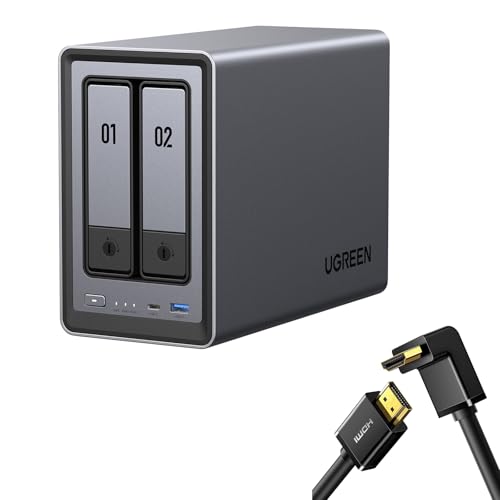
UGREEN NASync 2-Bay Desktop NAS
Best for: compact home media and local photo storage
- Number of Bays
- 2-Bay (what this guide is about)
- Drive Bays
- 2-Bay
- Network Connectivity
- 1x 2.5GbE
- Processor
- Intel N100
- Included Storage
- Diskless
- Form Factor
- Desktop
This 2-bay desktop unit runs on an Intel N100 processor and includes a single 2.5GbE network port for local data transfers. You get a diskless system that supports up to 80TB of raw capacity across two drive bays. A bundled right-angle HDMI cable pairs with onboard video output for direct media setups. It suits you if you need compact network storage with dedicated photo organizing and multi-device app support.
Pros
- Intel N100 12th Gen processor for multitasking
- 2.5GbE network port for fast data transfer
- Supports up to 80TB total storage capacity
- Includes a right-angle HDMI cable
- AI photo management for organizing faces and scenes
Cons
- Ships diskless, requiring separate drive purchases
- Provides only one 2.5GbE network port
- Limited to two internal drive bays
Good fit if
- You want an Intel N100 processor with 2.5GbE connectivity.
- You plan to connect your storage directly to a display via HDMI.
- You need access across smart TVs, mobile devices, and computers.
Skip if
- You need pre-installed hard drives out of the box.
- You require more than two drive bays for storage expansion.
Verdict: UGREEN 2-Bay Desktop NAS with Right-Angle HDMI Cable pairs an Intel N100 processor with 2.5GbE networking for local storage and streaming. It delivers solid file access and photo management across your home devices.

UGREEN 2-Bay Desktop NAS with HDMI Cable
Best for: direct TV playback and photo management
- Number of Bays
- 2-Bay (what this guide is about)
- Drive Bays
- 2-Bay
- Included Storage
- Diskless
- Form Factor
- Desktop
- Hardware Interface
- HDMI
This diskless 2-bay desktop unit pairs network attached storage with a 6.6-foot right-angle 4K HDMI cable. It supports up to 80TB of storage capacity across two drive bays for backing up files and hosting home media. Dedicated apps connect to Windows, macOS, mobile platforms, and smart TVs. It suits you if you want centralized local storage with direct HDMI video output and integrated AI tools for automated photo sorting.
Pros
- Supports up to 80TB total storage capacity across two bays
- Bundled with a 6.6-foot right-angle 4K HDMI cable
- AI photo album detects faces, objects, scenes, and duplicates
- Cross-platform app support for Windows, macOS, iOS, Android, and smart TVs
Cons
- Comes diskless without any pre-installed hard drives
- Limited to two drive bays for physical expansion
- Processor and system memory details not specified
Good fit if
- You need up to 80TB of local storage in a 2-bay desktop enclosure.
- You want an included right-angle 4K HDMI cable for direct display hookups.
- You want automated photo indexing across mobile, desktop, and smart TV apps.
Skip if
- You need a NAS that includes factory-installed storage drives out of the box.
- You require more than two drive bays for larger RAID configurations.
Verdict: UGREEN NASync 2-Bay NAS with Right-Angle HDMI Cable provides up to 80TB of capacity alongside bundled 4K video connectivity. It delivers practical local media streaming and automated photo indexing directly to your home network.
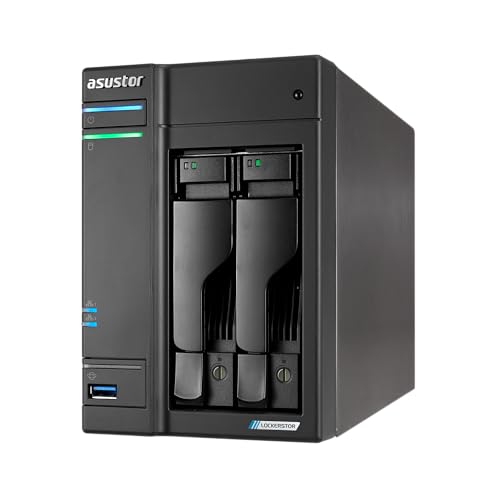
Asustor Lockerstor 2-Bay NAS with Dual 5GbE
Best for: High-speed 5GbE networking and NVMe caching
- Number of Bays
- 2-Bay (what this guide is about)
- Drive Bays
- 2-Bay
- Network Connectivity
- Dual 5GbE
- Processor
- Intel Celeron N5105
- RAM Capacity
- 4GB DDR4
- M.2 NVMe Slots
- 4 slots
The Asustor Lockerstor 2-Bay Dual 5GbE NAS gives you a desktop storage hub powered by an Intel Celeron N5105 quad-core processor and 4GB of expandable DDR4 RAM. It pairs two drive bays with four M.2 NVMe PCIe 3.0 slots for SSD caching or high-speed storage pools. Featuring dual 5GbE ports and hardware 4K transcoding, it suits creators handling intensive media workflows.
Pros
- Dual 5GbE network ports for high-bandwidth local transfers
- Four M.2 NVMe PCIe 3.0 slots for caching or flash storage pools
- Intel Celeron N5105 quad-core processor with hardware 4K transcoding
- Memory expandable up to 16GB DDR4
Cons
- Limited to two drive bays for primary storage drives
- Ships with 4GB RAM, requiring an upgrade to reach 16GB capacity
Good fit if
- You need multi-gigabit network speeds on a 5GbE local connection.
- You plan to use four M.2 NVMe SSDs for fast caching or storage.
- You want hardware 4K video transcoding for media streaming.
Skip if
- You need more than two drive bays for mass capacity storage.
- You want 16GB of system memory preinstalled out of the box.
Verdict: Asustor Lockerstor 2-Bay Dual 5GbE NAS brings fast multi-gigabit networking and four M.2 NVMe expansion slots to a compact chassis. It is a capable choice if you require high cache speeds and 4K media streaming support.

UGREEN 2-Bay Desktop NAS with HDMI Cable
Best for: large-capacity local media and automated photo backup
- Number of Bays
- 2-Bay (what this guide is about)
- Drive Bays
- 2-Bay
- Included Storage
- Diskless
- Form Factor
- Desktop
- Hardware Interface
- HDMI
This 2-bay desktop NAS from UGREEN provides centralized local storage with support for up to 80TB capacity across two drives. The unit ships diskless and includes an HDMI cable for direct video output. You can access files through dedicated apps across Windows, macOS, mobile platforms, and smart TVs. It suits you if you need compact high-capacity media storage with built-in photo indexing and duplicate file removal tools.
Pros
- Supports up to 80TB total storage capacity across two bays
- Includes bundled HDMI cable and integrated HDMI interface
- AI photo management organizes faces, scenes, objects, and locations
- Multi-platform app support for Windows, macOS, iOS, Android, and smart TVs
Cons
- Ships diskless without pre-installed hard drives
- Limited to two drive bays for internal expansion
Good fit if
- You need up to 80TB of local storage in a compact 2-bay desktop chassis.
- You plan to connect your NAS directly to a display using the included HDMI cable.
- You want automated photo indexing and duplicate file detection across your devices.
Skip if
- You want pre-installed hard drives ready to use out of the box.
- You need more than two drive bays for higher drive redundancy or expansion.
Verdict: UGREEN 2-Bay Desktop NAS with Bundled HDMI Cable delivers up to 80TB of diskless local storage with built-in HDMI connectivity and cross-platform access. It provides an efficient 2-bay solution for media playback and AI-assisted photo organization.

Synology 2-Bay Quad-Core NAS 24TB
Best for: turnkey Intel Celeron network storage
- Number of Bays
- 2-Bay (what this guide is about)
- Drive Bays
- 2-Bay
- Processor
- Intel Celeron J4125 Quad-Core
- RAM Capacity
- 2 GB DDR4 non-ECC SODIMM
- Included Storage
- 24TB
- RAID Support
- Synology Hybrid RAID (SHR)
The Synology DS225+ 24TB 2-Bay NAS provides pre-installed storage powered by an Intel Celeron J4125 quad-core processor. You get 2 GB of DDR4 non-ECC memory expandable to 6 GB, alongside 5GbE and 1GbE network connectivity. It runs the Btrfs file system with Synology Hybrid RAID for flexible drive setups. This unit suits you if you need a high-capacity, out-of-the-box storage hub for automated backups and file management.
Pros
- Intel Celeron J4125 quad-core processor
- Comes configured with 24TB of included storage
- Supports Synology Hybrid RAID and Btrfs snapshots
- Memory expandable up to 6 GB
Cons
- Base configuration includes only 2 GB of memory
- Hardware expansion limited to two drive bays
Good fit if
- You want 24TB of storage included out of the box.
- You need an Intel Celeron quad-core processor with Btrfs snapshot support.
- You plan to use Synology Hybrid RAID for flexible volume management.
Skip if
- You require more than two drive bays for long-term scalability.
- You need more than 6 GB of total system RAM.
Verdict: Synology DS225+ 24TB 2-Bay NAS combines an Intel Celeron quad-core processor with high pre-installed capacity and Btrfs data protection. It delivers ready-to-run 2-bay network storage with support for memory expansion up to 6 GB.

UGREEN 2-Bay Desktop NAS with 2.5Gb Switch
Best for: multi-gigabit desktop setups needing bundled switching
- Number of Bays
- 2-Bay (what this guide is about)
- Drive Bays
- 2-Bay
- Form Factor
- Desktop
This 2-bay desktop storage unit pairs with an included 6-port network switch to boost your local transfer speeds. It supports up to 80TB of raw capacity across two drive bays for file backups and media. The bundled switch supplies five 2.5Gb ethernet ports and a single 10Gb SFP+ slot with link aggregation support. It suits you if you need multi-gigabit local throughput for multiple devices without sourcing a separate high-speed switch.
Pros
- Bundled 6-port switch includes five 2.5Gb ports and one 10Gb SFP+ port
- Supports up to 80TB of total storage capacity across two drive bays
- Switch features hardware toggle modes for Link Aggregation and VLAN separation
Cons
- Optical and RJ45 modules for the 10Gb SFP+ port are not included
- Limited to two drive bays for internal storage expansion
Good fit if
- You need a multi-gigabit network switch bundled with your storage enclosure.
- You want up to 80TB of local desktop storage across two drives.
Skip if
- You already have a dedicated 2.5Gb or 10Gb network switch.
- You require more than two drive bays for larger drive arrays.
Verdict: UGREEN 2-Bay Desktop NAS with 2.5Gb Switch delivers up to 80TB of storage alongside a capable multi-gigabit switch. It provides fast local networking hardware and desktop data storage in a single package.

QNAP 2-Bay 2.5GbE Desktop NAS
Best for: fast 2.5GbE home storage and media organization
- Number of Bays
- 2-Bay (what this guide is about)
- Drive Bays
- 2-Bay
- Network Connectivity
- 2.5GbE
- Processor
- ARM Cortex-A55
- RAM Capacity
- 4GB DDR4
- Included Storage
- Diskless
The QNAP 2-Bay 2.5GbE Desktop NAS provides central network storage for your home media and personal backups. It pairs an ARM Cortex-A55 quad-core 2.0GHz processor with 4GB of DDR4 memory and a high-speed 2.5GbE port. A built-in NPU provides hardware acceleration for facial and object recognition tasks across photo libraries. This diskless unit suits you if you need fast local file transfers and dedicated multimedia organization across your network.
Pros
- 2.5GbE networking port for high-speed file transfers
- ARM Cortex-A55 quad-core 2.0GHz processor with 4GB DDR4 RAM
- Integrated NPU for AI-accelerated face and object recognition
Cons
- Ships diskless, requiring separate hard drive purchases
- ARM-based processor rather than an x86 CPU
Good fit if
- You have a 2.5GbE network setup and want faster transfer speeds
- You want an onboard NPU to accelerate photo indexing and object recognition
- You plan to supply your own hard drives for a 2-bay configuration
Skip if
- You want pre-installed storage drives ready to use out of the box
- You need more than two drive bays for higher capacity or multi-drive RAID setups
Verdict: QNAP 2-Bay 2.5GbE Desktop NAS offers 2.5GbE connectivity, 4GB RAM, and dedicated AI image processing in a compact two-bay form factor. It delivers solid network throughput and automated media indexing for home storage setups.

QNAP 2-Bay Quad-Core Desktop NAS
Best for: fast multi-user sharing and SSD caching
- Number of Bays
- 2-Bay (what this guide is about)
- Drive Bays
- 2 Bay
- Network Connectivity
- Dual 2.5GbE
- Processor
- Intel Quad-core
- RAM Capacity
- 8GB
- M.2 NVMe Slots
- Dual M.2 PCIe Gen3x2 NVMe
This QNAP 2-Bay Intel Desktop NAS provides central storage for your media files and personal backups. It features an Intel quad-core processor reaching 2.9 GHz, 8GB of memory, and dual 2.5GbE networking ports for fast data transfers. Two M.2 PCIe Gen3x2 NVMe slots allow you to add SSD cache acceleration or storage pools. It suits you if you need compact network storage for team file sharing or family media.
Pros
- Intel quad-core processor with burst speed up to 2.9 GHz
- Dual 2.5GbE ports for accelerated transfer speeds
- Dual M.2 PCIe Gen3x2 NVMe slots for SSD caching or storage pools
- Multiple USB 3.2 Gen 2 Type-A ports supporting up to 10Gb/s
- 8GB of included system memory
Cons
- Limited to two primary drive bays
- Includes USB Type-A ports without USB Type-C connectivity
Good fit if
- You need dual 2.5GbE networking ports for fast local data transfers.
- You want M.2 NVMe SSD caching or dedicated SSD pools to accelerate performance.
- You plan to connect high-speed 10Gb/s external drives via USB 3.2 Gen 2.
Skip if
- You require more than two primary drive bays for long-term capacity expansion.
- You specifically need native USB Type-C ports for your peripheral devices.
Verdict: QNAP 2-Bay Intel Desktop NAS delivers fast networking and flexible cache options with dual 2.5GbE ports, 8GB RAM, and two M.2 NVMe slots. It gives you capable performance for shared workflows and media management.

UGREEN 2-Bay Desktop NAS with Cat 8 Cable
Best for: Home users wanting AI photo tools
- Number of Bays
- 2-Bay (what this guide is about)
- Drive Bays
- 2-Bay
- Included Storage
- Diskless
- Form Factor
- Desktop
The UGREEN NASync DXP2800 is a 2-bay desktop NAS designed for home users and small teams. It supports up to 80TB of storage and includes AI-powered photo organization. This diskless model comes bundled with a Cat 8 Ethernet cable. It offers cross-platform app control for Windows, macOS, Android, and iOS. You get a local storage solution without ongoing subscription fees.
Pros
- Supports up to 80TB total storage capacity
- Includes AI-powered photo album with face and object recognition
- Comes with a Cat 8 Ethernet cable bundle
- Cross-platform app support for mobile and desktop
Cons
- Sold diskless with no included hard drives
- No mention of 2.5GbE or higher network ports in data
- No mention of hardware encryption or RAID levels
Good fit if
- You want to move data off cloud subscriptions
- You need AI tools to organize personal photos
- You are setting up a home media library
Skip if
- You need pre-installed drives for immediate use
- You require enterprise-grade security features
- You want a direct-attached storage solution
Verdict: UGREEN NASync DXP2800 2-Bay NAS Bundle is a practical entry point for users who want AI photo management and a bundled network cable. It suits home users ready to build their own storage capacity.
Specifications side by side
| Spec | Buffalo LinkStation 220 4TB 2-Bay NAS | QNAP 2-Bay USB-C Direct Attached Storage | Asustor Lockerstor 2-Bay NVMe NAS | Synology 2-Bay 8TB NAS | UGREEN 2-Bay Intel N100 NAS | Synology 2-Bay Intel Streaming NAS | UGREEN NASync 2-Bay Desktop NAS | UGREEN 2-Bay Desktop NAS with HDMI Cable | Asustor Lockerstor 2-Bay NAS with Dual 5GbE | UGREEN 2-Bay Desktop NAS with HDMI Cable | Synology 2-Bay Quad-Core NAS 24TB | UGREEN 2-Bay Desktop NAS with 2.5Gb Switch | QNAP 2-Bay 2.5GbE Desktop NAS | QNAP 2-Bay Quad-Core Desktop NAS | UGREEN 2-Bay Desktop NAS with Cat 8 Cable |
|---|---|---|---|---|---|---|---|---|---|---|---|---|---|---|---|
| Drive Bays | 2-Bay | 2-Bay | 2-Bay | 2-Bay | 2-Bay | 2-Bay | 2-Bay | 2-Bay | 2-Bay | 2-Bay | 2-Bay | 2-Bay | 2-Bay | 2 Bay | 2-Bay |
| Network Connectivity | not specified | not specified | Dual 2.5GbE | 1 x RJ-45 1GbE | 2.5GbE | not specified | 1x 2.5GbE | not specified | Dual 5GbE | not specified | not specified | not specified | 2.5GbE | Dual 2.5GbE | not specified |
| Processor | not specified | not specified | Intel Celeron N5105 | Realtek RTD1619B | Intel N100 | not specified | Intel N100 | not specified | Intel Celeron N5105 | not specified | Intel Celeron J4125 Quad-Core | not specified | ARM Cortex-A55 | Intel Quad-core | not specified |
| RAM Capacity | not specified | not specified | 4GB DDR4 | 2 GB DDR4 | 8GB DDR5 | not specified | not specified | not specified | 4GB DDR4 | not specified | 2 GB DDR4 non-ECC SODIMM | not specified | 4GB DDR4 | 8GB | not specified |
| M.2 NVMe Slots | not specified | not specified | 4 slots | not specified | 2 slots | not specified | not specified | not specified | 4 slots | not specified | not specified | not specified | not specified | Dual M.2 PCIe Gen3x2 NVMe | not specified |
| Included Storage | 4TB | not specified | Diskless | 8TB | Diskless | Diskless | Diskless | Diskless | not specified | Diskless | 24TB | not specified | Diskless | not specified | Diskless |
| RAID Support | RAID 0, RAID 1 | RAID 0, 1, JBOD | not specified | not specified | not specified | not specified | not specified | not specified | not specified | not specified | Synology Hybrid RAID (SHR) | not specified | not specified | not specified | not specified |
| Form Factor | not specified | not specified | not specified | not specified | not specified | not specified | Desktop | Desktop | not specified | Desktop | not specified | Desktop | Desktop | Desktop | Desktop |
| Hardware Interface | not specified | not specified | not specified | not specified | not specified | not specified | HDMI | HDMI | not specified | HDMI | not specified | not specified | not specified | not specified | not specified |
| Number of Bays | 2-Bay | 2-Bay | 2-Bay | 2-Bay | 2-Bay | 2-Bay | 2-Bay | 2-Bay | 2-Bay | 2-Bay | 2-Bay | 2-Bay | 2-Bay | 2-Bay | 2-Bay |
| Size | 4TB (2x2TB) | DAS | 2 Bay | 8TB | DXP2800,2-Bay | 165 mm x 108 mm x 232.2 mm | not specified | not specified | 2 Bay | not specified | 24TB | 1.5" x 7" x 9" | 2 Bay (Diskless) | 2 Bay | not specified |
| Target Audience | not specified | not specified | not specified | not specified | Content Creators | not specified | not specified | not specified | Content Creators | not specified | not specified | not specified | not specified | not specified | not specified |
| Processor Cores | not specified | not specified | not specified | Quad-Core | not specified | not specified | not specified | not specified | not specified | not specified | Quad-Core | not specified | not specified | not specified | not specified |
| Intended Use | Home Users | not specified | not specified | not specified | Home Users | not specified | not specified | not specified | not specified | not specified | not specified | not specified | not specified | not specified | not specified |
| Dimensions | 5.04 × 10 × 8.82 inches | 8.86 × 4.02 × 6.63 inches | 9.06 × 4.25 × 6.44 inches | 9.17 × 4.25 × 6.5 inches | 9.33 × 4.29 × 6.97 inches | 9.14 × 4.25 × 6.5 inches | not specified | not specified | 9.06 × 4.25 × 6.44 inches | not specified | not specified | not specified | not specified | not specified | not specified |
| Weight | 1 pounds | 2.65 pounds | 5.34 pounds | 6.68 pounds | 5.69 pounds | 2.87 pounds | not specified | not specified | 4.41 pounds | not specified | 4.41 pounds | not specified | not specified | not specified | not specified |
| Color | Black | Clear | AS67 | Seagate IronWolf | Grey | Black | gray | Black | Black | black | black | Grey | White | Black | not specified |
| Model | LS220D0402 | TR-002 | AS6702T | not specified | DXP2800,2-Bay (Diskless) | DS225+ | DXP2800 | DXP2800 | AS6702T v2 | DXP2800 | DS225+/24TB-IW | DXP2800 | TS-216G-US | TS-264-8G-US | not specified |
If your NAS features multi-gigabit ports, you can connect the storage to the best 2 5g network switches.
How to Choose the Right 2-Bay NAS
-
Evaluate the Processor Type
Check the processor specification before you buy. Basic file sharing runs smoothly on standard quad-core processors, which keep power consumption low for simple home backups. If you plan to transcode 4K video or manage containerized applications, select an Intel Celeron or Intel N100 processor instead. Units such as the UGREEN 2-Bay Intel N100 NAS supply the dedicated processing power required for automated indexing and media serving across multiple client devices without choking local transfers.
-
Match RAM to Workloads
System memory limits how many simultaneous background services your storage device can manage. Basic units equipped with 1GB or 2GB of RAM handle scheduled file backups and basic network sharing reliably. If you host local media servers, surveillance recording, or automated photo tagging, target 4GB to 8GB of memory. Some models support future memory upgrades to prevent bottlenecks as data demands grow. For example, the Synology 2-Bay Quad-Core NAS 24TB supports expansion up to 6GB of system memory.
-
Check for Direct HDMI
Most network attached enclosures stream multimedia purely over local network cables, relying on your router bandwidth and client playback apps. If you prefer to connect your storage straight to a television or monitor, look for an integrated HDMI port. Direct display output bypasses the local area network entirely, ensuring stutter-free 4K playback for home entertainment centers. The UGREEN 2-Bay Desktop NAS with HDMI Cable features this dedicated hardware interface, allowing direct media playback alongside standard networked file sharing.
-
Verify Network Port Speeds
Ethernet port speeds establish the maximum throughput ceiling between your storage device and local workstations. Baseline 1GbE ports limit transfers to approximately 125 megabytes per second, which works well for individual document backups. If you edit high-resolution video or move massive file archives regularly, look for 2.5GbE or 5GbE connectivity to avoid bandwidth bottlenecks. Models like the Asustor Lockerstor 2-Bay NAS with Dual 5GbE provide high-speed networking that matches modern multi-gigabit switches, speeding up transfers across your local network.
-
Consider NVMe Caching Slots
Check whether the device includes internal M.2 NVMe slots alongside its main drive bays. In a two-bay chassis, standard mechanical hard drives deliver dense capacity but lower random read and write speeds. Dedicated NVMe slots let you add fast solid-state storage for read or write caching without taking up either of the two main SATA bays. The QNAP 2-Bay Quad-Core Desktop NAS includes two M.2 NVMe slots, accelerating database indexing and frequent small-file operations across your local network.
-
Evaluate Hot-Swap Bay Trays
Inspect how the physical drive bays are accessed and serviced during maintenance. Some enclosures require unscrewing the chassis casing to install or replace mechanical hard drives. Hot-swappable bays feature front-facing locking trays that let you slide drives in and out without powering down the operating system. If you run critical network backups where downtime causes disruption, hot-swap hardware simplifies maintenance. The Synology 2-Bay 8TB NAS provides hot-swap drive bays, letting you replace degraded disks quickly while keeping the system running.
Frequently asked questions
Can you connect a 2-bay NAS directly to a TV?
Yes, you can connect select models directly to displays using integrated HDMI hardware interfaces. Certain enclosures, such as the UGREEN DXP2800 models, feature dedicated HDMI ports for direct video output. This connection allows you to stream local media files and playback 4K video straight to your screen without routing video feeds through a separate streaming media player across your local network.
How does direct-attached storage differ from a 2-bay network attached storage?
Direct-attached storage links to a single computer using a local physical cable rather than your network router. For instance, the QNAP TR-002 operates as hardware-managed direct-attached storage via USB-C. It expands workstation capacity or supplements an existing setup. Unlike network attached storage enclosures, it lacks an Ethernet interface and cannot serve files independently across your home local area network.
What network speeds do 2-bay NAS enclosures provide?
Modern 2-bay enclosures range from standard 1GbE Ethernet up to multi-gigabit 2.5GbE and 5GbE connections. Entry setups like the Synology DS223j utilize standard 1GbE ports. Faster units provide multi-gigabit bandwidth, such as the Asustor AS6702T v2 offering 5GbE and the QNAP TS-264-8G-US supplying dual 2.5GbE. These higher interfaces prevent data bottlenecks when you transfer large video files across multi-user environments.
Can you add M.2 NVMe solid-state drives to a 2-bay NAS?
Yes, several 2-bay enclosures include dedicated M.2 NVMe slots alongside standard drive bays. The Asustor AS6702T includes four M.2 NVMe slots, while the QNAP TS-264-8G-US and UGREEN DXP2800 feature two slots. You use these solid-state drives for high-speed SSD caching or fast dedicated storage volumes, which significantly accelerates file transfer response times during demanding multi-client workloads.
What is the maximum storage capacity available in a 2-bay NAS?
Capacity varies between pre-configured packages and diskless units capable of holding high-density drives. Turnkey systems like the Synology DS225+/24TB-IW arrive with 24TB of storage installed across two drives. If you choose diskless models, certain enclosures like the UGREEN NASync DXP2800 support up to 80TB total capacity. This upper limit gives you ample room for long-term data archives and surveillance footage.
Can you expand the RAM on a 2-bay NAS?
Yes, select 2-bay systems permit system memory expansion depending on processor and motherboard architecture. Entry-level units feature fixed configurations, like 1GB in the Synology DS223j or 2GB in standard models. Higher-tier enclosures support expansion, such as the Synology DS225+, which allows you to expand RAM up to 6GB. Adding memory helps your system manage multi-user file access and background applications efficiently.
What features should you look for when using a 2-bay NAS for surveillance?
Look for sustained write speeds, dependable processor cores, and operating systems equipped for video feeds. The Synology DS225+ provides 282 MB/s file transfers and 4K hardware transcoding, functioning reliably as a dedicated surveillance hub. Fast throughput ensures constant multi-camera streams record without frame drops, while support for file systems like Btrfs protects your stored camera video archives from silent data corruption.